ECO mode CHEVROLET CAMARO SS 2010 User Guide
[x] Cancel search | Manufacturer: CHEVROLET, Model Year: 2010, Model line: CAMARO SS, Model: CHEVROLET CAMARO SS 2010Pages: 372, PDF Size: 1.91 MB
Page 206 of 372

Manual Transmission
Shift Pattern (V8 Engines)
Shift Pattern (V6 Engine)
These are the shift patterns for the
six-speed manual transmissions.To operate the transmission:
1 (First):Press the clutch pedal and
shift into 1 (First). Then slowly let up
on the clutch pedal as you press the
accelerator pedal.
You can shift into 1 (First) when
you are going less than 64 km/h
(40 mph). If you come to a complete
stop and it is hard to shift into
1 (First), put the shift lever in Neutral
and let up on the clutch. Press the
clutch pedal back down. Then shift
into 1 (First).
2 (Second):Press the clutch pedal
as you let up on the accelerator
pedal and shift into 2 (Second).
Then, slowly let up on the clutch
pedal as you press the accelerator
pedal.3 (Third), 4 (Fourth), 5 (Fifth)
and 6 (Sixth):Shift into 3 (Third),
4 (Fourth), 5 (Fifth) and 6 (Sixth) the
same way you do for 2 (Second).
Slowly let up on the clutch pedal as
you press the accelerator pedal.
To stop, let up on the accelerator
pedal and press the brake pedal.
Just before the vehicle stops, press
the clutch pedal and the brake pedal,
and shift to Neutral.
Neutral:Use this position when
you start or idle the engine. The shift
lever is in Neutral when it is centered
in the shift pattern, not in any gear.
R (Reverse):To back up, press
down the clutch pedal and shift
into R (Reverse). On V8 models,
apply pressure to get the lever
past 5 (Fifth) and 6 (Sixth) into
R (Reverse). Let up on the clutch
pedal slowly while pressing the
accelerator pedal.
8-30 Driving and Operating
Page 211 of 372
Press and release the StabiliTrak/
TCS button and the traction control
system turns off and the TCS
warning light comes on. Press and
release the button again to turn the
system back on. For information on
turning StabiliTrak off and on, see
StabiliTrak System following.
Launch Control (V8 with
Manual Transmission
Models Only)
Launch Control uses a form of
traction control specifically tuned to
optimize tire spin while launching the
vehicle during closed track events
and competitive driving. The feature
is activated when the vehicle is at
rest while in Competitive Mode.
SeeCompetitive Driving Mode on
page 8-37for more information.
At rest, if the accelerator pedal is
pressed to the floor with the clutch
engaged, the RPM is limited to a
predetermined level. A smooth, quick
release of the clutch while keeping
the accelerator pedal on the floor
will provide controlled wheel spin for
consistent acceleration. Complete
shifts as described inManual
Transmission on page 8-30.When in Competitive Mode the
StabiliTrak Off light comes on the
instrument panel cluster. Adjust your
driving accordingly. SeeCompetitive
Driving Mode on page 8-37for more
information.
Adding non-dealer/non-retailer
accessories can affect the vehicle’s
performance. SeeAccessories
and Modications on page 9-3
for more information.
Driving and Operating 8-35
Page 214 of 372
Competitive Driving Mode is
designed and recommended for
use only during closed track events
and at competitive driving venues.
The TCS system uses engine and
brake systems to control wheel spin
during acceleration and cornering
while the StabiliTrak system helps
maintain directional control of
the vehicle by selective brake
application.
When the StabiliTrak button is
pressed again, or the vehicle is
restarted, the StabiliTrak and TCS
will be turned back on to normal
operation.
Notice:When traction control
is turned off, or Competitive
Driving Mode is active, it is
possible to lose traction. If youattempt to shift with the drive
wheels spinning with a loss of
traction, it is possible to cause
damage to the transmission.
Do not attempt to shift when the
drive wheels do not have traction.
Damage caused by misuse of the
vehicle is not covered. See the
warranty book for additional
information.
Limited-Slip Rear Axle
Vehicles with a limited-slip rear
axle can give more traction on snow,
mud, ice, sand or gravel. It works
like a standard axle most of the time,
but when traction is low, this feature
allows the drive wheel with the most
traction to move the vehicle.
Cruise Control
With cruise control, the vehicle
can maintain a speed of about
40 km/h (25 mph) or more without
keeping your foot on the accelerator.
Cruise control does not work at
speeds below 40 km/h (25 mph).
{WARNING
Cruise control can be dangerous
where you cannot drive safely at
a steady speed. So, do not use
the cruise control on winding
roads or in heavy traffic.
Cruise control can be dangerous
on slippery roads. On such roads,
fast changes in tire traction can
cause excessive wheel slip, and
you could lose control. Do not use
cruise control on slippery roads.
8-38 Driving and Operating
Page 226 of 372

•Vehicles with automatic
transmissions can tow in D (Drive)
but M (Manual Mode) is
recommended. See “Manual
Mode” inAutomatic Transmission
on page 8-26for more
information. Use a lower gear if
the transmission shifts too often.
For vehicles with a manual
transmission, it is better not
to use the highest gear.
•Use the cruise control when
towing.
•Obey speed limit restrictions.
Do not drive faster than the
maximum posted speed for
trailers, or no more than 90 km/h
(55 mph), to reduce wear on the
vehicle.
Driving with a Trailer
Towing a trailer requires experience.
Get familiar with handling and
braking with the added trailer weight.
The vehicle is now longer and not as
responsive as the vehicle is by itself.
Check all trailer hitch parts and
attachments, safety chains, electrical
connectors, lamps, tires and mirror
adjustments. If the trailer has electric
brakes, start the vehicle and trailer
moving and then apply the trailer
brake controller by hand to be sure
the brakes are working.
During the trip, check regularly to
be sure that the load is secure, and
the lamps and trailer brakes are
working properly.
Towing with a Stability
Control System
When towing, the sound of the
stability control system might be
heard. The system is reacting to the
vehicle movement caused by the
trailer, which mainly occurs during
cornering. This is normal when
towing heavier trailers.
Following Distance
Stay at least twice as far behind the
vehicle ahead as you would when
driving the vehicle without a trailer.
This can help to avoid situations that
require heavy braking and sudden
turns.
Passing
More passing distance is needed
when towing a trailer. Because the
rig is longer, it is necessary to go
much farther beyond the passed
vehicle before returning to the lane.
8-50 Driving and Operating
Page 270 of 372
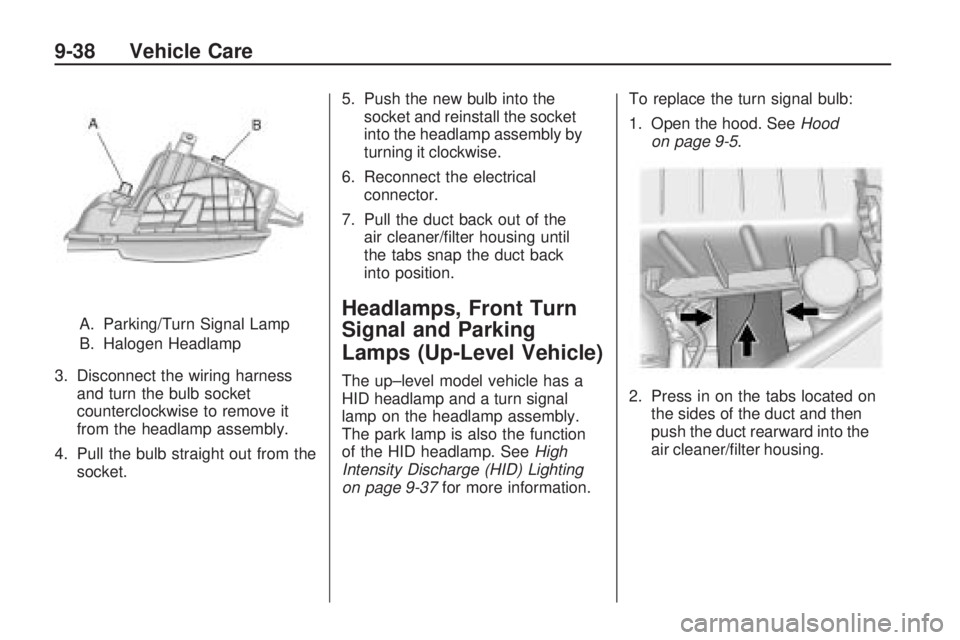
A. Parking/Turn Signal Lamp
B. Halogen Headlamp
3. Disconnect the wiring harness
and turn the bulb socket
counterclockwise to remove it
from the headlamp assembly.
4. Pull the bulb straight out from the
socket.5. Push the new bulb into the
socket and reinstall the socket
into the headlamp assembly by
turning it clockwise.
6. Reconnect the electrical
connector.
7. Pull the duct back out of the
air cleaner/filter housing until
the tabs snap the duct back
into position.Headlamps, Front Turn
Signal and Parking
Lamps (Up-Level Vehicle)
The up–level model vehicle has a
HID headlamp and a turn signal
lamp on the headlamp assembly.
The park lamp is also the function
of the HID headlamp. SeeHigh
Intensity Discharge (HID) Lighting
on page 9-37for more information.To replace the turn signal bulb:
1. Open the hood. SeeHood
on page 9-5.
2. Press in on the tabs located on
the sides of the duct and then
push the duct rearward into the
air cleaner/filter housing.
9-38 Vehicle Care
Page 271 of 372
3. Disconnect the wiring harness
and turn the bulb socket
counterclockwise to remove it
from the headlamp assembly.
4. Pull the bulb straight out from the
socket.
5. Push the new bulb into the
socket and reinstall the socket
into the headlamp assembly by
turning it clockwise.
6. Reconnect the electrical
connector.
7. Pull the duct back out of the
air cleaner/filter housing until
the tabs snap the duct back
into position.
Daytime Running
Lamps (DRL)
The up-level model vehicle may
have daytime running lamps which
would be located on the facia.
To replace one of these bulbs:
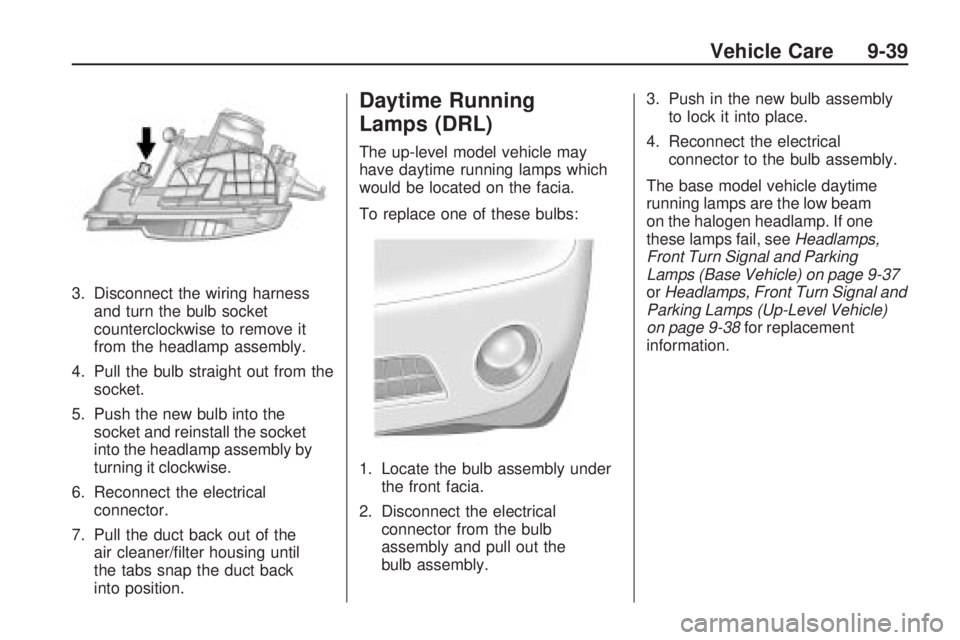
1. Locate the bulb assembly under
the front facia.
2. Disconnect the electrical
connector from the bulb
assembly and pull out the
bulb assembly.3. Push in the new bulb assembly
to lock it into place.
4. Reconnect the electrical
connector to the bulb assembly.
The base model vehicle daytime
running lamps are the low beam
on the halogen headlamp. If one
these lamps fail, seeHeadlamps,
Front Turn Signal and Parking
Lamps (Base Vehicle) on page 9-37
orHeadlamps, Front Turn Signal and
Parking Lamps (Up-Level Vehicle)
on page 9-38for replacement
information.
Vehicle Care 9-39
Page 272 of 372
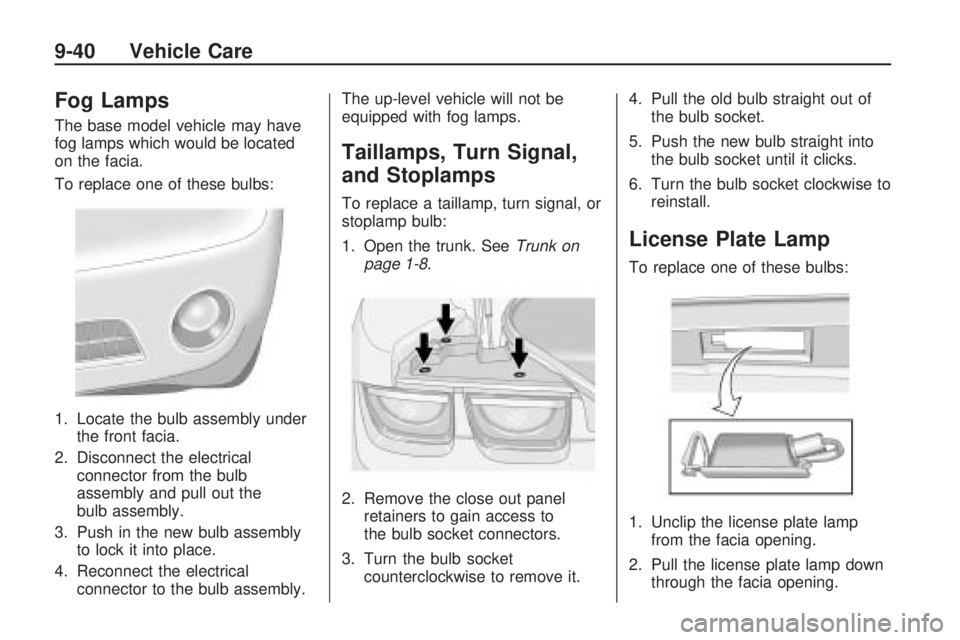
Fog Lamps
The base model vehicle may have
fog lamps which would be located
on the facia.
To replace one of these bulbs:
1. Locate the bulb assembly under
the front facia.
2. Disconnect the electrical
connector from the bulb
assembly and pull out the
bulb assembly.
3. Push in the new bulb assembly
to lock it into place.
4. Reconnect the electrical
connector to the bulb assembly.The up-level vehicle will not be
equipped with fog lamps.
Taillamps, Turn Signal,
and Stoplamps
To replace a taillamp, turn signal, or
stoplamp bulb:
1. Open the trunk. SeeTrunk on
page 1-8.
2. Remove the close out panel
retainers to gain access to
the bulb socket connectors.
3. Turn the bulb socket
counterclockwise to remove it.4. Pull the old bulb straight out of
the bulb socket.
5. Push the new bulb straight into
the bulb socket until it clicks.
6. Turn the bulb socket clockwise to
reinstall.
License Plate Lamp
To replace one of these bulbs:
1. Unclip the license plate lamp
from the facia opening.
2. Pull the license plate lamp down
through the facia opening.
9-40 Vehicle Care
Page 285 of 372

Intended Outboard Sidewall:The side of an asymmetrical tire,
that must always face outward
when mounted on a vehicle.
Kilopascal (kPa)
:The metric
unit for air pressure.
Light Truck (LT-Metric) Tire
:A tire used on light duty trucks
and some multipurpose
passenger vehicles.
Load Index
:An assigned
number ranging from 1 to 279
that corresponds to the load
carrying capacity of a tire.
Maximum Ination Pressure
:The maximum air pressure to
which a cold tire can be inflated.
The maximum air pressure is
molded onto the sidewall.
Maximum Load Rating
:The load rating for a tire at the
maximum permissible inflation
pressure for that tire.Maximum Loaded Vehicle
Weight
:The sum of curb weight,
accessory weight, vehicle
capacity weight, and production
options weight.
Normal Occupant Weight
:The
number of occupants a vehicle
is designed to seat multiplied
by 150 lbs (68 kg). SeeVehicle
Load Limits on page 8-12.
Occupant Distribution
:Designated seating positions.
Outward Facing Sidewall
:The
side of an asymmetrical tire that
has a particular side that faces
outward when mounted on a
vehicle. The side of the tire that
contains a whitewall, bears white
lettering, or bears manufacturer,
brand, and/or model name
molding that is higher or deeper
than the same moldings on the
other sidewall of the tire.Passenger (P-Metric) Tire
:A tire used on passenger
cars and some light duty trucks
and multipurpose vehicles.
Recommended Ination
Pressure
:Vehicle
manufacturer’s recommended
tire inflation pressure as shown
on the tire placard. SeeTire
Pressure on page 9-54and
Vehicle Load Limits on
page 8-12.
Radial Ply Tire
:A pneumatic
tire in which the ply cords that
extend to the beads are laid at
90 degrees to the centerline of
the tread.
Rim
:A metal support for a tire
and upon which the tire beads
are seated.
Sidewall
:The portion of a tire
between the tread and the bead.
Vehicle Care 9-53
Page 292 of 372

TPMS Sensor Matching
Process
Each TPMS sensor has a unique
identification code. Any time you
replace one or more of the TPMS
sensors or rotate your vehicle’s tires,
the identification codes need to be
matched to the new tire/wheel
position. The sensors are matched
to the tire/wheel positions in the
following order: driver side front tire,
passenger side front tire, passenger
side rear tire, and driver side rear
tire using a TPMS diagnostic tool.
See your dealer/retailer for service.
The TPMS sensors can also be
matched to each tire/wheel position
by increasing or decreasing the
tire’s air pressure. If increasing the
tire’s air pressure, do not exceed
the maximum inflation pressure
indicated on the tire’s sidewall.
To decrease the tire’s air-pressure
use the pointed end of the valve
cap, a pencil-style air pressure
gage, or a key.You have two minutes to match
the first tire/wheel position, and
five minutes overall, to match all
four tire/wheel positions. If it takes
longer than two minutes, to match
the first tire and wheel, or more than
five minutes to match all four tire
and wheel positions, the matching
process stops and you need to
start over.
The TPMS matching process is
outlined below:
1. Set the parking brake.
2. Turn the ignition switch to
ON/RUN with the engine off.
3. Go to the TPM vehicle
information screen on the DIC.
SeeDriver Information Center
(DIC) on page 4-27. Press set to
relearn the sensors. The horn
sounds twice to signal the
receiver is in relearn mode and
Tire Learning Active message
displays on the DIC screen.
4. Start with the driver side
front tire.5. Remove the valve cap from
the valve stem. Activate the
TPMS sensor by increasing or
decreasing the tire’s air pressure
for 10 seconds, or until a horn
chirp sounds. The horn chirp,
which can take up to 30 seconds
to sound, confirms that the TPMS
sensor identification code has
been matched to this tire position.
6. Proceed to the passenger
side front tire, and repeat
the procedure in Step 5.
7. Proceed to the passenger
side rear tire, and repeat
the procedure in Step 5.
8. Proceed to the driver side rear
tire, and repeat the procedure
in Step 5.
9. After hearing the confirming horn
chirp, for the driver side rear tire,
the horn sounds two more times
to signal the tire learning mode is
no longer active. Turn the ignition
switch to LOCK/OFF.
9-60 Vehicle Care
Page 355 of 372
If a Crash Occurs
If there has been an injury, call
emergency services for help. Do not
leave the scene of a crash until
all matters have been taken care of.
Move the vehicle only if its position
puts you in danger, or you are
instructed to move it by a police
officer.
Give only the necessary information
to police and other parties involved
in the crash.
For emergency towing seeRoadside
Assistance Program on page 12-6.
Gather the following information:
•Driver’s name, address, phone
number
•Driver’s license number
•Owner’s name, address, phone
number
•Vehicle license plate
•Vehicle make, model and
model year
•Vehicle Identification
Number (VIN)
•Insurance company and policy
number
•General description of the
damage to the other vehicle
Choose a reputable repair facility
that uses quality replacement parts.
See “Collision Parts” earlier in
this section.
If the airbag has inflated, seeWhat
Will You See After an Airbag
Inates? on page 2-27.
Managing the Vehicle Damage
Repair Process
In the event that your vehicle
requires damage repairs, GM
recommends that you take an active
role in its repair. If you have a
pre-determined repair facility
of choice, take your vehicle there, or
have it towed there. Specify to the
facility that any required
replacement collision parts be
original equipment parts, either newGenuine GM parts or recycled
original GM parts. Remember,
recycled parts will not be covered
by your GM vehicle warranty.
Insurance pays the bill for the repair,
but you must live with the repair.
Depending on your policy limits,
your insurance company may
initially value the repair using
aftermarket parts. Discuss this with
your repair professional, and
insist on Genuine GM parts.
Remember if your vehicle is leased
you may be obligated to have
the vehicle repaired with Genuine
GM parts, even if your insurance
coverage does not pay the full cost.
If another party’s insurance
company is paying for the repairs,
you are not obligated to accept
a repair valuation based on
that insurance company’s collision
policy repair limits, as you have
no contractual limits with that
company. In such cases, you can
have control of the repair and
parts choices as long as cost stays
within reasonable limits.
Customer Information 12-11