radio CHEVROLET CAMARO SS 2010 User Guide
[x] Cancel search | Manufacturer: CHEVROLET, Model Year: 2010, Model line: CAMARO SS, Model: CHEVROLET CAMARO SS 2010Pages: 372, PDF Size: 1.91 MB
Page 133 of 372

Flash-to-Pass
The flash-to-pass feature works with
the low-beams or daytime running
lamps (DRL) on or off.
To flash the high beams, pull the turn
signal/lane change lever all the way
towards you. Then release it.
Daytime Running
Lamps (DRL)
Daytime Running Lamps (DRL) can
make it easier for others to see
the front of your vehicle during
the day. Fully functional daytime
running lamps are required on
all vehicles first sold in Canada.
A light sensor on top of the
instrument panel makes the DRL
work, so be sure it is not covered.
The DRL system will make the
low-beam headlamps come on at a
reduced brightness or for vehicles
with High Intensity Discharge(HID) headlamps, the dedicated
DRL lights will come on when
the following conditions are met:
•The ignition is in the ON/RUN
position.
•The exterior lamps control is
in AUTO, or has been briefly
turned to OFF to turn the
automatic light control on again.
•The engine is running.
When the DRL are on, the
headlamps, taillamps, sidemarker,
instrument panel and other
lamps will not be on.
The headlamps automatically
change from DRL to the regular
headlamps depending on the
darkness of the surroundings.
The other lamps that come on with
the headlamps will also come on.
When it is bright enough outside,
the headlamps will go off and
the DRL will come on.To turn the DRL lamps off or on
again, turn the exterior lamps control
to the off position and then release.
For vehicles first sold in Canada, the
DRL lamps cannot be turned off.
The regular headlamp system should
be turned on when needed.
Automatic Headlamp
System
When it is dark enough outside and
the headlamp switch is in AUTO, the
automatic headlamp system will turn
on the headlamps at the normal
brightness along with other lamps
such as the taillamps, sidemarker,
parking lamps, license plate lamps,
and the instrument panel lights.
The radio lights will also be dim.
To turn off the automatic headlamp
system, turn the exterior lamps
switch to the off position and then
release. For vehicles first sold in
Canada, the transmission must be in
the P (Park) position, before the
automatic headlamp system can be
turned off.
Lighting 5-3
Page 139 of 372
Infotainment
System
IntroductionIntroduction..........................6-1
Theft-Deterrent Feature..........6-2
Overview..............................6-2
Operation.............................6-4
RadioAM-FM Radio.......................6-8
Satellite Radio.....................6-10
Radio Reception..................6-13
Backglass Antenna..............6-13
Satellite Radio Antenna........6-14
Audio PlayersCD Player..........................6-14
Auxiliary Devices.................6-16
PhoneBluetooth (Overview)............6-22
Bluetooth
(Infotainment Controls)........6-23
Bluetooth
(Voice Recognition)............6-26
Introduction
Read the following pages to
become familiar with the
infotainment system features.
{WARNING
Taking your eyes off the road
for extended periods could cause
a crash resulting in injury or
death to you or others. Do not
give extended attention to
entertainment tasks while driving.
This system provides access to
many audio and non audio listings.
To minimize taking your eyes off
the road while driving, do the
following while the vehicle is parked:
•Become familiar with the
operation and controls of
the audio system.
•Set up the tone, speaker
adjustments, and preset radio
stations.For more information, seeDefensive
Driving on page 8-2.
Notice:Contact your
dealer/retailer before adding any
equipment.
Adding audio or communication
equipment could interfere
with the operation of the vehicle’s
engine, radio, or other systems,
and could damage them.
Follow federal rules covering
mobile radio and telephone
equipment.
The vehicle has Retained Accessory
Power (RAP). With RAP, the
infotainment system can play even
after the ignition is turned off.
SeeRetained Accessory Power
(RAP) on page 8-19for more
information.
Infotainment System 6-1
Page 140 of 372
Theft-Deterrent Feature
The theft-deterrent feature works by
learning a portion of the Vehicle
Identification Number (VIN) to
the infotainment system. The system
does not operate if it is stolen or
moved to a different vehicle.
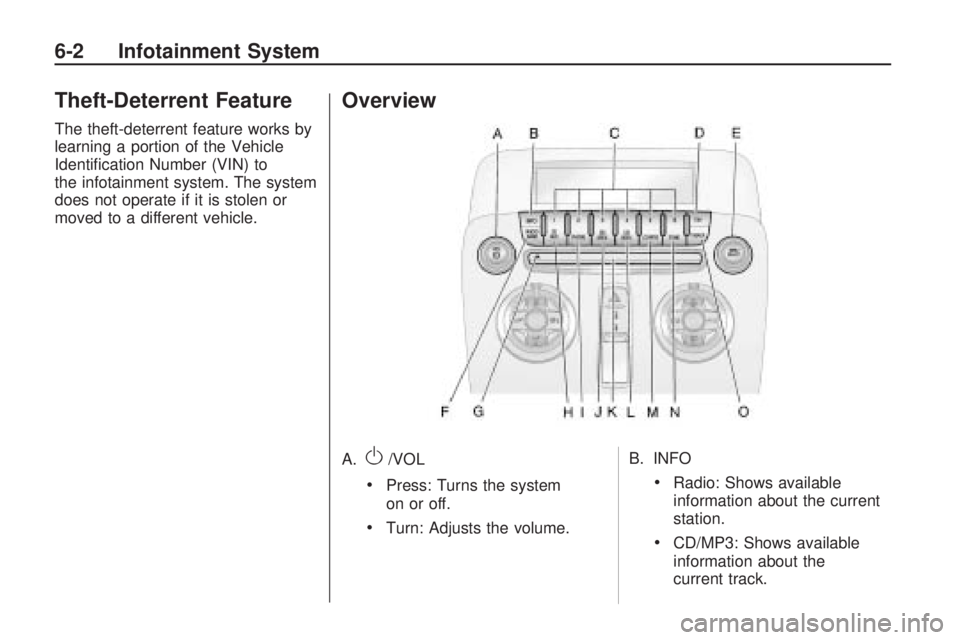
Overview
A.O/VOL
•Press: Turns the system
on or off.
•Turn: Adjusts the volume.B. INFO
•Radio: Shows available
information about the current
station.
•CD/MP3: Shows available
information about the
current track.
6-2 Infotainment System
Page 141 of 372

C. Buttons1-6
•Radio: Saves and selects
favorite stations.
D. FAV
•Radio: Opens the favorites list.
E. MENU/SELECT
•Press: Opens the menus and
selects menu items.
•Turn: Highlights menu items
or sets values while in a
menu. Manually selects radio
stations while listening to
the radio.
F. RADIO/BAND
•Changes the band while
listening to the radio.
•Selects the radio when
listening to a different audio
source.G.
ZCD Eject
•Removes CD from slot.
H. CD/AUX
•Selects between the CD
player or a connected external
audio source.
I. PHONE
•Opens the phone main menu.
•Mutes the audio system.
J.
gSEEK
•Radio: Seeks the previous
station.
•CD: Selects the previous
track or rewinds within a track.
K. CD Slot
•Insert a CD.L.
lSEEK
•Radio: Seeks the next station.
•CD: Selects the next track
or fast forwards within a
track.
M. CONFIG
•Opens the settings menu.
N. TONE
•Opens the tone menu.
O.
0BACK
•Menu: Moves one level back.
•Character Input: Deletes
the last character.
Infotainment System 6-3
Page 144 of 372

Press the0BACK button to delete
the last character or press and
hold
0BACK to delete the entire
character sequence.
Audio Settings
The audio settings can be set for
each radio band and each audio
player source.
To adjust the audio setting, press
the TONE button and select the
audio setting. Press the
0BACK
button to go back to the Tone
Settings menu.
To quickly reset an audio setting
value to 0:
1. Highlight the option.
2. Press and hold the
MENU/SELECT knob until the
value changes to 0.Adjusting the Treble, Midrange,
and Bass
1. Select Treble, Midrange, or Bass.
2. Select the value.
Adjusting the Fader and Balance
1. Select Fader or Balance.
2. Select the value.Adjusting the EQ (Equalizer)
For vehicles that have an equalizer:
1. Select EQ.
2. Select the setting.
6-6 Infotainment System
Page 145 of 372

System Settings
Conguring the Number of
Favorite Pages
To configure the number of available
favorite pages:
1. Press the CONFIG button.
2. Select Radio Settings.
3. Select Radio Favorites.
4. Select the number of available
favorite pages.
5. Press the
0BACK button to
go back to the System
Configuration menu.Auto Volume
The auto volume feature
automatically adjusts the radio
volume to compensate for road and
wind noise as the vehicle speeds
up or slows down, so that the
volume level is consistent
The level of volume compensation
can be selected, or the auto
volume feature can be turned off.
1. Press the CONFIG button.
2. Select Radio Settings.
3. Select Auto Volume.
4. Select the setting
5. Press the
0BACK button
to go back to the System
Configuration menu.Maximum Startup Volume
The maximum volume played when
the radio is first turned on can be set.
1. Press the CONFIG button.
2. Select Radio Settings.
3. Select Maximum Startup Volume.
4. Select the setting
5. Press the
0BACK button
to go back to the System
Configuration menu.
Infotainment System 6-7
Page 146 of 372

Radio
AM-FM Radio
Control Buttons
The buttons used to control the
radio are:
RADIO/BAND:Press to turn the
radio on and choose between
AM, FM, and XM™, if equipped.
gSEEK/lSEEK:Press to
search for stations.
FAV:Press to open the
favorites list.
1-6:Press to select preset stations.
MENU/SELECT:Turn to manually
search for stations.
RDS (Radio Data System)
The radio may have RDS. The RDS
feature is available for use only on
FM stations that broadcast RDS
information. This feature only works
when the information from the radio
station is available. In rare cases,
a radio station could broadcast
incorrect information that causes the
radio features to work improperly.
If this happens, contact the radio
station.
While the radio is tuned to an
FM-RDS station, the station name
or call letters display.
Radio Menus
Radio menus are available for AM,
FM and XM, if equipped.Press the MENU/SELECT knob to
open the main radio menu for
that frequency.
Selecting a Band
Press the RADIO/BAND button
to choose AM, FM, or XM™,
if equipped. The last station that
was playing starts playing again.
Selecting a Station
Seek Tuning
Briefly press
gSEEK orlSEEK
to automatically search for the
next available station. If a station is
not found, the radio switches to
a more sensitive search level.
If a station still is not found, the
frequency that was last active
begins to play.
Press and hold
gSEEK or
lSEEK until the station on the
display is reached, then release
the button.
6-8 Infotainment System
Page 148 of 372

Storing and Retrieving
Favorites
Stations from all bands can be
stored in the favorite lists in
any order.
Up to six stations can be stored in
each favorite page and the
number of available favorite pages
can be set.
Storing a Station as a Favorite
To store the station to a position in
the list, press the corresponding
numeric button 1-6 until the station
can be heard again.
Retrieving Stations
Press the FAV button to open a
favorite page or to switch to another
favorite page. Briefly press one of
the 1-6 buttons to retrieve the
station.
Satellite Radio
Vehicles with an XM™ Satellite
Radio tuner and a valid XM Satellite
Radio subscription can receive
XM programming.
XM Satellite Radio Service
XM is a satellite radio service that
is based in the 48 contiguous
United States and 10 Canadian
provinces. XM Satellite Radio has
a wide variety of programming
and commercial-free music,
coast-to-coast, and in digital-quality
sound. During your trial or when
you subscribe, you will get unlimited
access to XM Radio Online for
when you are not in the vehicle.
A service fee is required to
receive the XM service. For more
information, contact XM at
www.xmradio.com or call
1-800-929-2100 in the U.S. and
www.xmradio.ca or call
1-877-438-9677 in Canada.
Control Buttons
The buttons used to control the
XM radio are:
RADIO/BAND:Press to turn the
radio on and choose between
AM, FM, and XM™, if equipped.
gSEEK /lSEEK:Press to
search for stations.
FAV:Press to open the
favorites list.
1-6:Press to select preset stations.
MENU/SELECT:Turn to search
for stations.
Selecting the XM Band
Press the RADIO/BAND button to
choose between the AM, FM,
and XM bands. The last station
played in that band begins to play
when that band is selected.
6-10 Infotainment System
Page 150 of 372

Retrieving stations
Press the FAV button to open a
favorite page or to switch to another
favorite page. Briefly press one of
the 1-6 buttons to retrieve the
station.
XM Messages
XL (Explicit Language Channels):
These channels, or any others,
can be blocked by request,
by calling 1-800-852-XMXM (9696).
XM Updating:The encryption
code is being updated, no action
is required.
Loading XM:The audio system is
acquiring and processing audio
and text data, no action is needed.
Channel Off Air:This channel
is not currently in service.
Channel Unauth:This channel is
blocked or cannot be received
with the XM Subscription package.Channel Unavail:This previously
assigned channel is no longer
assigned.
No Artist Info:No artist information
is available.
No Title Info:No song title
information is available.
No CAT Info:No category
information is available.
No Information:No text or
informational messages are
available.
No XM Signal:The vehicle may
be in a location that where the
XM signal is being blocked.
When the vehicle is moved,
the signal should return.
CAT Not Found:There are no
channels available for the selected
category.XM Theftlocked:The XM receiver
in the vehicle may have been in
another vehicle. XM receivers
cannot be swapped between
vehicles. If this message is received
after having the vehicle serviced,
check with your dealer/retailer.
XM Radio ID:If tuned to channel 0,
this message alternates with the
XM Radio 8 digit radio ID label.
This label is needed to activate the
service.
Unknown:If this message is
received when tuned to channel 0,
there could be a receiver fault.
Consult with your dealer/retailer.
Check XM Receivr:If this message
does not clear within a short period of
time, the receiver could have a fault.
Consult with your dealer/retailer.
XM Not Available:If this message
does not clear within a short period of
time, the receiver could have a fault.
Consult with your dealer/retailer.
6-12 Infotainment System
Page 151 of 372
Radio Reception
Frequency interference and static
can occur during normal radio
reception if items such as cell phone
chargers, vehicle convenience
accessories, and external electronic
devices are plugged into the
accessory power outlet. If there is
interference or static, unplug the item
from the accessory power outlet.
FM
FM signals only reach about
16 to 65 km (10 to 40 miles).
Although the radio has a built-in
electronic circuit that automatically
works to reduce interference,
some static can occur, especially
around tall buildings or hills, causing
the sound to fade in and out.
AM
The range for most AM stations is
greater than for FM, especially at
night. The longer range can cause
station frequencies to interfere with
each other. For better radio
reception, most AM radio stations
boost the power levels during the
day, and then reduce these levels
during the night. Static can also
occur when things like storms and
power lines interfere with radio
reception. When this happens, try
reducing the treble on the radio.
XM™ Satellite Radio Service
XM Satellite Radio Service gives
digital radio reception from
coast-to-coast in the 48 contiguous
United States, and in Canada.
Just as with FM, tall buildings or hills
can interfere with satellite radio
signals, causing the sound to fade
in and out. In addition, traveling
or standing under heavy foliage,
bridges, garages, or tunnels may
cause loss of the XM signal for
a period of time.
Cellular Phone Usage
Cellular phone usage may cause
interference with the vehicle’s radio.
This interference may occur when
making or receiving phone calls,
charging the phone’s battery,
or simply having the phone on.
This interference can cause
an increased level of static while
listening to the radio. If static
is received while listening to the
radio, unplug the cellular phone and
turn it off.
Backglass Antenna
The AM-FM antenna is integrated
with the rear window defogger,
located in the rear window. Make
sure that the inside surface of
the rear window is not scratched
and that the lines on the glass are
not damaged. If the inside surface
is damaged, it could interfere
with radio reception. For proper
radio reception, the antenna
connector needs to be properly
attached to the post on the glass.
Infotainment System 6-13