radio CHEVROLET CAMARO SS 2010 Owner's Manual
[x] Cancel search | Manufacturer: CHEVROLET, Model Year: 2010, Model line: CAMARO SS, Model: CHEVROLET CAMARO SS 2010Pages: 372, PDF Size: 1.91 MB
Page 152 of 372
If a cellular telephone antenna
needs to be attached to the glass,
make sure that the grid lines for
the AM-FM antenna are not
damaged. There is enough space
between the grid lines to attach
a cellular telephone antenna without
interfering with radio reception.
Notice:Using a razor blade or
sharp object to clear the inside
rear window can damage the rear
window antenna and/or the rear
window defogger. Repairs would
not be covered by the vehicle
warranty. Do not clear the inside
rear window with sharp objects.Notice:Do not apply aftermarket
glass tinting with metallic lm.
The metallic lm in some tinting
materials will interfere with or
distort the incoming radio
reception. Any damage caused to
your backglass antenna due to
metallic tinting materials will
not be covered by the vehicle
warranty.
Satellite Radio Antenna
For vehicles with XM™ Satellite
Radio Service, the antenna is
located on the decklid of the vehicle.
Keep the antenna clear of
obstructions for clear radio
reception.
Audio Players
CD Player
The CD player can play audio CDs
and MP3 CDs.
The CD player will not play
8 cm (3 inches) CDs.
Care of CDs
Sound quality can be reduced due to
disc quality, recording method,
quality of the music recorded, and
how the disc has been handled.
Handle discs carefully and store
them in their original cases or other
protective cases away from direct
sunlight and dust. If the bottom
surface of a disc is damaged, the
disc may not play properly or at all.
Do not touch the bottom surface of a
disc while handling it; this could
damage the surface. Pick up discs by
grasping the outer edges or the edge
of the hole and the outer edge.
6-14 Infotainment System
Page 160 of 372
Controlling a Bluetooth®
Device
Bluetooth devices that support
AVRCP (Audio/Video Remote
Control Profile) version 1.0 may
be able to be controlled by the
Infotainment System.
Press and release
gSEEK /
lSEEK to skip tracks. Press and
hold
gSEEK /lSEEK to fast
forward or fast reverse within
a track.
Other Information
The Bluetooth®word mark and
logos are owned by the Bluetooth®
SIG, Inc. and any use of such
marks by General Motors is under
license. Other trademarks and
trade names are those of their
respective owners.
SeeRadio Frequency Statement
(US, Can) on page 12-15for
FCC information.
Phone
Bluetooth (Overview)
Vehicles with a Bluetooth system
can use a Bluetooth capable
cell phone with a Hands Free Profile
to make and receive phone calls.
The infotainment system and
voice recognition are used to
control the system. The system
can be used while in ON/RUN or
ACC/ACCESSORY. The range
of the Bluetooth system can be up
to 9.1 m (30 ft.). Not all phones
support all functions and not
all phones work with the Bluetooth
system. See www.gm.com/bluetooth
for more information about
compatible phones.
Bluetooth Controls
Use the buttons located on the
infotainment system and the
steering wheel to operate the
Bluetooth system.Steering Wheel Controls
b/g(Push To Talk):Press to
answer incoming calls, to confirm
system information, and to start
voice recognition.
c/$(End Call / Mute):Press
to end a call, reject a call, or to
cancel an operation.
Infotainment System Controls
MENU/SELECT:Press and turn
to navigate the menu screens.
SeeOperation on page 6-4for
more information.
PHONE:Press to enter the Phone
main menu.
CONFIG:Press to enter the
System Configuration menu.
6-22 Infotainment System
Page 161 of 372
Voice Recognition
The voice recognition system is
used to interpret commands
that control the system and dial
phone numbers.
Noise:The system may not
recognize voice commands if there
is too much background noise.
When to Speak:A tone sounds to
indicate that the system is ready
for a voice command. Wait for
the tone and then speak.
How to Speak:Speak clearly in a
calm and natural voice.
Audio System
When using the Bluetooth system,
sound comes through the vehicle’s
front audio system speakers
and overrides the audio system.
Use the audio system volume knob,
during a call, to change the
volume level. The adjusted volume
level remains in memory for later
calls. The system maintains a
minimum volume level.
Other Information
The Bluetooth®word mark and
logos are owned by the Bluetooth®
SIG, Inc. and any use of such
marks by General Motors is under
license. Other trademarks and
trade names are those of their
respective owners.
SeeRadio Frequency Statement
(US, Can) on page 12-15for
FCC information.
Bluetooth
(Infotainment Controls)
Pairing
A Bluetooth enabled cell phone
must be paired to the Bluetooth
system first and then connected to
the vehicle before it can be
used. See the cell phone
manufacturer user guide for
Bluetooth functions before pairing
the cell phone. If a Bluetooth phone
is not connected, calls will be
made using OnStar
®Hands-FreeCalling, if available. Refer to the
OnStar owner’s guide for more
information.
The pairing process can be started
by using the voice recognition
system or the controls on the
infotainment system.
Pairing Information:
•Up to five cell phones can be
paired to the Bluetooth system.
•The pairing process is disabled
when the vehicle is moving.
•The Bluetooth system
automatically links with the first
available paired cell phone in the
order the phone was paired.
•Only one paired cell phone can
be connected to the Bluetooth
system at a time.
•Pairing should only need to be
completed once, unless changes
to the pairing information have
been made or the phone is
deleted.
Infotainment System 6-23
Page 195 of 372
If charging or jump starting the
battery does not work, remove the
plug covering the hole below the
ignition lock. Insert a screwdriver into
the opening as far as it will go and
remove the key from the ignition.
Retained Accessory
Power (RAP)
These vehicle accessories may be
used for up to 10 minutes after
the engine is turned off:
•Audio System
•Power Windows
The power windows will continue to
work for up to 10 minutes or until any
door is opened. The radio will work
when the key is in ON/RUN or
ACC/ACCESSORY. Once the key is
turned from ON/RUN to LOCK/OFF,
the radio will continue to work for
10 minutes, or until the driver door
is opened or the key is removed
from the ignition.
Starting the Engine
Place the transmission in the
proper gear.
Automatic Transmission
Move the shift lever to P (Park) or
N (Neutral). The engine will not start
in any other position. To restart the
vehicle when it is already moving,
use N (Neutral) only.
Notice:Do not try to shift to
P (Park) if the vehicle is moving.
If you do, you could damage
the transmission. Shift to P (Park)
only when the vehicle is stopped.
Manual Transmission
The shift lever should be in
N (Neutral) and the parking brake
engaged. Hold the clutch pedal
down to the floor and start the
engine. The vehicle will not start
if the clutch pedal is not all the
way down.Starting Procedure
1. With your foot off the accelerator
pedal, turn the ignition key to
START. When the engine starts,
let go of the key. The idle speed
will go down as the engine
warms. Do not race the engine
immediately after starting it. Allow
the oil to warm up and lubricate all
moving parts.
The vehicle has a
Computer-Controlled Cranking
System. This feature assists in
starting the engine and protects
components. If the ignition key
is turned to the START position,
and then released when the
engine begins cranking, the
engine will continue cranking
for a few seconds or until the
vehicle starts. If the engine
does not start and the key
is held in START for many
seconds, cranking stops
after 15 seconds to prevent
cranking motor damage.
Driving and Operating 8-19
Page 279 of 372
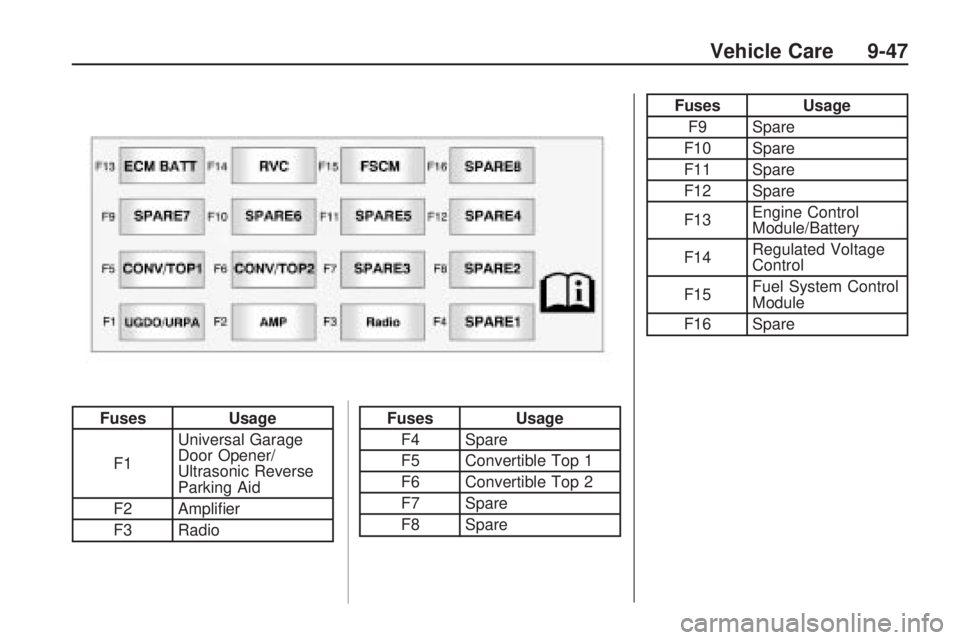
FusesUsage
F1 Universal Garage
Door Opener/
Ultrasonic Reverse
Parking Aid
F2 Amplifier
F3 RadioFuses Usage
F4 Spare
F5 Convertible Top 1
F6 Convertible Top 2
F7 Spare
F8 Spare
Fuses Usage
F9 Spare
F10 Spare
F11 Spare
F12 Spare
F13 Engine Control
Module/Battery
F14 Regulated Voltage
Control
F15 Fuel System Control
Module
F16 Spare
Vehicle Care 9-47
Page 288 of 372
Tire Pressure for
High-Speed Operation
{WARNING
Driving at high speeds, 100 mph
(160 km/h) or higher, puts an
additional strain on tires. Sustained
high-speed driving causes
excessive heat build up and
can cause sudden tire failure.
You could have a crash and you
or others could be killed. Some
high-speed rated tires require
inflation pressure adjustment for
high speed operation. When speed
limits and road conditions are such
that a vehicle can be driven at high
speeds, make sure the tires are
rated for high speed operation, in
excellent condition, and set to the
correct cold tire inflation pressure
for the vehicle load.Vehicles with 245/45ZR20 103Y,
P245/50ZR19 104W and
275/40ZR20 106Y size tires,
have tires capable of high speed
use. Make sure the tires are inflated
to the recommended cold inflation
pressures before operating the
vehicle at speeds over 100 mph
(160 km/h). SeeVehicle Load Limits
on page 8-12andTire Pressure on
page 9-54.
Tire Pressure Monitor
System
The Tire Pressure Monitor System
(TPMS) uses radio and sensor
technology to check tire pressure
levels. The TPMS sensors monitor
the air pressure in your vehicle’s tires
and transmit tire pressure readings
to a receiver located in the vehicle.
Each tire, including the spare
(if provided), should be checked
monthly when cold and inflated to
the inflation pressure recommended
by the vehicle manufacturer on thevehicle placard or tire inflation
pressure label. (If your vehicle has
tires of a different size than the size
indicated on the vehicle placard or
tire inflation pressure label, you
should determine the proper tire
inflation pressure for those tires.)
As an added safety feature, your
vehicle has been equipped with a
tire pressure monitoring system
(TPMS) that illuminates a low tire
pressure telltale when one or
more of your tires is significantly
under-inflated.
Accordingly, when the low tire
pressure telltale illuminates, you
should stop and check your tires as
soon as possible, and inflate them
to the proper pressure. Driving on
a significantly under-inflated tire
causes the tire to overheat and can
lead to tire failure. Under-inflation
also reduces fuel efficiency and
tire tread life, and may affect the
vehicle’s handling and stopping
ability.
9-56 Vehicle Care
Page 289 of 372
Please note that the TPMS
is not a substitute for proper tire
maintenance, and it is the driver’s
responsibility to maintain correct tire
pressure, even if under-inflation
has not reached the level to trigger
illumination of the TPMS low tire
pressure telltale.
Your vehicle has also been
equipped with a TPMS malfunction
indicator to indicate when the system
is not operating properly. The TPMS
malfunction indicator is combined
with the low tire pressure telltale.
When the system detects a
malfunction, the telltale will flash
for approximately one minute and
then remain continuously illuminated.
This sequence will continue upon
subsequent vehicle start-ups as
long as the malfunction exists.
When the malfunction indicator is
illuminated, the system may not
be able to detect or signal low
tire pressure as intended. TPMS
malfunctions may occur for a varietyof reasons, including the installation
of replacement or alternate tires or
wheels on the vehicle that prevent
the TPMS from functioning properly.
Always check the TPMS malfunction
telltale after replacing one or more
tires or wheels on your vehicle to
ensure that the replacement or
alternate tires and wheels allow
the TPMS to continue to function
properly.
SeeTire Pressure Monitor
Operation on page 9-57for
additional information.
Federal Communications
Commission (FCC) and
Industry and Science Canada
SeeRadio Frequency Statement
(US, Can) on page 12-15for
information regarding Part 15
of the Federal Communications
Commission (FCC) Rules and
RSS-210/211 of Industry and
Science Canada.
Tire Pressure Monitor
Operation
This vehicle may have a Tire
Pressure Monitor System (TPMS).
The TPMS is designed to warn the
driver when a low tire pressure
condition exists. TPMS sensors are
mounted onto each tire and wheel
assembly, excluding the spare tire
and wheel assembly, if the vehicle
has one. The TPMS sensors monitor
the air pressure in the vehicle’s tires
and transmits the tire pressure
readings to a receiver located in
the vehicle.
Using the Driver Information
Center (DIC), the driver can also
check tire pressure levels using the
DIC. For additional information and
details about the DIC operation and
displays seeTire Messages on
page 4-36.
Vehicle Care 9-57
Page 291 of 372
TPMS Malfunction Light and
Message
The TPMS will not function properly
if one or more of the TPMS sensors
are missing or inoperable. When the
system detects a malfunction, the
low tire warning light flashes for
about one minute and then stays
on for the remainder of the ignition
cycle. A DIC warning message is
also displayed. The low tire warning
light and DIC warning message
come on at each ignition cycle until
the problem is corrected. Some of
the conditions that can cause the
malfunction light and DIC message
to come on are:
•One of the road tires has been
replaced with the spare tire, if the
vehicle has one. The spare tire
does not have a TPMS sensor.
The DIC message should go off
once you re-install the road tire
containing the TPMS sensor.
•The TPMS sensor matching
process was not done or not
completed successfully after
rotating the vehicle’s tires.
The DIC message should go
off after successfully completing
the sensor matching process.
See “TPMS Sensor Matching
Process” later in this section.
•One or more TPMS sensors
are missing or damaged.
The DIC message and the
TPMS malfunction light should
go off when the TPMS sensors
are installed and the sensor
matching process is performed
successfully. See your dealer/
retailer for service.
•Replacement tires or wheels do
not match your vehicle’s original
equipment tires or wheels. Tires
and wheels other than those
recommended for your vehicle
could prevent the TPMS from
functioning properly. SeeBuying
New Tires on page 9-63.
•Operating electronic devices or
being near facilities using radio
wave frequencies similar to the
TPMS could cause the TPMS
sensors to malfunction.
If the TPMS is not functioning it
cannot detect or signal a low tire
condition. See your dealer/retailer for
service if the TPMS malfunction light
and DIC message comes on and
stays on.
Vehicle Care 9-59
Page 317 of 372
The positive jump start connection
is covered by a red cap. Remove to
expose the terminal.
1. Check the other vehicle. It must
have a 12-volt battery with a
negative ground system.
Notice:If the other vehicle’s
system is not a 12-volt system
with a negative ground, both
vehicles can be damaged. Only
use vehicles with 12-volt systems
with negative grounds to jump
start your vehicle.
2. Position the two vehicles so that
they are not touching.
3. Set the parking brake firmly and
put the shift lever in P (Park).
SeeShifting Into Park on
page 8-21.Notice:If you leave the radio or
other accessories on during the
jump starting procedure, they
could be damaged. The repairs
would not be covered by the
warranty. Always turn off the
radio and other accessories
when jump starting the vehicle.
4. Turn the ignition to LOCK/OFF
and switch off all lights and
accessories in both vehicles,
except the hazard warning
flashers if needed.
{WARNING
An electric fan can start up even
when the engine is not running
and can injure you. Keep hands,
clothing and tools away from any
underhood electric fan.
{WARNING
Using a match near a battery can
cause battery gas to explode.
People have been hurt doing this,
and some have been blinded. Use
a flashlight if you need more light.
Be sure the battery has enough
water. You do not need to add
water to the battery installed in
your new vehicle. But if a battery
has filler caps, be sure the right
amount of fluid is there. If it is
low, add water to take care of
that first. If you don’t, explosive
gas could be present.
Battery fluid contains acid that
can burn you. Do not get it on
you. If you accidentally get it in
your eyes or on your skin, flush
the place with water and get
medical help immediately.
Vehicle Care 9-85
Page 345 of 372
Customer
Information
Customer InformationCustomer Satisfaction
Procedure.........................12-1
Customer Assistance
Offices..............................12-3
Customer Assistance for
Text Telephone (TTY)
Users...............................12-4
Online Owner Center...........12-4
GM Mobility Reimbursement
Program...........................12-5
Roadside Assistance
Program...........................12-6
Scheduling Service
Appointments....................12-8
Courtesy Transportation
Program...........................12-8
Collision Damage Repair......12-9
Service Publications
Ordering Information.........12-12
Reporting Safety DefectsReporting Safety Defects
to the United States
Government.....................12-13
Reporting Safety Defects
to the Canadian
Government.....................12-13
Reporting Safety Defects
to General Motors............12-13
Vehicle Data Recording
and Privacy
Vehicle Data Recording
and Privacy.....................12-14
Event Data Recorders........12-14
OnStar
®............................12-15
Radio Frequency
Identification (RFID)..........12-15
Radio Frequency
Statement (US, Can)........12-15
Customer Information
Customer Satisfaction
Procedure
Your satisfaction and goodwill are
important to your dealer and to
Chevrolet. Normally, any concerns
with the sales transaction or the
operation of the vehicle will be
resolved by the dealer’s sales or
service departments. Sometimes,
however, despite the best intentions
of all concerned, misunderstandings
can occur. If your concern has
not been resolved to your
satisfaction, the following steps
should be taken:
STEP ONE:Discuss your concern
with a member of dealership
management. Normally, concerns
can be quickly resolved at that level.
If the matter has already been
reviewed with the sales, service, or
parts manager, contact the owner
of the dealership or the general
manager.
Customer Information 12-1