10-2 CHEVROLET CAMARO SS 2010 Owners Manual
[x] Cancel search | Manufacturer: CHEVROLET, Model Year: 2010, Model line: CAMARO SS, Model: CHEVROLET CAMARO SS 2010Pages: 372, PDF Size: 1.91 MB
Page 2 of 372
Bulb Replacement
.........9-37
Electrical System
...........9-41
Wheels and Tires
..........9-48
Jump Starting
...............9-84
Towing
........................9-87
Appearance Care
..........9-88
Service and
Maintenance.....................10-1
General Information
.......10-1
Scheduled
Maintenance
..............10-2
Recommended Fluids,
Lubricants, and
Parts
........................10-7
Maintenance Records
. . . 10-10
Technical Data.................11-1
Vehicle Identification
......11-1
Vehicle Data
.................11-2
Customer Information......12-1
Customer Information
.....12-1
Reporting Safety
Defects
...................12-13
Vehicle Data Recording
and Privacy
.............12-14
Index................................... i-1
Page 109 of 372
OnStar Turn by Turn
This display is used for the OnStar
Turn by Turn guidance. SeeOnStar
®
System on page 4-42for more
information.
Blank Display
This display shows no information.
Vehicle Information
Menu Items
Press the MENU button on the
turn signal lever until Vehicle
Information Menu is displayed.
Use the thumbwheel to scroll
through the following menu items:
•Unit
•Tire Pressure
•Remaining Oil Life
•Coolant Temp
•Battery Voltage
•Speed WarningUnit
Move the thumbwheel up or down to
switch between US or Metric when
the Unit display is active. Press SET
to confirm the setting. This will
change the displays on the cluster
and DIC to either English (US) or
metric measurements.
Tire Pressure
The display will show a vehicle with
the approximate pressures of all
four tires. Tire pressure is displayed
in either pounds per square
inch (psi) or in kilopascal (kPa).
SeeTire Pressure Monitor System
on page 9-56andTire Pressure
Monitor Operation on page 9-57
for more information.
Remaining Oil Life
This display shows an estimate
of the oil’s remaining useful life.
If Remaining Oil Life 99% is
displayed, that means 99% of
the current oil life remains.When the remaining oil life is low,
the CHANGE ENGINE OIL SOON
message will appear on the
display. SeeEngine Oil Messages
on page 4-32. The oil should
changed as soon as possible.
SeeEngine Oil on page 9-10.
In addition to the engine oil life
system monitoring the oil life,
additional maintenance is
recommended in the Maintenance
Schedule in this manual.
SeeScheduled Maintenance on
page 10-2for more information.
Remember, the Oil Life display
must be reset after each oil change.
It will not reset itself. Also, be
careful not to reset the Oil Life
display accidentally at any time
other than when the oil has
just been changed. It cannot be
reset accurately until the next
oil change. To reset the engine oil
life system press the SET button
while the Oil Life display is active.
SeeEngine Oil Life System on
page 9-13.
Instruments and Controls 4-29
Page 112 of 372
Engine Cooling System
Messages
A/C Off Due to High
Engine Temp
This message displays when the
engine coolant becomes hotter than
the normal operating temperature.
To avoid added strain on a hot
engine, the air conditioning
compressor automatically turns off.
When the coolant temperature
returns to normal, the air conditioning
compressor turns back on. You can
continue to drive your vehicle.
If this message continues to appear,
have the system repaired by your
dealer/retailer as soon as possible
to avoid damage to the engine.
Coolant Level Low Add
Coolant
This message will display if the
coolant is low, seeEngine Coolant
on page 9-19.
Engine Overheated — Idle
Engine
This message displays when the
engine coolant temperature is
too hot. Stop and allow the vehicle
to idle until it cools down.
Engine Overheated — Stop
Engine
This message displays and a
continuous chime sounds if the
engine cooling system reaches
unsafe temperatures for operation.
Stop and turn off the vehicle as
soon as it is safe to do so to avoid
severe damage. This message
clears when the engine has cooled
to a safe operating temperature.
High Coolant Temperature
This message displays if the coolant
temperature is hot, seeEngine
Overheating on page 9-24.
Engine Oil Messages
Change Engine Oil Soon
This message displays when the
engine oil needs to be changed.
When you change the engine oil,
be sure to reset the CHANGE
ENGINE OIL SOON message.
SeeEngine Oil Life System
on page 9-13andDriver Information
Center (DIC) on page 4-27for
information on how to reset
the message. SeeEngine Oil
on page 9-10andScheduled
Maintenance on page 10-2for
more information.
Engine Oil Hot, Idle Engine
This message displays when
the engine oil temperature is too
hot. Stop and allow the vehicle
to idle until it cools down.
Engine Oil Low – Add Oil
This message displays when
the engine oil level is too low.
Check the oil level. SeeEngine Oil
on page 9-10.
4-32 Instruments and Controls
Page 175 of 372

Passenger Compartment
Air Filter
The passenger compartment air
filter removes most of the pollen
and dust from the air that enters
the vehicle. The filter will need
to be replaced periodically.
SeeScheduled Maintenance on
page 10-2.
Using the climate control system
without an air filter installed is
not recommended. Water or other
debris could enter the system
and result in leaks or noises.
Always install a new filter when
removing the old filter.
Air Vents
Use the air outlets located in the
center and on the side of the
instrument panel to direct the
airflow. Use the thumbwheels
near the center air outlets to
direct airflow to the left or right.
Operation Tips
•In defog or defrost mode, warm
air flows from the some air
outlets. To improve side window
defogging or defrosting, direct
side air outlets towards the side
windows.
•Clear away any ice, snow, or
leaves from air inlets at the
base of the windshield that
could block the flow of air into
the vehicle.
•Keep the path under the front
seats clear of objects to help
circulate the air inside of
the vehicle more effectively.
•Use of non-GM approved hood
deflectors can adversely affect
the performance of the system.
Check with your dealer/retailer
before adding equipment to
the outside of the vehicle.
Climate Controls 7-3
Page 246 of 372
What to Do with Used Oil
Used engine oil contains certain
elements that can be unhealthy for
your skin and could even cause
cancer. Do not let used oil stay on
your skin for very long. Clean your
skin and nails with soap and water,
or a good hand cleaner. Wash or
properly dispose of clothing or rags
containing used engine oil. See the
manufacturer’s warnings about the
use and disposal of oil products.
Used oil can be a threat to the
environment. If you change your own
oil, be sure to drain all the oil from the
filter before disposal. Never dispose
of oil by putting it in the trash, pouring
it on the ground, into sewers, or into
streams or bodies of water. Recycle
it by taking it to a place that collects
used oil.
Automatic Transmission
Fluid
How to Check Automatic
Transmission Fluid
It is not necessary to check
the transmission fluid level.
A transmission fluid leak is the
only reason for fluid loss. If a leak
occurs, take the vehicle to your
dealer/retailer service department
and have it repaired as soon as
possible.
There is a special procedure
for checking and changing the
transmission fluid. Because this
procedure is difficult, you should
have this done at your dealer/
retailer service department.Contact your dealer/retailer for
additional information or the
procedure can be found in the
service manual. To purchase a
service manual, seeService
Publications Ordering Information
on page 12-12.
Change the fluid and filter at the
intervals listed inScheduled
Maintenance on page 10-2, and
be sure to use the fluid listed
inRecommended Fluids and
Lubricants on page 10-7.
9-14 Vehicle Care
Page 265 of 372
Park on a fairly steep hill, with the
vehicle facing downhill. Keeping
your foot on the regular brake,
set the parking brake.
•To check the parking brake’s
holding ability: With the engine
running and the transmission
in N (Neutral), slowly remove
foot pressure from the regular
brake pedal. Do this until
the vehicle is held by the
parking brake only.
•To check the P (Park)
mechanism’s holding ability:
With the engine running, shift
to P (Park). Then release the
parking brake followed by the
regular brake.
Contact your dealer/retailer if
service is required.
Wiper Blade
Replacement
Windshield wiper blades should be
inspected for wear and cracking.
SeeScheduled Maintenance on
page 10-2for more information.
Replacement blades come in
different types and are removed
in different ways. For proper type
and length, seeMaintenance
Replacement Parts on page 10-9.To replace the windshield wiper
blade:
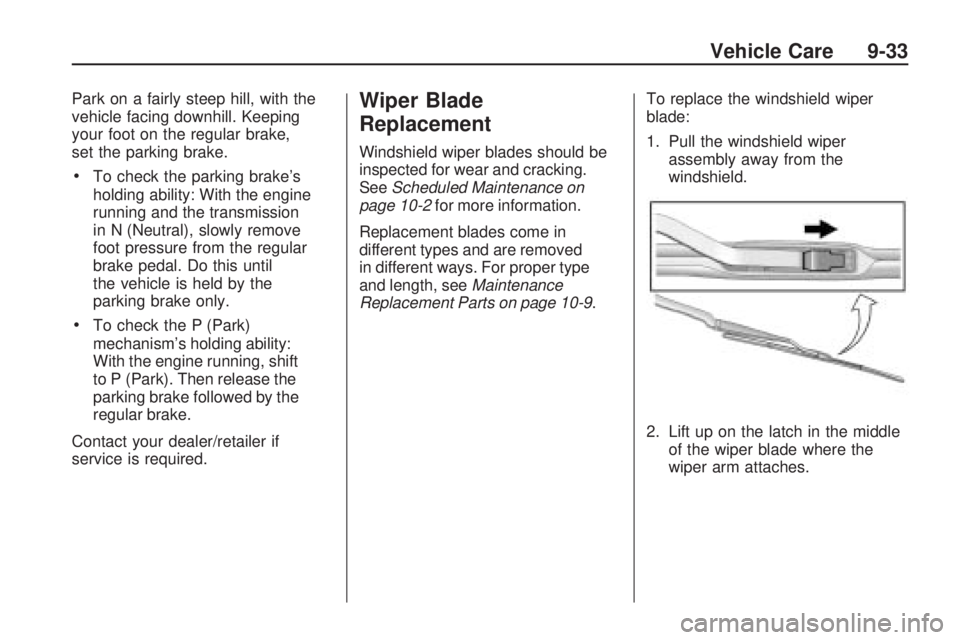
1. Pull the windshield wiper
assembly away from the
windshield.
2. Lift up on the latch in the middle
of the wiper blade where the
wiper arm attaches.
Vehicle Care 9-33
Page 293 of 372
10. Set all four tires to the
recommended air pressure
level as indicated on the tire
and loading information label.
11. Put the valve caps back on the
valve stems.
The tires air pressure will not
appear on the screen until you start
driving the vehicle.
Tire Inspection
We recommend that you
regularly inspect your vehicle’s
tires, including the spare tire, if
the vehicle has one, for signs of
wear or damage. SeeWhen It Is
Time for New Tires on page 9-62
for more information.
Tire Rotation
Tire rotation is not
recommended if the vehicle
has different size tires on the
front and rear wheels.
Different tire sizes should not be
rotated front to rear. Each tire
and wheel should only be used in
its original front or rear position.
Tire rotation is recommended if
the vehicle has the same size
tires on all four wheel positions.
These tires should be rotated
every 5,000 to 8,000 miles
(8 000 to 13 000 km). See
Scheduled Maintenance on
page 10-2.
The purpose of a regular tire
rotation is to achieve a uniform
wear for all tires on the vehicle.
This will ensure that your vehicle
continues to perform most like it
did when the tires were new.Any time you notice unusual
wear, rotate the tires as soon
as possible and check wheel
alignment. Also check for
damaged tires or wheels.
SeeWhen It Is Time for
New Tires on page 9-62
andWheel Replacement
on page 9-67.
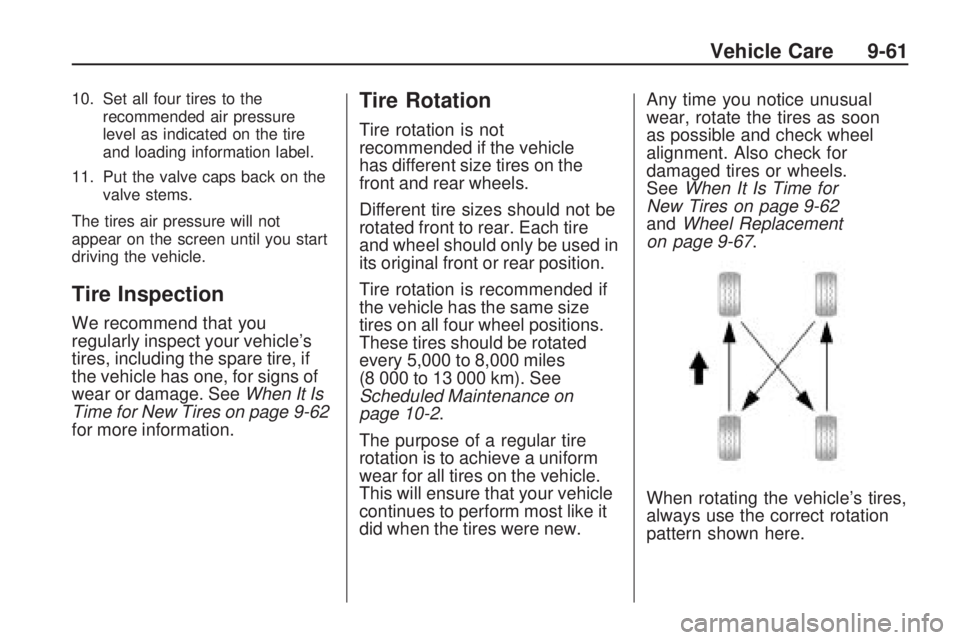
When rotating the vehicle’s tires,
always use the correct rotation
pattern shown here.
Vehicle Care 9-61
Page 329 of 372

Service and
Maintenance
General InformationGeneral Information.............10-1
Scheduled MaintenanceScheduled Maintenance........10-2
Recommended Fluids,
Lubricants, and Parts
Recommended Fluids and
Lubricants.........................10-7
Maintenance Replacement
Parts................................10-9
Maintenance RecordsMaintenance Records.........10-10
General Information
Notice:Maintenance
intervals, checks, inspections,
recommended uids, and
lubricants are necessary to
keep this vehicle in good
working condition. Damage
caused by failure to follow
scheduled maintenance might
not be covered by the vehicle
warranty.
Proper vehicle maintenance helps to
keep the vehicle in good working
condition, improves fuel economy,
and reduces vehicle emissions
for better air quality.
Because of all the different ways
people use vehicles, maintenance
needs vary. The vehicle might need
more frequent checks and services.
Please read the information under
Scheduled Maintenance. To keep
the vehicle in good condition, see
your dealer/retailer.The maintenance schedule is for
vehicles that:•carry passengers and cargo
within recommended limits on
the Tire and Loading Information
label. SeeVehicle Load Limits
on page 8-12.
•are driven on reasonable road
surfaces within legal driving
limits.
•use the recommended fuel.
SeeRecommended Fuel
on page 8-44.
{WARNING
Performing maintenance work can
be dangerous. Some jobs can
cause serious injury. Perform
maintenance work only if you
have the required know-how and
the proper tools and equipment.
If in doubt, see your dealer/retailer
to have a qualified technician do
the work. SeeDoing Your Own
Service Work on page 9-4.
Service and Maintenance 10-1
Page 330 of 372
At your General Motors dealer/
retailer, you can be certain that
you will receive the highest level
of service available. Your dealer
/retailer has specially trained service
technicians, uses genuine GM
replacement parts, as well as, up to
date tools and equipment to ensure
fast and accurate diagnostics.
The proper replacement parts,
fluids, and lubricants to use are
listed inRecommended Fluids
and Lubricants on page 10-7and
Maintenance Replacement Parts on
page 10-9. We recommend the use
of genuine parts from your dealer/
retailer.
Rotation of New Tires
Tire rotation is not recommended if
the vehicle has different size tires
on the front and rear wheels. If tire
rotation is recommended for the
vehicle, to maintain ride, handling,
and performance of the vehicle,
it is important that the first rotation
service for new tires be performed
when they have 8 000 to 13 000 km
(5,000 to 8,000 miles). SeeTire
Rotation on page 9-61.Scheduled
Maintenance
When the Change Engine Oil
Soon Message Displays
Change engine oil and filter.
SeeEngine Oil on page 9-10.
An Emission Control Service.
When the Change Engine Oil
Soon message displays, service is
required for the vehicle as soon as
possible, within the next 1 000 km/
600 miles. If driving under the best
conditions, the engine oil life system
might not indicate the need for
vehicle service for more than a year.
The engine oil and filter must be
changed at least once a year and the
oil life system must be reset. Your
dealer/retailer has trained service
technicians who will perform this
work and reset the system.If the engine oil life system is reset
accidentally, service the vehicle
within 5 000 km/3,000 miles since
the last service. Reset the oil life
system whenever the oil is changed.
SeeEngine Oil Life System on
page 9-13.
When the Change Engine Oil
Soon message displays, certain
services, checks, and inspections
are required. The services described
for MaintenanceIshould be
performed at every engine oil
change. The services described
for MaintenanceIIshould be
performed when:
•MaintenanceIwas performed
the last time the engine oil was
changed.
•It has been 10 months or more
since the Change Engine Oil
Soon message has displayed
or since the last service.
10-2 Service and Maintenance
Page 366 of 372
L
Labeling, Tire Sidewall..........9-49
Lamp Messages..................4-33
Lamps
Daytime
Running (DRL).......5-3, 9-39
Dome ............................... 5-6
Exterior Controls................ 5-1
Front Fog.......................... 5-5
Headlamps, Front Turn
Signal and Parking
Lamps .................9-37, 9-38
License Plate...................9-40
Malfunction Indicator.........4-19
Lap-Shoulder Belt................2-16
Latch, Lower Anchors and
Tethers for Children...........2-43
LATCH System
Replacing Parts After a
Crash..........................2-48
Latches, Seatback................. 2-5
Lighting
Entry................................ 5-6
Theater Dimming................ 5-6
Lights
Airbag Readiness.............4-17Lights (cont.)
Antilock Brake System
(ABS) Warning..............4-23
Charging System..............4-19
Cruise Control..................4-26
Engine Oil Pressure..........4-25
Flash-to-Pass..................... 5-3
Fog Lamps ......................4-26
High/Low Beam Changer..... 5-2
Immobilizer......................4-26
Safety Belt Reminders.......4-16
Taillamp Indicator..............4-26
Tire Pressure...................4-24
Traction Control OFF/
StabiliTrak OFF.............4-24
Traction Control System
(TCS)/StabiliTrak
®..........4-24
Traction Off......................4-23
Limited-Slip Rear Axle...........8-38
Locks
Door ................................. 1-6
Lockout Protection.............. 1-8
Power Door ....................... 1-7
Loss of Control..................... 8-6
Lower Anchors and Tethers
for Children (LATCH
SYSTEM)........................2-43
M
Maintenance
Records.........................10-10
Maintenance Schedule
Recommended Fluids and
Lubricants....................10-7
Scheduled Maintenance.....10-2
Malfunction Indicator Lamp....4-19
Manual Mode......................8-29
Manual Transmission............8-30
Fluid...............................9-15
Messages
Airbag System..................4-35
Anti-Theft Alarm System....4-35
Battery Voltage and
Charging......................4-30
Brake System..................4-31
Compass.........................4-31
Door Ajar.........................4-31
Engine Cooling System.....4-32
Engine Oil.......................4-32
Engine Power..................4-33
Fuel System....................4-33
Key and Lock..................4-33
Lamp ..............................4-33
Object Detection System....4-34
i-6 INDEX