clutch CHEVROLET CAMARO SS 2010 Owners Manual
[x] Cancel search | Manufacturer: CHEVROLET, Model Year: 2010, Model line: CAMARO SS, Model: CHEVROLET CAMARO SS 2010Pages: 372, PDF Size: 1.91 MB
Page 116 of 372
Tire Messages
Check XXX Tire Pressure
This message displays if the vehicle
detects low pressure in one or
more tires. The tire with the
low pressure will be shown in the
message. Check the tire pressures.
Service Tire Monitor System
This message displays if there
is a problem with the Tire Pressure
Monitor System (TPMS). SeeTire
Pressure Monitor Operation on
page 9-57for more information.
Tire Learning Active
This message displays when the
system is learning new tires. See
Tire Pressure Monitor Operation on
page 9-57for more information.
Tire Pressure System Reset
This message displays when
resetting the TPMS. SeeTire
Pressure Monitor Operation on
page 9-57for more information.
Transmission Messages
1 – 4 Shift
This message displays when you
can only shift from 1 (First) to
4 (Fourth) instead of 1 (First)
to 2 (Second). SeeManual
Transmission on page 8-30for
more information.
Press Clutch To Start
This message displays when
attempting to start a vehicle with
a manual transmission without
pressing on the clutch pedal.
Service Transmission
This message displays if there is
a problem with the transmission.
See your dealer/retailer.
Shift Denied
This message displays when
attempting to use the automatic
transmission manual mode to
shift to too low of a gear.
SeeManual Mode on page 8-29
for more information.
Shift To Park
This message displays when the
transmission needs to be shifted
to park. This may appear when
attempting to remove the key from
the ignition if the vehicle is not
in P (Park).
Transmission Hot – Idle
Engine
This message displays and a chime
sounds if the transmission fluid in the
vehicle gets hot. Driving with the
transmission fluid temperature high
can cause damage to the vehicle.
Stop the vehicle and let it idle to
allow the transmission to cool.
This message clears when the fluid
temperature reaches a safe level.
4-36 Instruments and Controls
Page 195 of 372
If charging or jump starting the
battery does not work, remove the
plug covering the hole below the
ignition lock. Insert a screwdriver into
the opening as far as it will go and
remove the key from the ignition.
Retained Accessory
Power (RAP)
These vehicle accessories may be
used for up to 10 minutes after
the engine is turned off:
•Audio System
•Power Windows
The power windows will continue to
work for up to 10 minutes or until any
door is opened. The radio will work
when the key is in ON/RUN or
ACC/ACCESSORY. Once the key is
turned from ON/RUN to LOCK/OFF,
the radio will continue to work for
10 minutes, or until the driver door
is opened or the key is removed
from the ignition.
Starting the Engine
Place the transmission in the
proper gear.
Automatic Transmission
Move the shift lever to P (Park) or
N (Neutral). The engine will not start
in any other position. To restart the
vehicle when it is already moving,
use N (Neutral) only.
Notice:Do not try to shift to
P (Park) if the vehicle is moving.
If you do, you could damage
the transmission. Shift to P (Park)
only when the vehicle is stopped.
Manual Transmission
The shift lever should be in
N (Neutral) and the parking brake
engaged. Hold the clutch pedal
down to the floor and start the
engine. The vehicle will not start
if the clutch pedal is not all the
way down.Starting Procedure
1. With your foot off the accelerator
pedal, turn the ignition key to
START. When the engine starts,
let go of the key. The idle speed
will go down as the engine
warms. Do not race the engine
immediately after starting it. Allow
the oil to warm up and lubricate all
moving parts.
The vehicle has a
Computer-Controlled Cranking
System. This feature assists in
starting the engine and protects
components. If the ignition key
is turned to the START position,
and then released when the
engine begins cranking, the
engine will continue cranking
for a few seconds or until the
vehicle starts. If the engine
does not start and the key
is held in START for many
seconds, cranking stops
after 15 seconds to prevent
cranking motor damage.
Driving and Operating 8-19
Page 200 of 372
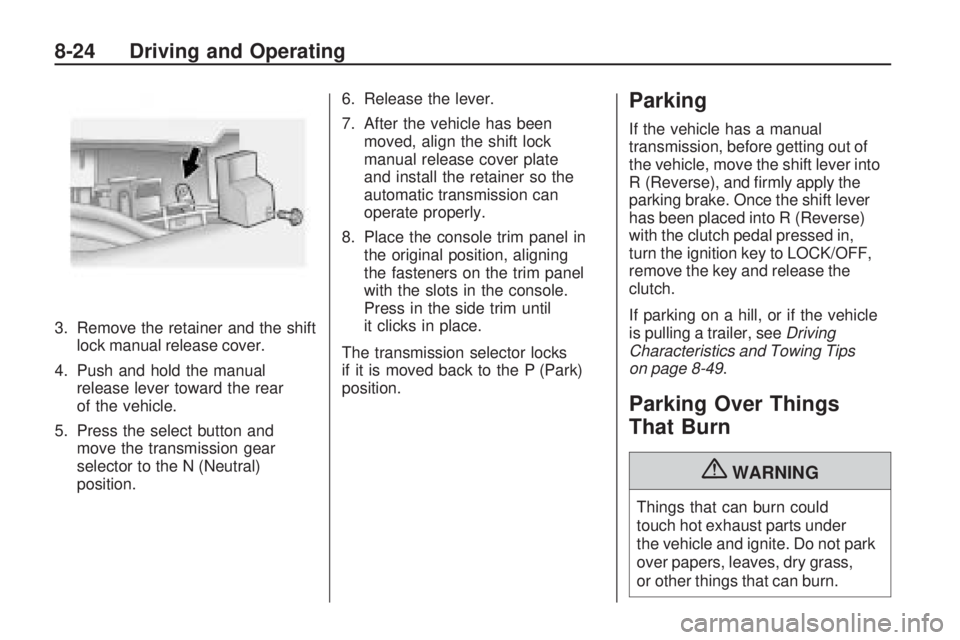
3. Remove the retainer and the shift
lock manual release cover.
4. Push and hold the manual
release lever toward the rear
of the vehicle.
5. Press the select button and
move the transmission gear
selector to the N (Neutral)
position.6. Release the lever.
7. After the vehicle has been
moved, align the shift lock
manual release cover plate
and install the retainer so the
automatic transmission can
operate properly.
8. Place the console trim panel in
the original position, aligning
the fasteners on the trim panel
with the slots in the console.
Press in the side trim until
it clicks in place.
The transmission selector locks
if it is moved back to the P (Park)
position.
Parking
If the vehicle has a manual
transmission, before getting out of
the vehicle, move the shift lever into
R (Reverse), and firmly apply the
parking brake. Once the shift lever
has been placed into R (Reverse)
with the clutch pedal pressed in,
turn the ignition key to LOCK/OFF,
remove the key and release the
clutch.
If parking on a hill, or if the vehicle
is pulling a trailer, seeDriving
Characteristics and Towing Tips
on page 8-49.
Parking Over Things
That Burn
{WARNING
Things that can burn could
touch hot exhaust parts under
the vehicle and ignite. Do not park
over papers, leaves, dry grass,
or other things that can burn.
8-24 Driving and Operating
Page 206 of 372

Manual Transmission
Shift Pattern (V8 Engines)
Shift Pattern (V6 Engine)
These are the shift patterns for the
six-speed manual transmissions.To operate the transmission:
1 (First):Press the clutch pedal and
shift into 1 (First). Then slowly let up
on the clutch pedal as you press the
accelerator pedal.
You can shift into 1 (First) when
you are going less than 64 km/h
(40 mph). If you come to a complete
stop and it is hard to shift into
1 (First), put the shift lever in Neutral
and let up on the clutch. Press the
clutch pedal back down. Then shift
into 1 (First).
2 (Second):Press the clutch pedal
as you let up on the accelerator
pedal and shift into 2 (Second).
Then, slowly let up on the clutch
pedal as you press the accelerator
pedal.3 (Third), 4 (Fourth), 5 (Fifth)
and 6 (Sixth):Shift into 3 (Third),
4 (Fourth), 5 (Fifth) and 6 (Sixth) the
same way you do for 2 (Second).
Slowly let up on the clutch pedal as
you press the accelerator pedal.
To stop, let up on the accelerator
pedal and press the brake pedal.
Just before the vehicle stops, press
the clutch pedal and the brake pedal,
and shift to Neutral.
Neutral:Use this position when
you start or idle the engine. The shift
lever is in Neutral when it is centered
in the shift pattern, not in any gear.
R (Reverse):To back up, press
down the clutch pedal and shift
into R (Reverse). On V8 models,
apply pressure to get the lever
past 5 (Fifth) and 6 (Sixth) into
R (Reverse). Let up on the clutch
pedal slowly while pressing the
accelerator pedal.
8-30 Driving and Operating
Page 211 of 372
Press and release the StabiliTrak/
TCS button and the traction control
system turns off and the TCS
warning light comes on. Press and
release the button again to turn the
system back on. For information on
turning StabiliTrak off and on, see
StabiliTrak System following.
Launch Control (V8 with
Manual Transmission
Models Only)
Launch Control uses a form of
traction control specifically tuned to
optimize tire spin while launching the
vehicle during closed track events
and competitive driving. The feature
is activated when the vehicle is at
rest while in Competitive Mode.
SeeCompetitive Driving Mode on
page 8-37for more information.
At rest, if the accelerator pedal is
pressed to the floor with the clutch
engaged, the RPM is limited to a
predetermined level. A smooth, quick
release of the clutch while keeping
the accelerator pedal on the floor
will provide controlled wheel spin for
consistent acceleration. Complete
shifts as described inManual
Transmission on page 8-30.When in Competitive Mode the
StabiliTrak Off light comes on the
instrument panel cluster. Adjust your
driving accordingly. SeeCompetitive
Driving Mode on page 8-37for more
information.
Adding non-dealer/non-retailer
accessories can affect the vehicle’s
performance. SeeAccessories
and Modications on page 9-3
for more information.
Driving and Operating 8-35
Page 216 of 372
Increasing Speed While Using
Cruise Control
There are two ways to go to a
higher speed.
•Disengage the cruise control,
but do not turn it off.
•If the cruise control system is
already engaged, press the
thumbwheel up toward RES/+
and hold it until the vehicle
accelerates to the desired speed,
and then release the switch.
To increase the speed in small
amounts, press the thumbwheel
up toward RES/+ briefly and then
release it. Each time this is done,
the vehicle goes about 1.6 km/h
(1 mph) faster.
Reducing Speed While Using
Cruise Control
If the cruise control system is
already engaged,
•Push the thumbwheel toward
SET/−and hold until the desired
lower speed is reached, then
release it.
•To slow down in very small
amounts, push the thumbwheel
toward SET/−briefly. Each time
this is done, the vehicle goes
about 1.6 km/h (1 mph) slower.
Passing Another Vehicle While
Using Cruise Control
Use the accelerator pedal to
increase the vehicle’s speed.
When you take your foot off the
pedal, the vehicle will slow down
to the previously set cruise control
speed.
Using Cruise Control on Hills
How well the cruise control works
on hills depends upon the vehicle’s
speed, load, and the steepness of
the hills. When going up steep hills,
you might have to step on the
accelerator pedal to maintain the
vehicle’s speed. When going
downhill, you might have to brake
or shift to a lower gear to maintain
the vehicle’s speed. When the
brakes are applied the cruise
control shuts off.Ending Cruise Control
There are three ways to end the
cruise control:
•Step lightly on the brake pedal
or clutch; when cruise control
disengages, the indicator light
on the instrument panel cluster
goes out.
•Press5to turn off the cruise
control system.
•Press\to disengage the cruise
control.
Erasing Speed Memory
The cruise control set speed
memory is erased when the cruise
control or the ignition is turned off.
8-40 Driving and Operating
Page 233 of 372
Vehicle Care
General InformationGeneral Information...............9-2
California Proposition 65
Warning.............................9-2
California Perchlorate
Materials Requirements........9-3
Accessories and
Modifications.......................9-3
Vehicle ChecksDoing Your Own
Service Work......................9-4
Hood...................................9-5
Engine Compartment
Overview............................9-6
Engine Cover.......................9-9
Engine Oil..........................9-10
Engine Oil Life System.........9-13
Automatic Transmission
Fluid................................9-14
Manual Transmission Fluid. . . .9-15
Hydraulic Clutch..................9-15
Engine Air Cleaner/Filter.......9-16
Cooling System...................9-17
Engine Coolant...................9-19
Engine Overheating.............9-24
Power Steering Fluid............9-25Washer Fluid......................9-26
Brakes...............................9-27
Brake Fluid.........................9-28
Battery...............................9-29
Rear Axle...........................9-30
Starter Switch Check............9-31
Automatic Transmission
Shift Lock Control
System Check...................9-32
Ignition Transmission
Lock Check.......................9-32
Park Brake and P (Park)
Mechanism Check..............9-32
Wiper Blade Replacement......9-33Headlamp AimingHeadlamp Aiming................9-34
Bulb ReplacementBulb Replacement...............9-37
Halogen Bulbs....................9-37
High Intensity Discharge
(HID) Lighting....................9-37
Headlamps, Front Turn
Signal and Parking Lamps
(Base Vehicle)...................9-37
Headlamps, Front Turn
Signal and Parking Lamps
(Up-Level Vehicle)..............9-38
Daytime Running
Lamps (DRL)....................9-39
Fog Lamps.........................9-40Taillamps, Turn Signal, and
Stoplamps.........................9-40
License Plate Lamp.............9-40
Replacement Bulbs..............9-41
Electrical SystemElectrical System
Overload...........................9-41
Fuses and Circuit
Breakers...........................9-42
Engine Compartment
Fuse Block.......................9-42
Instrument Panel
Fuse Block.......................9-45
Rear Compartment
Fuse Block.......................9-46
Wheels and TiresTires..................................9-48
Winter Tires........................9-48
Tire Sidewall Labeling..........9-49
Tire Designations.................9-51
Tire Terminology and
Definitions.........................9-52
Tire Pressure......................9-54
Tire Pressure for
High-Speed Operation........9-56
Tire Pressure Monitor
System.............................9-56
Tire Pressure Monitor
Operation..........................9-57
Tire Inspection....................9-61
Vehicle Care 9-1
Page 239 of 372
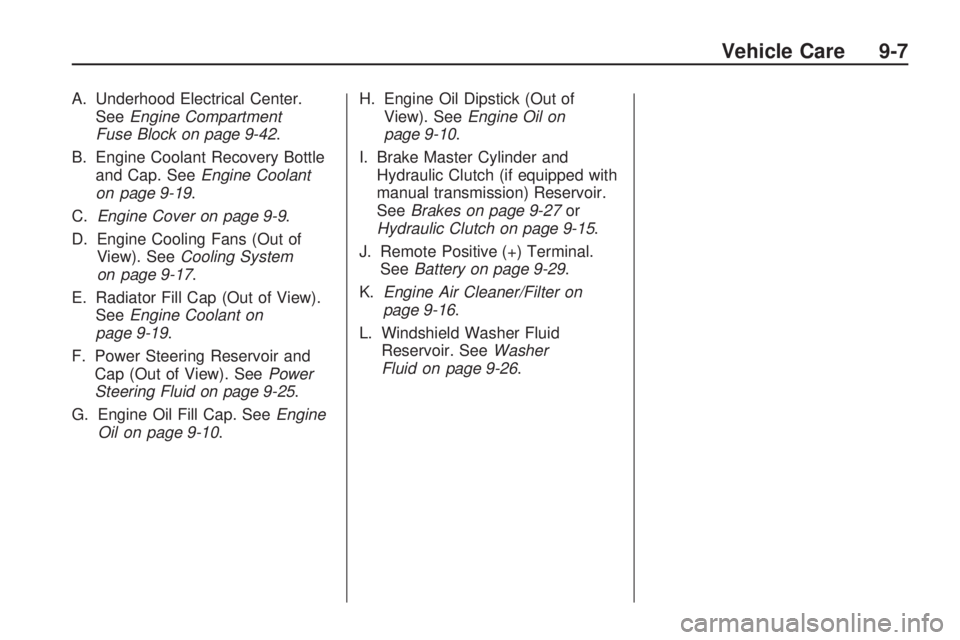
A. Underhood Electrical Center.
SeeEngine Compartment
Fuse Block on page 9-42.
B. Engine Coolant Recovery Bottle
and Cap. SeeEngine Coolant
on page 9-19.
C.Engine Cover on page 9-9.
D. Engine Cooling Fans (Out of
View). SeeCooling System
on page 9-17.
E. Radiator Fill Cap (Out of View).
SeeEngine Coolant on
page 9-19.
F. Power Steering Reservoir and
Cap (Out of View). SeePower
Steering Fluid on page 9-25.
G. Engine Oil Fill Cap. SeeEngine
Oil on page 9-10.H. Engine Oil Dipstick (Out of
View). SeeEngine Oil on
page 9-10.
I. Brake Master Cylinder and
Hydraulic Clutch (if equipped with
manual transmission) Reservoir.
SeeBrakes on page 9-27or
Hydraulic Clutch on page 9-15.
J. Remote Positive (+) Terminal.
SeeBattery on page 9-29.
K.Engine Air Cleaner/Filter on
page 9-16.
L. Windshield Washer Fluid
Reservoir. SeeWasher
Fluid on page 9-26.
Vehicle Care 9-7
Page 241 of 372
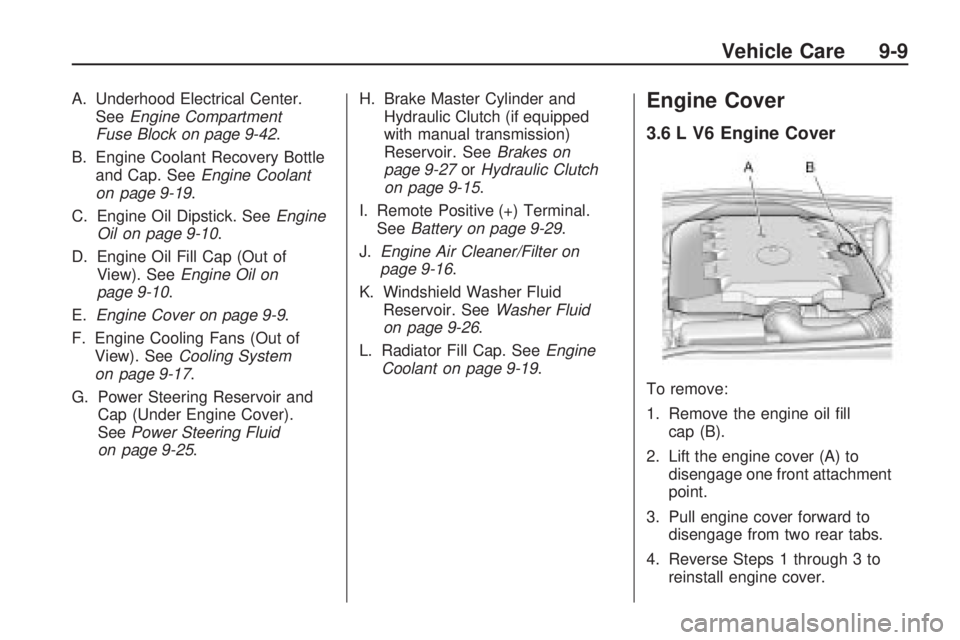
A. Underhood Electrical Center.
SeeEngine Compartment
Fuse Block on page 9-42.
B. Engine Coolant Recovery Bottle
and Cap. SeeEngine Coolant
on page 9-19.
C. Engine Oil Dipstick. SeeEngine
Oil on page 9-10.
D. Engine Oil Fill Cap (Out of
View). SeeEngine Oil on
page 9-10.
E.Engine Cover on page 9-9.
F. Engine Cooling Fans (Out of
View). SeeCooling System
on page 9-17.
G. Power Steering Reservoir and
Cap (Under Engine Cover).
SeePower Steering Fluid
on page 9-25.H. Brake Master Cylinder and
Hydraulic Clutch (if equipped
with manual transmission)
Reservoir. SeeBrakes on
page 9-27orHydraulic Clutch
on page 9-15.
I. Remote Positive (+) Terminal.
SeeBattery on page 9-29.
J.Engine Air Cleaner/Filter on
page 9-16.
K. Windshield Washer Fluid
Reservoir. SeeWasher Fluid
on page 9-26.
L. Radiator Fill Cap. SeeEngine
Coolant on page 9-19.Engine Cover
3.6 L V6 Engine Cover
To remove:
1. Remove the engine oil fill
cap (B).
2. Lift the engine cover (A) to
disengage one front attachment
point.
3. Pull engine cover forward to
disengage from two rear tabs.
4. Reverse Steps 1 through 3 to
reinstall engine cover.
Vehicle Care 9-9
Page 247 of 372
Manual Transmission
Fluid
It is not necessary to check the
manual transmission fluid level.
A transmission fluid leak is the only
reason for fluid loss. If a leak occurs,
take the vehicle to your dealer/
retailer service department and
have it repaired as soon as possible.
SeeRecommended Fluids and
Lubricants on page 10-7for the
proper fluid to use.
Hydraulic Clutch
It is not necessary to regularly
check brake/clutch fluid unless
you suspect there is a leak in the
system. Adding fluid will not correct
a leak. A fluid loss in this system
could indicate a problem. Have the
system inspected and repaired.
When to Check and What
to Use
The brake/hydraulic clutch fluid
reservoir cap has this symbol
on it. The common hydraulic clutch
and brake master cylinder fluid
reservoir is filled with DOT 3 brake
fluid as indicated on the reservoir
cap. SeeEngine Compartment
Overview on page 9-6for reservoir
location.
How to Check and Add Fluid
Visually check the brake/clutch
fluid reservoir to make sure the
fluid level is at the MIN (minimum)
line on the side of the reservoir.
The brake/hydraulic clutch fluid
system should be closed and
sealed.
Do not remove the cap to check
the fluid level or to top-off the fluid
level. Remove the cap only when
necessary to add the proper fluid
until the level reaches the MIN line.
Vehicle Care 9-15