key battery CHEVROLET CAMARO SS 2010 Owners Manual
[x] Cancel search | Manufacturer: CHEVROLET, Model Year: 2010, Model line: CAMARO SS, Model: CHEVROLET CAMARO SS 2010Pages: 372, PDF Size: 1.91 MB
Page 9 of 372
Remote Keyless Entry
(RKE) System
SeeRadio Frequency Statement
(US, Can) on page 12-15for
information regarding Part 15 of
the Federal Communications
Commission (FCC) Rules and
RSS-210/211 of Industry and
Science Canada.
Changes or modifications to this
system by other than an authorized
service facility could void
authorization to use this equipment.
If there is a decrease in the RKE
operating range, try this:
•Check the distance. The
transmitter may be too far from
the vehicle. Stand closer
during rainy or snowy weather.
•Check the location. Other
vehicles or objects may be
blocking the signal. Take a
few steps to the left or right,
hold the transmitter higher, and
try again.
•Check the transmitter’s battery.
See “Battery Replacement”
later in this section.
•If the transmitter is still not
working correctly, see your
dealer/retailer or a qualified
technician for service.
Remote Keyless Entry
(RKE) System Operation
If available, the Remote Keyless
Entry (RKE) transmitter will work
up to 65 feet (20 m) away from
the vehicle.
Other conditions can affect the
performance of the transmitter.
SeeRemote Keyless Entry (RKE)
System on page 1-3.The following may be available:
Q(Lock):Press to lock all doors.
The turn signal indicators may
flash and/or the horn may sound to
indicate locking, see “Remote
Feedback” underVehicle
Personalization on page 4-38.
If the passenger door is open
when
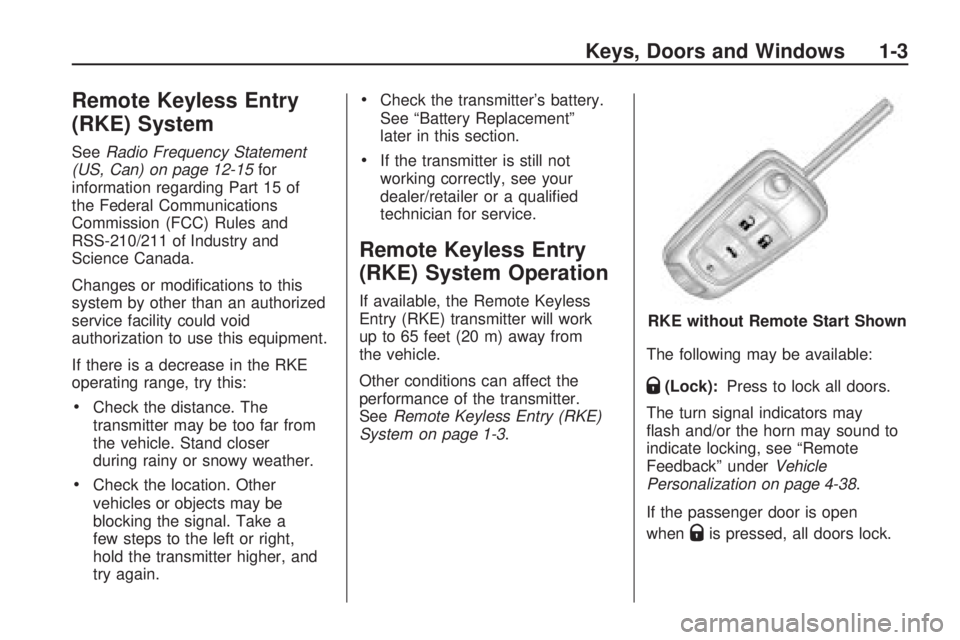
Qis pressed, all doors lock. RKE without Remote Start Shown
Keys, Doors and Windows 1-3
Page 10 of 372
If the driver door is open whenQis
pressed, all doors lock except
the driver door, if enabled through
the vehicle personalization.
Pressing
Qmay also arm the
theft-deterrent system. See
Anti-Theft Alarm System on
page 1-10.
K(Unlock):Press to unlock
the driver door or all doors, see
“Remote Unlock” underVehicle
Personalization on page 4-38.
The turn signal indicators may flash
and/or the horn may sound to
indicate unlocking, see “Remote
Feedback” underVehicle
Personalization on page 4-38.
Pressing
Kwill disarm the
theft-deterrent system. See
Anti-Theft Alarm System on
page 1-10.
V(Remote Trunk Release):
Press and hold to unlock the trunk.
7(Vehicle Locator/Panic Alarm):
Press and release one time to locate
the vehicle. The exterior lamps flash
and the horn chirps.
Press and hold
7for at least
two seconds to sound the panic
alarm. The horn sounds and the turn
signals flash until
7is pressed again
or the key is placed in the ignition
and turned to ON/RUN.
/(Remote Vehicle Start):For
vehicles with this feature, press
Q
and then/to start the engine from
outside the vehicle using the RKE
transmitter. SeeRemote Vehicle
Start on page 1-5for additional
information.
Programming Transmitters to
the Vehicle
Only RKE transmitters programmed
to this vehicle will work. If a
transmitter is lost or stolen, a
replacement can be purchased
and programmed through your
dealer/retailer. When the
replacement transmitter is
programmed to this vehicle, all
remaining transmitters must also be
reprogrammed. Any lost or stolen
transmitters will no longer work once
the new transmitter is programmed.
Battery Replacement
Replace the battery if the Replace
Battery in Remote Key message
displays in the DIC. See “Replace
Battery in Remote Key” under
Key and Lock Messages on
page 4-33.
The battery is not rechargeable.
See your dealer/retailer to replace
the battery.
1-4 Keys, Doors and Windows
Page 22 of 372

Programming the Power
Windows
If the battery on the vehicle has
been recharged, disconnected,
or is not working, you will need to
reprogram each front power window
for the express-up feature to work.
Before reprogramming, replace
or recharge the vehicle’s battery.
To program each front window,
follow these steps:
1. With the ignition in ACC/
ACCESSORY, ON/RUN,
or when Retained Accessory
Power (RAP) is active, close
all doors.
2. Press and hold the power
window switch until the window
is fully open.3. Pull the power window switch up
until the window is fully closed.
4. Continue holding the switch up
for approximately two seconds
after the window is completely
closed.
The window is now reprogrammed.
Repeat the process for the other
windows.
Sun Visors
Pull the sun visor toward you or
move it to the side to reduce glare.
Roof
Sunroof
On vehicles with a sunroof, the
switch is located on the overhead
console.
The sunroof only operates
when the ignition is in ON/RUN,
ACC/ACCESSORY, or if Retained
Accessory Power (RAP) is
active. SeeRetained Accessory
Power (RAP) on page 8-19.
1-16 Keys, Doors and Windows
Page 81 of 372
Instruments and
Controls
Instrument Panel OverviewInstrument Panel Overview......4-4
ControlsSteering Wheel Adjustment.....4-6
Steering Wheel Controls.........4-6
Horn....................................4-7
Windshield Wiper/Washer.......4-7
Compass.............................4-8
Clock...................................4-8
Power Outlets.......................4-9
Warning Lights, Gages,
and Indicators
Warning Lights, Gages,
and Indicators.....................4-9
Instrument Cluster...............4-10
Speedometer......................4-11
Odometer...........................4-11
Trip Odometer.....................4-11
Tachometer........................4-11
Fuel Gage..........................4-11
Engine Oil Pressure Gage......4-12Engine Oil
Temperature Gage.............4-13
Engine Coolant
Temperature Gage.............4-14
Transmission
Temperature Gage.............4-14
Voltmeter Gage...................4-15
Safety Belt Reminders..........4-16
Airbag Readiness Light.........4-17
Passenger Airbag Status
Indicator...........................4-18
Charging System Light.........4-19
Malfunction
Indicator Lamp..................4-19
Brake System Warning
Light................................4-22
Antilock Brake System
(ABS) Warning Light...........4-23
Traction Off Light.................4-23
Traction Control System
(TCS)/StabiliTrak
®Light.......4-24
Traction Control System
(TCS) OFF/StabiliTrak
®OFF
Light................................4-24
Tire Pressure Light..............4-24
Engine Oil Pressure Light.....4-25
Immobilizer Light.................4-26
Fog Lamp Light...................4-26
Taillamp Indicator Light.........4-26
Cruise Control Light.............4-26
Information DisplaysDriver Information
Center (DIC).....................4-27
Vehicle MessagesBattery Voltage and
Charging Messages............4-30
Brake System Messages......4-31
Compass Messages.............4-31
Cruise Control Messages......4-31
Door Ajar Messages............4-31
Engine Cooling System
Messages.........................4-32
Engine Oil Messages...........4-32
Engine Power Messages......4-33
Fuel System Messages........4-33
Key and Lock Messages......4-33
Lamp Messages..................4-33
Object Detection System
Messages.........................4-34
Ride Control System
Messages.........................4-34
Airbag System Messages......4-35
Safety Belt Messages...........4-35
Anti-Theft Alarm System
Messages.........................4-35
Service Vehicle Messages.....4-35
Tire Messages....................4-36
Transmission Messages........4-36
Vehicle Reminder
Messages.........................4-37
Instruments and Controls 4-1
Page 89 of 372
Power Outlets
The vehicle has two accessory
power outlets; one is located below
the climate control system and
the other is inside the center storage
console.
The accessory power outlets do not
work when the key is removed
from the ignition and the driver door
is opened, this helps to preserve
the battery life of the vehicle.
Certain power accessory plugs may
not be compatible to the accessory
power outlet and could result in
blown vehicle or adapter fuses.
If you experience a problem,
see your dealer/retailer for additional
information on the accessory
power plugs.Notice:Adding any electrical
equipment to the vehicle can
damage it or keep other
components from working as
they should. The repairs would
not be covered by the vehicle
warranty. Each outlet is rated to
a maximum output of 120W.
Usage of equipment exceeding
an amperage rating of 20A may
require fuse replacement. Check
with your dealer/retailer before
adding electrical equipment.
When adding electrical equipment,
be sure to follow the proper
installation instructions included
with the equipment.
Notice:Improper use of the
power outlet can cause damage
not covered by the warranty.
Do not hang any type of
accessory or accessory bracket
from the plug because the
power outlets are designed for
accessory power plugs only.
Warning Lights,
Gages, and Indicators
Warning lights come on when
there could be a problem with a
vehicle function. Some warning
lights come on briefly when
the engine is started to indicate
they are working.
Gages can indicate when there
could be a problem with a vehicle
function. Often gages and warning
lights work together to indicate
a problem with the vehicle.
When one of the warning lights
comes on and stays on while
driving, or when one of the gages
shows there may be a problem,
check the section that explains what
to do. Follow this manual’s advice.
Waiting to do repairs can be
costly and even dangerous.
Instruments and Controls 4-9
Page 101 of 372
•Make sure to fuel the vehicle with
quality fuel. Poor fuel quality
causes the engine not to run as
efficiently as designed and can
cause: stalling after start-up,
stalling when the vehicle is
changed into gear, misfiring,
hesitation on acceleration, or
stumbling on acceleration. These
conditions might go away once
the engine is warmed up.
If one or more of these conditions
occurs, change the fuel brand
used. It will require at least one
full tank of the proper
fuel to turn the light off.
SeeGasoline Specications
on page 8-44.
If none of the above have made the
light turn off, your dealer/retailer can
check the vehicle. The dealer/retailer
has the proper test equipment and
diagnostic tools to fix any mechanical
or electrical problems that might
have developed.Emissions Inspection and
Maintenance Programs
Some state/provincial and local
governments have or might begin
programs to inspect the emission
control equipment on the vehicle.
Failure to pass this inspection
could prevent getting a vehicle
registration.
Here are some things to know to
help the vehicle pass an inspection:
•The vehicle will not pass this
inspection if the check engine
light is on with the engine
running, or if the key is in
ON/RUN and the light is not on.
•The vehicle will not pass
this inspection if the OBD II
(on-board diagnostic) system
determines that critical emission
control systems have not been
completely diagnosed by the
system. The vehicle would
be considered not ready forinspection. This can happen
if the battery has recently been
replaced or if the battery has run
down. The diagnostic system is
designed to evaluate critical
emission control systems during
normal driving. This can take
several days of routine driving.
If this has been done and the
vehicle still does not pass
the inspection for lack of
OBD II system readiness,
your dealer/retailer can prepare
the vehicle for inspection.
Instruments and Controls 4-21
Page 113 of 372
Oil Pressure Low – Stop
Engine
This message displays if low oil
pressure levels occur. Stop the
vehicle as soon as safely possible
and do not operate it until the cause
of the low oil pressure has been
corrected. Check the oil as soon as
possible and have your vehicle
serviced by your dealer/retailer.
Engine Power Messages
Engine Power Is Reduced
This message displays when the
vehicle’s engine power is reduced.
Reduced engine power can affect the
vehicle’s ability to accelerate. If this
message is on, but there is no
reduction in performance, proceed to
your destination. The performance
may be reduced the next time the
vehicle is driven. The vehicle may
be driven at a reduced speed whilethis message is on, but maximum
acceleration and speed may be
reduced. Anytime this message
stays on, the vehicle should be taken
to your dealer/retailer for service as
soon as possible.
Fuel System Messages
Fuel Level Low
This message displays when the
vehicle is low on fuel. Refuel
as soon as possible
Tighten Gas Cap
This message displays when the
fuel cap is not on tight. Tighten the
fuel cap.
Change Fuel Filter
This message displays when the
fuel needs to be replaced. Take the
vehicle to your dealer/retailer for
service.
Key and Lock Messages
Number Of Keys Programmed
This message displays when
programming new keys to the
vehicle.
Replace Battery In Remote Key
This message displays when the
battery in the Remote Keyless
Entry (RKE) transmitter needs to be
replaced.
Lamp Messages
Automatic Light Control On
This message is displayed when the
automatic light control has been
turned on. SeeAutomatic Headlamp
System on page 5-3.
Instruments and Controls 4-33
Page 136 of 372
Dome Lamps
The dome lamp buttons are located
in the overhead console.
To change the settings, press the
following:
((Off):Turns the lamp off, even
when a door is open.
1(Door):The lamp comes on
automatically when a door is
opened.
'(On):Turns the dome lamp on.
Lighting Features
Entry Lighting
The lamps inside the vehicle come
on when any door is opened. They
stay on about 20 seconds and when
all of the doors have been closed or
the ignition is turned to ON/RUN they
gradually fade out. They also come
on when the unlock symbol button is
pressed on the Remote Keyless
Entry (RKE) system transmitter.
The lamps inside the vehicle stay
on for about 20 seconds after
the key is removed from the ignition
to provide light as you exit.
Theater Dimming
This feature allows for a three to
five second fade out of the courtesy
lamps instead of immediately
turning off.
Battery Load
Management
The vehicle has Electric Power
Management (EPM) that estimates
the battery’s temperature and
state of charge. It then adjusts the
voltage for best performance
and extended life of the battery.
When the battery’s state of charge is
low, the voltage is raised slightly to
quickly bring the charge back up.
When the state of charge is high, the
voltage is lowered slightly to prevent
overcharging. If the vehicle has a
voltmeter gage or a voltage display
on the Driver Information Center
(DIC), you may see the voltage move
up or down. This is normal. If there is
a problem, an alert will be displayed.
The battery can be discharged at
idle if the electrical loads are
very high. This is true for all
vehicles. This is because the
generator (alternator) may not be
spinning fast enough at idle to
produce all the power that is needed
for very high electrical loads.
5-6 Lighting
Page 194 of 372
A (LOCK/OFF):This is the only
position from which the key can be
removed. This locks the steering
wheel, ignition and automatic
transmission.
On vehicles with an automatic
transmission, the shift lever must
be in P (Park) to turn the ignition
switch to the LOCK/OFF position.
The ignition switch can bind in the
LOCK/OFF position with the wheels
turned off center. If this happens,
move the steering wheel from right
to left while turning the key to
ACC/ACCESSORY. If this does not
work, then the vehicle needs service.
B (ACC/ACCESSORY):This
position provides power to some of
the electrical accessories. It unlocks
the steering wheel and ignition. The
transmission is also unlocked in this
position on automatic transmission
vehicles. To move the key from
ACC/ACCESSORY to LOCK/OFF,
push in the key and then turn it to
LOCK/OFF.C (ON/RUN):The ignition switch
stays in this position when the engine
is running. This position can be used
to operate the electrical accessories,
including the ventilation fan and
12 volt power outlet, as well as to
display some warning and indicator
lights.
The battery could be drained if the
key is left in the ACC/ACCESSORY
or ON/RUN position with the engine
off. The vehicle might not start if the
battery is allowed to drain for an
extended period of time.
D (START):This position starts
the engine. When the engine starts,
release the key. The ignition switch
will return to ON/RUN for normal
driving.
A warning tone sounds when the
driver door is opened if the ignition
is still in ACC/ACCESSORY and the
key is in the ignition.Key Lock Release
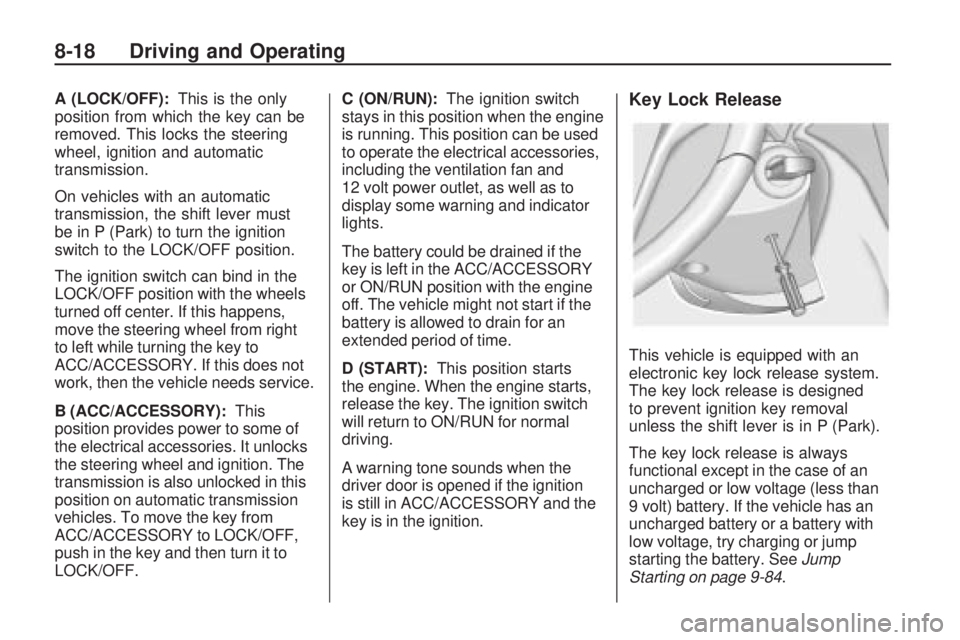
This vehicle is equipped with an
electronic key lock release system.
The key lock release is designed
to prevent ignition key removal
unless the shift lever is in P (Park).
The key lock release is always
functional except in the case of an
uncharged or low voltage (less than
9 volt) battery. If the vehicle has an
uncharged battery or a battery with
low voltage, try charging or jump
starting the battery. SeeJump
Starting on page 9-84.
8-18 Driving and Operating
Page 195 of 372
If charging or jump starting the
battery does not work, remove the
plug covering the hole below the
ignition lock. Insert a screwdriver into
the opening as far as it will go and
remove the key from the ignition.
Retained Accessory
Power (RAP)
These vehicle accessories may be
used for up to 10 minutes after
the engine is turned off:
•Audio System
•Power Windows
The power windows will continue to
work for up to 10 minutes or until any
door is opened. The radio will work
when the key is in ON/RUN or
ACC/ACCESSORY. Once the key is
turned from ON/RUN to LOCK/OFF,
the radio will continue to work for
10 minutes, or until the driver door
is opened or the key is removed
from the ignition.
Starting the Engine
Place the transmission in the
proper gear.
Automatic Transmission
Move the shift lever to P (Park) or
N (Neutral). The engine will not start
in any other position. To restart the
vehicle when it is already moving,
use N (Neutral) only.
Notice:Do not try to shift to
P (Park) if the vehicle is moving.
If you do, you could damage
the transmission. Shift to P (Park)
only when the vehicle is stopped.
Manual Transmission
The shift lever should be in
N (Neutral) and the parking brake
engaged. Hold the clutch pedal
down to the floor and start the
engine. The vehicle will not start
if the clutch pedal is not all the
way down.Starting Procedure
1. With your foot off the accelerator
pedal, turn the ignition key to
START. When the engine starts,
let go of the key. The idle speed
will go down as the engine
warms. Do not race the engine
immediately after starting it. Allow
the oil to warm up and lubricate all
moving parts.
The vehicle has a
Computer-Controlled Cranking
System. This feature assists in
starting the engine and protects
components. If the ignition key
is turned to the START position,
and then released when the
engine begins cranking, the
engine will continue cranking
for a few seconds or until the
vehicle starts. If the engine
does not start and the key
is held in START for many
seconds, cranking stops
after 15 seconds to prevent
cranking motor damage.
Driving and Operating 8-19