ECO mode CHEVROLET CAMARO SS 2018 Owner's Manual
[x] Cancel search | Manufacturer: CHEVROLET, Model Year: 2018, Model line: CAMARO SS, Model: CHEVROLET CAMARO SS 2018Pages: 386, PDF Size: 5.57 MB
Page 212 of 386
Chevrolet Camaro Owner Manual (GMNA-Localizing-U.S./Canada/Mexico-
11348325) - 2018 - crc - 4/11/17
Driving and Operating 211
Do not turn the engine off when the
vehicle is moving. This will cause a
loss of power assist in the brake
and steering systems and disable
the airbags.
If the vehicle must be shut off in an
emergency:1. Brake using a firm and steady pressure. Do not pump the
brakes repeatedly. This may
deplete power assist, requiring
increased brake pedal force.
2. Shift the vehicle to N (Neutral). This can be done while the
vehicle is moving. After shifting
to N (Neutral), firmly apply the
brakes and steer the vehicle to
a safe location.
3. Come to a complete stop. Shift to P (Park) with an automatic
transmission, or N (Neutral)
with a manual transmission.
Turn the ignition off.
4. Set the parking brake. See Electric Parking Brake 0226.{Warning
Turning off the vehicle while
moving may cause loss of power
assist in the brake and steering
systems and disable the airbags.
While driving, only shut the
vehicle off in an emergency.
If the vehicle cannot be pulled over,
and must be shut off while driving,
press and hold ENGINE START/
STOP for longer than two seconds,
or press twice within five seconds.
ACC/ACCESSORY (Amber
Indicator Light) : This mode allows
the use of some electrical
accessories when the engine is off.
With the ignition off, pressing the
button one time without the brake
pedal applied will place the ignition
system in ACC/ACCESSORY.
The ignition will switch from ACC/
ACCESSORY to OFF after
five minutes to prevent battery
rundown. ON/RUN/START (Green Indicator
Light) :
This mode is for driving and
starting. With the ignition off, and
the brake pedal applied, pressing
the button once will place the
ignition system in ON/RUN/START.
Once engine cranking begins,
release the button. Engine cranking
will continue until the engine starts.
See Starting the Engine 0212. The
ignition will then remain on.
Service Mode
This power mode is available for
service and diagnostics, and to
verify the proper operation of the
malfunction indicator lamp as may
be required for emission inspection
purposes. With the vehicle off, and
the brake pedal not applied,
pressing and holding ENGINE
START/STOP for more than
five seconds will place the vehicle in
Service Mode. The instruments and
audio systems will operate as they
do in ON/RUN, but the vehicle will
not be able to be driven. The engine
will not start in Service Mode. Press
the button again to turn the
vehicle off.
Page 217 of 386
Chevrolet Camaro Owner Manual (GMNA-Localizing-U.S./Canada/Mexico-
11348325) - 2018 - crc - 4/11/17
216 Driving and Operating
If torque lock does occur, the
vehicle may need to be pushed
uphill by another vehicle to relieve
the parking pawl pressure, so you
can shift out of P (Park).
Shifting out of Park
This vehicle is equipped with an
electronic shift lock control system.
The shift lock release is designed to
prevent movement of the shift lever
out of P (Park), unless the ignition is
in on and the brake pedal is applied.
The shift lock release is always
functional except in the case of an
uncharged or low voltage (less than
9-volt) battery.
If the vehicle has an uncharged
battery or a battery with low voltage,
try charging or jump starting the
battery. SeeJump Starting - North
America 0314.
To shift out of P (Park): 1. Apply the brake pedal.
2. Turn the ignition on. 3. Release the parking brake.
See Electric Parking Brake
0 226.
4. Press the shift lever button.
5. Move the shift lever to the desired position.
If still unable to shift out of P (Park): 1. Fully release the shift lever button.
2. Hold the brake pedal down and press the shift lever button
again.
3. Move the shift lever to the desired position.
If the shift lever still cannot be
moved from P (Park), see your
dealer.
Parking
If the vehicle has a manual
transmission, before getting out of
the vehicle, move the shift lever into
R (Reverse), and firmly apply the
parking brake. Once the shift lever
has been placed into R (Reverse) with the clutch pedal pressed in,
turn the ignition to off, and release
the clutch.
Parking over Things
That Burn
{Warning
Things that can burn could touch
hot exhaust parts under the
vehicle and ignite. Do not park
over papers, leaves, dry grass,
or other things that can burn.
Active Fuel Management
Vehicles with V6 and V8 engines
and an automatic transmission have
Active Fuel Management. This
system allows the engine to operate
on either all or four of its cylinders,
depending on the driving conditions.
When less power is required, such
as cruising at a constant vehicle
speed, the system will operate in
four cylinder mode, allowing the
vehicle to achieve better fuel
economy. When greater power
Page 222 of 386
Chevrolet Camaro Owner Manual (GMNA-Localizing-U.S./Canada/Mexico-
11348325) - 2018 - crc - 4/11/17
Driving and Operating 221
The transmission will only allow you
to shift into gears appropriate for the
vehicle speed and engine
revolutions per minute (rpm). The
transmission will not automatically
shift to the next lower gear if the
engine rpm is too high, nor to the
next higher gear when the maximum
engine rpm is reached.
While in the DSC mode, the
transmission will automatically
downshift as the vehicle comes to a
stop. This will allow for more power
during take-off.
When accelerating the vehicle from
a stop in snowy and icy conditions,
you may want to shift into second
gear. A higher gear allows the
vehicle to gain more traction on
slippery surfaces.Tap Shift
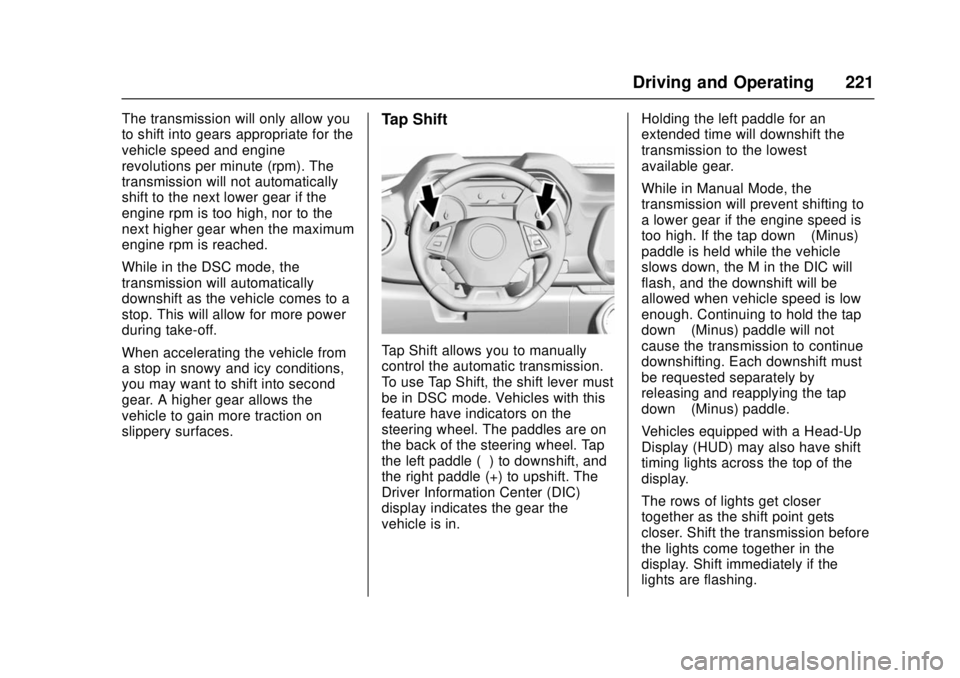
Tap Shift allows you to manually
control the automatic transmission.
To use Tap Shift, the shift lever must
be in DSC mode. Vehicles with this
feature have indicators on the
steering wheel. The paddles are on
the back of the steering wheel. Tap
the left paddle (−) to downshift, and
the right paddle (+) to upshift. The
Driver Information Center (DIC)
display indicates the gear the
vehicle is in.Holding the left paddle for an
extended time will downshift the
transmission to the lowest
available gear.
While in Manual Mode, the
transmission will prevent shifting to
a lower gear if the engine speed is
too high. If the tap down
−(Minus)
paddle is held while the vehicle
slows down, the M in the DIC will
flash, and the downshift will be
allowed when vehicle speed is low
enough. Continuing to hold the tap
down −(Minus) paddle will not
cause the transmission to continue
downshifting. Each downshift must
be requested separately by
releasing and reapplying the tap
down −(Minus) paddle.
Vehicles equipped with a Head-Up
Display (HUD) may also have shift
timing lights across the top of the
display.
The rows of lights get closer
together as the shift point gets
closer. Shift the transmission before
the lights come together in the
display. Shift immediately if the
lights are flashing.
Page 223 of 386
Chevrolet Camaro Owner Manual (GMNA-Localizing-U.S./Canada/Mexico-
11348325) - 2018 - crc - 4/11/17
222 Driving and Operating
SeeHead-Up Display (HUD) 0132.
Temporary Tap Shift Mode allows
brief entry into Tap Shift Mode while
in D (Drive). Tapping either the
upshift or downshift control will
place the transmission in Tap Shift
Mode. Exit Tap Shift Mode by
holding the upshift control for
two seconds. The system will return
to automatic shifting after
seven seconds of driving at a
steady speed, or when the vehicle
comes to a stop.
This may be used for sport driving
or when climbing or descending
hills, to stay in gear longer, or to
downshift for more power or engine
braking. The transmission will only
allow you to shift into gears
appropriate for the vehicle speed
and engine revolutions per minute
(rpm). The transmission will not
automatically shift to the next higher
gear if the engine rpm is too high. If shifting is prevented for any
reason, the message SHIFT
DENIED will appear in the DIC,
indicating that the transmission has
not shifted gears. While in the Tap
Shift Mode, the transmission will not
automatically downshift on hard
acceleration.
When accelerating the vehicle from
a stop in snowy and icy conditions,
you may want to shift into
2 (Second) gear. A higher gear ratio
allows you to gain more traction on
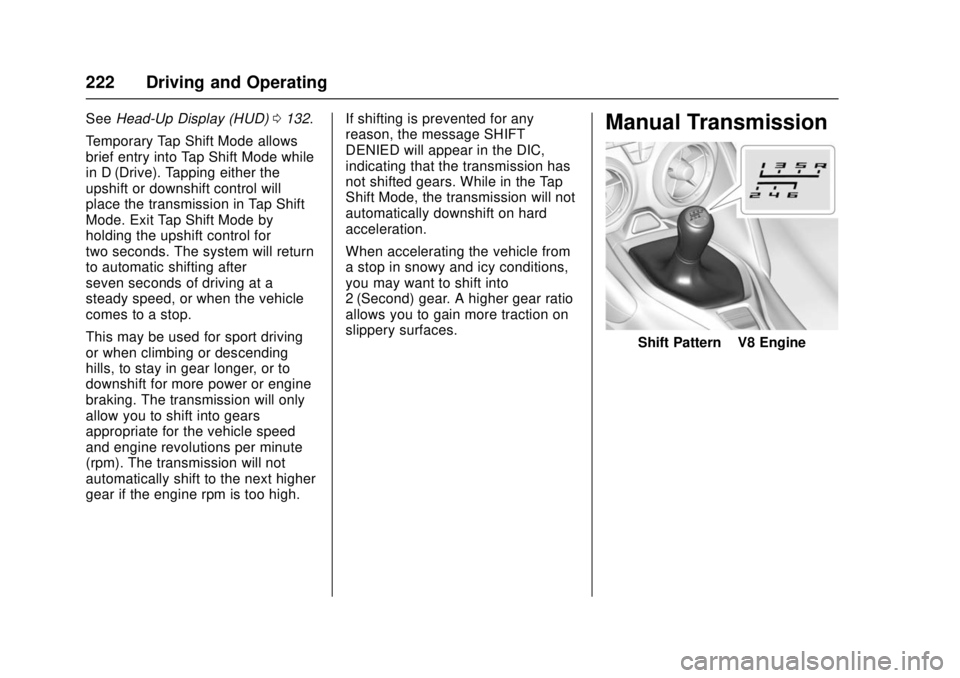
slippery surfaces.Manual Transmission
Shift Pattern
–V8 Engine
Page 224 of 386
Chevrolet Camaro Owner Manual (GMNA-Localizing-U.S./Canada/Mexico-
11348325) - 2018 - crc - 4/11/17
Driving and Operating 223
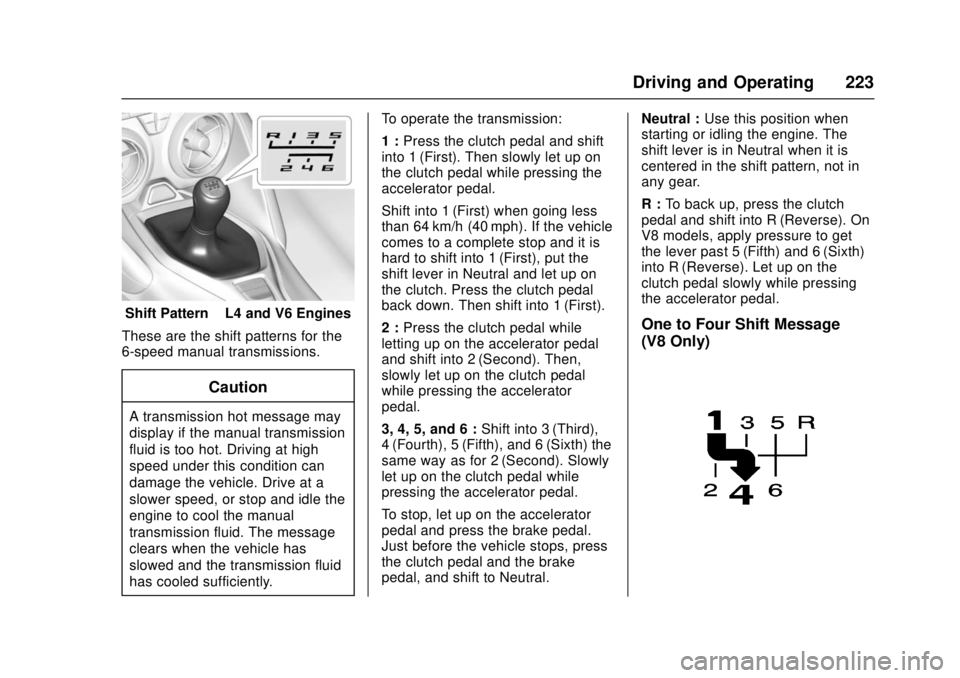
Shift Pattern–L4 and V6 Engines
These are the shift patterns for the
6-speed manual transmissions.
Caution
A transmission hot message may
display if the manual transmission
fluid is too hot. Driving at high
speed under this condition can
damage the vehicle. Drive at a
slower speed, or stop and idle the
engine to cool the manual
transmission fluid. The message
clears when the vehicle has
slowed and the transmission fluid
has cooled sufficiently. To operate the transmission:
1 :
Press the clutch pedal and shift
into 1 (First). Then slowly let up on
the clutch pedal while pressing the
accelerator pedal.
Shift into 1 (First) when going less
than 64 km/h (40 mph). If the vehicle
comes to a complete stop and it is
hard to shift into 1 (First), put the
shift lever in Neutral and let up on
the clutch. Press the clutch pedal
back down. Then shift into 1 (First).
2 : Press the clutch pedal while
letting up on the accelerator pedal
and shift into 2 (Second). Then,
slowly let up on the clutch pedal
while pressing the accelerator
pedal.
3, 4, 5, and 6 : Shift into 3 (Third),
4 (Fourth), 5 (Fifth), and 6 (Sixth) the
same way as for 2 (Second). Slowly
let up on the clutch pedal while
pressing the accelerator pedal.
To stop, let up on the accelerator
pedal and press the brake pedal.
Just before the vehicle stops, press
the clutch pedal and the brake
pedal, and shift to Neutral. Neutral :
Use this position when
starting or idling the engine. The
shift lever is in Neutral when it is
centered in the shift pattern, not in
any gear.
R : To back up, press the clutch
pedal and shift into R (Reverse). On
V8 models, apply pressure to get
the lever past 5 (Fifth) and 6 (Sixth)
into R (Reverse). Let up on the
clutch pedal slowly while pressing
the accelerator pedal.
One to Four Shift Message
(V8 Only)
Page 232 of 386
Chevrolet Camaro Owner Manual (GMNA-Localizing-U.S./Canada/Mexico-
11348325) - 2018 - crc - 4/11/17
Driving and Operating 231
Tour Mode
Use for normal city and highway
driving to provide a smooth,
soft ride.
When selected, the Tour Mode
indicator will display in the Driver
Information Center (DIC).
Sport Mode
Use where road conditions or
personal preference demand a more
controlled response.
When selected, the Sport Mode
indicator will display in the DIC.
When in Sport Mode, the vehicle will
shift automatically but hold a lower
gear longer than it would in the
normal driving mode based on
braking, throttle input, and vehicle
lateral acceleration. SeeAutomatic
Transmission 0218. The steering
will change to provide more precise
control. If the vehicle has Magnetic
Ride Control, the suspension will
change to provide better cornering
performance. If the vehicle is
equipped with Active Exhaust, the
exhaust valves will open earlier and
more often. Competitive Driving Mode can be accessed through this
mode by pressing the button with
this
gicon twice.
Snow/Ice Mode
Use when more traction is needed
during slippery conditions. The
vehicle will upshift normally when
the vehicle is moving. The
acceleration will adjust to help
provide a smoother launch. The
transmission will also shift differently
to assist in maintaining traction.
When selected, the Snow/Ice Mode
indicator will display in the DIC.
This feature is not intended for use
when the vehicle is stuck in sand,
mud, ice, snow, or gravel. If the
vehicle becomes stuck, see
If the
Vehicle Is Stuck 0205.
Track Mode
Use when maximum vehicle
handling is desired.
When selected, the Track Mode
indicator will display in the DIC. When in Track Mode, the automatic
transmission and steering will
function similar to Sport Mode. The
accelerator pedal is adjusted to give
maximum control during the highest
level of spirited driving. The
Magnetic Ride Control will be set to
the optimum level for vehicle
responsiveness. If the vehicle is
equipped with Active Exhaust, the
exhaust valves will open.
Competitive Driving Mode can be
accessed through this mode by
pressing the button with this
gicon.
There are attributes that vary by
mode shown below. Not all vehicles
have all features, depending on the
vehicle options.
Page 236 of 386
Chevrolet Camaro Owner Manual (GMNA-Localizing-U.S./Canada/Mexico-
11348325) - 2018 - crc - 4/11/17
Driving and Operating 235
Limited-Slip Rear Axle
Vehicles with a limited-slip rear axle
can give more traction on snow,
mud, ice, sand, or gravel. When
traction is low, this feature allows
the drive wheel with the most
traction to move the vehicle. The
limited-slip rear axle also gives the
driver enhanced control when
cornering hard or completing a
maneuver, such as a lane change.
For vehicles with limited-slip
differential, driven under severe
conditions, the rear axle fluid should
be changed.
SeeCompetitive Driving Mode
0 233 andMaintenance Schedule
0 330.
Cruise Control
If equipped with cruise control, the
vehicle can maintain a speed of
about 40 km/h (25 mph) or more
without keeping your foot on the
accelerator. Cruise control does not
work at speeds below 40 km/h
(25 mph).
{Warning
Cruise control can be dangerous
where you cannot drive safely at
a steady speed. Do not use
cruise control on winding roads or
in heavy traffic.
Cruise control can be dangerous
on slippery roads. On such roads,
fast changes in tire traction can
cause excessive wheel slip, and
you could lose control. Do not use
cruise control on slippery roads. If equipped with a manual
transmission, the cruise control will
remain active when the gears are
shifted. The cruise is disengaged if
the clutch is pressed for several
seconds.
If the StabiliTrak
®system begins to
limit wheel spin while using cruise
control, the cruise control
automatically disengages. See
Traction Control/Electronic Stability
Control 0228. When road
conditions allow you to safely use it
again, cruise control can be turned
back on.
Cruise control will disengage if
either TCS or StabiliTrak is
turned off.
Cruise control is not available when
using Competitive Driving Mode,
if equipped. See Competitive Driving
Mode 0233.
If the brakes are applied, cruise
control disengages.
Page 293 of 386
Chevrolet Camaro Owner Manual (GMNA-Localizing-U.S./Canada/Mexico-
11348325) - 2018 - crc - 4/11/17
292 Vehicle Care
Department of Transportation
(DOT) Motor Vehicle Safety
Standards. The DOT code
includes the Tire Identification
Number (TIN), an alphanumeric
designator which can also
identify the tire manufacturer,
production plant, brand, and
date of production.
GVWR
:Gross Vehicle Weight
Rating. See Vehicle Load Limits
0 206.
GAWR FRT
:Gross Axle Weight
Rating for the front axle. See
Vehicle Load Limits 0206.
GAWR RR
:Gross Axle Weight
Rating for the rear axle. See
Vehicle Load Limits 0206.
Intended Outboard Sidewall
:
The side of an asymmetrical tire
that must always face outward
when mounted on a vehicle.
Kilopascal (kPa)
:The metric
unit for air pressure. Light Truck (LT-Metric) Tire
:A
tire used on light duty trucks and
some multipurpose passenger
vehicles.
Load Index
:An assigned
number ranging from 1 to 279
that corresponds to the load
carrying capacity of a tire.
Maximum Inflation Pressure
:
The maximum air pressure to
which a cold tire can be inflated.
The maximum air pressure is
molded onto the sidewall.
Maximum Load Rating
:The
load rating for a tire at the
maximum permissible inflation
pressure for that tire.
Maximum Loaded Vehicle
Weight
:The sum of curb
weight, accessory weight,
vehicle capacity weight, and
production options weight. Normal Occupant Weight
:The
number of occupants a vehicle
is designed to seat multiplied by
68 kg (150 lb). See Vehicle Load
Limits 0206.
Occupant Distribution
:
Designated seating positions.
Outward Facing Sidewall
:The
side of an asymmetrical tire that
has a particular side that faces
outward when mounted on a
vehicle. The side of the tire that
contains a whitewall, bears
white lettering, or bears
manufacturer, brand, and/or
model name molding that is
higher or deeper than the same
moldings on the other sidewall
of the tire.
Passenger (P-Metric) Tire
:A
tire used on passenger cars and
some light duty trucks and
multipurpose vehicles.
Recommended Inflation
Pressure
:Vehicle
manufacturer's recommended
Page 299 of 386

Chevrolet Camaro Owner Manual (GMNA-Localizing-U.S./Canada/Mexico-
11348325) - 2018 - crc - 4/11/17
298 Vehicle Care
successfully. See“TPMS Sensor
Matching Process” later in this
section.
. The TPMS sensor matching
process was not done or not
completed successfully after
rotating the tires. The
malfunction light and the DIC
message should go off after
successfully completing the
sensor matching process. See
"TPMS Sensor Matching
Process" later in this section.
. One or more TPMS sensors are
missing or damaged. The
malfunction light and the DIC
message should go off when the
TPMS sensors are installed and
the sensor matching process is
performed successfully. See
your dealer for service.
. Replacement tires or wheels do
not match the original equipment
tires or wheels. Tires and wheels
other than those recommended
could prevent the TPMS from
functioning properly. See Buying
New Tires 0302. .
Operating electronic devices or
being near facilities using radio
wave frequencies similar to the
TPMS could cause the TPMS
sensors to malfunction.
If the TPMS is not functioning
properly it cannot detect or signal a
low tire pressure condition. See
your dealer for service if the TPMS
malfunction light and DIC message
comes on and stays on.
TPMS Sensor Matching
Process
Each TPMS sensor has a unique
identification code. The identification
code needs to be matched to a new
tire/wheel position after rotating the
vehicle’s tires or replacing one or
more of the TPMS sensors. The
TPMS sensor matching process
should also be performed after
replacing a spare tire with a road
tire containing the TPMS sensor.
The malfunction light and the DIC
message should go off at the next
ignition cycle. The sensors are
matched to the tire/wheel positions,
using a TPMS relearn tool, in the
following order: driver side front tire, passenger side front tire, passenger
side rear tire, and driver side rear.
See your dealer for service or to
purchase a relearn tool. A TPMS
relearn tool can also be purchased.
See Tire Pressure Monitor
Sensor Activation Tool at
www.gmtoolsandequipment.com or
call 1-800-GM TOOLS
(1-800-468-6657).
There are two minutes to match the
first tire/wheel position, and
five minutes overall to match all four
tire/wheel positions. If it takes
longer, the matching process stops
and must be restarted.
The TPMS sensor matching
process is:
1. Set the parking brake.
2. Place the vehicle in Service Mode. See Ignition Positions
0 210.
3. Make sure the Tire Pressure info display option is turned on.
The info displays on the DIC
can be turned on and off
Page 300 of 386

Chevrolet Camaro Owner Manual (GMNA-Localizing-U.S./Canada/Mexico-
11348325) - 2018 - crc - 4/11/17
Vehicle Care 299
through the Options menu. See
Driver Information Center (DIC)
0130.
4. Use the five-way DIC control on the right side of the steering
wheel to scroll to the Tire
Pressure screen under the DIC
info page. See Driver
Information Center (DIC) 0130.
5. Press and hold SEL in the center of the five-way DIC
control.
The horn sounds twice to
signal the receiver is in relearn
mode and the TIRE
LEARNING ACTIVE message
displays on the DIC screen.
6. Start with the driver side front tire.
7. Place the relearn tool against the tire sidewall, near the valve
stem. Then press the button to
activate the TPMS sensor.
A horn chirp confirms that the
sensor identification code has
been matched to this tire and
wheel position. 8. Proceed to the passenger side
front tire, and repeat Step 7.
9. Proceed to the passenger side rear tire, and repeat Step 7.
10. Proceed to the driver side rear tire, and repeat Step 7. The
horn sounds two times to
indicate the sensor
identification code has been
matched to the driver side rear
tire, and the TPMS sensor
matching process is no longer
active. The TIRE LEARNING
ACTIVE message on the DIC
display screen goes off.
11. Turn the vehicle off.
12. Set all four tires to the recommended air pressure
level as indicated on the Tire
and Loading Information label.
Tire Inspection
We recommend that the tires,
including the spare tire, if the
vehicle has one, be inspected
for signs of wear or damage at
least once a month. Replace the tire if:
.The indicators at three or
more places around the tire
can be seen.
.There is cord or fabric
showing through the tire's
rubber.
.The tread or sidewall is
cracked, cut, or snagged
deep enough to show cord or
fabric.
.The tire has a bump, bulge,
or split.
.The tire has a puncture, cut,
or other damage that cannot
be repaired well because of
the size or location of the
damage.
Tire Rotation
Tires should be rotated every
12 000 km/7,500 mi. See
Maintenance Schedule
0330.