AUX CHEVROLET CAMARO SS 2018 Owners Manual
[x] Cancel search | Manufacturer: CHEVROLET, Model Year: 2018, Model line: CAMARO SS, Model: CHEVROLET CAMARO SS 2018Pages: 386, PDF Size: 5.57 MB
Page 21 of 386
Chevrolet Camaro Owner Manual (GMNA-Localizing-U.S./Canada/Mexico-
11348325) - 2018 - crc - 4/11/17
20 In Brief
.www.siriusxm.ca or call
1-877-438-9677 (Canada).
See Satellite Radio 0161.
Portable Audio Devices
This vehicle has a 3.5 mm (1/8 in)
auxiliary input and two USB ports in
the center console. External devices
such as iPods, MP3 players, and
USB storage devices may be
connected.
See Auxiliary Devices 0170 and
USB Port 0164.
Bluetooth
The Bluetooth system allows users
with a Bluetooth-enabled cell phone
to make and receive hands-free
calls using the vehicle audio system
and controls.
The Bluetooth-enabled cell phone
must be paired with the in-vehicle
Bluetooth system before it can be
used in the vehicle. Not all phones
will support all functions.
See Bluetooth (Overview) 0176 or
Bluetooth (Infotainment Controls)
0 177.
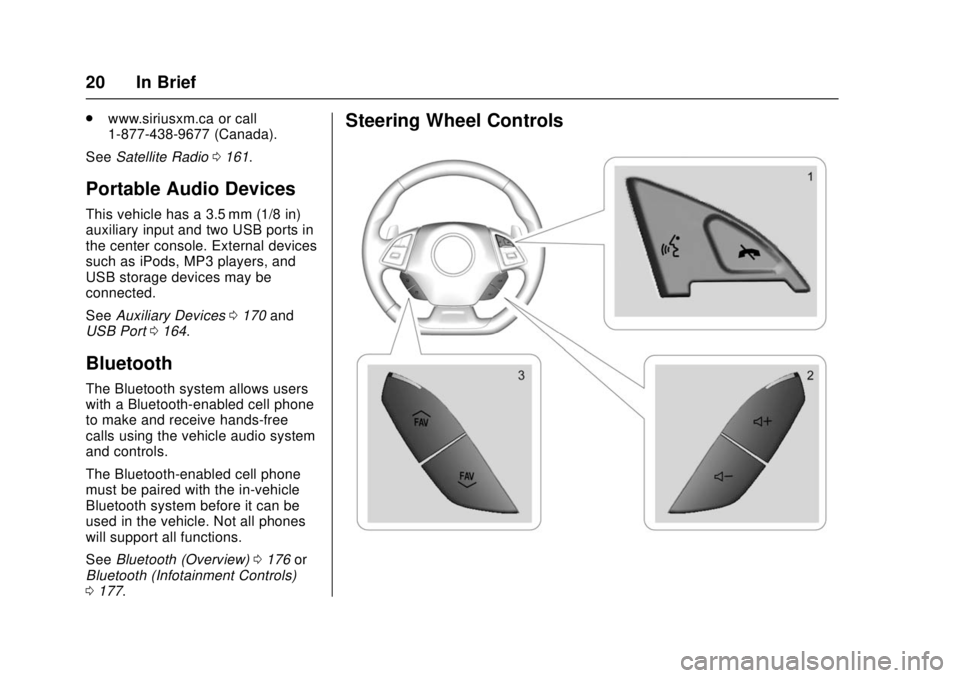
Steering Wheel Controls
Page 103 of 386
Chevrolet Camaro Owner Manual (GMNA-Localizing-U.S./Canada/Mexico-
11348325) - 2018 - crc - 4/11/17
102 Storage
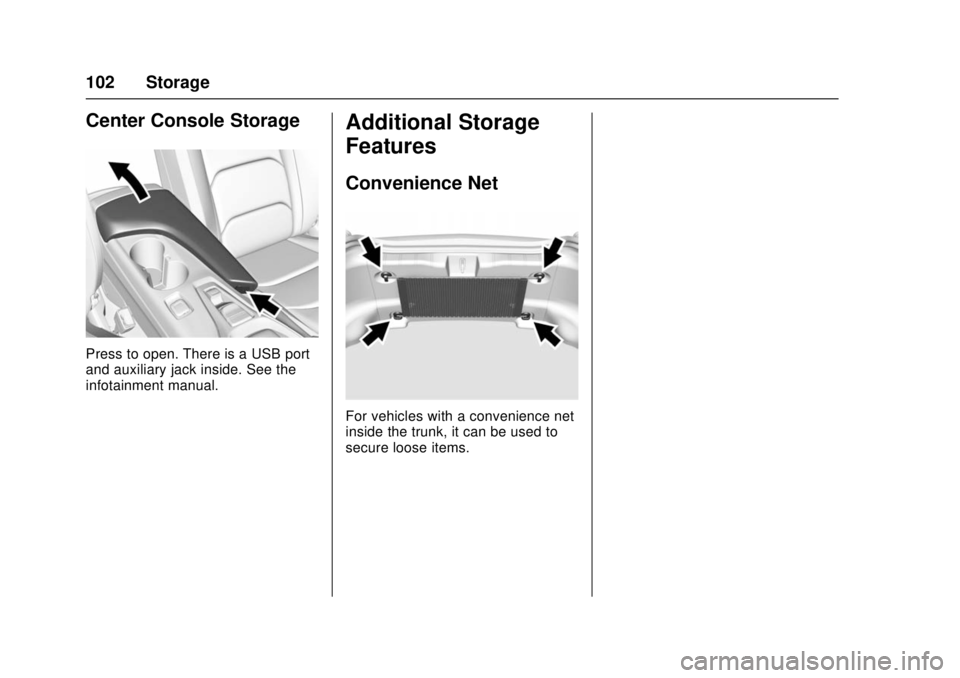
Center Console Storage
Press to open. There is a USB port
and auxiliary jack inside. See the
infotainment manual.
Additional Storage
Features
Convenience Net
For vehicles with a convenience net
inside the trunk, it can be used to
secure loose items.
Page 156 of 386
Chevrolet Camaro Owner Manual (GMNA-Localizing-U.S./Canada/Mexico-
11348325) - 2018 - crc - 4/11/17
Infotainment System 155
Infotainment
System
Introduction
Infotainment . . . . . . . . . . . . . . . . . . 155
Theft-Deterrent Feature . . . . . . 156
Overview . . . . . . . . . . . . . . . . . . . . . 157
Home Page . . . . . . . . . . . . . . . . . . 158
Operation . . . . . . . . . . . . . . . . . . . . . 158
Software Updates . . . . . . . . . . . . 159
Radio
AM-FM Radio . . . . . . . . . . . . . . . . 160
Satellite Radio . . . . . . . . . . . . . . . . 161
Radio Reception . . . . . . . . . . . . . . 162
Antenna (Convertible Only) . . . 163
Backglass Antenna(Coupe Only) . . . . . . . . . . . . . . . 163
Multi-Band Antenna . . . . . . . . . . 164
Audio Players
Avoiding Untrusted Media Devices . . . . . . . . . . . . . . . . . . . . . 164
USB Port . . . . . . . . . . . . . . . . . . . . . 164
Auxiliary Devices . . . . . . . . . . . . . 170
Performance Data
Recorder (PDR)
Performance Data Recorder (PDR) . . . . . . . . . . . . . 171
Phone
Bluetooth (Overview) . . . . . . . . . 176
Bluetooth (InfotainmentControls) . . . . . . . . . . . . . . . . . . . . 177
Apple CarPlay and Android Auto . . . . . . . . . . . . . . . . 181
Hands-Free Phone . . . . . . . . . . . 182
Trademarks and License
Agreements
Trademarks and License Agreements . . . . . . . . . . . . . . . . . 184
Introduction
Infotainment
Base radio information is included in
this manual. See the infotainment
manual for information on other
available infotainment systems.
Read the following pages to
become familiar with the features.
{Warning
Taking your eyes off the road for
too long or too often while using
any infotainment feature can
cause a crash. You or others
could be injured or killed. Do not
give extended attention to
infotainment tasks while driving.
Limit your glances at the vehicle
displays and focus your attention
on driving. Use voice commands
whenever possible.
Page 159 of 386
Chevrolet Camaro Owner Manual (GMNA-Localizing-U.S./Canada/Mexico-
11348325) - 2018 - crc - 4/11/17
158 Infotainment System
4.d
.Radio: Press and release to
go to the next station or
channel. Press and hold to
fast seek the next track or
strongest station or
channel.
. USB/Music/Pictures: Press
to go to the next content.
Press and hold to fast
forward.
5.
5
. Press and release to
access the phone screen,
answer an incoming call,
or access the device home
screen.
Home Page
Infotainment Display
Infotainment display icons show
when available. When a function is
unavailable, the button may gray
out. When a function is selected, the
button may highlight.
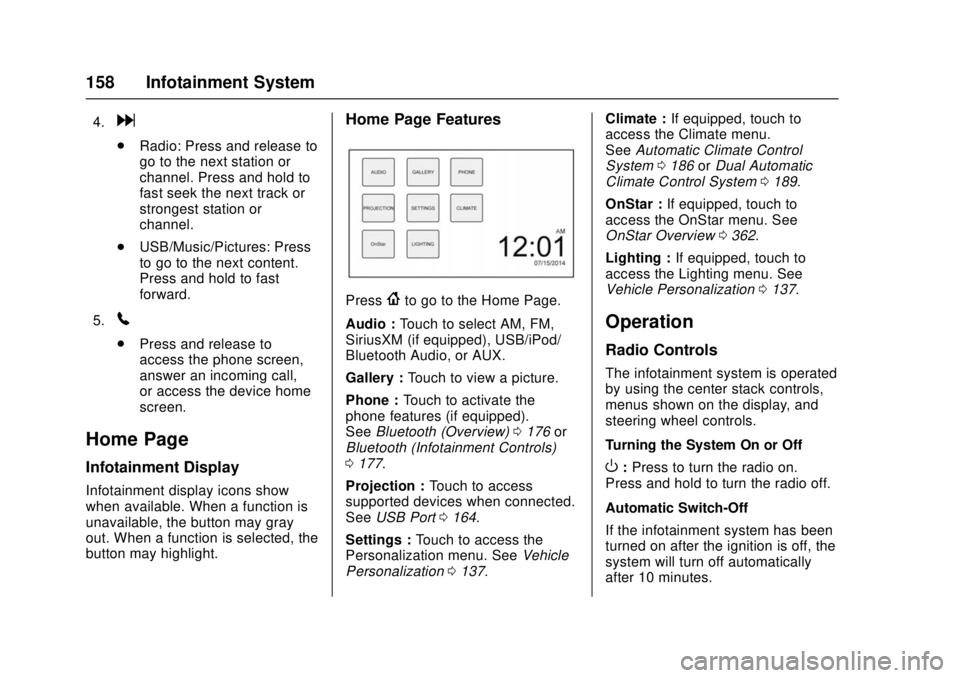
Home Page Features
Press{to go to the Home Page.
Audio : Touch to select AM, FM,
SiriusXM (if equipped), USB/iPod/
Bluetooth Audio, or AUX.
Gallery : Touch to view a picture.
Phone : Touch to activate the
phone features (if equipped).
See Bluetooth (Overview) 0176 or
Bluetooth (Infotainment Controls)
0 177.
Projection : Touch to access
supported devices when connected.
See USB Port 0164.
Settings : Touch to access the
Personalization menu. See Vehicle
Personalization 0137. Climate :
If equipped, touch to
access the Climate menu.
See Automatic Climate Control
System 0186 orDual Automatic
Climate Control System 0189.
OnStar : If equipped, touch to
access the OnStar menu. See
OnStar Overview 0362.
Lighting : If equipped, touch to
access the Lighting menu. See
Vehicle Personalization 0137.
Operation
Radio Controls
The infotainment system is operated
by using the center stack controls,
menus shown on the display, and
steering wheel controls.
Turning the System On or Off
O:Press to turn the radio on.
Press and hold to turn the radio off.
Automatic Switch-Off
If the infotainment system has been
turned on after the ignition is off, the
system will turn off automatically
after 10 minutes.
Page 165 of 386
Chevrolet Camaro Owner Manual (GMNA-Localizing-U.S./Canada/Mexico-
11348325) - 2018 - crc - 4/11/17
164 Infotainment System
Multi-Band Antenna
The multi-band antenna is on the
roof of the vehicle. The antenna is
used for OnStar, the SiriusXM
Satellite Radio Service System, and
GPS (Global Positioning System),
if the vehicle has these features.
Keep the antenna clear of
obstructions for clear reception.
If the vehicle has a sunroof, and it is
open, reception can also be
affected.
Audio Players
Avoiding Untrusted Media
Devices
When using media devices such as
CDs, DVDs, Blu-ray Discs, SD
cards, USB devices, and mobile
devices, consider the source.
Untrusted media devices could
contain files that affect system
operation or performance. Avoid use
if the content or origin cannot be
trusted.
USB Port
Using the USB Port
The infotainment system can play
music by connecting an auxiliary
device to the USB port.
USB Support
The USB ports are in the center
console, and use the USB 2.0
standard.
USB Supported Devices
.USB Flash Drives .
iPods/iPhones
. Portable USB Hard Drives
Not all iPods and USB drives are
compatible with the USB port.
Make sure the iPod has the latest
firmware from Apple for proper
operation. iPod firmware can be
updated using the latest iTunes
application. See www.apple.com/
itunes.
For help with identifying your iPod,
go to www.apple.com/support.
The USB port can play both lower
and upper case .mp3, .wma, .ogg,
and .wav files stored on a USB
storage device.
Supported Apple Devices
To view supported devices in the
U.S., see www.my.chevrolet.com/
learn.
To view supported devices in
Canada, see
www.chevroletowner.ca.
To view supported devices in
Mexico, see your dealer.
Page 171 of 386
Chevrolet Camaro Owner Manual (GMNA-Localizing-U.S./Canada/Mexico-
11348325) - 2018 - crc - 4/11/17
170 Infotainment System
Rotating a Picture
Touch
wfrom the picture screen.
Enlarging a Picture
Touch
xfrom the picture screen.
Using the USB Picture Menu 1. Touch MENU from the picture screen.
2. Touch the appropriate menu: .Slide Show Time: Allows
selection of the slide show
interval.
. Clock, Temp. Display:
Allows selection of On or
Off to show the clock and
temperature on the full
screen.
. Display Settings: Adjusts
for Brightness and Contrast.
3. Touch Back on the infotainment display to exit.
Auxiliary Devices
Using the Auxiliary Input Jack
Settings menus and functions may
vary depending on vehicle options.
The auxiliary input jack can be used
to connect external audio devices
such as an iPod, iPhone, MP3
player, CD player, and other
supported devices for use as
another source for audio listening.
This input jack is not an audio
output; do not plug headphones into
the front auxiliary input jack.
The auxiliary input jack is in the
center console. The infotainment
system can play music connected
by the auxiliary device.
Play will begin when the system has
finished reading the information on
the device. Playing Music
To play music from the device, if the
device is already connected:
1. Press{.
2. Touch AUDIO.
3. Touch Source.
4. Touch AUX.
5. Touch
0.
To adjust the tone settings, see
“Tone Settings” inOperation 0158.
Page 345 of 386

Chevrolet Camaro Owner Manual (GMNA-Localizing-U.S./Canada/Mexico-
11348325) - 2018 - crc - 4/11/17
344 Technical Data
Vehicle Data
Capacities and Specifications
For Camaro High Performance models, see the Camaro High Performance supplement.Application Capacities
Metric English
Air Conditioning Refrigerant For the air conditioning system refrigerant type and charge amount, see the refrigerant label under the
hood. See your dealer for more information.
Engine Cooling System 2.0L L4 Engine (LTG) without Auxiliary Cooler 8.5 L 9.0 qt
2.0L L4 Engine (LTG) with Auxiliary Cooler 10.3 L 10.9 qt
3.6L V6 Engine (LGX) with Engine Oil Cooler, without
Auxiliary Cooler 10.1 L 10.7 qt
3.6L V6 Engine (LGX) with Auxiliary Cooler 13.7 L 14.5 qt
6.2L V8 Engine (LT1) without Auxiliary Cooler 11.6 L 12.3 qt
6.2L V8 Engine (LT1) with Auxiliary Cooler 13.2 L 13.9 qt
Engine Oil with Filter 2.0L L4 Engine (LTG) without Engine Oil Cooler 4.7 L 5.0 qt
2.0L L4 Engine (LTG) with Engine Oil Cooler 5.2 L 5.5 qt
3.6L V6 Engine (LGX) without Auxiliary Cooler 5.2 L 5.5 qt
Page 346 of 386

Chevrolet Camaro Owner Manual (GMNA-Localizing-U.S./Canada/Mexico-
11348325) - 2018 - crc - 4/11/17
Technical Data 345
ApplicationCapacities
Metric English
3.6L V6 Engine (LGX) with Auxiliary Cooler 5.7 L 6.0 qt
6.2L V8 Engine (LT1) 9.5 L 10.0 qt
Fuel Tank 72.0 L 19.0 gal
Rear Axle Fluid 2.0L L4 Engine (LTG) Automatic Transmission 0.5 L 0.53 qt
2.0L L4 Engine (LTG) Manual Transmission 1.1 L 1.2 qt
3.6L V6 Engine (LGX) Automatic Transmission 0.5 L 0.53 qt
3.6L V6 Engine (LGX) Manual Transmission 1.1 L 1.2 qt
6.2L V8 Engine (LT1) 1.1 L 1.2 qt
Wheel Nut Torque 190 Y140 lb ft
*See Automatic Transmission Fluid 0260 for information on checking fluid level.
All capacities are approximate. When adding, be sure to fill to the approximate level, as recommended in this
manual. Recheck fluid level after filling.
Page 376 of 386

Chevrolet Camaro Owner Manual (GMNA-Localizing-U.S./Canada/Mexico-
11348325) - 2018 - crc - 4/11/17
Index 375
Apple CarPlay andAndroid Auto . . . . . . . . . . . . . . . . . . 181
Assistance Program, Roadside . . . . . . . . . . . . . . . . . . . . . . 352
Assistance Systems for Parking and Backing . . . . . . . . . . 239
Audio
Theft-Deterrent Feature . . . . . . . 156
Automatic Climate Control System . . . . . . . 186
Dimming Mirrors . . . . . . . . . . . . . . . . 47
Door Locks . . . . . . . . . . . . . . . . . . . . . 40
Headlamp System . . . . . . . . . . . . 150
Transmission . . . . . . . . . . . . . . . . . 218
Transmission Fluid . . . . . . . . . . . 260
Automatic Transmission
Manual Mode . . . . . . . . . . . . . . . . . 220
Shift Lock Control FunctionCheck . . . . . . . . . . . . . . . . . . . . . . . 273
Auxiliary Devices . . . . . . . . . . . . . . . . . . . . . . . 170
Avoiding Untrusted Media Devices . . . . . . . . . . . . . . . . . . . . . . . 164
Axle, Rear . . . . . . . . . . . . . . . . . . . . . . 272B
Backglass Antenna . . . . . . . . . . . . . 163
Battery Exterior Lighting BatterySaver . . . . . . . . . . . . . . . . . . . . . . . 154
Load Management . . . . . . . . . . . . 153
Power Protection . . . . . . . . . . . . . 154
Battery - North America . . . . 271, 314
Blade Replacement, Wiper . . . . . 274
Bluetooth Overview . . . . . . . . . . . . . . . . 176, 177
Boost Gauge . . . . . . . . . . . . . . . . . . . 117
Brake Parking, Electric . . . . . . . . . . . . . . 226
System Warning Light . . . . . . . . 125
Brakes . . . . . . . . . . . . . . . . . . . . . . . . . . 269 Antilock . . . . . . . . . . . . . . . . . . . . . . . 225
Assist . . . . . . . . . . . . . . . . . . . . . . . . . 227
Fluid . . . . . . . . . . . . . . . . . . . . . . . . . . 270
Braking . . . . . . . . . . . . . . . . . . . . . . . . . 196
Break-In, New Vehicle . . . . . . . . . . 209
Bulb Replacement Front Turn Signal Lamps . . . . . 276
Halogen Bulbs . . . . . . . . . . . . . . . . 276
Headlamp Aiming . . . . . . . . . . . . . 276
Headlamps . . . . . . . . . . . . . . . . . . . 276
High Intensity Discharge(HID) Lighting . . . . . . . . . . . . . . . 276 Bulb Replacement (cont'd)
License Plate Lamps . . . . . . . . . 278
Taillamps, Turn Signal,
Sidemarker, Stoplamps,
and Backup Lamps . . . . . . . . . . 277
Buying New Tires . . . . . . . . . . . . . . . 302
C
Calibration . . . . . . . . . . . . . . . . . . . . . . 106
California Fuel Requirements . . . . . . . . . . . 244
Perchlorate MaterialsRequirements . . . . . . . . . . . . . . . 250
California
Proposition
65 Warning . . . . . . . . . .249, 271, 314, Back Cover
Canadian Vehicle Owners . . . . . . . . 2
Capacities and Specifications . . . . . . . . . . . . . . . . . 344
Carbon Monoxide Engine Exhaust . . . . . . . . . . . . . . . 217
Trunk . . . . . . . . . . . . . . . . . . . . . . . . . . . 41
Winter Driving . . . . . . . . . . . . . . . . 204
Caution, Danger, and Warning . . . . 3
Center Console Storage . . . . . . . . 102
Chains, Tire . . . . . . . . . . . . . . . . . . . . 306
Charging Wireless . . . . . . . . . . . . . . . . . . . . . . 109
Page 377 of 386

Chevrolet Camaro Owner Manual (GMNA-Localizing-U.S./Canada/Mexico-
11348325) - 2018 - crc - 4/11/17
376 Index
Charging System Light . . . . . . . . . 123
CheckEngine Light (MalfunctionIndicator) . . . . . . . . . . . . . . . . . . . . 123
Child Restraints Infants and Young Children . . . . . 85
Lower Anchors and Tethersfor Children . . . . . . . . . . . . . . . . . . . 90
Older Children . . . . . . . . . . . . . . . . . . 84
Securing . . . . . . . . . . . . . . . . . . . . 96, 98
Systems . . . . . . . . . . . . . . . . . . . . . . . . 88
Circuit Breakers . . . . . . . . . . . . . . . . 279
Cleaning Exterior Care . . . . . . . . . . . . . . . . . 319
Interior Care . . . . . . . . . . . . . . . . . . 324
Climate Control Systems
Automatic . . . . . . . . . . . . . . . . . . . . . 186
Dual Automatic . . . . . . . . . . . . . . . 189
Clock . . . . . . . . . . . . . . . . . . . . . . . . . . . 107
Cluster, Instrument . . . . . . . . . . . . . 112
Clutch, Hydraulic . . . . . . . . . . . . . . . 261
Collision Damage Repair . . . . . . . 355
Compartments Storage . . . . . . . . . . . . . . . . . . . . . . . 101
Compass . . . . . . . . . . . . . . . . . . . . . . . 106
Competitive Driving Mode . . . . . . 233
Compressor Kit, Tire Sealant . . . 308 Connections
OnStar . . . . . . . . . . . . . . . . . . . . . . . 365
Control Traction and ElectronicStability . . . . . . . . . . . . . . . . . . . . . 228
Control of a Vehicle . . . . . . . . . . . . . 196
Convenience Net . . . . . . . . . . . . . . . 102
Convertible Top . . . . . . . . . . . . . . . . . . 52
Convex Mirrors . . . . . . . . . . . . . . . . . . 46
Coolant Engine Temperature Gauge . . .119
Cooling . . . . . . . . . . . . . . . . . . . . 186, 189
Cooling System . . . . . . . . . . . . . . . . . 263
Courtesy Transportation Program . . . . . . . . . . . . . . . . . . . . . . . 354
Cruise Control . . . . . . . . . . . . . . . . . . 235
Light . . . . . . . . . . . . . . . . . . . . . . . . . . 129
Customer Assistance . . . . . . . . . . . 351 Offices . . . . . . . . . . . . . . . . . . . . . . . . 350
Text Telephone (TTY)Users . . . . . . . . . . . . . . . . . . . . . . . 351
Customer Information Service PublicationsOrdering Information . . . . . . . . 357
Customer Satisfaction
Procedure . . . . . . . . . . . . . . . . . . . . . 348D
Damage Repair, Collision . . . . . . . 355
Danger, Warning, and Caution . . . . 3
Data CollectionInfotainment System . . . . . . . . . . 361
OnStar . . . . . . . . . . . . . . . . . . . . . . . 361
Data Recorder Performance . . . . . . . . . . . . . . . . . . 171
Data Recorders, Event . . . . . . . . . 360
Daytime Running Lamps (DRL) . . . . . . . . . . . . . . . . . . 150
Defensive Driving . . . . . . . . . . . . . . . 195
Delayed Locking . . . . . . . . . . . . . . . . . 40
Devices Auxiliary . . . . . . . . . . . . . . . . . . . . . . 170
Diagnostics OnStar . . . . . . . . . . . . . . . . . . . . . . . 367
Distracted Driving . . . . . . . . . . . . . . . 195
Door Ajar Light . . . . . . . . . . . . . . . . . . . . . 129
Delayed Locking . . . . . . . . . . . . . . . . 40
Locks . . . . . . . . . . . . . . . . . . . . . . . . . . . 37
Power Locks . . . . . . . . . . . . . . . . . . . . 39
Drive Belt Routing, Engine . . . . . . 347
Driver Assistance Systems . . . . . 238
Driver Information
Center (DIC) . . . . . . . . . . . . . . . . . . 130
Driver Mode Control . . . . . . . . . . . . 230