Driving mode CHEVROLET CAMARO ZL1 2018 Owners Manual
[x] Cancel search | Manufacturer: CHEVROLET, Model Year: 2018, Model line: CAMARO ZL1, Model: CHEVROLET CAMARO ZL1 2018Pages: 53, PDF Size: 1.44 MB
Page 4 of 53
Chevrolet Camaro High Performance Owner Manual Supplemen (GMNA-
Localizing-U.S./Canada/Mexico-11348335) - 2018 - CRC - 4/5/17
Seats and Restraints 3
Seats and
Restraints
Seat Belts
Lap-Shoulder Belt . . . . . . . . . . . . . . . 3
Seat Belts
Lap-Shoulder Belt
On coupe models, the driver seat
belt has an Automatic Locking
Retractor (ALR). This feature is
useful in performance driving
scenarios where the driver wants to
be held in the seat more tightly to
take advantage of the aggressive
bolstering of the seat.
To use:1. Move the seat 8–10 cm (3–4 in) rearward from the
normal driving position.
2. Pull the driver shoulder belt out as far as it will go, until it stops,
to set the lock. While holding
the shoulder belt in this
position, buckle the belt. When you release the shoulder
belt, the retractor will make a
ratchet sound when it retracts.
When the retractor lock is set,
the belt can be tightened but
not pulled out of the retractor.
3. Adjust the belt close to your body, and then move the seat
forward 8–10 cm (3–4 in) to the
desired driving position. This
will hold the belt to your body
even tighter. The belt fit should
be tight, but not uncomfortable.
To unlatch the belt, press the button
on the buckle. The belt should
return to its stowed position.
Page 8 of 53
Chevrolet Camaro High Performance Owner Manual Supplemen (GMNA-
Localizing-U.S./Canada/Mexico-11348335) - 2018 - CRC - 4/5/17
Instruments and Controls 7
English
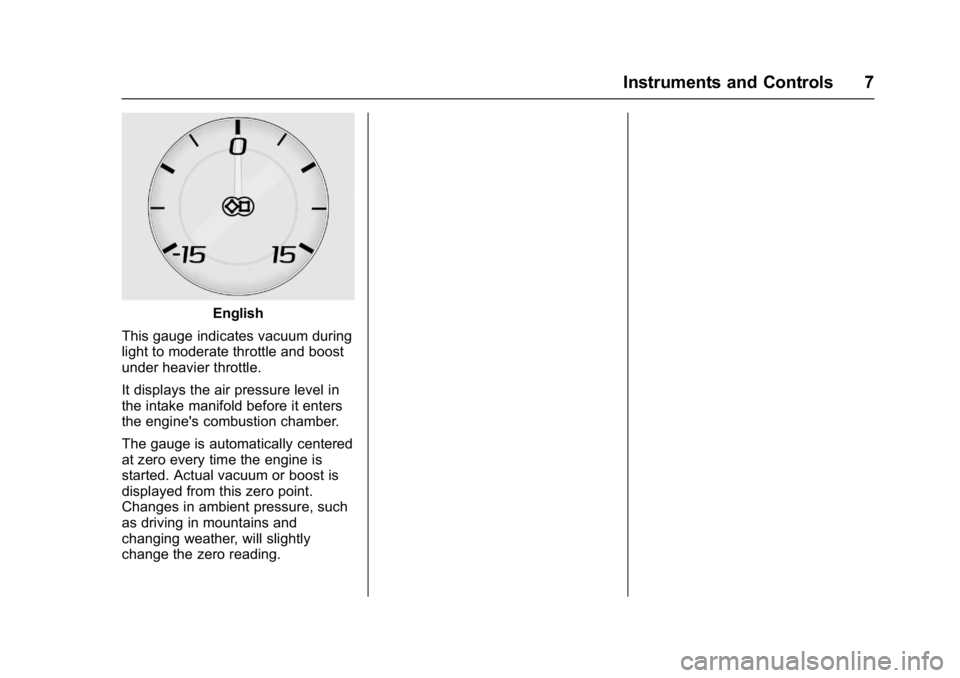
This gauge indicates vacuum during
light to moderate throttle and boost
under heavier throttle.
It displays the air pressure level in
the intake manifold before it enters
the engine's combustion chamber.
The gauge is automatically centered
at zero every time the engine is
started. Actual vacuum or boost is
displayed from this zero point.
Changes in ambient pressure, such
as driving in mountains and
changing weather, will slightly
change the zero reading.
Page 15 of 53
Chevrolet Camaro High Performance Owner Manual Supplemen (GMNA-
Localizing-U.S./Canada/Mexico-11348335) - 2018 - CRC - 4/5/17
14 Driving and Operating
Driving and
Operating
Driving Information
Track Events and CompetitiveDriving . . . . . . . . . . . . . . . . . . . . . . . 14
Automatic Transmission
Automatic Transmission . . . . . . . 26
Ride Control Systems
Competitive Driving Mode . . . . . 28
Limited-Slip Differential . . . . . . . . 32
Fuel
Fuel . . . . . . . . . . . . . . . . . . . . . . . . . . . 33
Driving Information
Track Events and
Competitive Driving
{Danger
High-performance features are
intended for use only on closed
tracks by experienced and
qualified drivers and should not
be used on public roads.
High-speed driving, aggressive
cornering, hard braking, and other
high-performance driving can be
dangerous. Improper driver inputs
for the conditions may result in
loss of control of the vehicle,
which could injure or kill you or
others. Always drive safely.
This section covers specific track
events and competitive driving
information for the Camaro High
Performance models only. For
additional track events and
competitive driving information, see
the owner ’s manual. Track events or competitive driving
may affect the vehicle warranty. See
the warranty manual before using
the vehicle for racing or other
competitive driving.
The Engine Sound Management
setting should not be set to Stealth
Mode during track events and
competitive driving. See
“Driver
Mode Control” under“Ride Control
Systems” in the owner ’s manual.
Engine Oil
Caution
If you use the vehicle for racing or
other competitive driving, the
engine may use more oil than it
would with normal use. Low oil
levels can damage the engine.
For information on how to add oil,
see“Engine Oil” in the owner’s
manual.
Be sure to check the oil level
often during racing or other
competitive driving and keep the
(Continued)
Page 17 of 53
Chevrolet Camaro High Performance Owner Manual Supplemen (GMNA-
Localizing-U.S./Canada/Mexico-11348335) - 2018 - CRC - 4/5/17
16 Driving and Operating
ModelAxleRoad course
cold starting
pressures (1) Road course target
hot pressures (1) Drag strip cold
starting
pressures Sustained
high speed
cold starting
pressures (2)
ZL1 1LE Tire
Pressure Settings Front 180 kPa
(26 psi)220–240 kPa (32–
35 psi) N/A 300 kPa
(44 psi)
Rear 180 kPa (26 psi)220–240 kPa (32–
35 psi) N/A 300 kPa
(44 psi)
ZL1 Tire Pressure Settings Front 190 kPa
(28 psi)240–255 kPa (35–
37 psi) 220 kPa
(32 psi) 300 kPa
(44 psi)
Rear 190 kPa (28 psi)255–270 kPa (37–
39 psi) 180 kPa
(26 psi) 300 kPa
(44 psi)
SS 1LE Tire
Pressure Settings Front 190 kPa
(28 psi)240–255 kPa (35–
37 psi) N/A 300 kPa
(44 psi)
Rear 190 kPa (28 psi)255–270 kPa (37–
39 psi) N/A 300 kPa
(44 psi)
LS/LT 1LE Tire
Pressure Settings Front 210 kPa
(30 psi)250–260 kPa (36–
38 psi) N/A 280 kPa
(41 psi)
Rear 210 kPa (30 psi)250–260 kPa (36–
38 psi) N/A 280 kPa
(41 psi)
(
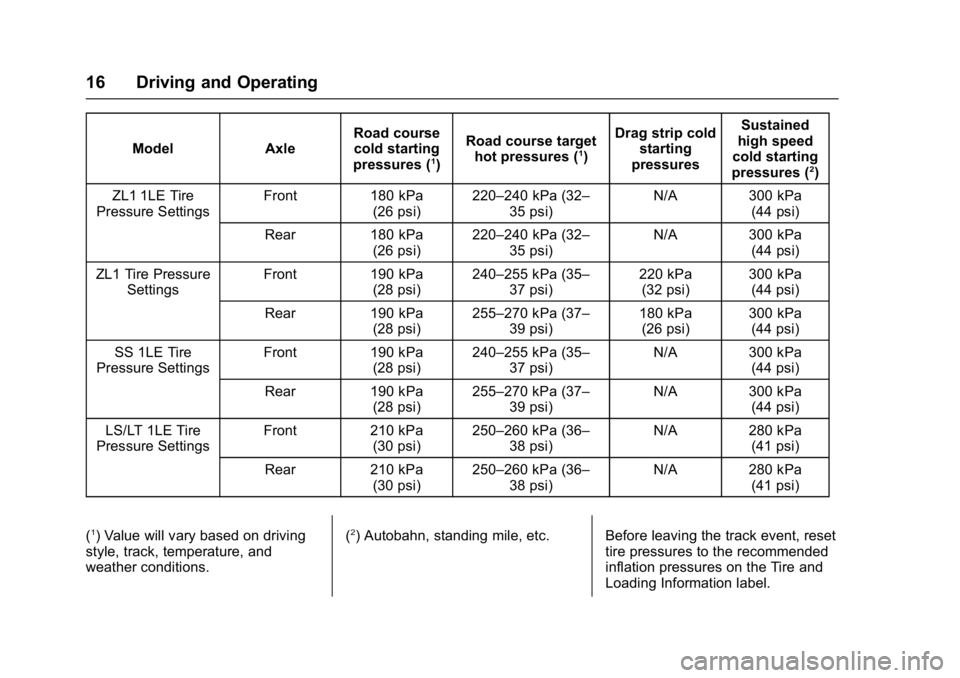
1) Value will vary based on driving
style, track, temperature, and
weather conditions. (2) Autobahn, standing mile, etc. Before leaving the track event, reset
tire pressures to the recommended
inflation pressures on the Tire and
Loading Information label.
Page 22 of 53
Chevrolet Camaro High Performance Owner Manual Supplemen (GMNA-
Localizing-U.S./Canada/Mexico-11348335) - 2018 - CRC - 4/5/17
Driving and Operating 21
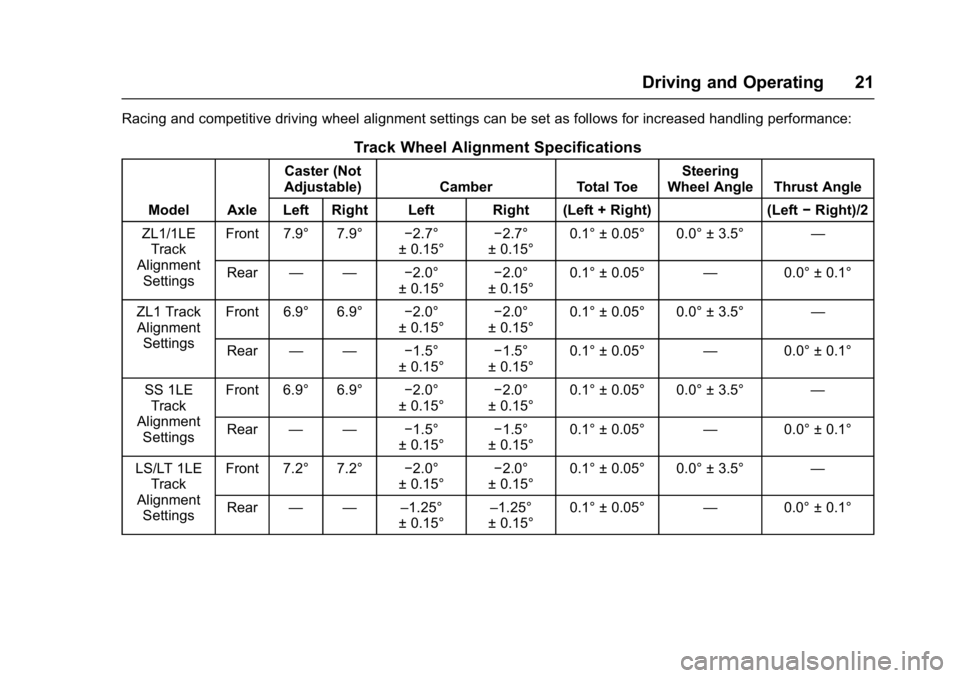
Racing and competitive driving wheel alignment settings can be set as follows for increased handling performance:
Track Wheel Alignment Specifications
Model AxleCaster (Not
Adjustable) Camber Total Toe Steering
Wheel Angle Thrust Angle
Left Right Left Right (Left + Right) (Left −Right)/2
ZL1/1LE Track
Alignment Settings Front 7.9° 7.9°
−2.7°
± 0.15° −2.7°
± 0.15° 0.1° ± 0.05° 0.0° ± 3.5°
—
Rear — — −2.0°
± 0.15° −2.0°
± 0.15° 0.1° ± 0.05°
—0.0° ± 0.1°
ZL1 Track Alignment Settings Front 6.9° 6.9°
−2.0°
± 0.15° −2.0°
± 0.15° 0.1° ± 0.05° 0.0° ± 3.5°
—
Rear — — −1.5°
± 0.15° −1.5°
± 0.15° 0.1° ± 0.05°
—0.0° ± 0.1°
SS 1LE Track
Alignment Settings Front 6.9° 6.9°
−2.0°
± 0.15° −2.0°
± 0.15° 0.1° ± 0.05° 0.0° ± 3.5°
—
Rear — — −1.5°
± 0.15° −1.5°
± 0.15° 0.1° ± 0.05°
—0.0° ± 0.1°
LS/LT 1LE Track
Alignment Settings Front 7.2° 7.2°
−2.0°
± 0.15° −2.0°
± 0.15° 0.1° ± 0.05° 0.0° ± 3.5°
—
Rear — — –1.25°
± 0.15°–1.25°
± 0.15° 0.1° ± 0.05°
—0.0° ± 0.1°
Page 23 of 53
Chevrolet Camaro High Performance Owner Manual Supplemen (GMNA-
Localizing-U.S./Canada/Mexico-11348335) - 2018 - CRC - 4/5/17
22 Driving and Operating
Caution
Using these wheel alignment
settings may cause excessive tire
wear. Only use these wheel
alignment settings for racing or
competitive driving. Excessive tire
wear is not covered under the
vehicle warranty.
Custom Launch Control
(ZL1 Only)
Custom Launch Control allows the
following parameters for Launch
Control to be modified:
.Launch RPM
. Slip Target (5%–15%)
. Surface Type
To adjust the Launch RPM, all of
these conditions must be met:
. The vehicle must be in Track
Mode. See “Track Mode” under
“Driver Mode Control” in the
owner ’s manual. .
Performance Traction
Management (PTM) Mode must
be enabled. For convertibles,
Competitive Driving Mode must
be enabled. See “Driver Mode
Control” in the owner ’s manual.
. The steering wheel must be
straight.
. The driver door must be closed.
. The transmission must be in a
gear other than R (Reverse).
It will work in P (Park) or
N (Neutral).
. The parking brake must not be
engaged.
For more information on
Competitive Driving Mode, see
Competitive Driving Mode 028.
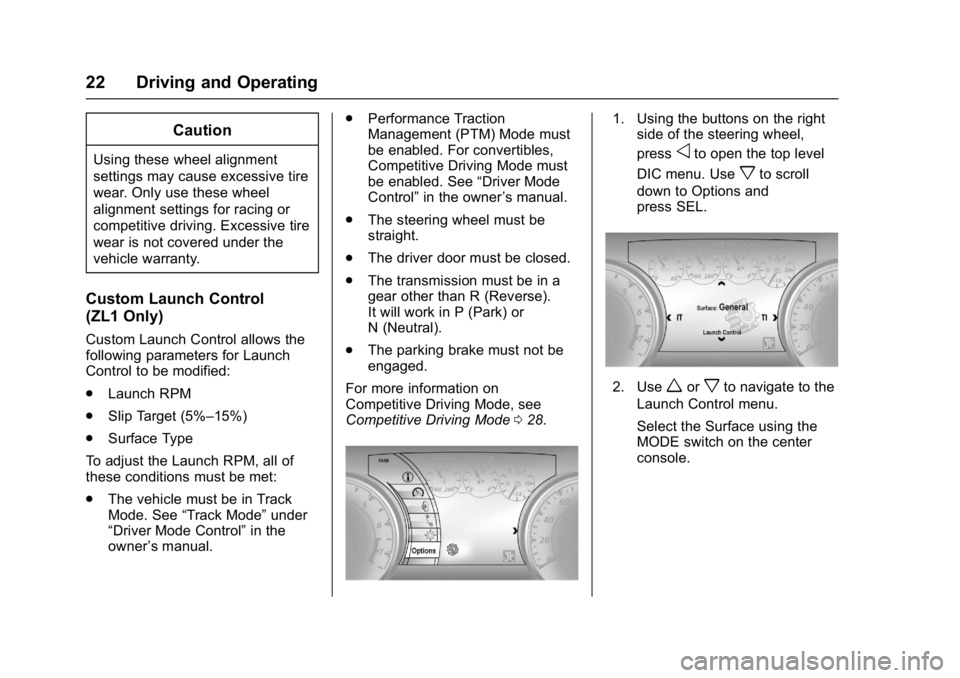
1. Using the buttons on the right
side of the steering wheel,
press
oto open the top level
DIC menu. Use
xto scroll
down to Options and
press SEL.
2. Useworxto navigate to the
Launch Control menu.
Select the Surface using the
MODE switch on the center
console.
Page 25 of 53
Chevrolet Camaro High Performance Owner Manual Supplemen (GMNA-
Localizing-U.S./Canada/Mexico-11348335) - 2018 - CRC - 4/5/17
24 Driving and Operating
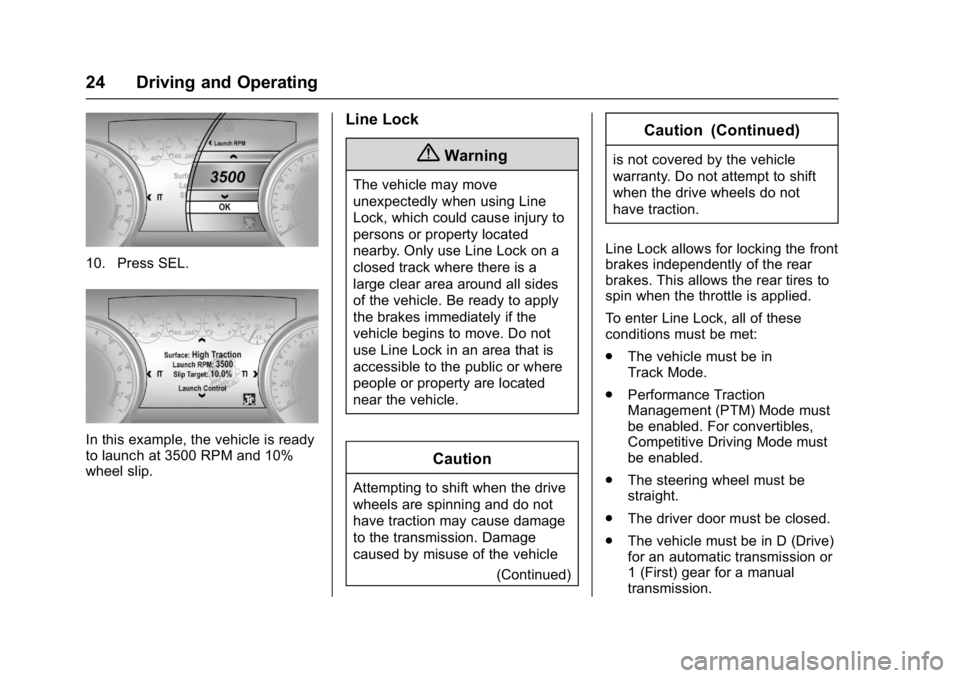
10. Press SEL.
In this example, the vehicle is ready
to launch at 3500 RPM and 10%
wheel slip.
Line Lock
{Warning
The vehicle may move
unexpectedly when using Line
Lock, which could cause injury to
persons or property located
nearby. Only use Line Lock on a
closed track where there is a
large clear area around all sides
of the vehicle. Be ready to apply
the brakes immediately if the
vehicle begins to move. Do not
use Line Lock in an area that is
accessible to the public or where
people or property are located
near the vehicle.
Caution
Attempting to shift when the drive
wheels are spinning and do not
have traction may cause damage
to the transmission. Damage
caused by misuse of the vehicle(Continued)
Caution (Continued)
is not covered by the vehicle
warranty. Do not attempt to shift
when the drive wheels do not
have traction.
Line Lock allows for locking the front
brakes independently of the rear
brakes. This allows the rear tires to
spin when the throttle is applied.
To enter Line Lock, all of these
conditions must be met:
. The vehicle must be in
Track Mode.
. Performance Traction
Management (PTM) Mode must
be enabled. For convertibles,
Competitive Driving Mode must
be enabled.
. The steering wheel must be
straight.
. The driver door must be closed.
. The vehicle must be in D (Drive)
for an automatic transmission or
1 (First) gear for a manual
transmission.
Page 27 of 53
Chevrolet Camaro High Performance Owner Manual Supplemen (GMNA-
Localizing-U.S./Canada/Mexico-11348335) - 2018 - CRC - 4/5/17
26 Driving and Operating
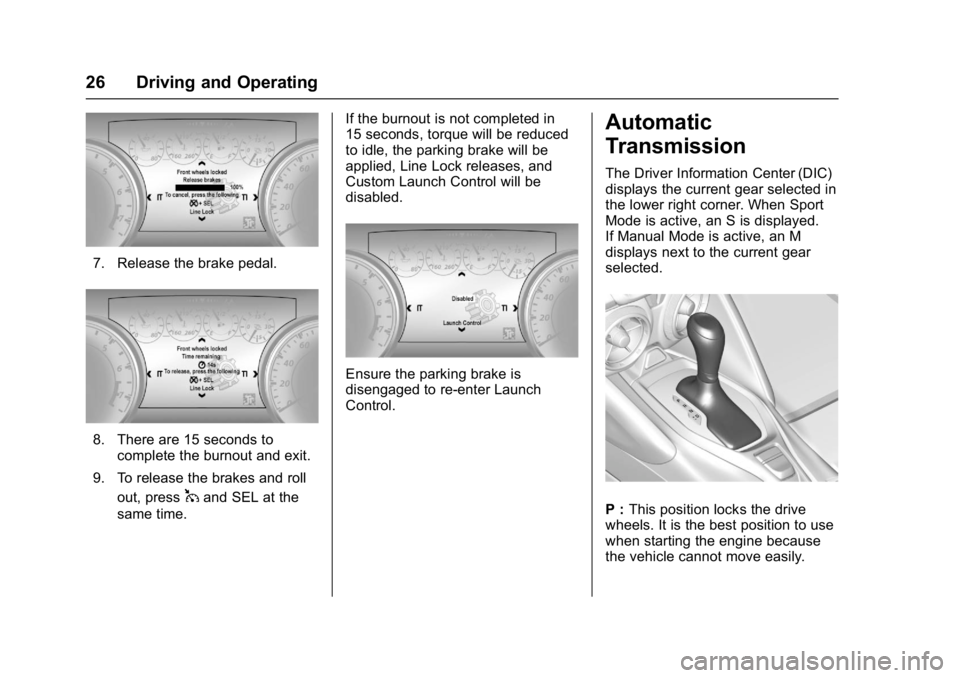
7. Release the brake pedal.
8. There are 15 seconds tocomplete the burnout and exit.
9. To release the brakes and roll out, press
1and SEL at the
same time. If the burnout is not completed in
15 seconds, torque will be reduced
to idle, the parking brake will be
applied, Line Lock releases, and
Custom Launch Control will be
disabled.
Ensure the parking brake is
disengaged to re-enter Launch
Control.
Automatic
Transmission
The Driver Information Center (DIC)
displays the current gear selected in
the lower right corner. When Sport
Mode is active, an S is displayed.
If Manual Mode is active, an M
displays next to the current gear
selected.
P :
This position locks the drive
wheels. It is the best position to use
when starting the engine because
the vehicle cannot move easily.
Page 29 of 53
Chevrolet Camaro High Performance Owner Manual Supplemen (GMNA-
Localizing-U.S./Canada/Mexico-11348335) - 2018 - CRC - 4/5/17
28 Driving and Operating
Caution
If the vehicle does not shift gears,
the transmission could be
damaged. Have the vehicle
serviced right away.
Performance Shifting
While driving in Sport Mode and
Track Mode, if Tap Shift has not
been activated, the transmission
determines when the vehicle is
being driven in a competitive
manner. The transmission may
remain in a gear longer than it
would in the normal driving mode
based on throttle input and vehicle
lateral acceleration. If there is arapid reduction in throttle from a
heavy throttle position at high rpm,
the transmission will maintain the
current gear up to near redline rpm.
While braking, the transmission will
automatically downshift to the next
lower gear keeping engine speed
above approximately 3000 rpm.
If the vehicle is then driven for a
short time at a steady speed, and
without high cornering loads, the
transmission will upshift one gear at
a time, until 10 (Tenth) gear. After
shifting to 10 (Tenth) gear, or coming
to a complete stop, the transmission
will return to normal Sport Mode
shifting.
Ride Control Systems
Competitive Driving Mode
Competitive Driving Mode,
Performance Traction Management,
and Launch Control are systems
designed to allow increased
performance while accelerating and/
or cornering. This is accomplished
by regulating and optimizing the
engine, brakes, and suspension
performance. These modes are for
use at a closed course race track
and are not intended for use on
public roads. They will not
compensate for driver inexperience
or lack of familiarity with the race
track. Drivers who prefer to allow
the system to have more control of
the engine, brakes, and suspension
are advised to turn the normal
Traction Control System (TCS) and
StabiliTrak™
on.
Page 30 of 53
Chevrolet Camaro High Performance Owner Manual Supplemen (GMNA-
Localizing-U.S./Canada/Mexico-11348335) - 2018 - CRC - 4/5/17
Driving and Operating 29
Caution
Attempting to shift when the drive
wheels are spinning and do not
have traction may cause damage
to the transmission. Damage
caused by misuse of the vehicle
is not covered by the vehicle
warranty. Do not attempt to shift
when the drive wheels do not
have traction.
Competitive Driving Mode allows full
engine power while StabiliTrak
helps maintain directional control of
the vehicle by selective brake
application. In this mode, TCS is off
and Launch Control is available.
Adjust your driving style to account
for the available engine power. See
“Launch Control” later in this
section.
Do not use cruise control in
performance driving situations.
When StabiliTrak is in a
performance driving state by
pressing
Ytwice for Competitive
Driving Mode or Performance Traction Management Mode, or by
pressing and holding
Yfor
five seconds to turn StabiliTrak Off,
the cruise control buttons on the left
side of the steering wheel will be
inoperative.
To regain cruise control capability,
press
Yonce to return to regular
StabiliTrak operation.
Performance Traction
Management (PTM) (SS 1LE
and ZL1 Only)
PTM integrates the TCS,
StabiliTrak, and Competitive Driving
Mode systems to provide improved
and consistent performance when
cornering. The amount of available
engine power is based on the mode
selected, track conditions, driver
skill, and radius of each corner.
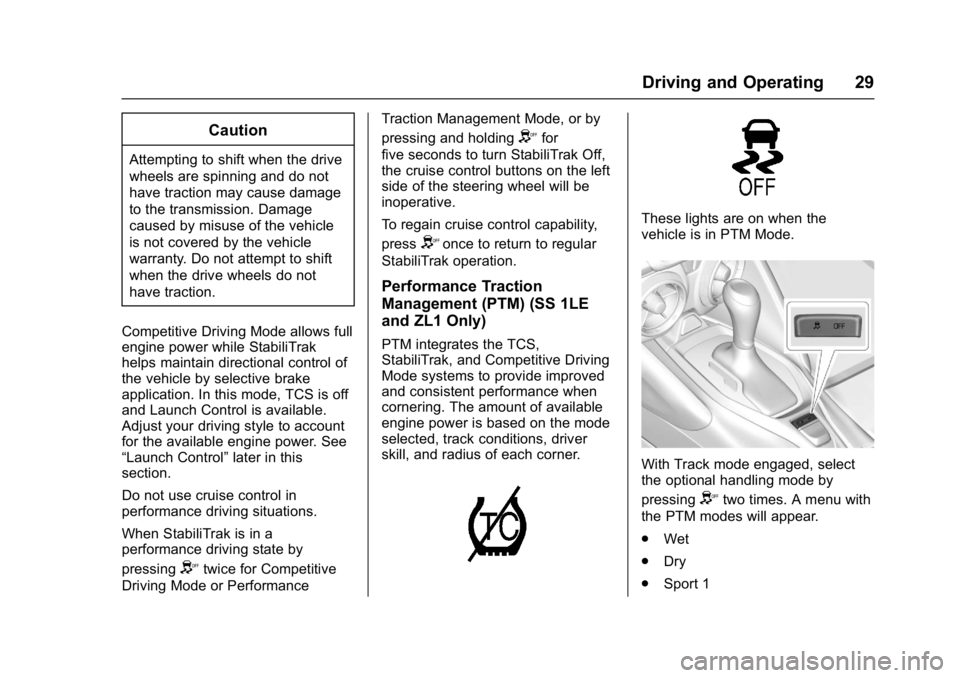
These lights are on when the
vehicle is in PTM Mode.
With Track mode engaged, select
the optional handling mode by
pressing
Ytwo times. A menu with
the PTM modes will appear.
. Wet
. Dry
. Sport 1