wheel CHEVROLET CAPTIVA SPORT 2013 Owner's Manual
[x] Cancel search | Manufacturer: CHEVROLET, Model Year: 2013, Model line: CAPTIVA SPORT, Model: CHEVROLET CAPTIVA SPORT 2013Pages: 374, PDF Size: 6.66 MB
Page 129 of 374
Black plate (33,1)Chevrolet Captiva Sport Owner Manual - 2013 - crc - 11/12/12
Instruments and Controls 5-33resetting the system by turning the
ignition off and then back on. If this
message still stays on or turns back
on again while you are driving, the
vehicle needs service. Have the
system inspected by your dealer as
soon as possible.
SERVICE TRACTION
CONTROL This message displays when the
Traction Control System (TCS) is
not functioning properly. A warning
light also appears on the instrument
cluster. See Traction Control System
(TCS) Warning Light on page 5 ‑ 19
and Traction Control System (TCS)
on page 9 ‑ 27 for more information.
Have the TCS serviced by your
dealer as soon as possible.
STABILITRAK OFF
If the vehicle has StabiliTrak, this
message displays when you turn off
the StabiliTrak, or when the stability
control has been automatically
disabled. To limit wheel spin and
realize the full benefits of the stability enhancement system, you
should normally leave StabiliTrak
on. However, you should turn
StabiliTrak off if the vehicle gets
stuck in sand, mud, ice, or snow
and you want to rock the vehicle to
attempt to free it, or if you are
driving in extreme off-road
conditions and require more wheel
spin. See If the Vehicle Is Stuck on
page 9 ‑ 9 . To turn the StabiliTrak
system on or off, see StabiliTrak ®
System on page 9 ‑ 28 .
TRACTION CONTROL OFF This message displays when the
Traction Control System (TCS) turns
off. See Traction Control System
(TCS) on page 9 ‑ 27 for more
information.
This message only displays while
the ignition is in ON/RUN and
disappears after 10 seconds, unless
it is acknowledged or an urgent
warning appears. Any of the following conditions may
cause the TCS to turn off: .
The TCS is turned off by
pressing the TCS/StabiliTrak
button. See StabiliTrak ®
System
on page 9 ‑ 28 for more
information. .
The battery is low. .
There is a TCS failure. See your
dealer for service.
TRACTION CONTROL ON This message displays when the
Traction Control System (TCS) turns
on. See StabiliTrak ®
System on
page 9 ‑ 28 for more information.
Airbag System Messages SERVICE AIR BAG
This message displays when there
is a problem with the airbag system.
Have the vehicle serviced by your
dealer immediately. See Airbag
Readiness Light on page 5 ‑ 12 for
more information.
Page 143 of 374
Black plate (1,1)Chevrolet Captiva Sport Owner Manual - 2013 - crc - 11/12/12
Lighting 6-1
Lighting Exterior Lighting Exterior Lamp Controls . . . . . . . . 6-1
Headlamp High/Low-Beam
Changer . . . . . . . . . . . . . . . . . . . . . 6-2
Flash-to-Pass . . . . . . . . . . . . . . . . . 6-2
Daytime Running
Lamps (DRL) . . . . . . . . . . . . . . . . 6-2
Automatic Headlamp
System . . . . . . . . . . . . . . . . . . . . . . 6-3
Hazard Warning Flashers . . . . . 6-3
Turn and Lane-Change
Signals . . . . . . . . . . . . . . . . . . . . . . 6-3
Fog Lamps . . . . . . . . . . . . . . . . . . . . 6-4
Interior Lighting Instrument Panel Illumination
Control . . . . . . . . . . . . . . . . . . . . . . 6-4
Dome Lamps . . . . . . . . . . . . . . . . . 6-5
Reading Lamps . . . . . . . . . . . . . . . 6-5
Lighting Features Entry Lighting . . . . . . . . . . . . . . . . . 6-6
Battery Load Management . . . . 6-6
Battery Power Protection . . . . . . 6-6 Exterior Lighting Exterior Lamp Controls
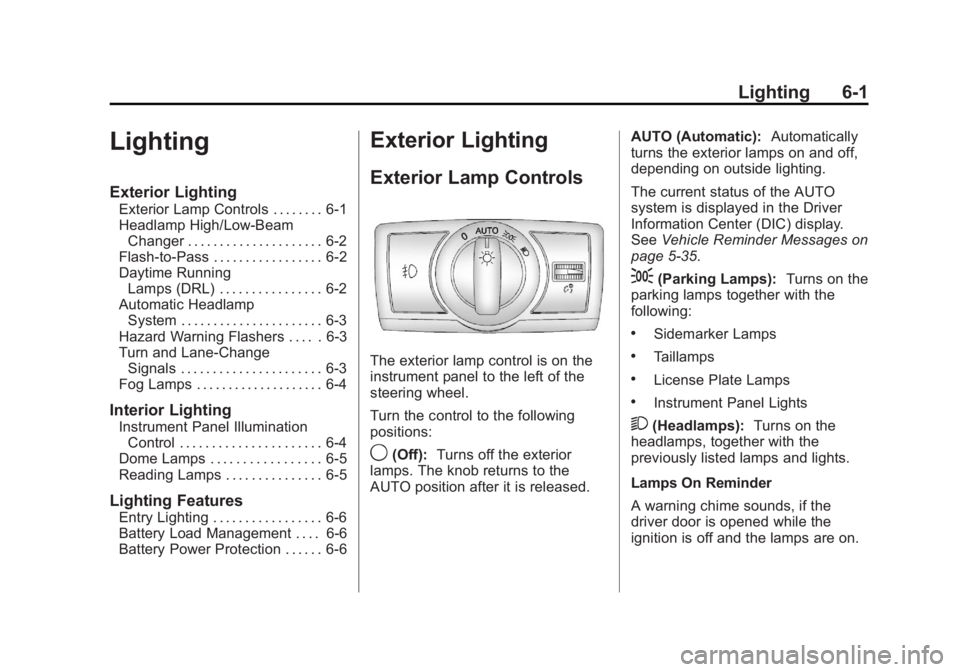
The exterior lamp control is on the
instrument panel to the left of the
steering wheel.
Turn the control to the following
positions:
9 (Off): Turns off the exterior
lamps. The knob returns to the
AUTO position after it is released. AUTO (Automatic): Automatically
turns the exterior lamps on and off,
depending on outside lighting.
The current status of the AUTO
system is displayed in the Driver
Information Center (DIC) display.
See Vehicle Reminder Messages on
page 5 ‑ 35 .
; (Parking Lamps): Turns on the
parking lamps together with the
following: .
Sidemarker Lamps .
Taillamps .
License Plate Lamps .
Instrument Panel Lights
2 (Headlamps): Turns on the
headlamps, together with the
previously listed lamps and lights.
Lamps On Reminder
A warning chime sounds, if the
driver door is opened while the
ignition is off and the lamps are on.
Page 146 of 374
Black plate (4,1)Chevrolet Captiva Sport Owner Manual - 2013 - crc - 11/12/12
6-4 Lighting Raise or lower the lever until the
arrow starts to flash and then
release, to signal a lane change.
The turn signal flashes
automatically three times.
The lever returns to its starting
position whenever it is released.
If after signaling a turn or lane
change the arrow flashes rapidly or
does not come on, a signal bulb
may be burned out.
Have any burned out bulbs
replaced. If a bulb is not burned out,
check the fuse. See Instrument
Panel Fuse Block on page 10 ‑ 33 .
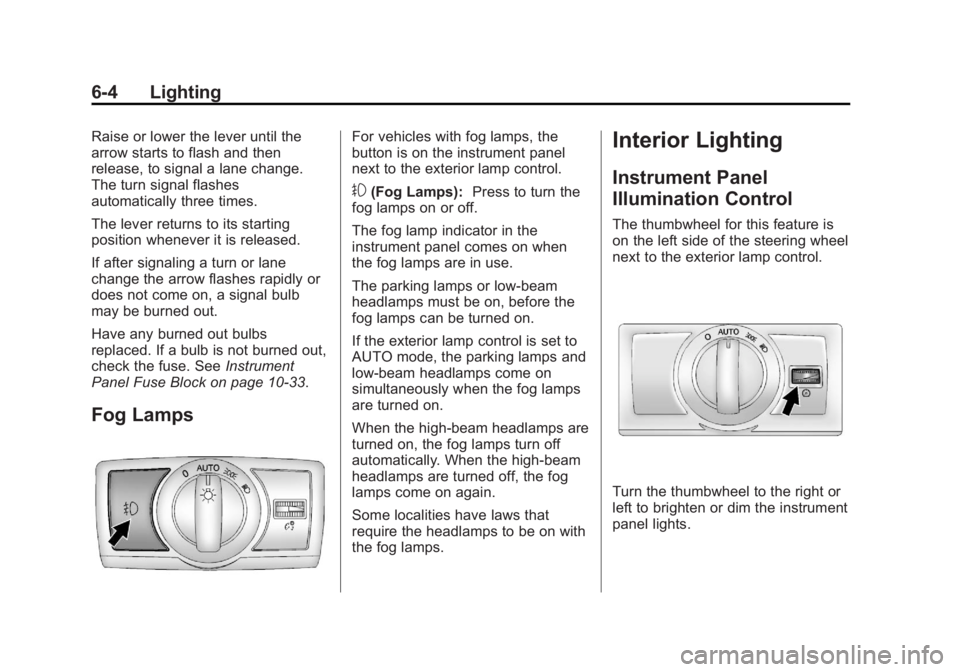
Fog Lamps For vehicles with fog lamps, the
button is on the instrument panel
next to the exterior lamp control.
# (Fog Lamps): Press to turn the
fog lamps on or off.
The fog lamp indicator in the
instrument panel comes on when
the fog lamps are in use.
The parking lamps or low-beam
headlamps must be on, before the
fog lamps can be turned on.
If the exterior lamp control is set to
AUTO mode, the parking lamps and
low-beam headlamps come on
simultaneously when the fog lamps
are turned on.
When the high-beam headlamps are
turned on, the fog lamps turn off
automatically. When the high-beam
headlamps are turned off, the fog
lamps come on again.
Some localities have laws that
require the headlamps to be on with
the fog lamps. Interior Lighting Instrument Panel
Illumination Control The thumbwheel for this feature is
on the left side of the steering wheel
next to the exterior lamp control.
Turn the thumbwheel to the right or
left to brighten or dim the instrument
panel lights.
Page 153 of 374
Black plate (5,1)Chevrolet Captiva Sport Owner Manual - 2013 - crc - 11/12/12
Infotainment System 7-5The volume level changes between
Normal and Loud. The selected
volume level appears on the radio
display.
Removing the radio and not
replacing it with a factory radio or
chime module will disable vehicle
chimes.
Radio Messages Calibration Error: The audio
system has been calibrated for the
vehicle from the factory.
If Calibration Error displays, it
means that the radio has not been
configured properly for the vehicle
and it must be returned to your
dealer for service.
Locked: This message displays
when the TheftLock system has
locked up the radio. Take the
vehicle to your dealer for service.
If any error occurs repeatedly or if
an error cannot be corrected,
contact your dealer. Radio AM-FM Radio Radio Data System (RDS) The RDS feature is available for use
only on FM stations that broadcast
RDS information. This system relies
upon receiving specific information
from these stations and only works
when the information is available.
While the radio is tuned to an
FM-RDS station, the station name
or call letters display. In rare cases,
a radio station could broadcast
incorrect information that causes the
radio features to work improperly.
If this happens, contact the radio
station.
Finding a Station
BAND: Press to switch between
AM or FM.
f (Tune): Turn to select radio
stations.
© SEEK or
¨ SEEK: Press to go to
the previous or to the next station. To scan stations, press and hold
either button for a few seconds until
a beep sounds. The radio goes to a
station, plays for a few seconds,
then goes to the next station. Press
either button again to stop scanning.
The radio only seeks and scans
stations with a strong signal that are
in the selected band.
Storing a Radio Station as a
Favorite Drivers are encouraged to set up
their radio station favorites while the
vehicle is in P (Park). Tune to
favorite stations using the presets,
favorites button, and steering wheel
controls. See Steering Wheel
Controls on page 5 ‑ 2 .
FAV (Favorites): A maximum of
36 stations can be programmed as
favorites using the six pushbuttons
below the radio station frequency
labels, and by using the radio
favorites page button (FAV button).
Press to go through up to six pages
of favorites, each having six favorite
Page 155 of 374
Black plate (7,1)Chevrolet Captiva Sport Owner Manual - 2013 - crc - 11/12/12
Infotainment System 7-7Finding a Category (CAT)
Station CAT (Category): The CAT button is
used to find SiriusXM stations when
the radio is in the XM mode. To find
SiriusXM channels within a desired
category:
1. Press BAND until the XM
frequency displays.
2. Press CAT to display the
category tabs.
3. To navigate through the
categories, do one of the
following: .
Press the CAT button. .
Press the
s REV or
\FWD button. .
Turn the
f knob.
4. To tune to a station in the
selected category, do one of the
following: .
Turn the
f knob. .
Press the pushbutton below
the right or left arrows on
the display. .
Press the
© SEEK or
¨ SEEK button.
5. To exit the category search
mode, press the FAV button or
the BAND button to display the
favorites again.
Removing SiriusXM Categories
Undesired SiriusXM categories can
be removed through the setup
menu. To remove an undesired
category:
1. Press the MENU button.
2. Press the pushbutton below the
XM CAT label.
3. Turn the
f knob, then press the
© SEEK or
¨ SEEK button or the
s REV or
\ FWD button to
display the category to be
removed. 4. Press the pushbutton under the
Remove tab until the category
name along with the word
Removed displays.
5. Repeat the steps to remove
more categories.
Removed categories can be
restored by pressing the pushbutton
under the Add label when a
removed category is displayed or by
pressing the pushbutton under the
Restore All label.
Categories cannot be removed or
added while the vehicle is moving
faster than 8 km/h (5 mph).
Storing a Radio Station as a
Favorite Drivers are encouraged to set up
their radio station favorites while the
vehicle is in P (Park). Tune to
favorite stations using the presets,
favorites button, and steering wheel
controls. See Steering Wheel
Controls on page 5 ‑ 2 .
Page 172 of 374
Black plate (24,1)Chevrolet Captiva Sport Owner Manual - 2013 - crc - 11/12/12
7-24 Infotainment System A Bluetooth system can use a
Bluetooth-capable cell phone with a
Hands-Free Profile to make and
receive phone calls. The system
can be used while the key is in the
ON/RUN or ACC/ACCESSORY
position. The range of the Bluetooth
system can be up to 9.1 m (30 ft).
Not all phones support all functions,
and not all phones work with the
in-vehicle Bluetooth system. See
www.gm.com/bluetooth for more
information on compatible phones.
Voice Recognition The Bluetooth system uses voice
recognition to interpret voice
commands to dial phone numbers
and name tags.
For additional information, say
“ Help ” while you are in a voice
recognition menu.
Noise: Keep interior noise levels to
a minimum. The system may not
recognize voice commands if there
is too much background noise. When to Speak: A short tone
sounds after the system responds
indicating when it is waiting for a
voice command. Wait until the tone
and then speak.
How to Speak: Speak clearly in a
calm and natural voice.
Audio System When using the in-vehicle Bluetooth
system, sound comes through the
vehicle's front audio system
speakers and overrides the audio
system. Use the audio system
volume knob, during a call, to
change the volume level. The
adjusted volume level remains in
memory for later calls. To prevent
missed calls, a minimum volume
level is used if the volume is turned
down too low.
Bluetooth Controls
Use the buttons on the steering
wheel to operate the in-vehicle
Bluetooth system. See Steering
Wheel Controls on page 5 ‑ 2 .J /
0 (Call/Mute): Press to answer
incoming calls, confirm system
information, and start speech
recognition.
K (End Call): Press to end a call,
reject a call, or cancel an operation.
Pairing A Bluetooth-enabled cell phone
must be paired to the Bluetooth
system and then connected to the
vehicle before it can be used. See
the cell phone manufacturer's user
guide for Bluetooth functions before
pairing the cell phone. If a Bluetooth
phone is not connected, calls will be
made using OnStar Hands-Free
Calling, if equipped. See OnStar
Overview on page 14 ‑ 1 .
Pairing Information .
A Bluetooth phone with MP3
capability cannot be paired to
the vehicle as a phone and an
MP3 player at the same time. .
Up to five cell phones can be
paired to the Bluetooth system.
Page 186 of 374
Black plate (8,1)Chevrolet Captiva Sport Owner Manual - 2013 - crc - 11/12/12
8-8 Climate Controls
Air Vents Move the louvers on the air outlets
up or down to change the direction
of the airflow. The louvers do
not turn.
Use the thumbwheels near each
vent to open and close off the
airflow.
Operation Tips .
Clear away any ice, snow,
or leaves from the air inlets at
the base of the vehicle that may
block the flow of air into the
vehicle. .
Do not use any non-GM
approved hood deflectors that
could adversely affect the
performance of the system. .
Keep the path under the front
seats clear of objects to help
circulate the air inside of the
vehicle more effectively. .
Do not insert objects into the air
outlets. This may affect the
operation of the outlet. Maintenance Passenger Compartment
Air Filter The filter removes dust, pollen, and
other airborne irritants from outside
air that is pulled into the vehicle.
The filter should be replaced as part
of routine scheduled maintenance.
See Maintenance Schedule on
page 11 ‑ 3 for replacement intervals.
To find out what type of filter to use,
see Maintenance Replacement
Parts on page 11 ‑ 14 .
The passenger compartment air
filter can be accessed by removing
the entire glove box. 1. Remove the four screws from
around the glove box and detach
the three inner clips from the
glove box.
2. Lower the loosened glove box
housing.
Page 189 of 374
Black plate (1,1)Chevrolet Captiva Sport Owner Manual - 2013 - crc - 11/12/12
Driving and Operating 9-1
Driving and
Operating Driving Information Driver Behavior . . . . . . . . . . . . . . . 9-2
Driving Environment . . . . . . . . . . 9-2
Vehicle Design . . . . . . . . . . . . . . . . 9-2
Distracted Driving . . . . . . . . . . . . . 9-3
Defensive Driving . . . . . . . . . . . . . 9-3
Drunk Driving . . . . . . . . . . . . . . . . . 9-4
Control of a Vehicle . . . . . . . . . . . 9-4
Braking . . . . . . . . . . . . . . . . . . . . . . . 9-4
Steering . . . . . . . . . . . . . . . . . . . . . . . 9-4
Off-Road Recovery . . . . . . . . . . . . 9-5
Loss of Control . . . . . . . . . . . . . . . . 9-5
Driving on Wet Roads . . . . . . . . . 9-6
Highway Hypnosis . . . . . . . . . . . . 9-7
Hill and Mountain Roads . . . . . . 9-7
Winter Driving . . . . . . . . . . . . . . . . . 9-8
If the Vehicle Is Stuck . . . . . . . . . 9-9
Vehicle Load Limits . . . . . . . . . . 9-10
Starting and Operating
New Vehicle Break-In . . . . . . . . 9-14
Ignition Positions . . . . . . . . . . . . 9-14
Starting the Engine . . . . . . . . . . 9-16 Retained Accessory
Power (RAP) . . . . . . . . . . . . . . . 9-17
Shifting Into Park . . . . . . . . . . . . 9-17
Shifting out of Park . . . . . . . . . . 9-18
Parking over Things
That Burn . . . . . . . . . . . . . . . . . . 9-19
Engine Exhaust Engine Exhaust . . . . . . . . . . . . . . 9-19
Running the Vehicle While
Parked . . . . . . . . . . . . . . . . . . . . . 9-20
Automatic Transmission Automatic Transmission . . . . . 9-20
Manual Mode . . . . . . . . . . . . . . . . 9-22
Fuel Economy Mode . . . . . . . . . 9-23
Drive Systems All-Wheel Drive . . . . . . . . . . . . . . 9-24
Brakes Antilock Brake
System (ABS) . . . . . . . . . . . . . . 9-24
Parking Brake . . . . . . . . . . . . . . . 9-25
Ride Control Systems
Traction Control
System (TCS) . . . . . . . . . . . . . . 9-27
StabiliTrak ®
System . . . . . . . . . 9-28 Cruise Control Cruise Control . . . . . . . . . . . . . . . 9-29
Object Detection Systems Ultrasonic Parking Assist . . . . 9-31
Rear Vision
Camera (RVC) . . . . . . . . . . . . . 9-33
Fuel Fuel . . . . . . . . . . . . . . . . . . . . . . . . . 9-35
Recommended Fuel . . . . . . . . . 9-35
Gasoline Specifications . . . . . . 9-35
Fuels in Foreign Countries . . . 9-36
Fuel Additives . . . . . . . . . . . . . . . 9-36
Fuel E85 (85% Ethanol) . . . . . 9-36
Filling the Tank . . . . . . . . . . . . . . 9-37
Filling a Portable Fuel
Container . . . . . . . . . . . . . . . . . . . 9-38
Towing General Towing
Information . . . . . . . . . . . . . . . . . 9-39
Driving Characteristics and
Towing Tips . . . . . . . . . . . . . . . . 9-39
Trailer Towing . . . . . . . . . . . . . . . . 9-42
Towing Equipment . . . . . . . . . . . 9-44
Conversions and Add-Ons
Add-On Electrical
Equipment . . . . . . . . . . . . . . . . . 9-45
Page 190 of 374
Black plate (2,1)Chevrolet Captiva Sport Owner Manual - 2013 - crc - 11/12/12
9-2 Driving and Operating
Driving Information Driver Behavior Whenever we drive, we are taking
on an important responsibility. This
is true for any motor vehicle —
passenger car, van, truck, sport
utility. Driver behavior, the driving
environment, and the vehicle's
design all affect how well a vehicle
performs. But statistics show that
the most important factor, by far, is
how we drive.
Knowing how these three factors
work together can help you
understand how your vehicle
handles and what you can do to
avoid many types of crashes,
including a rollover crash.
The single most important thing is
this: everyone in the vehicle,
including the driver, should buckle
up. See Safety Belts on page 3 ‑ 9 . In
fact, most serious injuries and
fatalities to unbelted occupants can
be reduced or prevented by the use
of safety belts. In a rollover crash, an unbelted person is significantly
more likely to die than a person
wearing a seat belt. In addition,
avoiding excessive speed, sudden
or abrupt turns, and drunken or
aggressive driving can help make
trips safer and avoid the possibility
of a crash, especially a rollover
crash. This section provides many
useful tips to help you drive more
safely.
Driving Environment You can also help avoid a rollover or
other type of crash by being
prepared for driving in inclement
weather, at night, or during other
times where visibility or traction may
be limited, such as on curves,
slippery roads, or hilly terrain.
Unfamiliar surroundings can also
have hidden hazards.
To help you learn more about
driving in different conditions, this
section contains information about city, freeway, and off-road driving,
as well as other hints for driving in
various weather conditions.
Vehicle Design According to the U.S. Department of
Transportation, utility vehicles have
a significantly higher rollover rate
than other types of vehicles. Utility
vehicles do have higher ground
clearance and a narrower track or
shorter wheelbase than passenger
cars, to make them more capable
for off-road driving. Specific design
characteristics like these give the
driver a better view of the road, but
also give utility vehicles a higher
center of gravity than other types of
vehicles. This means that you
should not expect a utility vehicle to
handle the same way a vehicle with
a lower center of gravity, like a car,
would in similar situations.
But driver behavior factors are far
more often the cause of a utility
vehicle rollover than are
environmental or vehicle factors.
Page 191 of 374
Black plate (3,1)Chevrolet Captiva Sport Owner Manual - 2013 - crc - 11/12/12
Driving and Operating 9-3Safe driver behavior and
understanding the environment in
which you will be driving can help
avoid a rollover crash in any type of
vehicle, including utility vehicles.
Distracted Driving Distraction comes in many forms
and can take your focus from the
task of driving. Exercise good
judgment and do not let other
activities divert your attention away
from the road. Many local
governments have enacted laws
regarding driver distraction. Become
familiar with the local laws in
your area.
To avoid distracted driving, always
keep your eyes on the road, hands
on the wheel, and mind on the drive. .
Do not use a phone in
demanding driving situations.
Use a hands-free method to
place or receive necessary
phone calls. .
Watch the road. Do not read,
take notes, or look up
information on phones or other
electronic devices. .
Designate a front seat
passenger to handle potential
distractions. .
Become familiar with vehicle
features before driving, such as
programming favorite radio
stations and adjusting climate
control and seat settings.
Program all trip information into
any navigation device prior to
driving. .
Wait until the vehicle is parked
to retrieve items that have fallen
to the floor. .
Stop or park the vehicle to tend
to children. .
Keep pets in an appropriate
carrier or restraint. .
Avoid stressful conversations
while driving, whether with a
passenger or on a cell phone.{ WARNINGTaking your eyes off the road too
long or too often could cause a
crash resulting in injury or death.
Focus your attention on driving.
Refer to the Infotainment section for
more information on using that
system, including pairing and using
a cell phone.
Defensive Driving Defensive driving means “ always
expect the unexpected. ” The first
step in driving defensively is to wear
the safety belt. See Safety Belts on
page 3 ‑ 9 . .
Assume that other road users
(pedestrians, bicyclists, and
other drivers) are going to be
careless and make mistakes.
Anticipate what they might do
and be ready.