warning CHEVROLET CAPTIVA SPORT 2013 Repair Manual
[x] Cancel search | Manufacturer: CHEVROLET, Model Year: 2013, Model line: CAPTIVA SPORT, Model: CHEVROLET CAPTIVA SPORT 2013Pages: 374, PDF Size: 6.66 MB
Page 129 of 374
Black plate (33,1)Chevrolet Captiva Sport Owner Manual - 2013 - crc - 11/12/12
Instruments and Controls 5-33resetting the system by turning the
ignition off and then back on. If this
message still stays on or turns back
on again while you are driving, the
vehicle needs service. Have the
system inspected by your dealer as
soon as possible.
SERVICE TRACTION
CONTROL This message displays when the
Traction Control System (TCS) is
not functioning properly. A warning
light also appears on the instrument
cluster. See Traction Control System
(TCS) Warning Light on page 5 ‑ 19
and Traction Control System (TCS)
on page 9 ‑ 27 for more information.
Have the TCS serviced by your
dealer as soon as possible.
STABILITRAK OFF
If the vehicle has StabiliTrak, this
message displays when you turn off
the StabiliTrak, or when the stability
control has been automatically
disabled. To limit wheel spin and
realize the full benefits of the stability enhancement system, you
should normally leave StabiliTrak
on. However, you should turn
StabiliTrak off if the vehicle gets
stuck in sand, mud, ice, or snow
and you want to rock the vehicle to
attempt to free it, or if you are
driving in extreme off-road
conditions and require more wheel
spin. See If the Vehicle Is Stuck on
page 9 ‑ 9 . To turn the StabiliTrak
system on or off, see StabiliTrak ®
System on page 9 ‑ 28 .
TRACTION CONTROL OFF This message displays when the
Traction Control System (TCS) turns
off. See Traction Control System
(TCS) on page 9 ‑ 27 for more
information.
This message only displays while
the ignition is in ON/RUN and
disappears after 10 seconds, unless
it is acknowledged or an urgent
warning appears. Any of the following conditions may
cause the TCS to turn off: .
The TCS is turned off by
pressing the TCS/StabiliTrak
button. See StabiliTrak ®
System
on page 9 ‑ 28 for more
information. .
The battery is low. .
There is a TCS failure. See your
dealer for service.
TRACTION CONTROL ON This message displays when the
Traction Control System (TCS) turns
on. See StabiliTrak ®
System on
page 9 ‑ 28 for more information.
Airbag System Messages SERVICE AIR BAG
This message displays when there
is a problem with the airbag system.
Have the vehicle serviced by your
dealer immediately. See Airbag
Readiness Light on page 5 ‑ 12 for
more information.
Page 130 of 374
Black plate (34,1)Chevrolet Captiva Sport Owner Manual - 2013 - crc - 11/12/12
5-34 Instruments and Controls
Service Vehicle Messages SERVICE A/C (Air
Conditioning) SYSTEM This message displays when there
is a problem detected in the air
conditioning system. Have the
vehicle serviced by your dealer.
SERVICE VEHICLE SOON This message displays when a
non-emissions-related malfunction
occurs. Have the vehicle serviced
by your dealer as soon as possible.
Tire Messages CHECK TIRE PRESSURE On vehicles with the Tire Pressure
Monitor System (TPMS), this
message displays when the
pressure in one or more of the
vehicle's tires needs to be checked.
This message also displays LEFT
FRONT, RIGHT FRONT, LEFT
REAR, or RIGHT REAR to indicate
which tire needs to be checked. You
can receive more than one tire pressure message at a time. To
read the other messages that may
have been sent at the same time,
press the set/reset button. If a tire
pressure message appears on the
DIC, stop as soon as you can. Have
the tire pressures checked and set
to those shown on the Tire and
Loading Information label. See Tires
on page 10 ‑ 36 , Vehicle Load Limits
on page 9 ‑ 10 , and Tire Pressure on
page 10 ‑ 43 . The DIC also shows
the tire pressure values. See Driver
Information Center (DIC) on
page 5 ‑ 23 . If the tire pressure is low,
the low tire pressure warning light
comes on. See Tire Pressure Light
on page 5 ‑ 20 .
SERVICE TIRE MONITORING
SYSTEM
On vehicles with the Tire Pressure
Monitor System (TPMS), this
message displays if a part on the
TPMS is not working properly. The
tire pressure light also flashes and
then remains on during the same
ignition cycle. See Tire Pressure Light on page 5 ‑ 20 . Several
conditions may cause this message
to appear. See Tire Pressure
Monitor Operation on page 10 ‑ 46 for
more information. If the warning
comes on and stays on, there may
be a problem with the TPMS. See
your dealer.
TIRE LEARNING ACTIVE On vehicles with the Tire Pressure
Monitor System (TPMS), this
message displays when the TPMS
is re-learning the tire positions on
the vehicle. The tire positions must
be re-learned after rotating the tires
or after replacing a tire or sensor.
See Tire Rotation on page 10 ‑ 49 ,
Tire Pressure Monitor System on
page 10 ‑ 45 , and Tire Pressure on
page 10 ‑ 43 for more information.
Page 131 of 374
Black plate (35,1)Chevrolet Captiva Sport Owner Manual - 2013 - crc - 11/12/12
Instruments and Controls 5-35
Transmission Messages CHANGE TRANSMISSION
FLUID Notice: Use of the incorrect
automatic transmission fluid may
damage the vehicle, and the
damages may not be covered by
the vehicle warranty. Always use
the automatic transmission fluid
listed in Recommended Fluids
and Lubricants on page 11 ‑ 12 .
This message displays when the life
of the transmission fluid has expired
and it should be changed. See
Maintenance Schedule on
page 11 ‑ 3 and Recommended
Fluids and Lubricants on page 11 ‑ 12
for the proper fluid and change
intervals.
SERVICE TRANSMISSION
This message displays when there
is a problem with the transmission.
See your dealer for service. TRANSMISSION HOT IDLE
ENGINE Notice: Do not drive the vehicle
while the transmission fluid is
overheating and the transmission
temperature warning is displayed
on the instrument cluster and/or
DIC, or the transmission can be
damaged. This could lead to
costly repairs that would not be
covered by the warranty.
This message displays along with a
chime if the transmission fluid in the
vehicle gets hot. Driving with the
transmission fluid temperature high
can cause damage to the vehicle.
Stop the vehicle and let it idle to
allow the transmission to cool. This
message clears and the chime
stops when the fluid temperature
reaches a safe level. Vehicle Reminder
Messages ICE POSSIBLE DRIVE
WITH CARE This message displays when the
outside air temperature is cold
enough to create icy road
conditions. Adjust your driving
accordingly.
TURN SIGNAL ON This message displays and a chime
sounds as a reminder to turn off the
turn signal if you drive the vehicle
for more than about 1.2 km
(0.75 mile) with a turn signal on.
See Turn and Lane-Change Signals
on page 6 ‑ 3 for more information.
Page 143 of 374
Black plate (1,1)Chevrolet Captiva Sport Owner Manual - 2013 - crc - 11/12/12
Lighting 6-1
Lighting Exterior Lighting Exterior Lamp Controls . . . . . . . . 6-1
Headlamp High/Low-Beam
Changer . . . . . . . . . . . . . . . . . . . . . 6-2
Flash-to-Pass . . . . . . . . . . . . . . . . . 6-2
Daytime Running
Lamps (DRL) . . . . . . . . . . . . . . . . 6-2
Automatic Headlamp
System . . . . . . . . . . . . . . . . . . . . . . 6-3
Hazard Warning Flashers . . . . . 6-3
Turn and Lane-Change
Signals . . . . . . . . . . . . . . . . . . . . . . 6-3
Fog Lamps . . . . . . . . . . . . . . . . . . . . 6-4
Interior Lighting Instrument Panel Illumination
Control . . . . . . . . . . . . . . . . . . . . . . 6-4
Dome Lamps . . . . . . . . . . . . . . . . . 6-5
Reading Lamps . . . . . . . . . . . . . . . 6-5
Lighting Features Entry Lighting . . . . . . . . . . . . . . . . . 6-6
Battery Load Management . . . . 6-6
Battery Power Protection . . . . . . 6-6 Exterior Lighting Exterior Lamp Controls
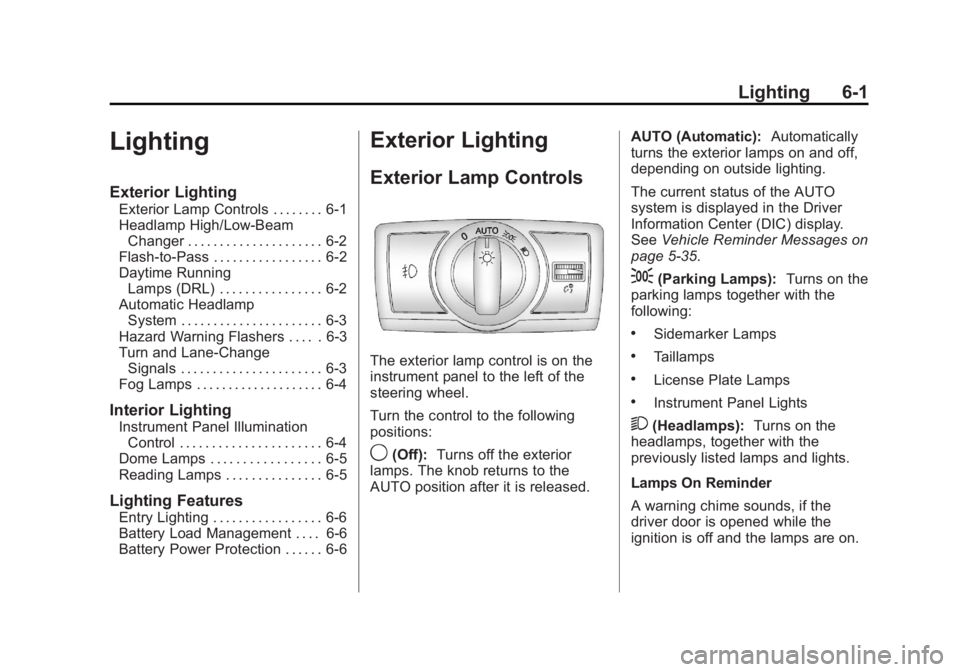
The exterior lamp control is on the
instrument panel to the left of the
steering wheel.
Turn the control to the following
positions:
9 (Off): Turns off the exterior
lamps. The knob returns to the
AUTO position after it is released. AUTO (Automatic): Automatically
turns the exterior lamps on and off,
depending on outside lighting.
The current status of the AUTO
system is displayed in the Driver
Information Center (DIC) display.
See Vehicle Reminder Messages on
page 5 ‑ 35 .
; (Parking Lamps): Turns on the
parking lamps together with the
following: .
Sidemarker Lamps .
Taillamps .
License Plate Lamps .
Instrument Panel Lights
2 (Headlamps): Turns on the
headlamps, together with the
previously listed lamps and lights.
Lamps On Reminder
A warning chime sounds, if the
driver door is opened while the
ignition is off and the lamps are on.
Page 145 of 374
Black plate (3,1)Chevrolet Captiva Sport Owner Manual - 2013 - crc - 11/12/12
Lighting 6-3
Automatic Headlamp
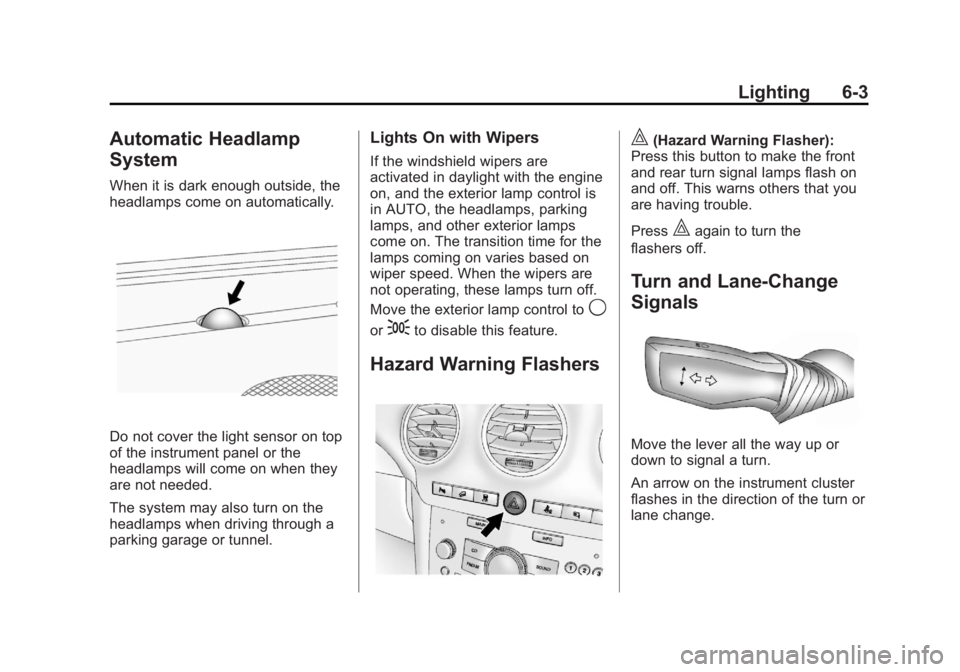
System When it is dark enough outside, the
headlamps come on automatically.
Do not cover the light sensor on top
of the instrument panel or the
headlamps will come on when they
are not needed.
The system may also turn on the
headlamps when driving through a
parking garage or tunnel. Lights On with Wipers If the windshield wipers are
activated in daylight with the engine
on, and the exterior lamp control is
in AUTO, the headlamps, parking
lamps, and other exterior lamps
come on. The transition time for the
lamps coming on varies based on
wiper speed. When the wipers are
not operating, these lamps turn off.
Move the exterior lamp control to
9or
; to disable this feature.
Hazard Warning Flashers | (Hazard Warning Flasher):
Press this button to make the front
and rear turn signal lamps flash on
and off. This warns others that you
are having trouble.
Press
| again to turn the
flashers off.
Turn and Lane-Change
Signals
Move the lever all the way up or
down to signal a turn.
An arrow on the instrument cluster
flashes in the direction of the turn or
lane change.
Page 149 of 374
Black plate (1,1)Chevrolet Captiva Sport Owner Manual - 2013 - crc - 11/12/12
Infotainment System 7-1
Infotainment
System Introduction Infotainment . . . . . . . . . . . . . . . . . . . 7-1
Theft-Deterrent Feature . . . . . . . 7-2
Overview . . . . . . . . . . . . . . . . . . . . . . 7-2
Operation . . . . . . . . . . . . . . . . . . . . . 7-3
Radio AM-FM Radio . . . . . . . . . . . . . . . . . 7-5
Satellite Radio . . . . . . . . . . . . . . . . 7-6
Radio Reception . . . . . . . . . . . . . . 7-9
Fixed Mast Antenna . . . . . . . . . 7-10
Satellite Radio Antenna . . . . . . 7-10
Audio Players CD Player . . . . . . . . . . . . . . . . . . . 7-10
MP3 . . . . . . . . . . . . . . . . . . . . . . . . . 7-15
Auxiliary Devices . . . . . . . . . . . . 7-19
Phone Bluetooth . . . . . . . . . . . . . . . . . . . . 7-23 Introduction Infotainment Read the following pages to
become familiar with the
infotainment system features.
{ WARNINGTaking your eyes off the road for
extended periods could cause a
crash resulting in injury or death
to you or others. Do not give
extended attention to infotainment
tasks while driving.
This system provides access to
many audio and non ‐ audio listings.
To minimize taking your eyes off the
road while driving, do the following
while the vehicle is parked: .
Become familiar with the
operation and controls of the
audio system. .
Set up the tone, speaker
adjustments, and preset radio
stations.
For more information, see Defensive
Driving on page 9 ‑ 3 .
Notice: Contact your dealer
before adding any equipment.
Adding audio or communication
equipment could interfere with
the operation of the engine, radio,
or other systems, and could
damage them. Follow federal
rules covering mobile radio and
telephone equipment.
The vehicle has Retained
Accessory Power (RAP). With RAP,
the infotainment system can play
even after the ignition is turned off.
See Retained Accessory Power
(RAP) on page 9 ‑ 17 for more
information.
Page 171 of 374
Black plate (23,1)Chevrolet Captiva Sport Owner Manual - 2013 - crc - 11/12/12
Infotainment System 7-23
> (Shuffle Off): Press the
softkey below
2 to turn shuffle
off. This is the default mode when a
USB storage device or iPod is first
connected.
2 (Shuffle All Songs/Shuffle
Songs): Press the softkey below
= or
C to shuffle all songs on
the USB storage device or iPod.
C (Shuffle Album): Press the
softkey below
> to shuffle all
songs in the current album on
an iPod.
= (Shuffle Folder): Press the
softkey below
> to shuffle all
songs in the current folder on a USB
storage device. Phone Bluetooth For vehicles equipped with
Bluetooth capability, the system can
interact with many cell phones,
allowing: .
Placement and receipt of calls in
a hands-free mode. .
Sharing of the cell phone ’ s
address book or contact list with
the vehicle.
To minimize driver distraction,
before driving, and with the vehicle
parked: .
Become familiar with the
features of the cell phone.
Organize the phone book and
contact lists clearly and delete
duplicate or rarely used entries.
If possible, program speed dial
or other shortcuts. .
Review the controls and
operation of the infotainment
system. .
Pair cell phone(s) to the vehicle.
The system may not work with
all cell phones. See “ Pairing ” in
this section for more information. .
If the cell phone has voice
dialing capability, learn to use
that feature to access the
address book or contact list. See
“ Voice Pass-Thru ” in this section
for more information. .
See “ Storing and Deleting Phone
Numbers ” in this section for
more information.
{ WARNING
When using a cell phone, it can
be distracting to look too long or
too often at the screen of the
phone or the infotainment
(navigation) system. Taking your
eyes off the road too long or too
often could cause a crash
resulting in injury or death. Focus
your attention on driving.
Page 191 of 374
Black plate (3,1)Chevrolet Captiva Sport Owner Manual - 2013 - crc - 11/12/12
Driving and Operating 9-3Safe driver behavior and
understanding the environment in
which you will be driving can help
avoid a rollover crash in any type of
vehicle, including utility vehicles.
Distracted Driving Distraction comes in many forms
and can take your focus from the
task of driving. Exercise good
judgment and do not let other
activities divert your attention away
from the road. Many local
governments have enacted laws
regarding driver distraction. Become
familiar with the local laws in
your area.
To avoid distracted driving, always
keep your eyes on the road, hands
on the wheel, and mind on the drive. .
Do not use a phone in
demanding driving situations.
Use a hands-free method to
place or receive necessary
phone calls. .
Watch the road. Do not read,
take notes, or look up
information on phones or other
electronic devices. .
Designate a front seat
passenger to handle potential
distractions. .
Become familiar with vehicle
features before driving, such as
programming favorite radio
stations and adjusting climate
control and seat settings.
Program all trip information into
any navigation device prior to
driving. .
Wait until the vehicle is parked
to retrieve items that have fallen
to the floor. .
Stop or park the vehicle to tend
to children. .
Keep pets in an appropriate
carrier or restraint. .
Avoid stressful conversations
while driving, whether with a
passenger or on a cell phone.{ WARNINGTaking your eyes off the road too
long or too often could cause a
crash resulting in injury or death.
Focus your attention on driving.
Refer to the Infotainment section for
more information on using that
system, including pairing and using
a cell phone.
Defensive Driving Defensive driving means “ always
expect the unexpected. ” The first
step in driving defensively is to wear
the safety belt. See Safety Belts on
page 3 ‑ 9 . .
Assume that other road users
(pedestrians, bicyclists, and
other drivers) are going to be
careless and make mistakes.
Anticipate what they might do
and be ready.
Page 192 of 374
Black plate (4,1)Chevrolet Captiva Sport Owner Manual - 2013 - crc - 11/12/12
9-4 Driving and Operating .
Allow enough following distance
between you and the driver in
front of you. .
Focus on the task of driving.
Drunk Driving Death and injury associated with
drinking and driving is a global
tragedy.
{ WARNINGDrinking and then driving is very
dangerous. Your reflexes,
perceptions, attentiveness, and
judgment can be affected by even
a small amount of alcohol. You
can have a serious — or even
fatal — collision if you drive after
drinking.
Do not drink and drive or ride with
a driver who has been drinking.
Ride home in a cab; or if you are
with a group, designate a driver
who will not drink. Control of a Vehicle Braking, steering, and accelerating
are important factors in helping to
control a vehicle while driving.
Braking Braking action involves perception
time and reaction time. Deciding to
push the brake pedal is perception
time. Actually doing it is
reaction time.
Average driver reaction time is
about three-quarters of a second. In
that time, a vehicle moving at
100 km/h (60 mph) travels 20 m
(66 ft), which could be a lot of
distance in an emergency.
Helpful braking tips to keep in mind
include: .
Keep enough distance between
you and the vehicle in front
of you. .
Avoid needless heavy braking. .
Keep pace with traffic. If the engine ever stops while the
vehicle is being driven, brake
normally but do not pump the
brakes. Doing so could make the
pedal harder to push down. If the
engine stops, there will be some
power brake assist but it will be
used when the brake is applied.
Once the power assist is used up, it
can take longer to stop and the
brake pedal will be harder to push.
Steering Hydraulic Power Steering Your vehicle has hydraulic power
steering. It may require
maintenance. See Power Steering
Fluid on page 10 ‑ 19 .
If power steering assist is lost
because the engine stops or
because of a system malfunction,
the vehicle can be steered but may
require increased effort. See your
dealer if there is a problem.
Page 194 of 374
Black plate (6,1)Chevrolet Captiva Sport Owner Manual - 2013 - crc - 11/12/12
9-6 Driving and Operating If the vehicle starts to slide, follow
these suggestions: .
Ease your foot off the
accelerator pedal and steer the
way you want the vehicle to go.
The vehicle may straighten out.
Be ready for a second skid if it
occurs. .
Slow down and adjust your
driving according to weather
conditions. Stopping distance
can be longer and vehicle
control can be affected when
traction is reduced by water,
snow, ice, gravel, or other
material on the road. Learn to
recognize warning clues — such
as enough water, ice, or packed
snow on the road to make a
mirrored surface — and slow
down when you have any doubt. .
Try to avoid sudden steering,
acceleration, or braking,
including reducing vehicle speed
by shifting to a lower gear. Any
sudden changes could cause
the tires to slide. Remember: Antilock brakes help
avoid only the braking skid.
Driving on Wet Roads Rain and wet roads can reduce
vehicle traction and affect your
ability to stop and accelerate.
Always drive slower in these types
of driving conditions and avoid
driving through large puddles and
deep ‐ standing or flowing water.
{ WARNINGWet brakes can cause crashes.
They might not work as well in a
quick stop and could cause
pulling to one side. You could
lose control of the vehicle.
After driving through a large
puddle of water or a car/vehicle
wash, lightly apply the brake
pedal until the brakes work
normally.
(Continued) WARNING (Continued) Flowing or rushing water creates
strong forces. Driving through
flowing water could cause the
vehicle to be carried away. If this
happens, you and other vehicle
occupants could drown. Do not
ignore police warnings and be
very cautious about trying to drive
through flowing water.
Hydroplaning Hydroplaning is dangerous. Water
can build up under the vehicle's
tires so they actually ride on the
water. This can happen if the road is
wet enough and you are going fast
enough. When the vehicle is
hydroplaning, it has little or no
contact with the road.
There is no hard and fast rule about
hydroplaning. The best advice is to
slow down when the road is wet.