remote control CHEVROLET CAPTIVA SPORT 2014 Owner's Guide
[x] Cancel search | Manufacturer: CHEVROLET, Model Year: 2014, Model line: CAPTIVA SPORT, Model: CHEVROLET CAPTIVA SPORT 2014Pages: 382, PDF Size: 4.12 MB
Page 183 of 382
Black plate (1,1)Chevrolet Captiva Sport Owner Manual (GMNA-Localizing-U.S./Mexico-
6014141) - 2014 - crc - 8/13/13
Climate Controls 8-1
Climate Controls
Climate Control Systems
Climate Control Systems . . . . . . 8-1
Automatic Climate ControlSystem . . . . . . . . . . . . . . . . . . . . . . 8-5
Air Vents
Air Vents . . . . . . . . . . . . . . . . . . . . . . 8-9
Maintenance
Passenger Compartment AirFilter . . . . . . . . . . . . . . . . . . . . . . . . . 8-9
Climate Control Systems
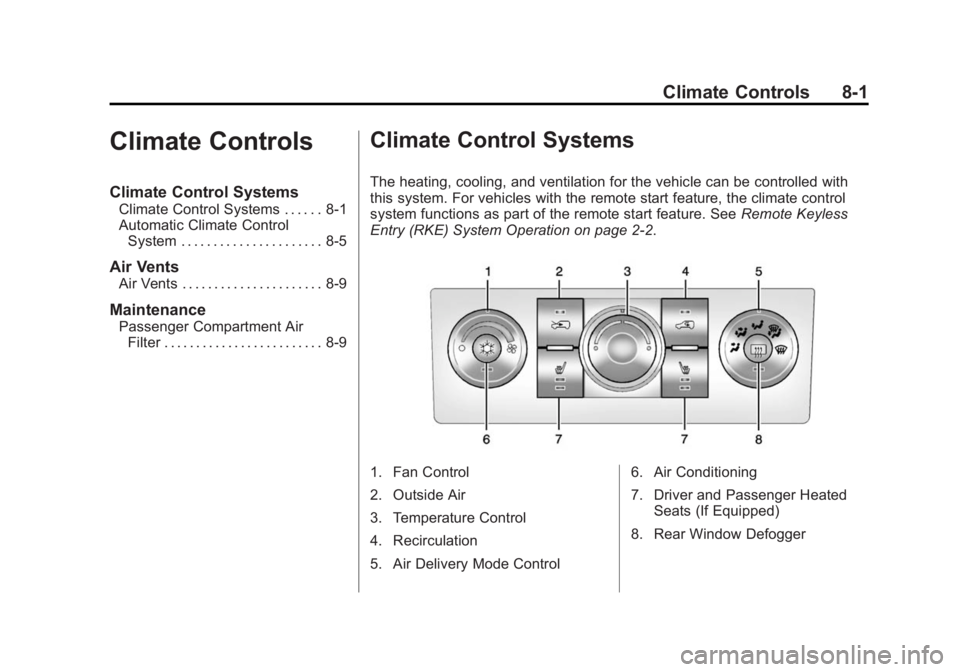
The heating, cooling, and ventilation for the vehicle can be controlled with
this system. For vehicles with the remote start feature, the climate control
system functions as part of the remote start feature. See Remote Keyless
Entry (RKE) System Operation on page 2-2.
1. Fan Control
2. Outside Air
3. Temperature Control
4. Recirculation
5. Air Delivery Mode Control 6. Air Conditioning
7. Driver and Passenger Heated
Seats (If Equipped)
8. Rear Window Defogger
Page 186 of 382
Black plate (4,1)Chevrolet Captiva Sport Owner Manual (GMNA-Localizing-U.S./Mexico-
6014141) - 2014 - crc - 8/13/13
8-4 Climate Controls
If turned on again, the defogger only
runs for approximately five minutes
before turning off again. At higher
vehicle speeds, the defogger may
stay on continuously. The defogger
can also be turned off by turning off
the engine.
{Caution
Using a razor blade or sharp
object on the inside rear window
can damage the antenna or
defogger. Repairs would not be
covered by the vehicle warranty.
Do not stick anything to the rear
window.
LorM(Heated Front Seats, If
Equipped): Press to heat the driver
or passenger seat cushion and
seatback. To turn off, press the
button until the indicator lights turn
off. See Heated Front Seats on
page 3-6. Remote Start Climate Control
Operation
For vehicles with the remote start
feature, when it is activated, the
climate control system heats and
cools the inside of the vehicle using
the modes that were set before the
vehicle was turned off.
Page 187 of 382
Black plate (5,1)Chevrolet Captiva Sport Owner Manual (GMNA-Localizing-U.S./Mexico-
6014141) - 2014 - crc - 8/13/13
Climate Controls 8-5
Automatic Climate Control System
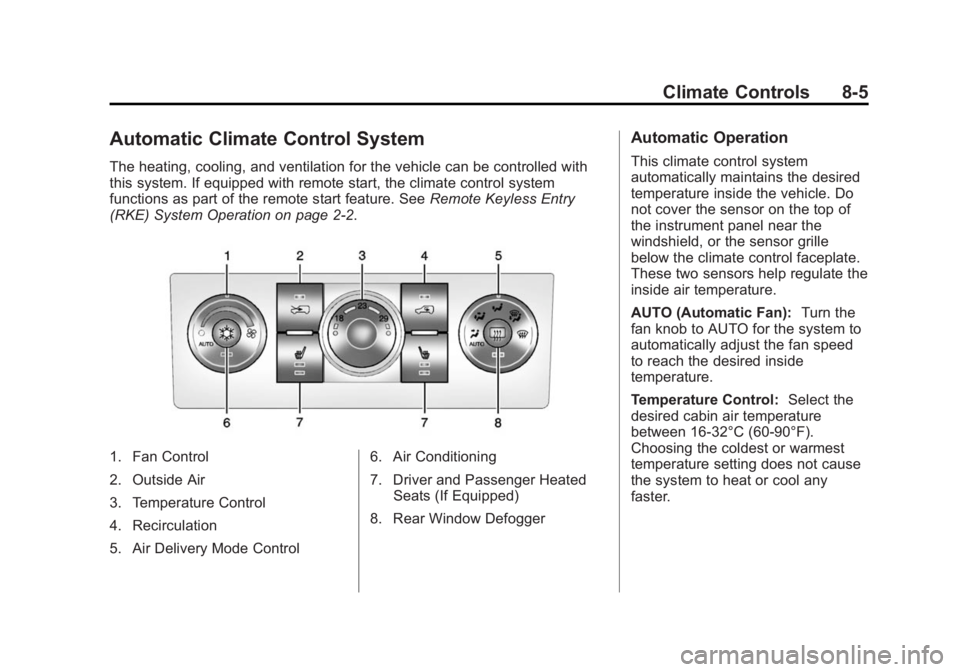
The heating, cooling, and ventilation for the vehicle can be controlled with
this system. If equipped with remote start, the climate control system
functions as part of the remote start feature. SeeRemote Keyless Entry
(RKE) System Operation on page 2-2.
1. Fan Control
2. Outside Air
3. Temperature Control
4. Recirculation
5. Air Delivery Mode Control 6. Air Conditioning
7. Driver and Passenger Heated
Seats (If Equipped)
8. Rear Window Defogger
Automatic Operation
This climate control system
automatically maintains the desired
temperature inside the vehicle. Do
not cover the sensor on the top of
the instrument panel near the
windshield, or the sensor grille
below the climate control faceplate.
These two sensors help regulate the
inside air temperature.
AUTO (Automatic Fan): Turn the
fan knob to AUTO for the system to
automatically adjust the fan speed
to reach the desired inside
temperature.
Temperature Control: Select the
desired cabin air temperature
between 16-32°C (60-90°F).
Choosing the coldest or warmest
temperature setting does not cause
the system to heat or cool any
faster.
Page 190 of 382
Black plate (8,1)Chevrolet Captiva Sport Owner Manual (GMNA-Localizing-U.S./Mexico-
6014141) - 2014 - crc - 8/13/13
8-8 Climate Controls
prevent window fogging and
moisture building up inside the
vehicle.
Rear Window Defogger
The rear window defogger uses a
warming grid to remove fog from the
rear window.
The rear window defogger only
works when the ignition is in
ON/RUN.
1(Rear Window Defogger):
Press to turn the rear window
defogger on or off. An indicator light
on the button comes on to show that
it is activated.
The rear window defogger stays on
for approximately 10 minutes after
the button is pressed, unless the
ignition is turned to ACC/
ACCESSORY or LOCK/OFF.
If turned on again, the defogger only
runs for approximately five minutes
before turning off. At higher vehicle
speeds, the defogger may stay on continuously. The defogger can also
be turned off by turning off the
engine.{Caution
Using a razor blade or sharp
object on the inside rear window
can damage the antenna or
defogger. Repairs would not be
covered by the vehicle warranty.
Do not stick anything to the rear
window.
LorM(Heated Front Seats, If
Equipped): Press to heat the driver
or passenger seat cushion and
seatback. To turn off, press the
button until the indicator lights turn
off. See Heated Front Seats on
page 3-6. Remote Start Climate Control
Operation
If equipped with the remote start
feature, when it is activated, the
climate control system heats and
cools the inside of the vehicle using
the modes that were set before the
vehicle was turned off.
Page 275 of 382
Black plate (35,1)Chevrolet Captiva Sport Owner Manual (GMNA-Localizing-U.S./Mexico-
6014141) - 2014 - crc - 8/13/13
Vehicle Care 10-35
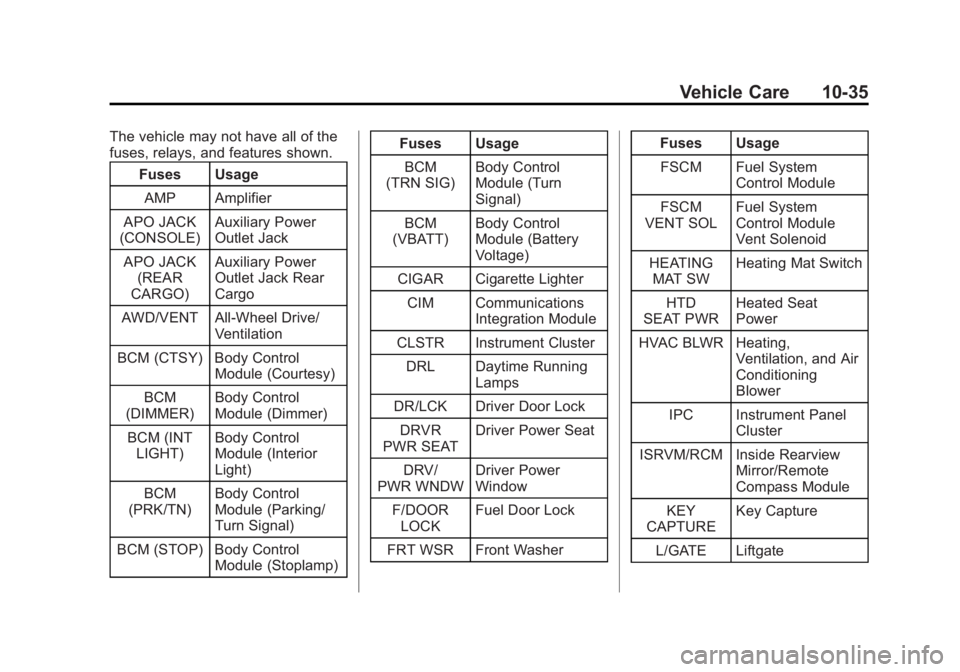
The vehicle may not have all of the
fuses, relays, and features shown.Fuses Usage
AMP Amplifier
APO JACK
(CONSOLE) Auxiliary Power
Outlet Jack
APO JACK (REAR
CARGO) Auxiliary Power
Outlet Jack Rear
Cargo
AWD/VENT All-Wheel Drive/ Ventilation
BCM (CTSY) Body Control Module (Courtesy)
BCM
(DIMMER) Body Control
Module (Dimmer)
BCM (INT LIGHT) Body Control
Module (Interior
Light)
BCM
(PRK/TN) Body Control
Module (Parking/
Turn Signal)
BCM (STOP) Body Control Module (Stoplamp) Fuses Usage
BCM
(TRN SIG) Body Control
Module (Turn
Signal)
BCM
(VBATT) Body Control
Module (Battery
Voltage)
CIGAR Cigarette Lighter CIM Communications Integration Module
CLSTR Instrument Cluster DRL Daytime Running Lamps
DR/LCK Driver Door Lock
DRVR
PWR SEAT Driver Power Seat
DRV/
PWR WNDW Driver Power
Window
F/DOOR LOCK Fuel Door Lock
FRT WSR Front Washer Fuses Usage
FSCM Fuel System Control Module
FSCM
VENT SOL Fuel System
Control Module
Vent Solenoid
HEATING MAT SW Heating Mat Switch
HTD
SEAT PWR Heated Seat
Power
HVAC BLWR Heating, Ventilation, and Air
Conditioning
Blower
IPC Instrument Panel Cluster
ISRVM/RCM Inside Rearview Mirror/Remote
Compass Module
KEY
CAPTURE Key Capture
L/GATE Liftgate
Page 310 of 382
Black plate (70,1)Chevrolet Captiva Sport Owner Manual (GMNA-Localizing-U.S./Mexico-
6014141) - 2014 - crc - 8/13/13
10-70 Vehicle Care
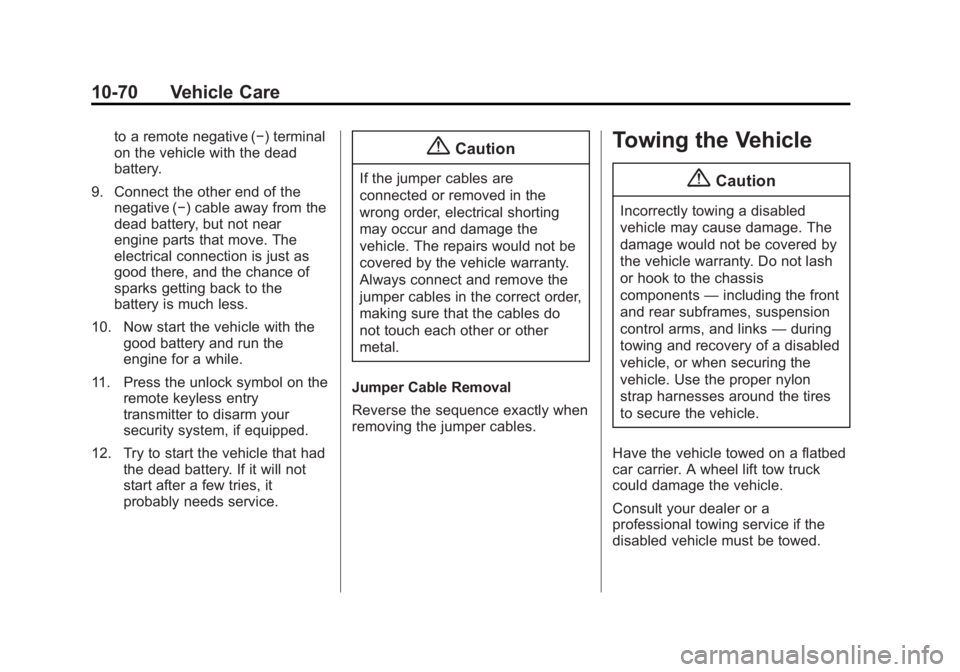
to a remote negative (−) terminal
on the vehicle with the dead
battery.
9. Connect the other end of the negative (−) cable away from the
dead battery, but not near
engine parts that move. The
electrical connection is just as
good there, and the chance of
sparks getting back to the
battery is much less.
10. Now start the vehicle with the good battery and run the
engine for a while.
11. Press the unlock symbol on the remote keyless entry
transmitter to disarm your
security system, if equipped.
12. Try to start the vehicle that had the dead battery. If it will not
start after a few tries, it
probably needs service.{Caution
If the jumper cables are
connected or removed in the
wrong order, electrical shorting
may occur and damage the
vehicle. The repairs would not be
covered by the vehicle warranty.
Always connect and remove the
jumper cables in the correct order,
making sure that the cables do
not touch each other or other
metal.
Jumper Cable Removal
Reverse the sequence exactly when
removing the jumper cables.
Towing the Vehicle
{Caution
Incorrectly towing a disabled
vehicle may cause damage. The
damage would not be covered by
the vehicle warranty. Do not lash
or hook to the chassis
components —including the front
and rear subframes, suspension
control arms, and links —during
towing and recovery of a disabled
vehicle, or when securing the
vehicle. Use the proper nylon
strap harnesses around the tires
to secure the vehicle.
Have the vehicle towed on a flatbed
car carrier. A wheel lift tow truck
could damage the vehicle.
Consult your dealer or a
professional towing service if the
disabled vehicle must be towed.
Page 363 of 382
Black plate (3,1)Chevrolet Captiva Sport Owner Manual (GMNA-Localizing-U.S./Mexico-
6014141) - 2014 - crc - 8/13/13
OnStar 14-3
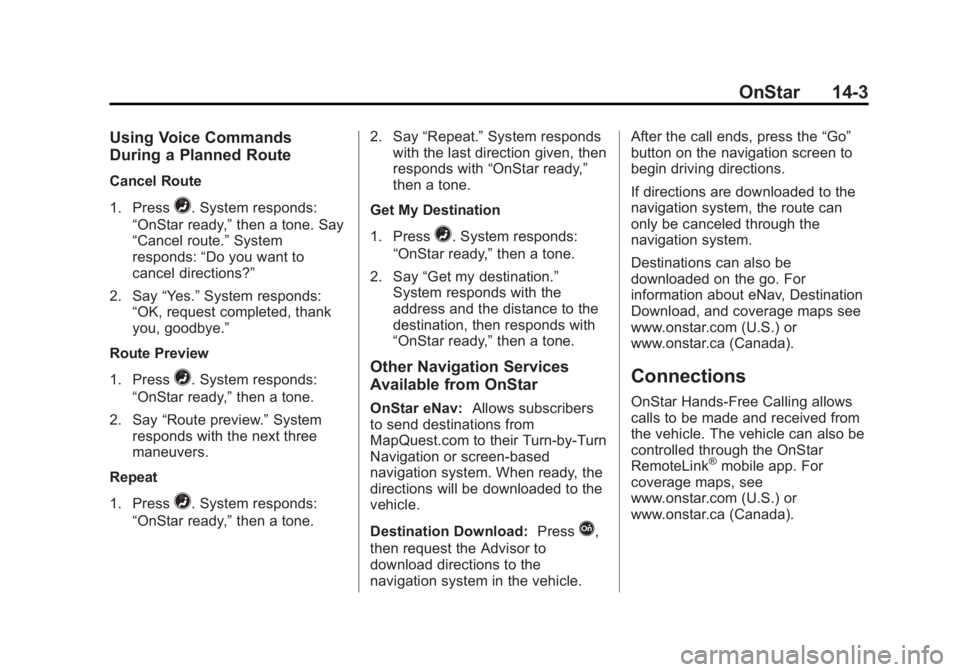
Using Voice Commands
During a Planned Route
Cancel Route
1. Press
=. System responds:
“OnStar ready,” then a tone. Say
“Cancel route.” System
responds: “Do you want to
cancel directions?”
2. Say “Yes.”System responds:
“OK, request completed, thank
you, goodbye.”
Route Preview
1. Press
=. System responds:
“OnStar ready,” then a tone.
2. Say “Route preview.” System
responds with the next three
maneuvers.
Repeat
1. Press
=. System responds:
“OnStar ready,” then a tone. 2. Say
“Repeat.” System responds
with the last direction given, then
responds with “OnStar ready,”
then a tone.
Get My Destination
1. Press
=. System responds:
“OnStar ready,” then a tone.
2. Say “Get my destination.”
System responds with the
address and the distance to the
destination, then responds with
“OnStar ready,” then a tone.
Other Navigation Services
Available from OnStar
OnStar eNav:Allows subscribers
to send destinations from
MapQuest.com to their Turn-by-Turn
Navigation or screen-based
navigation system. When ready, the
directions will be downloaded to the
vehicle.
Destination Download: Press
Q,
then request the Advisor to
download directions to the
navigation system in the vehicle. After the call ends, press the
“Go”
button on the navigation screen to
begin driving directions.
If directions are downloaded to the
navigation system, the route can
only be canceled through the
navigation system.
Destinations can also be
downloaded on the go. For
information about eNav, Destination
Download, and coverage maps see
www.onstar.com (U.S.) or
www.onstar.ca (Canada).
Connections
OnStar Hands-Free Calling allows
calls to be made and received from
the vehicle. The vehicle can also be
controlled through the OnStar
RemoteLink
®mobile app. For
coverage maps, see
www.onstar.com (U.S.) or
www.onstar.ca (Canada).
Page 366 of 382
Black plate (6,1)Chevrolet Captiva Sport Owner Manual (GMNA-Localizing-U.S./Mexico-
6014141) - 2014 - crc - 8/13/13
14-6 OnStar
to function properly. These systems
may not operate if the battery is
discharged or disconnected.
OnStar service cannot work unless
your vehicle is in a place where
OnStar has an agreement with a
wireless service provider for service
in that area, and the wireless
service provider has coverage,
network capacity, reception, and
technology compatible with OnStar
service. Service involving location
information about the vehicle cannot
work unless GPS signals are
available, unobstructed, and
compatible with the OnStar
hardware. OnStar service may not
work if the OnStar equipment is not
properly installed or it has not been
properly maintained. If equipment or
software is added, connected,
or modified, OnStar service may not
work. Other problems beyond the
control of OnStar may prevent
service such as hills, tall buildings,
tunnels, weather, electrical system
design and architecture of thevehicle, damage to the vehicle in a
crash, or wireless phone network
congestion or jamming.
See
Radio Frequency Statement on
page 13-15.
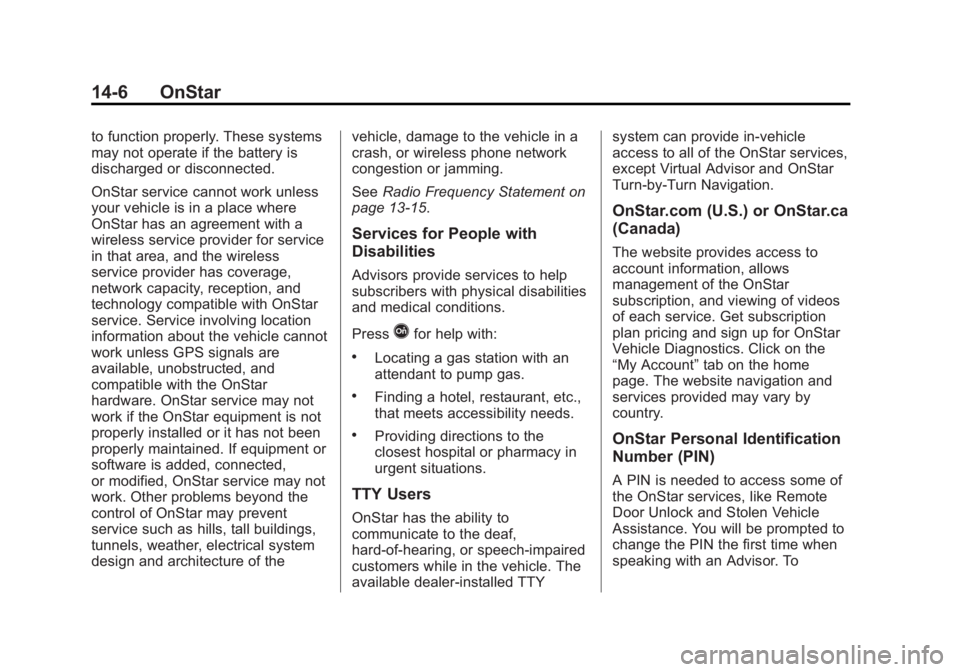
Services for People with
Disabilities
Advisors provide services to help
subscribers with physical disabilities
and medical conditions.
Press
Qfor help with:
.Locating a gas station with an
attendant to pump gas.
.Finding a hotel, restaurant, etc.,
that meets accessibility needs.
.Providing directions to the
closest hospital or pharmacy in
urgent situations.
TTY Users
OnStar has the ability to
communicate to the deaf,
hard-of-hearing, or speech-impaired
customers while in the vehicle. The
available dealer-installed TTY system can provide in-vehicle
access to all of the OnStar services,
except Virtual Advisor and OnStar
Turn-by-Turn Navigation.
OnStar.com (U.S.) or OnStar.ca
(Canada)
The website provides access to
account information, allows
management of the OnStar
subscription, and viewing of videos
of each service. Get subscription
plan pricing and sign up for OnStar
Vehicle Diagnostics. Click on the
“My Account”
tab on the home
page. The website navigation and
services provided may vary by
country.
OnStar Personal Identification
Number (PIN)
A PIN is needed to access some of
the OnStar services, like Remote
Door Unlock and Stolen Vehicle
Assistance. You will be prompted to
change the PIN the first time when
speaking with an Advisor. To
Page 376 of 382
Black plate (6,1)Chevrolet Captiva Sport Owner Manual (GMNA-Localizing-U.S./Mexico-
6014141) - 2014 - crc - 8/13/13
i-6 INDEX
I
Ignition Positions . . . . . . . . . . . . . . 9-15
Ignition Transmission LockCheck . . . . . . . . . . . . . . . . . . . . . . . 10-25
Immobilizer . . . . . . . . . . . . . . . . . . . . 2-10
Infants and Young Children, Restraints . . . . . . . . . . . . . . . . . . . . 3-32
Infotainment . . . . . . . . . . . . . . . . . . . . 7-1
Instrument Cluster . . . . . . . . . . . . . . 5-9
Instrument Panel Storage Area . . . . . . . . . . . . . . . . . . 4-1
Instrument Panel Overview . . . . . 1-2
Interior Rearview Mirrors . . . . . . . 2-13
Introduction . . . . . . . . . . . . . . . . . . . . . . . iii
J
Jump Starting . . . . . . . . . . . . . . . . . 10-66
K
Key and Lock Messages . . . . . . . 5-32
Keyless Entry Remote (RKE) System . . . . . . . . 2-2
Keys . . . . . . . . . . . . . . . . . . . . . . . . . . . . 2-1
L
Labeling, Tire Sidewall . . . . . . . . 10-39
Lamps Daytime Running (DRL) . . . . . . . 6-2
Dome . . . . . . . . . . . . . . . . . . . . . . . . . . 6-5
Exterior Controls . . . . . . . . . . . . . . . 6-1
Front Turn Signal andParking Lamps . . . . . . . . . . . . 10-28
License Plate . . . . . . . . . . . . . . . 10-29
Malfunction Indicator . . . . . . . . . 5-14
Messages . . . . . . . . . . . . . . . . . . . . 5-32
Reading . . . . . . . . . . . . . . . . . . . . . . . 6-5
Lap-Shoulder Belt . . . . . . . . . . . . . 3-12
LATCH System Replacing Parts after aCrash . . . . . . . . . . . . . . . . . . . . . . . 3-44
LATCH, Lower Anchors and Tethers for Children . . . . . . . . . . 3-38
Liftgate Carbon Monoxide . . . . . . . . . . . . . . 2-8
Lighting Entry . . . . . . . . . . . . . . . . . . . . . . . . . . 6-6
Illumination Control . . . . . . . . . . . . 6-4 Lights
Airbag Readiness . . . . . . . . . . . . . 5-12
All-Wheel Drive . . . . . . . . . . . . . . . 5-19
Antilock Brake System
(ABS) Warning . . . . . . . . . . . . . . 5-18
Brake System Warning . . . . . . . 5-16
Charging System . . . . . . . . . . . . . 5-13
Cruise Control . . . . . . . . . . . . . . . . 5-23
Door Ajar . . . . . . . . . . . . . . . . . . . . . 5-23
Electric Parking Brake . . . . . . . . 5-17
Engine Coolant Temperature Warning . . . . . . . 5-20
Flash-to-Pass . . . . . . . . . . . . . . . . . . 6-2
Front Fog Lamp . . . . . . . . . . . . . . 5-22
Fuel Economy . . . . . . . . . . . . . . . . 5-21
Gate Ajar . . . . . . . . . . . . . . . . . . . . . 5-23
High-Beam On . . . . . . . . . . . . . . . . 5-22
High/Low Beam Changer . . . . . . 6-2
Low Fuel Warning . . . . . . . . . . . . 5-21
Low Washer Fluid Warning . . . 5-23
Reduced Engine Power . . . . . . 5-22
Safety Belt Reminders . . . . . . . . 5-11
Security . . . . . . . . . . . . . . . . . . . . . . 5-21
Service Vehicle Soon . . . . . . . . . 5-16
StabiliTrak
®Indicator . . . . . . . . . 5-19
Page 379 of 382
Black plate (9,1)Chevrolet Captiva Sport Owner Manual (GMNA-Localizing-U.S./Mexico-
6014141) - 2014 - crc - 8/13/13
INDEX i-9
R
Radio FrequencyIdentification (RFID) . . . . . . . . 13-15
Statement . . . . . . . . . . . . . . . . . . 13-15
Radios AM-FM Radio . . . . . . . . . . . . . . . . . . 7-5
Reception . . . . . . . . . . . . . . . . . . . . 7-10
Satellite . . . . . . . . . . . . . . . . . . . . . . . . 7-6
Reading Lamps . . . . . . . . . . . . . . . . . 6-5
Rear Seats . . . . . . . . . . . . . . . . . . . . . 3-8
Rear Vision Camera (RVC) . . . . 9-34
Rear Window Washer/Wiper . . . . 5-4
Rearview Mirrors . . . . . . . . . . . . . . 2-13 Automatic Dimming . . . . . . . . . . . 2-13
Reclining Seatbacks . . . . . . . . . . . . 3-5
Recommended Fuel . . . . . . . . . . . . . . . . . . . . . . . . . . 9-36
Recommended Fluids and Lubricants . . . . . . . . . . . . . . . . . . . 11-12
Records
Maintenance . . . . . . . . . . . . . . . . .11-15
Recreational Vehicle Towing . . . . . . . . . . . . . . . . . . . . . . 10-71
Reduced Engine Power Light . . . . . . . . . . . . . . . . . . . . . . . . . 5-22 Reimbursement Program,
GM Mobility . . . . . . . . . . . . . . . . . . 13-5
Remote Keyless Entry (RKE) System . . . . . . . . . . . . . . . . . . . . . . . . 2-2
Remote Vehicle Start . . . . . . . . . . . 2-4
Replacement Bulbs . . . . . . . . . . . 10-30
Replacement Parts Airbags . . . . . . . . . . . . . . . . . . . . . . . 3-30
Maintenance . . . . . . . . . . . . . . . . .11-13
Replacing Airbag System . . . . . . 3-30
Replacing LATCH System Parts after a Crash . . . . . . . . . . . 3-44
Replacing Safety Belt System Parts after a Crash . . . 3-17
Reporting Safety Defects Canadian Government . . . . . . 13-13
General Motors . . . . . . . . . . . . . 13-13
U.S. Government . . . . . . . . . . . 13-12
Restraints Where to Put . . . . . . . . . . . . . . . . . 3-36
Retained Accessory
Power (RAP) . . . . . . . . . . . . . . . . . 9-18
Ride Control Systems Messages . . . . . . . . . . . . . . . . . . . . 5-33
Roads
Driving, Wet . . . . . . . . . . . . . . . . . . . 9-6 Roadside Assistance
Program . . . . . . . . . . . . . . . . . . . . . . 13-5
Roof Sunroof . . . . . . . . . . . . . . . . . . . . . . . 2-14
Roof Rack System . . . . . . . . . . . . . . 4-3
Rotation, Tires . . . . . . . . . . . . . . . . 10-50
Routing, Engine Drive Belt . . . . . 12-4
Running the Vehicle While Parked . . . . . . . . . . . . . . . . . . . . . . . 9-21
S
Safety Belts . . . . . . . . . . . . . . . . . . . . 3-9Care . . . . . . . . . . . . . . . . . . . . . . . . . . 3-16
Extender . . . . . . . . . . . . . . . . . . . . . . 3-16
How to Wear Safety Belts
Properly . . . . . . . . . . . . . . . . . . . . . 3-11
Lap-Shoulder Belt . . . . . . . . . . . . 3-12
Reminders . . . . . . . . . . . . . . . . . . . . 5-11
Replacing after a Crash . . . . . . 3-17
Use During Pregnancy . . . . . . . . 3-15
Safety Defects Reporting Canadian Government . . . . . . 13-13
General Motors . . . . . . . . . . . . . 13-13
U.S. Government . . . . . . . . . . . 13-12
Safety Locks . . . . . . . . . . . . . . . . . . . . 2-7
Safety System Check . . . . . . . . . . 3-16