transmission CHEVROLET CAPTIVA SPORT 2015 Owner's Manual
[x] Cancel search | Manufacturer: CHEVROLET, Model Year: 2015, Model line: CAPTIVA SPORT, Model: CHEVROLET CAPTIVA SPORT 2015Pages: 373, PDF Size: 4.11 MB
Page 2 of 373
Black plate (1,1)Chevrolet Captiva Sport Owner Manual (GMNA-Localizing-U.S./Mexico-
7576028) - 2015 - First Edition - 3/21/14
2015 Chevrolet Captiva Sport Owner ManualM
In Brief. . . . . . . . . . . . . . . . . . . . . . . . 1-1
Instrument Panel . . . . . . . . . . . . . . 1-2
Initial Drive Information . . . . . . . . 1-4
Vehicle Features . . . . . . . . . . . . . 1-16
Performance and Maintenance . . . . . . . . . . . . . . . . 1-20
Keys, Doors, and Windows . . . . . . . . . . . . . . . . . . . . 2-1
Keys and Locks . . . . . . . . . . . . . . . 2-1
Doors . . . . . . . . . . . . . . . . . . . . . . . . . . 2-8
Vehicle Security . . . . . . . . . . . . . . . . 2-9
Exterior Mirrors . . . . . . . . . . . . . . . 2-11
Interior Mirrors . . . . . . . . . . . . . . . . 2-12
Windows . . . . . . . . . . . . . . . . . . . . . 2-13
Roof . . . . . . . . . . . . . . . . . . . . . . . . . . 2-14
Seats and Restraints . . . . . . . . . 3-1
Head Restraints . . . . . . . . . . . . . . . 3-2
Front Seats . . . . . . . . . . . . . . . . . . . . 3-3
Rear Seats . . . . . . . . . . . . . . . . . . . . 3-8
Safety Belts . . . . . . . . . . . . . . . . . . . . 3-9
Airbag System . . . . . . . . . . . . . . . . 3-17
Child Restraints . . . . . . . . . . . . . . 3-30 Storage
. . . . . . . . . . . . . . . . . . . . . . . 4-1
Storage Compartments . . . . . . . . 4-1
Additional Storage Features . . . 4-2
Roof Rack System . . . . . . . . . . . . . 4-3
Instruments and Controls . . . . 5-1
Controls . . . . . . . . . . . . . . . . . . . . . . . 5-2
Warning Lights, Gauges, and
Indicators . . . . . . . . . . . . . . . . . . . . 5-8
Information Displays . . . . . . . . . . 5-23
Vehicle Messages . . . . . . . . . . . . 5-28
Vehicle Personalization . . . . . . . 5-35
Universal Remote System . . . . 5-41
Lighting . . . . . . . . . . . . . . . . . . . . . . . 6-1
Exterior Lighting . . . . . . . . . . . . . . . 6-1
Interior Lighting . . . . . . . . . . . . . . . . 6-4
Lighting Features . . . . . . . . . . . . . . 6-6
Infotainment System . . . . . . . . . 7-1
Introduction . . . . . . . . . . . . . . . . . . . . 7-1
Radio . . . . . . . . . . . . . . . . . . . . . . . . . . 7-5
Audio Players . . . . . . . . . . . . . . . . . . 7-9
Phone . . . . . . . . . . . . . . . . . . . . . . . . 7-19 Climate Controls
. . . . . . . . . . . . . 8-1
Climate Control Systems . . . . . . 8-1
Air Vents . . . . . . . . . . . . . . . . . . . . . . . 8-8
Maintenance . . . . . . . . . . . . . . . . . . . 8-9
Driving and Operating . . . . . . . . 9-1
Driving Information . . . . . . . . . . . . . 9-2
Starting and Operating . . . . . . . 9-14
Engine Exhaust . . . . . . . . . . . . . . 9-20
Automatic Transmission . . . . . . 9-21
Drive Systems . . . . . . . . . . . . . . . . 9-24
Brakes . . . . . . . . . . . . . . . . . . . . . . . 9-25
Ride Control Systems . . . . . . . . 9-28
Cruise Control . . . . . . . . . . . . . . . . 9-30
Driver Assistance Systems . . . 9-32
Fuel . . . . . . . . . . . . . . . . . . . . . . . . . . 9-36
Trailer Towing . . . . . . . . . . . . . . . . 9-40
Conversions and Add-Ons . . . 9-47
Vehicle Care . . . . . . . . . . . . . . . . . 10-1
General Information . . . . . . . . . . 10-2
Vehicle Checks . . . . . . . . . . . . . . . 10-3
Headlamp Aiming . . . . . . . . . . . 10-27
Bulb Replacement . . . . . . . . . . 10-27
Electrical System . . . . . . . . . . . . 10-30
Wheels and Tires . . . . . . . . . . . 10-37
Page 6 of 373
Black plate (1,1)Chevrolet Captiva Sport Owner Manual (GMNA-Localizing-U.S./Mexico-
7576028) - 2015 - First Edition - 3/21/14
In Brief 1-1
In Brief
Instrument Panel
Instrument Panel . . . . . . . . . . . . . . 1-2
Initial Drive Information
Initial Drive Information . . . . . . . . 1-4
Remote Keyless Entry (RKE)System . . . . . . . . . . . . . . . . . . . . . . 1-4
Remote Vehicle Start . . . . . . . . . 1-4
Door Locks . . . . . . . . . . . . . . . . . . . 1-5
Liftgate . . . . . . . . . . . . . . . . . . . . . . . . 1-6
Windows . . . . . . . . . . . . . . . . . . . . . . 1-6
Seat Adjustment . . . . . . . . . . . . . . 1-7
Second Row Seats . . . . . . . . . . . 1-9
Heated Seats . . . . . . . . . . . . . . . . . 1-9
Head Restraint Adjustment . . . . . . . . . . . . . . . . . 1-10 Safety Belts . . . . . . . . . . . . . . . . . . 1-10
Passenger Sensing System
(United States) . . . . . . . . . . . . . 1-10
Mirror Adjustment . . . . . . . . . . . . 1-11
Steering Wheel Adjustment . . . . . . . . . . . . . . . . . 1-12
Interior Lighting . . . . . . . . . . . . . . 1-12
Exterior Lighting . . . . . . . . . . . . . 1-13
Windshield Wiper/Washer . . . . 1-13
Climate Controls . . . . . . . . . . . . . 1-14
Transmission . . . . . . . . . . . . . . . . 1-15
Vehicle Features
Radio(s) . . . . . . . . . . . . . . . . . . . . . 1-16
Satellite Radio . . . . . . . . . . . . . . . 1-17
Portable Audio Devices . . . . . . 1-17
Bluetooth
®. . . . . . . . . . . . . . . . . . . 1-17
Steering Wheel Controls . . . . . 1-17
Cruise Control . . . . . . . . . . . . . . . 1-18 Driver Information
Center (DIC) . . . . . . . . . . . . . . . 1-18
Rear Vision Camera (RVC) . . . . . . . . . . . . . 1-19
Parking Assist . . . . . . . . . . . . . . . 1-19
Power Outlets . . . . . . . . . . . . . . . 1-19
Universal Remote System . . . 1-19
Performance and Maintenance
Traction Control/Electronic
Stability Control . . . . . . . . . . . . 1-20
Tire Pressure Monitor . . . . . . . . 1-20
Engine Oil Life System . . . . . . 1-21
E85 or FlexFuel . . . . . . . . . . . . . . 1-21
Driving for Better Fuel Economy . . . . . . . . . . . . . . . . . . . 1-21
Roadside Assistance
Program . . . . . . . . . . . . . . . . . . . . 1-22
OnStar
®. . . . . . . . . . . . . . . . . . . . . 1-22
Page 8 of 373
Black plate (3,1)Chevrolet Captiva Sport Owner Manual (GMNA-Localizing-U.S./Mexico-
7576028) - 2015 - First Edition - 3/21/14
In Brief 1-3
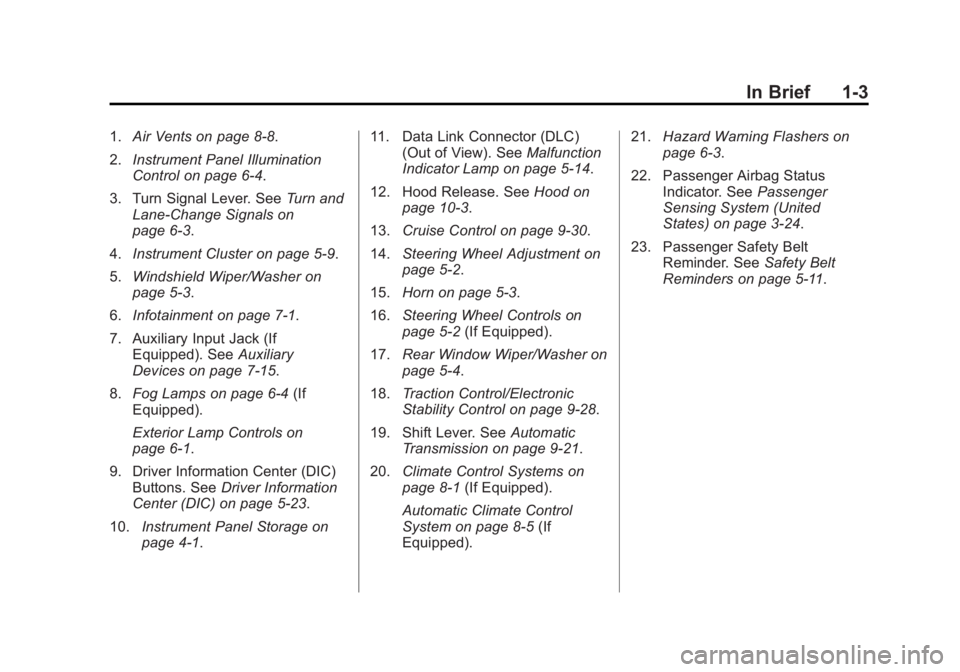
1.Air Vents on page 8-8.
2. Instrument Panel Illumination
Control on page 6-4.
3. Turn Signal Lever. See Turn and
Lane-Change Signals on
page 6-3.
4. Instrument Cluster on page 5-9.
5. Windshield Wiper/Washer on
page 5-3.
6. Infotainment on page 7-1.
7. Auxiliary Input Jack (If Equipped). See Auxiliary
Devices on page 7-15.
8. Fog Lamps on page 6-4 (If
Equipped).
Exterior Lamp Controls on
page 6-1.
9. Driver Information Center (DIC) Buttons. See Driver Information
Center (DIC) on page 5-23.
10. Instrument Panel Storage on
page 4-1. 11. Data Link Connector (DLC)
(Out of View). See Malfunction
Indicator Lamp on page 5-14.
12. Hood Release. See Hood on
page 10-3.
13. Cruise Control on page 9-30.
14. Steering Wheel Adjustment on
page 5-2.
15. Horn on page 5-3.
16. Steering Wheel Controls on
page 5-2 (If Equipped).
17. Rear Window Wiper/Washer on
page 5-4.
18. Traction Control/Electronic
Stability Control on page 9-28.
19. Shift Lever. See Automatic
Transmission on page 9-21.
20. Climate Control Systems on
page 8-1 (If Equipped).
Automatic Climate Control
System on page 8-5 (If
Equipped). 21.
Hazard Warning Flashers on
page 6-3.
22. Passenger Airbag Status Indicator. See Passenger
Sensing System (United
States) on page 3-24.
23. Passenger Safety Belt Reminder. See Safety Belt
Reminders on page 5-11.
Page 20 of 373
Black plate (15,1)Chevrolet Captiva Sport Owner Manual (GMNA-Localizing-U.S./Mexico-
7576028) - 2015 - First Edition - 3/21/14
In Brief 1-15
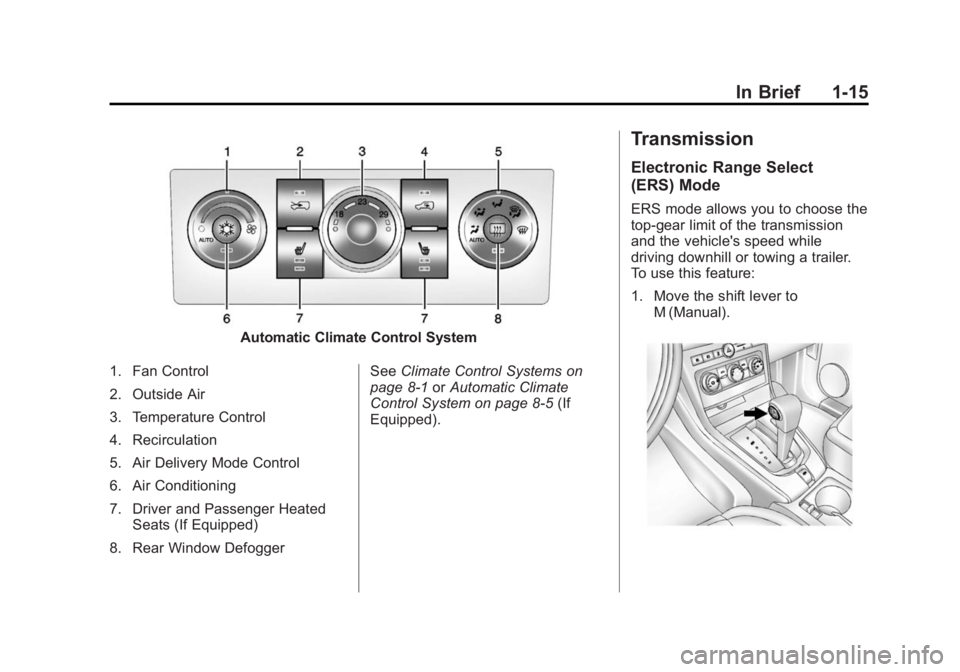
Automatic Climate Control System
1. Fan Control
2. Outside Air
3. Temperature Control
4. Recirculation
5. Air Delivery Mode Control
6. Air Conditioning
7. Driver and Passenger Heated Seats (If Equipped)
8. Rear Window Defogger See
Climate Control Systems on
page 8-1 orAutomatic Climate
Control System on page 8-5 (If
Equipped).
Transmission
Electronic Range Select
(ERS) Mode
ERS mode allows you to choose the
top-gear limit of the transmission
and the vehicle's speed while
driving downhill or towing a trailer.
To use this feature:
1. Move the shift lever to M (Manual).
Page 99 of 373
Black plate (2,1)Chevrolet Captiva Sport Owner Manual (GMNA-Localizing-U.S./Mexico-
7576028) - 2015 - First Edition - 3/21/14
5-2 Instruments and Controls
Tire Messages . . . . . . . . . . . . . . . 5-33
Transmission Messages . . . . . 5-34
Vehicle ReminderMessages . . . . . . . . . . . . . . . . . . 5-35
Vehicle Personalization
Vehicle Personalization . . . . . . 5-35
Universal Remote System
Universal Remote System . . . 5-41
Universal Remote SystemProgramming . . . . . . . . . . . . . . . 5-41
Universal Remote System Operation . . . . . . . . . . . . . . . . . . 5-44
Controls
Steering Wheel
Adjustment
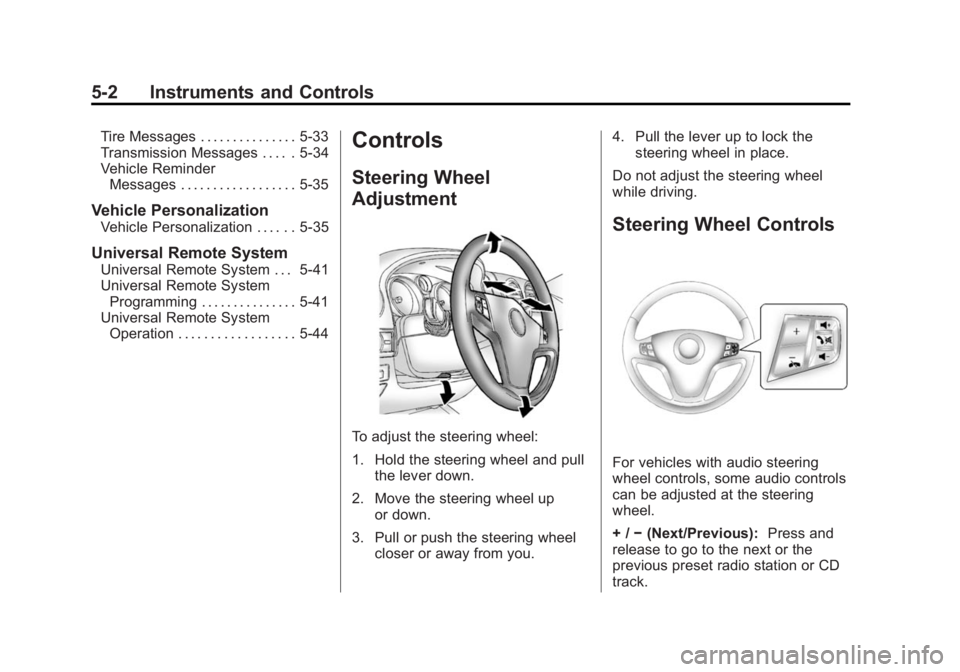
To adjust the steering wheel:
1. Hold the steering wheel and pull
the lever down.
2. Move the steering wheel up or down.
3. Pull or push the steering wheel closer or away from you. 4. Pull the lever up to lock the
steering wheel in place.
Do not adjust the steering wheel
while driving.
Steering Wheel Controls
For vehicles with audio steering
wheel controls, some audio controls
can be adjusted at the steering
wheel.
+ / −(Next/Previous): Press and
release to go to the next or the
previous preset radio station or CD
track.
Page 111 of 373
Black plate (14,1)Chevrolet Captiva Sport Owner Manual (GMNA-Localizing-U.S./Mexico-
7576028) - 2015 - First Edition - 3/21/14
5-14 Instruments and Controls
Malfunction
Indicator Lamp
A computer system called OBD II
(On-Board Diagnostics-Second
Generation) monitors the operation
of the vehicle to ensure emissions
are at acceptable levels, helping to
maintain a clean environment. The
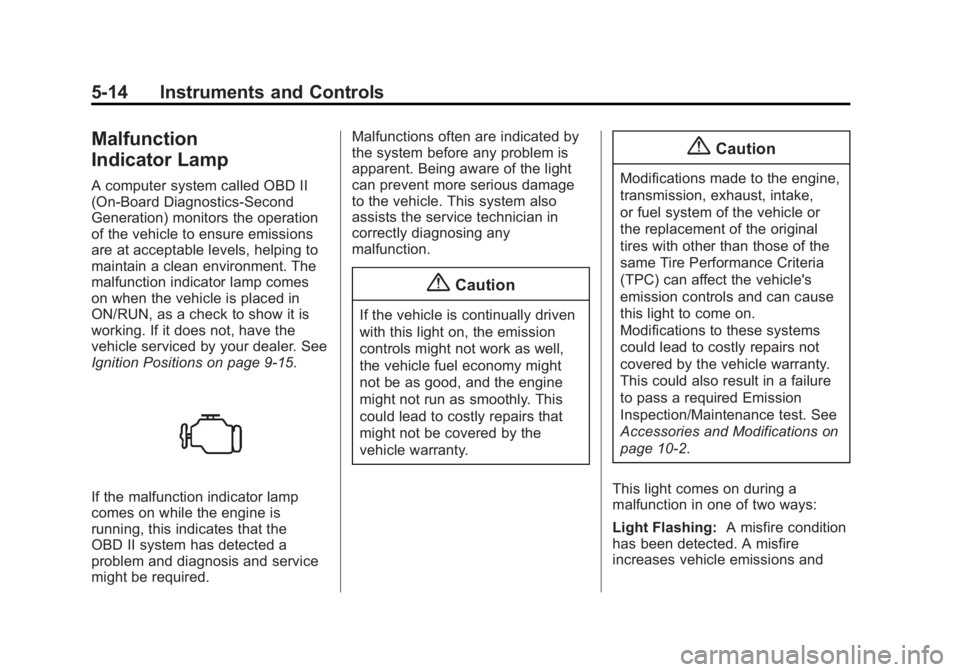
malfunction indicator lamp comes
on when the vehicle is placed in
ON/RUN, as a check to show it is
working. If it does not, have the
vehicle serviced by your dealer. See
Ignition Positions on page 9-15.
If the malfunction indicator lamp
comes on while the engine is
running, this indicates that the
OBD II system has detected a
problem and diagnosis and service
might be required.Malfunctions often are indicated by
the system before any problem is
apparent. Being aware of the light
can prevent more serious damage
to the vehicle. This system also
assists the service technician in
correctly diagnosing any
malfunction.
{Caution
If the vehicle is continually driven
with this light on, the emission
controls might not work as well,
the vehicle fuel economy might
not be as good, and the engine
might not run as smoothly. This
could lead to costly repairs that
might not be covered by the
vehicle warranty.
{Caution
Modifications made to the engine,
transmission, exhaust, intake,
or fuel system of the vehicle or
the replacement of the original
tires with other than those of the
same Tire Performance Criteria
(TPC) can affect the vehicle's
emission controls and can cause
this light to come on.
Modifications to these systems
could lead to costly repairs not
covered by the vehicle warranty.
This could also result in a failure
to pass a required Emission
Inspection/Maintenance test. See
Accessories and Modifications on
page 10-2.
This light comes on during a
malfunction in one of two ways:
Light Flashing: A misfire condition
has been detected. A misfire
increases vehicle emissions and
Page 121 of 373
Black plate (24,1)Chevrolet Captiva Sport Owner Manual (GMNA-Localizing-U.S./Mexico-
7576028) - 2015 - First Edition - 3/21/14
5-24 Instruments and Controls
If an abnormal temperature reading
is displayed for an extended period
of time, consult your dealer. Under
certain circumstances, especially
when the engine is idling, a delay in
updating the temperature display is
normal.
SeeCompass on page 5-4 and
Automatic Transmission on
page 9-21.
The DIC has different displays
which can be accessed by pressing
the DIC buttons on the instrument
panel, below the exterior lamps
control.
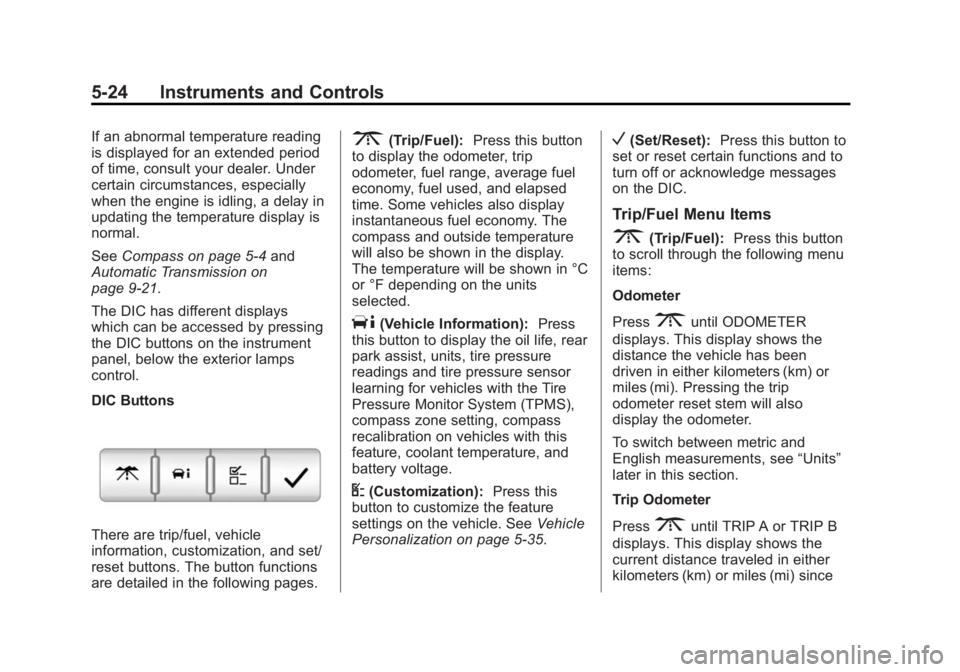
DIC Buttons
There are trip/fuel, vehicle
information, customization, and set/
reset buttons. The button functions
are detailed in the following pages.
3(Trip/Fuel): Press this button
to display the odometer, trip
odometer, fuel range, average fuel
economy, fuel used, and elapsed
time. Some vehicles also display
instantaneous fuel economy. The
compass and outside temperature
will also be shown in the display.
The temperature will be shown in °C
or °F depending on the units
selected.
T(Vehicle Information): Press
this button to display the oil life, rear
park assist, units, tire pressure
readings and tire pressure sensor
learning for vehicles with the Tire
Pressure Monitor System (TPMS),
compass zone setting, compass
recalibration on vehicles with this
feature, coolant temperature, and
battery voltage.
U(Customization): Press this
button to customize the feature
settings on the vehicle. See Vehicle
Personalization on page 5-35.
V(Set/Reset): Press this button to
set or reset certain functions and to
turn off or acknowledge messages
on the DIC.
Trip/Fuel Menu Items
3(Trip/Fuel): Press this button
to scroll through the following menu
items:
Odometer
Press
3until ODOMETER
displays. This display shows the
distance the vehicle has been
driven in either kilometers (km) or
miles (mi). Pressing the trip
odometer reset stem will also
display the odometer.
To switch between metric and
English measurements, see “Units”
later in this section.
Trip Odometer
Press
3until TRIP A or TRIP B
displays. This display shows the
current distance traveled in either
kilometers (km) or miles (mi) since
Page 131 of 373
Black plate (34,1)Chevrolet Captiva Sport Owner Manual (GMNA-Localizing-U.S./Mexico-
7576028) - 2015 - First Edition - 3/21/14
5-34 Instruments and Controls
on page 10-37,Vehicle Load Limits
on page 9-10, and Tire Pressure on
page 10-44. The DIC also shows
the tire pressure values. See Driver
Information Center (DIC) on
page 5-23. If the tire pressure is low,
the low tire pressure warning light
comes on. See Tire Pressure Light
on page 5-20.
SERVICE TIRE MONITORING
SYSTEM
On vehicles with the Tire Pressure
Monitor System (TPMS), this
message displays if a part on the
TPMS is not working properly. The
tire pressure light also flashes and
then remains on during the same
ignition cycle. See Tire Pressure
Light on page 5-20. Several
conditions may cause this message
to appear. See Tire Pressure
Monitor Operation on page 10-47 for
more information. If the warning
comes on and stays on, there may
be a problem with the TPMS. See
your dealer.
TIRE LEARNING ACTIVE
On vehicles with the Tire Pressure
Monitor System (TPMS), this
message displays when the TPMS
is re-learning the tire positions on
the vehicle. The tire positions must
be re-learned after rotating the tires
or after replacing a tire or sensor.
See Tire Rotation on page 10-50,
Tire Pressure Monitor System on
page 10-46, and Tire Pressure on
page 10-44 for more information.
Transmission Messages
CHANGE TRANSMISSION
FLUID
{Caution
Use of the incorrect automatic
transmission fluid may damage
the vehicle, and the damages
may not be covered by the
vehicle warranty. Always use the
(Continued)
Caution (Continued)
automatic transmission fluid listed
inRecommended Fluids and
Lubricants on page 11-12.
This message displays when the life
of the transmission fluid has expired
and it should be changed. See
Maintenance Schedule on
page 11-2 andRecommended
Fluids and Lubricants on page 11-12
for the proper fluid and change
intervals.
SERVICE TRANSMISSION
This message displays when there
is a problem with the transmission.
See your dealer for service.
Page 132 of 373
Black plate (35,1)Chevrolet Captiva Sport Owner Manual (GMNA-Localizing-U.S./Mexico-
7576028) - 2015 - First Edition - 3/21/14
Instruments and Controls 5-35
TRANSMISSION HOT IDLE
ENGINE
{Caution
Do not drive the vehicle while the
transmission fluid is overheating,
or the transmission can be
damaged. This could lead to
costly repairs that would not be
covered by the warranty.
This message displays along with a
chime if the transmission fluid in the
vehicle gets hot. Driving with the
transmission fluid temperature high
can cause damage to the vehicle.
Stop the vehicle and let it idle to
allow the transmission to cool. This
message clears and the chime
stops when the fluid temperature
reaches a safe level.
Vehicle Reminder
Messages
ICE POSSIBLE DRIVE
WITH CARE
This message displays when the
outside air temperature is cold
enough to create icy road
conditions. Adjust your driving
accordingly.
TURN SIGNAL ON
This message displays and a chime
sounds as a reminder to turn off the
turn signal if you drive the vehicle
for more than about 1.2 km
(0.75 mile) with a turn signal on.
See Turn and Lane-Change Signals
on page 6-3 for more information.
Vehicle
Personalization
The vehicle may have customization
capabilities that allow you to
program certain features to one
preferred setting. Customization
features can only be programmed to
one setting on the vehicle and
cannot be programmed to a
preferred setting for two different
drivers.
All of the customization options may
not be available on the vehicle. Only
the options available will be
displayed on the DIC.
The default settings for the
customization features were set
when the vehicle left the factory, but
may have been changed from their
default state since then.
The customization preferences are
automatically recalled.
To change customization
preferences, use the following
procedure.
Page 139 of 373
Black plate (42,1)Chevrolet Captiva Sport Owner Manual (GMNA-Localizing-U.S./Mexico-
7576028) - 2015 - First Edition - 3/21/14
5-42 Instruments and Controls
Make sure the hand-held transmitter
has a new battery for quicker and
more accurate transmission of the
radio-frequency signal.
Programming the Universal
Remote System
For questions or help programming
the Universal Remote system, call
1-800-355-3515 or see
www.homelink.com.
Programming involves
time-sensitive actions, and may time
out causing the procedure to be
repeated.
To program up to three devices:
1. Hold the end of the hand-heldtransmitter about 3 to 8 cm (1 to
3 in) away from the Universal
Remote system buttons with the
indicator light in view. The
hand-held transmitter was
supplied by the manufacturer of
the garage door opener receiver. 2. At the same time, press and
hold both the hand-held
transmitter button and one of the
three Universal Remote system
buttons to be used to operate
the garage door. Do not release
either button until the indicator
light changes from a slow to a
rapid flash. Then release both
buttons.
Some garage door openers may
require substitution of Step 2
with the procedure under “Radio
Signals for Canada and Some
Gate Operators” later in this
section.
3. Press and hold the newly programmed Universal Remote
system button for five seconds
while watching the indicator light
and garage door activation.
.If the indicator light stays on
continuously or the garage
door moves when the
button is pressed, then programming is complete.
There is no need to
complete Steps 4–6.
.If the indicator light does
not come on or the garage
door does not move, a
second button press may
be required. For a second
time, press and hold the
newly programmed button
for five seconds. If the light
stays on or the garage door
moves, programming is
complete.
.If the indicator light blinks
rapidly for two seconds,
then changes to a solid light
and the garage door does
not move, continue with
programming Steps 4–6.