warning CHEVROLET CITY EXPRESS 2015 Workshop Manual
[x] Cancel search | Manufacturer: CHEVROLET, Model Year: 2015, Model line: CITY EXPRESS, Model: CHEVROLET CITY EXPRESS 2015Pages: 297, PDF Size: 3.5 MB
Page 86 of 297
Black plate (1,1)Chevrolet City Express Owner Manual (GMNA-Localizing-U.S./Canada-
7707496) - 2015 - CRC - 11/26/14
Storage 4-1
Storage Storage Compartments Storage Compartments . . . . . . . 4-1
Glove Box . . . . . . . . . . . . . . . . . . . . 4-1
Underseat Storage . . . . . . . . . . . . 4-1
Additional Storage Features Cargo Tie-Downs . . . . . . . . . . . . . 4-2
Storage
Compartments
{ WarningDo not store heavy or sharp
objects in storage compartments.
In a crash, these objects may
cause the cover to open and
could result in injury.
Glove Box Open the glove box by lifting up on
the lever. Underseat Storage
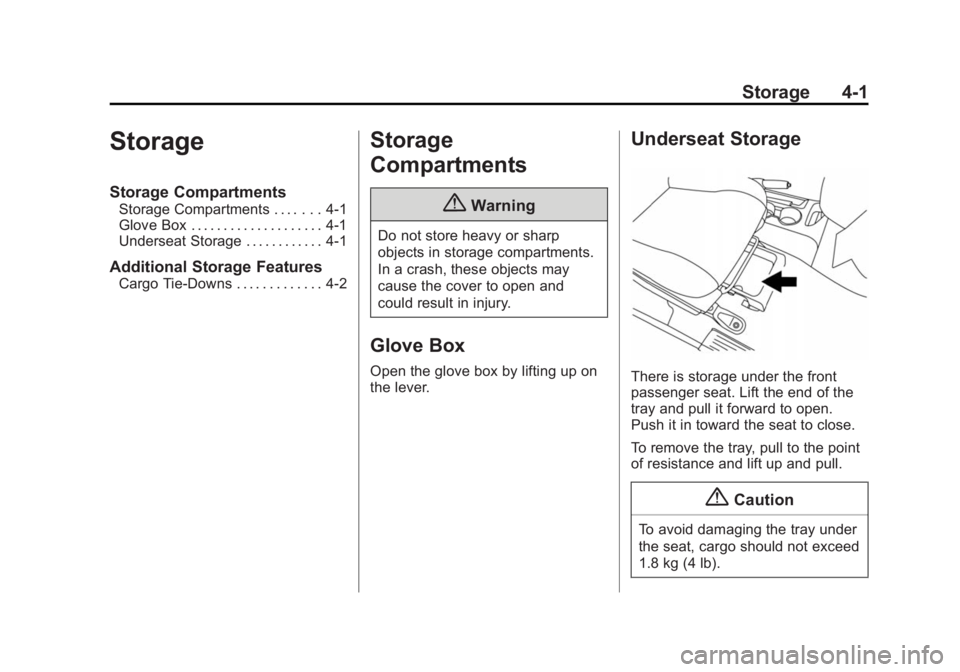
There is storage under the front
passenger seat. Lift the end of the
tray and pull it forward to open.
Push it in toward the seat to close.
To remove the tray, pull to the point
of resistance and lift up and pull.
{ Caution
To avoid damaging the tray under
the seat, cargo should not exceed
1.8 kg (4 lb).
Page 87 of 297
Black plate (2,1)Chevrolet City Express Owner Manual (GMNA-Localizing-U.S./Canada-
7707496) - 2015 - CRC - 11/26/14
4-2 Storage
Additional Storage
Features Cargo Tie-Downs
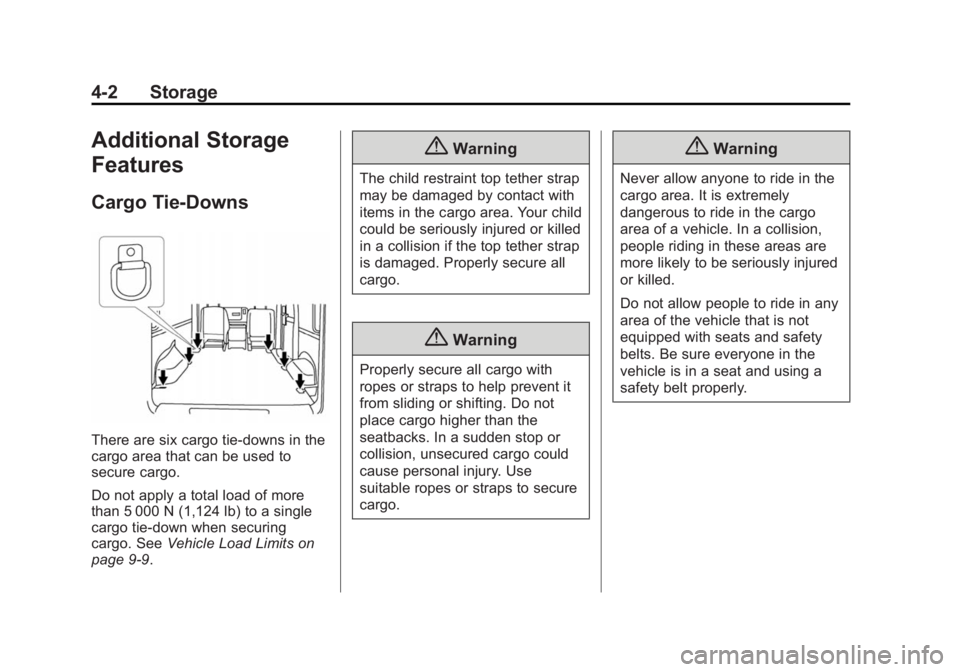
There are six cargo tie-downs in the
cargo area that can be used to
secure cargo.
Do not apply a total load of more
than 5 000 N (1,124 lb) to a single
cargo tie-down when securing
cargo. See Vehicle Load Limits on
page 9-9 . { WarningThe child restraint top tether strap
may be damaged by contact with
items in the cargo area. Your child
could be seriously injured or killed
in a collision if the top tether strap
is damaged. Properly secure all
cargo.
{ WarningProperly secure all cargo with
ropes or straps to help prevent it
from sliding or shifting. Do not
place cargo higher than the
seatbacks. In a sudden stop or
collision, unsecured cargo could
cause personal injury. Use
suitable ropes or straps to secure
cargo. { WarningNever allow anyone to ride in the
cargo area. It is extremely
dangerous to ride in the cargo
area of a vehicle. In a collision,
people riding in these areas are
more likely to be seriously injured
or killed.
Do not allow people to ride in any
area of the vehicle that is not
equipped with seats and safety
belts. Be sure everyone in the
vehicle is in a seat and using a
safety belt properly.
Page 88 of 297
Black plate (1,1)Chevrolet City Express Owner Manual (GMNA-Localizing-U.S./Canada-
7707496) - 2015 - CRC - 11/26/14
Instruments and Controls 5-1
Instruments and
Controls Controls Steering Wheel Controls . . . . . . 5-2
Horn . . . . . . . . . . . . . . . . . . . . . . . . . . 5-2
Windshield Wiper/Washer . . . . . 5-2
Clock . . . . . . . . . . . . . . . . . . . . . . . . . 5-3
Power Outlets . . . . . . . . . . . . . . . . . 5-4
Cigarette Lighter . . . . . . . . . . . . . . 5-5
Ashtrays . . . . . . . . . . . . . . . . . . . . . . 5-5
Warning Lights, Gauges, and
Indicators Warning Lights, Gauges, and
Indicators . . . . . . . . . . . . . . . . . . . . 5-6
Instrument Cluster . . . . . . . . . . . . 5-7
Speedometer . . . . . . . . . . . . . . . . . 5-8
Odometer . . . . . . . . . . . . . . . . . . . . . 5-8
Trip Odometer . . . . . . . . . . . . . . . . . 5-8 Tachometer . . . . . . . . . . . . . . . . . . . 5-8
Fuel Gauge . . . . . . . . . . . . . . . . . . . 5-8
Safety Belt Reminders . . . . . . . . 5-9
Airbag Readiness Light . . . . . . . 5-9
Passenger Airbag Status
Indicator . . . . . . . . . . . . . . . . . . . . 5-10
Charging System Light . . . . . . . 5-11
Malfunction
Indicator Lamp . . . . . . . . . . . . . 5-11
Brake System Warning
Light . . . . . . . . . . . . . . . . . . . . . . . 5-14
Antilock Brake System (ABS)
Warning Light . . . . . . . . . . . . . . 5-15
Overdrive Off Light . . . . . . . . . . 5-15
Power Steering Warning
Light . . . . . . . . . . . . . . . . . . . . . . . 5-15
Traction Control System
(TCS)/Electronic Stability
Control Light . . . . . . . . . . . . . . . 5-16
Electronic Stability Control
(ESC) Off Light . . . . . . . . . . . . . 5-16 Engine Coolant Temperature
Warning Light . . . . . . . . . . . . . . 5-17
Tire Pressure Light . . . . . . . . . . 5-17
Engine Oil Pressure Light . . . . 5-18
Low Fuel Warning Light . . . . . . 5-18
Security Light . . . . . . . . . . . . . . . . 5-19
High-Beam On Light . . . . . . . . . 5-19
Low Washer Fluid Warning
Light . . . . . . . . . . . . . . . . . . . . . . . 5-19
Cruise Control Light . . . . . . . . . 5-19
Door Ajar Light . . . . . . . . . . . . . . 5-19
Vehicle Messages Fuel System Messages . . . . . . 5-20
Tire Messages . . . . . . . . . . . . . . . 5-20
Trip Computer Trip Computer . . . . . . . . . . . . . . . 5-20
Vehicle Personalization Vehicle Personalization (Radio
with Touchscreen Only) . . . . 5-21
Page 90 of 297
Black plate (3,1)Chevrolet City Express Owner Manual (GMNA-Localizing-U.S./Canada-
7707496) - 2015 - CRC - 11/26/14
Instruments and Controls 5-3OFF: Use to turn the wipers off.
MIST: For a single wipe, briefly
move the wiper lever up.
Clear snow and ice from the wiper
blades before using them. If frozen
to the windshield, carefully loosen or
thaw them. Damaged blades should
be replaced. See Wiper Blade
Replacement on page 10-22 .
Heavy snow or ice can overload the
wiper motor.
Windshield Washer Pull the windshield wiper lever
toward you to spray windshield
washer fluid and activate the wipers.
See Washer Fluid on page 10-18 for
information on filling the windshield
washer fluid reservoir. { WarningIn freezing weather, do not use
the washer until the windshield is
warmed. Otherwise the washer
fluid can form ice on the
windshield, blocking your vision.
Clock Set the clock with the ignition in
ACC/ACCESSORY or ON.
Radio without Navigation
To set the clock:
1. Press and hold CLOCK on the
radio faceplate until the clock
display flashes.
2. Press
r SEEK/TRACK
q to
set the hour.
3. Press
Q TUNE/FF-REW/
FOLDER
R to set the minutes.
4. Press CLOCK to exit or let the
display time out. Radio with Navigation
To set the clock:
1. Press
B MENU on the radio
faceplate.
2. Select
8 Settings - System -
Clock Settings.
Time Format
Select to change between 12 hours
and 24 hours clock.
Date Format
Select the desired format.
Clock Mode
Select between Auto and Manual.
If Auto is selected, the clock is
automatically updated through the
Global Positioning System (GPS).
If Manual is selected, see “ Set
Clock Manually ” following.
Select “ Time Zone ” to have the time
set to a specific time, see “ Time
Zone ” following.
Page 91 of 297
Black plate (4,1)Chevrolet City Express Owner Manual (GMNA-Localizing-U.S./Canada-
7707496) - 2015 - CRC - 11/26/14
5-4 Instruments and Controls Set Clock Manually
Press − or + to change any of the
settings for Hour, Minute, Day,
Month, and Year.
Daylight Savings Time
Select to turn on and off.
Time Zone
This feature is only available if
selected in Clock Mode.
Select the desired setting. Power Outlets The accessory power outlets can be
used to plug in electrical equipment,
such as a cell phone or an MP3
player.
The vehicle may have two
accessory power outlets: .
Near the bottom of the center
stack. .
On the rear of the center floor
console.
Remove the cover to access and
replace when not in use.
Certain power accessory plugs may
not be compatible to the accessory
power outlet and could overload
vehicle or adapter fuses. If a
problem is experienced, see your
dealer.
The outlets are rated at 12 volt,
120W (10A) maximum. { WarningPower is always supplied to the
outlets. Do not leave electrical
equipment plugged in when the
vehicle is not in use because the
vehicle could catch fire and cause
injury or death.
{ CautionLeaving electrical equipment
plugged in for an extended period
of time while the vehicle is off will
drain the battery. Always unplug
electrical equipment when not in
use and do not plug in equipment
that exceeds the maximum
12 volt, 120W (10A) rating.
Page 93 of 297
Black plate (6,1)Chevrolet City Express Owner Manual (GMNA-Localizing-U.S./Canada-
7707496) - 2015 - CRC - 11/26/14
5-6 Instruments and Controls
Warning Lights,
Gauges, and
Indicators Warning lights and gauges can
signal that something is wrong
before it becomes serious enough
to cause an expensive repair or
replacement. Paying attention to the
warning lights and gauges could
prevent injury. Warning lights come on when there
could be a problem with a vehicle
function. Some warning lights come
on briefly when the engine is started
to indicate they are working.
Gauges can indicate when there
could be a problem with a vehicle
function. Often gauges and warning
lights work together to indicate a
problem with the vehicle. When one of the warning lights
comes on and stays on while
driving, or when one of the gauges
shows there may be a problem,
check the section that explains what
to do. Waiting to do repairs can be
costly and even dangerous.
Page 95 of 297
Black plate (8,1)Chevrolet City Express Owner Manual (GMNA-Localizing-U.S./Canada-
7707496) - 2015 - CRC - 11/26/14
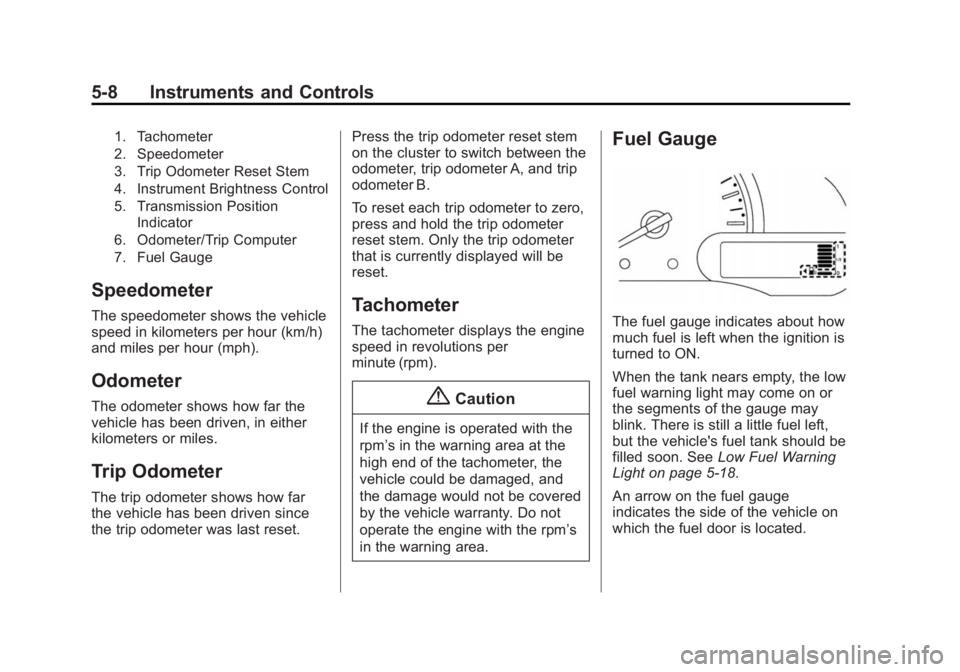
5-8 Instruments and Controls 1. Tachometer
2. Speedometer
3. Trip Odometer Reset Stem
4. Instrument Brightness Control
5. Transmission Position
Indicator
6. Odometer/Trip Computer
7. Fuel Gauge
Speedometer The speedometer shows the vehicle
speed in kilometers per hour (km/h)
and miles per hour (mph).
Odometer The odometer shows how far the
vehicle has been driven, in either
kilometers or miles.
Trip Odometer The trip odometer shows how far
the vehicle has been driven since
the trip odometer was last reset. Press the trip odometer reset stem
on the cluster to switch between the
odometer, trip odometer A, and trip
odometer B.
To reset each trip odometer to zero,
press and hold the trip odometer
reset stem. Only the trip odometer
that is currently displayed will be
reset.
Tachometer The tachometer displays the engine
speed in revolutions per
minute (rpm).
{ Caution
If the engine is operated with the
rpm ’ s in the warning area at the
high end of the tachometer, the
vehicle could be damaged, and
the damage would not be covered
by the vehicle warranty. Do not
operate the engine with the rpm ’ s
in the warning area. Fuel Gauge
The fuel gauge indicates about how
much fuel is left when the ignition is
turned to ON.
When the tank nears empty, the low
fuel warning light may come on or
the segments of the gauge may
blink. There is still a little fuel left,
but the vehicle's fuel tank should be
filled soon. See Low Fuel Warning
Light on page 5-18 .
An arrow on the fuel gauge
indicates the side of the vehicle on
which the fuel door is located.
Page 96 of 297
Black plate (9,1)Chevrolet City Express Owner Manual (GMNA-Localizing-U.S./Canada-
7707496) - 2015 - CRC - 11/26/14
Instruments and Controls 5-9Here are four things that some
owners ask about. None of these
show a problem with the fuel gauge: .
At the service station, the gas
pump shuts off before the gauge
reads full. .
It takes a little more or less fuel
to fill up than the gauge
indicated. For example, the
gauge may have indicated the
tank was half full, but it actually
took a little more or less than
half the tank's capacity to fill
the tank. .
The indicator moves a little when
turning a corner or speeding up. .
The gauge goes back to empty
when the ignition is turned off. Safety Belt Reminders
The light and chime remind you to
fasten your safety belts. The light
illuminates when the ignition is
placed in ON or START and remains
illuminated until the driver ’ s safety
belt is fastened. At the same time,
the chime sounds for about
six seconds unless the driver ’ s
safety belt is securely fastened.
The safety belt warning light may
also illuminate if the front
passenger ’ s safety belt is not
fastened when the front passenger
seat is occupied. For
seven seconds after the ignition
switch is placed in ON, the system
does not activate the warning light
for the front passenger. { WarningIf the safety belt warning light
stays on continuously while the
ignition is turned ON with all
doors closed and all safety belts
fastened, it may indicate a
malfunction in the system. Have
the system checked by your
dealer.
See Safety Belts on page 3-8 .
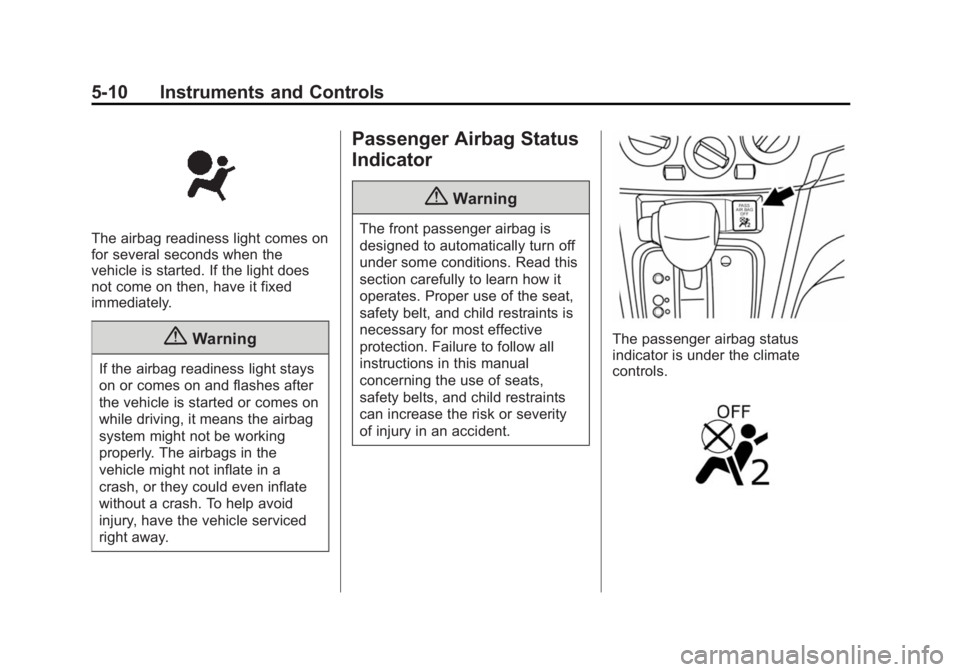
Airbag Readiness Light This light shows if there is an
electrical problem with the airbag
system. The system check includes
the airbag sensor(s), passenger
sensing system, the pretensioners,
the airbag modules, the wiring, and
the crash sensing and diagnostic
module. For more information on the
airbag system, see Airbag System
on page 3-15 .
Page 97 of 297
Black plate (10,1)Chevrolet City Express Owner Manual (GMNA-Localizing-U.S./Canada-
7707496) - 2015 - CRC - 11/26/14
5-10 Instruments and Controls
The airbag readiness light comes on
for several seconds when the
vehicle is started. If the light does
not come on then, have it fixed
immediately.
{ WarningIf the airbag readiness light stays
on or comes on and flashes after
the vehicle is started or comes on
while driving, it means the airbag
system might not be working
properly. The airbags in the
vehicle might not inflate in a
crash, or they could even inflate
without a crash. To help avoid
injury, have the vehicle serviced
right away. Passenger Airbag Status
Indicator
{ WarningThe front passenger airbag is
designed to automatically turn off
under some conditions. Read this
section carefully to learn how it
operates. Proper use of the seat,
safety belt, and child restraints is
necessary for most effective
protection. Failure to follow all
instructions in this manual
concerning the use of seats,
safety belts, and child restraints
can increase the risk or severity
of injury in an accident. The passenger airbag status
indicator is under the climate
controls.
Page 101 of 297
Black plate (14,1)Chevrolet City Express Owner Manual (GMNA-Localizing-U.S./Canada-
7707496) - 2015 - CRC - 11/26/14
5-14 Instruments and Controls happen if the 12-volt battery has
recently been replaced or run
down. The diagnostic system is
designed to evaluate critical
emission control systems during
normal driving. This can take
several days of routine driving.
If this has been done and the
vehicle still does not pass the
inspection for lack of OBD II
system readiness, your dealer
can prepare the vehicle for
inspection.
Brake System Warning
Light The vehicle brake system consists
of two hydraulic circuits. If one
circuit is not working, the remaining
circuit can still work to stop the
vehicle. For normal braking
performance, both circuits need to
be working.
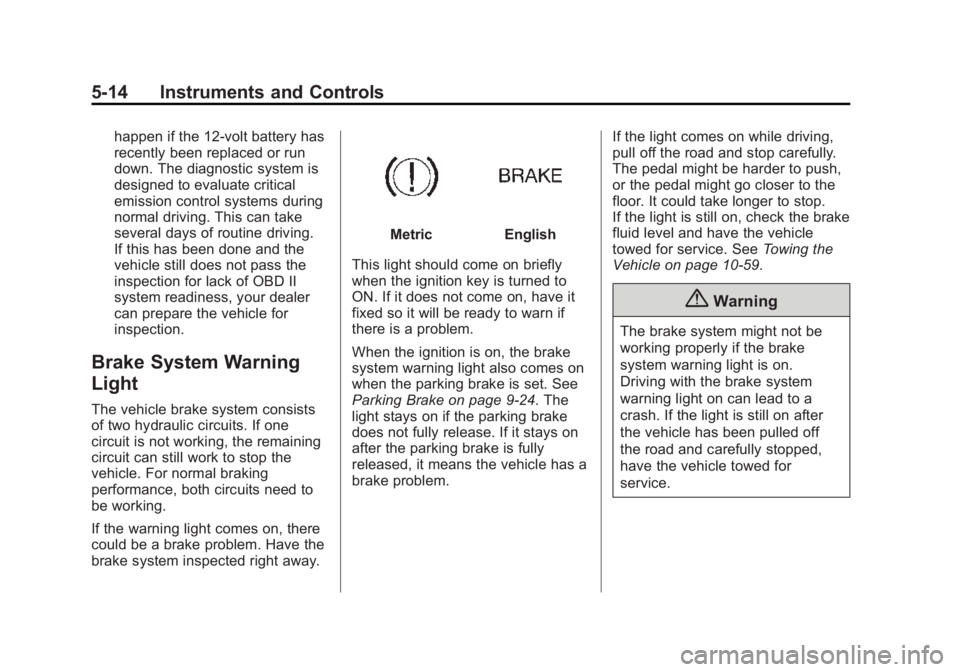
If the warning light comes on, there
could be a brake problem. Have the
brake system inspected right away. Metric English
This light should come on briefly
when the ignition key is turned to
ON. If it does not come on, have it
fixed so it will be ready to warn if
there is a problem.
When the ignition is on, the brake
system warning light also comes on
when the parking brake is set. See
Parking Brake on page 9-24 . The
light stays on if the parking brake
does not fully release. If it stays on
after the parking brake is fully
released, it means the vehicle has a
brake problem. If the light comes on while driving,
pull off the road and stop carefully.
The pedal might be harder to push,
or the pedal might go closer to the
floor. It could take longer to stop.
If the light is still on, check the brake
fluid level and have the vehicle
towed for service. See Towing the
Vehicle on page 10-59 .
{ WarningThe brake system might not be
working properly if the brake
system warning light is on.
Driving with the brake system
warning light on can lead to a
crash. If the light is still on after
the vehicle has been pulled off
the road and carefully stopped,
have the vehicle towed for
service.