lock CHEVROLET CITY EXPRESS 2015 Owners Manual
[x] Cancel search | Manufacturer: CHEVROLET, Model Year: 2015, Model line: CITY EXPRESS, Model: CHEVROLET CITY EXPRESS 2015Pages: 297, PDF Size: 3.5 MB
Page 2 of 297
Black plate (1,1)Chevrolet City Express Owner Manual (GMNA-Localizing-U.S./Canada-
7707496) - 2015 - CRC - 11/26/14
2015 Chevrolet City Express Owner Manual MIn Brief . . . . . . . . . . . . . . . . . . . . . . . . 1-1
Instrument Panel . . . . . . . . . . . . . . 1-2
Initial Drive Information . . . . . . . . 1-3
Vehicle Features . . . . . . . . . . . . . 1-12
Performance and
Maintenance . . . . . . . . . . . . . . . . 1-15
Keys, Doors, and
Windows . . . . . . . . . . . . . . . . . . . . 2-1
Keys and Locks . . . . . . . . . . . . . . . 2-1
Doors . . . . . . . . . . . . . . . . . . . . . . . . . . 2-8
Vehicle Security . . . . . . . . . . . . . . 2-10
Exterior Mirrors . . . . . . . . . . . . . . . 2-12
Interior Mirrors . . . . . . . . . . . . . . . . 2-13
Windows . . . . . . . . . . . . . . . . . . . . . 2-14
Seats and Restraints . . . . . . . . . 3-1
Head Restraints . . . . . . . . . . . . . . . 3-2
Front Seats . . . . . . . . . . . . . . . . . . . . 3-3
Safety Belts . . . . . . . . . . . . . . . . . . . . 3-8
Airbag System . . . . . . . . . . . . . . . . 3-15
Child Restraints . . . . . . . . . . . . . . 3-30 Storage . . . . . . . . . . . . . . . . . . . . . . . 4-1
Storage Compartments . . . . . . . . 4-1
Additional Storage Features . . . 4-2
Instruments and Controls . . . . 5-1
Controls . . . . . . . . . . . . . . . . . . . . . . . 5-2
Warning Lights, Gauges, and
Indicators . . . . . . . . . . . . . . . . . . . . 5-6
Vehicle Messages . . . . . . . . . . . . 5-20
Trip Computer . . . . . . . . . . . . . . . . 5-20
Vehicle Personalization . . . . . . . 5-21
Lighting . . . . . . . . . . . . . . . . . . . . . . . 6-1
Exterior Lighting . . . . . . . . . . . . . . . 6-1
Interior Lighting . . . . . . . . . . . . . . . . 6-3
Lighting Features . . . . . . . . . . . . . . 6-5
Infotainment System . . . . . . . . . 7-1
Introduction . . . . . . . . . . . . . . . . . . . . 7-1
Radio . . . . . . . . . . . . . . . . . . . . . . . . . . 7-5
Audio Players . . . . . . . . . . . . . . . . . . 7-7
Phone . . . . . . . . . . . . . . . . . . . . . . . . 7-10
Trademarks and License
Agreements . . . . . . . . . . . . . . . . . 7-19 Climate Controls . . . . . . . . . . . . . 8-1
Climate Control Systems . . . . . . 8-1
Air Vents . . . . . . . . . . . . . . . . . . . . . . . 8-3
Maintenance . . . . . . . . . . . . . . . . . . . 8-4
Driving and Operating . . . . . . . . 9-1
Driving Information . . . . . . . . . . . . . 9-2
Starting and Operating . . . . . . . 9-13
Engine Exhaust . . . . . . . . . . . . . . 9-17
Automatic Transmission . . . . . . 9-18
Brakes . . . . . . . . . . . . . . . . . . . . . . . 9-22
Ride Control Systems . . . . . . . . 9-25
Cruise Control . . . . . . . . . . . . . . . . 9-28
Driver Assistance Systems . . . 9-30
Fuel . . . . . . . . . . . . . . . . . . . . . . . . . . 9-37
Trailer Towing . . . . . . . . . . . . . . . . 9-41
Conversions and Add-Ons . . . 9-41
Vehicle Care . . . . . . . . . . . . . . . . . 10-1
General Information . . . . . . . . . . 10-2
Vehicle Checks . . . . . . . . . . . . . . . 10-4
Headlamp Aiming . . . . . . . . . . . 10-23
Bulb Replacement . . . . . . . . . . 10-23
Electrical System . . . . . . . . . . . . 10-24
Wheels and Tires . . . . . . . . . . . 10-26
Jump Starting . . . . . . . . . . . . . . . 10-55
Page 5 of 297
Black plate (4,1)Chevrolet City Express Owner Manual (GMNA-Localizing-U.S./Canada-
7707496) - 2015 - CRC - 11/26/14
iv Introduction
Danger, Warning, and
Caution Warning messages found on vehicle
labels and in this manual describe
hazards and what to do to avoid or
reduce them.
{ DangerDanger indicates a hazard with a
high level of risk which will result
in serious injury or death.
{ Warning
Warning indicates a hazard that
could result in injury or death.
{ Caution
Caution indicates a hazard that
could result in property or vehicle
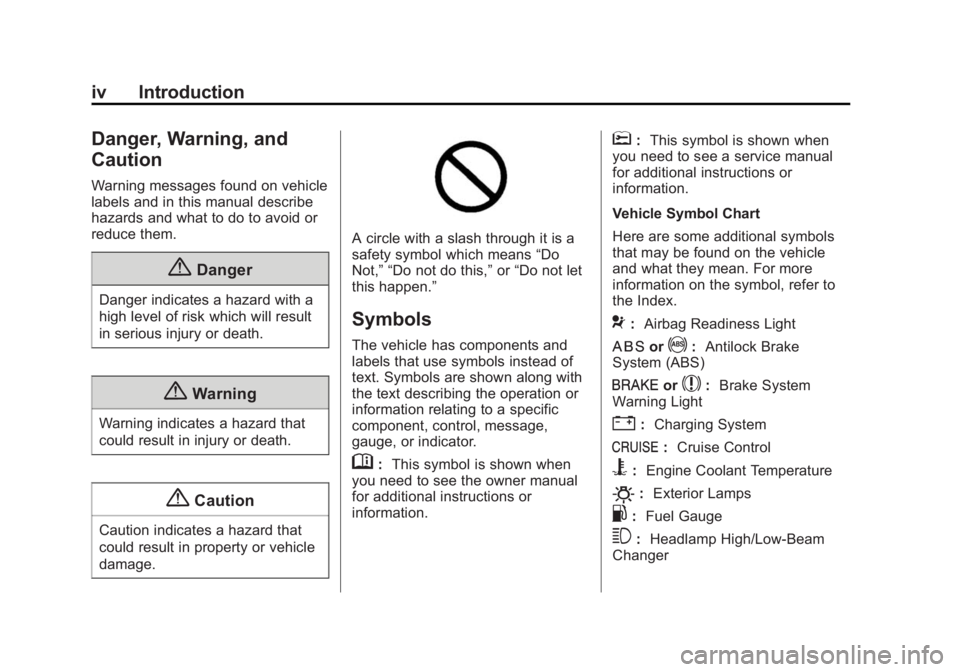
damage. A circle with a slash through it is a
safety symbol which means “ Do
Not, ” “ Do not do this, ” or “ Do not let
this happen. ”
Symbols The vehicle has components and
labels that use symbols instead of
text. Symbols are shown along with
the text describing the operation or
information relating to a specific
component, control, message,
gauge, or indicator.
M : This symbol is shown when
you need to see the owner manual
for additional instructions or
information. * : This symbol is shown when
you need to see a service manual
for additional instructions or
information.
Vehicle Symbol Chart
Here are some additional symbols
that may be found on the vehicle
and what they mean. For more
information on the symbol, refer to
the Index.
9 : Airbag Readiness Light
H or
! : Antilock Brake
System (ABS)
I or
$ : Brake System
Warning Light
" : Charging System
J : Cruise Control
B : Engine Coolant Temperature
O : Exterior Lamps
. : Fuel Gauge
3 : Headlamp High/Low-Beam
Changer
Page 8 of 297
Black plate (1,1)Chevrolet City Express Owner Manual (GMNA-Localizing-U.S./Canada-
7707496) - 2015 - CRC - 11/26/14
In Brief 1-1
In Brief Instrument Panel Instrument Panel . . . . . . . . . . . . . . 1-2
Initial Drive Information Initial Drive Information . . . . . . . . 1-3
Remote Keyless Entry (RKE)
System . . . . . . . . . . . . . . . . . . . . . . 1-3
Door Locks . . . . . . . . . . . . . . . . . . . 1-4
Windows . . . . . . . . . . . . . . . . . . . . . . 1-5
Seat Adjustment . . . . . . . . . . . . . . 1-5
Head Restraint Adjustment . . . . 1-8
Safety Belts . . . . . . . . . . . . . . . . . . . 1-8
Passenger Sensing System . . . 1-9
Mirror Adjustment . . . . . . . . . . . . . 1-9
Interior Lighting . . . . . . . . . . . . . . . 1-9
Exterior Lighting . . . . . . . . . . . . . 1-10
Windshield Wiper/Washer . . . . 1-11
Climate Controls . . . . . . . . . . . . . 1-11
Vehicle Features Infotainment System . . . . . . . . . 1-12
Radio(s) . . . . . . . . . . . . . . . . . . . . . 1-12
Portable Audio Devices . . . . . . 1-12
Bluetooth ®
. . . . . . . . . . . . . . . . . . . 1-12
Steering Wheel Controls . . . . . 1-13
Cruise Control . . . . . . . . . . . . . . . 1-13 Trip Computer . . . . . . . . . . . . . . . 1-14
Rear Vision
Camera (RVC) . . . . . . . . . . . . . 1-14
Parking Assist . . . . . . . . . . . . . . . 1-14
Power Outlets . . . . . . . . . . . . . . . 1-14
Performance and Maintenance Traction Control/Electronic
Stability Control . . . . . . . . . . . . 1-15
Tire Pressure Monitor . . . . . . . . 1-15
Driving for Better Fuel
Economy . . . . . . . . . . . . . . . . . . . 1-15
Roadside Assistance
Program . . . . . . . . . . . . . . . . . . . . 1-16
Page 10 of 297
Black plate (3,1)Chevrolet City Express Owner Manual (GMNA-Localizing-U.S./Canada-
7707496) - 2015 - CRC - 11/26/14
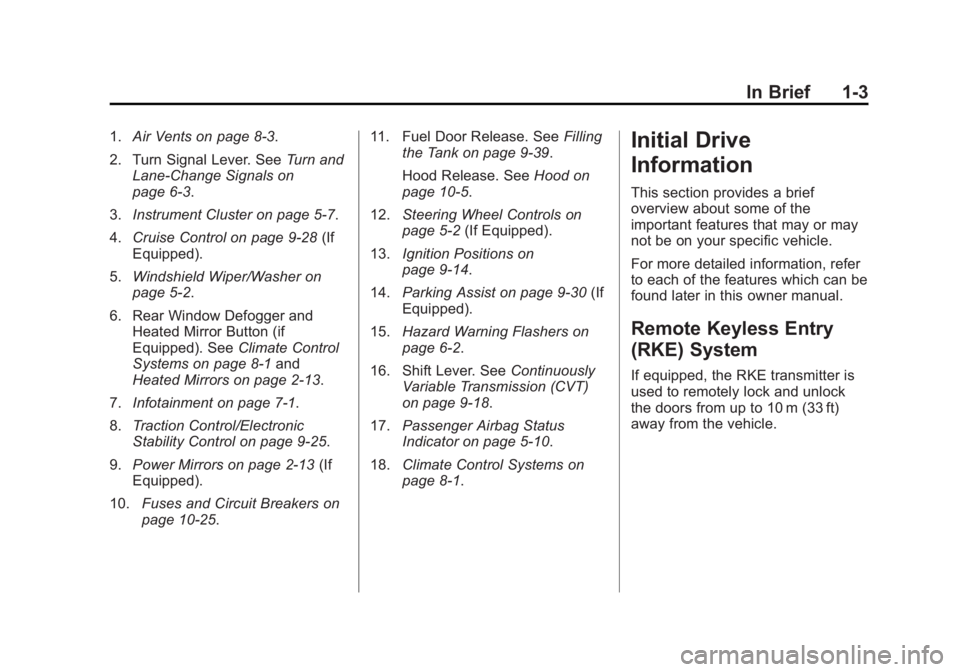
In Brief 1-31. Air Vents on page 8-3 .
2. Turn Signal Lever. See Turn and
Lane-Change Signals on
page 6-3 .
3. Instrument Cluster on page 5-7 .
4. Cruise Control on page 9-28 (If
Equipped).
5. Windshield Wiper/Washer on
page 5-2 .
6. Rear Window Defogger and
Heated Mirror Button (if
Equipped). See Climate Control
Systems on page 8-1 and
Heated Mirrors on page 2-13 .
7. Infotainment on page 7-1 .
8. Traction Control/Electronic
Stability Control on page 9-25 .
9. Power Mirrors on page 2-13 (If
Equipped).
10. Fuses and Circuit Breakers on
page 10-25 . 11. Fuel Door Release. See Filling
the Tank on page 9-39 .
Hood Release. See Hood on
page 10-5 .
12. Steering Wheel Controls on
page 5-2 (If Equipped).
13. Ignition Positions on
page 9-14 .
14. Parking Assist on page 9-30 (If
Equipped).
15. Hazard Warning Flashers on
page 6-2 .
16. Shift Lever. See Continuously
Variable Transmission (CVT)
on page 9-18 .
17. Passenger Airbag Status
Indicator on page 5-10 .
18. Climate Control Systems on
page 8-1 .Initial Drive
Information This section provides a brief
overview about some of the
important features that may or may
not be on your specific vehicle.
For more detailed information, refer
to each of the features which can be
found later in this owner manual.
Remote Keyless Entry
(RKE) System If equipped, the RKE transmitter is
used to remotely lock and unlock
the doors from up to 10 m (33 ft)
away from the vehicle.
Page 11 of 297
Black plate (4,1)Chevrolet City Express Owner Manual (GMNA-Localizing-U.S./Canada-
7707496) - 2015 - CRC - 11/26/14
1-4 In Brief
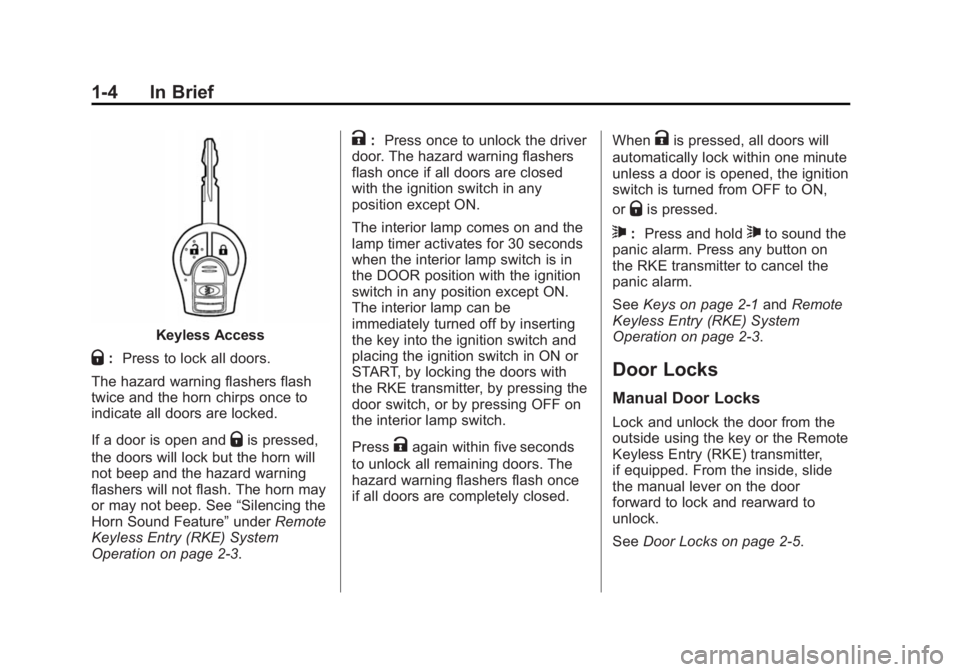
Keyless Access
Q : Press to lock all doors.
The hazard warning flashers flash
twice and the horn chirps once to
indicate all doors are locked.
If a door is open and
Q is pressed,
the doors will lock but the horn will
not beep and the hazard warning
flashers will not flash. The horn may
or may not beep. See “ Silencing the
Horn Sound Feature ” under Remote
Keyless Entry (RKE) System
Operation on page 2-3 . K : Press once to unlock the driver
door. The hazard warning flashers
flash once if all doors are closed
with the ignition switch in any
position except ON.
The interior lamp comes on and the
lamp timer activates for 30 seconds
when the interior lamp switch is in
the DOOR position with the ignition
switch in any position except ON.
The interior lamp can be
immediately turned off by inserting
the key into the ignition switch and
placing the ignition switch in ON or
START, by locking the doors with
the RKE transmitter, by pressing the
door switch, or by pressing OFF on
the interior lamp switch.
Press
K again within five seconds
to unlock all remaining doors. The
hazard warning flashers flash once
if all doors are completely closed. When
K is pressed, all doors will
automatically lock within one minute
unless a door is opened, the ignition
switch is turned from OFF to ON,
or
Q is pressed.
7 : Press and hold
7 to sound the
panic alarm. Press any button on
the RKE transmitter to cancel the
panic alarm.
See Keys on page 2-1 and Remote
Keyless Entry (RKE) System
Operation on page 2-3 .
Door Locks Manual Door Locks Lock and unlock the door from the
outside using the key or the Remote
Keyless Entry (RKE) transmitter,
if equipped. From the inside, slide
the manual lever on the door
forward to lock and rearward to
unlock.
See Door Locks on page 2-5 .
Page 12 of 297
Black plate (5,1)Chevrolet City Express Owner Manual (GMNA-Localizing-U.S./Canada-
7707496) - 2015 - CRC - 11/26/14
In Brief 1-5Power Door Locks On the front doors, press
Q or
K on
the power door lock switch to lock or
unlock the doors.
See Power Door Locks on page 2-7 .
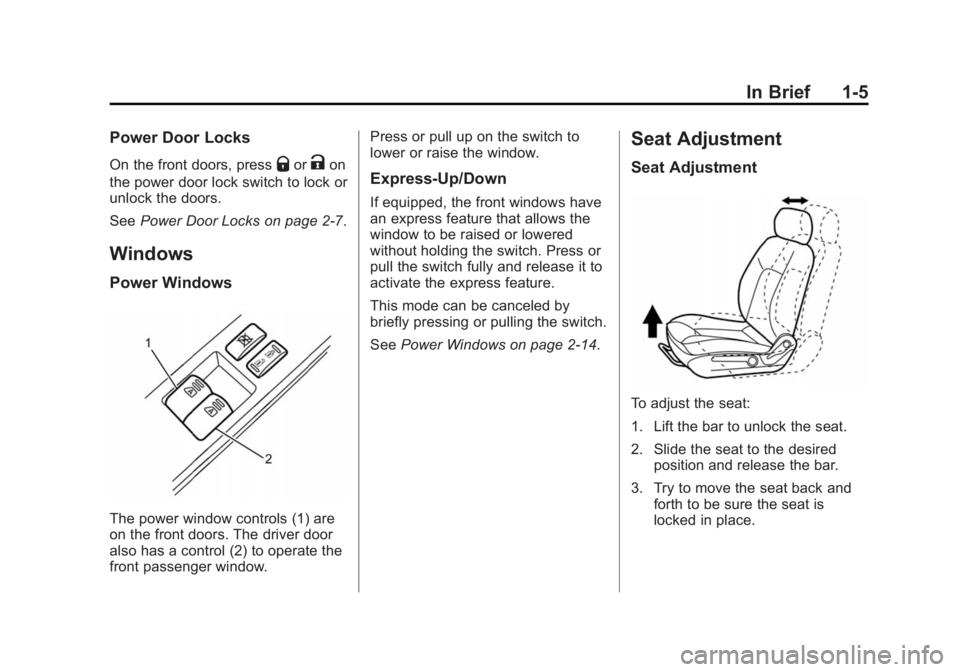
Windows Power Windows
The power window controls (1) are
on the front doors. The driver door
also has a control (2) to operate the
front passenger window. Press or pull up on the switch to
lower or raise the window.
Express-Up/Down If equipped, the front windows have
an express feature that allows the
window to be raised or lowered
without holding the switch. Press or
pull the switch fully and release it to
activate the express feature.
This mode can be canceled by
briefly pressing or pulling the switch.
See Power Windows on page 2-14 .Seat Adjustment Seat Adjustment
To adjust the seat:
1. Lift the bar to unlock the seat.
2. Slide the seat to the desired
position and release the bar.
3. Try to move the seat back and
forth to be sure the seat is
locked in place.
Page 13 of 297
Black plate (6,1)Chevrolet City Express Owner Manual (GMNA-Localizing-U.S./Canada-
7707496) - 2015 - CRC - 11/26/14
1-6 In Brief
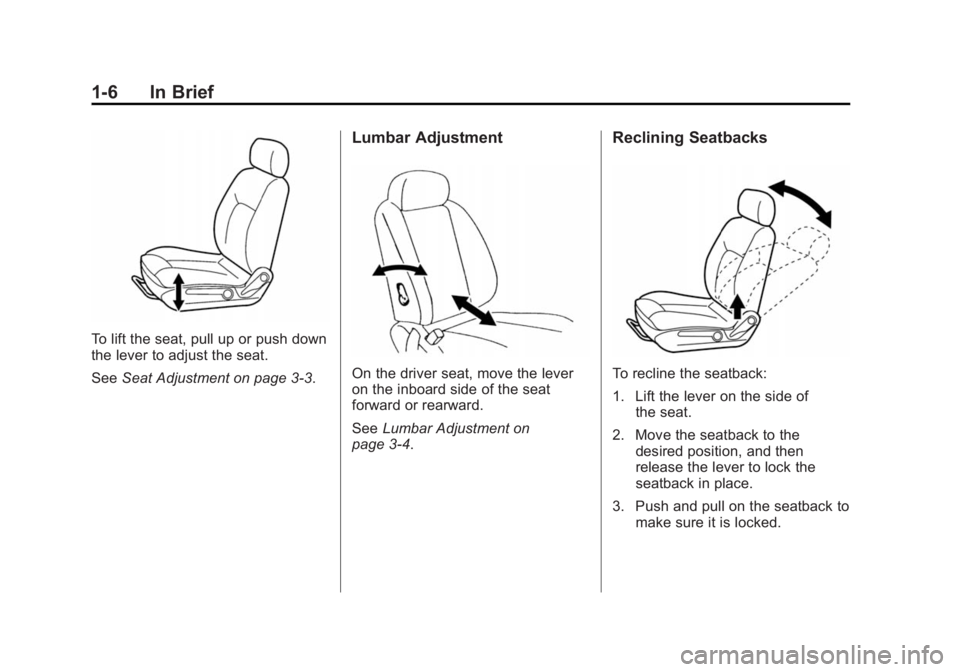
To lift the seat, pull up or push down
the lever to adjust the seat.
See Seat Adjustment on page 3-3 . Lumbar Adjustment
On the driver seat, move the lever
on the inboard side of the seat
forward or rearward.
See Lumbar Adjustment on
page 3-4 . Reclining Seatbacks
To recline the seatback:
1. Lift the lever on the side of
the seat.
2. Move the seatback to the
desired position, and then
release the lever to lock the
seatback in place.
3. Push and pull on the seatback to
make sure it is locked.
Page 14 of 297
Black plate (7,1)Chevrolet City Express Owner Manual (GMNA-Localizing-U.S./Canada-
7707496) - 2015 - CRC - 11/26/14
In Brief 1-7To return the seatback to the upright
position:
1. Lift the lever fully without
applying pressure to the
seatback, and the seatback will
return to the upright position.
2. Push and pull on the seatback to
make sure it is locked.
See Reclining Seatbacks on
page 3-4 .
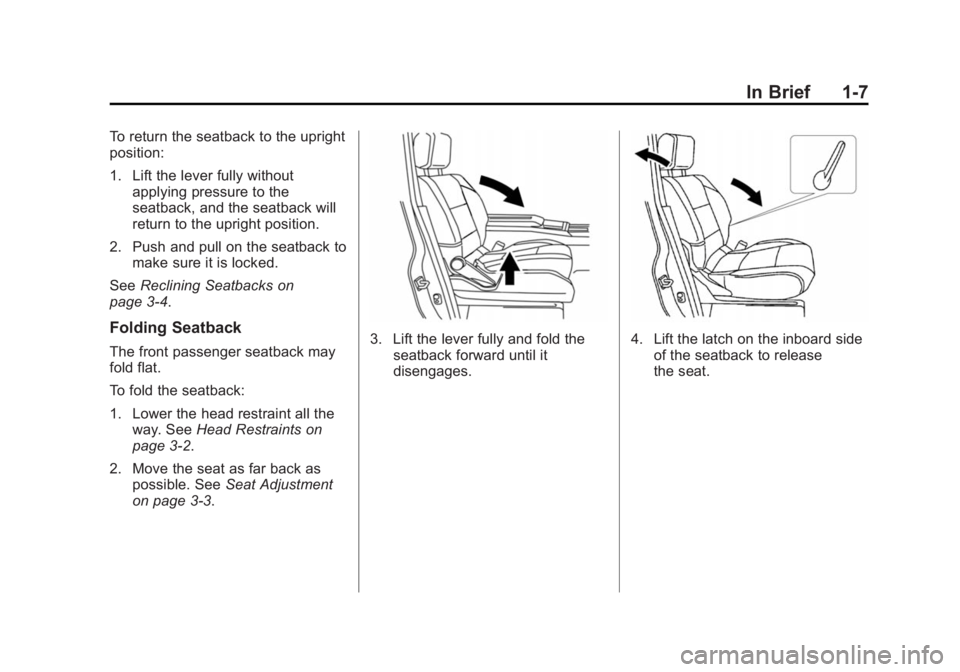
Folding Seatback The front passenger seatback may
fold flat.
To fold the seatback:
1. Lower the head restraint all the
way. See Head Restraints on
page 3-2 .
2. Move the seat as far back as
possible. See Seat Adjustment
on page 3-3 . 3. Lift the lever fully and fold the
seatback forward until it
disengages. 4. Lift the latch on the inboard side
of the seatback to release
the seat.
Page 15 of 297
Black plate (8,1)Chevrolet City Express Owner Manual (GMNA-Localizing-U.S./Canada-
7707496) - 2015 - CRC - 11/26/14
1-8 In Brief
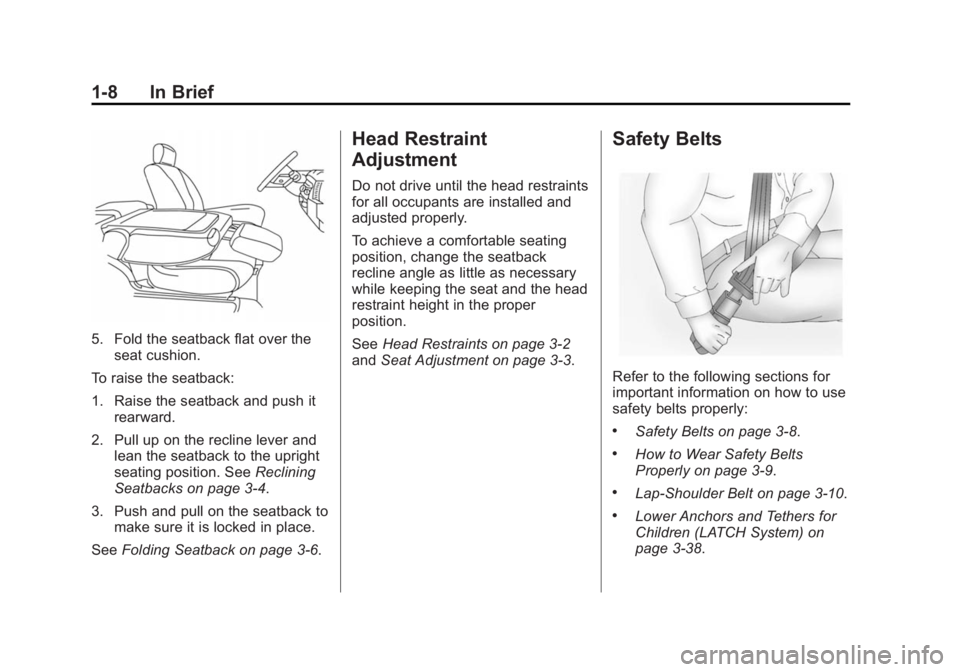
5. Fold the seatback flat over the
seat cushion.
To raise the seatback:
1. Raise the seatback and push it
rearward.
2. Pull up on the recline lever and
lean the seatback to the upright
seating position. See Reclining
Seatbacks on page 3-4 .
3. Push and pull on the seatback to
make sure it is locked in place.
See Folding Seatback on page 3-6 .Head Restraint
Adjustment Do not drive until the head restraints
for all occupants are installed and
adjusted properly.
To achieve a comfortable seating
position, change the seatback
recline angle as little as necessary
while keeping the seat and the head
restraint height in the proper
position.
See Head Restraints on page 3-2
and Seat Adjustment on page 3-3 .Safety Belts
Refer to the following sections for
important information on how to use
safety belts properly: .
Safety Belts on page 3-8 . .
How to Wear Safety Belts
Properly on page 3-9 . .
Lap-Shoulder Belt on page 3-10 . .
Lower Anchors and Tethers for
Children (LATCH System) on
page 3-38 .
Page 19 of 297
Black plate (12,1)Chevrolet City Express Owner Manual (GMNA-Localizing-U.S./Canada-
7707496) - 2015 - CRC - 11/26/14
1-12 In Brief
Vehicle Features Infotainment System The base radio information is
included in this manual. See the
infotainment manual for information
on the uplevel radio, audio player,
phone, navigation system, and
voice recognition. There is also
information on settings.
Radio(s) The ignition most be in ACC/
ACCESSORY or RUN/START.
PUSH/PWR: Press to turn the
system on and off.
VOL: Turn to increase or decrease
the volume.
AM: Press to change to AM
stations.
FM: Press to change to FM
stations and press to change
between FM1 and FM2.
CD: Press to change to play a CD. AUX: Press to change to an
auxiliary device.
> : Press to mute and unmute the
audio.
r SEEK/TRACK
q : Radio:
Press to fast seek or scan stations.
Q TUNE/FF-REW/FOLDER
R :
Press to seek or scan one station at
a time.
For more information about these
and other radio features, see
Infotainment on page 7-1 .
Storing a Favorite Station Up to 18 stations (six FM1, six FM2,
and six AM), can be programmed on
the six numbered buttons.
For more information on storing a
favorite station, see Operation on
page 7-4 .
Setting the Clock
For detailed instructions on setting
the clock for your specific audio
system, see Clock on page 5-3 .Portable Audio Devices This vehicle has an auxiliary input
jack on the lower right side of the
faceplate. External devices such as
an iPod ®
, laptop computer, MP3
player, cassette player, or CD
changer can be connected to the
auxiliary port using a 3.5 mm
(1/8 in) input cable.
This input jack is not an audio
output; do not plug headphones into
the front auxiliary input jack.
See Auxiliary Jack on page 7-9 .
Bluetooth ®
If equipped with a Bluetooth system,
it allows users with a
Bluetooth-enabled cell phone to
make and receive hands-free calls
using the vehicle ’ s audio system
and controls.
The Bluetooth-enabled cell phone
must be paired with the Bluetooth
system before it can be used in the
vehicle. Not all phones will support