AUX CHEVROLET CITY EXPRESS 2018 Infotainment System Guide
[x] Cancel search | Manufacturer: CHEVROLET, Model Year: 2018, Model line: CITY EXPRESS, Model: CHEVROLET CITY EXPRESS 2018Pages: 74, PDF Size: 0.86 MB
Page 59 of 74
Chevrolet City Express Infotainment System (GMNA-Localizing-U.S./Canada-
11683801) - 2018 - crc - 7/12/17
58 Settings
2. Touch Settings.
3. Touch System.
4. Scroll down and touch theTemperature Unit icon.
Clock Settings
This setting allows you to make
clock adjustments.
1. Press APPS
hor MENU on
the center stack.
2. Touch Settings.
3. Touch System.
4. Touch Clock.
5. Select the preferred setting item and make an adjustment.
.Time Format:
Touch to change the clock
format between 12 h and
24 h.
. Date Format:
Touch to choose one of five
available date formats. .
Clock Mode:
Select Manual to manually
set the clock with the Set
Clock Manually display
icon. Select Auto to have
the clock automatically
adjusted by the GPS
system. Select Time Zone
to have the time set to a
specific time zone.
. Set Clock Manually:
Set the clock manually. This
feature is only available if
Manual is selected for
Clock Mode.
. Daylight Savings Time:
Touch the Daylight Savings
Time display icon to switch
Daylight Savings Time on
or off. This feature is
unavailable if Clock Mode is
set to Auto.
. Time Zone:
Select and touch the time
zone of the current vehicle
location to bypass the GPS satellite. This feature is only
available if Time Zone is
selected for Clock Mode.
If Daylight Savings Time is
set to On and a time zone
is chosen for an area that
does not observe Daylight
Savings Time, the Daylight
Savings Time setting
remains On and must be
turned off manually.
6. After adjusting the desired settings, press BACK on the
center stack to return to the
previous display. Press MAP
on the center stack to return to
the previous display or the
current location map view.
Press FM, AM, CD, or AUX to
return to the audio display.
Set the Clock Manually
Adjust the hour, minute, day, month,
and year using + and −.
1. Press APPS
hor MENU on
the center stack.
2. Touch Settings.
3. Touch System.
Page 62 of 74
Chevrolet City Express Infotainment System (GMNA-Localizing-U.S./Canada-
11683801) - 2018 - crc - 7/12/17
Bluetooth Phone/Devices 61
the audio system speakers.
Storing the device in a different
location may reduce or eliminate
the noise.
. Refer to the cellular phone
owner ’s manual regarding the
telephone charges, cellular
phone antenna, and cellular
phone.
. The signal strength display on
the monitor will not match the
signal strength display of some
cellular phones.
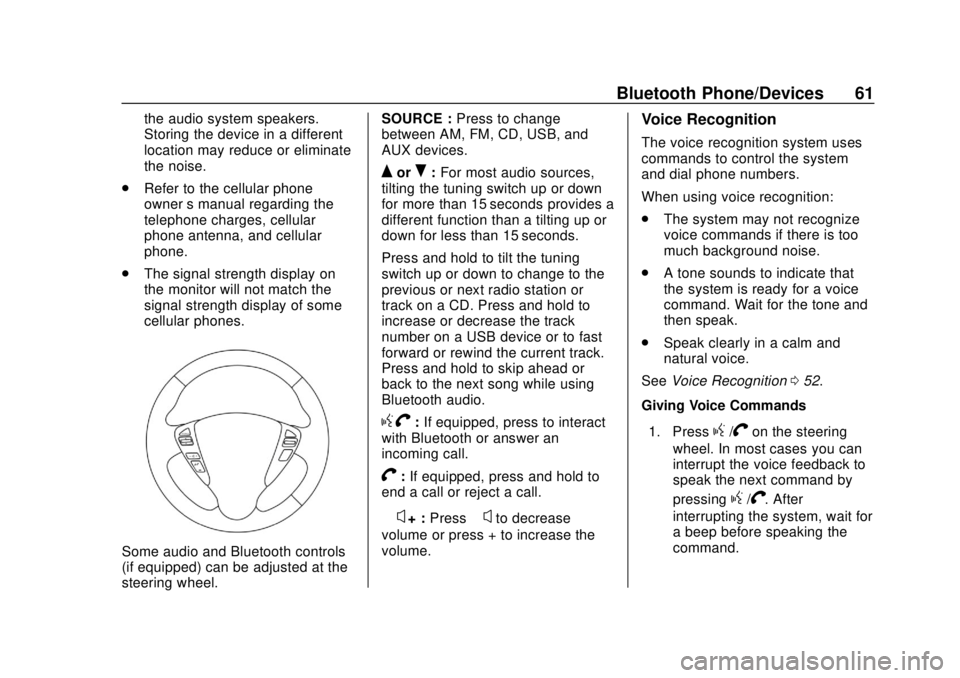
Some audio and Bluetooth controls
(if equipped) can be adjusted at the
steering wheel. SOURCE :
Press to change
between AM, FM, CD, USB, and
AUX devices.
QorR: For most audio sources,
tilting the tuning switch up or down
for more than 15 seconds provides a
different function than a tilting up or
down for less than 15 seconds.
Press and hold to tilt the tuning
switch up or down to change to the
previous or next radio station or
track on a CD. Press and hold to
increase or decrease the track
number on a USB device or to fast
forward or rewind the current track.
Press and hold to skip ahead or
back to the next song while using
Bluetooth audio.
g V:If equipped, press to interact
with Bluetooth or answer an
incoming call.
V: If equipped, press and hold to
end a call or reject a call.
−
x+ : Press −xto decrease
volume or press + to increase the
volume.
Voice Recognition
The voice recognition system uses
commands to control the system
and dial phone numbers.
When using voice recognition:
. The system may not recognize
voice commands if there is too
much background noise.
. A tone sounds to indicate that
the system is ready for a voice
command. Wait for the tone and
then speak.
. Speak clearly in a calm and
natural voice.
See Voice Recognition 052.
Giving Voice Commands
1. Press
g/Von the steering
wheel. In most cases you can
interrupt the voice feedback to
speak the next command by
pressing
g/V. After
interrupting the system, wait for
a beep before speaking the
command.
Page 71 of 74

Chevrolet City Express Infotainment System (GMNA-Localizing-U.S./Canada-
11683801) - 2018 - crc - 7/12/17
70 Index
IndexA
AgreementsTrademarks and License . . . . . . . . 66
Alpha-Numeric Keyboard . . . . . . . . 31
AM . . . . . . . . . . . . . . . . . . . . . . . . . . . . . . 12
AM-FM Radio . . . . . . . . . . . . . . . . . . . . . 8
Antenna Fixed Mast . . . . . . . . . . . . . . . . . . . . . . 13
Audio Bluetooth. . . . . . . . . . . . . . . . . . . . . . . . 21
Audio Players CD . . . . . . . . . . . . . . . . . . . . . . . . . . . . . . 14
Audio System . . . . . . . . . . . . . . . . . . . . 62
Audio System Voice Commands . . . . . . . . . . . . . . . . . . . . . 54
Auxiliary Devices . . . . . . . . . . . . . . . . . . . . . . . . . 21
Avoiding Untrusted Media Devices . . . . . . . . . . . . . . . . . . . . . . . . 14
B
Bluetooth . . . . . . . . . . . . . . . . . . . . 60, 67
Bluetooth Audio . . . . . . . . . . . . . . . . . 21
Brightness . . . . . . . . . . . . . . . . . . . . . . . 57
C
CD Care and Cleaning . . . . . . . . . . 15
CD Player . . . . . . . . . . . . . . . . . . . . . . . 14
CD/MP3 Display Mode . . . . . . . . . . 15
Cellular Phone Usage . . . . . . . . . . . 13
Cleaning High Gloss Surfaces
and Vehicle Information and
Radio Displays . . . . . . . . . . . . . . . . . . 7
Clock Settings . . . . . . . . . . . . . . . . . . . 58
Connecting with Infotainment Controls . . . . . . . . . . . . . . . . . . . . . . . . 62
Connecting with Voice Recognition . . . . . . . . . . . . . . . . . . . . 63
Controls
Steering Wheel. . . . . . . . . . . . . . . . . . . 5
Coverage Explanations . . . . . . . . . . 51
D
Database Coverage Explanations . . . . . . . . . . . . . . . . . . . 51
Destination . . . . . . . . . . . . . . . . . . . . . . 30
Detailed Areas . . . . . . . . . . . . . . . . . . . 30
Devices Auxiliary. . . . . . . . . . . . . . . . . . . . . . . . . 21
USB. . . . . . . . . . . . . . . . . . . . . . . . . . . . . 17