CD player CHEVROLET CITY EXPRESS 2018 Infotainment System Guide
[x] Cancel search | Manufacturer: CHEVROLET, Model Year: 2018, Model line: CITY EXPRESS, Model: CHEVROLET CITY EXPRESS 2018Pages: 74, PDF Size: 0.86 MB
Page 22 of 74
Chevrolet City Express Infotainment System (GMNA-Localizing-U.S./Canada-
11683801) - 2018 - crc - 7/12/17
Audio Players 21
Auxiliary Devices
This vehicle has an auxiliary input
jack in the center console below the
heater and air conditioner controls.
Possible auxiliary audio sources
include:
.Laptop computer
. MP3 player
. Tape player
This jack is not an audio output. Do
not plug headphones into the
auxiliary input jack. Set up any
auxiliary device while the vehicle is
in P (Park).
Connect a 3.5 mm (1/8 in) cable
from the auxiliary device to the
auxiliary input jack. When a device
is connected, the system
automatically begins playing audio
from the device over the vehicle
speakers.
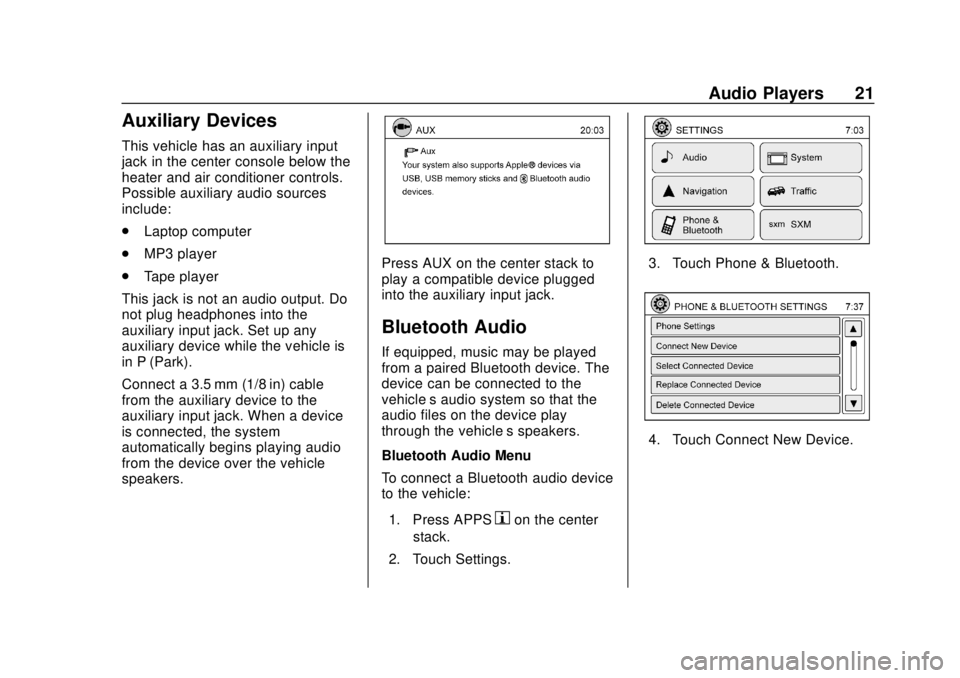
Press AUX on the center stack to
play a compatible device plugged
into the auxiliary input jack.
Bluetooth Audio
If equipped, music may be played
from a paired Bluetooth device. The
device can be connected to the
vehicle’s audio system so that the
audio files on the device play
through the vehicle’ s speakers.
Bluetooth Audio Menu
To connect a Bluetooth audio device
to the vehicle:
1. Press APPS
hon the center
stack.
2. Touch Settings.
3. Touch Phone & Bluetooth.
4. Touch Connect New Device.
Page 23 of 74
Chevrolet City Express Infotainment System (GMNA-Localizing-U.S./Canada-
11683801) - 2018 - crc - 7/12/17
22 Audio Players
5. The system confirms thecommand and asks to initiate
connecting from the phone
handset. The connecting
procedure of the cellular phone
varies according to each
cellular phone model. See the
manufacturer ’s manual for
details.
To switch to the Bluetooth audio
mode, press AUX on the center
stack repeatedly until the Bluetooth
audio mode displays.
The controls for the Bluetooth audio
are shown on the display.
Page 71 of 74

Chevrolet City Express Infotainment System (GMNA-Localizing-U.S./Canada-
11683801) - 2018 - crc - 7/12/17
70 Index
IndexA
AgreementsTrademarks and License . . . . . . . . 66
Alpha-Numeric Keyboard . . . . . . . . 31
AM . . . . . . . . . . . . . . . . . . . . . . . . . . . . . . 12
AM-FM Radio . . . . . . . . . . . . . . . . . . . . . 8
Antenna Fixed Mast . . . . . . . . . . . . . . . . . . . . . . 13
Audio Bluetooth. . . . . . . . . . . . . . . . . . . . . . . . 21
Audio Players CD . . . . . . . . . . . . . . . . . . . . . . . . . . . . . . 14
Audio System . . . . . . . . . . . . . . . . . . . . 62
Audio System Voice Commands . . . . . . . . . . . . . . . . . . . . . 54
Auxiliary Devices . . . . . . . . . . . . . . . . . . . . . . . . . 21
Avoiding Untrusted Media Devices . . . . . . . . . . . . . . . . . . . . . . . . 14
B
Bluetooth . . . . . . . . . . . . . . . . . . . . 60, 67
Bluetooth Audio . . . . . . . . . . . . . . . . . 21
Brightness . . . . . . . . . . . . . . . . . . . . . . . 57
C
CD Care and Cleaning . . . . . . . . . . 15
CD Player . . . . . . . . . . . . . . . . . . . . . . . 14
CD/MP3 Display Mode . . . . . . . . . . 15
Cellular Phone Usage . . . . . . . . . . . 13
Cleaning High Gloss Surfaces
and Vehicle Information and
Radio Displays . . . . . . . . . . . . . . . . . . 7
Clock Settings . . . . . . . . . . . . . . . . . . . 58
Connecting with Infotainment Controls . . . . . . . . . . . . . . . . . . . . . . . . 62
Connecting with Voice Recognition . . . . . . . . . . . . . . . . . . . . 63
Controls
Steering Wheel. . . . . . . . . . . . . . . . . . . 5
Coverage Explanations . . . . . . . . . . 51
D
Database Coverage Explanations . . . . . . . . . . . . . . . . . . . 51
Destination . . . . . . . . . . . . . . . . . . . . . . 30
Detailed Areas . . . . . . . . . . . . . . . . . . . 30
Devices Auxiliary. . . . . . . . . . . . . . . . . . . . . . . . . 21
USB. . . . . . . . . . . . . . . . . . . . . . . . . . . . . 17