fuses CHEVROLET CLASSIC 2005 Owners Manual
[x] Cancel search | Manufacturer: CHEVROLET, Model Year: 2005, Model line: CLASSIC, Model: CHEVROLET CLASSIC 2005Pages: 320, PDF Size: 4.86 MB
Page 93 of 320
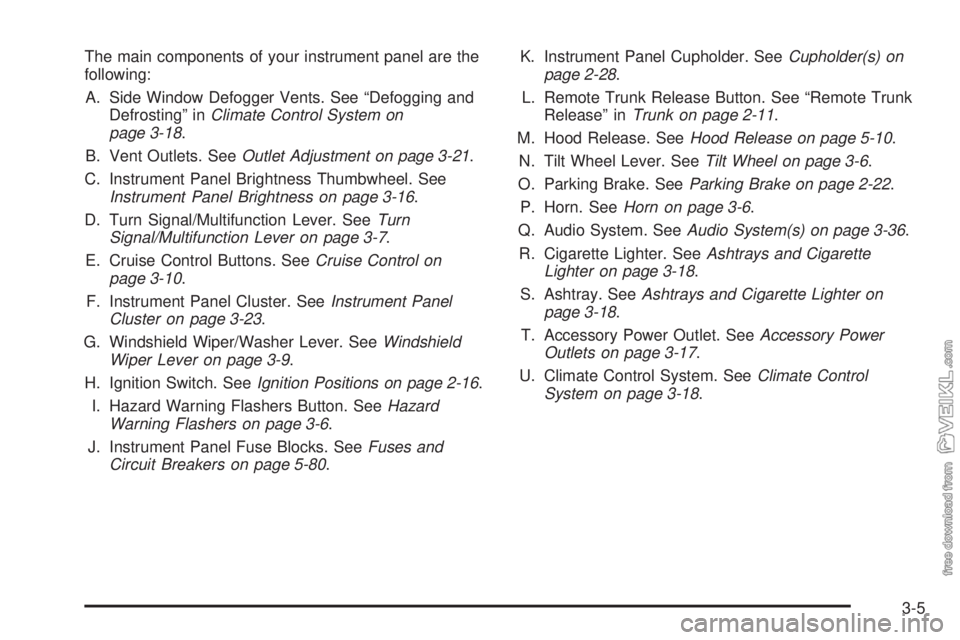
The main components of your instrument panel are the
following:
A. Side Window Defogger Vents. See “Defogging and
Defrosting” inClimate Control System on
page 3-18.
B. Vent Outlets. SeeOutlet Adjustment on page 3-21.
C. Instrument Panel Brightness Thumbwheel. See
Instrument Panel Brightness on page 3-16.
D. Turn Signal/Multifunction Lever. SeeTurn
Signal/Multifunction Lever on page 3-7.
E. Cruise Control Buttons. SeeCruise Control on
page 3-10.
F. Instrument Panel Cluster. SeeInstrument Panel
Cluster on page 3-23.
G. Windshield Wiper/Washer Lever. SeeWindshield
Wiper Lever on page 3-9.
H. Ignition Switch. SeeIgnition Positions on page 2-16.
I. Hazard Warning Flashers Button. SeeHazard
Warning Flashers on page 3-6.
J. Instrument Panel Fuse Blocks. SeeFuses and
Circuit Breakers on page 5-80.K. Instrument Panel Cupholder. SeeCupholder(s) on
page 2-28.
L. Remote Trunk Release Button. See “Remote Trunk
Release” inTrunk on page 2-11.
M. Hood Release. SeeHood Release on page 5-10.
N. Tilt Wheel Lever. SeeTilt Wheel on page 3-6.
O. Parking Brake. SeeParking Brake on page 2-22.
P. Horn. SeeHorn on page 3-6.
Q. Audio System. SeeAudio System(s) on page 3-36.
R. Cigarette Lighter. SeeAshtrays and Cigarette
Lighter on page 3-18.
S. Ashtray. SeeAshtrays and Cigarette Lighter on
page 3-18.
T. Accessory Power Outlet. SeeAccessory Power
Outlets on page 3-17.
U. Climate Control System. SeeClimate Control
System on page 3-18.
3-5
Page 96 of 320
Turn and Lane-Change Signals
The turn signal has two upward (for right) and
two downward (for left) positions. These positions
allow you to signal a turn or a lane change.
To signal a turn, move the lever all the way up or down.
When the turn is finished, the lever will return
automatically.
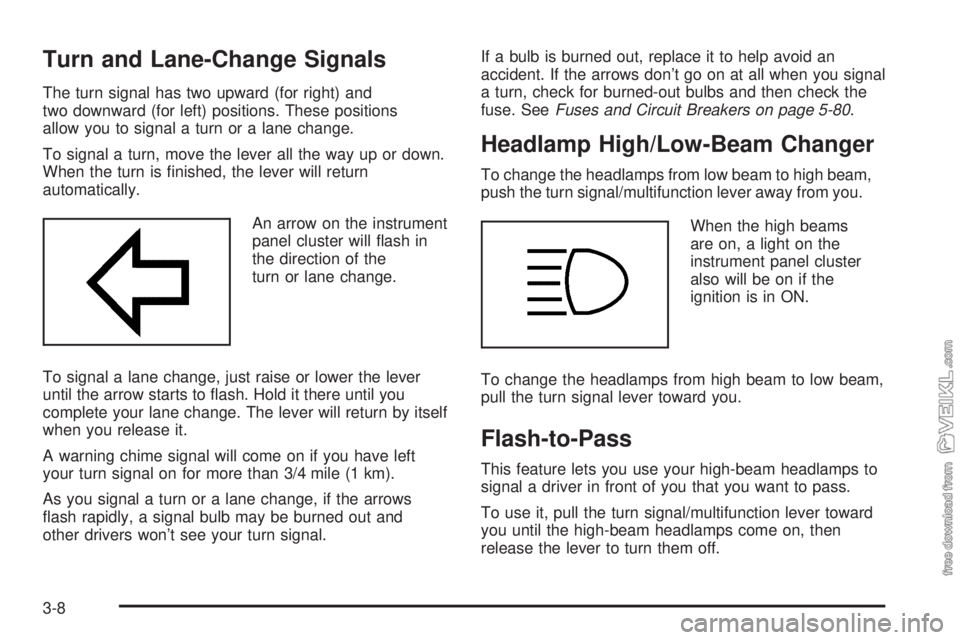
An arrow on the instrument
panel cluster will flash in
the direction of the
turn or lane change.
To signal a lane change, just raise or lower the lever
until the arrow starts to flash. Hold it there until you
complete your lane change. The lever will return by itself
when you release it.
A warning chime signal will come on if you have left
your turn signal on for more than 3/4 mile (1 km).
As you signal a turn or a lane change, if the arrows
flash rapidly, a signal bulb may be burned out and
other drivers won’t see your turn signal.If a bulb is burned out, replace it to help avoid an
accident. If the arrows don’t go on at all when you signal
a turn, check for burned-out bulbs and then check the
fuse. SeeFuses and Circuit Breakers on page 5-80.
Headlamp High/Low-Beam Changer
To change the headlamps from low beam to high beam,
push the turn signal/multifunction lever away from you.
When the high beams
are on, a light on the
instrument panel cluster
also will be on if the
ignition is in ON.
To change the headlamps from high beam to low beam,
pull the turn signal lever toward you.
Flash-to-Pass
This feature lets you use your high-beam headlamps to
signal a driver in front of you that you want to pass.
To use it, pull the turn signal/multifunction lever toward
you until the high-beam headlamps come on, then
release the lever to turn them off.
3-8
Page 105 of 320
To reactivate the interior lamps, do one of the following:
•Turn on the ignition,
•turn the exterior lamp control off and then on,
•open a door,
•press any remote keyless entry transmitter button
(if equipped),
•press the remote trunk release button, or
•press the power door lock switch.
The battery run-down feature will also be activated
when any door on the vehicle is left open and the
ignition is in OFF.
Accessory Power Outlets
With accessory power outlets you can plug in auxiliary
electrical equipment such as a cellular telephone or
CB radio.
The accessory power outlet is located to the right of
the ashtray.
Notice:Leaving electrical equipment on for
extended periods will drain the battery. Always turn
off electrical equipment when not in use and do
not plug in equipment that exceeds the maximum
amperage rating.Certain electrical accessories may not be compatible
with the accessory power outlet and could result
in blown vehicle or adapter fuses. If you experience a
problem see your dealer for additional information
on accessory power outlets.
Notice:Adding any electrical equipment to your
vehicle may damage it or keep other components
from working as they should. The repairs would not
be covered by your warranty. Do not use equipment
exceeding maximum amperage rating. Check
with your dealer before adding electrical equipment.
When adding electrical equipment, be sure to follow
the proper installation instructions included with
the equipment.
Notice:Improper use of the power outlet can cause
damage not covered by your warranty. Do not
hang any type of accessory or accessory bracket
from the plug because the power outlets are
designed for accessory power plugs only.
3-17
Page 175 of 320
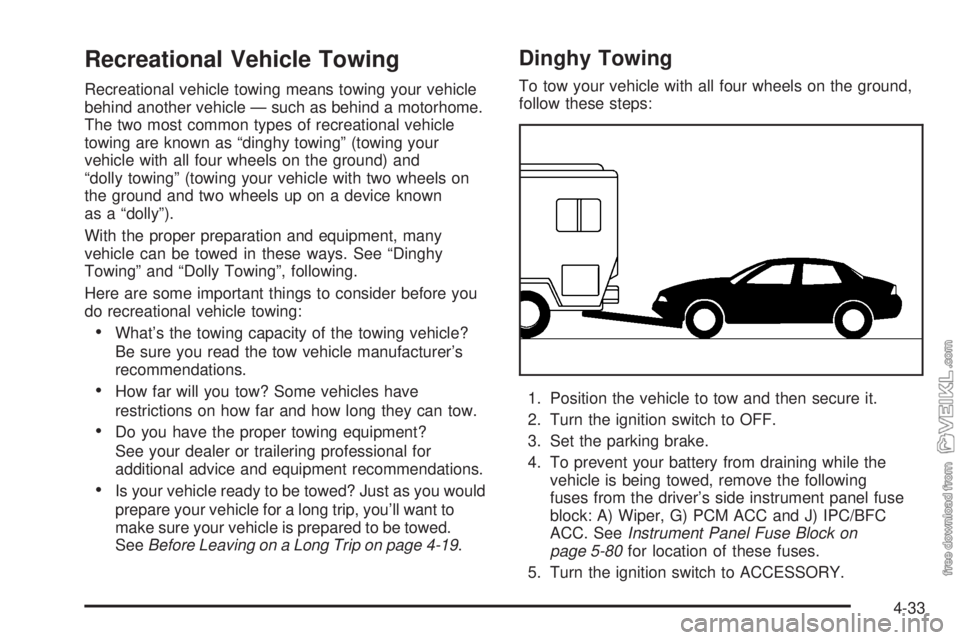
Recreational Vehicle Towing
Recreational vehicle towing means towing your vehicle
behind another vehicle — such as behind a motorhome.
The two most common types of recreational vehicle
towing are known as “dinghy towing” (towing your
vehicle with all four wheels on the ground) and
“dolly towing” (towing your vehicle with two wheels on
the ground and two wheels up on a device known
as a “dolly”).
With the proper preparation and equipment, many
vehicle can be towed in these ways. See “Dinghy
Towing” and “Dolly Towing”, following.
Here are some important things to consider before you
do recreational vehicle towing:
•What’s the towing capacity of the towing vehicle?
Be sure you read the tow vehicle manufacturer’s
recommendations.
•How far will you tow? Some vehicles have
restrictions on how far and how long they can tow.
•Do you have the proper towing equipment?
See your dealer or trailering professional for
additional advice and equipment recommendations.
•Is your vehicle ready to be towed? Just as you would
prepare your vehicle for a long trip, you’ll want to
make sure your vehicle is prepared to be towed.
SeeBefore Leaving on a Long Trip on page 4-19.
Dinghy Towing
To tow your vehicle with all four wheels on the ground,
follow these steps:
1. Position the vehicle to tow and then secure it.
2. Turn the ignition switch to OFF.
3. Set the parking brake.
4. To prevent your battery from draining while the
vehicle is being towed, remove the following
fuses from the driver’s side instrument panel fuse
block: A) Wiper, G) PCM ACC and J) IPC/BFC
ACC. SeeInstrument Panel Fuse Block on
page 5-80for location of these fuses.
5. Turn the ignition switch to ACCESSORY.
4-33
Page 176 of 320
6. Shift your transaxle to NEUTRAL (N).
7. Release the parking brake.
Remember to install the fuses once you reach your
destination. To reinstall a fuse:
1. Set the parking brake.
2. Remove the key from the ignition switch.
3. Reinstall the fuse.
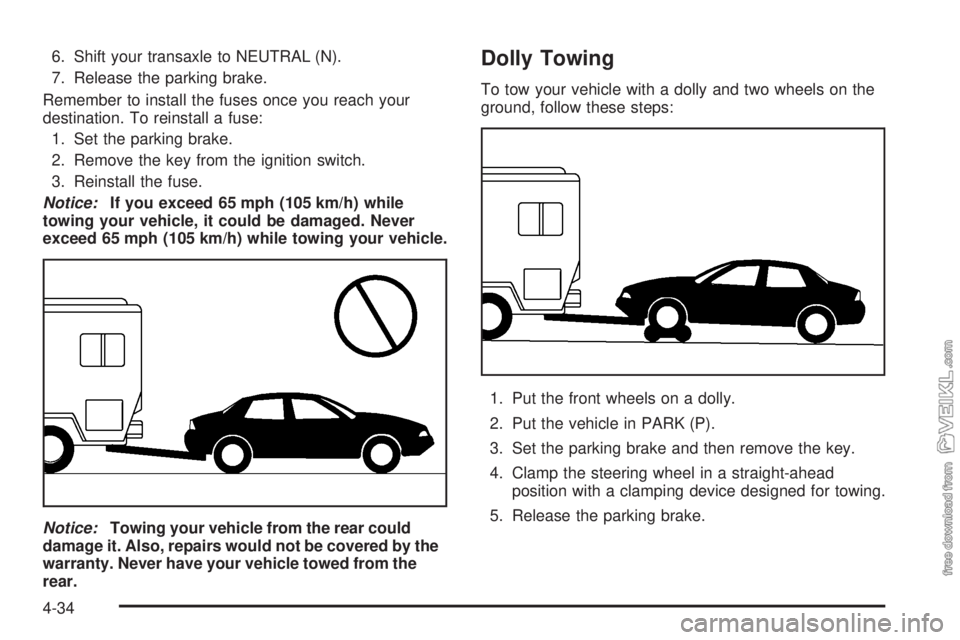
Notice:If you exceed 65 mph (105 km/h) while
towing your vehicle, it could be damaged. Never
exceed 65 mph (105 km/h) while towing your vehicle.
Notice:Towing your vehicle from the rear could
damage it. Also, repairs would not be covered by the
warranty. Never have your vehicle towed from the
rear.Dolly Towing
To tow your vehicle with a dolly and two wheels on the
ground, follow these steps:
1. Put the front wheels on a dolly.
2. Put the vehicle in PARK (P).
3. Set the parking brake and then remove the key.
4. Clamp the steering wheel in a straight-ahead
position with a clamping device designed for towing.
5. Release the parking brake.
4-34
Page 186 of 320
If a Tire Goes Flat........................................5-60
Changing a Flat Tire.....................................5-60
Removing the Spare Tire and Tools................5-62
Removing the Flat Tire and Installing
the Spare Tire..........................................5-63
Storing a Flat or Spare Tire and Tools............5-69
Compact Spare Tire......................................5-70
Appearance Care............................................5-71
Fabric/Carpet...............................................5-71
Vinyl...........................................................5-73
Instrument Panel..........................................5-73
Interior Plastic Components............................5-73
Glass Surfaces.............................................5-73
Care of Safety Belts......................................5-73
Weatherstrips...............................................5-74
Washing Your Vehicle...................................5-74
Cleaning Exterior Lamps/Lenses.....................5-74
Finish Care..................................................5-74
Windshield and Wiper Blades.........................5-75
Aluminum Wheels.........................................5-75Tires...........................................................5-76
Sheet Metal Damage.....................................5-76
Finish Damage.............................................5-76
Underbody Maintenance................................5-76
Chemical Paint Spotting.................................5-77
Vehicle Care/Appearance Materials..................5-77
Vehicle Identication......................................5-78
Vehicle Identification Number (VIN).................5-78
Service Parts Identification Label.....................5-78
Electrical System............................................5-79
Add-On Electrical Equipment..........................5-79
Headlamp Wiring..........................................5-79
Windshield Wiper Fuses................................5-79
Power Windows and Other Power Options.......5-79
Fuses and Circuit Breakers............................5-80
Instrument Panel Fuse Block..........................5-80
Engine Compartment Fuse Block....................5-83
Capacities and Specications..........................5-85
Normal Maintenance Replacement Parts..........5-86
Section 5 Service and Appearance Care
5-2
Page 263 of 320
Electrical System
Add-On Electrical Equipment
Notice:Don’t add anything electrical to your
vehicle unless you check with your dealer rst.
Some electrical equipment can damage your
vehicle and the damage wouldn’t be covered by
your warranty. Some add-on electrical equipment
can keep other components from working as
they should.
Your vehicle has an air bag system. Before attempting
to add anything electrical to your vehicle, see
Servicing Your Airbag-Equipped Vehicle on page 1-52.
Headlamp Wiring
The headlamp wiring is protected by fuses, one for each
headlamp, in the fuse block. An electrical overload
will cause the lamps to turn off. If this happens, have
your headlamp wiring checked right away.
Windshield Wiper Fuses
The windshield wiper motor is protected by an internal
circuit breaker and a fuse. If the motor overheats due to
heavy snow, etc., the wiper will stop until the motor
cools. If the overload is caused by some electrical
problem and not snow, etc., be sure to get it fixed.
Power Windows and Other Power
Options
Circuit breakers in the fuse block protect the power
windows and other power accessories. When the current
load is too heavy, the circuit breaker opens and
closes, protecting the circuit until the problem is fixed or
goes away.
5-79
Page 264 of 320
Fuses and Circuit Breakers
The wiring circuits in your vehicle are protected from
short circuits by a combination of fuses, circuit breakers
and fusible thermal links in the wiring itself.
Look at the silver-colored band inside the fuse. If the
band is broken or melted, replace the fuse. Be sure you
replace a bad fuse with a new one of the identical
size and rating.
If you ever have a problem on the road and don’t have
a spare fuse, you can borrow one that has the same
amperage. Just pick a feature of your vehicle that
you can get along without — like the radio or cigarette
lighter — and use its fuse, if it is the correct amperage.
Replace it as soon as you can.
There are three fuse blocks in your vehicle:
two instrument panel fuse blocks and the engine
compartment fuse block.
There is a fuse puller located on the engine
compartment fuse block. It can be used to easily
remove fuses from the fuse block.
Instrument Panel Fuse Block
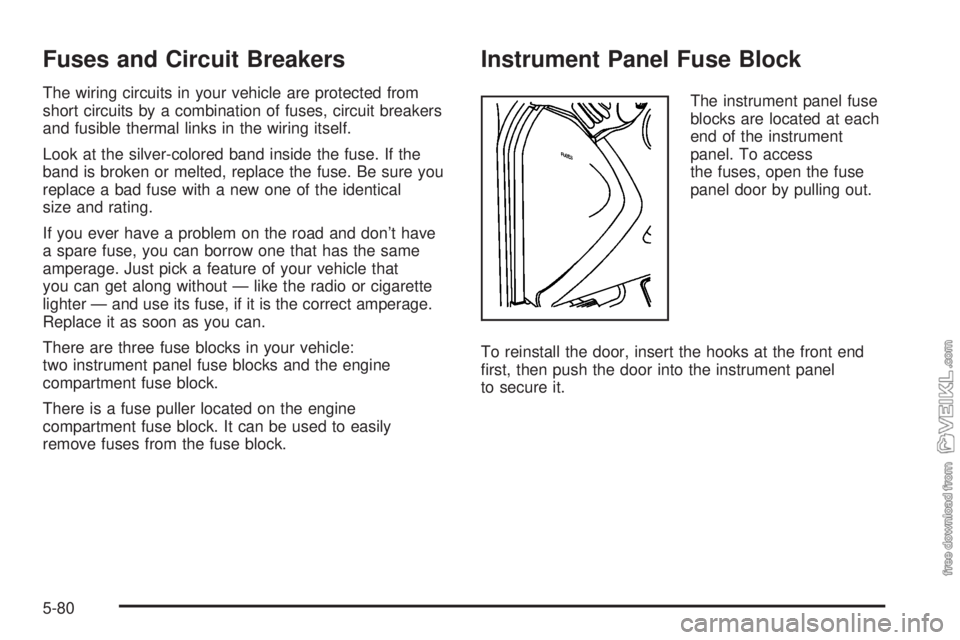
The instrument panel fuse
blocks are located at each
end of the instrument
panel. To access
the fuses, open the fuse
panel door by pulling out.
To reinstall the door, insert the hooks at the front end
first, then push the door into the instrument panel
to secure it.
5-80
Page 265 of 320
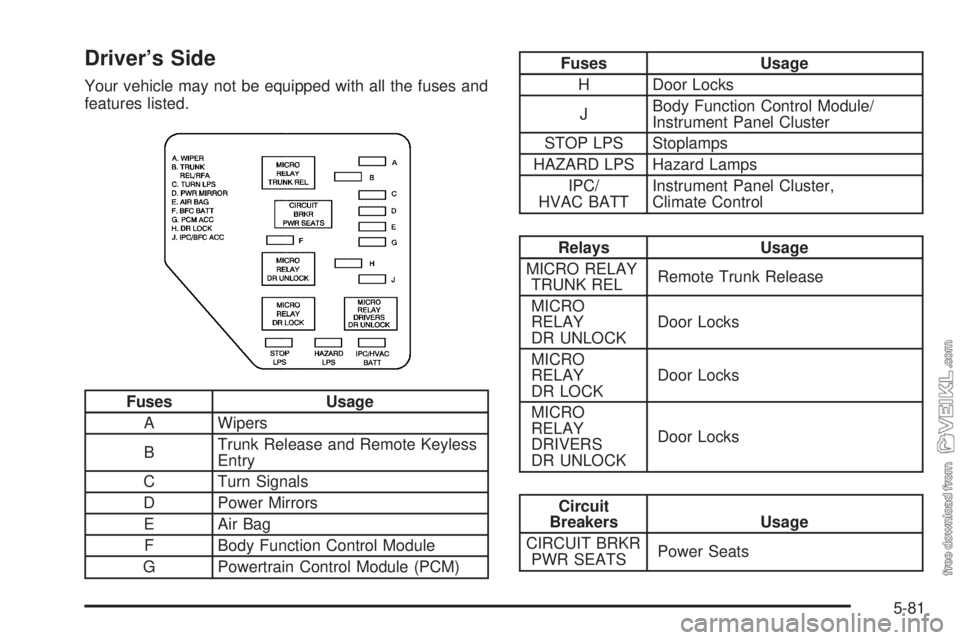
Driver’s Side
Your vehicle may not be equipped with all the fuses and
features listed.
Fuses Usage
A Wipers
BTrunk Release and Remote Keyless
Entry
C Turn Signals
D Power Mirrors
E Air Bag
F Body Function Control Module
G Powertrain Control Module (PCM)
Fuses Usage
H Door Locks
JBody Function Control Module/
Instrument Panel Cluster
STOP LPS Stoplamps
HAZARD LPS Hazard Lamps
IPC/
HVAC BATTInstrument Panel Cluster,
Climate Control
Relays Usage
MICRO RELAY
TRUNK RELRemote Trunk Release
MICRO
RELAY
DR UNLOCKDoor Locks
MICRO
RELAY
DR LOCKDoor Locks
MICRO
RELAY
DRIVERS
DR UNLOCKDoor Locks
Circuit
Breakers Usage
CIRCUIT BRKR
PWR SEATSPower Seats
5-81
Page 266 of 320
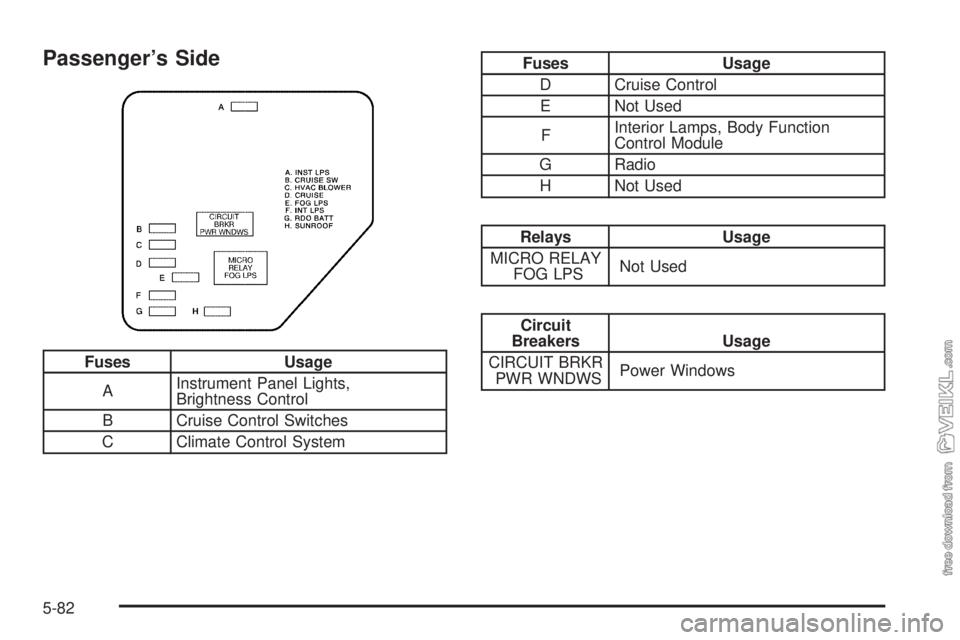
Passenger’s Side
Fuses Usage
AInstrument Panel Lights,
Brightness Control
B Cruise Control Switches
C Climate Control System
Fuses Usage
D Cruise Control
E Not Used
FInterior Lamps, Body Function
Control Module
G Radio
H Not Used
Relays Usage
MICRO RELAY
FOG LPSNot Used
Circuit
Breakers Usage
CIRCUIT BRKR
PWR WNDWSPower Windows
5-82