audio CHEVROLET COBALT 2009 1.G User Guide
[x] Cancel search | Manufacturer: CHEVROLET, Model Year: 2009, Model line: COBALT, Model: CHEVROLET COBALT 2009 1.GPages: 402, PDF Size: 2.15 MB
Page 187 of 402
Using the Auxiliary Input Jack
Your radio system has an auxiliary input jack located on
the lower right side of the faceplate. This is not an
audio output; do not plug the headphone set into the
front auxiliary input jack. You can however, connect an
external audio device such as an iPod, laptop computer,
MP3 player, CD changer, or cassette tape player, etc.
to the auxiliary input jack for use as another source for
audio listening.
Drivers are encouraged to set up any auxiliary device
while the vehicle is in PARK (P). SeeDefensive Driving
on page 4-2for more information on driver distraction.
To use a portable audio player, connect a 3.5 mm
(1/8 inch) cable to the radio’s front auxiliary input jack.
When a device is connected, press the radio CD/AUX
button to begin playing audio from the device over
the vehicle speakers.
O(Power/Volume):Turn clockwise or counterclockwise
to increase or decrease the volume of the portable player.
Additional volume adjustments might need to be made
from the portable device.
BAND:Press to listen to the radio while a portable audio
device is playing. The portable audio device continues to
play, so you might want to stop it or turn it off.CD/AUX (CD/Auxiliary):Press to play a CD while a
portable audio device is playing. Press again and
the system begins to play audio from the connected
portable audio player. If a portable audio player is not
connected, “No Aux Input Device” displays.
Using an MP3
MP3 CD-R or CD-RW Disc
The radio plays MP3 les that were recorded on a
CD-R or CD-RW disc. The les can be recorded with the
following xed bit rates: 32 kbps, 40 kbps, 56 kbps,
64 kbps, 80 kbps, 96 kbps, 112 kbps, 128 kbps,
160 kbps, 192 kbps, 224 kbps, 256 kbps, and 320 kbps or
a variable bit rate. Song title, artist name, and album can
display when recorded using ID3 tags version 1 and 2.
Compressed Audio
The radio also plays discs that contain both
uncompressed CD audio (.CDA les) and MP3 les.
By default the radio reads only the uncompressed audio
and ignores the MP3 les. Pressing the CAT (category)
button toggles between compressed and uncompressed
audio format.
3-69
Page 188 of 402
MP3 Format
If you burn your own MP3 disc on a personal computer:
Make sure the MP3 les are recorded on a CD-R
or CD-RW disc.
Do not mix standard audio and MP3 les on one disc.
Make sure the CD does not have more than a
maximum of 50 folders, 50 playlists, and 255 les to
read and play.
Create a folder structure that makes it easy to nd
songs while driving. Organize songs by albums using
one folder for each album. Each folder or album
should contain 18 songs or less.
Avoid subfolders. The system can support up to
8 subfolders deep, however, keep the total number
of folders to a minimum in order to reduce the
complexity and confusion in trying to locate a
particular folder during playback.
Make sure playlists have a .mp3 or .wpl extension
(other le extensions might not work).
Minimize the length of the le, folder, or playlist
names. Long le, folder, or playlist names, or a
combination of a large number of les and folders, or
playlists can cause the player to be unable to play up
to the maximum number of les, folders, playlists, or
sessions. If you wish to play a large number of les,
folders, playlists, or sessions, minimize the length of
the le, folder, or playlist name. Long names also
take up more space on the display, and might not
fully display.
Finalize the audio disc before you burn it. Trying to
add music to an existing disc can cause the disc not
to function in the player.
Playlists can be changed by using the previous and
next folder buttons, the tuner knob, or the seek buttons.
An MP3 CD-R or CD-RW that was recorded using no
le folders can also be played. If a CD-R or CD-RW
contains more than the maximum of 50 folders,
50 playlists, and 255 les, the player lets you access
and navigate up to the maximum, but all items over the
maximum are not accessible.
3-70
Page 189 of 402
Root Directory
The root directory of the CD-R or CD-RW is treated as
a folder. If the root directory has compressed audio
les, the directory displays as F1 ROOT. All les
contained directly under the root directory are accessed
prior to any root directory folders. However, playlists
(Px) are always accessed before root folders or les.
Empty Directory or Folder
If a root directory or a folder exists somewhere in the
le structure that contains only folders/subfolders
and no compressed les directly beneath them,
the player advances to the next folder in the le structure
that contains compressed audio les. The empty folder
does not display.
No Folder
When the CD-R or CD-RW contains only compressed
les, the les are located under the root folder. The next
and previous folder functions are not displayed on a
CD-R or CD-RW that was recorded without folders or
playlists. When displaying the name of the folder
the radio displays ROOT.When the CD-R or CD-RW contains only playlists and
compressed audio les, but no folders, all les are
located under the root folder. The folder down and the
folder up buttons search playlists (Px) rst and then
goes to the root folder. When the radio displays
the name of the folder, the radio displays ROOT.
Order of Play
Tracks recorded to the CD-R or CD-RW are played in
the following order:
Play begins from the rst track in the rst playlist
and continues sequentially through all tracks in
each playlist. When the last track of the last playlist
has played, play continues from the rst track of
the rst playlist.
Play begins from the rst track in the rst folder and
continues sequentially through all tracks in each
folder. When the last track of the last folder has
played, play continues from the rst track of the
rst folder.
When play enters a new folder, the display does not
automatically show the new folder name unless
the folder mode was chosen as the default display.
The new track name displays.
3-71
Page 190 of 402
File System and Naming
The song name that displays is the song name that is
contained in the ID3 tag. If the song name is not present
in the ID3 tag, then the radio displays the le name
without the extension (such as .mp3) as the track name.
Track names longer than 32 characters or four pages
are shortened. Parts of words on the last page of
text and the extension of the lename does not display.
Preprogrammed Playlists
Preprogrammed playlists that were created using
WinAmp™, MusicMatch™, or Real Jukebox™ software,
can be accessed, however, they cannot be edited
using the radio. These playlists are treated as special
folders containing compressed audio song les.
Playing an MP3
Insert a CD-R or CD-RW partway into the slot (Single
CD Player), or press the load button and wait for
the message to insert disc (Six-Disc CD Player), label
side up. The player pulls it in, and the CD-R or CD-RW
should begin playing.
If the ignition or radio is turned off with a CD-R or CD-RW
in the player, it stays in the player. When the ignition or
radio is turned on, the CD-R starts to play where it
stopped, if it was the last selected audio source.As each new track starts to play, the track number and
song title displays.
ZEJECT:Press this button to eject CD-R(s) or
CD-RW(s). To eject the CD-R or CD-RW that is currently
playing, press and release this button. A beep sounds
and Ejecting Disc displays. Once the disc is ejected,
Remove Disc displays. The CD-R or CD-RW can
be removed. If the CD-R or CD-RW is not removed,
after several seconds, the CD-R or CD-RW
automatically pulls back into the player and begins
playing. For the Six-Disc CD player, press and hold this
button for two seconds to eject all discs.
f(Tune):Turn this knob to select MP3 les on the
CD-R or CD-RW currently playing.
©SEEK¨:Press the left SEEK arrow to go to the
start of the current MP3 le, if more than ten seconds
have played. Press the right SEEK arrow to go to
the next MP3 le. If either SEEK arrow is held or
pressed multiple times, the player continues moving
backward or forward through MP3 les on the CD.
Sc(Previous Folder):Press the pushbutton
positioned under the Folder label to go to the rst track
in the previous folder.
cT(Next Folder):Press the pushbutton positioned
under the Folder label to go to the rst track in the
next folder.
3-72
Page 192 of 402
To change from playback by artist to playback by
album, press the pushbutton located below the Sort By
label. From the sort screen, push one of the buttons
below the album button. Press the pushbutton below the
back label to return to the main music navigator
screen. The album name displays on the second line
between the arrows and songs from the current
album and begins to play. Once all songs from that
album are played, the player moves to the next album
in alphabetical order on the CD-R or CD-RW and begins
playing MP3 les from that album.
To exit music navigator mode, press the pushbutton
below the Back label to return to normal MP3 playback.
BAND:Press this button to listen to the radio while
a CD is playing. The CD remains inside the radio
for future listening.
CD/AUX (CD/Auxiliary):Press this button to play a CD
while listening to the radio. The CD icon and a
message showing disc and/or track number displays
while a CD is in the player. Press this button again and
the system automatically searches for an auxiliary
input device such as a portable audio player. If a
portable audio player is not connected, “No Aux Input
Device” displays.XM Radio Messages
XL (Explicit Language Channels):These channels, or
any others, can be blocked at a customer’s request,
by calling 1-800-852-XMXM (9696).
XM Updating:The encryption code in the receiver is
being updated, and no action is required. This process
should take no longer than 30 seconds.
No XM Signal:The system is functioning correctly, but
the vehicle is in a location that is blocking the XM™
signal. When you move into an open area, the signal
should return.
Loading XM:The audio system is acquiring and
processing audio and text data. No action is needed.
This message should disappear shortly.
Channel Off Air:This channel is not currently in
service. Tune to another channel.
Channel Unavail:This previously assigned channel is
no longer assigned. Tune to another station. If this
station was one of the presets, choose another station
for that preset button.
3-74
Page 194 of 402
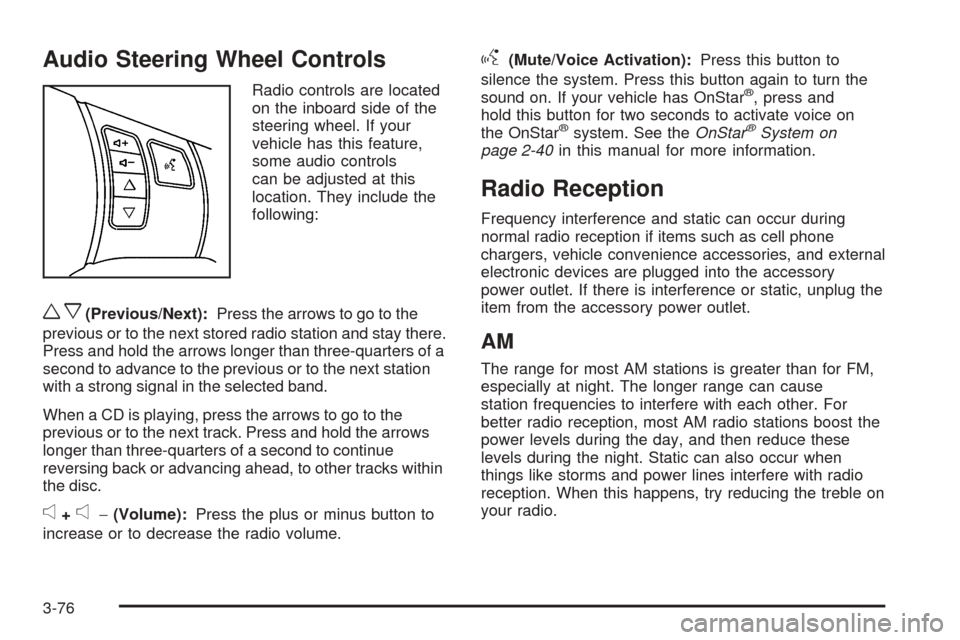
Audio Steering Wheel Controls
Radio controls are located
on the inboard side of the
steering wheel. If your
vehicle has this feature,
some audio controls
can be adjusted at this
location. They include the
following:
wx(Previous/Next):Press the arrows to go to the
previous or to the next stored radio station and stay there.
Press and hold the arrows longer than three-quarters of a
second to advance to the previous or to the next station
with a strong signal in the selected band.
When a CD is playing, press the arrows to go to the
previous or to the next track. Press and hold the arrows
longer than three-quarters of a second to continue
reversing back or advancing ahead, to other tracks within
the disc.
e+e−(Volume):Press the plus or minus button to
increase or to decrease the radio volume.
g(Mute/Voice Activation):Press this button to
silence the system. Press this button again to turn the
sound on. If your vehicle has OnStar
®, press and
hold this button for two seconds to activate voice on
the OnStar
®system. See theOnStar®System on
page 2-40in this manual for more information.
Radio Reception
Frequency interference and static can occur during
normal radio reception if items such as cell phone
chargers, vehicle convenience accessories, and external
electronic devices are plugged into the accessory
power outlet. If there is interference or static, unplug the
item from the accessory power outlet.
AM
The range for most AM stations is greater than for FM,
especially at night. The longer range can cause
station frequencies to interfere with each other. For
better radio reception, most AM radio stations boost the
power levels during the day, and then reduce these
levels during the night. Static can also occur when
things like storms and power lines interfere with radio
reception. When this happens, try reducing the treble on
your radio.
3-76
Page 346 of 402
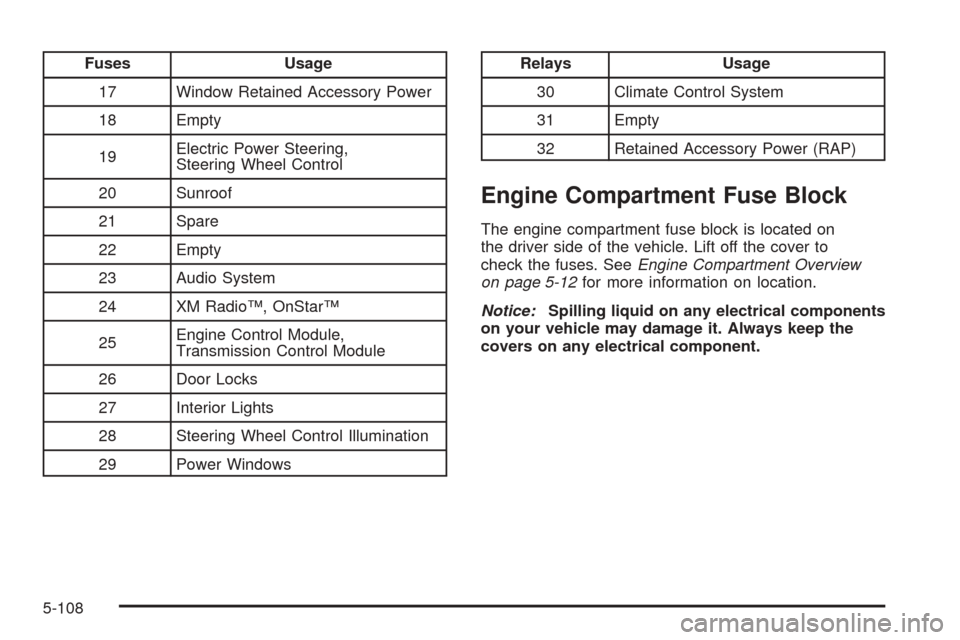
Fuses Usage
17 Window Retained Accessory Power
18 Empty
19Electric Power Steering,
Steering Wheel Control
20 Sunroof
21 Spare
22 Empty
23 Audio System
24 XM Radio™, OnStar™
25Engine Control Module,
Transmission Control Module
26 Door Locks
27 Interior Lights
28 Steering Wheel Control Illumination
29 Power WindowsRelays Usage
30 Climate Control System
31 Empty
32 Retained Accessory Power (RAP)
Engine Compartment Fuse Block
The engine compartment fuse block is located on
the driver side of the vehicle. Lift off the cover to
check the fuses. SeeEngine Compartment Overview
on page 5-12for more information on location.
Notice:Spilling liquid on any electrical components
on your vehicle may damage it. Always keep the
covers on any electrical component.
5-108
Page 390 of 402
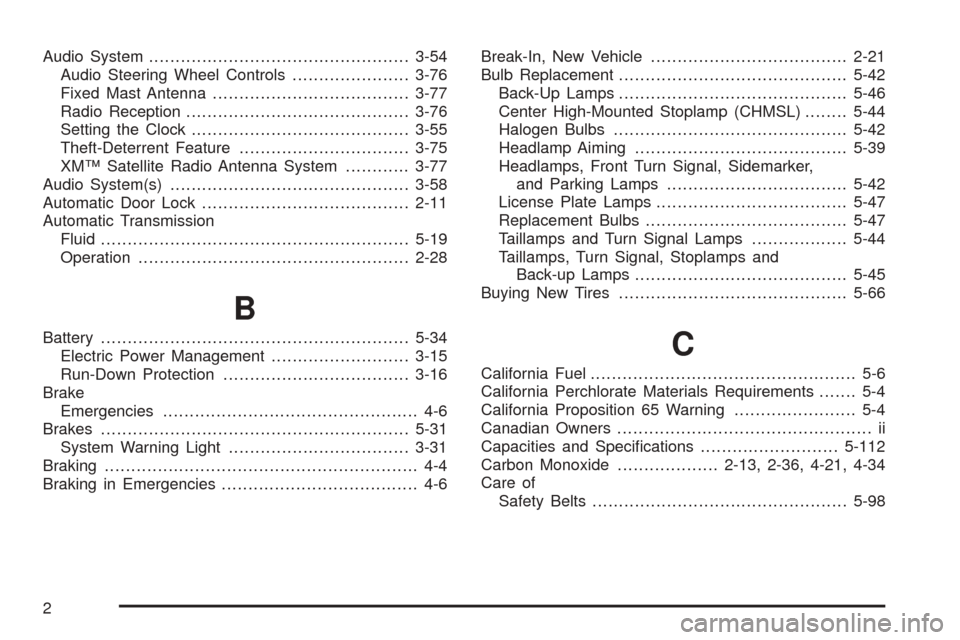
Audio System.................................................3-54
Audio Steering Wheel Controls......................3-76
Fixed Mast Antenna.....................................3-77
Radio Reception..........................................3-76
Setting the Clock.........................................3-55
Theft-Deterrent Feature................................3-75
XM™ Satellite Radio Antenna System............3-77
Audio System(s).............................................3-58
Automatic Door Lock.......................................2-11
Automatic Transmission
Fluid..........................................................5-19
Operation...................................................2-28
B
Battery..........................................................5-34
Electric Power Management..........................3-15
Run-Down Protection...................................3-16
Brake
Emergencies................................................ 4-6
Brakes..........................................................5-31
System Warning Light..................................3-31
Braking........................................................... 4-4
Braking in Emergencies..................................... 4-6Break-In, New Vehicle.....................................2-21
Bulb Replacement...........................................5-42
Back-Up Lamps...........................................5-46
Center High-Mounted Stoplamp (CHMSL)........5-44
Halogen Bulbs............................................5-42
Headlamp Aiming........................................5-39
Headlamps, Front Turn Signal, Sidemarker,
and Parking Lamps..................................5-42
License Plate Lamps....................................5-47
Replacement Bulbs......................................5-47
Taillamps and Turn Signal Lamps..................5-44
Taillamps, Turn Signal, Stoplamps and
Back-up Lamps........................................5-45
Buying New Tires...........................................5-66C
California Fuel.................................................. 5-6
California Perchlorate Materials Requirements....... 5-4
California Proposition 65 Warning....................... 5-4
Canadian Owners................................................ ii
Capacities and Specications..........................5-112
Carbon Monoxide...................2-13, 2-36, 4-21, 4-34
Care of
Safety Belts................................................5-98
2
Page 400 of 402
Starting the Engine.........................................2-25
Steering........................................................4-12
Steering Wheel Controls, Audio.........................3-76
Steering Wheel, Tilt Wheel................................. 3-6
Storage Areas
Center Console Storage Area........................2-43
Convenience Net.........................................2-43
Cupholder(s)...............................................2-43
Driver’s Storage Compartment.......................2-43
Glove Box..................................................2-43
Stuck in Sand, Mud, Ice, or Snow.....................4-26
Sun Visors.....................................................2-17
Sunroof.........................................................2-44
T
Tachometer....................................................3-25
Taillamps
Turn Signal Lamps......................................5-44
Turn Signal, Stoplamps and Back-up Lamps......5-45
Theft-Deterrent, Radio.....................................3-75
Theft-Deterrent Systems...................................2-18
Content Theft-Deterrent................................2-18
PASS-Key
®III+...........................................2-19
PASS-Key®III+ Operation.............................2-20
Tilt Wheel........................................................ 3-6Time, Setting..................................................3-55
Tire
Pressure Light.............................................3-34
Tires.............................................................5-49
Aluminum or Chrome-Plated Wheels,
Cleaning...............................................5-101
Buying New Tires........................................5-66
Chains.......................................................5-72
Changing a Flat Tire....................................5-74
Cleaning...................................................5-101
Compact Spare Tire.....................................5-94
Different Size..............................................5-68
If a Tire Goes Flat.......................................5-73
Ination - Tire Pressure................................5-56
Inspection and Rotation................................5-63
Installing the Spare Tire.......................5-80, 5-89
Pressure Monitor Operation...........................5-59
Pressure Monitor System..............................5-57
Removing the Flat Tire.........................5-80, 5-89
Removing the Spare Tire and Tools...............5-75
Storing a Flat or Spare Tire and Tools............5-93
Tire Sidewall Labeling..................................5-50
Tire Terminology and Denitions....................5-53
Uniform Tire Quality Grading.........................5-68
Wheel Alignment and Tire Balance.................5-70
Wheel Replacement.....................................5-70
When It Is Time for New Tires......................5-65
12