ECO mode CHEVROLET COLORADO 2012 1.G User Guide
[x] Cancel search | Manufacturer: CHEVROLET, Model Year: 2012, Model line: COLORADO, Model: CHEVROLET COLORADO 2012 1.GPages: 394, PDF Size: 6.38 MB
Page 162 of 394
Black plate (20,1)Chevrolet Colorado Owner Manual - 2012
7-20 Infotainment System
When in random, pressing and
releasing either SEEK arrow takes
the CD to the previous or to the next
random track.
Press and release this button again
to turn off random play. NO RDM
(no random) displays.
qSEEKr:Press the left SEEK
arrow to go to the start of the
previous track. Press the right
SEEK arrow to go to the start of the
next track. Pressing either SEEK
arrow for more than two seconds
searches the previous or next tracks
at two tracks per second. Release
the button to stop searching and to
play the track.
qTUNEr: Turn to reverse or
advance through the tracks in
all folders or playlists. The track
number and file name displays for
each track. Turning this knob while
in random reverses or advances the
tracks in sequential order. DISPL (Display):
Press this
knob to switch between track
mode, folder/playlist mode, and time
of day mode. The display shows
only eight characters, but there can
be up to four pages of text. If there
are more than eight characters
in the song, folder, or playlist
name, pressing this knob within
two seconds takes you to the next
page of text. If there are no other
pages to be shown, pressing this
knob within two seconds takes you
to the next display mode.
.Track mode displays the current
track number and the ID3 tag
song name.
.Folder/playlist mode displays the
current folder or playlist number
and the folder/playlist name.
.Time of day mode displays the
time of day and the ID3 tag
song name. To change the default on the
display, press the DISPL knob until
you see the desired display, then
press and hold this knob for two
two seconds. The radio produces
one beep and the selected display
is now the default.
INFO (Information):
INFO displays
when a current track has ID3 tag
information. Press this button to
display the artist name and album
contained in the tag. INFO
disappears from the display when
the information in the ID3 tag has
finished being read.
BAND: Press this button to listen to
the radio when a CD is playing. The
inactive CD remains inside the radio
for future listening.
CD AUX (Auxiliary): Press this
button to play a CD when listening
to the radio. The CD symbol
illuminates on the display when a
CD is loaded.
Page 163 of 394
Black plate (21,1)Chevrolet Colorado Owner Manual - 2012
Infotainment System 7-21
Z(Eject):Press this button to
eject a CD. Eject can activate while
either the ignition or radio is off.
CDs can be loaded with the ignition
and radio off if this button is pressed
first.
CD Messages
CHECK CD: If this message
displays and/or the CD comes out,
it could be for one of the following
reasons:
.It is very hot. When the
temperature returns to normal,
the CD should play.
.You are driving on a very rough
road. When the road becomes
smoother, the CD should play.
.The CD is dirty, scratched, wet,
or upside down.
.The air is very humid. If so, wait
about an hour and try again.
.The format of the CD might not
be compatible. See “Using an
MP3” later in this section.
.There could have been a
problem while burning the CD.
.The label could be caught in the
CD player.
If the CD is not playing correctly,
for any other reason, try a known
good CD.
If any error occurs repeatedly or
if an error cannot be corrected,
contact your dealer. If the radio
displays an error message, write it
down and provide it to your dealer
when reporting the problem.
Phone
Bluetooth
For vehicles equipped with
Bluetooth capability, the system
can interact with many cell phones,
allowing:
.Placement and receipt of calls in
a hands-free mode.
.Sharing of the cell phone’s
address book or contact list with
the vehicle.
To minimize driver distraction,
before driving, and with the vehicle
parked:
.Become familiar with the
features of the cell phone.
Organize the phone book and
contact lists clearly and delete
duplicate or rarely used entries.
If possible, program speed dial
or other shortcuts.
.Review the controls and
operation of the infotainment
system.
Page 172 of 394

Black plate (2,1)Chevrolet Colorado Owner Manual - 2012
8-2 Climate Controls
If the knob is set on“0”(zero), some
outside air will still enter the vehicle
and will be directed according to the
position of the mode knob.
Air Delivery Mode Control:
Turn the knob clockwise or
counterclockwise to change the
current airflow mode.
Select from the following modes:
H(Vent): Air is directed to the
instrument panel outlets.
\(Bi-Level): Air is divided
between the instrument panel
outlets and floor and side window
outlets. Cooler air is directed to the
upper outlets and warmer air to the
floor outlets.
[(Floor): Air is directed to the
floor outlets. Recirculation cannot
be selected while in floor mode
because this could cause the
interior window to fog.
/(Floor/Defog): This mode
clears the windows of fog or
moisture. Air is directed to the floor,
windshield, and side window outlets.
When this mode is selected, the
system runs the air conditioning
compressor unless the outside
temperature is near freezing or
below. Recirculation is not available
in this mode.
0(Defrost): This mode clears
the windshield of fog or frost
more quickly. Air is directed to the
windshield and side window outlets.
When this mode is selected, the
system runs the air conditioning
compressor unless the outside
temperature is near, or below
freezing. Recirculation is not
available in this mode.
Do not drive the vehicle until all the
windows are clear.
#(Air Conditioning): Press to
turn the air conditioning system
on or off. An indicator light on the
button comes on to show that the air
conditioning is on.
The fan control must be on to use
the air conditioning.
There might be a slight change in
engine performance when the air
conditioning compressor shuts off
and turns on again. This is normal.
The system is designed to make
adjustments to help with fuel
economy while still maintaining
the selected temperature.
The air conditioning system
removes moisture from the air, so a
small amount of water might drip
under the vehicle while idling or
after turning off the engine. This is
normal.
Page 191 of 394
Black plate (17,1)Chevrolet Colorado Owner Manual - 2012
Driving and Operating 9-17
WARNING (Continued)
vehicle handles. This could
cause loss of control and a
crash. Overloading can also
shorten the life of the vehicle.
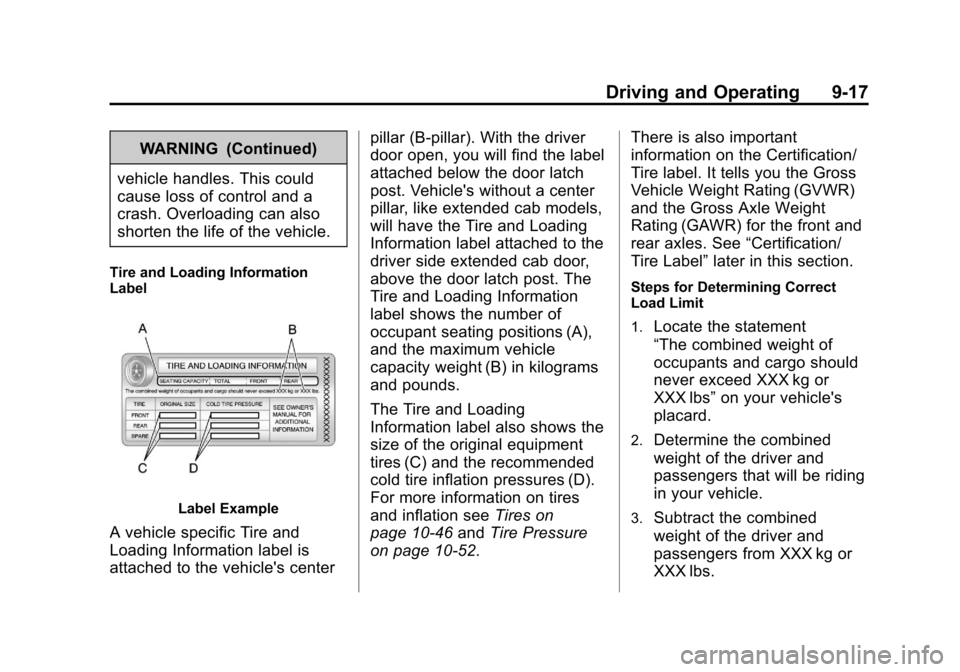
Tire and Loading Information
Label
Label Example
A vehicle specific Tire and
Loading Information label is
attached to the vehicle's center pillar (B‐pillar). With the driver
door open, you will find the label
attached below the door latch
post. Vehicle's without a center
pillar, like extended cab models,
will have the Tire and Loading
Information label attached to the
driver side extended cab door,
above the door latch post. The
Tire and Loading Information
label shows the number of
occupant seating positions (A),
and the maximum vehicle
capacity weight (B) in kilograms
and pounds.
The Tire and Loading
Information label also shows the
size of the original equipment
tires (C) and the recommended
cold tire inflation pressures (D).
For more information on tires
and inflation see
Tires on
page 10‑46 andTire Pressure
on page 10‑52. There is also important
information on the Certification/
Tire label. It tells you the Gross
Vehicle Weight Rating (GVWR)
and the Gross Axle Weight
Rating (GAWR) for the front and
rear axles. See
“Certification/
Tire Label” later in this section.
Steps for Determining Correct
Load Limit
1.
Locate the statement
“The combined weight of
occupants and cargo should
never exceed XXX kg or
XXX lbs”on your vehicle's
placard.
2.Determine the combined
weight of the driver and
passengers that will be riding
in your vehicle.
3.Subtract the combined
weight of the driver and
passengers from XXX kg or
XXX lbs.
Page 218 of 394
Black plate (44,1)Chevrolet Colorado Owner Manual - 2012
9-44 Driving and Operating
Adding non-dealer/non-retailer
accessories can affect the vehicle's
performance. SeeAccessories and
Modifications on page 10‑3.
StabiliTrak®System
The vehicle has an electronic
stability control system called
StabiliTrak. It is an advanced
computer controlled system that
assists the driver with directional
control of the vehicle in difficult
driving conditions.
StabiliTrak activates when the
computer senses a discrepancy
between the intended path and the
direction the vehicle is actually
traveling. StabiliTrak selectively
applies braking pressure at any one
of the vehicle's brakes to assist the
driver with keeping the vehicle on
the intended path.
When the vehicle is started and
begins to move, the system
performs several diagnostic checks
to insure there are no problems. The system may be heard or felt
while it is working. This is normal
and does not mean there is a
problem with the vehicle. The
system should initialize before the
vehicle reaches 32 km/h (20 mph).
In some cases, it may take
approximately two miles of driving
before the system initializes.
If cruise control is being used
when StabiliTrak activates, the
cruise control automatically
disengages. The cruise control
can be re-engaged when road
conditions allow. See
Cruise Control
on page 9‑46.
If there is a problem detected with
StabiliTrak, a SERVICE STAB SYS
message displays on the Driver
Information Center (DIC). See Ride
Control System Messages on
page 5‑25 for more information.
When this message is displayed,
the system is not working. Adjust
your driving accordingly. StabiliTrak and Traction Control
(TCS) come on automatically
whenever the vehicle is started
and the systems are reset with
each ignition cycle. However,
when the transfer case is placed
in Four-Wheel-Low mode,
StabiliTrak is automatically
disabled. See
Four-Wheel Drive on
page 10‑29 for more information.
It is recommended to leave the
system on for normal driving
conditions, but it may be necessary
to turn the TCS portion of the
system off if the vehicle is stuck in
sand, mud, ice, or snow, and it is
necessary to “rock”the vehicle to
attempt to free it. If traction control
is turned off, only the brake-traction
control portion of traction control
will work. The engine speed
management will be disabled.
In this mode, engine power is not
reduced automatically and the
drive wheels can spin more freely.
Page 232 of 394
Black plate (58,1)Chevrolet Colorado Owner Manual - 2012
9-58 Driving and Operating
Trailering is different than just
driving the vehicle by itself.
Trailering means changes in
handling, acceleration, braking,
durability and fuel economy.
Successful, safe trailering takes
correct equipment, and it has to be
used properly.
The following information has many
time-tested, important trailering tips
and safety rules. Many of these are
important for your safety and that of
your passengers. So please read
this section carefully before pulling a
trailer.Weight of the Trailer
How heavy can a trailer safely be?
It depends on how the rig is used.
For example, speed, altitude, road
grades, outside temperature and
how much the vehicle is used to pull
a trailer are all important. It can
depend on any special equipment
on the vehicle, and the amount of
tongue weight the vehicle can carry.
See“Weight of the Trailer Tongue”
later in this section for more
information. Maximum trailer weight is calculated
assuming only the driver is in the
tow vehicle and it has all the
required trailering equipment.
The weight of additional optional
equipment, passengers and cargo in
the tow vehicle must be subtracted
from the maximum trailer weight.
Use the following chart to determine
how much the vehicle can weigh,
based upon the vehicle model and
options.
Page 289 of 394

Black plate (51,1)Chevrolet Colorado Owner Manual - 2012
Vehicle Care 10-51
Maximum Inflation Pressure:
The maximum air pressure to
which a cold tire can be inflated.
The maximum air pressure is
molded onto the sidewall.
Maximum Load Rating
:The
load rating for a tire at the
maximum permissible inflation
pressure for that tire.
Maximum Loaded Vehicle
Weight
:The sum of curb
weight, accessory weight,
vehicle capacity weight, and
production options weight.
Normal Occupant Weight
:The
number of occupants a vehicle
is designed to seat multiplied by
68 kg (150 lbs). See Vehicle
Load Limits on page 9‑16.
Occupant Distribution
:
Designated seating positions. Outward Facing Sidewall
:The
side of an asymmetrical tire that
has a particular side that faces
outward when mounted on a
vehicle. The side of the tire that
contains a whitewall, bears
white lettering, or bears
manufacturer, brand, and/or
model name molding that is
higher or deeper than the same
moldings on the other sidewall
of the tire.
Passenger (P-Metric) Tire
:A
tire used on passenger cars
and some light duty trucks and
multipurpose vehicles.
Recommended Inflation
Pressure
:Vehicle
manufacturer's recommended
tire inflation pressure as shown
on the tire placard. See Tire
Pressure on page 10‑52
andVehicle Load Limits on
page 9‑16. Radial Ply Tire
:A pneumatic
tire in which the ply cords that
extend to the beads are laid at
90 degrees to the centerline of
the tread.
Rim
:A metal support for a tire
and upon which the tire beads
are seated.
Sidewall
:The portion of a tire
between the tread and the bead.
Speed Rating
:An
alphanumeric code assigned to
a tire indicating the maximum
speed at which a tire can
operate.
Traction
:The friction between
the tire and the road surface.
The amount of grip provided.
Tread
:The portion of a tire
that comes into contact with
the road.
Page 364 of 394
Black plate (4,1)Chevrolet Colorado Owner Manual - 2012
13-4 Customer Information
However, we recognize that
despite the good intentions of all
parties involved, sometimes a
misunderstanding may occur.
If you have a problem that has not
been satisfactorily handled through
the normal means, we suggest the
following steps:
STEP ONE
Explain your case to your dealer
service agent, service manager,
dealer sales agent, or sales
manager, depending on your case.
Make sure that they have all
necessary information. They are
interested in your continual
satisfaction.
STEP TWO
If you are not satisfied, please
contact the general manager or your
dealership owner to ask for their
help. If they are not able to resolve
your case, ask them to contact the
right people at General Motors for
support, if needed.STEP THREE
If your case is not resolved in a
reasonable amount of time by your
dealer, please call the General
Motors Customer Assistance
Center (CAC) and provide the
following information:
.Name
.Address
.Phone number
.Model year
.Brand
.Vehicle Identification
Number (VIN)
.Mileage
.Delivery date
.Description of the problem
.Dealership name
.Dealership address
See
Customer Assistance Offices
(U.S. and Canada) on page 13‑4 or
Customer Assistance Offices
(Mexico) on page 13‑5 for more
information.
Customer Assistance
Offices (U.S. and Canada)
Chevrolet encourages customers
to call the toll-free number for
assistance. However, if a customer
wishes to write or e-mail Chevrolet,
the letter should be addressed to:
United States
Chevrolet Motor Division
Chevrolet Customer
Assistance Center
P.O. Box 33170
Detroit, MI 48232-5170
www.Chevrolet.com
1-800-222-1020
1-800-833-2438 (For Text
Telephone Devices (TTYs))
Roadside Assistance:
1-800-243-8872
Page 376 of 394
Black plate (16,1)Chevrolet Colorado Owner Manual - 2012
13-16 Customer Information
If a Crash Occurs
If there has been an injury, call
emergency services for help. Do not
leave the scene of a crash until all
matters have been taken care of.
Move the vehicle only if its position
puts you in danger, or you are
instructed to move it by a police
officer.
Give only the necessary information
to police and other parties involved
in the crash.
For emergency towing see
Roadside Assistance Program
(U.S. and Canada) on page 13‑7
orRoadside Assistance Program
(Mexico) on page 13‑9.
Gather the following information:
.Driver name, address, and
telephone number.
.Driver license number.
.Owner name, address, and
telephone number.
.Vehicle license plate number.
.Vehicle make, model, and
model year.
.Vehicle Identification
Number (VIN).
.Insurance company and policy
number.
.General description of the
damage to the other vehicle.
Choose a reputable repair facility
that uses quality replacement parts.
See “Collision Parts” earlier in this
section.
If the airbag has inflated, see What
Will You See after an Airbag
Inflates? on page 3‑25.
Managing the Vehicle Damage
Repair Process
In the event that the vehicle requires
damage repairs, GM recommends
that you take an active role in its
repair. If you have a pre-determined
repair facility of choice, take the
vehicle there, or have it towed there. Specify to the facility that any
required replacement collision parts
be original equipment parts, either
new Genuine GM parts or recycled
original GM parts. Remember,
recycled parts will not be covered by
the GM vehicle warranty.
Insurance pays the bill for the repair,
but you must live with the repair.
Depending on your policy limits,
your insurance company may
initially value the repair using
aftermarket parts. Discuss this with
the repair professional, and insist
on Genuine GM parts. Remember,
if the vehicle is leased, you may
be obligated to have the vehicle
repaired with Genuine GM parts,
even if your insurance coverage
does not pay the full cost.
If another party's insurance
company is paying for the repairs,
you are not obligated to accept a
repair valuation based on that
insurance company's collision
policy repair limits, as you have no
contractual limits with that company.