ECO mode CHEVROLET COLORADO 2012 1.G Owners Manual
[x] Cancel search | Manufacturer: CHEVROLET, Model Year: 2012, Model line: COLORADO, Model: CHEVROLET COLORADO 2012 1.GPages: 394, PDF Size: 6.38 MB
Page 19 of 394
Black plate (13,1)Chevrolet Colorado Owner Manual - 2012
In Brief 1-13
N:For adjustable interval wipes,
turn the band up for more frequent
wipes or down for less frequent
wipes.
6 :For slow wipes, turn the
band to the first solid position past
the delay settings.
1 :For fast wipes, turn the band
to the second solid position past the
delay settings.
9: Use to turn the wipers off.
Windshield Washer: Push the
paddle on top of the turn signal/lane
change lever to spray washer fluid
on the windshield.
See Windshield Wiper/Washer on
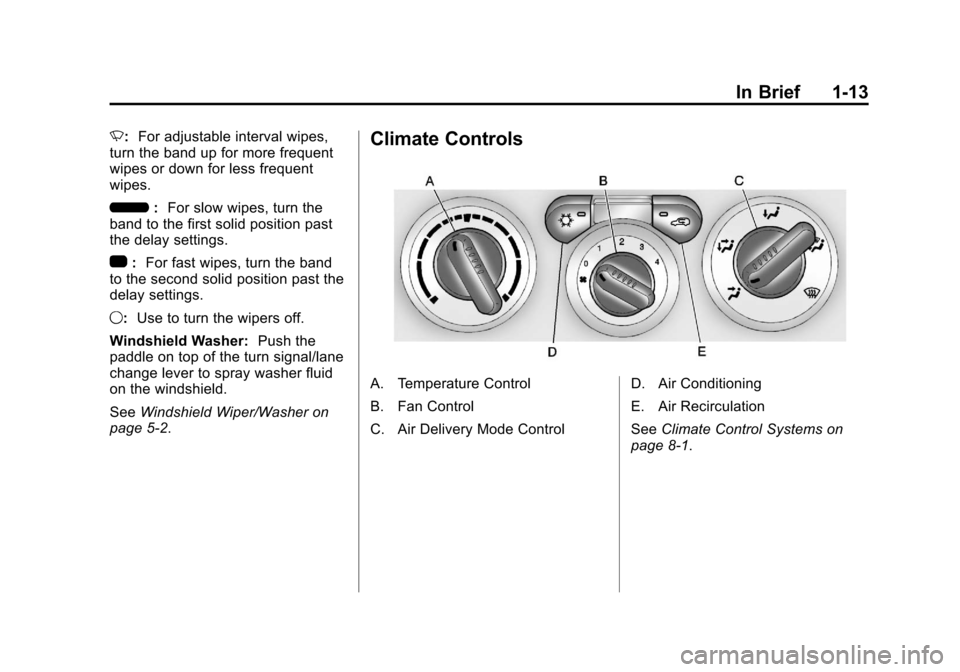
page 5‑2.Climate Controls
A. Temperature Control
B. Fan Control
C. Air Delivery Mode Control D. Air Conditioning
E. Air Recirculation
See
Climate Control Systems on
page 8‑1.
Page 31 of 394
Black plate (3,1)Chevrolet Colorado Owner Manual - 2012
Keys, Doors, and Windows 2-3
.Check the transmitter's battery.
See“Battery Replacement” later
in this section.
.If the transmitter is still not
working correctly, see your
dealer or a qualified technician
for service.
Remote Keyless Entry
(RKE) System Operation
Vehicles with Remote Keyless
Entry (RKE), transmitter functions
work up to 9 m (30 ft) away from the
vehicle.
There are other conditions which
can affect the performance of the
transmitter. See Remote Keyless
Entry (RKE) System on page 2‑2.
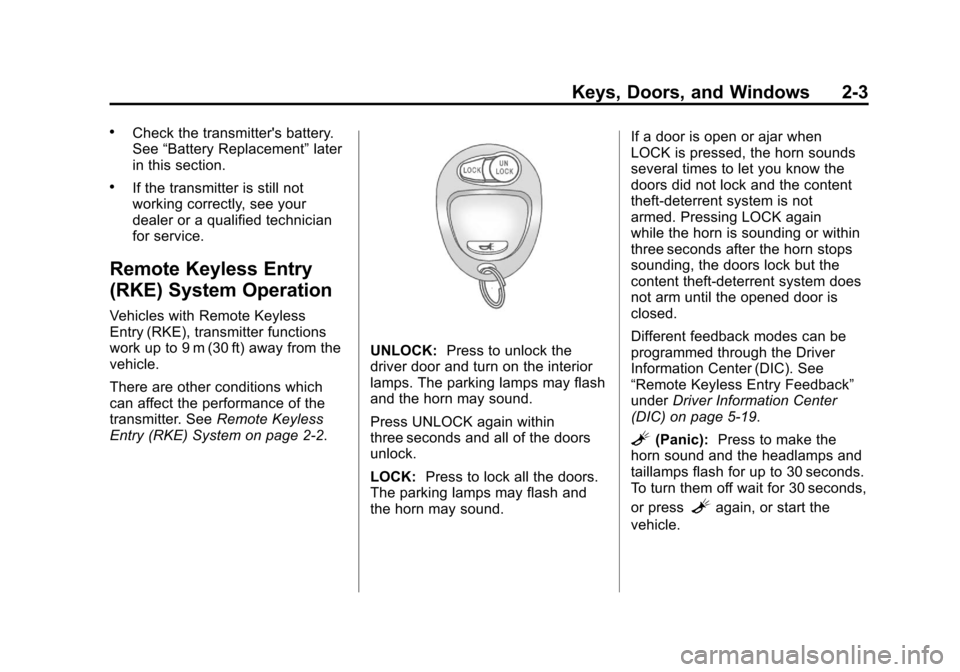
UNLOCK: Press to unlock the
driver door and turn on the interior
lamps. The parking lamps may flash
and the horn may sound.
Press UNLOCK again within
three seconds and all of the doors
unlock.
LOCK: Press to lock all the doors.
The parking lamps may flash and
the horn may sound. If a door is open or ajar when
LOCK is pressed, the horn sounds
several times to let you know the
doors did not lock and the content
theft‐deterrent system is not
armed. Pressing LOCK again
while the horn is sounding or within
three seconds after the horn stops
sounding, the doors lock but the
content theft‐deterrent system does
not arm until the opened door is
closed.
Different feedback modes can be
programmed through the Driver
Information Center (DIC). See
“Remote Keyless Entry Feedback”
under
Driver Information Center
(DIC) on page 5‑19.
L(Panic): Press to make the
horn sound and the headlamps and
taillamps flash for up to 30 seconds.
To turn them off wait for 30 seconds,
or press
Lagain, or start the
vehicle.
Page 112 of 394
Black plate (4,1)Chevrolet Colorado Owner Manual - 2012
5-4 Instruments and Controls
The compass can be calibrated by
driving the vehicle in circles at
8 km/h (5 mph) or less until the
display reads a direction.
Compass Variance
The mirror is set to zone eight.
If you do not live in zone eight or
drive out of the area, the compass
variance needs to be changed to
the appropriate zone.
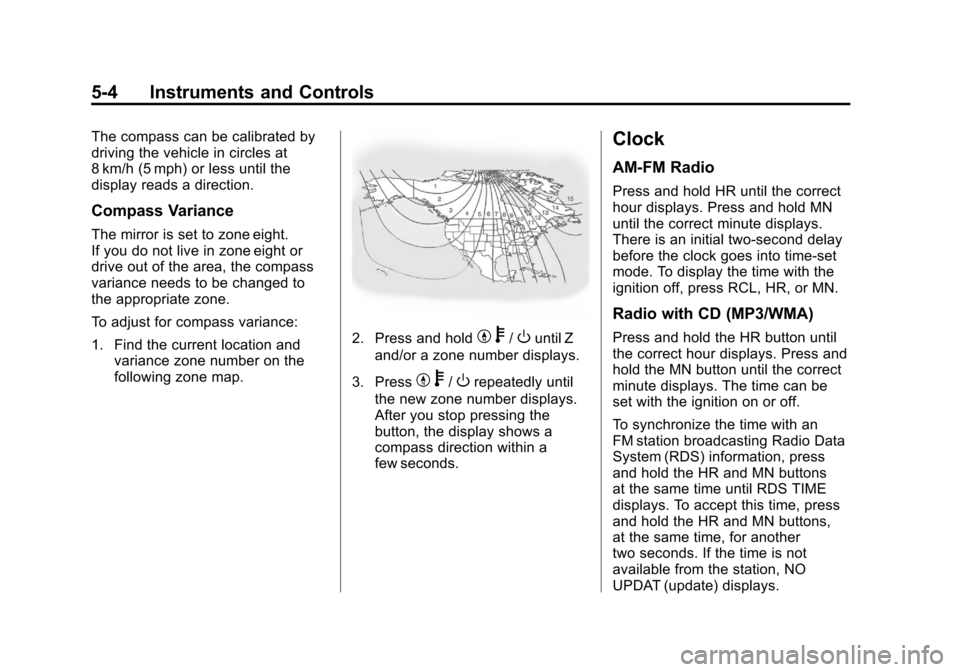
To adjust for compass variance:
1. Find the current location andvariance zone number on the
following zone map.
2. Press and holdYb/Ountil Z
and/or a zone number displays.
3. Press
Y b/Orepeatedly until
the new zone number displays.
After you stop pressing the
button, the display shows a
compass direction within a
few seconds.
Clock
AM-FM Radio
Press and hold HR until the correct
hour displays. Press and hold MN
until the correct minute displays.
There is an initial two-second delay
before the clock goes into time-set
mode. To display the time with the
ignition off, press RCL, HR, or MN.
Radio with CD (MP3/WMA)
Press and hold the HR button until
the correct hour displays. Press and
hold the MN button until the correct
minute displays. The time can be
set with the ignition on or off.
To synchronize the time with an
FM station broadcasting Radio Data
System (RDS) information, press
and hold the HR and MN buttons
at the same time until RDS TIME
displays. To accept this time, press
and hold the HR and MN buttons,
at the same time, for another
two seconds. If the time is not
available from the station, NO
UPDAT (update) displays.
Page 128 of 394
Black plate (20,1)Chevrolet Colorado Owner Manual - 2012
5-20 Instruments and Controls
Trip Odometer
Press and release the reset stem
until TRIP appears on the DIC
display. The trip odometer shows
the current distance traveled since
the last reset of the trip odometer in
either miles for the United States or
kilometers for Canada.
To reset the trip odometer, press
and hold the reset stem until the
display returns to zero.
Engine Oil Life System
With the engine off, turn the key
to ON/RUN and then press the
reset stem until OIL LIFE RESET
appears—alternating between OIL
LIFE and RESET —on the DIC
display. The CHANGE OIL message
alerts you to change the oil on a
schedule consistent with your
driving conditions. Always reset
the OIL LIFE message after an oil
change. To reset the message,
see Engine Oil Life System on
page 10‑12. In addition to the engine oil life
system monitoring the oil life,
additional maintenance is
recommended in the Maintenance
Schedule in this manual. See
Engine Oil on page 10‑9
and
Maintenance Schedule on
page 11‑3 for more information.
Personalization Features
Language
This feature allows you to choose
the language in which the DIC
display shows information.
To set your choice for this feature:
1. With the engine off, turn the key
to ON/RUN, but do not start the
engine.
2. Close all doors so the DOORS message does not display in
the DIC.
3. Momentarily press and release the reset stem until the current
language is displayed: English
(default), Spanish, or French. 4. To select a different language,
press and hold the reset stem
until the next language appears.
5. Repeat Step 4 until the desired language is displayed. Once the
desired language is shown on
the DIC display, the language
is set.
6. To exit the language selection, momentarily press and
release the reset stem. All DIC
messages will now display in the
language selected.
Automatic Door Locks
This feature allows you to program
the door locks to a preferred setting.
To set your choice for this feature:
1. With the engine off, turn the key to LOCK/OFF. Do not remove
the key from the ignition.
2. Press and hold the power door lock button until the DIC
display shows the current door
lock mode.
Page 130 of 394
Black plate (22,1)Chevrolet Colorado Owner Manual - 2012
5-22 Instruments and Controls
The following are the available
modes:
RFA 1 (default):This mode flashes
the parking lamps when you press
the lock or unlock buttons on the
RKE transmitter.
RFA 2: This mode flashes the
parking lamps and sounds the horn
when you press the lock button on
the RKE transmitter. This mode also
flashes the parking lamps when you
press the unlock button on the RKE
transmitter.
RFA 3: This mode flashes the
parking lamps and sounds the horn
when you press the lock or unlock
buttons on the RKE transmitter.
RFA 4: This mode disables RKE
feedback. There will be no feedback
when you press the lock or unlock
buttons on the RKE transmitter.Vehicle Messages
Messages are displayed on the DIC
to notify the driver that the status of
the vehicle has changed and that
some action may be needed by
the driver to correct the condition.
Multiple messages may appear one
after another. The messages are
displayed for several seconds each.
Some messages may not require
immediate action, but you should
press and release the trip odometer
reset stem to acknowledge that
you received the messages and to
clear them from the display. Each
message must be acknowledged
individually.
Some messages cannot be cleared
from the DIC display because they
are more urgent. These messages
require action before they can be
cleared. You should take any
messages that appear on the
display seriously and remember that
clearing the messages only makes
the messages disappear, not correct
the problem. The following are the possible
messages that can be displayed
and some information about them.
Battery Voltage and
Charging Messages
SERVICE CHARG (Charge)
SYS (System)
This message displays if there is a
problem with the battery charging
system. Under certain conditions,
the battery warning light may also
turn on in the instrument panel
cluster. See
Charging System Light
on page 5‑12. The battery will not
be charging at an optimal rate and
the vehicle will lose the ability to
enter the fuel economy mode. The
vehicle is safe to drive, however
have the electrical system checked
by your dealer. Press and release
the reset stem to acknowledge
the message and clear it from the
display.
Page 147 of 394
Black plate (5,1)Chevrolet Colorado Owner Manual - 2012
Infotainment System 7-5
To change the default on the
display, press the DISPL knob
until you see the desired display,
then press and hold this knob
for two seconds and the radio
beeps once.
AUTO VOL (Automatic Volume):
Automatic volume automatically
adjusts the audio system to make
up for road and wind noise while
driving. The volume level should
always sound the same while
driving.
Set the volume at the desired level.
Press to select LOW, MEDIUM, and
HIGH. AVOL displays. Each higher
setting allows for higher volume
compensation at faster vehicle
speeds.
NONE displays if the radio cannot
determine the vehicle speed. To turn
automatic volume off, press until
OFF displays.Setting the Tone (Bass/Treble)
AM-FM Radio
To adjust the bass or treble:
1. Press and release the AUDIObutton until BAS (bass) or
TRE (treble) displays.
2. Press and hold the
wor
xbutton to increase or to
decrease the tone.
To adjust the bass or treble to the
center position:
1. Press and release the AUDIO button until BAS (bass) or
TRE (treble) displays.
2. Press and hold the AUDIO button for more than
two seconds until a beep
sounds. To adjust both tone controls and
both speaker controls to the middle
position:
1. Exit out of audio mode by
pressing another button, causing
the radio to perform that function
or wait five seconds for the
display to return to time of day.
2. Press and hold AUDIO for more than two seconds until a beep
sounds. CEN (center) displays.
Radio with CD (MP3/WMA)
To adjust the bass or treble:
1. Press and release the AUDIO knob until BASS (bass) or
TREB (treble) displays.
2. Turn the AUDIO knob to increase or to decrease
the tone.
To adjust the bass/treble to the
middle position, press and hold the
AUDIO knob. The radio produces
one beep and adjusts the display
level to the middle position.
Page 148 of 394
Black plate (6,1)Chevrolet Colorado Owner Manual - 2012
7-6 Infotainment System
To adjust all tone and speaker
controls to the middle position, push
and hold the AUDIO knob when no
tone or speaker control displays.
ALL CENTERED displays and a
beep sounds.
AUTO EQ (Automatic
Equalization):Press to select
customized equalization settings
designed for country/western, jazz,
talk, pop, rock, and classical.
To return to the manual mode, press
the AUTO EQ button until CUSTOM
displays. Then manually adjust the
bass/treble, using the AUDIO knob.
Adjusting the Speakers
(Balance/Fade)
Fade may not be available if the
vehicle is a regular cab model.
AM-FM Radio
To adjust balance or fade:
1. Press and release the AUDIO
button until BAL (balance) or
FAD (fade) displays. 2. Press and hold the
wor
xbutton to increase or to
decrease the level.
To adjust the balance or fade to the
center position:
1. Press and release the AUDIO button until BAL (balance) or
FAD (fade) displays.
2. Press and hold the AUDIO button for more than
two seconds until a beep
sounds.
To adjust both speaker controls and
both tone controls to the middle
position:
1. Exit out of audio mode by pressing another button, causing
the radio to perform that function
or wait five seconds for the
display to return to time of day.
2. Press and hold AUDIO for more than two seconds until a beep
sounds. CEN (center) displays. Radio with CD (MP3/WMA)
To adjust the balance or fade:
1. Press and release the AUDIO
knob until BAL (balance) or
FADE (fade) displays.
2. Turn the AUDIO knob to increase or to decrease the
level.
To adjust the balance or fade to the
middle position:
1. Press and release the AUDIO knob until BAL (balance) or
FADE (fade) displays.
2. Press and hold the AUDIO knob until one beep sounds.
To adjust all tone and speaker
controls to the middle position, push
and hold the AUDIO knob when no
tone or speaker control displays.
ALL CENTERED displays and a
beep sounds.
Page 152 of 394
Black plate (10,1)Chevrolet Colorado Owner Manual - 2012
7-10 Infotainment System
Finding a Program Type (PTY)
Station
To select and find a PTY station:
1. Turn the P-TYPE knob. TYPEand a PTY displays.
2. Turn the P-TYPE knob again, to select a PTY.
3. Once the desired PTY displays, press the SEEK / TYPE button
to select PTY's first station.
4. To go to another station within that PTY, press the SEEK /
TYPE button twice to display the
PTY and then go to another
station.
To cancel the seek, press the
SEEK / TYPE button. This also exits
the program type seek mode and
returns to the last tuned station.
If both PTY and TRAF (traffic) are
on, the radio searches for stations
with the selected PTY and traffic
announcements. If the radio cannot find the desired
program type, NONE displays and
the radio returns to the last tuned
station.
SCAN:
To scan PTYs, press and
hold the SEEK / SCAN until a beep
sounds. The radio goes to a station,
plays for a few seconds, then goes
to the next station.
BAND (Alternate Frequency):
Alternate frequency lets the radio
switch to a stronger station with
the same program type. To turn
alternate frequency on, press and
hold BAND for two seconds. AF ON
displays. The radio could switch to
stations with a stronger frequency.
To turn alternate frequency off,
press and hold BAND again for
2 seconds. AF OFF displays. The
radio does not switch to other
stations.
DISPL (Display): Press to change
what information displays while
using RDS. The display options
are station name, RDS station frequency, PTY (program type),
and the name of the program
(if available).
Setting Preset PTYs Only
The six pushbuttons have factory
PTY presets. Up to 12 PTYs
(six FM1 and six FM2), can be
programmed on the numbered
pushbuttons. To program PTYs:
1. Press BAND to select FM1
or FM2.
2. Turn the P‐TYPE knob to activate program type select
mode. TYPE and the last
selected PTY displays.
3. Turn the P‐TYPE knob to select a PTY.
4. Press and hold one of the six numbered pushbuttons
until a beep sounds. When
that numbered pushbutton is
pressed, the PTY that was set,
returns.
5. Repeat the steps for each pushbutton.
Page 160 of 394
Black plate (18,1)Chevrolet Colorado Owner Manual - 2012
7-18 Infotainment System
No Folder
When the CD contains only
compressed files, the files are
located under the root folder. The
next and previous folder functions
have no function on a CD that was
recorded without folders or playlists.
When displaying the name of the
folder the radio displays ROOT.
When the CD contains only playlists
and compressed audio files, but no
folders, all files are located under
the root folder. The folder down
and the folder up buttons search
playlists (Px) first and then go to the
root folder. When the radio displays
the name of the folder, the radio
displays ROOT.Order of Play
Tracks are played in the following
order:
.Play begins from the first track in
the first playlist and continues
sequentially through all tracks
in each playlist. When the last
track of the last playlist has
played, play continues from the
first track of the first playlist.
.If the CD does not contain any
playlists, then play begins from
the first track under the root
directory. When all tracks from
the root directory have played,
play continues from files
according to their numerical
listing. After playing the last
track from the last folder, play
begins again at the first track of
the first folder or root directory.When play enters a new folder, the
display does not automatically show
the new folder name unless you
have chosen the folder mode as the
default display. See DISPL (display)
later in this section for more
information. The new track name
displays.
File System and Naming
The song name that displays is the
song name that is contained in the
ID3 tag. If the song name is not
present in the ID3 tag, then the
radio displays the file name without
the extension (such as .mp3) as the
track name.
Track names longer than
32 characters or four pages are
shortened. Parts of words on the
last page of text and the extension
of the filename does not display.
Page 161 of 394
Black plate (19,1)Chevrolet Colorado Owner Manual - 2012
Infotainment System 7-19
Preprogrammed Playlists
Preprogrammed playlists which
were created by WinAmp™,
MusicMatch™, or Real Jukebox™
software can be accessed, however,
they cannot be edited. These
playlists are treated as special
folders containing compressed
audio song files.
Playing an MP3/WMA
Insert a CD partway into the slot,
label side up. The player pulls it in,
and READING displays. The CD
should begin playing and the CD
symbol displays. If you want to
insert a CD with the ignition off,
first press the
Zbutton or the
DISPL knob.
If the ignition or radio is turned off
with a CD in the player it stays in
the player. When the ignition or
radio is turned on, the CD starts to
play where it stopped, if it was the
last selected audio source. As each new track starts to play, the
track number displays.
1 FLD
x(Previous Folder):
Press
this button to go to the first track in
the previous folder. Pressing this
button while in folder random mode
takes you to the previous folder and
plays the tracks in random order in
that folder.
2 FLD
w(Next Folder): Press this
button to go to the first track in the
next folder. Pressing this button
while in folder random mode takes
the CD to the next folder and plays
the tracks in random order in that
folder.
3 REV (Reverse): Press and hold
this button to reverse quickly within
a track. Press and hold this button
for less than two seconds to reverse
at 10 times the normal playing
speed. Press and hold it for more
than two seconds to reverse at
20 times the normal playing speed.
Release this button to play the
track. 4 FWD (Forward):
Press and
hold this button to advance quickly
within a track. Press and hold this
button for less than two seconds
to advance at 10 times the normal
playing speed. Press and hold it for
more than two seconds to advance
at 20 times the normal playing
speed. Release this button to play
the track.
6 RDM (Random): To play the
tracks in random order in the current
folder or playlist, press and release
this button. FLDR RDM (folder
random) displays. Once all of the
tracks in the current folder or playlist
have played, the system moves to
the next folder or playlist and plays
all of the tracks in random order.
To play all the tracks in random
order on the CD, press and
hold this button for two seconds.
A beep sounds and DISC RDM
(disc random) displays. This feature
does not work with playlists.