key CHEVROLET COLORADO 2015 2.G Repair Manual
[x] Cancel search | Manufacturer: CHEVROLET, Model Year: 2015, Model line: COLORADO, Model: CHEVROLET COLORADO 2015 2.GPages: 431, PDF Size: 5.74 MB
Page 307 of 431
Black plate (28,1)Chevrolet Colorado Owner Manual (GMNA-Localizing-U.S./Canada-
7586788) - 2015 - crc - 2/9/15
10-28 Vehicle Care
Automatic Transmission
Shift Lock Control
Function Check
{Warning
When you are doing this
inspection, the vehicle could
move suddenly. If the vehicle
moves, you or others could be
injured.
1. Before starting this check, be sure there is enough room
around the vehicle. It should be
parked on a level surface.
2. Apply the parking brake. Be ready to apply the regular brake
immediately if the vehicle begins
to move.
3. With the engine off, turn the ignition on, but do not start the
engine. Without applying the
regular brake, try to move the
shift lever out of P (Park) with normal effort. If the shift lever
moves out of P (Park), contact
your dealer for service.
Ignition Transmission
Lock Check
While parked, and with the parking
brake set, try to turn the ignition to
LOCK/OFF in each shift lever
position.
.For automatic transmission
vehicles, the ignition should turn
to LOCK/OFF only when the
shift lever is in P (Park).
.For manual transmission
vehicles, the ignition should turn
to LOCK/OFF only when you
press the key release button.
On all vehicles, the ignition key
should come out only in LOCK/OFF.
Contact your dealer if service is
required.
Park Brake and P (Park)
Mechanism Check
{Warning
When you are doing this check,
the vehicle could begin to move.
You or others could be injured
and property could be damaged.
Make sure there is room in front
of the vehicle in case it begins to
roll. Be ready to apply the regular
brake at once should the vehicle
begin to move.
Park on a fairly steep hill, with the
vehicle facing downhill. Keeping
your foot on the regular brake, set
the parking brake.
.To check the parking brake's
holding ability: With the engine
running and the transmission in
N (Neutral), slowly remove foot
pressure from the regular brake
pedal. Do this until the vehicle is
held by the parking brake only.
Page 344 of 431
Black plate (65,1)Chevrolet Colorado Owner Manual (GMNA-Localizing-U.S./Canada-
7586788) - 2015 - crc - 2/9/15
Vehicle Care 10-65
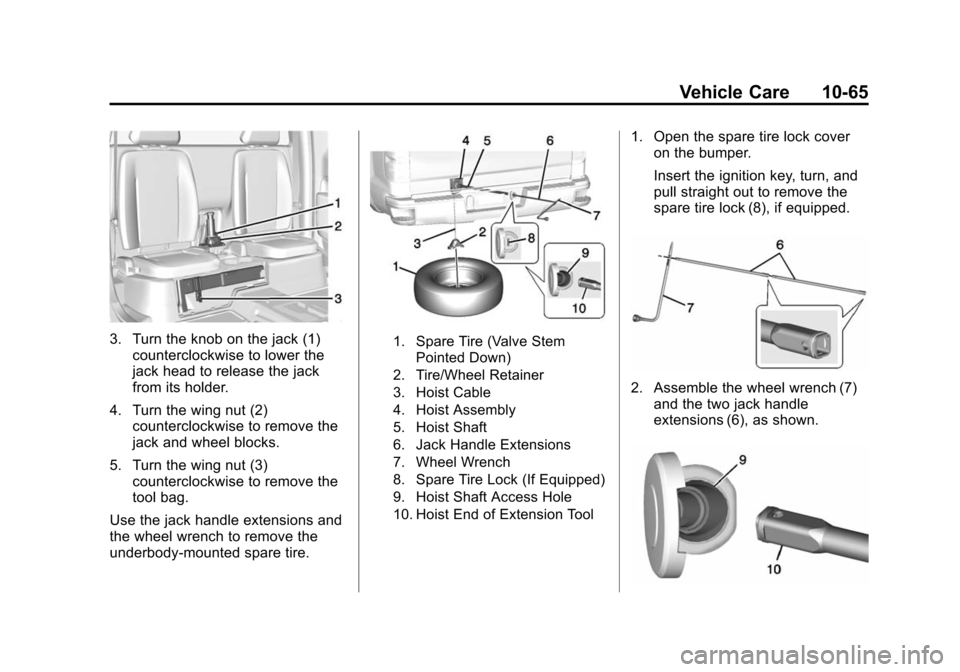
3. Turn the knob on the jack (1)counterclockwise to lower the
jack head to release the jack
from its holder.
4. Turn the wing nut (2) counterclockwise to remove the
jack and wheel blocks.
5. Turn the wing nut (3) counterclockwise to remove the
tool bag.
Use the jack handle extensions and
the wheel wrench to remove the
underbody-mounted spare tire.1. Spare Tire (Valve Stem Pointed Down)
2. Tire/Wheel Retainer
3. Hoist Cable
4. Hoist Assembly
5. Hoist Shaft
6. Jack Handle Extensions
7. Wheel Wrench
8. Spare Tire Lock (If Equipped)
9. Hoist Shaft Access Hole
10. Hoist End of Extension Tool
1. Open the spare tire lock cover on the bumper.
Insert the ignition key, turn, and
pull straight out to remove the
spare tire lock (8), if equipped.
2. Assemble the wheel wrench (7)
and the two jack handle
extensions (6), as shown.
Page 358 of 431
Black plate (79,1)Chevrolet Colorado Owner Manual (GMNA-Localizing-U.S./Canada-
7586788) - 2015 - crc - 2/9/15
Vehicle Care 10-79
{Warning
Shifting a four-wheel-drive
vehicle's transfer case into
N (Neutral) can cause the vehicle
to roll even if the transmission is
in P (Park). You or others could
be injured. Set the parking brake
before shifting the transfer case
to N (Neutral).
To dinghy tow:
1. Position the vehicle being towed behind the tow vehicle, facing
forward and on a level surface.
2. Securely attach the vehicle being towed to the tow vehicle.
3. Apply the parking brake and start the engine.
4. Shift the transfer case to N (Neutral). See “Shifting into
N (Neutral)” underFour-Wheel
Drive on page 9-36. Check that
the vehicle is in N (Neutral) by
shifting the transmission to R (Reverse) and then to D
(Drive). There should be no
movement of the vehicle while
shifting.
5. Shift the transmission into D (Drive). Turn the engine off.
Then shift the transmission into
P (Park).
6. Wait for at least 10 seconds, then restart the engine.
7. Shift the transmission to D (Drive), then turn the engine off
again.
{Caution
Failure to disconnect the negative
battery cable or to have it contact
the terminals can cause damage
to the vehicle.
8. Disconnect the negative battery cable at the battery and secure
the nut and bolt. Cover the
negative battery post with a non-conductive material to
prevent any contact with the
negative battery terminal.
9. Shift the transmission to P (Park).
{Caution
If the steering column is locked,
vehicle damage may occur.
10. Move the steering wheel to make sure the steering column
is unlocked.
11. With a foot on the brake pedal, release the parking brake.
Keep the ignition key in the
towed vehicle in ACC/
ACCESSORY to prevent the
steering column from locking.
Disconnecting the Towed Vehicle
Before disconnecting the towed
vehicle:
1. Park on a level surface.
Page 359 of 431
Black plate (80,1)Chevrolet Colorado Owner Manual (GMNA-Localizing-U.S./Canada-
7586788) - 2015 - crc - 2/9/15
10-80 Vehicle Care
2. Set the parking brake, then shiftthe transmission to P (Park), and
move the ignition key to OFF.
3. Connect the battery.
4. Apply the brake pedal.
5. Shift the transfer case out of N (Neutral) to Two-Wheel Drive
High. See “Shifting out of
N (Neutral)” underFour-Wheel
Drive on page 9-36. See your
dealer if the transfer case cannot
be shifted out of N (Neutral).
6. Check that the vehicle is in Two-Wheel Drive High by
shifting the transmission to
R (Reverse) and then to D
(Drive). There should be
movement of the vehicle while
shifting.
7. Shift the transmission to P (Park) and turn off the ignition.
8. Disconnect the vehicle from the tow vehicle.
9. Release the parking brake. 10. Reset any lost presets.
The outside temperature
display will default to 0 °C (32 °
F) but will reset with normal
usage.
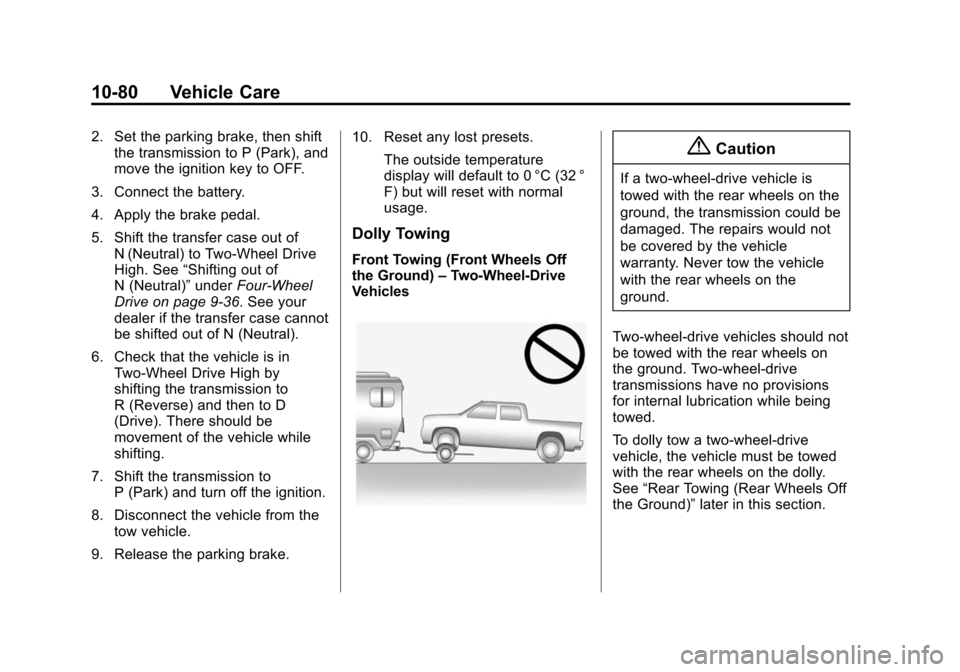
Dolly Towing
Front Towing (Front Wheels Off
the Ground) –Two-Wheel-Drive
Vehicles
{Caution
If a two-wheel-drive vehicle is
towed with the rear wheels on the
ground, the transmission could be
damaged. The repairs would not
be covered by the vehicle
warranty. Never tow the vehicle
with the rear wheels on the
ground.
Two-wheel-drive vehicles should not
be towed with the rear wheels on
the ground. Two-wheel-drive
transmissions have no provisions
for internal lubrication while being
towed.
To dolly tow a two-wheel-drive
vehicle, the vehicle must be towed
with the rear wheels on the dolly.
See “Rear Towing (Rear Wheels Off
the Ground)” later in this section.
Page 366 of 431
Black plate (87,1)Chevrolet Colorado Owner Manual (GMNA-Localizing-U.S./Canada-
7586788) - 2015 - crc - 2/9/15
Vehicle Care 10-87
Steering, Suspension, and
Chassis Components
Visually inspect steering,
suspension, and chassis
components for damaged, loose,
or missing parts or signs of wear at
least once a year.
Inspect power steering for proper
hook-up, binding, leaks, cracks,
chafing, etc.
Visually check constant velocity joint
boots and axle seals for leaks.
Body Component Lubrication
Lubricate all key lock cylinders,
hood hinges, liftgate hinges, steel
fuel door hinge, and power assist
step hinges, unless the components
are plastic. Applying silicone grease
on weatherstrips with a clean cloth
will make them last longer, seal
better, and not stick or squeak
Underbody Maintenance
At least twice a year, spring and fall,
use plain water to flush any
corrosive materials from theunderbody. Take care to thoroughly
clean any areas where mud and
other debris can collect.
Sheet Metal Damage
If the vehicle is damaged and
requires sheet metal repair or
replacement, make sure the body
repair shop applies anti-corrosion
material to parts repaired or
replaced to restore corrosion
protection.
Original manufacturer replacement
parts will provide the corrosion
protection while maintaining the
vehicle warranty.
Finish Damage
Quickly repair minor chips and
scratches with touch-up materials
available from your dealer to avoid
corrosion. Larger areas of finish
damage can be corrected in your
dealer's body and paint shop.
Chemical Paint Spotting
Airborne pollutants can fall upon
and attack painted vehicle surfaces
causing blotchy, ring-shaped
discolorations, and small, irregular
dark spots etched into the paint
surface. Refer to
“Finish Care”
previously in this section.
Interior Care
To prevent dirt particle abrasions,
regularly clean the vehicle's interior.
Immediately remove any soils. Note
that newspapers or dark garments
that can transfer color to home
furnishings can also permanently
transfer color to the vehicle's
interior.
Use a soft bristle brush to remove
dust from knobs and crevices on the
instrument cluster. Using a mild
soap solution, immediately remove
hand lotions, sunscreen, and insect
repellent from all interior surfaces or
permanent damage may result.
Page 375 of 431

Black plate (4,1)Chevrolet Colorado Owner Manual (GMNA-Localizing-U.S./Canada-
7586788) - 2015 - crc - 2/9/15
11-4 Service and Maintenance
.Check restraint system
components. SeeSafety System
Check on page 3-16.
.Visually inspect fuel system for
damage or leaks.
.Visually inspect exhaust system
and nearby heat shields for
loose or damaged parts.
.Lubricate body components. See
Exterior Care on page 10-82.
.Check starter switch. See Starter
Switch Check on page 10-27.
.Check automatic transmission
shift lock control function. See
Automatic Transmission Shift
Lock Control Function Check on
page 10-28.
.Check ignition transmission lock.
See Ignition Transmission Lock
Check on page 10-28.
.Check parking brake and
automatic transmission park
mechanism. See Park Brake and
P (Park) Mechanism Check on
page 10-28.
.Check accelerator pedal for
damage, high effort, or binding.
Replace if needed.
.Visually inspect gas strut for
signs of wear, cracks, or other
damage. Check the hold open
ability of the strut. See your
dealer if service is required.
.Verify spare tire key lock
operation and lubricate as
needed. See Tire Changing on
page 10-64.
Page 384 of 431
Black plate (13,1)Chevrolet Colorado Owner Manual (GMNA-Localizing-U.S./Canada-
7586788) - 2015 - crc - 2/9/15
Service and Maintenance 11-13
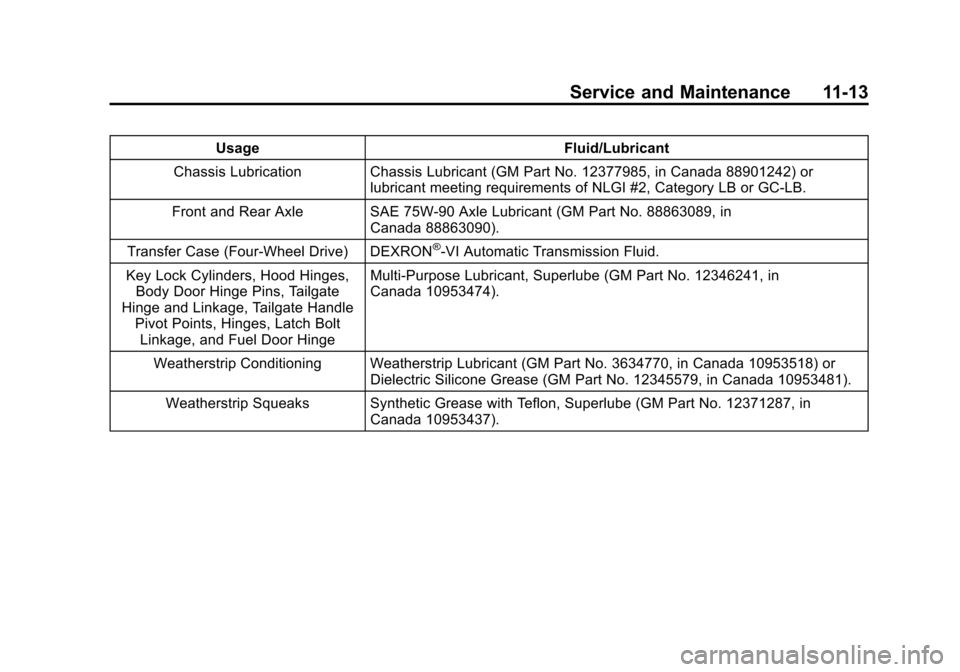
UsageFluid/Lubricant
Chassis Lubrication Chassis Lubricant (GM Part No. 12377985, in Canada 88901242) or lubricant meeting requirements of NLGI #2, Category LB or GC-LB.
Front and Rear Axle SAE 75W-90 Axle Lubricant (GM Part No. 88863089, in Canada 88863090).
Transfer Case (Four-Wheel Drive) DEXRON
®-VI Automatic Transmission Fluid.
Key Lock Cylinders, Hood Hinges, Body Door Hinge Pins, Tailgate
Hinge and Linkage, Tailgate Handle Pivot Points, Hinges, Latch Bolt
Linkage, and Fuel Door Hinge Multi-Purpose Lubricant, Superlube (GM Part No. 12346241, in
Canada 10953474).
Weatherstrip Conditioning Weatherstrip Lubricant (GM Part No. 3634770, in Canada 10953518) or Dielectric Silicone Grease (GM Part No. 12345579, in Canada 10953481).
Weatherstrip Squeaks Synthetic Grease with Teflon, Superlube (GM Part No. 12371287, in Canada 10953437).
Page 409 of 431
Black plate (2,1)Chevrolet Colorado Owner Manual (GMNA-Localizing-U.S./Canada-
7586788) - 2015 - crc - 2/9/15
14-2 OnStar
.Give OnStar Turn-by-Turn
Navigation voice commands.
Requires a specific OnStar
subscription plan.
.Obtain the WiFi network name,
or Service Set Identifier or SSID,
and passphrase (if equipped).
Press
Qto connect to a live
Advisor to:
.Verify account information or
update contact information.
.Get driving directions. Requires
a specific OnStar
subscription plan.
.Receive On-Demand
Diagnostics for a check of the
vehicle’s key operating systems.
.Receive Roadside Assistance.
.Manage WiFi Settings (if
equipped).
Press
>to get a priority connection
to an OnStar Emergency Advisor
available 24/7 to:
.Get help for an emergency.
.Be a Good Samaritan or
respond to an AMBER Alert.
.Get assistance in severe
weather or other crisis and
evacuation routes.
OnStar Services
Emergency
With Automatic Crash Response,
the OnStar system can
automatically connect to an OnStar
Emergency Advisor. The built-in
system can automatically connect to
help in certain crashes.
Press
>to connect to an OnStar
Emergency Advisor. GPS
technology is used to identify the
vehicle location and can provide
important information to emergency
personnel. OnStar Emergency
Advisors are trained to provide
assistance and link to existing
public emergency service providers
in emergency situations.
With OnStar Crisis Assist, specially
trained Crisis Advisors are available
24 hours a day, 7 days a week, to
provide a central point of contact,
assistance, and information if a
crisis occurs.
Page 411 of 431
Black plate (4,1)Chevrolet Colorado Owner Manual (GMNA-Localizing-U.S./Canada-
7586788) - 2015 - crc - 2/9/15
14-4 OnStar
Destination Download:PressQ,
then request the Advisor to
download directions to the
navigation system in the vehicle (if
equipped). After the call ends, press
the “Go” button on the navigation
screen to begin driving directions.
If directions are downloaded to the
navigation system, the route can
only be canceled through the
navigation system.
Destinations can also be
downloaded on the go. For
information about eNav or
Destination Download, see
www.onstar.com (U.S.) or
www.onstar.ca (Canada).
Connections
The required specific Onstar
subscription plan includes the
services that follow to help
customers stay connected.
For coverage maps, see
www.onstar.com (U.S.) or
www.onstar.ca (Canada). WiFi Connectivity (If Equipped)
The vehicle has a WiFi hotspot that
provides a high-speed, wireless
Internet connection to connect
multiple mobile devices (data plan
required).
1. To retrieve WiFi hotspot
information, press
=and select
or say “WiFi settings.”
2. The WiFi settings will display the WiFi network name/SSID,
passphrase, and level of
encryption.
3. To change the SSID or passphrase, press
Qor call
1-888-4-ONSTAR to connect
with an Advisor.
OnStar RemoteLink
®Mobile App
(If Equipped)
Download the OnStar RemoteLink
mobile app to select Apple
®,
Android™, and BlackBerry®or
Windows 7 or 8 mobile devices.
From the mobile device, check the
vehicle’s fuel level, oil life, or tire pressure (if the vehicle is equipped
with the tire pressure monitoring
system); or activate remote horn
and lights. Also remote start the
vehicle (if factory equipped) or
unlock the doors from anywhere
with a wireless connection (if
equipped with automatic locks).
With a required specific OnStar
subscription plan, a destination can
be sent to the vehicle. For OnStar
RemoteLink information and
compatibility, see www.onstar.com
(U.S.) or www.onstar.ca (Canada).
OnStar RemoteLink
®Key Fob
Services
This feature is included for five
years and allows for remote door
lock/unlock (if equipped with
automatic locks), remote start (if
factory equipped), or activation of
horn and lights from anywhere with
a wireless signal. Download the app
and start using it any time during the
trial period to get started.
Page 423 of 431

Black plate (6,1)Chevrolet Colorado Owner Manual (GMNA-Localizing-U.S./Canada-
7586788) - 2015 - crc - 2/9/15
i-6 INDEX
Heated Mirrors . . . . . . . . . . . . . . . . . 2-15
HeaterEngine Coolant . . . . . . . . . . . . . . . 9-25
Heating and Air Conditioning . . . . . . . . . . . . . . . 8-1, 8-3
High-Beam On Light . . . . . . . . . . . 5-22
Hill and Mountain Roads . . . . . . . 9-11
Hill Descent Control (HDC) . . . . 9-44
Hill Descent Control Light . . . . . . 5-19
Hill Start Assist (HSA) . . . . . . . . . 9-42
Home Page . . . . . . . . . . . . . . . . . . . . . 7-4
Hood . . . . . . . . . . . . . . . . . . . . . . . . . . 10-4
Horn . . . . . . . . . . . . . . . . . . . . . . . . . . . . 5-3
How to Wear Safety Belts Properly . . . . . . . . . . . . . . . . . . . . . . 3-10
Hydraulic Clutch . . . . . . . . . . . . . . 10-13
I
Ignition Positions . . . . . . . . . . . . . . 9-22
Ignition Transmission Lock
Check . . . . . . . . . . . . . . . . . . . . . . . 10-28
Immobilizer . . . . . . . . . . . . . . . . . . . . 2-13 Indicator
Vehicle Ahead . . . . . . . . . . . . . . . . 5-19
Infants and Young Children, Restraints . . . . . . . . . . . . . . . . . . . . 3-32
Infotainment . . . . . . . . . . . . . . . . . . . . 7-1
Infotainment System . . . . . . . . . . 13-15
Instrument Cluster . . . . . . . . . . . . . . 5-8
Interior Rearview Mirrors . . . . . . . 2-16
Internet Radio Pandora . . . . . . . . . . . . . . . . . . . . . . . 7-9
Introduction . . . . . . . . . . . . . . . . . . . . . . . iii
J
Jack
Auxiliary . . . . . . . . . . . . . . . . . . . . . . 7-15
Jump Starting - North America . . . . . . . . . . . . . . . . . . . . . 10-74
K
Key and Lock Messages . . . . . . . 5-30
Keyless EntryRemote (RKE) System . . . . . . . . 2-4
Keys . . . . . . . . . . . . . . . . . . . . . . . . . . . . 2-1
L
Labeling, Tire Sidewall . . . . . . . . 10-43
Lamps Cargo . . . . . . . . . . . . . . . . . . . . . . . . . . 6-6
Daytime Running (DRL) . . . . . . . 6-3
Dome . . . . . . . . . . . . . . . . . . . . . . . . . . 6-6
Exterior Controls . . . . . . . . . . . . . . . 6-1
Exterior Lamps OffReminder . . . . . . . . . . . . . . . . . . . . 6-2
Fog . . . . . . . . . . . . . . . . . . . . . . . . . . . . 6-5
Malfunction Indicator . . . . . . . . . 5-14
Messages . . . . . . . . . . . . . . . . . . . . 5-30
On Reminder . . . . . . . . . . . . . . . . . 5-22
Reading . . . . . . . . . . . . . . . . . . . . . . . 6-7
Lane Departure Warning (LDW) . . . . . . . . . . . . . . . 9-52
Lane Departure Warning Light . . . . . . . . . . . . . . . . . . . . . . . . . 5-19
Lap-Shoulder Belt . . . . . . . . . . . . . 3-11
LATCH System Replacing Parts after aCrash . . . . . . . . . . . . . . . . . . . . . . . 3-54
LATCH, Lower Anchors and Tethers for Children . . . . . . . . . . 3-38
Light
Hill Decent Control . . . . . . . . . . . 5-19