steering CHEVROLET COLORADO 2016 2.G Owner's Manual
[x] Cancel search | Manufacturer: CHEVROLET, Model Year: 2016, Model line: COLORADO, Model: CHEVROLET COLORADO 2016 2.GPages: 396, PDF Size: 6.6 MB
Page 127 of 396
Chevrolet Colorado Owner Manual (GMNA-Localizing-U.S/Canada/Mexico-
9159327) - 2016 - crc - 8/28/15
126 Instruments and Controls
The display provides feedback on
how current driving behavior in the
bar graph affects the running
average in the top display and how
well recent driving compares to the
best that has been achieved.
Driver Information Center
(DIC) (Uplevel)
The DIC displays are shown in the
center of the instrument cluster in
the Info app. SeeInstrument Cluster
(Base Level) 0107
iior Instrument
Cluster (Uplevel) 0109ii. The
displays show the status of many
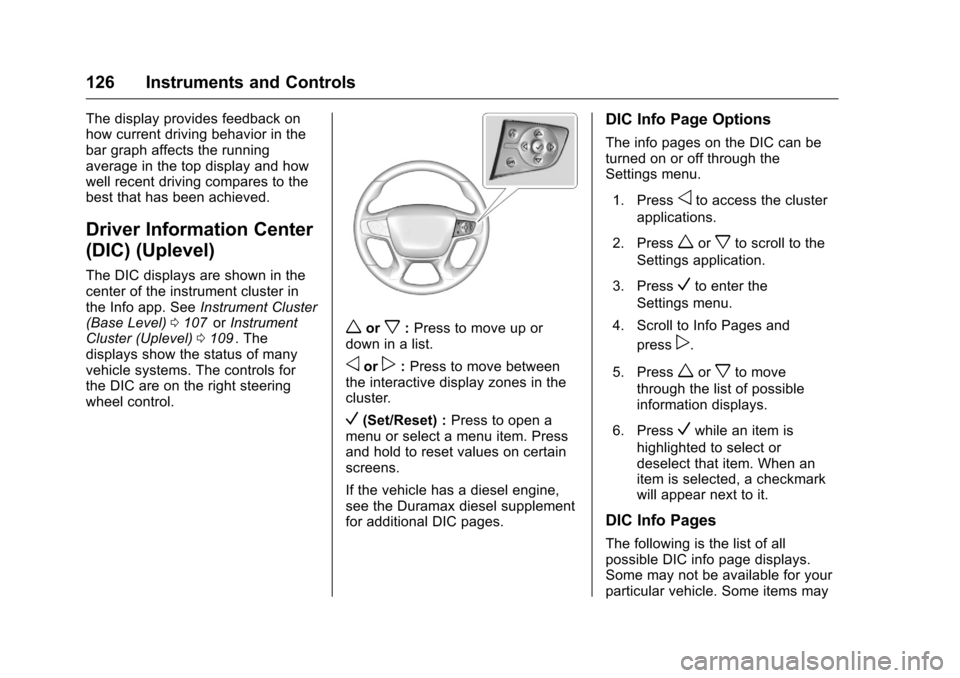
vehicle systems. The controls for
the DIC are on the right steering
wheel control.worx: Press to move up or
down in a list.
oorp: Press to move between
the interactive display zones in the
cluster.
V(Set/Reset) : Press to open a
menu or select a menu item. Press
and hold to reset values on certain
screens.
If the vehicle has a diesel engine,
see the Duramax diesel supplement
for additional DIC pages.
DIC Info Page Options
The info pages on the DIC can be
turned on or off through the
Settings menu.
1. Press
oto access the cluster
applications.
2. Press
worxto scroll to the
Settings application.
3. Press
Vto enter the
Settings menu.
4. Scroll to Info Pages and press
p.
5. Press
worxto move
through the list of possible
information displays.
6. Press
Vwhile an item is
highlighted to select or
deselect that item. When an
item is selected, a checkmark
will appear next to it.
DIC Info Pages
The following is the list of all
possible DIC info page displays.
Some may not be available for your
particular vehicle. Some items may
Page 135 of 396
Chevrolet Colorado Owner Manual (GMNA-Localizing-U.S/Canada/Mexico-
9159327) - 2016 - crc - 8/28/15
134 Instruments and Controls
Airbag System Messages
SERVICE AIRBAG
This message displays if there is a
problem with the airbag system.
Take the vehicle to your dealer for
service.
Safety Belt Messages
SHIFTER LOCKED. BUCKLE
SEATBELT
This message displays if the vehicle
is equipped with the Safety Belt
Assurance System and the driver
and front outboard passenger,
if present, safety belts are not
buckled. The vehicle will not shift
out of P (Park). Buckle the safety
belt(s) to unlock the shift lever.
This system may not allow the
vehicle to shift out of P (Park) if an
object—such as a briefcase,
handbag, grocery bag, laptop,
or other electronic device —is on
the front outboard passenger seat.
If this happens, remove the object
from the seat or buckle the
safety belt. If the driver or front outboard
passenger unbuckles their safety
belt while driving, the safety belt
reminder chime and light(s) will
come on. See
Safety Belt
Reminders 0113
ii.
SHIFTER UNLOCKED. BRAKE
TO SHIFT
This message displays when the
Safety Belt Assurance System times
out and allows the vehicle to be
shifted out of P (Park) after
30 seconds following brake apply.
See “Safety Belts” and“Child
Restraints” in the Index for
information about the importance of
proper restraint use.
This system may not function
properly if the airbag readiness light
is on. See Airbag Readiness Light
0 114
ii.
Security Messages
SERVICE THEFT DETERRENT
SYSTEM
This message displays when there
is a problem with the theft-deterrent
system. The vehicle may or may not restart, so you may want to take the
vehicle to your dealer before turning
off the engine. See
Immobilizer
Operation 035
ii.
Steering System
Messages
STEERING ASSIST IS
REDUCED DRIVE WITH CARE
This message may display if a
problem occurs with the electric
power steering system. If this
message appears, steering effort
may be slightly higher than normal.
The vehicle is still safe to drive. Use
caution while in reduced assist
mode. If this message is persistent
or appears repeatedly, take the
vehicle to your dealer for service.
See Steering 0195
ii.
SERVICE POWER STEERING
This message displays when there
is a problem with electric power
steering. If this message displays
and a reduction in steering
performance or loss of power
steering assistance is noticed, see
your dealer. See Steering0195
ii.
Page 138 of 396
Chevrolet Colorado Owner Manual (GMNA-Localizing-U.S/Canada/Mexico-
9159327) - 2016 - crc - 8/28/15
Instruments and Controls 137
Vehicle
Personalization
Use the audio system controls to
access the personalization menus
for customizing vehicle features.
The following are all possible
personalization features. Depending
on the vehicle, some may not be
available.
Base Radio Audio System
Controls
MENU :Press the center of the
knob to enter menus and select
menu items. Turn the knob to scroll
through the menus.
oBACK : Press to return to the
previous menu or exit.
Uplevel Radio Audio System
Controls
1. Press the desired feature to display a list of available
options.
2. Press to select the desired feature setting. 3. Press
oBACK on the
faceplate or the
0screen
button to return to the previous
menu or exit.
Turn the vehicle to ON/RUN to
access the Settings menu, then
select SETTINGS from the Home
page on the infotainment system
display.
Personalization Menus
The following list of menu items may
be available:
. Time and Date
. Language (Language)
. Valet Mode
. Radio
. Vehicle
. Bluetooth
. Apple CarPlay
. Android Auto
. Voice
. Display
. Rear Camera .
Return to Factory Settings
. Software Information
Detailed information for each menu
follows.
Time and Date
Manually set the time and date. See
Clock 0104ii.
Language (Language)
Select Language, then select from
the available language(s).
The selected language will display
on the system, and voice
recognition will reflect the selected
language.
Valet Mode (If Equipped)
This will lock the infotainment
system and steering wheel controls.
It may also limit access to vehicle
storage locations (if equipped).
To enable valet mode:
1. Enter a four-digit code on the keypad.
2. Select Enter to go to the confirmation screen.
Page 144 of 396
Chevrolet Colorado Owner Manual (GMNA-Localizing-U.S/Canada/Mexico-
9159327) - 2016 - crc - 8/28/15
Lighting 143
Lighting
Exterior Lighting
Exterior Lamp Controls . . . . . . . 143
Exterior Lamps OffReminder . . . . . . . . . . . . . . . . . . . 144
Headlamp High/Low-Beam Changer . . . . . . . . . . . . . . . . . . . . 144
Flash-to-Pass . . . . . . . . . . . . . . . . 144
Daytime Running Lamps (DRL) . . . . . . . . . . . . . . . 144
Automatic Headlamp System . . . . . . . . . . . . . . . . . . . . . . 145
Hazard Warning Flashers . . . . . 146
Turn and Lane-Change Signals . . . . . . . . . . . . . . . . . . . . . . 146
Fog Lamps . . . . . . . . . . . . . . . . . . . 146
Interior Lighting
Instrument Panel Illumination Control . . . . . . . . . . . . . . . . . . . . . . 147
Cargo Lamp . . . . . . . . . . . . . . . . . . 147
Dome Lamps . . . . . . . . . . . . . . . . . 148
Reading Lamps . . . . . . . . . . . . . . 148
Lighting Features
Entry Lighting . . . . . . . . . . . . . . . . 148
Exit Lighting . . . . . . . . . . . . . . . . . . 148
Battery Load Management . . . 149
Battery Power Protection . . . . . 149
Exterior Lighting
Exterior Lamp Controls
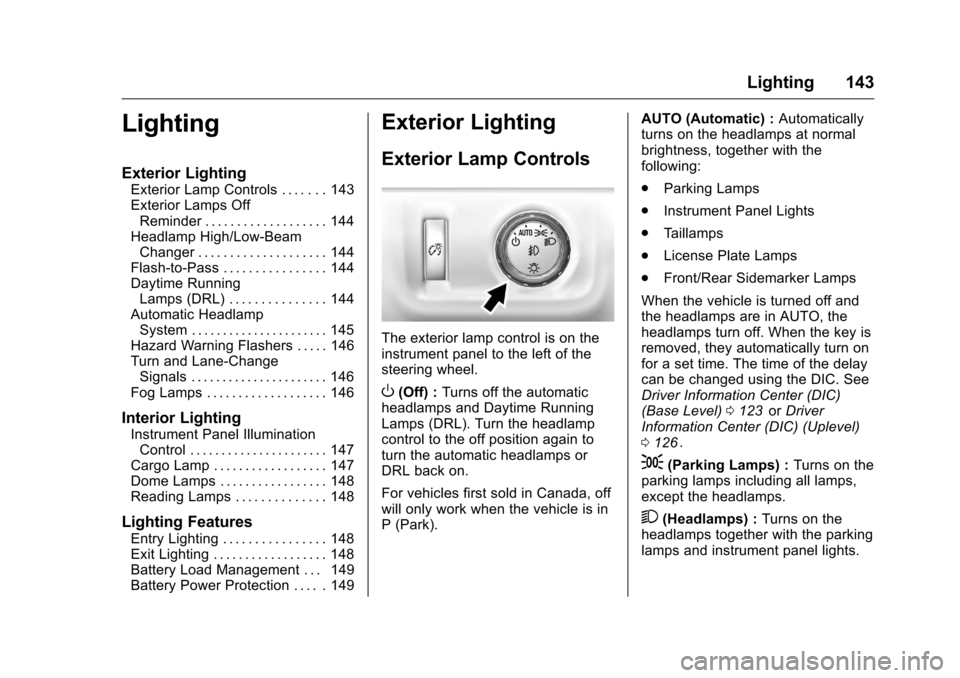
The exterior lamp control is on the
instrument panel to the left of the
steering wheel.
O(Off) : Turns off the automatic
headlamps and Daytime Running
Lamps (DRL). Turn the headlamp
control to the off position again to
turn the automatic headlamps or
DRL back on.
For vehicles first sold in Canada, off
will only work when the vehicle is in
P (Park). AUTO (Automatic) :
Automatically
turns on the headlamps at normal
brightness, together with the
following:
. Parking Lamps
. Instrument Panel Lights
. Taillamps
. License Plate Lamps
. Front/Rear Sidemarker Lamps
When the vehicle is turned off and
the headlamps are in AUTO, the
headlamps turn off. When the key is
removed, they automatically turn on
for a set time. The time of the delay
can be changed using the DIC. See
Driver Information Center (DIC)
(Base Level) 0123
iior Driver
Information Center (DIC) (Uplevel)
0 126
ii.
;(Parking Lamps) : Turns on the
parking lamps including all lamps,
except the headlamps.
2(Headlamps) : Turns on the
headlamps together with the parking
lamps and instrument panel lights.
Page 148 of 396
Chevrolet Colorado Owner Manual (GMNA-Localizing-U.S/Canada/Mexico-
9159327) - 2016 - crc - 8/28/15
Lighting 147
If equipped, the control is on the
center of the exterior lamp control,
to the left of the steering column.
The ignition must be in the ON/RUN
position for the fog lamps to
come on.
#(Fog Lamps) :Press to turn the
fog lamps on or off. A light will come
on in the instrument cluster.
When the fog lamps are turned on,
the parking lamps automatically
turn on.
When the headlamps are changed
to high beam, the fog lamps go off.
When the high-beam headlamps are
turned off, the fog lamps will come
on again.
Some localities have laws that
require the headlamps to be on with
the fog lamps.
Interior Lighting
Instrument Panel
Illumination Control
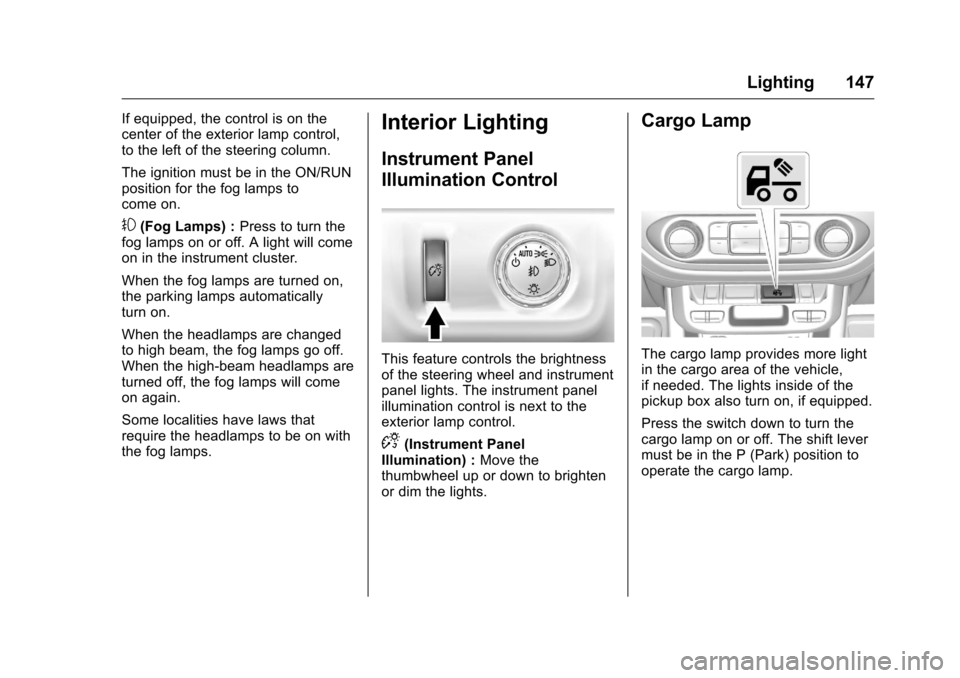
This feature controls the brightness
of the steering wheel and instrument
panel lights. The instrument panel
illumination control is next to the
exterior lamp control.
D(Instrument Panel
Illumination) : Move the
thumbwheel up or down to brighten
or dim the lights.
Cargo Lamp
The cargo lamp provides more light
in the cargo area of the vehicle,
if needed. The lights inside of the
pickup box also turn on, if equipped.
Press the switch down to turn the
cargo lamp on or off. The shift lever
must be in the P (Park) position to
operate the cargo lamp.
Page 152 of 396
Chevrolet Colorado Owner Manual (GMNA-Localizing-U.S/Canada/Mexico-
9159327) - 2016 - crc - 8/28/15
Infotainment System 151
The infotainment system has built-in
features intended to help avoid
distraction by disabling some
functions when driving. These
functions may gray out when they
are unavailable. Many infotainment
features are also available through
the instrument cluster and steering
wheel controls.
Before driving:
.Become familiar with the
operation, faceplate buttons, and
screen buttons.
. Set up the audio by presetting
favorite stations, setting the
tone, and adjusting the
speakers.
. Set up phone numbers in
advance so they can be called
easily by pressing a single
button or by using a single voice
command if equipped with
Bluetooth phone capability.
See Defensive Driving 0194
ii.
To play the infotainment system with
the ignition off, see Retained
Accessory Power (RAP) 0214
ii.
Theft-Deterrent Feature
TheftLock®is designed to
discourage theft of the vehicle's
radio by learning a portion of the
Vehicle Identification Number (VIN).
The radio does not operate if it is
stolen or moved to a different
vehicle.
Page 194 of 396
Chevrolet Colorado Owner Manual (GMNA-Localizing-U.S/Canada/Mexico-
9159327) - 2016 - crc - 8/28/15
Driving and Operating 193
Driving and
Operating
Driving Information
Distracted Driving . . . . . . . . . . . . 194
Defensive Driving . . . . . . . . . . . . . 194
Drunk Driving . . . . . . . . . . . . . . . . . 194
Control of a Vehicle . . . . . . . . . . . 195
Braking . . . . . . . . . . . . . . . . . . . . . . . 195
Steering . . . . . . . . . . . . . . . . . . . . . . 195
Off-Road Recovery . . . . . . . . . . . 196
Loss of Control . . . . . . . . . . . . . . . 196
Off-Road Driving . . . . . . . . . . . . . 197
Driving on Wet Roads . . . . . . . . 201
Hill and Mountain Roads . . . . . 202
Winter Driving . . . . . . . . . . . . . . . . 203
If the Vehicle Is Stuck . . . . . . . . 204
Vehicle Load Limits . . . . . . . . . . . 205
Truck-Camper LoadingInformation . . . . . . . . . . . . . . . . . . 211
Starting and Operating
New Vehicle Break-In . . . . . . . . . 211
Ignition Positions . . . . . . . . . . . . . 212
Starting the Engine . . . . . . . . . . . 213
Retained AccessoryPower (RAP) . . . . . . . . . . . . . . . . 214
Engine Coolant Heater . . . . . . . 215
Shifting Into Park . . . . . . . . . . . . . 217 Shifting out of Park . . . . . . . . . . . 218
Parking . . . . . . . . . . . . . . . . . . . . . . . 218
Parking over Things
That Burn . . . . . . . . . . . . . . . . . . . 219
Engine Exhaust
Engine Exhaust . . . . . . . . . . . . . . 219
Running the Vehicle WhileParked . . . . . . . . . . . . . . . . . . . . . . 220
Automatic Transmission
Automatic Transmission . . . . . . 220
Manual Mode . . . . . . . . . . . . . . . . . 223
Tow/Haul Mode . . . . . . . . . . . . . . . 224
Manual Transmission
Manual Transmission . . . . . . . . . 225
Drive Systems
Four-Wheel Drive . . . . . . . . . . . . . 226
Brakes
Antilock BrakeSystem (ABS) . . . . . . . . . . . . . . . 233
Parking Brake . . . . . . . . . . . . . . . . 233
Brake Assist . . . . . . . . . . . . . . . . . . 234
Hill Start Assist (HSA) . . . . . . . . 234
Ride Control Systems
Traction Control/Electronic Stability Control . . . . . . . . . . . . . 235
Hill Descent Control (HDC) . . . 237
Cruise Control
Cruise Control . . . . . . . . . . . . . . . . 238
Driver Assistance Systems
Rear Vision Camera (RVC) . . . 240
Forward Collision Alert (FCA) System . . . . . . . . . . . . . . . . . . . . . . 242
Lane Departure Warning (LDW) . . . . . . . . . . . . . 244
Fuel
Fuel . . . . . . . . . . . . . . . . . . . . . . . . . . 245
California FuelRequirements . . . . . . . . . . . . . . . 246
Fuels in Foreign Countries . . . 246
Fuel Additives . . . . . . . . . . . . . . . . 246
Filling the Tank . . . . . . . . . . . . . . . 247
Filling a Portable Fuel Container . . . . . . . . . . . . . . . . . . . 248
Trailer Towing
General TowingInformation . . . . . . . . . . . . . . . . . . 249
Driving Characteristics and Towing Tips . . . . . . . . . . . . . . . . . 249
Trailer Towing . . . . . . . . . . . . . . . . 251
Towing Equipment . . . . . . . . . . . . 254
Trailer Sway Control (TSC) . . . 256
Conversions and Add-Ons
Add-On Electrical Equipment . . . . . . . . . . . . . . . . . . 257
Page 196 of 396
Chevrolet Colorado Owner Manual (GMNA-Localizing-U.S/Canada/Mexico-
9159327) - 2016 - crc - 8/28/15
Driving and Operating 195
{Warning
Drinking and then driving is very
dangerous. Your reflexes,
perceptions, attentiveness, and
judgment can be affected by even
a small amount of alcohol. You
can have a serious—or even
fatal —collision if you drive after
drinking.
Do not drink and drive or ride with
a driver who has been drinking.
Ride home in a cab; or if you are
with a group, designate a driver
who will not drink.
Control of a Vehicle
Braking, steering, and accelerating
are important factors in helping to
control a vehicle while driving.
Braking
Braking action involves perception
time and reaction time. Deciding to
push the brake pedal is perception
time. Actually doing it is
reaction time. Average driver reaction time is
about three-quarters of a second. In
that time, a vehicle moving at
100 km/h (60 mph) travels 20 m
(66 ft), which could be a lot of
distance in an emergency.
Helpful braking tips to keep in mind
include:
.
Keep enough distance between
you and the vehicle in front
of you.
. Avoid needless heavy braking.
. Keep pace with traffic.
If the engine ever stops while the
vehicle is being driven, brake
normally but do not pump the
brakes. Doing so could make the
pedal harder to push down. If the
engine stops, there will be some
power brake assist but it will be
used when the brake is applied.
Once the power assist is used up, it
can take longer to stop and the
brake pedal will be harder to push.
Steering
Electric Power Steering
The vehicle has electric power
steering. It does not have power
steering fluid. Regular maintenance
is not required.
If power steering assist is lost due
to a system malfunction, the vehicle
can be steered, but may require
increased effort.
See your dealer if there is a
problem.
If the steering wheel is turned until it
reaches the end of its travel and is
held against that position for an
extended period of time, power
steering assist may be reduced.
If the steering assist is used for an
extended period of time, power
assist may be reduced.
Normal use of the power steering
assist should return when the
system cools down.
See specific vehicle steering
messages under Steering System
Messages 0134
ii. See your dealer if
there is a problem.
Page 197 of 396
Chevrolet Colorado Owner Manual (GMNA-Localizing-U.S/Canada/Mexico-
9159327) - 2016 - crc - 8/28/15
196 Driving and Operating
Curve Tips
.Take curves at a reasonable
speed.
. Reduce speed before entering a
curve.
. Maintain a reasonable steady
speed through the curve.
. Wait until the vehicle is out of
the curve before accelerating
gently into the straightaway.
Steering in Emergencies
.There are some situations when
steering around a problem may
be more effective than braking.
. Holding both sides of the
steering wheel allows you to turn
180 degrees without removing
a hand.
. The Antilock Brake System
(ABS) allows steering while
braking.
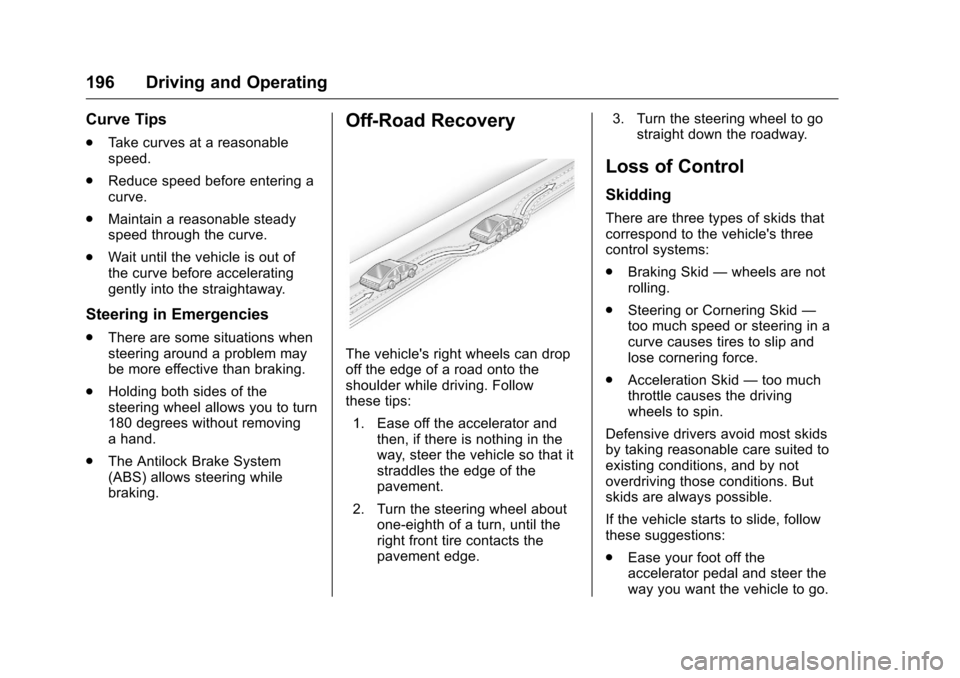
Off-Road Recovery
The vehicle's right wheels can drop
off the edge of a road onto the
shoulder while driving. Follow
these tips:
1. Ease off the accelerator and then, if there is nothing in the
way, steer the vehicle so that it
straddles the edge of the
pavement.
2. Turn the steering wheel about one-eighth of a turn, until the
right front tire contacts the
pavement edge. 3. Turn the steering wheel to go
straight down the roadway.
Loss of Control
Skidding
There are three types of skids that
correspond to the vehicle's three
control systems:
.Braking Skid —wheels are not
rolling.
. Steering or Cornering Skid —
too much speed or steering in a
curve causes tires to slip and
lose cornering force.
. Acceleration Skid —too much
throttle causes the driving
wheels to spin.
Defensive drivers avoid most skids
by taking reasonable care suited to
existing conditions, and by not
overdriving those conditions. But
skids are always possible.
If the vehicle starts to slide, follow
these suggestions:
. Ease your foot off the
accelerator pedal and steer the
way you want the vehicle to go.
Page 198 of 396
Chevrolet Colorado Owner Manual (GMNA-Localizing-U.S/Canada/Mexico-
9159327) - 2016 - crc - 8/28/15
Driving and Operating 197
The vehicle may straighten out.
Be ready for a second skid if it
occurs.
. Slow down and adjust your
driving according to weather
conditions. Stopping distance
can be longer and vehicle
control can be affected when
traction is reduced by water,
snow, ice, gravel, or other
material on the road. Learn to
recognize warning clues —such
as enough water, ice, or packed
snow on the road to make a
mirrored surface —and slow
down when you have any doubt.
. Try to avoid sudden steering,
acceleration, or braking,
including reducing vehicle speed
by shifting to a lower gear. Any
sudden changes could cause
the tires to slide.
Remember: Antilock brakes help
avoid only the braking skid.
Off-Road Driving
Four-wheel-drive vehicles can be
used for off-road driving. Vehicles
without four-wheel drive and vehicles not equipped with All
Terrain (AT) or On-Off Road (OOR)
tires must not be driven off-road
except on a level, solid surface. For
contact information about the
original equipment tires, see the
warranty manual.
One of the best ways for successful
off-road driving is to control the
speed.
{Warning
When driving off-road, bouncing
and quick changes in direction
can easily throw you out of
position. This could cause you to
lose control and crash. You and
your passengers should always
wear safety belts.
Before Driving Off-Road
.
Have all necessary maintenance
and service work completed.
. Fuel the vehicle, fill fluid levels,
and check inflation pressure in
all tires, including the spare,
if equipped. .
Read all the information about
four-wheel-drive vehicles in this
manual.
. Remove any underbody air
deflector, if equipped. Re-attach
the air deflector after off-road
driving.
. See Hill Descent Control (HDC)
0 237
ii.
. Know the local laws that apply to
off-road driving.
To gain more ground clearance if
needed, it may be necessary to
remove the front fascia lower air
dam. However, driving without the
air dam reduces fuel economy.
Caution
Operating the vehicle for
extended periods without the front
fascia lower air dam installed can
cause improper air flow to the
engine. Re-attach the front fascia
air dam after off-road driving.