USB CHEVROLET COLORADO 2017 2.G Owner's Manual
[x] Cancel search | Manufacturer: CHEVROLET, Model Year: 2017, Model line: COLORADO, Model: CHEVROLET COLORADO 2017 2.GPages: 419, PDF Size: 7.38 MB
Page 173 of 419
Chevrolet Colorado Owner Manual (GMNA-Localizing-U.S./Canada/Mexico-10122675) - 2017 - crc - 8/22/16
172 Infotainment System
The device battery rechargesautomatically while the vehicle is on.When the vehicle is off while adevice is connected using the USBcable, the device battery stopscharging and the device willautomatically turn off.
If the device is an unsupportedmodel, it can still be listened to inthe vehicle by connecting to theauxiliary input jack using a standard3.5 mm (1/8 in) stereo cable.
Menu
Press MENU to display the deviceMenu and the following may display:
Browse :Select to display the filesor songs on the device. See“Browse Device Media”later in thissection.
To n e S e t t i n g s :Select to adjustBass, Midrange, Treble, Balance,Fade, and EQ (Equalizer). See“To n e S e t t i n g s”inAM-FM Radio(Base Radio)0161orAM-FMRadio (Base Radio withTo u c h s c r e e n )0163.
EQ :If equipped, this featureadjusts the Equalizer settings. See“EQ (Equalizer)”inAM-FM Radio(Base Radio)0161orAM-FMRadio (Base Radio withTo u c h s c r e e n )0163.
Browse Device Media
Use the following to browse:
Playlists:
1. Turn MENU to highlight andpress to view the playlistsstored on the device.
2. Turn MENU to highlight andpress to select a playlist nameto view a list of all songs in theplaylist.
3. Turn MENU to highlight andpress to select the song fromthe list to begin playback.
Artists:
1. Turn MENU to highlight andpress to view the artists storedon the device.
2. Turn MENU to highlight andpress to select an artist nameto view a list of all albums bythe artist.
3. Turn MENU to highlight andpress to select an album nameto view a list of all songs on thealbum.
4. Turn MENU to highlight andpress to select the song fromthe list to begin playback.
Albums:
1. Turn MENU to highlight andpress to view the albumsstored on the device.
2. Turn MENU to highlight andpress to select an album nameto view a list of all songs on thealbum.
3. Turn MENU to highlight andpress to select the song fromthe list to begin playback.
Genres:
1. Turn MENU to highlight andpress to view the genres storedon the device.
2. Turn MENU to highlight andpress to select a genre nameto view a list of artists of thatgenre.
Page 174 of 419
Chevrolet Colorado Owner Manual (GMNA-Localizing-U.S./Canada/Mexico-10122675) - 2017 - crc - 8/22/16
Infotainment System 173
3. Turn MENU to highlight andpress to select to view albumsby that artist.
4. Turn MENU to highlight andpress to select an album toview songs.
5. Turn MENU to highlight andpress to select the song fromthe list to begin playback.
Songs:
1. Turn MENU to highlight andpress to view a list of all songsstored on the device.
2. Turn MENU to highlight andpress to select the song fromthe list to begin playback.
USB Port (Base Radio
with Touchscreen)
If equipped, there is a USB port fordata and charging in the centerstack, inside the center console,and/or at the rear of the centerconsole. For uplevel radios, see theinfotainment manual.
Using the USB Port
The infotainment system can playmusic by connecting an auxiliarydevice to the USB port.
USB Support
The USB port uses the USB 2.0standard. External devices such asiPhones/iPods®and USB storagedevices may be connected.
USB Supported Devices
.USB flash drives
.Portable USB hard drives
.iPod/iPhone devices
Not all iPods and USB drives arecompatible with the USB port.
Make sure the iPod has the latestfirmware from Apple®for properoperation. iPod firmware can beupdated using the latest iTunes®
application. See www.apple.com/itunes.
For help with identifying your iPod,go to www.apple.com/support.
The USB port can play both lowerand upper case .mp3, .wma, .ogg,and .wav files stored on a USBstorage device.
Supported Apple®Devices
To v i e w s u p p o r t e d d e v i c e s i n t h eU.S., see www.my.chevrolet.com/learned.
To v i e w s u p p o r t e d d e v i c e s i nCanada, seewww.chevroletowner.ca.
For supported devices in Mexico,see your dealer.
USB Supported File and FolderStructure
The infotainment system supports:
.FAT 1 6 .
.FAT 3 2 .
.exFAT.
Connecting a USB Storage
Device or iPod/iPhone
To c o n n e c t a U S B s t o r a g e d e v i c e ,connect the device to the USB port.
Page 175 of 419
Chevrolet Colorado Owner Manual (GMNA-Localizing-U.S./Canada/Mexico-10122675) - 2017 - crc - 8/22/16
174 Infotainment System
To c o n n e c t a n i P o d / i P h o n e , c o n n e c tone end of the device’scabletotheiPod/iPhone and the other end tothe USB port.
The iPod/iPhone charges while it isconnected to the vehicle if thevehicle is in ACC/ACCESSORY orON/RUN. SeeIgnition Positions0233.Whenthevehicleisturnedoff, the iPod/iPhone automaticallypowers off and will not charge ordraw power from the vehicle'sbattery.
For more information on USBusage, see“Audio SystemInformation”following.
Audio System Information
The infotainment system can playthe music files contained in the USBstorage device or iPod/iPhoneproducts.
Using MP3/WMA/OGG/WAV Files
.Music files with .mp3, .wma,.ogg, and .wav file nameextensions can be played.
.MP3 files that can be played: Bitrate: 8 kbps to 320 kbps.Sampling frequency: 48 kHz,44.1 kHz, 32 kHz, 24 kHz, 22.05kHz, and 16 kHz.
.Files with a bit rate above128 kbps will result in higherquality sound.
.ID3 Tag information for MP3files, such as the album nameand the artist, can be played.
.To d i s p l a y a l b u m t i t l e , t r a c k t i t l e ,and artist information, the fileshould be compatible with theID3 Tag V1 and V2 formats.
Using a USB Storage Device oriPod/iPhone
.Use a USB or flash memory typestorage device. Do not connectusing a USB adaptor.
.Do not connect and reconnectthe USB device repeatedly in ashort time, as this may causestatic electricity and problemsusing the device.
.Use a USB device with a metalconnecting terminal.
.Connection with i-Stick TypeUSB storage devices may befaulty due to vehicle vibration.
.Do not touch the USBconnecting terminal.
.Only USB storage devicesformatted in FAT16/32 or exFATfile systems are recognized.NTFS and other file systems arenot recognized.
.The time it takes to process fileswill depend on the USB storagedevice type and capacity, andthe type of files stored.
.Some USB storage device filesmay not be compatible.
.Up to two USB devices and oneiPod can be played through aUSB hub. All devices may not besupported, depending on theperformance of the USB hub.If there is not enough powersupply, it may not operatenormally.
Page 176 of 419
Chevrolet Colorado Owner Manual (GMNA-Localizing-U.S./Canada/Mexico-10122675) - 2017 - crc - 8/22/16
Infotainment System 175
.Do not disconnect the USBstorage device while it is playing.This may cause damage to theproduct or affect theperformance of the USB device.
.Disconnect the USB storagedevice when the ignition isturned off. If the ignition is turnedon while the USB device isconnected, the USB device maybe damaged or may not operatenormally.
.USB storage devices can onlybe connected for playing music,viewing photo files,or upgrading.
.Do not use the USB terminal tocharge USB accessoryequipment. The heat generatedmay cause performance issuesor damage.
.Music files to which Digital RightManagement (DRM) is appliedcannot be played.
.USB storage device with acapacity limit of 5,000 files, suchas music, photo, video, and15 stages of folder structure.
Normal usage cannot beguaranteed for a storage devicethat exceeds this limit. The iPod/iPhone can play all music filesthat are supported. The musicfile lists will only display up to5,000 files on the screen. Thesefiles are sorted in alphabeticalorder.
.Some iPod/iPhone models maynot support the connectivity orfunctionality of this product.
.Only connect the iPod/iPhonewith connection cablessupported by iPod/iPhoneproducts. Other connectioncables cannot be used.
.The iPod/iPhone may bedamaged if it is connected to thevehicle with the ignition on.When not in use, disconnect theiPod/iPhone.
.When the iPod/iPhone isconnected to the USB port byusing the iPod/iPhone cable, theBluetooth music is notsupported.
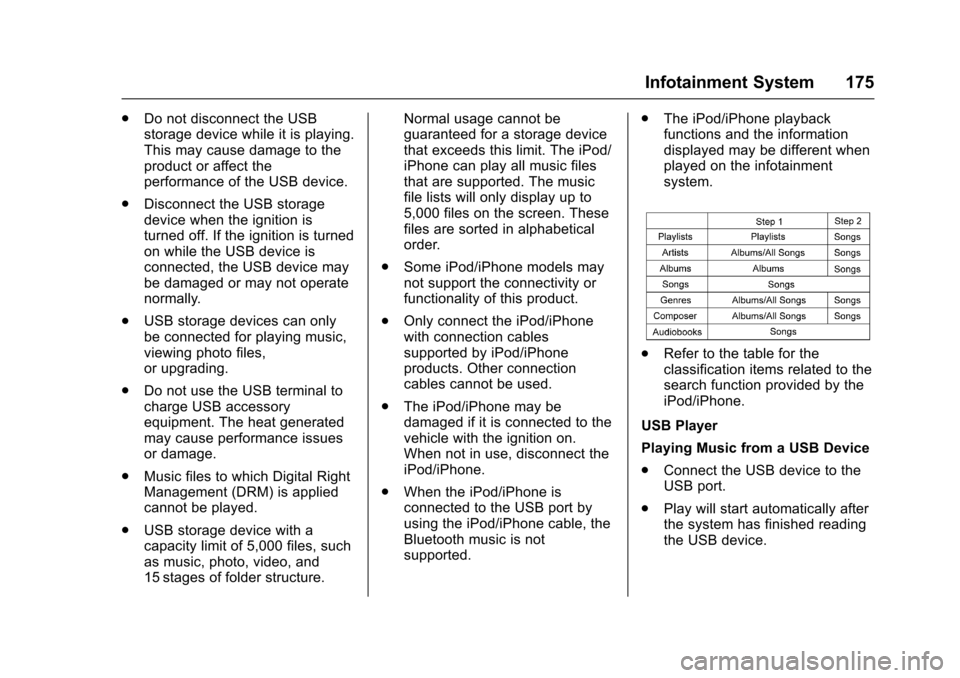
.The iPod/iPhone playbackfunctions and the informationdisplayed may be different whenplayed on the infotainmentsystem.
.Refer to the table for theclassification items related to thesearch function provided by theiPod/iPhone.
USB Player
Playing Music from a USB Device
.Connect the USB device to theUSB port.
.Play will start automatically afterthe system has finished readingthe USB device.
Page 177 of 419
Chevrolet Colorado Owner Manual (GMNA-Localizing-U.S./Canada/Mexico-10122675) - 2017 - crc - 8/22/16
176 Infotainment System
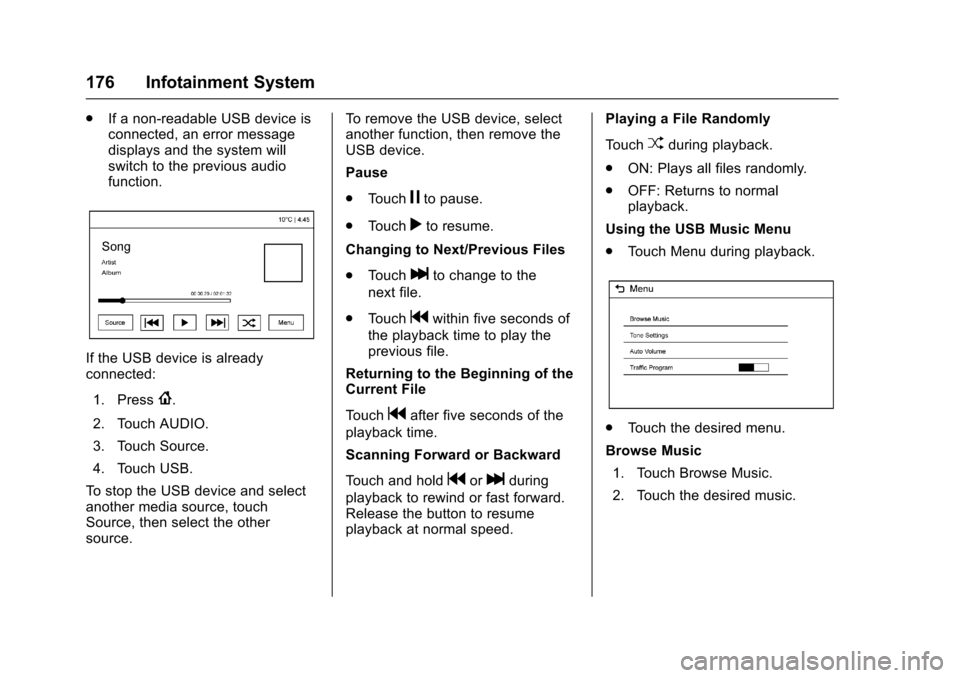
.If a non-readable USB device isconnected, an error messagedisplays and the system willswitch to the previous audiofunction.
If the USB device is alreadyconnected:
1. Press{.
2. Touch AUDIO.
3. Touch Source.
4. Touch USB.
To s t o p t h e U S B d e v i c e a n d s e l e c tanother media source, touchSource, then select the othersource.
To r e m o v e t h e U S B d e v i c e , s e l e c tanother function, then remove theUSB device.
Pause
.To u c hjto pause.
.To u c hrto resume.
Changing to Next/Previous Files
.To u c hlto change to the
next file.
.To u c hgwithin five seconds of
the playback time to play theprevious file.
Returning to the Beginning of theCurrent File
To u c hgafter five seconds of the
playback time.
Scanning Forward or Backward
To u c h a n d h o l dgorlduring
playback to rewind or fast forward.Release the button to resumeplayback at normal speed.
Playing a File Randomly
To u c hZduring playback.
.ON: Plays all files randomly.
.OFF: Returns to normalplayback.
Using the USB Music Menu
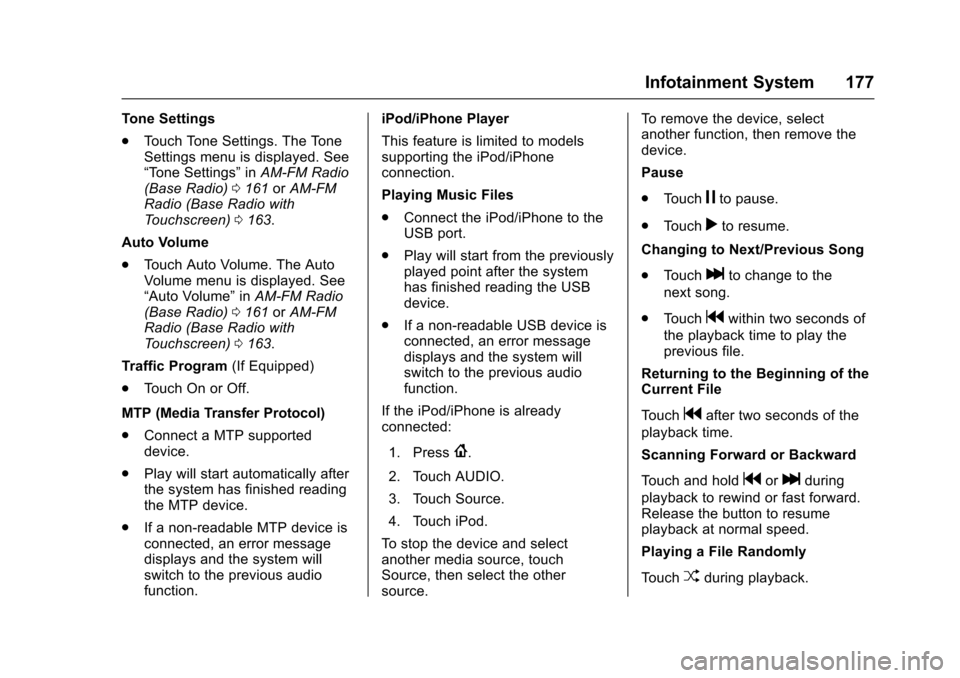
.To u c h M e n u d u r i n g p l a y b a c k .
.To u c h t h e d e s i r e d m e n u .
Browse Music
1. Touch Browse Music.
2. Touch the desired music.
Page 178 of 419
Chevrolet Colorado Owner Manual (GMNA-Localizing-U.S./Canada/Mexico-10122675) - 2017 - crc - 8/22/16
Infotainment System 177
To n e S e t t i n g s
.To u c h To n e S e t t i n g s . T h e To n eSettings menu is displayed. See“To n e S e t t i n g s”inAM-FM Radio(Base Radio)0161orAM-FMRadio (Base Radio withTo u c h s c r e e n )0163.
Auto Volume
.To u c h A u t o V o l u m e . T h e A u t oVolume menu is displayed. See“Auto Volume”inAM-FM Radio(Base Radio)0161orAM-FMRadio (Base Radio withTo u c h s c r e e n )0163.
Tr a f f i c P r o g r a m(If Equipped)
.To u c h O n o r O f f .
MTP (Media Transfer Protocol)
.Connect a MTP supporteddevice.
.Play will start automatically afterthe system has finished readingthe MTP device.
.If a non-readable MTP device isconnected, an error messagedisplays and the system willswitch to the previous audiofunction.
iPod/iPhone Player
This feature is limited to modelssupporting the iPod/iPhoneconnection.
Playing Music Files
.Connect the iPod/iPhone to theUSB port.
.Play will start from the previouslyplayed point after the systemhas finished reading the USBdevice.
.If a non-readable USB device isconnected, an error messagedisplays and the system willswitch to the previous audiofunction.
If the iPod/iPhone is alreadyconnected:
1. Press{.
2. Touch AUDIO.
3. Touch Source.
4. Touch iPod.
To s t o p t h e d e v i c e a n d s e l e c tanother media source, touchSource, then select the othersource.
To r e m o v e t h e d e v i c e , s e l e c tanother function, then remove thedevice.
Pause
.To u c hjto pause.
.To u c hrto resume.
Changing to Next/Previous Song
.To u c hlto change to the
next song.
.To u c hgwithin two seconds of
the playback time to play theprevious file.
Returning to the Beginning of theCurrent File
To u c hgafter two seconds of the
playback time.
Scanning Forward or Backward
To u c h a n d h o l dgorlduring
playback to rewind or fast forward.Release the button to resumeplayback at normal speed.
Playing a File Randomly
To u c hZduring playback.
Page 179 of 419
Chevrolet Colorado Owner Manual (GMNA-Localizing-U.S./Canada/Mexico-10122675) - 2017 - crc - 8/22/16
178 Infotainment System
.ON: Plays all files randomly.
.OFF: Returns to normalplayback.
Using the iPod Menu
.To u c h M e n u d u r i n g p l a y b a c k .
.To u c h t h e a p p r o p r i a t eplay mode.
Browse Music
1. Touch Browse Music.
2. Touch the desired music.
To n e S e t t i n g s
.To u c h To n e S e t t i n g s . T h e To n eSettings menu is displayed. See“To n e S e t t i n g s”inAM-FM Radio(Base Radio)0161orAM-FMRadio (Base Radio withTo u c h s c r e e n )0163.
Auto Volume
.To u c h A u t o V o l u m e . T h e A u t oVolume menu is displayed. See“Auto Volume”inAM-FM Radio(Base Radio)0161orAM-FMRadio (Base Radio withTo u c h s c r e e n )0163.
Picture System Information
The infotainment system can viewpicture files stored on a USBstorage device and devices thatsupport Media TransferProtocol (MTP).
.Supported file extensions: .jpg,.bmp, .png, .gif.
.Animated GIF files are notsupported.
.Some files may not operate dueto a different recording format orthe condition of the file.
Viewing Pictures
1. Connect the USB device to theUSB port.
2. Touch the screen to open to fullscreen. Touch the screen againto return to the previousscreen.
If the USB device is alreadyconnected:
1. Touch{.
2. Touch GALLERY.
Some features are disabled whilethe vehicle is in motion.
Viewing a Slide Show
1. Touchzfrom the picture
screen.
2. Touch the screen to cancel theslide show during the slideshow playback.
Viewing a Previous or NextPicture
To u c hSorTfrom the picture
screen.
Rotating a Picture
To u c hwfrom the picture screen.
Enlarging a Picture
To u c hxfrom the picture screen.
Using the USB Picture Menu
1. Touch MENU from the picturescreen.
2. Touch the appropriate menu:
.Slide Show Time: Allowsselection of the slide showinterval.
Page 245 of 419
Chevrolet Colorado Owner Manual (GMNA-Localizing-U.S./Canada/Mexico-10122675) - 2017 - crc - 8/22/16
244 Driving and Operating
Manual Mode
Range Selection Mode
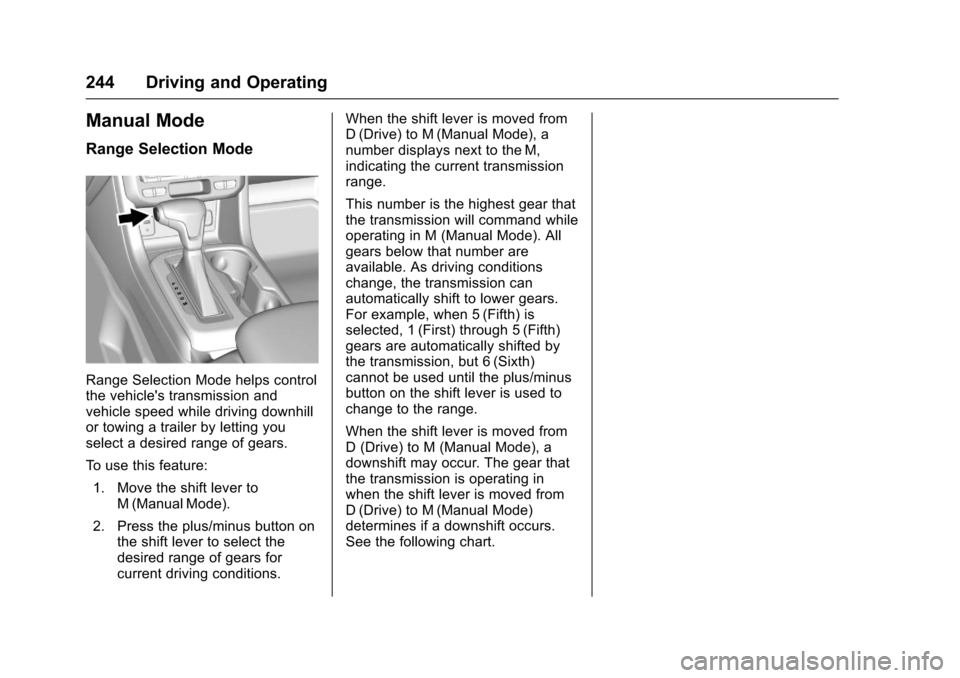
Range Selection Mode helps controlthe vehicle's transmission andvehicle speed while driving downhillor towing a trailer by letting youselect a desired range of gears.
To u s e t h i s f e a t u r e :
1. Move the shift lever toM(ManualMode).
2. Press the plus/minus button onthe shift lever to select thedesired range of gears forcurrent driving conditions.
When the shift lever is moved fromD(Drive) to M(Manual Mode), anumber displays next to the M,indicating the current transmissionrange.
This number is the highest gear thatthe transmission will command whileoperating in M (Manual Mode). Allgears below that number areavailable. As driving conditionschange, the transmission canautomatically shift to lower gears.For example, when 5 (Fifth) isselected, 1 (First) through 5 (Fifth)gears are automatically shifted bythe transmission, but 6 (Sixth)cannot be used until the plus/minusbutton on the shift lever is used tochange to the range.
When the shift lever is moved fromD(Drive)toM(ManualMode),adownshift may occur. The gear thatthe transmission is operating inwhen the shift lever is moved fromD(Drive) to M(Manual Mode)determines if a downshift occurs.See the following chart.
Page 317 of 419
Chevrolet Colorado Owner Manual (GMNA-Localizing-U.S./Canada/Mexico-10122675) - 2017 - crc - 8/22/16
316 Vehicle Care
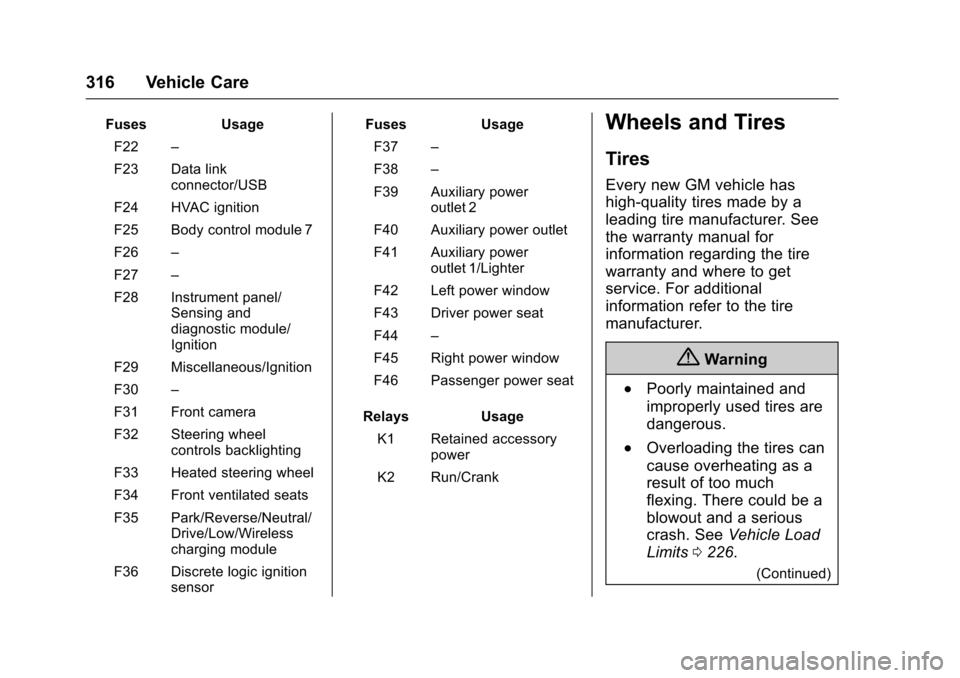
FusesUsage
F22–
F23 Data linkconnector/USB
F24 HVAC ignition
F25 Body control module 7
F26–
F27–
F28 Instrument panel/Sensing anddiagnostic module/Ignition
F29 Miscellaneous/Ignition
F30–
F31 Front camera
F32 Steering wheelcontrols backlighting
F33 Heated steering wheel
F34 Front ventilated seats
F35 Park/Reverse/Neutral/Drive/Low/Wirelesscharging module
F36 Discrete logic ignitionsensor
FusesUsage
F37–
F38–
F39 Auxiliary poweroutlet 2
F40 Auxiliary power outlet
F41 Auxiliary poweroutlet 1/Lighter
F42 Left power window
F43 Driver power seat
F44–
F45 Right power window
F46 Passenger power seat
RelaysUsage
K1 Retained accessorypower
K2 Run/Crank
Wheels and Tires
Tires
Every new GM vehicle has
high-quality tires made by a
leading tire manufacturer. See
the warranty manual for
information regarding the tire
warranty and where to get
service. For additional
information refer to the tire
manufacturer.
{Warning
.Poorly maintained and
improperly used tires are
dangerous.
.Overloading the tires can
cause overheating as a
result of too much
flexing. There could be a
blowout and a serious
crash. SeeVehicle Load
Limits0226.
(Continued)
Page 415 of 419

Chevrolet Colorado Owner Manual (GMNA-Localizing-U.S./Canada/Mexico-10122675) - 2017 - crc - 8/22/16
414 Index
OnStar®Emergency . . . . . . . . . . . . 398
OnStar®Navigation . . . . . . . . . . . . . 399
OnStar®Overview . . . . . . . . . . . . . . 397
OnStar®Security . . . . . . . . . . . . . . . 398
Operation
Fog Lamps . . . . . . . . . . . . . . . . . . . 149
Ordering
Service Publications . . . . . . . . . . 392
Outlets
Power . . . . . . . . . . . . . . . . . . . . . . . . 107
Overheating, Engine . . . . . . . . . . . . 296
Overview . . . . . . . . . . . . . . . . . . 155, 157
P
Pandora Internet Radio . . . . . . . . . 167
Park
Shifting Into . . . . . . . . . . . . . . . . . . . 238
Shifting Out of . . . . . . . . . . . . . . . . 239
Parking . . . . . . . . . . . . . . . . . . . . . . . . . 239
Brake . . . . . . . . . . . . . . . . . . . . . . . . . 254
Brake and P (Park)
Mechanism Check . . . . . . . . . . 305
Over Things That Burn . . . . . . . 240
Passenger Airbag Status
Indicator . . . . . . . . . . . . . . . . . . . . . . 117
Passenger Compartment Air
Filter . . . . . . . . . . . . . . . . . . . . . . . . . . 213
Passenger Sensing System . . . . . 64
Perchlorate Materials
Requirements, California . . . . . . 280
Personalization
Vehicle . . . . . . . . . . . . . . . . . . . . . . . 139
Phone
Bluetooth . . . . . . . . 187, 188,192, 197
Port
USB . . . . . . . . . . . . . . . . . . . . . 170, 173
Power
Door Locks . . . . . . . . . . . . . . . . . . . . . 34
Mirrors . . . . . . . . . . . . . . . . . . . . . . . . . . 39
Outlets . . . . . . . . . . . . . . . . . . . . . . . 107
Protection, Battery . . . . . . . . . . . . 152
Retained Accessory (RAP) . . . 237
Seat Adjustment . . . . . . . . . . . . . . . . 46
Windows . . . . . . . . . . . . . . . . . . . . . . . 41
Pregnancy, Using Safety Belts . . . 56
Privacy
Vehicle Data Recording . . . . . . . 394
Program
Courtesy Transportation . . . . . . 389
Proposition
65 Warning,
California . . . . . . . . . . . .280, 300, 348
R
Radio Frequency Statement . . . . 393
Radio Reception . . . . . . . . . . . . . . . . 166
Radios
AM-FM Radio . . . . . . . . . . . . 161, 163
Satellite . . . . . . . . . . . . . . . . . . 164, 165
Reading Lamps . . . . . . . . . . . . . . . . . 151
Rear Axle . . . . . . . . . . . . . . . . . . . . . . . 303
Rear Seats . . . . . . . . . . . . . . . . . . . . . . 49
Rear Vision Camera (RVC) . . . . . 261
Rear Windows . . . . . . . . . . . . . . . . . . . 43
Rearview Mirrors . . . . . . . . . . . . . . . . 40
Automatic Dimming . . . . . . . . . . . . . 41
Reclining Seatbacks . . . . . . . . . . . . . 47
Recognition
Voice . . . . . . . . . . . . . . . . . . . . . . . . . 181
Recommended Fluids and
Lubricants . . . . . . . . . . . . . . . . . . . . . 375
Records
Maintenance . . . . . . . . . . . . . . . . . . 378
Recreational Vehicle Towing . . . . 351
Reimbursement Program,
GM Mobility . . . . . . . . . . . . . . . . . . . 387
Remote Keyless Entry (RKE)
System . . . . . . . . . . . . . . . . . . . . . . . . . 30
Remote Vehicle Start . . . . . . . . . . . . 32
Replacement Bulbs . . . . . . . . . . . . . 309