key CHEVROLET COLORADO 2017 2.G Workshop Manual
[x] Cancel search | Manufacturer: CHEVROLET, Model Year: 2017, Model line: COLORADO, Model: CHEVROLET COLORADO 2017 2.GPages: 419, PDF Size: 7.38 MB
Page 262 of 419
Chevrolet Colorado Owner Manual (GMNA-Localizing-U.S./Canada/Mexico-10122675) - 2017 - crc - 8/22/16
Driving and Operating 261
Ending Cruise Control
There are four ways to end cruisecontrol:
.Step lightly on the brake pedal.
.Press*.
.Press the clutch pedal forseveral seconds or shift thetransmission to N (Neutral).
.To t u r n o f f c r u i s e c o n t r o l ,
press5.
Erasing Speed Memory
The cruise control set speed is
erased from memory if5is pressed
or if the ignition is turned off.
Driver Assistance
Systems
Rear Vision
Camera (RVC)
{Warning
The camera(s) do not display
children, pedestrians, bicyclists,
crossing traffic, animals, or any
other object outside of the
cameras’field of view, below the
bumper, or under the vehicle.
Shown distances may be different
from actual distances. Do not
drive or park the vehicle using
only these camera(s). Always
check behind and around the
vehicle before driving. Failure to
use proper care may result in
injury, death, or vehicle damage.
If equipped, the RVC system isdesigned to help the driver whenbacking up by displaying a view ofthe area behind the vehicle. Whenthe key is in ON/RUN and the driver
shifts the vehicle into R (Reverse),the video image automaticallyappears on the infotainment screen.The infotainment screen goes to theprevious screen after approximatelyfour seconds once the vehicle isshifted out of R (Reverse).
To s e e t h e p r e v i o u s s c r e e n s o o n e r,do one of the following:
.Press a hard key on theinfotainment system.
.Shift into P (Park).
The RVC will not work properly ifthe tailgate is down. If the tailgate isdown, do not use this system.
Guidelines
The RVC system may have aguideline overlay that can help thedriver align the vehicle whenbacking into a parking spot.
To t u r n t h e g u i d e l i n e s o n o r o f f :
1. Shift into P (Park).
2. Press SETTINGS on the homescreen of the infotainmentsystem.
3. Select Rear Camera.
Page 281 of 419
Chevrolet Colorado Owner Manual (GMNA-Localizing-U.S./Canada/Mexico-10122675) - 2017 - crc - 8/22/16
280 Vehicle Care
Wheel Alignment and TireBalance . . . . . . . . . . . . . . . . . . . . . 334Wheel Replacement . . . . . . . . . . 334Tire Chains . . . . . . . . . . . . . . . . . . . 335If a Tire Goes Flat . . . . . . . . . . . . 336Tire Changing . . . . . . . . . . . . . . . . 338Compact Spare Tire . . . . . . . . . . 346Full-Size Spare Tire . . . . . . . . . . 347
Jump Starting
Jump Starting - NorthAmerica . . . . . . . . . . . . . . . . . . . . . 348
Towing the Vehicle
To w i n g t h e V e h i c l e . . . . . . . . . . . 3 5 1Recreational VehicleTo w i n g . . . . . . . . . . . . . . . . . . . . . . 3 5 1
Appearance Care
Exterior Care . . . . . . . . . . . . . . . . . 356Interior Care . . . . . . . . . . . . . . . . . . 361Floor Mats . . . . . . . . . . . . . . . . . . . . 364
General Information
For service and parts needs, visityour dealer. You will receivegenuine GM parts and GM-trainedand supported service people.
Genuine GM parts have one ofthese marks:
California Proposition
65 Warning
WARNING:Most motor vehicles,including this one, as well as manyof its service parts and fluids,contain and/or emit chemicalsknown to the State of California to
cause cancer and birth defects orother reproductive harm. Engineexhaust, many parts and systems,many fluids, and some componentwear by-products contain and/oremit these chemicals.
SeeBattery - North America0300andJump Starting - NorthAmerica0348.
California Perchlorate
Materials Requirements
Certain types of automotiveapplications, such as airbaginitiators, safety belt pretensioners,and lithium batteries contained inRemote Keyless Entry transmitters,may contain perchlorate materials.Special handling may be necessary.For additional information, seewww.dtsc.ca.gov/hazardouswaste/perchlorate.
Page 305 of 419
Chevrolet Colorado Owner Manual (GMNA-Localizing-U.S./Canada/Mexico-10122675) - 2017 - crc - 8/22/16
304 Vehicle Care
Do not use the acceleratorpedal, and be ready to turn offthe engine immediately if itstarts.
3. For automatic transmissionvehicles, try to start the enginein each gear. The vehicleshould start only in P (Park) orN(Neutral). If the vehicle startsin any other position, contactyour dealer for service.
For manual transmissionvehicles, put the shift lever inNeutral, push the clutch pedaldown halfway, and try to startthe engine. The vehicle shouldstart only when the clutchpedal is pushed down all theway to the floor. If the vehiclestarts when the clutch pedal isnot pushed all the way down,contact your dealer for service.
Automatic Transmission
Shift Lock Control
Function Check
{Warning
When you are doing this
inspection, the vehicle could
move suddenly. If the vehicle
moves, you or others could be
injured.
1. Before starting this check, besure there is enough roomaround the vehicle. It should beparked on a level surface.
2. Apply the parking brake. Beready to apply the regularbrake immediately if the vehiclebegins to move.
3. With the engine off, turn theignition on, but do not start theengine. Without applying theregular brake, try to move theshift lever out of P (Park) withnormal effort. If the shift levermoves out of P (Park), contactyour dealer for service.
Ignition Transmission
Lock Check
While parked, and with the parkingbrake set, try to turn the ignition toLOCK/OFF in each shift leverposition.
.For automatic transmissionvehicles, the ignition should turnto LOCK/OFF only when theshift lever is in P (Park).
.For manual transmissionvehicles, the ignition should turnto LOCK/OFF only when youpress the key release button.
On all vehicles, the ignition keyshould come out only in LOCK/OFF.
Contact your dealer if service isrequired.
Page 340 of 419
Chevrolet Colorado Owner Manual (GMNA-Localizing-U.S./Canada/Mexico-10122675) - 2017 - crc - 8/22/16
Vehicle Care 339
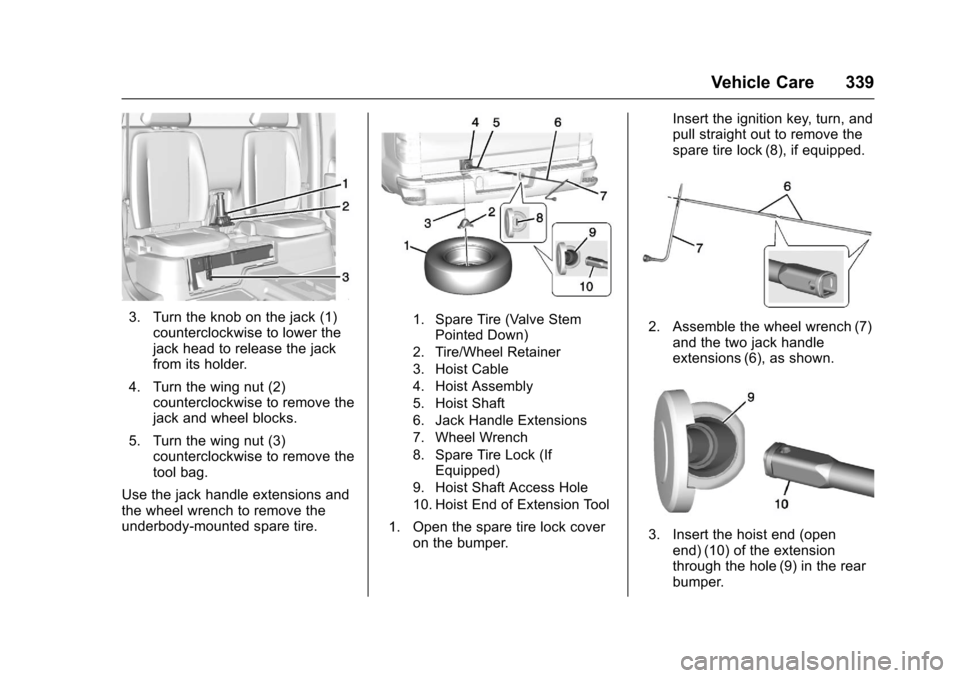
3. Turn the knob on the jack (1)counterclockwise to lower thejack head to release the jackfrom its holder.
4. Turn the wing nut (2)counterclockwise to remove thejack and wheel blocks.
5. Turn the wing nut (3)counterclockwise to remove thetool bag.
Use the jack handle extensions andthe wheel wrench to remove theunderbody-mounted spare tire.
1. Spare Tire (Valve StemPointed Down)
2. Tire/Wheel Retainer
3. Hoist Cable
4. Hoist Assembly
5. Hoist Shaft
6. Jack Handle Extensions
7. Wheel Wrench
8. Spare Tire Lock (IfEquipped)
9. Hoist Shaft Access Hole
10. Hoist End of Extension Tool
1. Open the spare tire lock coveron the bumper.
Insert the ignition key, turn, andpull straight out to remove thespare tire lock (8), if equipped.
2. Assemble the wheel wrench (7)and the two jack handleextensions (6), as shown.
3. Insert the hoist end (openend) (10) of the extensionthrough the hole (9) in the rearbumper.
Page 354 of 419
Chevrolet Colorado Owner Manual (GMNA-Localizing-U.S./Canada/Mexico-10122675) - 2017 - crc - 8/22/16
Vehicle Care 353
(Drive). There should be nomovement of the vehicle whileshifting.
5. Shift the transmission into D(Drive). Turn the engine off.Then shift the transmission intoP(Park).
6. Wait for at least 10 seconds,then restart the engine.
7. Shift the transmission to D(Drive), then turn the engine offagain.
Caution
Failure to disconnect the negative
battery cable or to have it contact
the terminals can cause damage
to the vehicle.
8. Disconnect the negativebattery cable at the battery andsecure the nut and bolt. Coverthe negative battery post with anon-conductive material toprevent any contact with thenegative battery terminal.
9. Shift the transmission toP(Park).
Caution
If the steering column is locked,
vehicle damage may occur.
10. Move the steering wheel tomake sure the steering columnis unlocked.
11 . W i t h a f o o t o n t h e b r a k e p e d a l ,release the parking brake.Keep the ignition key in thetowed vehicle in ACC/ACCESSORY to prevent thesteering column from locking.
Disconnecting the Towed Vehicle
Before disconnecting the towedvehicle:
1. Park on a level surface.
2. Set the parking brake, thenshift the transmission toP(Park),andmovetheignitionkey to OFF.
3. Connect the battery.
4. Apply the brake pedal.
5. Shift the transfer case out ofN(Neutral) to Two-Wheel DriveHigh. See“Shifting out ofN(Neutral)”underFour-WheelDrive0247.Seeyourdealerifthe transfer case cannot beshifted out of N (Neutral).
6. Check that the vehicle is inTw o - W h e e l D r i v e H i g h b yshifting the transmission toR(Reverse)andthentoD(Drive). There should bemovement of the vehicle whileshifting.
7. Shift the transmission toP(Park)andturnofftheignition.
8. Disconnect the vehicle from thetow vehicle.
9. Release the parking brake.
10. Reset any lost presets.
The outside temperaturedisplay will default to 0 °C(32 °F) but will reset withnormal usage.
Page 361 of 419
Chevrolet Colorado Owner Manual (GMNA-Localizing-U.S./Canada/Mexico-10122675) - 2017 - crc - 8/22/16
360 Vehicle Care
Caution (Continued)
on roads that have been sprayed
with magnesium, calcium,
or sodium chloride. These
chlorides are used on roads for
conditions such as ice and dust.
Always wash the chrome with
soap and water after exposure.
Caution
To a v o i d s u r f a c e d a m a g e , d o n o t
use strong soaps, chemicals,
abrasive polishes, cleaners,
brushes, or cleaners that contain
acid on aluminum or
chrome-plated wheels. Use only
approved cleaners. Also, never
drive a vehicle with aluminum or
chrome-plated wheels through an
automatic car wash that uses
silicone carbide tire cleaning
brushes. Damage could occur
and the repairs would not be
covered by the vehicle warranty.
Brake System
Visually inspect brake lines andhoses for proper hook-up, binding,leaks, cracks, chafing, etc. Inspectdisc brake pads for wear and rotorsfor surface condition. Inspect drumbrake linings/shoes for wear orcracks. Inspect all other brake parts.
Steering, Suspension, and
Chassis Components
Visually inspect steering,suspension, and chassiscomponents for damaged, loose,or missing parts or signs of wear atleast once a year.
Inspect power steering for properattachment, connections, binding,leaks, cracks, chafing, etc.
Visually check constant velocity jointboots and axle seals for leaks.
Body Component Lubrication
Lubricate all key lock cylinders,hood hinges, liftgate hinges, steelfuel door hinge, and power assiststep hinges, unless the componentsare plastic. Applying silicone grease
on weatherstrips with a clean clothwill make them last longer, sealbetter, and not stick or squeak
Underbody Maintenance
At least twice a year, spring and fall,use plain water to flush anycorrosive materials from theunderbody. Take care to thoroughlyclean any areas where mud andother debris can collect.
Do not directly power wash thetransfer case and/or front/rear axleoutput seals. High pressure watercan overcome the seals andcontaminate the fluid. Contaminatedfluid will decrease the life of thetransfer case and/or axles andshould be replaced.
Sheet Metal Damage
If the vehicle is damaged andrequires sheet metal repair orreplacement, make sure the bodyrepair shop applies anti-corrosionmaterial to parts repaired orreplaced to restore corrosionprotection.
Page 369 of 419

Chevrolet Colorado Owner Manual (GMNA-Localizing-U.S./Canada/Mexico-10122675) - 2017 - crc - 8/22/16
368 Service and Maintenance
.Check automatic transmissionshift lock control function. SeeAutomatic Transmission ShiftLock Control FunctionCheck0304.
.Check ignition transmission lock.SeeIgnition Transmission LockCheck0304.
.Check parking brake andautomatic transmission parkmechanism. SeePark Brake andP(Park)MechanismCheck0305.
.Check accelerator pedal fordamage, high effort, or binding.Replace if needed.
.Visually inspect gas strut forsigns of wear, cracks, or otherdamage. Check the hold openability of the strut. See yourdealer if service is required.
.Verify spare tire key lockoperation and lubricate asneeded. SeeTireChanging0338.
Page 377 of 419
Chevrolet Colorado Owner Manual (GMNA-Localizing-U.S./Canada/Mexico-10122675) - 2017 - crc - 8/22/16
376 Service and Maintenance
UsageFluid/Lubricant
Key Lock Cylinders, Hood Hinges,Body Door Hinge Pins, TailgateHinge and Linkage, Tailgate HandlePivot Points, Hinges, Latch BoltLinkage, and Fuel Door Hinge
Multi-Purpose Lubricant, Superlube (GM Part No. 12346241, inCanada 10953474).
Manual Transmission DEXRON®-VI Automatic Transmission Fluid.
Transfer Case (If Equipped WithFour-Wheel Drive)DEXRON®-VI Automatic Transmission Fluid.
Weatherstrip Conditioning Weatherstrip Lubricant (GM Part No. 3634770, in Canada 10953518) orDielectric Silicone Grease (GM Part No. 12345579, in Canada 10953481).
Weatherstrip Squeaks Synthetic Grease with Teflon, Superlube (GM Part No. 12371287, inCanada 10953437).
Windshield Washer Automotive windshield washer fluid that meets regional freeze protectionrequirements.
Page 399 of 419
Chevrolet Colorado Owner Manual (GMNA-Localizing-U.S./Canada/Mexico-10122675) - 2017 - crc - 8/22/16
398 OnStar
.Obtain and customize the Wi-Fi®
hotspot name or SSID andpassword, if equipped.
PressQto connect to an
Advisor to:
.Verify account information orupdate contact information.
.Get driving directions.
.Receive a Diagnostic check ofthe vehicle's key operatingsystems.
.Receive Roadside Assistance.
.Manage Wi-Fi Settings,if equipped.
Press>to get a priority connection
to an OnStar Advisor available24/7 to:
.Get help for an emergency.
.Be a Good Samaritan orrespond to an AMBER Alert.
.Get assistance in severeweather or other crisis situationsand find evacuation routes.
OnStar Services
Emergency
Emergency Services require anactive, OnStar service plan(excludes Basic Plan). WithAutomatic Crash Response, built-insensors can automatically alert aspecially trained OnStar Advisorwho is immediately connected in tothe vehicle to help.
Press>for a priority connection to
an OnStar Advisor who can contactemergency service providers, directthem to your exact location, andrelay important information.
With OnStar Crisis Assist, speciallytrained Advisors are available24 hours a day, 7 days a week, toprovide a central point of contact,assistance, and information during acrisis.
With Roadside Assistance, Advisorscan locate a nearby service providerto help with a flat tire, a batteryjump, or an empty gas tank.
Security
If equipped, OnStar provides theseservices:
.With Stolen Vehicle Assistance,OnStar Advisors can use GPS topinpoint the vehicle and helpauthorities quickly recover it.
.With Remote Ignition Block™,if equipped, OnStar can blockthe engine from being restarted.
.With Stolen Vehicle Slowdown®,if equipped, OnStar can workwith law enforcement togradually slow the vehicle down.
Theft Alarm Notification
If equipped, if the doors are lockedand the vehicle alarm sounds, anotification by text, e-mail, or phonecall will be sent. If the vehicle isstolen, an OnStar Advisor can workwith authorities to recover thevehicle.
Page 402 of 419
Chevrolet Colorado Owner Manual (GMNA-Localizing-U.S./Canada/Mexico-10122675) - 2017 - crc - 8/22/16
OnStar 401
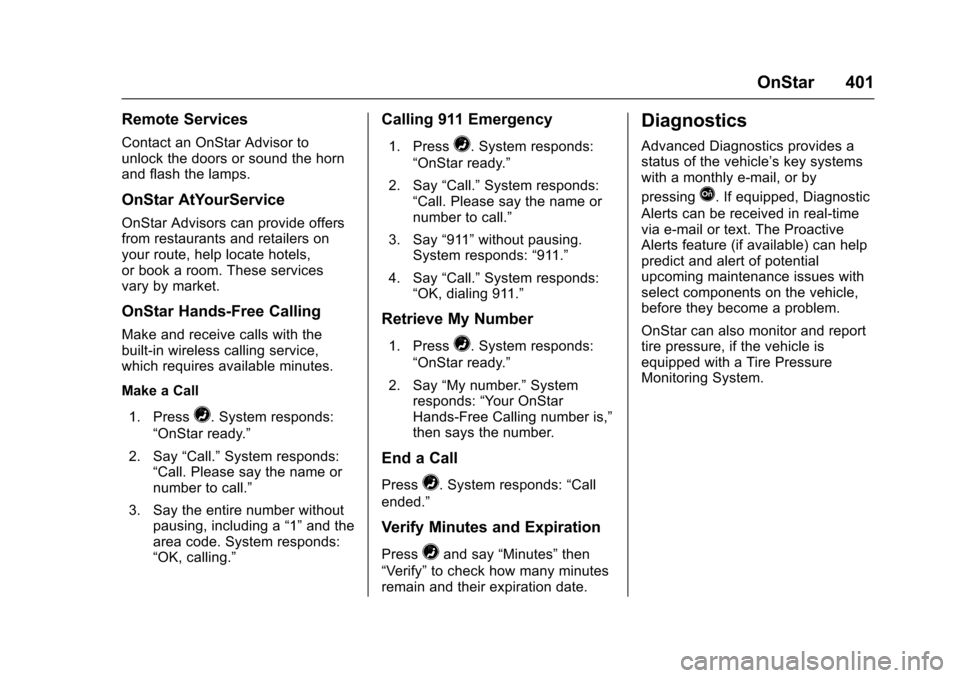
Remote Services
Contact an OnStar Advisor tounlock the doors or sound the hornand flash the lamps.
OnStar AtYourService
OnStar Advisors can provide offersfrom restaurants and retailers onyour route, help locate hotels,or book a room. These servicesvary by market.
OnStar Hands-Free Calling
Make and receive calls with thebuilt-in wireless calling service,which requires available minutes.
Make a Call
1. Press=.Systemresponds:
“OnStar ready.”
2. Say“Call.”System responds:“Call. Please say the name ornumber to call.”
3. Say the entire number withoutpausing, including a“1”and thearea code. System responds:“OK, calling.”
Calling 911 Emergency
1. Press=.Systemresponds:
“OnStar ready.”
2. Say“Call.”System responds:“Call. Please say the name ornumber to call.”
3. Say“911”without pausing.System responds:“911.”
4. Say“Call.”System responds:“OK, dialing 911.”
Retrieve My Number
1. Press=.Systemresponds:
“OnStar ready.”
2. Say“My number.”Systemresponds:“Yo u r O n S t a rHands-Free Calling number is,”then says the number.
End a Call
Press=.Systemresponds:“Call
ended.”
Verify Minutes and Expiration
Press=and say“Minutes”then
“Ve r i f y”to check how many minutesremain and their expiration date.
Diagnostics
Advanced Diagnostics provides astatus of the vehicle’skeysystemswith a monthly e-mail, or by
pressingQ.Ifequipped,Diagnostic
Alerts can be received in real-timevia e-mail or text. The ProactiveAlerts feature (if available) can helppredict and alert of potentialupcoming maintenance issues withselect components on the vehicle,before they become a problem.
OnStar can also monitor and reporttire pressure, if the vehicle isequipped with a Tire PressureMonitoring System.