cam CHEVROLET COLORADO 2018 Owner's Manual
[x] Cancel search | Manufacturer: CHEVROLET, Model Year: 2018, Model line: COLORADO, Model: CHEVROLET COLORADO 2018Pages: 421, PDF Size: 5.58 MB
Page 6 of 421
Chevrolet Colorado Owner Manual (GMNA-Localizing-U.S./Canada/Mexico-
11349743) - 2018 - crc - 10/12/17
In Brief 5
In Brief
Instrument Panel
Instrument Panel . . . . . . . . . . . . . . . . 6
Initial Drive Information
Initial Drive Information . . . . . . . . . . 8
Remote Keyless Entry (RKE)System . . . . . . . . . . . . . . . . . . . . . . . . 8
Remote Vehicle Start . . . . . . . . . . . 9
Door Locks . . . . . . . . . . . . . . . . . . . . . 9
Windows . . . . . . . . . . . . . . . . . . . . . . . . 9
Seat Adjustment . . . . . . . . . . . . . . . 10
Heated Seats . . . . . . . . . . . . . . . . . . 11
Head Restraint Adjustment . . . . 11
Seat Belts . . . . . . . . . . . . . . . . . . . . . 12
Passenger Sensing System . . . 12
Mirror Adjustment . . . . . . . . . . . . . . 12
Steering Wheel Adjustment . . . . 13
Interior Lighting . . . . . . . . . . . . . . . . 14
Exterior Lighting . . . . . . . . . . . . . . . 15
Windshield Wiper/Washer . . . . . . 15
Climate Controls . . . . . . . . . . . . . . . 16
Transmission . . . . . . . . . . . . . . . . . . 17
Four-Wheel Drive . . . . . . . . . . . . . . 18
Vehicle Features
Infotainment System . . . . . . . . . . . 19
Radio(s) . . . . . . . . . . . . . . . . . . . . . . . 19 Satellite Radio . . . . . . . . . . . . . . . . . 20
Portable Audio Devices . . . . . . . . 20
Bluetooth
®. . . . . . . . . . . . . . . . . . . . . 20
Steering Wheel Controls . . . . . . . 20
Cruise Control . . . . . . . . . . . . . . . . . 21
Driver Information Center (DIC) (Base Level) . . . . . . . . . . . . . . . . . 21
Driver Information Center (DIC) (Uplevel) . . . . . . . . . . . . . . . . . . . . . 22
Forward Collision Alert (FCA) System . . . . . . . . . . . . . . . . . . . . . . . 22
Lane Departure Warning (LDW) . . . . . . . . . . . . . . . 22
Rear Vision Camera (RVC) . . . . 23
Power Outlets . . . . . . . . . . . . . . . . . 23
Performance and Maintenance
Traction Control/Electronic Stability Control . . . . . . . . . . . . . . 23
Tire Pressure Monitor . . . . . . . . . . 24
Fuel (Gasoline) . . . . . . . . . . . . . . . . 25
Fuel (Diesel) . . . . . . . . . . . . . . . . . . . 25
E85 or FlexFuel . . . . . . . . . . . . . . . . 25
Engine Oil Life System . . . . . . . . 25
Driving for Better Fuel Economy . . . . . . . . . . . . . . . . . . . . . 26
Roadside Assistance Program . . . . . . . . . . . . . . . . . . . . . . 26
Page 23 of 421
Chevrolet Colorado Owner Manual (GMNA-Localizing-U.S./Canada/Mexico-
11349743) - 2018 - crc - 10/12/17
22 In Brief
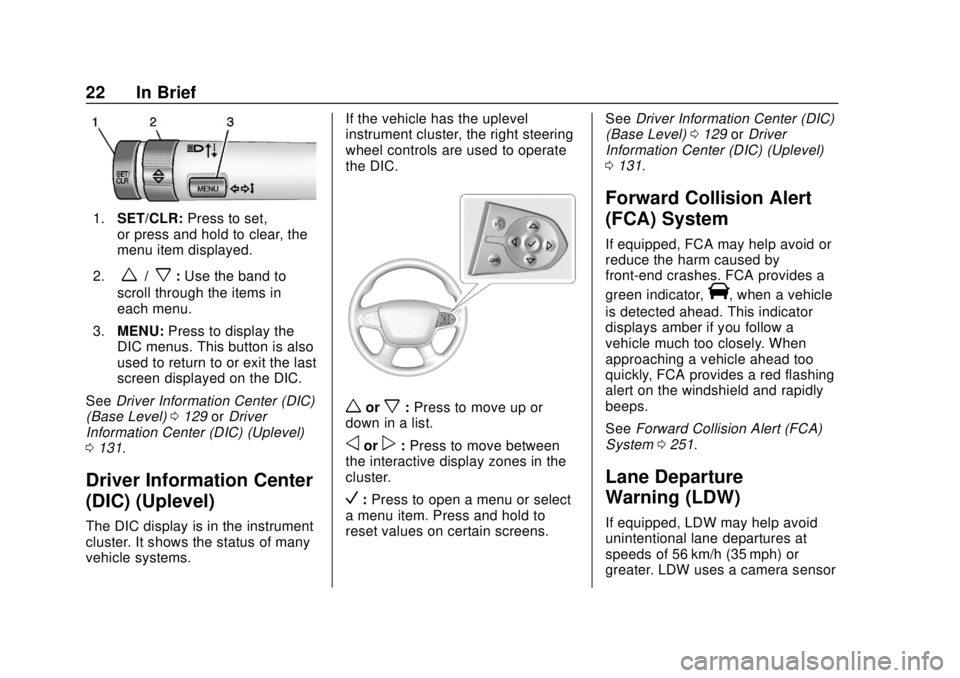
1.SET/CLR: Press to set,
or press and hold to clear, the
menu item displayed.
2.
w/x: Use the band to
scroll through the items in
each menu.
3. MENU: Press to display the
DIC menus. This button is also
used to return to or exit the last
screen displayed on the DIC.
See Driver Information Center (DIC)
(Base Level) 0129 orDriver
Information Center (DIC) (Uplevel)
0 131.
Driver Information Center
(DIC) (Uplevel)
The DIC display is in the instrument
cluster. It shows the status of many
vehicle systems. If the vehicle has the uplevel
instrument cluster, the right steering
wheel controls are used to operate
the DIC.
worx:
Press to move up or
down in a list.
oorp: Press to move between
the interactive display zones in the
cluster.
V: Press to open a menu or select
a menu item. Press and hold to
reset values on certain screens. See
Driver Information Center (DIC)
(Base Level) 0129 orDriver
Information Center (DIC) (Uplevel)
0 131.
Forward Collision Alert
(FCA) System
If equipped, FCA may help avoid or
reduce the harm caused by
front-end crashes. FCA provides a
green indicator,
V, when a vehicle
is detected ahead. This indicator
displays amber if you follow a
vehicle much too closely. When
approaching a vehicle ahead too
quickly, FCA provides a red flashing
alert on the windshield and rapidly
beeps.
See Forward Collision Alert (FCA)
System 0251.
Lane Departure
Warning (LDW)
If equipped, LDW may help avoid
unintentional lane departures at
speeds of 56 km/h (35 mph) or
greater. LDW uses a camera sensor
Page 24 of 421
Chevrolet Colorado Owner Manual (GMNA-Localizing-U.S./Canada/Mexico-
11349743) - 2018 - crc - 10/12/17
In Brief 23
to detect the lane markings. The
LDW light,
@, is green if a lane
marking is detected. If the vehicle
departs the lane without using a turn
signal in that direction, the light will
change to amber and flash. In
addition, beeps will sound.
See Lane Departure Warning (LDW)
0 253.
Rear Vision
Camera (RVC)
If equipped, RVC displays a view of
the area behind the vehicle, on the
infotainment display, when the
vehicle is shifted into R (Reverse).
See Rear Vision Camera (RVC)
0 250.
Power Outlets
Accessory power outlets can be
used to plug in electrical equipment,
such as a cell phone, MP3
player, etc. The vehicle may have accessory
power outlets:
.
On the center stack below the
climate control system,
if equipped.
. On the center floor console,
if equipped.
. On the rear of the center storage
console.
Lift the cover to access and replace
when not in use.
See Power Outlets 0109.
Performance and
Maintenance
Traction Control/
Electronic Stability
Control
The Traction Control System (TCS)
limits wheel spin. The system is on
when the vehicle is started.
The StabiliTrak system assists with
directional control of the vehicle in
difficult driving conditions. The
system is on when the vehicle is
started.
Turning the Systems Off and
On (Except ZR2)
.
To turn off TCS, press and
release
gon the center stack.
iilluminates in the instrument
cluster.
. To turn TCS on again, press and
release
g.iin the instrument
cluster will turn off.
Page 29 of 421
Chevrolet Colorado Owner Manual (GMNA-Localizing-U.S./Canada/Mexico-
11349743) - 2018 - crc - 10/12/17
28 Keys, Doors, and Windows
{Warning
If the key is unintentionally
rotated while the vehicle is
running, the ignition could be
moved out of the RUN position.
This could be caused by heavy
items hanging from the key ring,
or by large or long items attached
to the key ring that could be
contacted by the driver or
steering wheel. If the ignition
moves out of the RUN position,
the engine will shut off, braking
and steering power assist may be(Continued)
Warning (Continued)
impacted, and airbags may not
deploy. To reduce the risk of
unintentional rotation of the
ignition key, do not change the
way the ignition key and Remote
Keyless Entry (RKE) transmitter,
if equipped, are connected to the
provided key rings.
The ignition key and key rings, and
RKE transmitter, if equipped, are
designed to work together as a
system to reduce the risk of
unintentionally moving the key out
of the RUN position. The ignition
key has a small hole to allow
attachment of the provided key ring.
It is important that any replacement
ignition keys have a small hole. See
your dealer if a replacement key is
required.
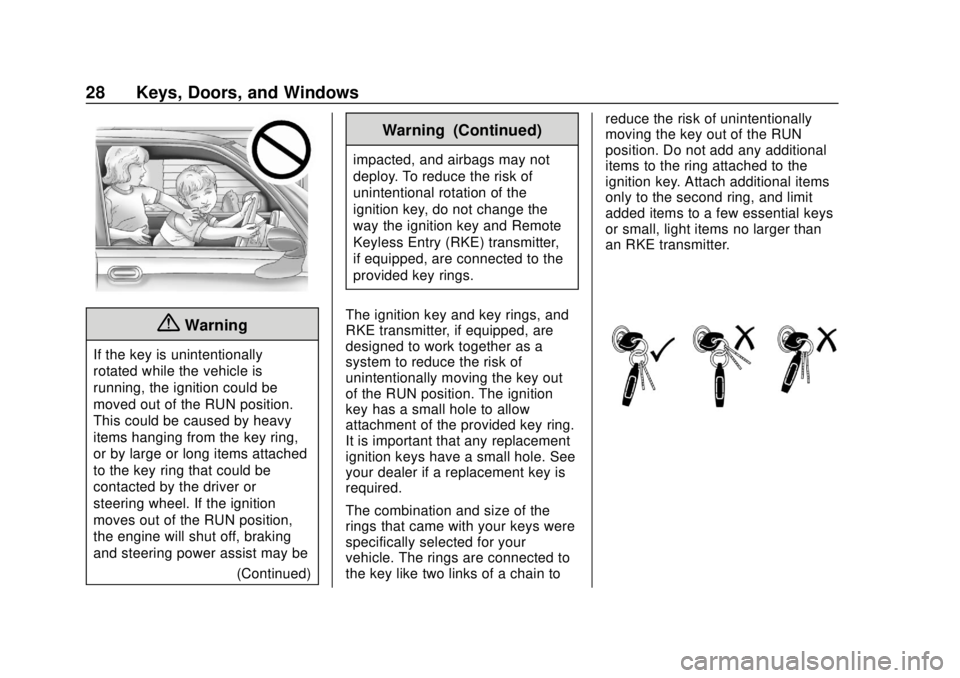
The combination and size of the
rings that came with your keys were
specifically selected for your
vehicle. The rings are connected to
the key like two links of a chain to reduce the risk of unintentionally
moving the key out of the RUN
position. Do not add any additional
items to the ring attached to the
ignition key. Attach additional items
only to the second ring, and limit
added items to a few essential keys
or small, light items no larger than
an RKE transmitter.
Page 79 of 421
Chevrolet Colorado Owner Manual (GMNA-Localizing-U.S./Canada/Mexico-
11349743) - 2018 - crc - 10/12/17
78 Seats and Restraints
Securing an Add-On Child
Restraint in the Vehicle
{Warning
A child can be seriously injured or
killed in a crash if the child
restraint is not properly secured in
the vehicle. Secure the child
restraint properly in the vehicle
using the vehicle’s seat belt or
LATCH system, following the
instructions that came with that
child restraint and the instructions
in this manual.
To help reduce the chance of injury,
the child restraint must be secured
in the vehicle. Child restraints must
be secured in vehicle seats by lap
belts or the lap belt portion of a
lap-shoulder belt, or by the LATCH
system. See Lower Anchors and
Tethers for Children (LATCH
System) 080 for more information.
Children can be endangered in a
crash if the child restraint is not
properly secured in the vehicle. When securing an add-on child
restraint, refer to the instructions
that come with the restraint which
may be on the restraint itself or in a
booklet, or both, and to this manual.
The child restraint instructions are
important, so if they are not
available, obtain a replacement
copy from the manufacturer.
Keep in mind that an unsecured
child restraint can move around in a
collision or sudden stop and injure
people in the vehicle. Be sure to
properly secure any child restraint in
the vehicle
—even when no child is
in it.
In some areas of the United States
and Canada, Certified Child
Passenger Safety Technicians
(CPSTs) are available to inspect
and demonstrate how to correctly
use and install child restraints. In
the U.S., refer to the National
Highway Traffic Safety
Administration (NHTSA) website to
locate the nearest child safety seat
inspection station. For CPST availability in Canada, check with
Transport Canada or the Provincial
Ministry of Transportation office.
Securing the Child Within the
Child Restraint
{Warning
A child can be seriously injured or
killed in a crash if the child is not
properly secured in the child
restraint. Secure the child
properly following the instructions
that came with that child restraint.
Where to Put the
Restraint
According to accident statistics,
children and infants are safer when
properly restrained in an appropriate
child restraint secured in a rear
seating position.
Whenever possible, children aged
12 and under should be secured in
a rear seating position.
Page 81 of 421
Chevrolet Colorado Owner Manual (GMNA-Localizing-U.S./Canada/Mexico-
11349743) - 2018 - crc - 10/12/17
80 Seats and Restraints
Never secure a rear-facing or
forward-facing child restraint in the
left rear seating position in an
extended cab model.
When securing a child restraint with
the seat belts in a rear seat position,
study the instructions that came with
the child restraint to make sure it is
compatible with this vehicle.
Child restraints and booster seats
vary considerably in size, and some
may fit in certain seating positions
better than others.
Depending on where you place the
child restraint and the size of the
child restraint, you may not be able
to access adjacent seat belts or
LATCH anchors for additional
passengers or child restraints.
Adjacent seating positions should
not be used if the child restraint
prevents access to or interferes with
the routing of the seat belt.
Wherever a child restraint is
installed, be sure to follow the
instructions that came with the child
restraint system and secure the
child restraint system properly.Keep in mind that an unsecured
child restraint can move around in a
collision or sudden stop and injure
people in the vehicle. Be sure to
properly secure any child restraint in
the vehicle
—even when no child is
in it.
Lower Anchors and
Tethers for Children
(LATCH System)
The LATCH system secures a child
restraint during driving or in a crash.
LATCH attachments on the child
restraint are used to attach the child
restraint to the anchors in the
vehicle. The LATCH system is
designed to make installation of a
child restraint easier.
In order to use the LATCH system in
your vehicle, you need a child
restraint that has LATCH
attachments. LATCH-compatible
rear-facing and forward-facing child
seats can be properly installed
using either the LATCH anchors or
the vehicle’ s seat belts. Do not use
both the seat belts and the LATCH anchorage system to secure a
rear-facing or forward-facing
child seat.
Booster seats use the vehicle’s seat
belts to secure the child and the
booster seat. If the manufacturer
recommends that the booster seat
be secured with the LATCH system,
this can be done as long as the
booster seat can be positioned
properly and there is no interference
with the proper positioning of the
lap-shoulder belt on the child.
Make sure to follow the instructions
that came with the child restraint,
and also the instructions in this
manual.
When installing a child restraint with
a top tether, you must also use
either the lower anchors or the seat
belts to properly secure the child
restraint. A child restraint must
never be installed using only the top
tether and anchor.
The LATCH anchorage system can
be used until the combined weight
of the child plus the child restraint is
29.5 kg (65 lbs). Use the seat belt
Page 85 of 421
Chevrolet Colorado Owner Manual (GMNA-Localizing-U.S./Canada/Mexico-
11349743) - 2018 - crc - 10/12/17
84 Seats and Restraints
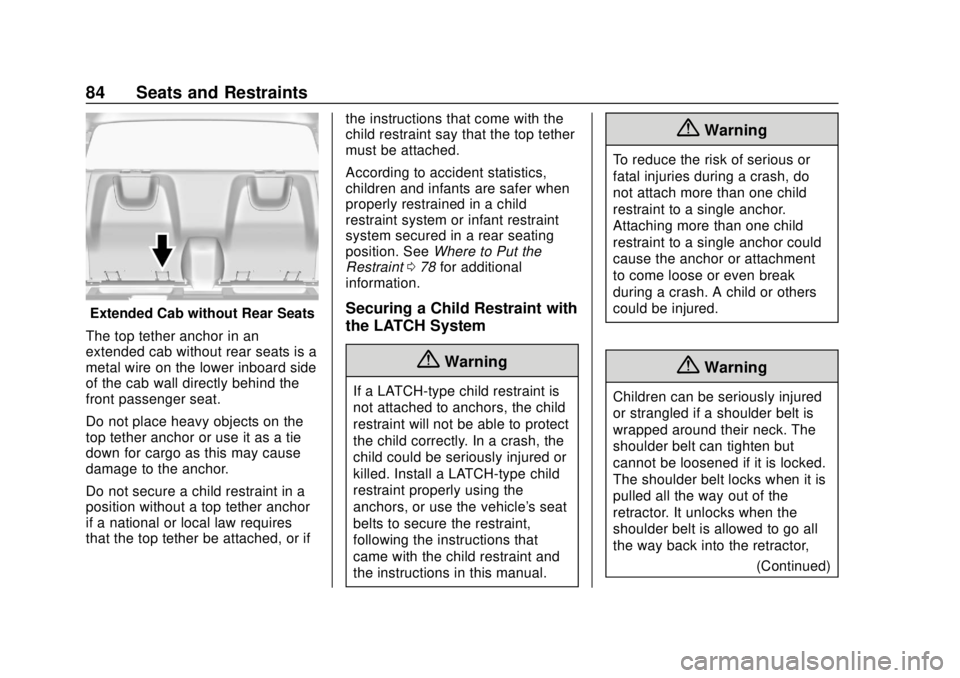
Extended Cab without Rear Seats
The top tether anchor in an
extended cab without rear seats is a
metal wire on the lower inboard side
of the cab wall directly behind the
front passenger seat.
Do not place heavy objects on the
top tether anchor or use it as a tie
down for cargo as this may cause
damage to the anchor.
Do not secure a child restraint in a
position without a top tether anchor
if a national or local law requires
that the top tether be attached, or if the instructions that come with the
child restraint say that the top tether
must be attached.
According to accident statistics,
children and infants are safer when
properly restrained in a child
restraint system or infant restraint
system secured in a rear seating
position. See
Where to Put the
Restraint 078 for additional
information.Securing a Child Restraint with
the LATCH System
{Warning
If a LATCH-type child restraint is
not attached to anchors, the child
restraint will not be able to protect
the child correctly. In a crash, the
child could be seriously injured or
killed. Install a LATCH-type child
restraint properly using the
anchors, or use the vehicle's seat
belts to secure the restraint,
following the instructions that
came with the child restraint and
the instructions in this manual.
{Warning
To reduce the risk of serious or
fatal injuries during a crash, do
not attach more than one child
restraint to a single anchor.
Attaching more than one child
restraint to a single anchor could
cause the anchor or attachment
to come loose or even break
during a crash. A child or others
could be injured.
{Warning
Children can be seriously injured
or strangled if a shoulder belt is
wrapped around their neck. The
shoulder belt can tighten but
cannot be loosened if it is locked.
The shoulder belt locks when it is
pulled all the way out of the
retractor. It unlocks when the
shoulder belt is allowed to go all
the way back into the retractor,
(Continued)
Page 95 of 421
Chevrolet Colorado Owner Manual (GMNA-Localizing-U.S./Canada/Mexico-
11349743) - 2018 - crc - 10/12/17
94 Seats and Restraints
Replacing LATCH System
Parts After a Crash
{Warning
A crash can damage the LATCH
system in the vehicle. A damaged
LATCH system may not properly
secure the child restraint,
resulting in serious injury or even
death in a crash. To help make
sure the LATCH system is
working properly after a crash,
see your dealer to have the
system inspected and any
necessary replacements made as
soon as possible.
If the vehicle has the LATCH system
and it was being used during a
crash, new LATCH system parts
may be needed.
New parts and repairs may be
necessary even if the LATCH
system was not being used at the
time of the crash.
Securing Child Restraints
(With the Seat Belt in the
Rear Seat)
When securing a child restraint with
the seat belts in a rear seat position,
study the instructions that came with
the child restraint to make sure it is
compatible with this vehicle.
If the child restraint has the LATCH
system, see Lower Anchors and
Tethers for Children (LATCH
System) 080 for how and where to
install the child restraint using
LATCH. If a child restraint is secured
in the vehicle using a seat belt and
it uses a top tether, see Lower
Anchors and Tethers for Children
(LATCH System) 080 for top tether
anchor locations.
Do not secure a child seat in a
position without a top tether anchor
if a national or local law requires
that the top tether be anchored, or if
the instructions that come with the
child restraint say that the top strap
must be anchored. If the child restraint or vehicle seat
position does not have the LATCH
system, you will be using the seat
belt to secure the child restraint. Be
sure to follow the instructions that
came with the child restraint.
If more than one child restraint
needs to be installed in the rear
seat, be sure to read
Where to Put
the Restraint 078.
Extended Cab
{Warning
Never secure a rear-facing or
forward-facing child restraint in
the left rear seating position in an
extended cab model. This seating
position is not suitable for child
restraint installation. The seat
cushion is too short to properly
support a rear-facing or
forward-facing child restraint.
A child could be seriously injured
or killed in a sudden stop or
crash.
(Continued)
Page 96 of 421
Chevrolet Colorado Owner Manual (GMNA-Localizing-U.S./Canada/Mexico-
11349743) - 2018 - crc - 10/12/17
Seats and Restraints 95
Warning (Continued)
A booster seat can be used in the
left or right rear seating position if
the base of the booster seat fits
on the seat cushion and does not
extend past the front edge. If it
does, it should be installed in the
right rear seating position using
the seat cushion extension. Only
install a booster seat in either rear
seating position if it can be
properly installed according to the
child restraint manufacturer’s
instructions.
A rear-facing or forward-facing
child restraint can be installed in
the right rear seating position
using the seat cushion extension
in an extended cab model. Never
install a rear-facing or
forward-facing child restraint in
the right rear seating position
without the seat cushion
extension.
{Warning
Do not let anyone ride in the front
passenger seat when a
rear-facing child restraint is
installed in the right rear seating
position. To properly fit the
rear-facing child restraint, the
front seatback will need to be
tilted forward which will not allow
a passenger to sit properly in the
front outboard passenger seat.
The passenger could be seriously
injured or killed in a sudden stop
or crash.
A booster seat may be used in the
left rear seating position if the base
of the booster seat fits on the seat
cushion and does not extend past
the front edge of the seat cushion.
If the booster seat extends past the
front of the seat cushion, it should
be used in the right rear seating
position with the seat cushion
extension. When using the lap-shoulder belt to
secure the child restraint in this
position, follow the instructions that
came with the child restraint and the
following instructions:
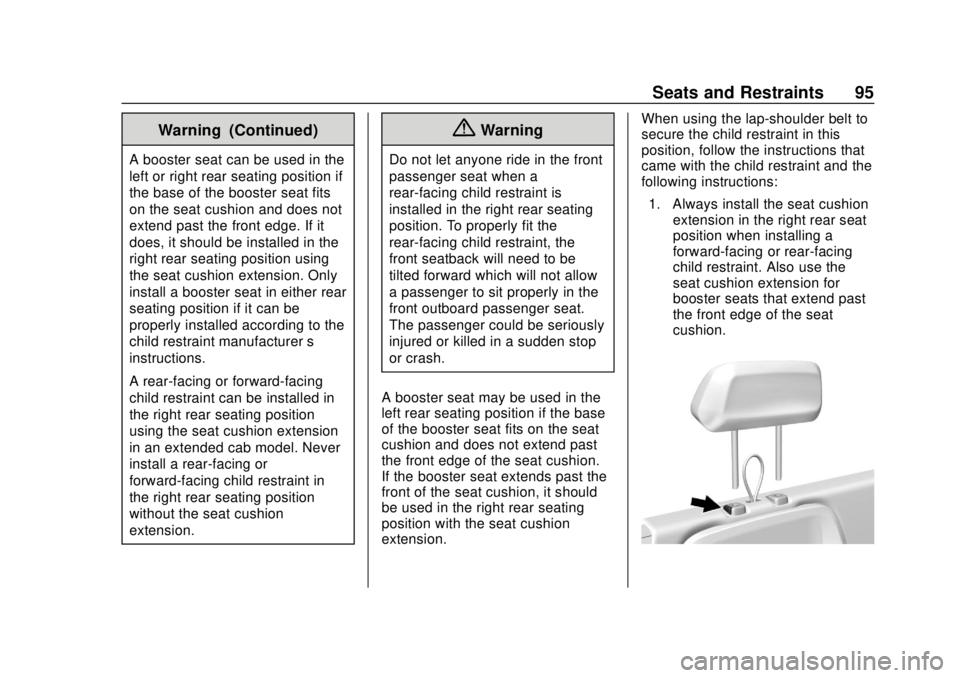
1. Always install the seat cushion extension in the right rear seat
position when installing a
forward-facing or rear-facing
child restraint. Also use the
seat cushion extension for
booster seats that extend past
the front edge of the seat
cushion.
Page 97 of 421
Chevrolet Colorado Owner Manual (GMNA-Localizing-U.S./Canada/Mexico-
11349743) - 2018 - crc - 10/12/17
96 Seats and Restraints
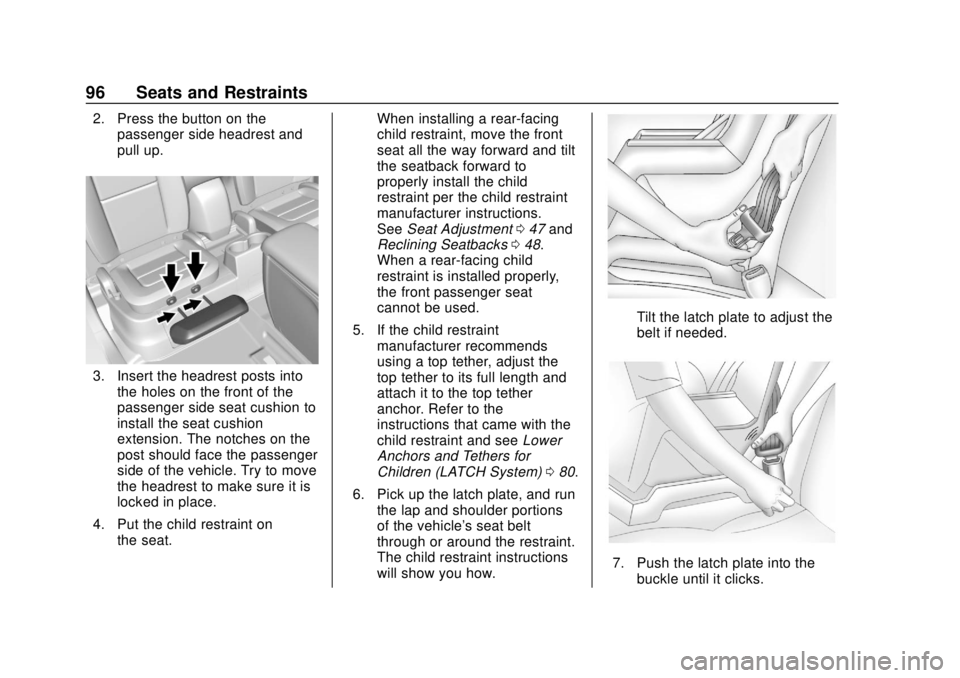
2. Press the button on thepassenger side headrest and
pull up.
3. Insert the headrest posts into
the holes on the front of the
passenger side seat cushion to
install the seat cushion
extension. The notches on the
post should face the passenger
side of the vehicle. Try to move
the headrest to make sure it is
locked in place.
4. Put the child restraint on the seat. When installing a rear-facing
child restraint, move the front
seat all the way forward and tilt
the seatback forward to
properly install the child
restraint per the child restraint
manufacturer instructions.
See
Seat Adjustment 047 and
Reclining Seatbacks 048.
When a rear-facing child
restraint is installed properly,
the front passenger seat
cannot be used.
5. If the child restraint manufacturer recommends
using a top tether, adjust the
top tether to its full length and
attach it to the top tether
anchor. Refer to the
instructions that came with the
child restraint and see Lower
Anchors and Tethers for
Children (LATCH System) 080.
6. Pick up the latch plate, and run the lap and shoulder portions
of the vehicle's seat belt
through or around the restraint.
The child restraint instructions
will show you how.
Tilt the latch plate to adjust the
belt if needed.
7. Push the latch plate into thebuckle until it clicks.