parking brake CHEVROLET COLORADO 2019 User Guide
[x] Cancel search | Manufacturer: CHEVROLET, Model Year: 2019, Model line: COLORADO, Model: CHEVROLET COLORADO 2019Pages: 387, PDF Size: 5.69 MB
Page 181 of 387
Chevrolet Colorado Owner Manual (GMNA-Localizing-U.S./Canada/Mexico-
12460274) - 2019 - CRC - 10/1/18
180 Driving and Operating
2. Hold the button on the shiftlever and push the lever toward
the front of the vehicle into
P (Park).
3. Be sure the transfer case (if equipped) is in a drive
gear —not in N (Neutral).
4. Push the ignition key in, towards the steering column
and then turn the ignition off.
5. Remove the key and take it with you. If you can leave the
vehicle with the ignition key in
your hand, the vehicle is in
P (Park).
Leaving the Vehicle with the
Engine Running
{Warning
It can be dangerous to leave the
vehicle with the engine running.
The vehicle could move suddenly
if the shift lever is not fully in
P (Park) with the parking brake
firmly set.
(Continued)
Warning (Continued)
If you have four-wheel drive and
the transfer case is in N (Neutral),
the vehicle will be free to roll,
even if the shift lever is in
P (Park). So be sure the transfer
case is in a drive gear –not in
N (Neutral).
And, if you leave the vehicle with
the engine running, it could
overheat and even catch fire. You
or others could be injured. Do not
leave the vehicle with the engine
running unless you have to.
If you have to leave the vehicle with
the engine running, be sure the
vehicle is in P (Park) and the
parking brake is firmly set before
you leave it. After you move the shift
lever into P (Park), hold the regular
brake pedal down. Then, see if you
can move the shift lever away from
P (Park) without pressing the button
on the shift lever. If you can, it
means that the shift lever was not
fully locked into P (Park).
Torque Lock
If you are parking on a hill and you
do not shift the transmission into
P (Park) properly, the weight of the
vehicle may put too much force on
the parking pawl in the
transmission. You may find it difficult
to pull the shift lever out of P (Park).
This is called torque lock. To
prevent torque lock, set the parking
brake and then shift into P (Park)
properly before you leave the driver
seat. To find out how, see Shifting
Into Park 0179.
When you are ready to drive, move
the shift lever out of P (Park) before
you release the parking brake.
If torque lock does occur, you may
need to have another vehicle push
yours a little uphill to take some of
the pressure from the parking pawl
in the transmission. You will then be
able to pull the shift lever out of
P (Park).
Page 182 of 387
Chevrolet Colorado Owner Manual (GMNA-Localizing-U.S./Canada/Mexico-
12460274) - 2019 - CRC - 10/1/18
Driving and Operating 181
Shifting out of Park
This vehicle is equipped with an
electronic shift lock release system.
The shift lock release is
designed to:
.Prevent ignition key removal
unless the shift lever is in
P (Park).
. Prevent movement of the shift
lever out of P (Park), unless the
ignition is on and the regular
brake pedal is applied.
To shift out of P (Park): 1. Apply the brake pedal.
2. Press the button on the shift lever.
3. Move the shift lever to the desired position.
If you still are unable to shift out of
P (Park):
1. Ease the pressure on the shift lever. 2. While holding down the brake
pedal and pressing the shift
lever button, move the shift
lever all the way into P (Park).
3. While holding the shift lever button, move the shift lever to
the desired position.
If you are still having a problem
shifting, then have the vehicle
serviced soon.
This vehicle may have the Seat Belt
Assurance System, which may
prevent the vehicle from shifting out
of P (Park). See Seat Belts051.
Parking (Manual
Transmission)
{Warning
If the vehicle has a manual
transmission, never get out of the
vehicle without first moving the
shift lever into 1st or R (Reverse),
setting the parking brake and
(Continued)
Warning (Continued)
turning the ignition off. The
vehicle can roll, which could
cause serious injury or death.
If you are parking on a hill, or if the
vehicle is pulling a trailer, see
Driving Characteristics and Towing
Tips 0219.
Parking over Things
That Burn
{Warning
Things that can burn could touch
hot exhaust parts under the
vehicle and ignite. Do not park
over papers, leaves, dry grass,
or other things that can burn.
Page 184 of 387
Chevrolet Colorado Owner Manual (GMNA-Localizing-U.S./Canada/Mexico-
12460274) - 2019 - CRC - 10/1/18
Driving and Operating 183
Automatic
Transmission
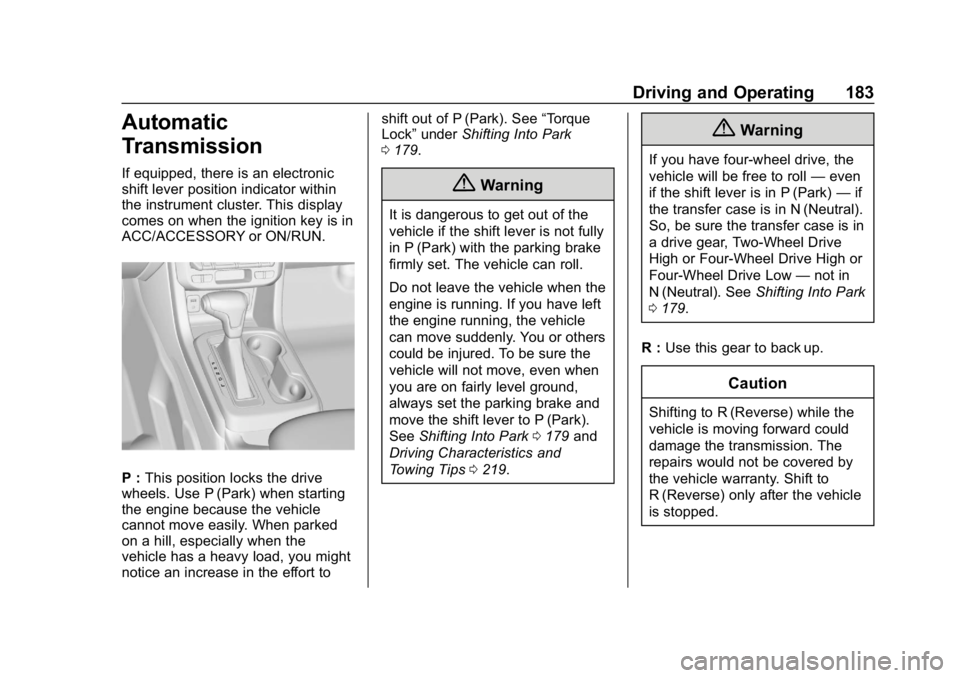
If equipped, there is an electronic
shift lever position indicator within
the instrument cluster. This display
comes on when the ignition key is in
ACC/ACCESSORY or ON/RUN.
P :This position locks the drive
wheels. Use P (Park) when starting
the engine because the vehicle
cannot move easily. When parked
on a hill, especially when the
vehicle has a heavy load, you might
notice an increase in the effort to shift out of P (Park). See
“Torque
Lock” under Shifting Into Park
0 179.
{Warning
It is dangerous to get out of the
vehicle if the shift lever is not fully
in P (Park) with the parking brake
firmly set. The vehicle can roll.
Do not leave the vehicle when the
engine is running. If you have left
the engine running, the vehicle
can move suddenly. You or others
could be injured. To be sure the
vehicle will not move, even when
you are on fairly level ground,
always set the parking brake and
move the shift lever to P (Park).
See Shifting Into Park 0179 and
Driving Characteristics and
Towing Tips 0219.
{Warning
If you have four-wheel drive, the
vehicle will be free to roll —even
if the shift lever is in P (Park) —if
the transfer case is in N (Neutral).
So, be sure the transfer case is in
a drive gear, Two-Wheel Drive
High or Four-Wheel Drive High or
Four-Wheel Drive Low —not in
N (Neutral). See Shifting Into Park
0 179.
R : Use this gear to back up.
Caution
Shifting to R (Reverse) while the
vehicle is moving forward could
damage the transmission. The
repairs would not be covered by
the vehicle warranty. Shift to
R (Reverse) only after the vehicle
is stopped.
Page 191 of 387
Chevrolet Colorado Owner Manual (GMNA-Localizing-U.S./Canada/Mexico-
12460274) - 2019 - CRC - 10/1/18
190 Driving and Operating
Caution (Continued)
the vehicle warranty. Shift to
R (Reverse) only after the vehicle
is stopped.
Use R (Reverse), along with the
parking brake, for parking the
vehicle.
Shift Speeds
{Warning
If you skip a gear when
downshifting, you could lose
control of the vehicle. You could
injure yourself or others. Do not
shift down more than one gear at
a time when downshifting.
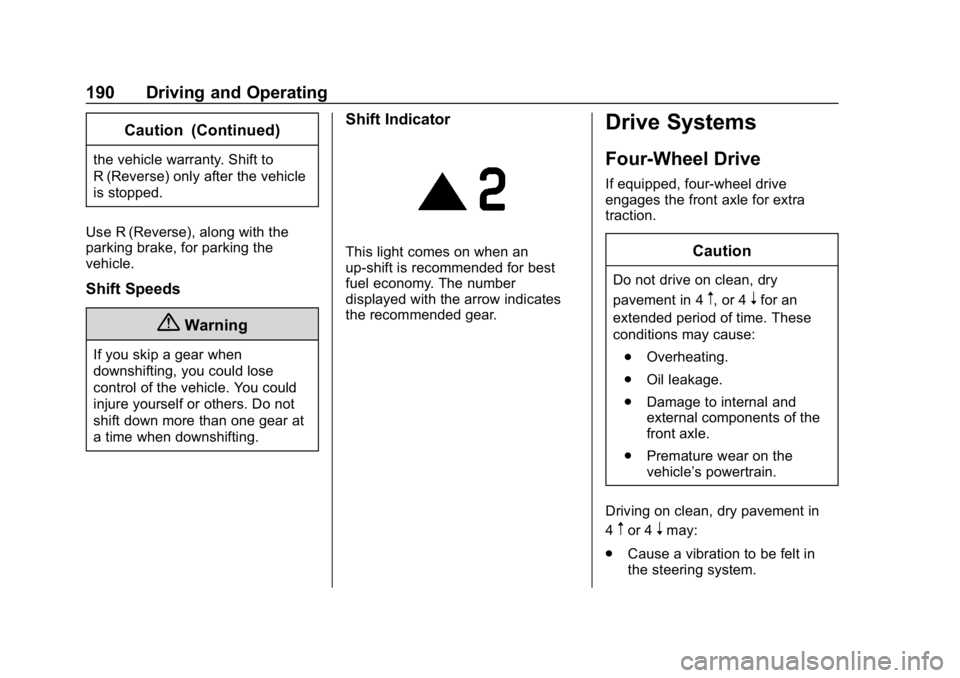
Shift Indicator
This light comes on when an
up-shift is recommended for best
fuel economy. The number
displayed with the arrow indicates
the recommended gear.
Drive Systems
Four-Wheel Drive
If equipped, four-wheel drive
engages the front axle for extra
traction.
Caution
Do not drive on clean, dry
pavement in 4
m, or 4nfor an
extended period of time. These
conditions may cause:
. Overheating.
. Oil leakage.
. Damage to internal and
external components of the
front axle.
. Premature wear on the
vehicle’s powertrain.
Driving on clean, dry pavement in
4
mor 4nmay:
. Cause a vibration to be felt in
the steering system.
Page 192 of 387
Chevrolet Colorado Owner Manual (GMNA-Localizing-U.S./Canada/Mexico-
12460274) - 2019 - CRC - 10/1/18
Driving and Operating 191
.Cause tires to wear faster.
. Cause additional driveline noise.
{Warning
If equipped with four-wheel drive,
the vehicle will be free to roll if the
transfer case is in N (Neutral),
even when the shift lever is in
P (Park). You or someone else
could be seriously injured. Be
sure the transfer case is in a drive
gear —2
m, 4m, or 4n—or set the
parking brake before placing the
transfer case in N (Neutral). See
Shifting Into Park 0179.
Caution
Extended high-speed operation in
4
nmay damage or shorten the
life of the drivetrain. Engagement noise and bump when
shifting between 4
nand 4mor from
N (Neutral), with the engine running,
is normal.
Shifting into 4
nwill turn Traction
Control and StabiliTrak/Electronic
Stability Control (ESC) off. See
Traction Control/Electronic Stability
Control 0199.
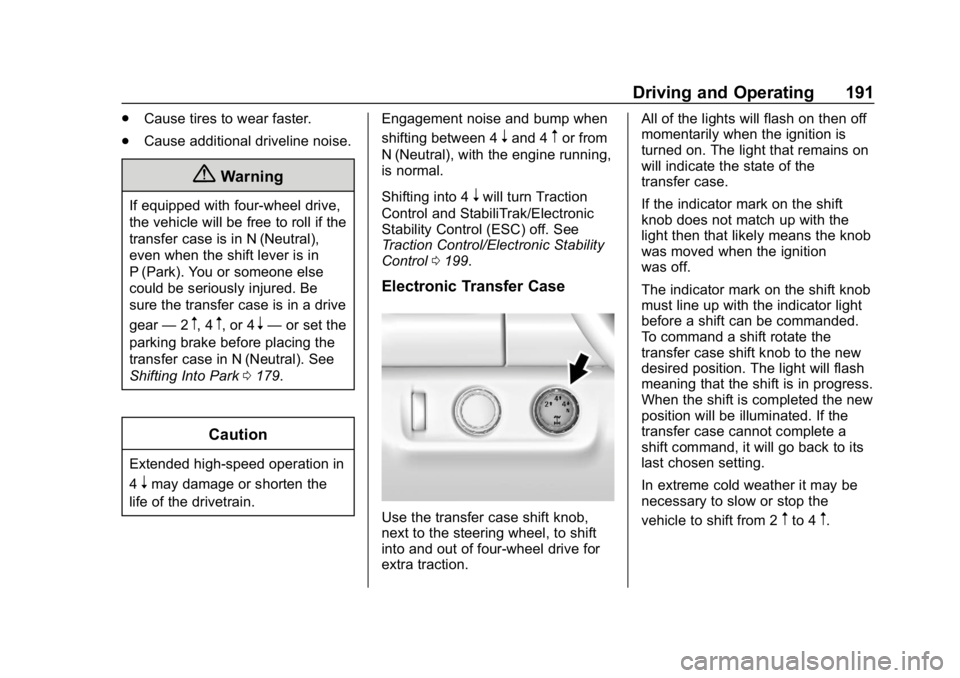
Electronic Transfer Case
Use the transfer case shift knob,
next to the steering wheel, to shift
into and out of four-wheel drive for
extra traction. All of the lights will flash on then off
momentarily when the ignition is
turned on. The light that remains on
will indicate the state of the
transfer case.
If the indicator mark on the shift
knob does not match up with the
light then that likely means the knob
was moved when the ignition
was off.
The indicator mark on the shift knob
must line up with the indicator light
before a shift can be commanded.
To command a shift rotate the
transfer case shift knob to the new
desired position. The light will flash
meaning that the shift is in progress.
When the shift is completed the new
position will be illuminated. If the
transfer case cannot complete a
shift command, it will go back to its
last chosen setting.
In extreme cold weather it may be
necessary to slow or stop the
vehicle to shift from 2mto 4m.
Page 194 of 387

Chevrolet Colorado Owner Manual (GMNA-Localizing-U.S./Canada/Mexico-
12460274) - 2019 - CRC - 10/1/18
Driving and Operating 193
Shifting Out of 4n
1. To shift out of 4nthe vehicle
must be stopped or moving
less than 5 km/h (3 mph) with
the transmission in N (Neutral)
and the ignition on. It is best for
the vehicle to be moving
1.6 to 3.2 km/h (1 to 2 mph).
2. Turn the knob to 4
mor 2m.
Wait for the 4
mor 2mindicator
light to stop flashing before
shifting the transmission
into gear.
If the transmission is in gear and/or
moving more than 5 km/h (3 mph),
the 4
mor 2mindicator light will flash
for 30 seconds, but will not complete
the shift. With the vehicle moving
less than 5 km/h (3 mph), and the
transmission in N (Neutral), attempt
the shift again.
Shifting Into N (Neutral)
To shift:
1. Park the vehicle on a level surface. 2. Set the parking brake and
press and hold the brake
pedal. See Parking Brake
0 198.
3. Start the vehicle or turn the ignition on.
4. Shift the transmission to N (Neutral).
5. Shift the transfer case to 2
m.
6. Turn the transfer case knob clockwise past the 4
ndetent to
N (Neutral) until it stops and
hold it there until the
N (Neutral) light starts flashing.
This will take at least
10 seconds. Then slowly
release the knob to the 4
n
position. The N (Neutral) light
will come on when the transfer
case shift to N (Neutral) is
complete.
7. With the engine running, verify that the transfer case is in
N (Neutral) by shifting the
transmission to R (Reverse), then to D (Drive). There should
be no movement of the vehicle
while shifting the transmission.
8. Turn the engine off, and the ignition to ACC/ACCESSORY.
9. Place the transmission shift lever in P (Park). See
Recreational Vehicle Towing
0315.
Shifting Out of N (Neutral)
To shift: 1. Set the parking brake.
2. Turn the ignition on with the engine off.
3. Shift the transmission to N (Neutral).
4. Turn the transfer case shift knob to 2
m.
After the transfer case has
shifted out of N (Neutral), the
N (Neutral) light will go out.
5. Shift to P (Park).
Page 195 of 387
Chevrolet Colorado Owner Manual (GMNA-Localizing-U.S./Canada/Mexico-
12460274) - 2019 - CRC - 10/1/18
194 Driving and Operating
Caution
Shifting the transmission into gear
before the requested mode
indicator light has stopped
flashing could damage the
transfer case.
6. Release the parking brake.
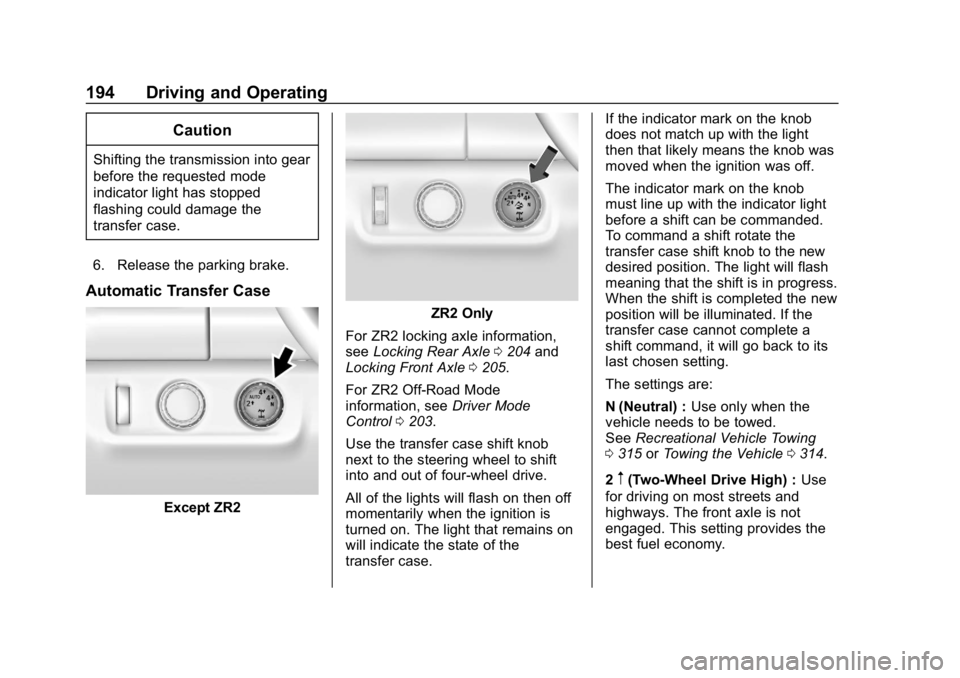
Automatic Transfer Case
Except ZR2
ZR2 Only
For ZR2 locking axle information,
see Locking Rear Axle 0204 and
Locking Front Axle 0205.
For ZR2 Off-Road Mode
information, see Driver Mode
Control 0203.
Use the transfer case shift knob
next to the steering wheel to shift
into and out of four-wheel drive.
All of the lights will flash on then off
momentarily when the ignition is
turned on. The light that remains on
will indicate the state of the
transfer case. If the indicator mark on the knob
does not match up with the light
then that likely means the knob was
moved when the ignition was off.
The indicator mark on the knob
must line up with the indicator light
before a shift can be commanded.
To command a shift rotate the
transfer case shift knob to the new
desired position. The light will flash
meaning that the shift is in progress.
When the shift is completed the new
position will be illuminated. If the
transfer case cannot complete a
shift command, it will go back to its
last chosen setting.
The settings are:
N (Neutral) :
Use only when the
vehicle needs to be towed.
See Recreational Vehicle Towing
0 315 orTowing the Vehicle 0314.
2
m(Two-Wheel Drive High) : Use
for driving on most streets and
highways. The front axle is not
engaged. This setting provides the
best fuel economy.
Page 197 of 387
Chevrolet Colorado Owner Manual (GMNA-Localizing-U.S./Canada/Mexico-
12460274) - 2019 - CRC - 10/1/18
196 Driving and Operating
the knob to 4mto display the
indicator. With the vehicle moving
less than 5 km/h (3 mph), and the
transmission in N (Neutral), attempt
the shift again.
Shifting Out of 4
n
To shift:
1. The vehicle must be stopped or moving less than 5 km/h
(3 mph) with the transmission
in N (Neutral) and the ignition
on. It is best for the vehicle to
be moving
1.6 to 3.2 km/h (1 to 2 mph).
2. Turn the knob to 4
m, AUTO,
or 2
m. Wait for the 4m, AUTO,
or 2
mindicator light to stop
flashing before shifting the
transmission into gear.
Caution
Shifting the transmission into gear
before the requested mode
indicator light has stopped
flashing could damage the
transfer case.
If the transmission is in gear and/or
moving more than 5 km/h (3 mph),
the 4
m, AUTO, or 2mindicator light
will flash for 30 seconds but will not
complete the shift. With the vehicle
moving less than 5 km/h (3 mph),
and the transmission in N (Neutral),
attempt the shift again.
Shifting Into N (Neutral)
To shift:
1. Park the vehicle on a level surface.
2. Set the parking brake and press and hold the brake
pedal. See Parking Brake
0 198.
3. Start the vehicle or turn the ignition on. 4. Shift the transmission to
N (Neutral).
5. Shift the transfer case to 2
m.
6. Turn the transfer case shift knob clockwise past the 4
n
detent to N (Neutral) until it
stops and hold it there until the
N (Neutral) light starts flashing.
This will take at least
10 seconds. Then slowly
release the knob to the 4
n
position. The N (Neutral) light
will come on when the transfer
case shift to N (Neutral) is
complete.
7. With the engine running, verify that the transfer case is in
N (Neutral) by shifting the
transmission to R (Reverse),
then shift the transmission to
D (Drive). There should be no
movement of the vehicle while
shifting the transmission.
8. Turn the engine off, and the ignition to ACC/ACCESSORY.
9. Place the transmission shift lever in P (Park).
Page 198 of 387
Chevrolet Colorado Owner Manual (GMNA-Localizing-U.S./Canada/Mexico-
12460274) - 2019 - CRC - 10/1/18
Driving and Operating 197
Shifting Out of N (Neutral)
To shift:1. Set the parking brake.
2. Turn the ignition on with the engine off.
3. Shift the transmission to N (Neutral).
4. Turn the transfer case shift knob to 2
m.
After the transfer case has
shifted out of N (Neutral), the
N (Neutral) light will go out and
the new 2
mstate will be
displayed.
5. Place the transmission shift lever in P (Park).
6. Release the parking brake.
Brakes
Antilock Brake
System (ABS)
This vehicle has an Antilock Brake
System (ABS), an advanced
electronic braking system that helps
prevent a braking skid.
When the vehicle begins to drive
away, ABS checks itself.
A momentary motor or clicking noise
may be heard while this test is going
on, and it may even be noticed that
the brake pedal moves a little. This
is normal.
If there is a problem with ABS, this
warning light stays on. See Antilock
Brake System (ABS) Warning Light
0 123. If driving safely on a wet road and it
becomes necessary to slam on the
brakes and continue braking to
avoid a sudden obstacle, a
computer senses the wheels are
slowing down. If one of the wheels
is about to stop rolling, the computer
will separately work the brakes at
each wheel.
ABS can change the brake pressure
to each wheel, as required, faster
than any driver could. This can help
you steer around the obstacle while
braking hard.
As the brakes are applied, the
computer keeps receiving updates
on wheel speed and controls
braking pressure accordingly.
Remember: ABS does not change
the time needed to get a foot up to
the brake pedal or always decrease
stopping distance. If you get too
close to the vehicle in front of you,
there will not be enough time to
apply the brakes if that vehicle
suddenly slows or stops. Always
leave enough room up ahead to
stop, even with ABS.
Page 199 of 387
Chevrolet Colorado Owner Manual (GMNA-Localizing-U.S./Canada/Mexico-
12460274) - 2019 - CRC - 10/1/18
198 Driving and Operating
Using ABS
Do not pump the brakes. Just hold
the brake pedal down firmly and let
ABS work. You may hear the ABS
pump or motor operating and feel
the brake pedal pulsate. This is
normal.
Braking in Emergencies
ABS allows you to steer and brake
at the same time. In many
emergencies, steering can help
more than even the very best
braking.
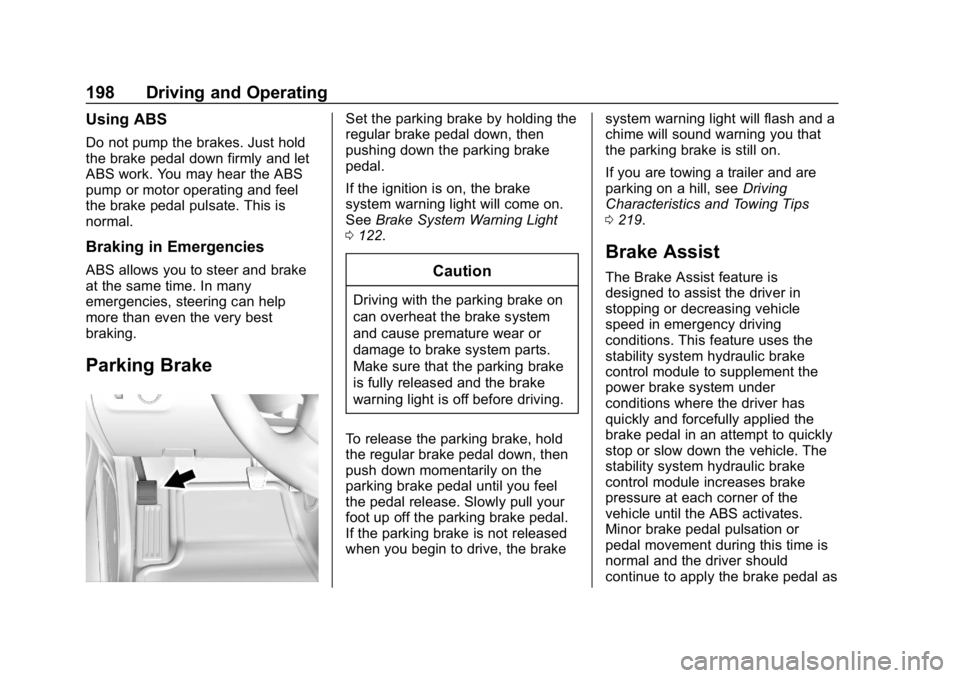
Parking Brake
Set the parking brake by holding the
regular brake pedal down, then
pushing down the parking brake
pedal.
If the ignition is on, the brake
system warning light will come on.
SeeBrake System Warning Light
0 122.
Caution
Driving with the parking brake on
can overheat the brake system
and cause premature wear or
damage to brake system parts.
Make sure that the parking brake
is fully released and the brake
warning light is off before driving.
To release the parking brake, hold
the regular brake pedal down, then
push down momentarily on the
parking brake pedal until you feel
the pedal release. Slowly pull your
foot up off the parking brake pedal.
If the parking brake is not released
when you begin to drive, the brake system warning light will flash and a
chime will sound warning you that
the parking brake is still on.
If you are towing a trailer and are
parking on a hill, see
Driving
Characteristics and Towing Tips
0 219.
Brake Assist
The Brake Assist feature is
designed to assist the driver in
stopping or decreasing vehicle
speed in emergency driving
conditions. This feature uses the
stability system hydraulic brake
control module to supplement the
power brake system under
conditions where the driver has
quickly and forcefully applied the
brake pedal in an attempt to quickly
stop or slow down the vehicle. The
stability system hydraulic brake
control module increases brake
pressure at each corner of the
vehicle until the ABS activates.
Minor brake pedal pulsation or
pedal movement during this time is
normal and the driver should
continue to apply the brake pedal as