steering CHEVROLET COLORADO 2019 Owner's Guide
[x] Cancel search | Manufacturer: CHEVROLET, Model Year: 2019, Model line: COLORADO, Model: CHEVROLET COLORADO 2019Pages: 387, PDF Size: 5.69 MB
Page 135 of 387
Chevrolet Colorado Owner Manual (GMNA-Localizing-U.S./Canada/Mexico-
12460274) - 2019 - CRC - 10/1/18
134 Instruments and Controls
PressVto select the distance or
reset best value. Use
wandxto
choose the distance and press
V.
Press
wandxto select “Reset
Best Score.” Press
Vto reset the
best average fuel economy. After
reset, the best value displays “-,-”
until the selected distance has been
traveled.
The display provides information on
how current driving behavior affects
the running average and how well
recent driving compares to the best
that has been achieved for the
selected distance.
Timer : This display can be used as
a timer. To start the timer, press
V
while this display is active. The
display will show the amount of time
that has passed since the timer was
last reset. To stop the timer, press
V
briefly while this display is active
and the timer is running. To reset
the timer to zero, press and hold
V
while this display is active. Speed Limit :
Shows sign
information, which comes from a
roadway database in the onboard
navigation, if equipped.
Battery Voltage : Displays the
current battery voltage, if equipped.
Battery voltage changes are normal
while driving. See Charging System
Light 0120. If there is a problem
with the battery charging system,
the DIC will display a message.
Oil Pressure : Oil pressure is
displayed in either kilopascal (kPa)
or in pounds per square inch (psi).
Engine Hours : Shows the total
number of hours the engine has run.
Off Road Page : This page shows
the traction, four wheel drive, and
steering angle states. When the
front or rear axles are locked, a lock
icon is displayed. See Off-Road
Driving 0159. Transmission Fluid
Temperature :
Shows the
temperature of the automatic
transmission fluid in either degrees
Celsius (°C) or degrees
Fahrenheit (°F).
Trailer Brake (If Equipped) :
TRAILER GAIN shows the trailer
gain setting. This setting can be
adjusted from 0.0 to 10.0 with either
a trailer connected or disconnected.
OUTPUT shows the power output to
the trailer anytime a trailer with
electric brakes is connected. Output
is displayed as a bar graph. Dashes
may appear in the OUTPUT display
if a trailer is not connected.
Blank Page : Shows no
information.
Page 136 of 387
Chevrolet Colorado Owner Manual (GMNA-Localizing-U.S./Canada/Mexico-
12460274) - 2019 - CRC - 10/1/18
Instruments and Controls 135
Vehicle Messages
Messages displayed on the DIC
indicate the status of the vehicle or
some action that may be needed to
correct a condition. Multiple
messages may appear one after
another.
The messages that do not require
immediate action can be
acknowledged and cleared by
pressing
V. The messages that
require immediate action cannot be
cleared until that action is
performed.
All messages should be taken
seriously; clearing the message
does not correct the problem.
If a SERVICE message appears,
see your dealer.
Follow the instructions given in the
messages. The system displays
messages regarding the following
topics:
. Service Messages
. Fluid Levels
. Vehicle Security .
Brakes
. Steering
. Ride Control Systems
. Driver Assistance Systems
. Cruise Control
. Lighting and Bulb Replacement
. Wiper/Washer Systems
. Doors and Windows
. Seat Belts
. Airbag Systems
. Engine and Transmission
. Tire Pressure
. Battery
Engine Power Messages
ENGINE POWER IS REDUCED
This message displays when the
vehicle's propulsion power is
reduced. A reduction in propulsion
power can affect the vehicle's ability
to accelerate. If this message is on,
but there is no observed reduction
in performance, proceed to your
destination. The performance may be reduced the next time the vehicle
is driven. The vehicle may be driven
while this message is on, but
maximum acceleration and speed
may be reduced. Anytime this
message stays on, or displays
repeatedly, the vehicle should be
taken to your dealer for service as
soon as possible.
Vehicle Speed Messages
SPEED LIMITED TO
XXX KM/H (MPH)
This message shows that the
vehicle speed has been limited to
the speed displayed. The limited
speed is a protection for various
propulsion and vehicle systems,
such as lubrication, thermal,
suspension, Teen Driver if
equipped, or tires.
If equipped with a diesel engine,
see the Duramax Diesel
supplement.
Page 139 of 387
Chevrolet Colorado Owner Manual (GMNA-Localizing-U.S./Canada/Mexico-
12460274) - 2019 - CRC - 10/1/18
138 Instruments and Controls
Remote Door Unlock
This allows selection of which doors
will unlock when pressing
Kon the
RKE transmitter.
Touch All Doors or Driver Door.
Remote Start Auto Heat Seats
If equipped and turned on, this
feature will turn on the heated seats
when using remote start on
cold days. See Heated Front Seats
0 48 and Remote Vehicle Start 030.
Touch Off or On.
Teen Driver
See “Teen Driver” under“Settings”
in the infotainment manual.
Valet Mode
This will lock the infotainment
system and steering wheel controls.
It may also limit access to vehicle
storage locations, if equipped.
To enable valet mode:
1. Enter a four-digit code on the keypad. 2. Select Enter to go to the
confirmation screen.
3. Re-enter the four-digit code.
Touch Lock or Unlock to lock or
unlock the system. Touch Back to
go back to the previous menu.
Page 140 of 387
Chevrolet Colorado Owner Manual (GMNA-Localizing-U.S./Canada/Mexico-
12460274) - 2019 - CRC - 10/1/18
Lighting 139
Lighting
Exterior Lighting
Exterior Lamp Controls . . . . . . . 139
Exterior Lamps OffReminder . . . . . . . . . . . . . . . . . . . 140
Headlamp High/Low-Beam Changer . . . . . . . . . . . . . . . . . . . . 140
Flash-to-Pass . . . . . . . . . . . . . . . . 140
Daytime Running Lamps (DRL) . . . . . . . . . . . . . . . 141
Automatic Headlamp System . . . . . . . . . . . . . . . . . . . . . . 141
Hazard Warning Flashers . . . . . 142
Turn and Lane-Change Signals . . . . . . . . . . . . . . . . . . . . . . 142
Fog Lamps . . . . . . . . . . . . . . . . . . . 143
Exterior Cargo Lamps . . . . . . . . 143
Interior Lighting
Instrument Panel Illumination Control . . . . . . . . . . . . . . . . . . . . . . 144
Dome Lamps . . . . . . . . . . . . . . . . . 144
Reading Lamps . . . . . . . . . . . . . . 145
Lighting Features
Entry Lighting . . . . . . . . . . . . . . . . 145
Exit Lighting . . . . . . . . . . . . . . . . . . 145
Battery Load Management . . . 145
Battery Power Protection . . . . . 146
Exterior Lighting Battery Saver . . . . . . . . . . . . . . . . . . . . . . . 146Exterior Lighting
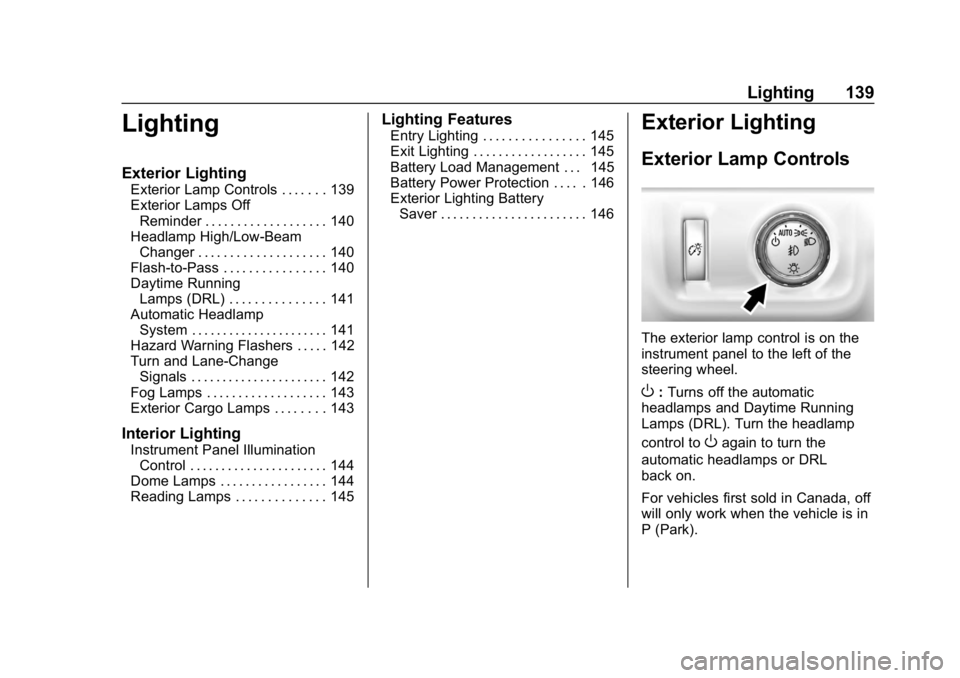
Exterior Lamp Controls
The exterior lamp control is on the
instrument panel to the left of the
steering wheel.
O: Turns off the automatic
headlamps and Daytime Running
Lamps (DRL). Turn the headlamp
control to
Oagain to turn the
automatic headlamps or DRL
back on.
For vehicles first sold in Canada, off
will only work when the vehicle is in
P (Park).
Page 144 of 387
Chevrolet Colorado Owner Manual (GMNA-Localizing-U.S./Canada/Mexico-
12460274) - 2019 - CRC - 10/1/18
Lighting 143
If after signaling a turn or a lane
change the arrows flash rapidly or
do not come on, a signal bulb could
be burned out.
Replace any burned out bulbs. If a
bulb is not burned out, check the
fuse. SeeFuses and Circuit
Breakers 0271.
Turn Signal On Chime
If the turn signal is left on for more
than 1.2 km (0.75 mi), a chime
sounds at each flash of the turn
signal. The message TURN
SIGNAL ON will also appear in the
Driver Information Center (DIC). To
turn the chime and message off,
move the turn signal lever to the off
position.Fog Lamps
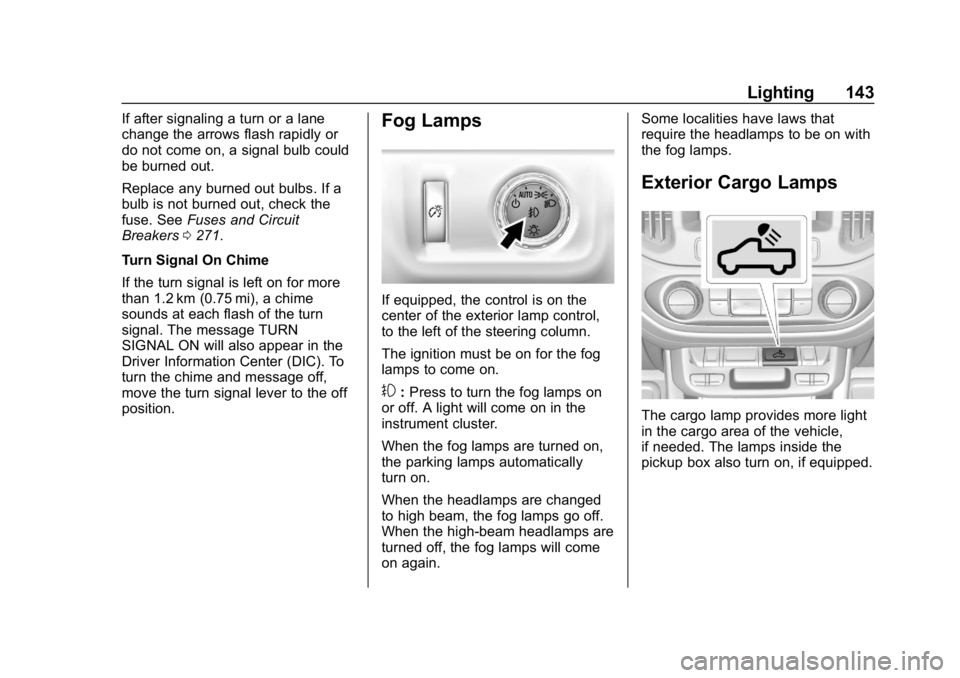
If equipped, the control is on the
center of the exterior lamp control,
to the left of the steering column.
The ignition must be on for the fog
lamps to come on.
#: Press to turn the fog lamps on
or off. A light will come on in the
instrument cluster.
When the fog lamps are turned on,
the parking lamps automatically
turn on.
When the headlamps are changed
to high beam, the fog lamps go off.
When the high-beam headlamps are
turned off, the fog lamps will come
on again. Some localities have laws that
require the headlamps to be on with
the fog lamps.
Exterior Cargo Lamps
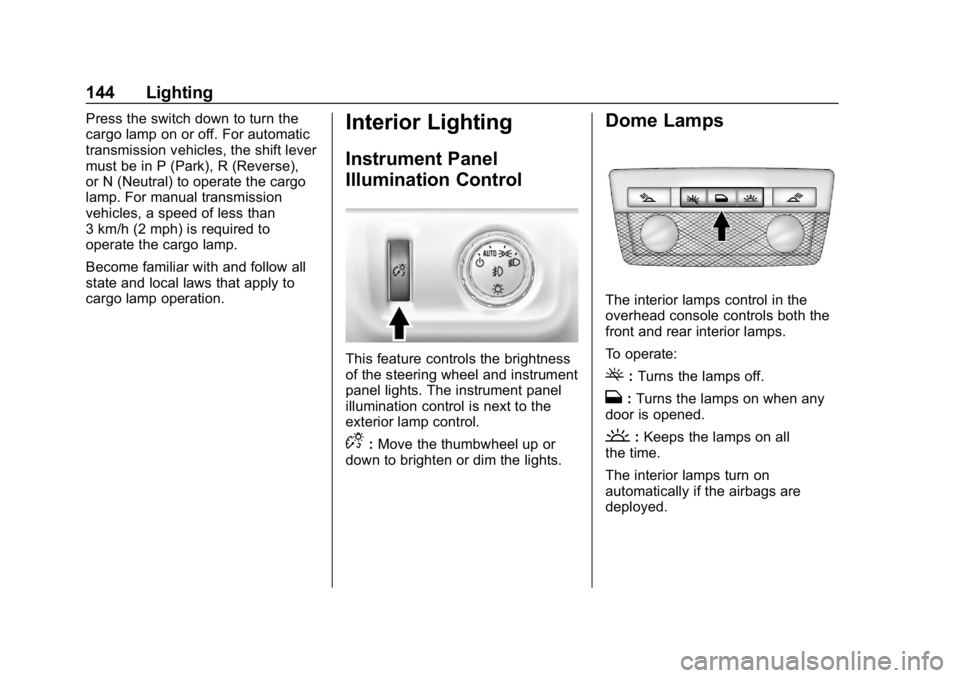
The cargo lamp provides more light
in the cargo area of the vehicle,
if needed. The lamps inside the
pickup box also turn on, if equipped.
Page 145 of 387
Chevrolet Colorado Owner Manual (GMNA-Localizing-U.S./Canada/Mexico-
12460274) - 2019 - CRC - 10/1/18
144 Lighting
Press the switch down to turn the
cargo lamp on or off. For automatic
transmission vehicles, the shift lever
must be in P (Park), R (Reverse),
or N (Neutral) to operate the cargo
lamp. For manual transmission
vehicles, a speed of less than
3 km/h (2 mph) is required to
operate the cargo lamp.
Become familiar with and follow all
state and local laws that apply to
cargo lamp operation.Interior Lighting
Instrument Panel
Illumination Control
This feature controls the brightness
of the steering wheel and instrument
panel lights. The instrument panel
illumination control is next to the
exterior lamp control.
D:Move the thumbwheel up or
down to brighten or dim the lights.
Dome Lamps
The interior lamps control in the
overhead console controls both the
front and rear interior lamps.
To operate:
(: Turns the lamps off.
H: Turns the lamps on when any
door is opened.
': Keeps the lamps on all
the time.
The interior lamps turn on
automatically if the airbags are
deployed.
Page 156 of 387
Chevrolet Colorado Owner Manual (GMNA-Localizing-U.S./Canada/Mexico-
12460274) - 2019 - CRC - 10/1/18
Driving and Operating 155
Driving and
Operating
Driving Information
Distracted Driving . . . . . . . . . . . . 156
Defensive Driving . . . . . . . . . . . . . 157
Drunk Driving . . . . . . . . . . . . . . . . . 157
Control of a Vehicle . . . . . . . . . . . 157
Braking . . . . . . . . . . . . . . . . . . . . . . . 157
Steering . . . . . . . . . . . . . . . . . . . . . . 158
Off-Road Recovery . . . . . . . . . . . 158
Loss of Control . . . . . . . . . . . . . . . 159
Off-Road Driving . . . . . . . . . . . . . 159
Driving on Wet Roads . . . . . . . . 164
Hill and Mountain Roads . . . . . 165
Winter Driving . . . . . . . . . . . . . . . . 165
If the Vehicle Is Stuck . . . . . . . . 167
Vehicle Load Limits . . . . . . . . . . . 168
Truck-Camper LoadingInformation . . . . . . . . . . . . . . . . . . 173
Starting and Operating
New Vehicle Break-In . . . . . . . . . 174
Ignition Positions . . . . . . . . . . . . . 174
Starting the Engine . . . . . . . . . . . 176
Engine Heater . . . . . . . . . . . . . . . . 177
Retained AccessoryPower (RAP) . . . . . . . . . . . . . . . . 179 Shifting Into Park . . . . . . . . . . . . . 179
Shifting out of Park . . . . . . . . . . . 181
Parking (Manual
Transmission) . . . . . . . . . . . . . . . 181
Parking over Things
That Burn . . . . . . . . . . . . . . . . . . . 181
Engine Exhaust
Engine Exhaust . . . . . . . . . . . . . . 182
Running the Vehicle WhileParked . . . . . . . . . . . . . . . . . . . . . . 182
Automatic Transmission
Automatic Transmission . . . . . . 183
Manual Mode . . . . . . . . . . . . . . . . . 185
Tow/Haul Mode . . . . . . . . . . . . . . . 188
Manual Transmission
Manual Transmission . . . . . . . . . 188
Drive Systems
Four-Wheel Drive . . . . . . . . . . . . . 190
Brakes
Antilock BrakeSystem (ABS) . . . . . . . . . . . . . . . 197
Parking Brake . . . . . . . . . . . . . . . . 198
Brake Assist . . . . . . . . . . . . . . . . . . 198
Hill Start Assist (HSA) . . . . . . . . 199
Ride Control Systems
Traction Control/Electronic Stability Control . . . . . . . . . . . . . 199
Hill Descent Control (HDC) . . . 202
Driver Mode Control . . . . . . . . . . 203
Limited-Slip Differential . . . . . . . 204
Locking Rear Axle . . . . . . . . . . . . 204
Locking Front Axle . . . . . . . . . . . 205
Cruise Control
Cruise Control . . . . . . . . . . . . . . . . 206
Driver Assistance Systems
Driver Assistance Systems . . . 209
Assistance Systems for Parking or Backing . . . . . . . . . . 210
Forward Collision Alert (FCA) System . . . . . . . . . . . . . . . . . . . . . . 212
Lane Departure Warning (LDW) . . . . . . . . . . . . . 214
Fuel
Top Tier Fuel . . . . . . . . . . . . . . . . . 216
Recommended Fuel . . . . . . . . . . 216
Prohibited Fuels . . . . . . . . . . . . . . 216
Fuels in Foreign Countries . . . 217
Fuel Additives . . . . . . . . . . . . . . . . 217
Filling the Tank . . . . . . . . . . . . . . . 217
Filling a Portable FuelContainer . . . . . . . . . . . . . . . . . . . 218
Page 157 of 387
Chevrolet Colorado Owner Manual (GMNA-Localizing-U.S./Canada/Mexico-
12460274) - 2019 - CRC - 10/1/18
156 Driving and Operating
Trailer Towing
General TowingInformation . . . . . . . . . . . . . . . . . . 219
Driving Characteristics and Towing Tips . . . . . . . . . . . . . . . . . 219
Trailer Towing . . . . . . . . . . . . . . . . 224
Towing Equipment . . . . . . . . . . . . 229
Trailer Sway Control (TSC) . . . 235
Conversions and Add-Ons
Add-On Electrical
Equipment . . . . . . . . . . . . . . . . . . 237
Driving Information
Distracted Driving
Distraction comes in many forms
and can take your focus from the
task of driving. Exercise good
judgment and do not let other
activities divert your attention away
from the road. Many local
governments have enacted laws
regarding driver distraction. Become
familiar with the local laws in
your area.
To avoid distracted driving, keep
your eyes on the road, keep your
hands on the steering wheel, and
focus your attention on driving.
. Do not use a phone in
demanding driving situations.
Use a hands-free method to
place or receive necessary
phone calls.
. Watch the road. Do not read,
take notes, or look up
information on phones or other
electronic devices. .
Designate a front seat
passenger to handle potential
distractions.
. Become familiar with vehicle
features before driving, such as
programming favorite radio
stations and adjusting climate
control and seat settings.
Program all trip information into
any navigation device prior to
driving.
. Wait until the vehicle is parked
to retrieve items that have fallen
to the floor.
. Stop or park the vehicle to tend
to children.
. Keep pets in an appropriate
carrier or restraint.
. Avoid stressful conversations
while driving, whether with a
passenger or on a cell phone.
Page 158 of 387
Chevrolet Colorado Owner Manual (GMNA-Localizing-U.S./Canada/Mexico-
12460274) - 2019 - CRC - 10/1/18
Driving and Operating 157
{Warning
Taking your eyes off the road too
long or too often could cause a
crash resulting in injury or death.
Focus your attention on driving.
Refer to the infotainment manual for
more information on using that
system and the navigation system,
if equipped, including pairing and
using a cell phone.
Defensive Driving
Defensive driving means “always
expect the unexpected.” The first
step in driving defensively is to wear
the seat belt. See Seat Belts051.
. Assume that other road users
(pedestrians, bicyclists, and
other drivers) are going to be
careless and make mistakes.
Anticipate what they might do
and be ready.
. Allow enough following distance
between you and the driver in
front of you. .
Focus on the task of driving.
Drunk Driving
Death and injury associated with
drinking and driving is a global
tragedy.
{Warning
Drinking and then driving is very
dangerous. Your reflexes,
perceptions, attentiveness, and
judgment can be affected by even
a small amount of alcohol. You
can have a serious —or even
fatal —collision if you drive after
drinking.
Do not drink and drive or ride with
a driver who has been drinking.
Ride home in a cab; or if you are
with a group, designate a driver
who will not drink.
Control of a Vehicle
Braking, steering, and accelerating
are important factors in helping to
control a vehicle while driving.
Braking
Braking action involves perception
time and reaction time. Deciding to
push the brake pedal is perception
time. Actually doing it is
reaction time.
Average driver reaction time is
about three-quarters of a second. In
that time, a vehicle moving at
100 km/h (60 mph) travels 20 m
(66 ft), which could be a lot of
distance in an emergency.
Helpful braking tips to keep in mind
include:
. Keep enough distance between
you and the vehicle in front
of you.
. Avoid needless heavy braking.
. Keep pace with traffic.
If the engine ever stops while the
vehicle is being driven, brake
normally but do not pump the
brakes. Doing so could make the
pedal harder to push down. If the
engine stops, there will be some
power brake assist but it will be
used when the brake is applied.
Page 159 of 387
Chevrolet Colorado Owner Manual (GMNA-Localizing-U.S./Canada/Mexico-
12460274) - 2019 - CRC - 10/1/18
158 Driving and Operating
Once the power assist is used up, it
can take longer to stop and the
brake pedal will be harder to push.
Steering
Electric Power Steering
The vehicle has electric power
steering. It does not have power
steering fluid. Regular maintenance
is not required.
If power steering assist is lost due
to a system malfunction, the vehicle
can be steered, but may require
increased effort.
If the steering assist is used for an
extended period of time while the
vehicle is not moving, power assist
may be reduced.
If the steering wheel is turned until it
reaches the end of its travel and is
held against that position for an
extended period of time, power
steering assist may be reduced.
Normal use of the power steering
assist should return when the
system cools down.See your dealer if there is a
problem.
Curve Tips
.
Take curves at a reasonable
speed.
. Reduce speed before entering a
curve.
. Maintain a reasonable steady
speed through the curve.
. Wait until the vehicle is out of
the curve before accelerating
gently into the straightaway.
Steering in Emergencies
.There are some situations when
steering around a problem may
be more effective than braking.
. Holding both sides of the
steering wheel allows you to turn
180 degrees without removing
a hand.
. The Antilock Brake System
(ABS) allows steering while
braking.
Off-Road Recovery
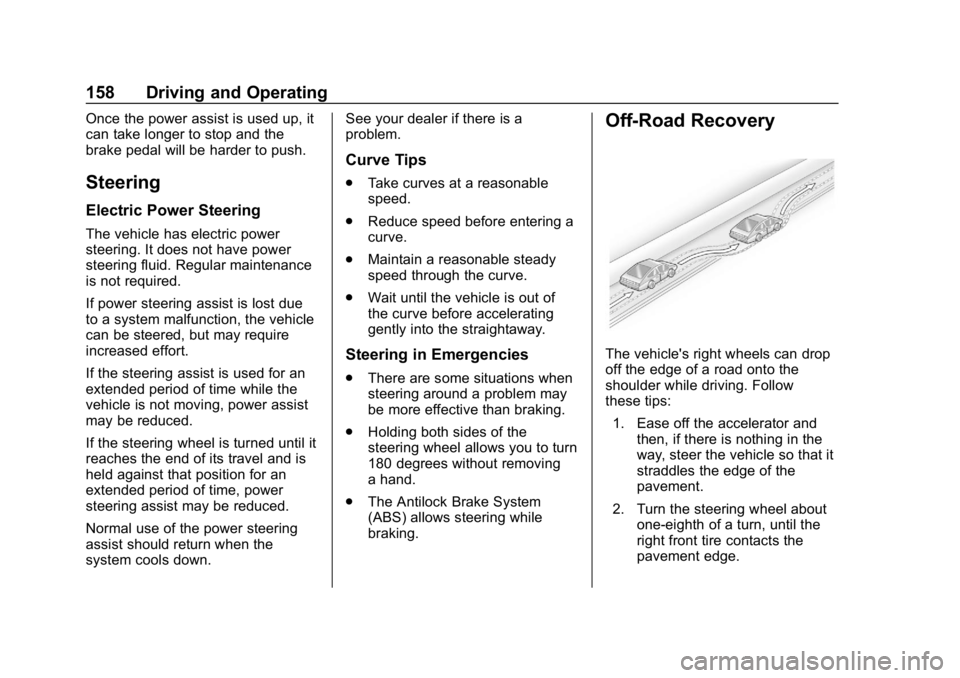
The vehicle's right wheels can drop
off the edge of a road onto the
shoulder while driving. Follow
these tips:
1. Ease off the accelerator and then, if there is nothing in the
way, steer the vehicle so that it
straddles the edge of the
pavement.
2. Turn the steering wheel about one-eighth of a turn, until the
right front tire contacts the
pavement edge.