mode CHEVROLET COLORADO 2023 User Guide
[x] Cancel search | Manufacturer: CHEVROLET, Model Year: 2023, Model line: COLORADO, Model: CHEVROLET COLORADO 2023Pages: 362, PDF Size: 13.62 MB
Page 55 of 362
Chevrolet Colorado Owner Manual (GMNA-Localizing-U.S./Canada/Mexico-
15274222) - 2022 - CRC - 11/2/21
54 Seats and Restraints
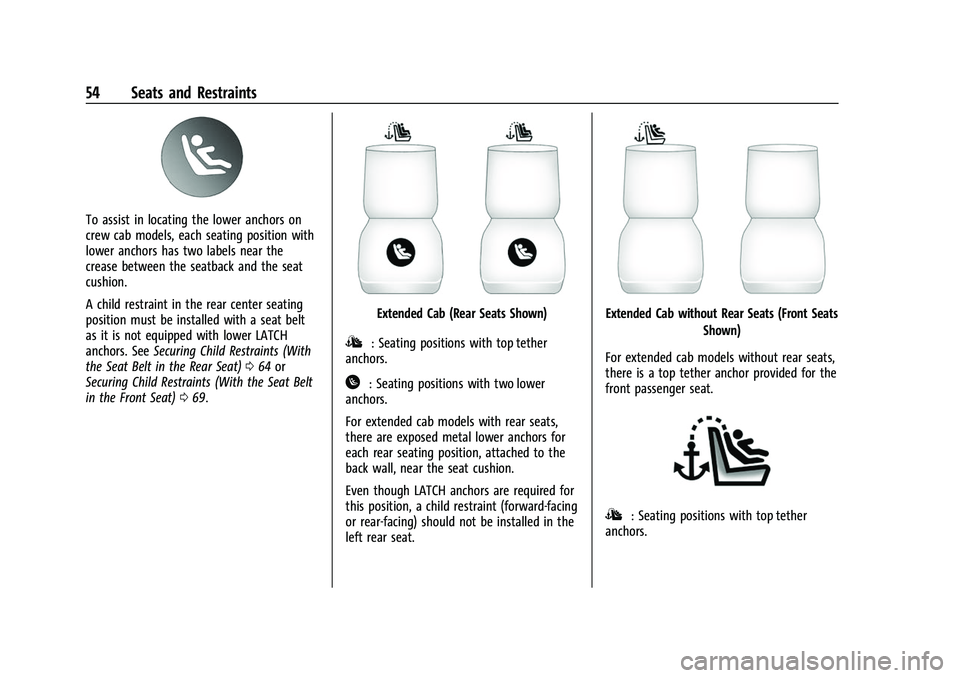
To assist in locating the lower anchors on
crew cab models, each seating position with
lower anchors has two labels near the
crease between the seatback and the seat
cushion.
A child restraint in the rear center seating
position must be installed with a seat belt
as it is not equipped with lower LATCH
anchors. SeeSecuring Child Restraints (With
the Seat Belt in the Rear Seat) 064 or
Securing Child Restraints (With the Seat Belt
in the Front Seat) 069.
Extended Cab (Rear Seats Shown)
I: Seating positions with top tether
anchors.
H: Seating positions with two lower
anchors.
For extended cab models with rear seats,
there are exposed metal lower anchors for
each rear seating position, attached to the
back wall, near the seat cushion.
Even though LATCH anchors are required for
this position, a child restraint (forward-facing
or rear-facing) should not be installed in the
left rear seat.
Extended Cab without Rear Seats (Front Seats
Shown)
For extended cab models without rear seats,
there is a top tether anchor provided for the
front passenger seat.
I: Seating positions with top tether
anchors.
Page 56 of 362
Chevrolet Colorado Owner Manual (GMNA-Localizing-U.S./Canada/Mexico-
15274222) - 2022 - CRC - 11/2/21
Seats and Restraints 55
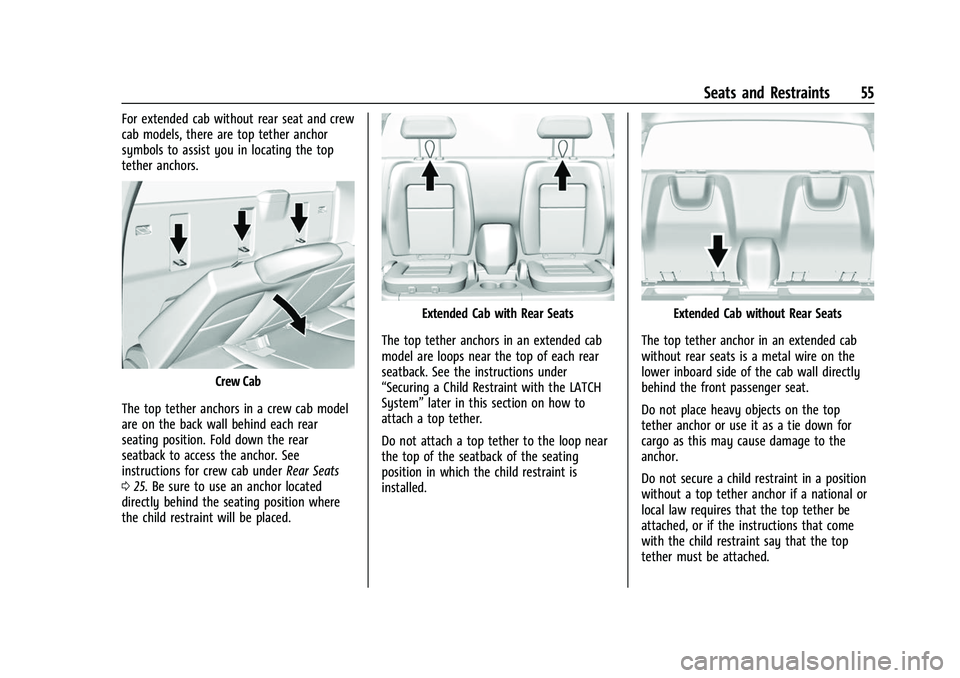
For extended cab without rear seat and crew
cab models, there are top tether anchor
symbols to assist you in locating the top
tether anchors.
Crew Cab
The top tether anchors in a crew cab model
are on the back wall behind each rear
seating position. Fold down the rear
seatback to access the anchor. See
instructions for crew cab under Rear Seats
0 25. Be sure to use an anchor located
directly behind the seating position where
the child restraint will be placed.
Extended Cab with Rear Seats
The top tether anchors in an extended cab
model are loops near the top of each rear
seatback. See the instructions under
“Securing a Child Restraint with the LATCH
System” later in this section on how to
attach a top tether.
Do not attach a top tether to the loop near
the top of the seatback of the seating
position in which the child restraint is
installed.Extended Cab without Rear Seats
The top tether anchor in an extended cab
without rear seats is a metal wire on the
lower inboard side of the cab wall directly
behind the front passenger seat.
Do not place heavy objects on the top
tether anchor or use it as a tie down for
cargo as this may cause damage to the
anchor.
Do not secure a child restraint in a position
without a top tether anchor if a national or
local law requires that the top tether be
attached, or if the instructions that come
with the child restraint say that the top
tether must be attached.
Page 59 of 362
Chevrolet Colorado Owner Manual (GMNA-Localizing-U.S./Canada/Mexico-
15274222) - 2022 - CRC - 11/2/21
58 Seats and Restraints
If the position you are using has a
fixed head restraint and you are
using a dual tether, route the
tether around the sides of the head
restraint.
If the child restraint is installed next
to a center seat, make sure the top
tether does not interfere with the
center seating position shoulder
belt/retractor. If it does, find
another suitable seating position to
install the child restraint.
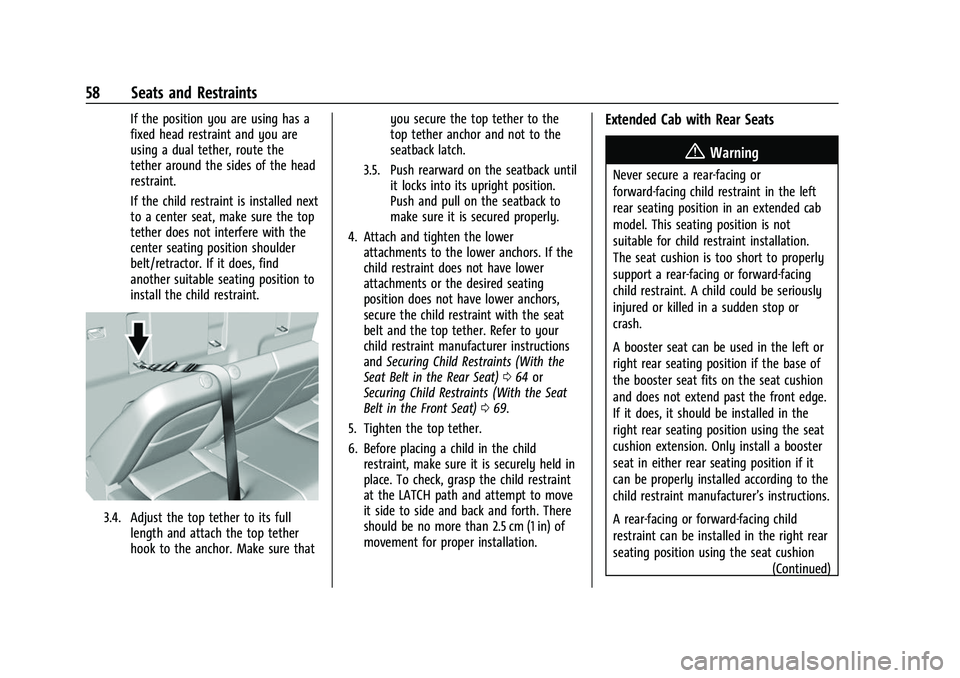
3.4. Adjust the top tether to its fulllength and attach the top tether
hook to the anchor. Make sure that you secure the top tether to the
top tether anchor and not to the
seatback latch.
3.5. Push rearward on the seatback until it locks into its upright position.
Push and pull on the seatback to
make sure it is secured properly.
4. Attach and tighten the lower attachments to the lower anchors. If the
child restraint does not have lower
attachments or the desired seating
position does not have lower anchors,
secure the child restraint with the seat
belt and the top tether. Refer to your
child restraint manufacturer instructions
and Securing Child Restraints (With the
Seat Belt in the Rear Seat) 064 or
Securing Child Restraints (With the Seat
Belt in the Front Seat) 069.
5. Tighten the top tether.
6. Before placing a child in the child restraint, make sure it is securely held in
place. To check, grasp the child restraint
at the LATCH path and attempt to move
it side to side and back and forth. There
should be no more than 2.5 cm (1 in) of
movement for proper installation.
Extended Cab with Rear Seats
{Warning
Never secure a rear-facing or
forward-facing child restraint in the left
rear seating position in an extended cab
model. This seating position is not
suitable for child restraint installation.
The seat cushion is too short to properly
support a rear-facing or forward-facing
child restraint. A child could be seriously
injured or killed in a sudden stop or
crash.
A booster seat can be used in the left or
right rear seating position if the base of
the booster seat fits on the seat cushion
and does not extend past the front edge.
If it does, it should be installed in the
right rear seating position using the seat
cushion extension. Only install a booster
seat in either rear seating position if it
can be properly installed according to the
child restraint manufacturer’s instructions.
A rear-facing or forward-facing child
restraint can be installed in the right rear
seating position using the seat cushion
(Continued)
Page 60 of 362
Chevrolet Colorado Owner Manual (GMNA-Localizing-U.S./Canada/Mexico-
15274222) - 2022 - CRC - 11/2/21
Seats and Restraints 59
Warning (Continued)
extension in an extended cab model.
Never install a rear-facing or
forward-facing child restraint in the right
rear seating position without the seat
cushion extension.
{Warning
Do not let anyone ride in the front
passenger seat when a rear-facing child
restraint is installed in the right rear
seating position. To properly fit the
rear-facing child restraint, the front
seatback will need to be tilted forward
which will not allow a passenger to sit
properly in the front outboard passenger
seat. The passenger could be seriously
injured or killed in a sudden stop or
crash.
{Warning
Do not attach a top tether to the loop
near the top of the seatback and directly
behind the seating position in which the
child restraint is installed in an extended
cab with rear seats. The top tether will
not be able to be properly tightened. See
instructions below for how to properly
attach a top tether.
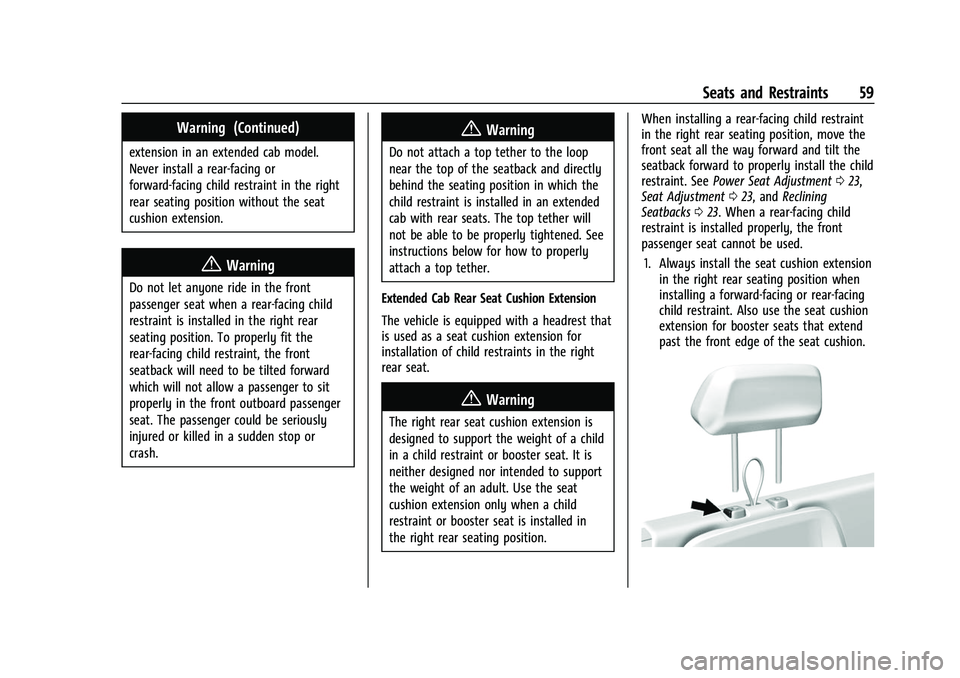
Extended Cab Rear Seat Cushion Extension
The vehicle is equipped with a headrest that
is used as a seat cushion extension for
installation of child restraints in the right
rear seat.
{Warning
The right rear seat cushion extension is
designed to support the weight of a child
in a child restraint or booster seat. It is
neither designed nor intended to support
the weight of an adult. Use the seat
cushion extension only when a child
restraint or booster seat is installed in
the right rear seating position. When installing a rear-facing child restraint
in the right rear seating position, move the
front seat all the way forward and tilt the
seatback forward to properly install the child
restraint. See
Power Seat Adjustment 023,
Seat Adjustment 023, and Reclining
Seatbacks 023. When a rear-facing child
restraint is installed properly, the front
passenger seat cannot be used.
1. Always install the seat cushion extension in the right rear seating position when
installing a forward-facing or rear-facing
child restraint. Also use the seat cushion
extension for booster seats that extend
past the front edge of the seat cushion.
Page 66 of 362
Chevrolet Colorado Owner Manual (GMNA-Localizing-U.S./Canada/Mexico-
15274222) - 2022 - CRC - 11/2/21
Seats and Restraints 65
Extended Cab
{Warning
Never secure a rear-facing or
forward-facing child restraint in the left
rear seating position in an extended cab
model. This seating position is not
suitable for child restraint installation.
The seat cushion is too short to properly
support a rear-facing or forward-facing
child restraint. A child could be seriously
injured or killed in a sudden stop or
crash.
A booster seat can be used in the left or
right rear seating position if the base of
the booster seat fits on the seat cushion
and does not extend past the front edge.
If it does, it should be installed in the
right rear seating position using the seat
cushion extension. Only install a booster
seat in either rear seating position if it
can be properly installed according to the
child restraint manufacturer’s instructions.
A rear-facing or forward-facing child
restraint can be installed in the right rear
seating position using the seat cushion(Continued)
Warning (Continued)
extension in an extended cab model.
Never install a rear-facing or
forward-facing child restraint in the right
rear seating position without the seat
cushion extension.
{Warning
Do not let anyone ride in the front
passenger seat when a rear-facing child
restraint is installed in the right rear
seating position. To properly fit the
rear-facing child restraint, the front
seatback will need to be tilted forward
which will not allow a passenger to sit
properly in the front outboard passenger
seat. The passenger could be seriously
injured or killed in a sudden stop or
crash.
A booster seat may be used in the left rear
seating position if the base of the booster
seat fits on the seat cushion and does not
extend past the front edge of the seat
cushion. If the booster seat extends past the front of the seat cushion, it should be used
in the right rear seating position with the
seat cushion extension.
When using the lap-shoulder belt to secure
the child restraint in this position, follow the
instructions that came with the child
restraint and the following instructions:
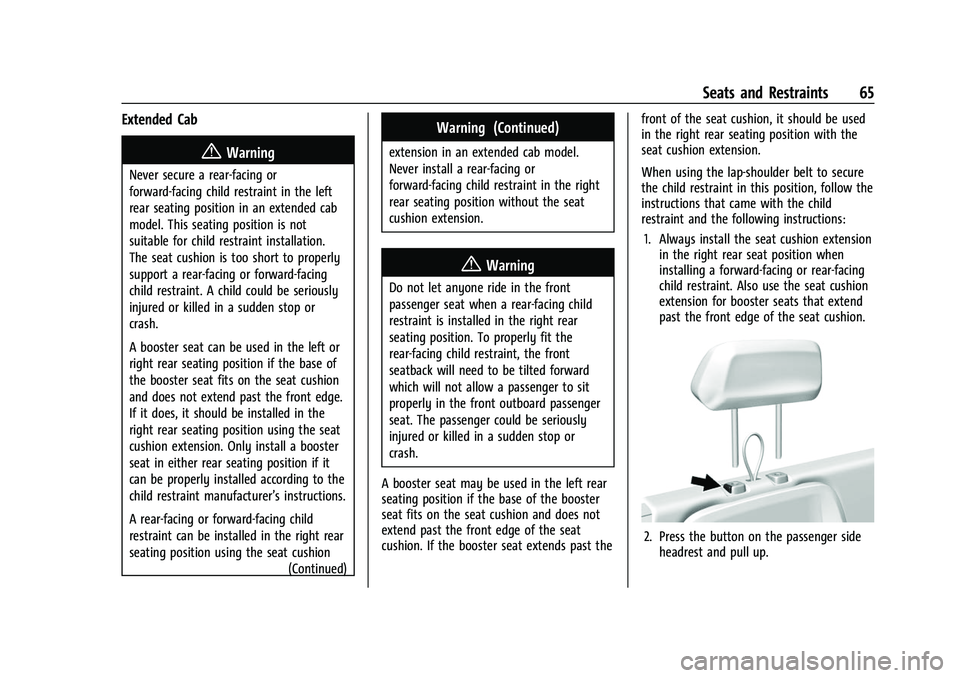
1. Always install the seat cushion extension in the right rear seat position when
installing a forward-facing or rear-facing
child restraint. Also use the seat cushion
extension for booster seats that extend
past the front edge of the seat cushion.
2. Press the button on the passenger sideheadrest and pull up.
Page 75 of 362
Chevrolet Colorado Owner Manual (GMNA-Localizing-U.S./Canada/Mexico-
15274222) - 2022 - CRC - 11/2/21
74 Storage
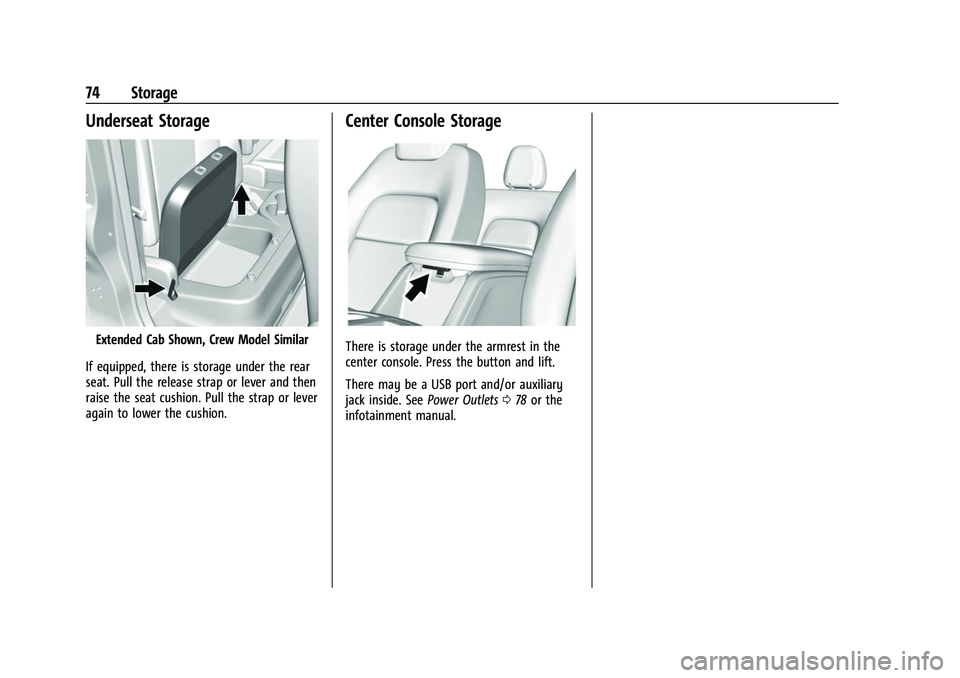
Underseat Storage
Extended Cab Shown, Crew Model Similar
If equipped, there is storage under the rear
seat. Pull the release strap or lever and then
raise the seat cushion. Pull the strap or lever
again to lower the cushion.
Center Console Storage
There is storage under the armrest in the
center console. Press the button and lift.
There may be a USB port and/or auxiliary
jack inside. See Power Outlets078 or the
infotainment manual.
Page 76 of 362
Chevrolet Colorado Owner Manual (GMNA-Localizing-U.S./Canada/Mexico-
15274222) - 2022 - CRC - 11/2/21
Instruments and Controls 75
Instruments and Controls
Controls
Steering Wheel Adjustment . . . . . . . . . . . . 76
Steering Wheel Controls . . . . . . . . . . . . . . . . 76
Heated Steering Wheel . . . . . . . . . . . . . . . . . 76
Horn . . . . . . . . . . . . . . . . . . . . . . . . . . . . . . . . . . . 76
Windshield Wiper/Washer . . . . . . . . . . . . . . 77
Compass . . . . . . . . . . . . . . . . . . . . . . . . . . . . . . . . 78
Clock . . . . . . . . . . . . . . . . . . . . . . . . . . . . . . . . . . . 78
Power Outlets . . . . . . . . . . . . . . . . . . . . . . . . . . 78
Wireless Charging . . . . . . . . . . . . . . . . . . . . . . 79
Warning Lights, Gauges, and Indicators
Warning Lights, Gauges, andIndicators . . . . . . . . . . . . . . . . . . . . . . . . . . . . . 81
Instrument Cluster . . . . . . . . . . . . . . . . . . . . . . 81
Speedometer . . . . . . . . . . . . . . . . . . . . . . . . . . . 83
Odometer . . . . . . . . . . . . . . . . . . . . . . . . . . . . . . 83
Trip Odometer . . . . . . . . . . . . . . . . . . . . . . . . . 84
Tachometer . . . . . . . . . . . . . . . . . . . . . . . . . . . . 84
Fuel Gauge . . . . . . . . . . . . . . . . . . . . . . . . . . . . . 84
Engine Coolant Temperature Gauge . . . . 85
Seat Belt Reminders . . . . . . . . . . . . . . . . . . . . 85
Airbag Readiness Light . . . . . . . . . . . . . . . . . 86
Passenger Airbag Status Indicator . . . . . . 86
Charging System Light . . . . . . . . . . . . . . . . . 87
Malfunction Indicator Lamp (Check Engine Light) . . . . . . . . . . . . . . . . . . . . . . . . . 87 Brake System Warning Light . . . . . . . . . . . 88
Antilock Brake System (ABS) Warning
Light . . . . . . . . . . . . . . . . . . . . . . . . . . . . . . . . . 89
Four-Wheel-Drive Light . . . . . . . . . . . . . . . . . 89
Tow/Haul Mode Light . . . . . . . . . . . . . . . . . . 90
Hill Descent Control Light . . . . . . . . . . . . . . 90
Lane Departure Warning (LDW) Light . . . . . . . . . . . . . . . . . . . . . . . . . . . . . . . . . 90
Vehicle Ahead Indicator . . . . . . . . . . . . . . . . 90
Traction Off Light . . . . . . . . . . . . . . . . . . . . . . 90
StabiliTrak OFF Light . . . . . . . . . . . . . . . . . . . . 91
Traction Control System (TCS)/StabiliTrak Light . . . . . . . . . . . . . . . . . . . . . . . . . . . . . . . . . . 91
Tire Pressure Light . . . . . . . . . . . . . . . . . . . . . . 91
Engine Oil Pressure Light . . . . . . . . . . . . . . . 92
Low Fuel Warning Light . . . . . . . . . . . . . . . . 92
Security Light . . . . . . . . . . . . . . . . . . . . . . . . . . 92
High-Beam On Light . . . . . . . . . . . . . . . . . . . . 93
Front Fog Lamp Light . . . . . . . . . . . . . . . . . . . 93
Lamps On Reminder . . . . . . . . . . . . . . . . . . . . 93
Cruise Control Light . . . . . . . . . . . . . . . . . . . . 93
Door Ajar Light (Uplevel Cluster) . . . . . . . 93
Information Displays
Driver Information Center (DIC) (Base Level) . . . . . . . . . . . . . . . . . . . . . . . . . . . . . . . . . 93
Driver Information Center (DIC) (Uplevel) . . . . . . . . . . . . . . . . . . . . . . . . . . . . . 96
Vehicle Messages
Vehicle Messages . . . . . . . . . . . . . . . . . . . . . . 98
Engine Power Messages . . . . . . . . . . . . . . . . 98
Vehicle Speed Messages . . . . . . . . . . . . . . . 99
Vehicle Personalization
Vehicle Personalization . . . . . . . . . . . . . . . . . 99
Page 91 of 362
Chevrolet Colorado Owner Manual (GMNA-Localizing-U.S./Canada/Mexico-
15274222) - 2022 - CRC - 11/2/21
90 Instruments and Controls
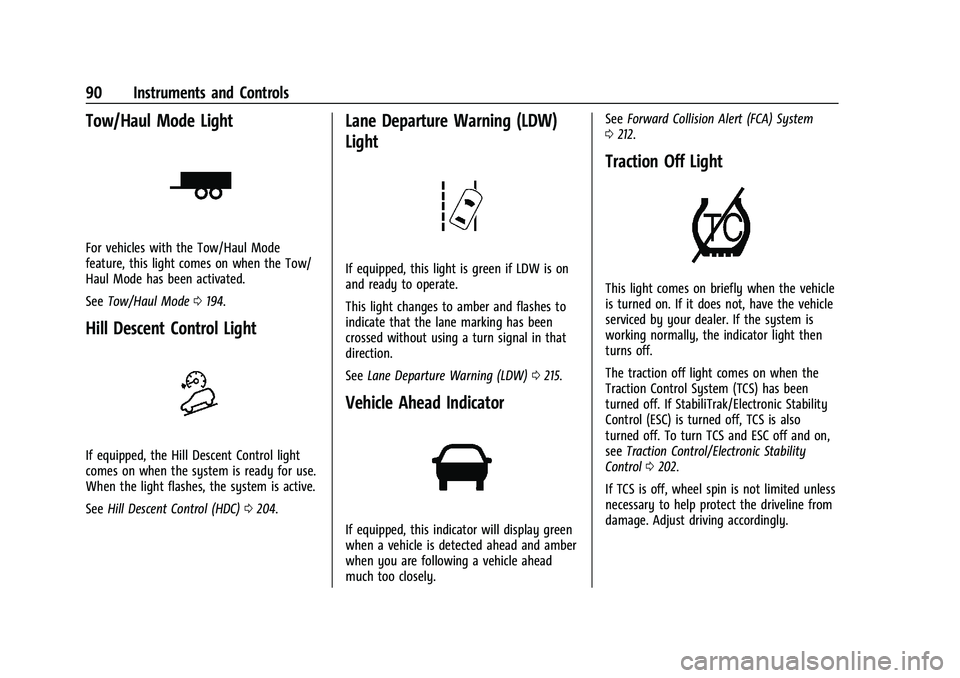
Tow/Haul Mode Light
For vehicles with the Tow/Haul Mode
feature, this light comes on when the Tow/
Haul Mode has been activated.
SeeTow/Haul Mode 0194.
Hill Descent Control Light
If equipped, the Hill Descent Control light
comes on when the system is ready for use.
When the light flashes, the system is active.
See Hill Descent Control (HDC) 0204.
Lane Departure Warning (LDW)
Light
If equipped, this light is green if LDW is on
and ready to operate.
This light changes to amber and flashes to
indicate that the lane marking has been
crossed without using a turn signal in that
direction.
See Lane Departure Warning (LDW) 0215.
Vehicle Ahead Indicator
If equipped, this indicator will display green
when a vehicle is detected ahead and amber
when you are following a vehicle ahead
much too closely. See
Forward Collision Alert (FCA) System
0 212.
Traction Off Light
This light comes on briefly when the vehicle
is turned on. If it does not, have the vehicle
serviced by your dealer. If the system is
working normally, the indicator light then
turns off.
The traction off light comes on when the
Traction Control System (TCS) has been
turned off. If StabiliTrak/Electronic Stability
Control (ESC) is turned off, TCS is also
turned off. To turn TCS and ESC off and on,
see Traction Control/Electronic Stability
Control 0202.
If TCS is off, wheel spin is not limited unless
necessary to help protect the driveline from
damage. Adjust driving accordingly.
Page 102 of 362
Chevrolet Colorado Owner Manual (GMNA-Localizing-U.S./Canada/Mexico-
15274222) - 2022 - CRC - 11/2/21
Instruments and Controls 101
Remote Lock Feedback
This allows selection of what type of
feedback is given when locking the vehicle
with the RKE transmitter.
Touch Off, Lights and Horn, Lights Only,
or Horn Only.
Remote Door Unlock
This allows selection of which doors will
unlock when pressing
Kon the RKE
transmitter.
Touch All Doors or Driver Door.
Remote Start Auto Heat Seats
If equipped and turned on, this feature will
turn on the heated seats when using remote
start on cold days. See Heated Front Seats
0 25 and
Remote Vehicle Start 011.
Touch Off or On.
Teen Driver
See Teen Driver 0151.
Valet Mode
This will lock the infotainment system and
steering wheel controls. It may also limit
access to vehicle storage locations,
if equipped.
To enable valet mode:
1. Enter a four-digit code on the keypad.
2. Select Enter to go to the confirmation screen.
3. Re-enter the four-digit code.
Touch Lock or Unlock to lock or unlock the
system. Touch Back to go back to the
previous menu.
Page 113 of 362
Chevrolet Colorado Owner Manual (GMNA-Localizing-U.S./Canada/Mexico-
15274222) - 2022 - CRC - 11/2/21
112 Infotainment System
pressed. PressingOwill mute the
system and trigger this pane to
show a long press is required to
actually power down the system.
.Turn to decrease or increase the
volume.
4.6
.Radio: Press and release to go to
the next station or channel. Press
and hold to fast seek the next
strongest station or channel.
.USB/Bluetooth: Press to seek the
next track. Press and hold to fast
forward through a track. Release to
return to playing speed. See USB
Port 0119 or
Bluetooth Audio 0122.
5.v
.Press and release to access the
phone display or answer an
incoming call.
Home Page
The Home Page is where vehicle application
icons are accessed. Some applications are
disabled when the vehicle is moving.
Swipe left or right across the display to
access the pages of icons. Managing Home Page Icons
1. Touch and hold any of the Home Page icons to enter edit mode.
2. Continue holding the icon and drag it to the desired position.
3. Release your finger to drop the icon in the desired position.
4. To move an application to another page, drag the icon to the edge of the display
toward the desired page.
5. Continue dragging and dropping application icons as desired.
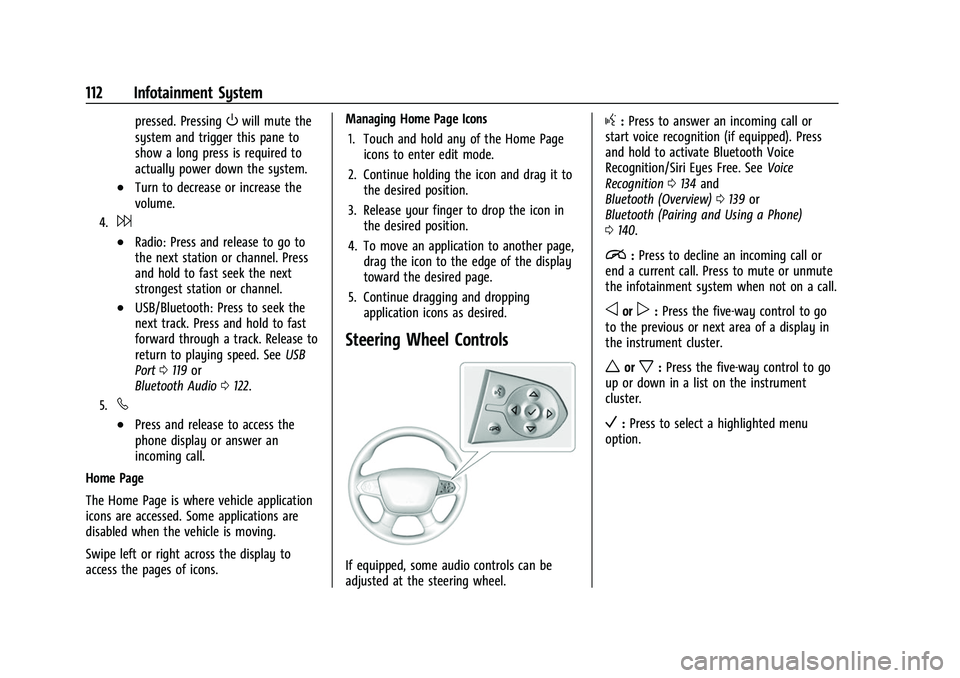
Steering Wheel Controls
If equipped, some audio controls can be
adjusted at the steering wheel.
g:Press to answer an incoming call or
start voice recognition (if equipped). Press
and hold to activate Bluetooth Voice
Recognition/Siri Eyes Free. See Voice
Recognition 0134 and
Bluetooth (Overview) 0139 or
Bluetooth (Pairing and Using a Phone)
0 140.
i:Press to decline an incoming call or
end a current call. Press to mute or unmute
the infotainment system when not on a call.
oorp: Press the five-way control to go
to the previous or next area of a display in
the instrument cluster.
worx: Press the five-way control to go
up or down in a list on the instrument
cluster.
V: Press to select a highlighted menu
option.