mode CHEVROLET COLORADO 2023 Owner's Guide
[x] Cancel search | Manufacturer: CHEVROLET, Model Year: 2023, Model line: COLORADO, Model: CHEVROLET COLORADO 2023Pages: 362, PDF Size: 13.62 MB
Page 148 of 362
Chevrolet Colorado Owner Manual (GMNA-Localizing-U.S./Canada/Mexico-
15274222) - 2022 - CRC - 11/2/21
Infotainment System 147
.Audible Touch Feedback: This setting
determines if a sound plays when
touching the infotainment display or
radio controls. This feature can be turned
off or on.
Voice
Touch and the following may display:
.Confirm More/Less: This setting specifies
how often the voice recognition system
confirms commands. Touch Confirm More
to have the system check with you more
often before acting on your commands.
.Prompt Length: This setting specifies the
amount of detail the voice recognition
system provides when giving you
feedback. Touch Auto to have the system
automatically adjust to your speech
habits. Touch Informative, Short, or Auto.
.Audio Feedback Speed: Touch Slow,
Medium, or Fast to adjust how quickly
the voice recognition system speaks.
.Friendly Prompts: This setting adjusts the
formality of voice prompts. Touch Off for
shorter prompts. Touch On to hear
prompts with more personality. Touch
Auto to have the prompt match your
command style.
.Tutorial Mode: Touch Off or On to
provide tutorial feedback on the display.
.Allow Prompt Interruptions: This setting
controls whether voice commands can be
spoken before voice prompts finish. Turn
this on to speak commands without
hearing the full prompt. Speaking while
the prompt is still playing will
immediately stop playing the current
prompt and recognize your command.
Background noise may cause accidental
interruptions. Touch Off or On.
Favorites
Touch and the following may display:
.Manage Favorites: Touch to display a list
of Audio, Phone, and Navigation favorites.
Favorites can be moved, renamed,
or deleted.
To move, touch and hold the favorite, and
then drag up or down to rearrange the
position.
.Set Number of Audio Favorites: Touch to
select how many favorites pages can be
viewed from the audio application. The
Auto setting will automatically adjust this
number based on the number of favorites
you have saved. Touch Auto, 5, 10, 15, 20,
25, 30, 35, or 40. Updates
If equipped, the vehicle can download and
install select software updates over a
wireless connection. The system will prompt
for certain updates to be downloaded and
installed. There is also an option to check
for updates manually.
To manually check for updates, touch
Settings on the Home Page and select the
System tab. Go to the Vehicle Software
section and touch Updates. Follow the
on-screen prompts. The steps to check for,
download, and install updates may vary by
vehicle.
The vehicle can be used normally during the
software download. Once the download is
complete, there may be a prompt to accept
the installation of the update upon the next
ignition cycle or the next time the vehicle is
shifted into P (Park). For most updates, the
vehicle will be disabled and cannot be driven
during the installation. The system will
deliver messages indicating success or error
during and after the download and
installation processes.
Downloading Over-the-Air vehicle software
updates requires Internet connectivity, which
can be accessed through the vehicle’s
built-in 4G LTE connection, if equipped and
Page 150 of 362
Chevrolet Colorado Owner Manual (GMNA-Localizing-U.S./Canada/Mexico-
15274222) - 2022 - CRC - 11/2/21
Infotainment System 149
Audio
Depending on the current audio source,
different options will be available.
Touch and the following may display:
.Tone Settings: Touch to adjust Equalizer,
Fade/Balance, or Sound Mode. See
“Infotainment System Sound Menu”in
AM-FM Radio 0116.
.Auto Volume: This feature adjusts the
volume based on the vehicle speed.
Touch Off, Low, Medium-Low, Medium,
Medium-High, or High.
.Bose AudioPilot Noise Compensation
Technology (If Equipped): This feature
adjusts the volume based on the noise in
the vehicle and the speed.
Touch Off or On.
.Manage Favorites: Touch to display a list
of Audio, Mobile Devices, and Navigation
favorites.
Favorites can be moved, renamed,
or deleted.
To move, touch and hold the favorite, and
then drag up or down to rearrange the
position.
.Set Number of Audio Favorites: Touch to
select how many favorites pages can be
viewed from the audio application. The
Auto setting will automatically adjust this
number based on the number of favorites
you have saved. Touch Auto, 5, 10, 15, 20,
25, 30, 35, or 40.
.RDS: This allows the Radio Data System
(RDS) to be turned on or off.
Touch the controls on the infotainment
display to disable or enable.
.HD Radio: This allows HD Radio reception
to be turned on or off.
Touch the controls on the infotainment
display to disable or enable.
.Explicit Content Filter: This setting allows
access to explicit content SiriusXM
channels.
Touch Off or On.
.Manage Phones: Select to connect to a
different phone source, disconnect a
phone, or delete a phone.
.Reset Music Index: This allows the music
index to be reset if you are having
difficulty accessing all of the media
content on your device.
Touch Yes or No. Climate
Touch and the following may display:
.Auto Fan Speed: This setting specifies the
amount of airflow when the climate
control fan setting is Auto Fan.
Touch Low, Medium, or High.
.Air Quality Sensor: This setting switches
the system into Recirculation Mode based
on the quality of the outside air.
Touch Off, Low Sensitivity, or High
Sensitivity.
.Auto Cooled Seats: This setting
automatically turns on and regulates the
ventilated seats when the cabin
temperature is warm.
Touch the controls on the infotainment
display to disable or enable.
.Auto Heated Seats: This setting
automatically turns on and regulates the
heated seats when the cabin temperature
is cool. The auto heated seats can be
turned off by using the heated seat
controls on the center stack.
Touch the controls on the infotainment
display to disable or enable.
.Auto Defog: This setting automatically
turns the front defogger on when the
vehicle engine is started.
Page 151 of 362
Chevrolet Colorado Owner Manual (GMNA-Localizing-U.S./Canada/Mexico-
15274222) - 2022 - CRC - 11/2/21
150 Infotainment System
Touch the controls on the infotainment
display to disable or enable.
.Auto Rear Defog: This setting
automatically turns the rear window
defogger on when the vehicle engine is
started.
Touch the controls on the infotainment
display to disable or enable.
Navigation
Touch and the following may display:
.Set Up My Places
.Map Preferences
.Route Preferences
.Navigation Voice Control
.Traffic Preferences
.Alert Preferences
.Manage History
.Predictive Navigation
.About
See Using the Navigation System 0123.
Phone
Touch and the following may display:
.My Number: Displays the cell phone
number of the Bluetooth connected
device.
.Active Call View: Shows active call display
when answering a call.
Touch the controls on the infotainment
display to disable or enable.
.Privacy: Only show call alerts in the
instrument cluster.
Touch Off or On.
.Sort Contacts: Touch to sort by first or
last name.
.Re-sync Device Contacts:
This allows the device contacts to re-sync
if you are having difficulty accessing all of
the contacts on your cell phone.
.Delete All Vehicle Contacts: Touch to
delete all vehicle stored contacts.
.OnStar Phone TTY Mode: This enables
OnStar cell phone TTY mode.
Touch Disable or Enable.
Vehicle
This menu allows adjustment of different
vehicle features. See Vehicle Personalization
0 99.
Personal
If equipped, this menu allows adjustment of
different user profile settings. See “Users”in
Using the System 0113 for information on
setting up user profiles.
The menu may contain the following:
Name
Touch to edit your user name that will be
displayed in the vehicle.
Vehicle Account Information
Touch to view the vehicle account
information and to change the account
password.
An “unverified user account” pop-up will
display until the account information
verification process has been completed on
the Internet. Check your registered e-mail
account for an activation e-mail to complete
the verification process.
Profile Picture
Touch to choose or change your profile
picture.
Profile Identifiers
Touch to have the vehicle recognize the
identifier you choose.
Page 163 of 362
Chevrolet Colorado Owner Manual (GMNA-Localizing-U.S./Canada/Mexico-
15274222) - 2022 - CRC - 11/2/21
162 Climate Controls
Climate Controls
Climate Control Systems
Climate Control Systems . . . . . . . . . . . . . . . 162
Automatic Climate Control System . . . . 164
Air Vents
Air Vents . . . . . . . . . . . . . . . . . . . . . . . . . . . . . . 167
Maintenance
Passenger Compartment Air Filter . . . . . 167
Service . . . . . . . . . . . . . . . . . . . . . . . . . . . . . . . . . 167
Climate Control Systems
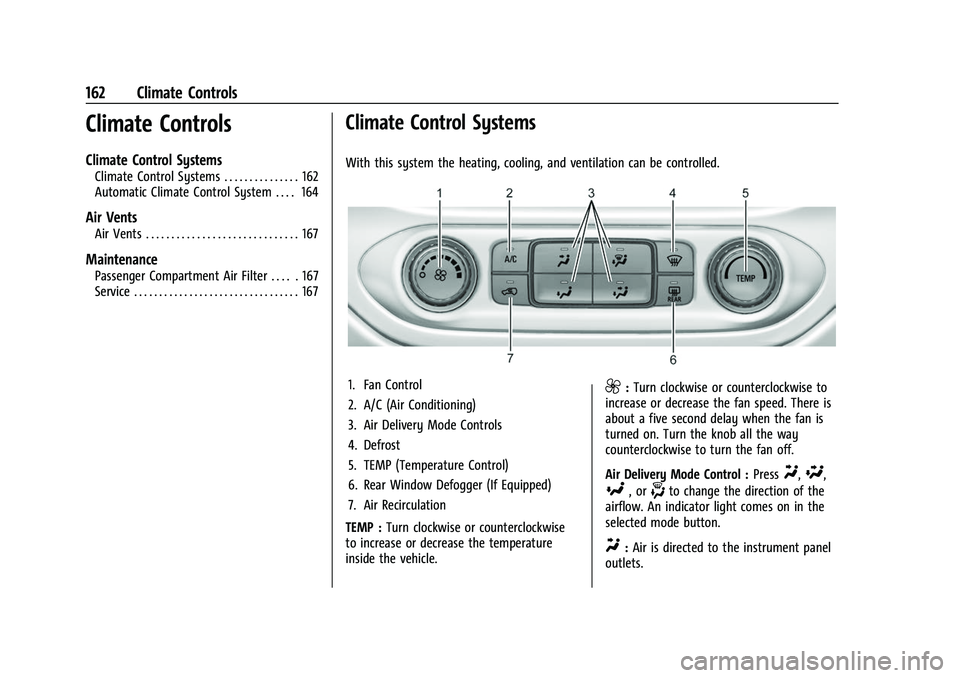
With this system the heating, cooling, and ventilation can be controlled.
1. Fan Control
2. A/C (Air Conditioning)
3. Air Delivery Mode Controls
4. Defrost
5. TEMP (Temperature Control)
6. Rear Window Defogger (If Equipped)
7. Air Recirculation
TEMP : Turn clockwise or counterclockwise
to increase or decrease the temperature
inside the vehicle.9: Turn clockwise or counterclockwise to
increase or decrease the fan speed. There is
about a five second delay when the fan is
turned on. Turn the knob all the way
counterclockwise to turn the fan off.
Air Delivery Mode Control : Press
Y,\,
[, or-to change the direction of the
airflow. An indicator light comes on in the
selected mode button.
Y: Air is directed to the instrument panel
outlets.
Page 164 of 362
Chevrolet Colorado Owner Manual (GMNA-Localizing-U.S./Canada/Mexico-
15274222) - 2022 - CRC - 11/2/21
Climate Controls 163
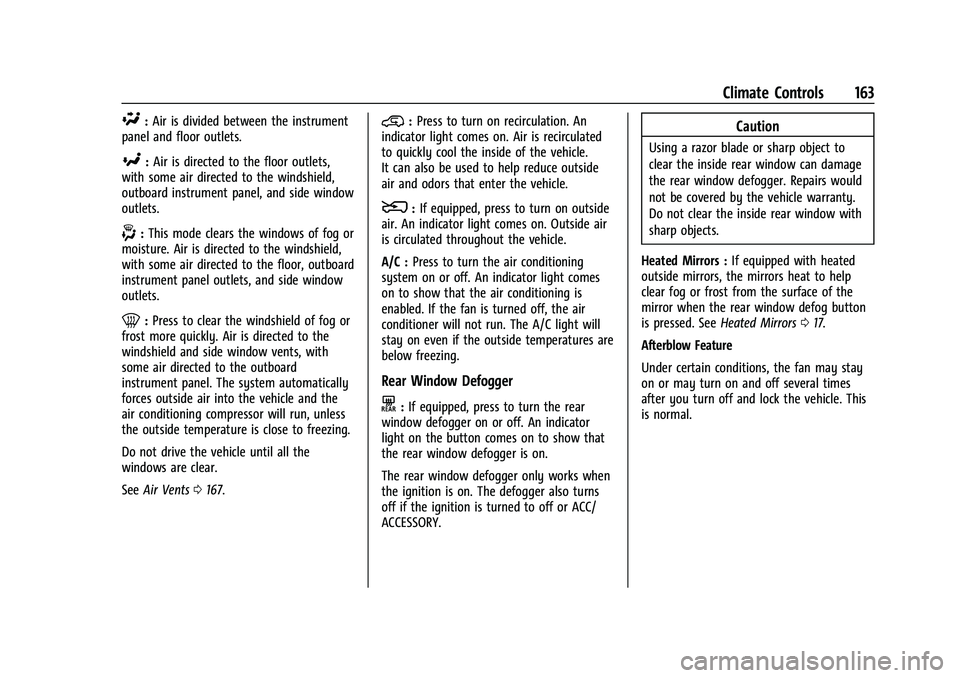
\:Air is divided between the instrument
panel and floor outlets.
[: Air is directed to the floor outlets,
with some air directed to the windshield,
outboard instrument panel, and side window
outlets.
-: This mode clears the windows of fog or
moisture. Air is directed to the windshield,
with some air directed to the floor, outboard
instrument panel outlets, and side window
outlets.
0: Press to clear the windshield of fog or
frost more quickly. Air is directed to the
windshield and side window vents, with
some air directed to the outboard
instrument panel. The system automatically
forces outside air into the vehicle and the
air conditioning compressor will run, unless
the outside temperature is close to freezing.
Do not drive the vehicle until all the
windows are clear.
See Air Vents 0167.
@:Press to turn on recirculation. An
indicator light comes on. Air is recirculated
to quickly cool the inside of the vehicle.
It can also be used to help reduce outside
air and odors that enter the vehicle.
8: If equipped, press to turn on outside
air. An indicator light comes on. Outside air
is circulated throughout the vehicle.
A/C : Press to turn the air conditioning
system on or off. An indicator light comes
on to show that the air conditioning is
enabled. If the fan is turned off, the air
conditioner will not run. The A/C light will
stay on even if the outside temperatures are
below freezing.
Rear Window Defogger
K: If equipped, press to turn the rear
window defogger on or off. An indicator
light on the button comes on to show that
the rear window defogger is on.
The rear window defogger only works when
the ignition is on. The defogger also turns
off if the ignition is turned to off or ACC/
ACCESSORY.
Caution
Using a razor blade or sharp object to
clear the inside rear window can damage
the rear window defogger. Repairs would
not be covered by the vehicle warranty.
Do not clear the inside rear window with
sharp objects.
Heated Mirrors : If equipped with heated
outside mirrors, the mirrors heat to help
clear fog or frost from the surface of the
mirror when the rear window defog button
is pressed. See Heated Mirrors 017.
Afterblow Feature
Under certain conditions, the fan may stay
on or may turn on and off several times
after you turn off and lock the vehicle. This
is normal.
Page 165 of 362
Chevrolet Colorado Owner Manual (GMNA-Localizing-U.S./Canada/Mexico-
15274222) - 2022 - CRC - 11/2/21
164 Climate Controls
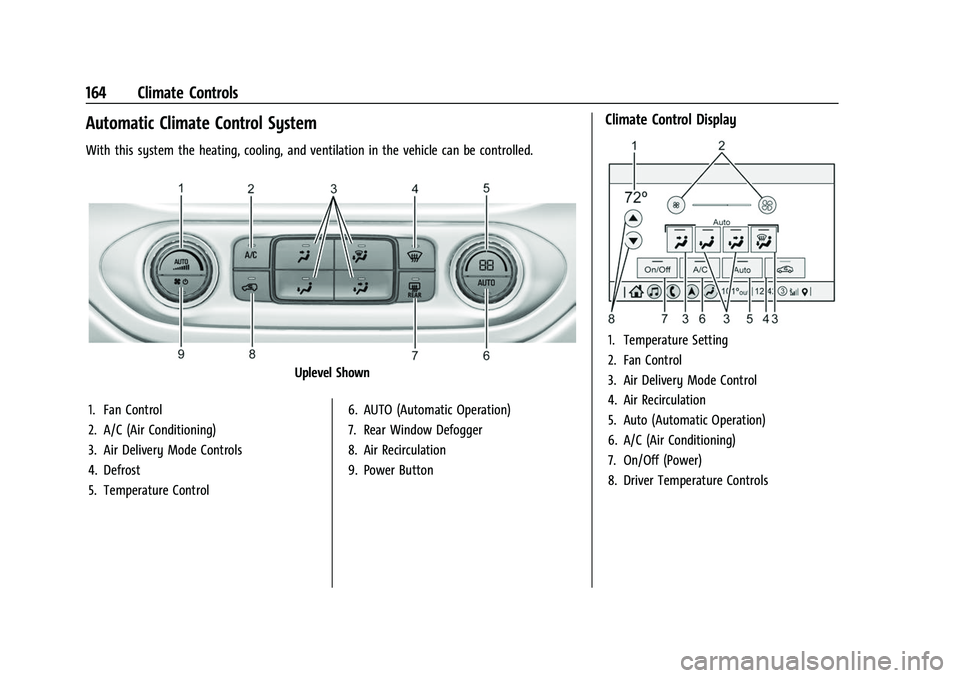
Automatic Climate Control System
With this system the heating, cooling, and ventilation in the vehicle can be controlled.
Uplevel Shown
1. Fan Control
2. A/C (Air Conditioning)
3. Air Delivery Mode Controls
4. Defrost
5. Temperature Control 6. AUTO (Automatic Operation)
7. Rear Window Defogger
8. Air Recirculation
9. Power Button
Climate Control Display
1. Temperature Setting
2. Fan Control
3. Air Delivery Mode Control
4. Air Recirculation
5. Auto (Automatic Operation)
6. A/C (Air Conditioning)
7. On/Off (Power)
8. Driver Temperature Controls
Page 166 of 362
Chevrolet Colorado Owner Manual (GMNA-Localizing-U.S./Canada/Mexico-
15274222) - 2022 - CRC - 11/2/21
Climate Controls 165
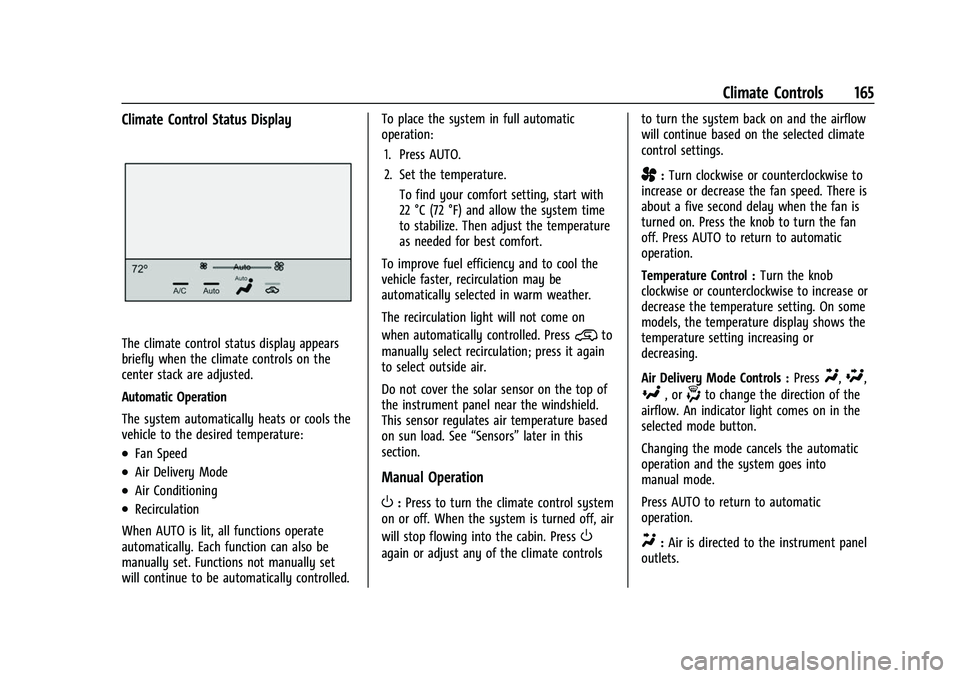
Climate Control Status Display
The climate control status display appears
briefly when the climate controls on the
center stack are adjusted.
Automatic Operation
The system automatically heats or cools the
vehicle to the desired temperature:
.Fan Speed
.Air Delivery Mode
.Air Conditioning
.Recirculation
When AUTO is lit, all functions operate
automatically. Each function can also be
manually set. Functions not manually set
will continue to be automatically controlled. To place the system in full automatic
operation:
1. Press AUTO.
2. Set the temperature. To find your comfort setting, start with
22 °C (72 °F) and allow the system time
to stabilize. Then adjust the temperature
as needed for best comfort.
To improve fuel efficiency and to cool the
vehicle faster, recirculation may be
automatically selected in warm weather.
The recirculation light will not come on
when automatically controlled. Press
@to
manually select recirculation; press it again
to select outside air.
Do not cover the solar sensor on the top of
the instrument panel near the windshield.
This sensor regulates air temperature based
on sun load. See “Sensors”later in this
section.
Manual Operation
O: Press to turn the climate control system
on or off. When the system is turned off, air
will stop flowing into the cabin. Press
O
again or adjust any of the climate controls to turn the system back on and the airflow
will continue based on the selected climate
control settings.
A:
Turn clockwise or counterclockwise to
increase or decrease the fan speed. There is
about a five second delay when the fan is
turned on. Press the knob to turn the fan
off. Press AUTO to return to automatic
operation.
Temperature Control : Turn the knob
clockwise or counterclockwise to increase or
decrease the temperature setting. On some
models, the temperature display shows the
temperature setting increasing or
decreasing.
Air Delivery Mode Controls : Press
Y,\,
[, or-to change the direction of the
airflow. An indicator light comes on in the
selected mode button.
Changing the mode cancels the automatic
operation and the system goes into
manual mode.
Press AUTO to return to automatic
operation.
Y: Air is directed to the instrument panel
outlets.
Page 167 of 362
Chevrolet Colorado Owner Manual (GMNA-Localizing-U.S./Canada/Mexico-
15274222) - 2022 - CRC - 11/2/21
166 Climate Controls
\:Air is divided between the instrument
panel and floor outlets.
[: Air is directed to the floor outlets,
with some to the windshield, outboard
instrument panel outlets, side window
outlets, and second row floor outlets.
-: This mode clears the windows of fog or
moisture. Air is directed to the windshield,
floor outlets, outboard instrument panel
outlets, and side window outlets. The
system automatically forces outside air into
the vehicle and the air conditioning
compressor will run, unless the outside
temperature is close to or below freezing.
0: Press to clear the windshield of fog or
frost more quickly. Air is directed to the
windshield and the side window vents, with
some air directed to the outboard
instrument panel outlets. The system
automatically forces outside air into the
vehicle and the air conditioning compressor
will run, unless the outside temperature is
close to or below freezing.
Do not drive the vehicle until all windows
are clear.
See Air Vents 0167. A/C :
Press to turn the air conditioning
system on or off. An indicator light comes
on to show that the air conditioning is
enabled. The A/C light will stay on even if
the outside temperatures are below freezing.
If the fan is turned off, the air conditioner
will not run. Press AUTO to return to
automatic operation.
@: Press to turn on recirculation. An
indicator light comes on. Air is recirculated
to quickly cool the inside of the vehicle.
It can also be used to help reduce outside
air and odors that enter the vehicle. The air
conditioning compressor also comes on
when this mode is activated. Press AUTO to
return to automatic operation.
Auto Defog : The climate control system
may have a sensor to automatically detect
high humidity inside the vehicle. When high
humidity is detected, the climate control
system may adjust air delivery modes,
outside air supply, and turn on the air
conditioner. If the climate control system
does not detect possible window fogging, it
returns to normal operation. To turn Auto
Defog off or on, see “Climate and Air
Quality” underVehicle Personalization 099.
Rear Window Defogger
The rear window defogger uses a warming
grid to remove fog from the rear window.
K:Press to turn the rear window defogger
on or off. An indicator light on the button
comes on to show that the rear window
defogger is on.
The rear window defogger only works when
the ignition is on. The defogger also turns
off if the ignition is turned to off or ACC/
ACCESSORY.
Caution
Using a razor blade or sharp object to
clear the inside rear window can damage
the rear window defogger. Repairs would
not be covered by the vehicle warranty.
Do not clear the inside rear window with
sharp objects.
Heated Mirrors : If equipped with heated
outside mirrors, the mirrors heat to help
clear fog or frost from the surface of the
mirror when the rear window defog button
is pressed. See Heated Mirrors 017.
Page 168 of 362
Chevrolet Colorado Owner Manual (GMNA-Localizing-U.S./Canada/Mexico-
15274222) - 2022 - CRC - 11/2/21
Climate Controls 167
Afterblow Feature
Under certain conditions, the fan may stay
on or may turn on and off several times
after you turn off and lock the vehicle. This
is normal.
Air Vents
Adjustable air vents are in the center and on
the side of the instrument panel. Use the
sliding knobs on the air vents to change the
direction of the airflow. Slide the knob up or
down to open or close off the airflow.
Air vents blow warm air on the side
windows in cold weather. If Floor, Defog,
or Defrost modes are selected, a small
amount of air will come from the vents
close to the window. If the airflow is shut
off using the sliding knobs, warm air will be
directed to the other instrument panel
vents. This is normal operation.
Use the sliding knobs to turn vent airflow
on or off based on the mode selected.
Operation Tips
.Clear away any ice, snow, or leaves from
air inlets at the base of the windshield
that could block the flow of air into the
vehicle.
.Clear snow off the hood to improve
visibility and help decrease moisture
drawn into the vehicle.
.Keep the path under the front seats clear
of objects to help circulate the air inside
of the vehicle more effectively.
.Use of non-GM approved hood deflectors
can adversely affect the performance of
the system. Check with your dealer
before adding equipment to the outside
of the vehicle.
Maintenance
Passenger Compartment Air Filter
The passenger compartment air filter
reduces dust, pollen, and other airborne
irritants from outside air that is pulled into
the vehicle. The filter will need to be
replaced periodically. SeeMaintenance
Schedule 0314.
Using the climate control system without an
air filter installed is not recommended.
Water or other debris could enter the
system and result in leaks or noises. Always
install a new filter when removing the old
filter. For more information on filter replacement,
see your dealer.
Service
All vehicles have a label underhood that
identifies the refrigerant used in the vehicle.
The refrigerant system should only be
serviced by trained and certified technicians.
The air conditioning evaporator should never
be repaired or replaced by one from a
salvage vehicle. It should only be replaced
by a new evaporator to ensure proper and
safe operation.
During service, all refrigerants should be
reclaimed with proper equipment. Venting
refrigerants directly to the atmosphere is
harmful to the environment and may also
create unsafe conditions based on
inhalation, combustion, frostbite, or other
health-based concerns.
The air conditioning system requires periodic
maintenance. See
Maintenance Schedule
0 314.
Page 169 of 362
Chevrolet Colorado Owner Manual (GMNA-Localizing-U.S./Canada/Mexico-
15274222) - 2022 - CRC - 11/2/21
168 Driving and Operating
Driving and Operating
Driving Information
Driving for Better Fuel Economy . . . . . . 169
Distracted Driving . . . . . . . . . . . . . . . . . . . . . 169
Defensive Driving . . . . . . . . . . . . . . . . . . . . . . 169
Impaired Driving . . . . . . . . . . . . . . . . . . . . . . . 170
Control of a Vehicle . . . . . . . . . . . . . . . . . . . 170
Braking . . . . . . . . . . . . . . . . . . . . . . . . . . . . . . . . 170
Steering . . . . . . . . . . . . . . . . . . . . . . . . . . . . . . . 170
Off-Road Recovery . . . . . . . . . . . . . . . . . . . . . . 171
Loss of Control . . . . . . . . . . . . . . . . . . . . . . . . . 171
Off-Road Driving . . . . . . . . . . . . . . . . . . . . . . . 172
Driving on Wet Roads . . . . . . . . . . . . . . . . . 175
Hill and Mountain Roads . . . . . . . . . . . . . . 176
Winter Driving . . . . . . . . . . . . . . . . . . . . . . . . . 176
If the Vehicle Is Stuck . . . . . . . . . . . . . . . . . . 177
Vehicle Load Limits . . . . . . . . . . . . . . . . . . . . 178
Truck-Camper Loading Information . . . . . 183
Starting and Operating
New Vehicle Break-In . . . . . . . . . . . . . . . . . . 183
Ignition Positions . . . . . . . . . . . . . . . . . . . . . . 184
Starting the Engine . . . . . . . . . . . . . . . . . . . . 186
Engine Heater . . . . . . . . . . . . . . . . . . . . . . . . . 187
Retained Accessory Power (RAP) . . . . . . . 188
Shifting Into Park . . . . . . . . . . . . . . . . . . . . . . 188
Shifting out of Park . . . . . . . . . . . . . . . . . . . 189
Parking over Things That Burn . . . . . . . . 189
Active Fuel Management . . . . . . . . . . . . . . 190
Engine Exhaust
Engine Exhaust . . . . . . . . . . . . . . . . . . . . . . . . 190
Running the Vehicle While Parked . . . . . 190
Automatic Transmission
Automatic Transmission . . . . . . . . . . . . . . . 190
Manual Mode . . . . . . . . . . . . . . . . . . . . . . . . . 193
Tow/Haul Mode . . . . . . . . . . . . . . . . . . . . . . . 194
Drive Systems
Four-Wheel Drive . . . . . . . . . . . . . . . . . . . . . . 195
Brakes
Antilock Brake System (ABS) . . . . . . . . . . 200
Parking Brake . . . . . . . . . . . . . . . . . . . . . . . . . . 201
Brake Assist . . . . . . . . . . . . . . . . . . . . . . . . . . . 201
Hill Start Assist (HSA) . . . . . . . . . . . . . . . . . 201
Ride Control Systems
Traction Control/Electronic StabilityControl . . . . . . . . . . . . . . . . . . . . . . . . . . . . . . 202
Hill Descent Control (HDC) . . . . . . . . . . . . 204
Driver Mode Control . . . . . . . . . . . . . . . . . . 205
Limited-Slip Differential . . . . . . . . . . . . . . . . 205
Locking Rear Axle . . . . . . . . . . . . . . . . . . . . . 205
Locking Front Axle . . . . . . . . . . . . . . . . . . . . 206
Cruise Control
Cruise Control . . . . . . . . . . . . . . . . . . . . . . . . . 207
Driver Assistance Systems
Driver Assistance Systems . . . . . . . . . . . . . 209 Assistance Systems for Parking or
Backing . . . . . . . . . . . . . . . . . . . . . . . . . . . . . . 210
Rear Vision Camera (RVC) . . . . . . . . . . . . . . 210
Park Assist . . . . . . . . . . . . . . . . . . . . . . . . . . . . . 212
Forward Collision Alert (FCA) System . . . . . . . . . . . . . . . . . . . . . . . . . . . . . . . 212
Automatic Emergency Braking (AEB) . . . 214
Lane Departure Warning (LDW) . . . . . . . . 215
Fuel
Top Tier Fuel . . . . . . . . . . . . . . . . . . . . . . . . . . 216
Recommended Fuel . . . . . . . . . . . . . . . . . . . . 216
Prohibited Fuels . . . . . . . . . . . . . . . . . . . . . . . . 217
Fuels in Foreign Countries . . . . . . . . . . . . . 217
Fuel Additives . . . . . . . . . . . . . . . . . . . . . . . . . . 217
Filling the Tank . . . . . . . . . . . . . . . . . . . . . . . . 217
Filling a Portable Fuel Container . . . . . . . 219
Trailer Towing
General Towing Information . . . . . . . . . . . 219
Driving Characteristics and Towing Tips . . . . . . . . . . . . . . . . . . . . . . . . . . 219
Trailer Towing . . . . . . . . . . . . . . . . . . . . . . . . . 223
Towing Equipment . . . . . . . . . . . . . . . . . . . . 228
Trailer Sway Control (TSC) . . . . . . . . . . . . . 233
Conversions and Add-Ons
Add-On Electrical Equipment . . . . . . . . . . . 234