Cargo CHEVROLET COLORADO 2023 Owners Manual
[x] Cancel search | Manufacturer: CHEVROLET, Model Year: 2023, Model line: COLORADO, Model: CHEVROLET COLORADO 2023Pages: 362, PDF Size: 13.62 MB
Page 6 of 362
Chevrolet Colorado Owner Manual (GMNA-Localizing-U.S./Canada/Mexico-
15274222) - 2022 - CRC - 11/2/21
Introduction 5
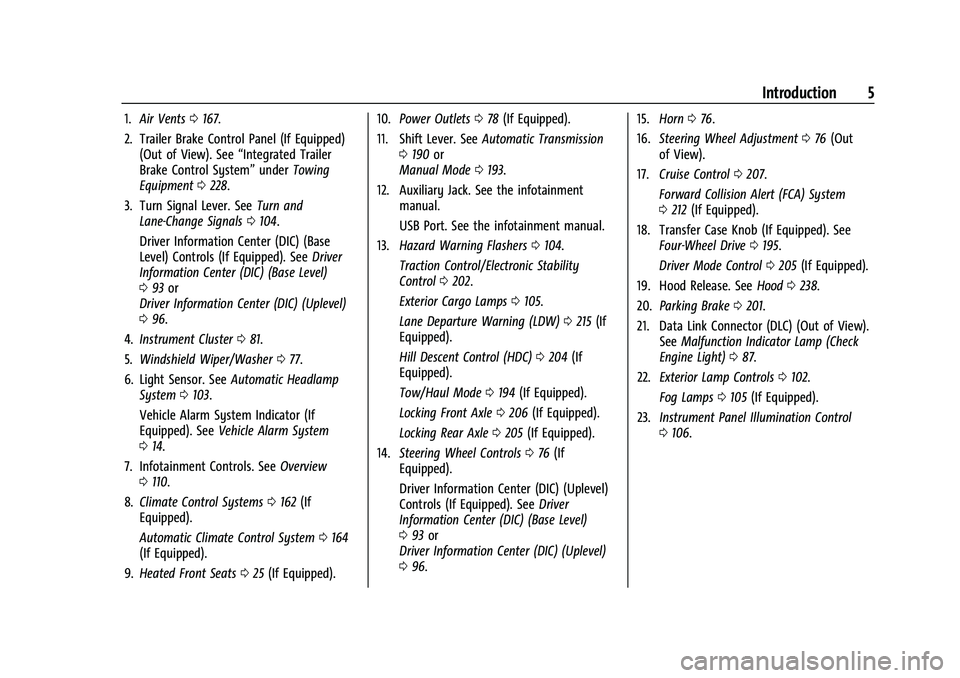
1.Air Vents 0167.
2. Trailer Brake Control Panel (If Equipped) (Out of View). See “Integrated Trailer
Brake Control System” underTowing
Equipment 0228.
3. Turn Signal Lever. See Turn and
Lane-Change Signals 0104.
Driver Information Center (DIC) (Base
Level) Controls (If Equipped). See Driver
Information Center (DIC) (Base Level)
0 93 or
Driver Information Center (DIC) (Uplevel)
0 96.
4. Instrument Cluster 081.
5. Windshield Wiper/Washer 077.
6. Light Sensor. See Automatic Headlamp
System 0103.
Vehicle Alarm System Indicator (If
Equipped). See Vehicle Alarm System
0 14.
7. Infotainment Controls. See Overview
0 110.
8. Climate Control Systems 0162 (If
Equipped).
Automatic Climate Control System 0164
(If Equipped).
9. Heated Front Seats 025 (If Equipped). 10.
Power Outlets 078 (If Equipped).
11. Shift Lever. See Automatic Transmission
0 190 or
Manual Mode 0193.
12. Auxiliary Jack. See the infotainment manual.
USB Port. See the infotainment manual.
13. Hazard Warning Flashers 0104.
Traction Control/Electronic Stability
Control 0202.
Exterior Cargo Lamps 0105.
Lane Departure Warning (LDW) 0215 (If
Equipped).
Hill Descent Control (HDC) 0204 (If
Equipped).
Tow/Haul Mode 0194 (If Equipped).
Locking Front Axle 0206 (If Equipped).
Locking Rear Axle 0205 (If Equipped).
14. Steering Wheel Controls 076 (If
Equipped).
Driver Information Center (DIC) (Uplevel)
Controls (If Equipped). See Driver
Information Center (DIC) (Base Level)
0 93 or
Driver Information Center (DIC) (Uplevel)
0 96. 15.
Horn 076.
16. Steering Wheel Adjustment 076 (Out
of View).
17. Cruise Control 0207.
Forward Collision Alert (FCA) System
0 212 (If Equipped).
18. Transfer Case Knob (If Equipped). See Four-Wheel Drive 0195.
Driver Mode Control 0205 (If Equipped).
19. Hood Release. See Hood0238.
20. Parking Brake 0201.
21. Data Link Connector (DLC) (Out of View). SeeMalfunction Indicator Lamp (Check
Engine Light) 087.
22. Exterior Lamp Controls 0102.
Fog Lamps 0105 (If Equipped).
23. Instrument Panel Illumination Control
0106.
Page 28 of 362
Chevrolet Colorado Owner Manual (GMNA-Localizing-U.S./Canada/Mexico-
15274222) - 2022 - CRC - 11/2/21
Seats and Restraints 27
Warning (Continued)
seatback, always check to be sure that
the seat belts are properly routed and
attached, and are not twisted.
4. Reconnect the center seat belt latch plate to the mini-buckle. Make sure the
seat belt is not twisted.
5. Push and pull on the latch plate to be sure it is secure.
When the seatback is not in use, it should
be kept in the upright, locked position.
Seat Belts
This section describes how to use seat belts
properly, and some things not to do.
{Warning
Do not let anyone ride where a seat belt
cannot be worn properly. In a crash,
if you or your passenger(s) are not
wearing seat belts, injuries can be much
worse than if you are wearing seat belts.
You can be seriously injured or killed by
hitting things inside the vehicle harder or (Continued)
Warning (Continued)
by being ejected from the vehicle. In
addition, anyone who is not buckled up
can strike other passengers in the vehicle.
It is extremely dangerous to ride in a
cargo area, inside or outside of a vehicle.
In a collision, passengers riding in these
areas are more likely to be seriously
injured or killed. Do not allow passengers
to ride in any area of the vehicle that is
not equipped with seats and seat belts.
Always wear a seat belt, and check that
all passenger(s) are restrained
properly too.
This vehicle has indicators as a reminder to
buckle the seat belts. See Seat Belt
Reminders 085.
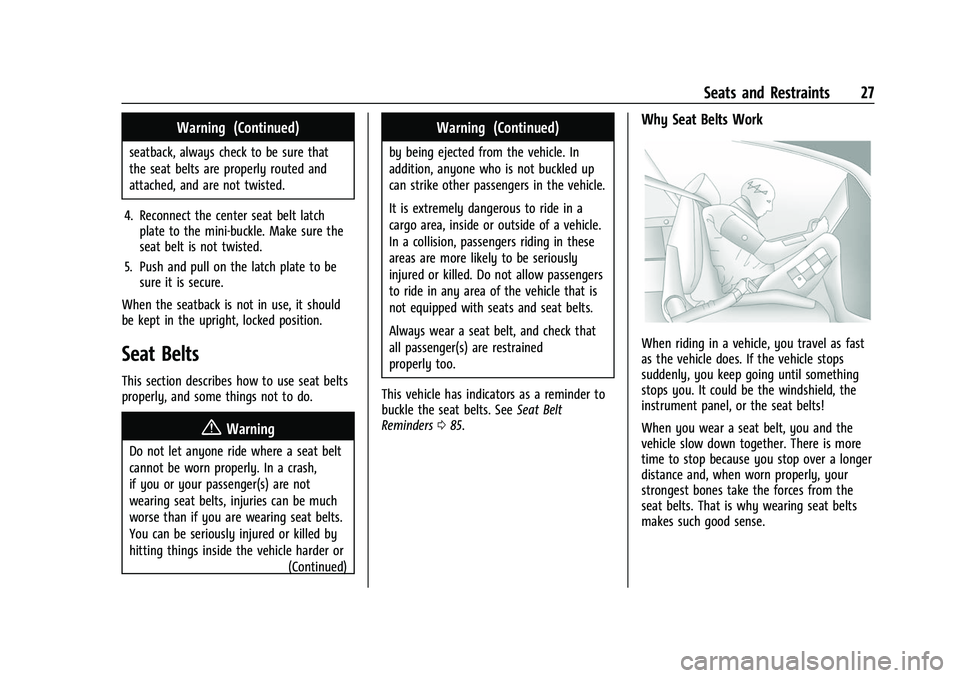
Why Seat Belts Work
When riding in a vehicle, you travel as fast
as the vehicle does. If the vehicle stops
suddenly, you keep going until something
stops you. It could be the windshield, the
instrument panel, or the seat belts!
When you wear a seat belt, you and the
vehicle slow down together. There is more
time to stop because you stop over a longer
distance and, when worn properly, your
strongest bones take the forces from the
seat belts. That is why wearing seat belts
makes such good sense.
Page 56 of 362
Chevrolet Colorado Owner Manual (GMNA-Localizing-U.S./Canada/Mexico-
15274222) - 2022 - CRC - 11/2/21
Seats and Restraints 55
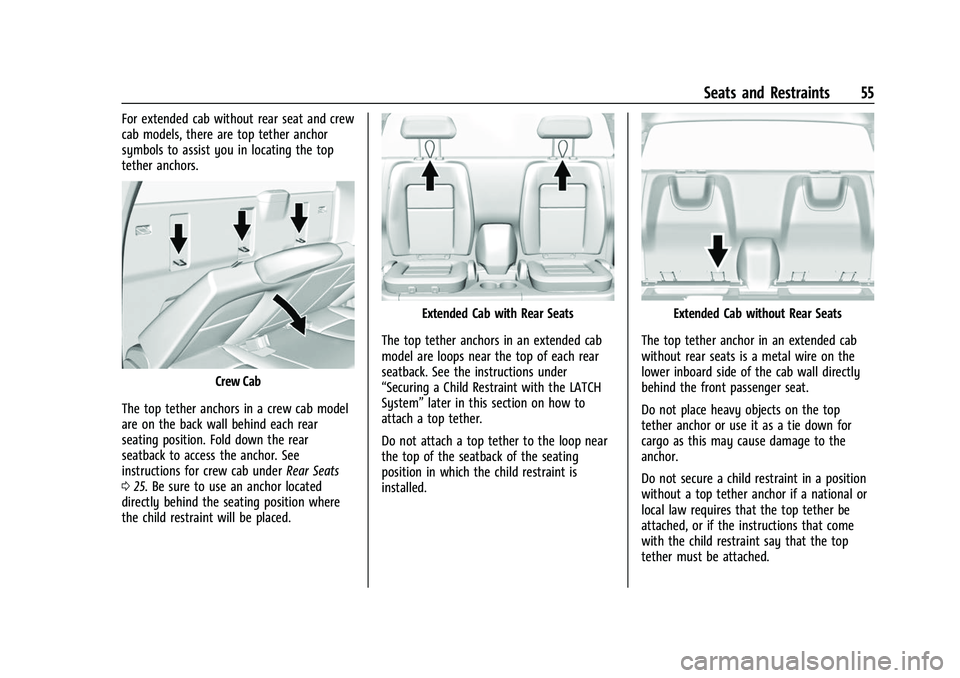
For extended cab without rear seat and crew
cab models, there are top tether anchor
symbols to assist you in locating the top
tether anchors.
Crew Cab
The top tether anchors in a crew cab model
are on the back wall behind each rear
seating position. Fold down the rear
seatback to access the anchor. See
instructions for crew cab under Rear Seats
0 25. Be sure to use an anchor located
directly behind the seating position where
the child restraint will be placed.
Extended Cab with Rear Seats
The top tether anchors in an extended cab
model are loops near the top of each rear
seatback. See the instructions under
“Securing a Child Restraint with the LATCH
System” later in this section on how to
attach a top tether.
Do not attach a top tether to the loop near
the top of the seatback of the seating
position in which the child restraint is
installed.Extended Cab without Rear Seats
The top tether anchor in an extended cab
without rear seats is a metal wire on the
lower inboard side of the cab wall directly
behind the front passenger seat.
Do not place heavy objects on the top
tether anchor or use it as a tie down for
cargo as this may cause damage to the
anchor.
Do not secure a child restraint in a position
without a top tether anchor if a national or
local law requires that the top tether be
attached, or if the instructions that come
with the child restraint say that the top
tether must be attached.
Page 89 of 362
Chevrolet Colorado Owner Manual (GMNA-Localizing-U.S./Canada/Mexico-
15274222) - 2022 - CRC - 11/2/21
88 Instruments and Controls
If the light is flashing :A malfunction has
been detected that could damage the
emission control system and increase vehicle
emissions. Diagnosis and service may be
required.
To help prevent damage, reduce vehicle
speed and avoid hard accelerations and
uphill grades. If towing a trailer, reduce the
amount of cargo being hauled as soon as
possible.
If the light continues to flash, find a safe
place to park. Turn the vehicle off and wait
at least 10 seconds before restarting the
engine. If the light is still flashing, follow
the previous guidelines and see your dealer
for service as soon as possible.
If the light is on steady : A malfunction has
been detected. Diagnosis and service may be
required.
Check the following:
.If fuel has been added to the vehicle
using the capless funnel adapter, make
sure that it has been removed. See
“Filling the Tank with a Portable Gas Can”
under Filling the Tank 0217. The
diagnostic system can detect if the
adapter has been left installed in the
vehicle, allowing fuel to evaporate into the atmosphere. A few driving trips with
the adapter removed may turn off the
light.
.Poor fuel quality can cause inefficient
engine operation and poor driveability,
which may go away once the engine is
warmed up. If this occurs, change the fuel
brand. It may require at least one full
tank of the proper fuel to turn the light
off. See
Recommended Fuel 0216.
If the light remains on, see your dealer.
Emissions Inspection and Maintenance
Programs
If the vehicle requires an Emissions
Inspection/Maintenance test, the test
equipment will likely connect to the
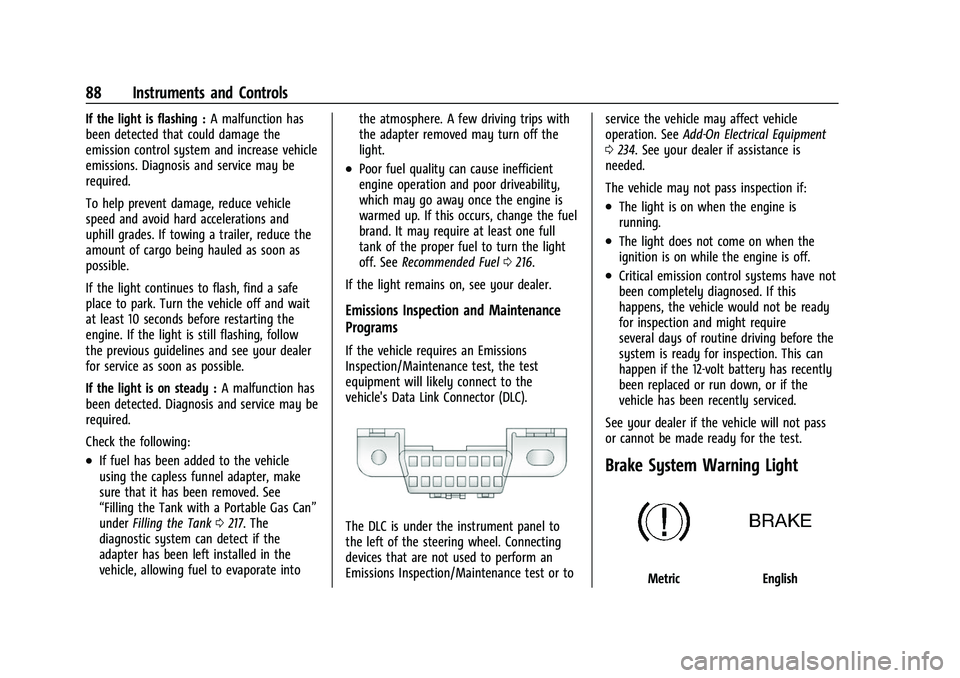
vehicle's Data Link Connector (DLC).
The DLC is under the instrument panel to
the left of the steering wheel. Connecting
devices that are not used to perform an
Emissions Inspection/Maintenance test or to service the vehicle may affect vehicle
operation. See
Add-On Electrical Equipment
0 234. See your dealer if assistance is
needed.
The vehicle may not pass inspection if:
.The light is on when the engine is
running.
.The light does not come on when the
ignition is on while the engine is off.
.Critical emission control systems have not
been completely diagnosed. If this
happens, the vehicle would not be ready
for inspection and might require
several days of routine driving before the
system is ready for inspection. This can
happen if the 12-volt battery has recently
been replaced or run down, or if the
vehicle has been recently serviced.
See your dealer if the vehicle will not pass
or cannot be made ready for the test.
Brake System Warning Light
MetricEnglish
Page 103 of 362
Chevrolet Colorado Owner Manual (GMNA-Localizing-U.S./Canada/Mexico-
15274222) - 2022 - CRC - 11/2/21
102 Lighting
Lighting
Exterior Lighting
Exterior Lamp Controls . . . . . . . . . . . . . . . . 102
Exterior Lamps Off Reminder . . . . . . . . . . 103
Headlamp High/Low-Beam Changer . . . 103
Flash-to-Pass . . . . . . . . . . . . . . . . . . . . . . . . . . . 103
Daytime Running Lamps (DRL) . . . . . . . . . 103
Automatic Headlamp System . . . . . . . . . . 103
Hazard Warning Flashers . . . . . . . . . . . . . . 104
Turn and Lane-Change Signals . . . . . . . . . 104
Fog Lamps . . . . . . . . . . . . . . . . . . . . . . . . . . . . . 105
Exterior Cargo Lamps . . . . . . . . . . . . . . . . . . 105
Interior Lighting
Instrument Panel IlluminationControl . . . . . . . . . . . . . . . . . . . . . . . . . . . . . . 106
Dome Lamps . . . . . . . . . . . . . . . . . . . . . . . . . . 106
Reading Lamps . . . . . . . . . . . . . . . . . . . . . . . . 106
Lighting Features
Entry Lighting . . . . . . . . . . . . . . . . . . . . . . . . . 107
Exit Lighting . . . . . . . . . . . . . . . . . . . . . . . . . . . 107
Battery Load Management . . . . . . . . . . . . 107
Battery Power Protection . . . . . . . . . . . . . . 108
Exterior Lighting Battery Saver . . . . . . . . 108
Exterior Lighting
Exterior Lamp Controls
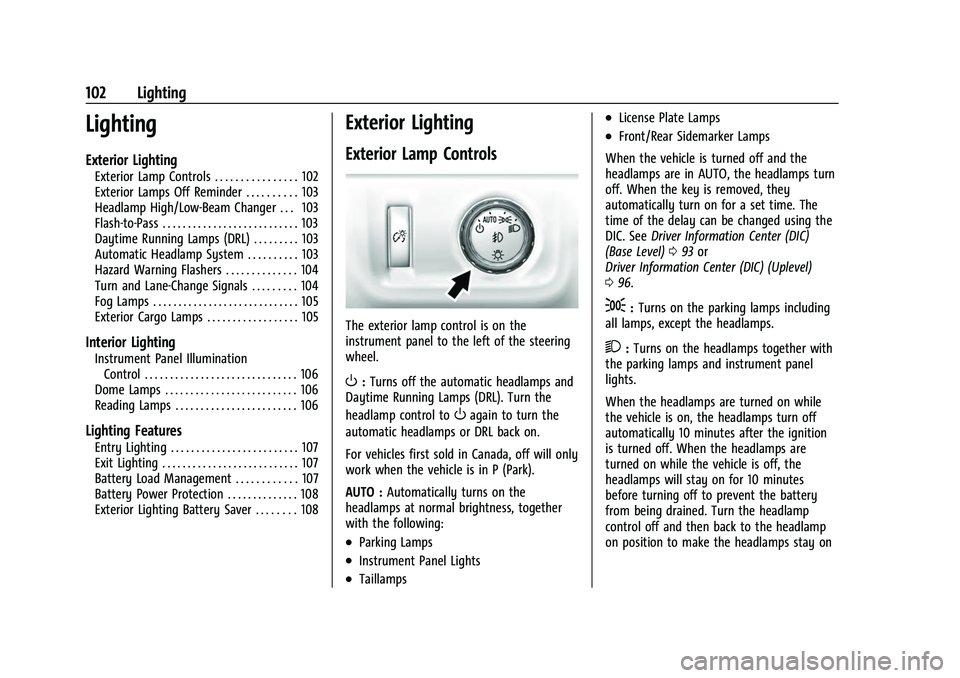
The exterior lamp control is on the
instrument panel to the left of the steering
wheel.
O: Turns off the automatic headlamps and
Daytime Running Lamps (DRL). Turn the
headlamp control to
Oagain to turn the
automatic headlamps or DRL back on.
For vehicles first sold in Canada, off will only
work when the vehicle is in P (Park).
AUTO : Automatically turns on the
headlamps at normal brightness, together
with the following:
.Parking Lamps
.Instrument Panel Lights
.Taillamps
.License Plate Lamps
.Front/Rear Sidemarker Lamps
When the vehicle is turned off and the
headlamps are in AUTO, the headlamps turn
off. When the key is removed, they
automatically turn on for a set time. The
time of the delay can be changed using the
DIC. See Driver Information Center (DIC)
(Base Level) 093 or
Driver Information Center (DIC) (Uplevel)
0 96.
;:Turns on the parking lamps including
all lamps, except the headlamps.
2: Turns on the headlamps together with
the parking lamps and instrument panel
lights.
When the headlamps are turned on while
the vehicle is on, the headlamps turn off
automatically 10 minutes after the ignition
is turned off. When the headlamps are
turned on while the vehicle is off, the
headlamps will stay on for 10 minutes
before turning off to prevent the battery
from being drained. Turn the headlamp
control off and then back to the headlamp
on position to make the headlamps stay on
Page 106 of 362
Chevrolet Colorado Owner Manual (GMNA-Localizing-U.S./Canada/Mexico-
15274222) - 2022 - CRC - 11/2/21
Lighting 105
An arrow on the instrument cluster flashes
in the direction of the turn or lane change.
Move the turn signal lever all the way up or
down to signal a turn.
Raise or lower the lever for less than
one second until the arrow starts to flash to
signal a lane change. This causes the turn
signals to automatically flash three times.
Holding the turn signal lever for more than
one second will cause the turn signals to
flash until the lever is released.
The lever returns to its starting position
whenever it is released.
If after signaling a turn or a lane change the
arrows flash rapidly or do not come on, a
signal bulb could be burned out.
Replace any burned out bulbs. If a bulb is
not burned out, check the fuse. SeeFuses
and Circuit Breakers 0262.
Turn Signal On Chime
If the turn signal is left on for more than
1.2 km (0.75 mi), a chime sounds at each
flash of the turn signal. The message TURN
SIGNAL ON will also appear in the Driver
Information Center (DIC). To turn the chime
and message off, move the turn signal lever
to the off position.Fog Lamps
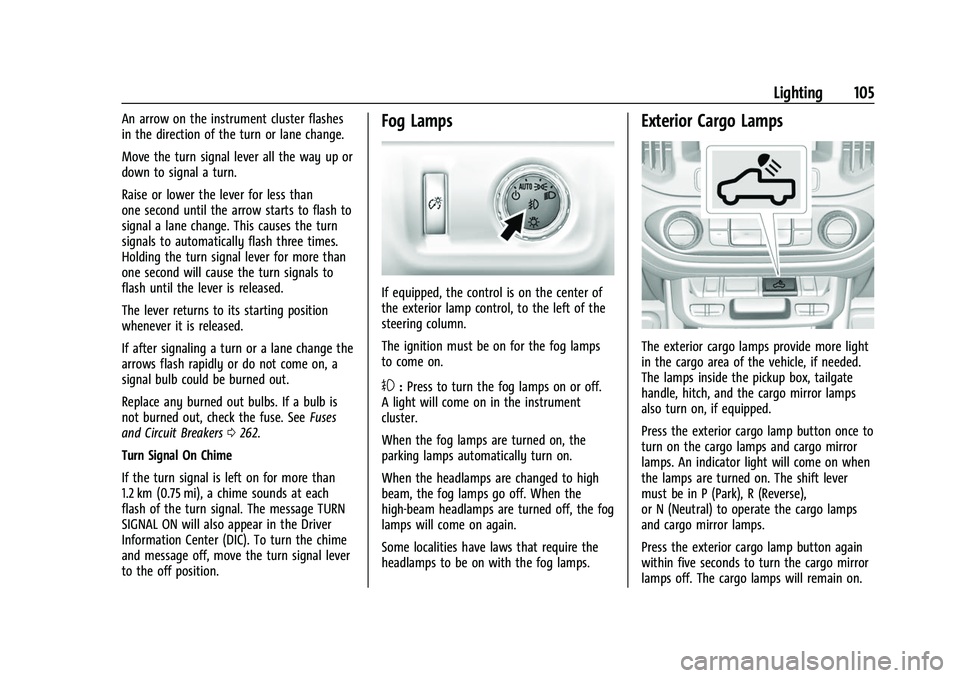
If equipped, the control is on the center of
the exterior lamp control, to the left of the
steering column.
The ignition must be on for the fog lamps
to come on.
#: Press to turn the fog lamps on or off.
A light will come on in the instrument
cluster.
When the fog lamps are turned on, the
parking lamps automatically turn on.
When the headlamps are changed to high
beam, the fog lamps go off. When the
high-beam headlamps are turned off, the fog
lamps will come on again.
Some localities have laws that require the
headlamps to be on with the fog lamps.
Exterior Cargo Lamps
The exterior cargo lamps provide more light
in the cargo area of the vehicle, if needed.
The lamps inside the pickup box, tailgate
handle, hitch, and the cargo mirror lamps
also turn on, if equipped.
Press the exterior cargo lamp button once to
turn on the cargo lamps and cargo mirror
lamps. An indicator light will come on when
the lamps are turned on. The shift lever
must be in P (Park), R (Reverse),
or N (Neutral) to operate the cargo lamps
and cargo mirror lamps.
Press the exterior cargo lamp button again
within five seconds to turn the cargo mirror
lamps off. The cargo lamps will remain on.
Page 107 of 362
Chevrolet Colorado Owner Manual (GMNA-Localizing-U.S./Canada/Mexico-
15274222) - 2022 - CRC - 11/2/21
106 Lighting
Press the exterior cargo lamp button for a
third time to turn off all the cargo lamps.
Become familiar with and follow all state
and local laws that apply to cargo lamp
operation.
Interior Lighting
Instrument Panel Illumination
Control
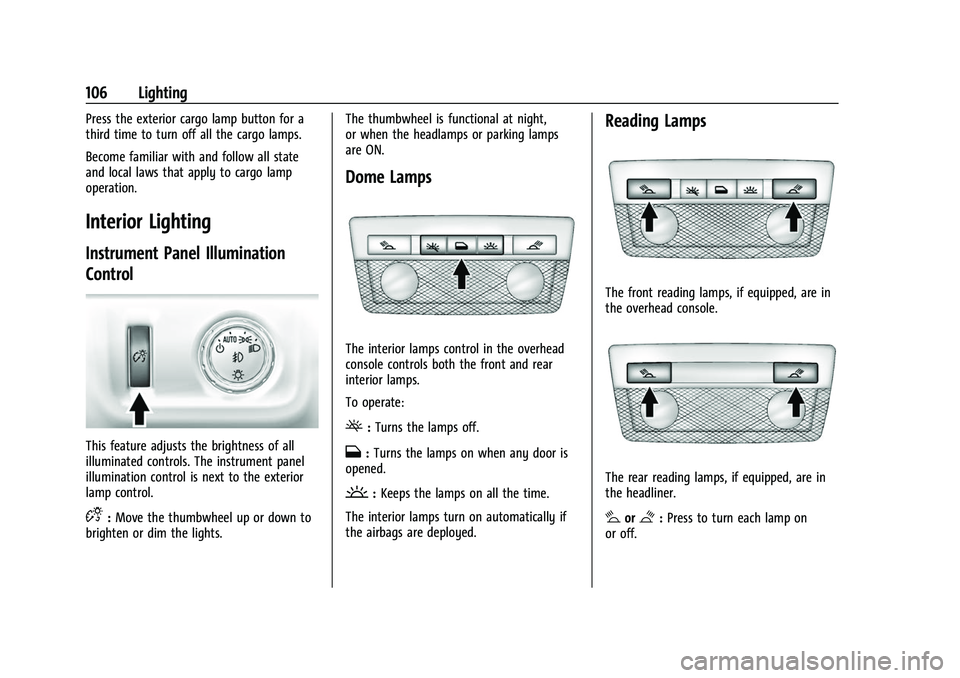
This feature adjusts the brightness of all
illuminated controls. The instrument panel
illumination control is next to the exterior
lamp control.
D:Move the thumbwheel up or down to
brighten or dim the lights. The thumbwheel is functional at night,
or when the headlamps or parking lamps
are ON.
Dome Lamps
The interior lamps control in the overhead
console controls both the front and rear
interior lamps.
To operate:
(:
Turns the lamps off.
H:Turns the lamps on when any door is
opened.
': Keeps the lamps on all the time.
The interior lamps turn on automatically if
the airbags are deployed.
Reading Lamps
The front reading lamps, if equipped, are in
the overhead console.
The rear reading lamps, if equipped, are in
the headliner.
#or$: Press to turn each lamp on
or off.
Page 173 of 362
Chevrolet Colorado Owner Manual (GMNA-Localizing-U.S./Canada/Mexico-
15274222) - 2022 - CRC - 11/2/21
172 Driving and Operating
.Ease your foot off the accelerator pedal
and steer the way you want the vehicle
to go. The vehicle may straighten out. Be
ready for a second skid if it occurs.
.Slow down and adjust your driving
according to weather conditions. Stopping
distance can be longer and vehicle control
can be affected when traction is reduced
by water, snow, ice, gravel, or other
material on the road. Learn to recognize
warning clues—such as enough water,
ice, or packed snow on the road to make
a mirrored surface —and slow down
when you have any doubt.
.Try to avoid sudden steering, acceleration,
or braking, including reducing vehicle
speed by shifting to a lower gear. Any
sudden changes could cause the tires to
slide.
Remember: Antilock brakes help avoid only
the braking skid.
Off-Road Driving
Four-wheel-drive vehicles can be used for
off-road driving. Vehicles without four-wheel
drive and vehicles not equipped with All
Terrain (AT) or On-Off Road (OOR) tires must
not be driven off-road except on a level, solid surface. For contact information about
the original equipment tires, see the
warranty manual.
One of the best ways for successful off-road
driving is to control the speed.
{Warning
When driving off-road, bouncing and
quick changes in direction can easily
throw you out of position. This could
cause you to lose control and crash. You
and your passengers should always wear
seat belts.
Before Driving Off-Road
.Have all necessary maintenance and
service work completed.
.Fuel the vehicle, fill fluid levels, and check
inflation pressure in all tires, including the
spare, if equipped.
.Read all the information about
four-wheel-drive vehicles in this manual.
.Remove any underbody air deflector,
if equipped. Re-attach the air deflector
after off-road driving.
.Know the local laws that apply to off-road
driving.To gain more ground clearance if needed, it
may be necessary to remove the front fascia
lower air dam, if equipped. However, driving
without the air dam reduces fuel economy.
Caution
Operating the vehicle for extended
periods without the front fascia lower air
dam installed can cause improper airflow
to the engine. Reattach the front fascia
air dam after off-road driving.
Loading the Vehicle for Off-Road Driving
{Warning
.Unsecured cargo on the load floor can
be tossed about when driving over
rough terrain. You or your passengers
can be struck by flying objects. Secure
the cargo properly.
.Keep cargo in the cargo area as far
forward and as low as possible. The
heaviest things should be on the floor,
forward of the rear axle.
.Heavy loads on the roof raise the
vehicle's center of gravity, making it
more likely to roll over. You can be
(Continued)
Page 174 of 362
Chevrolet Colorado Owner Manual (GMNA-Localizing-U.S./Canada/Mexico-
15274222) - 2022 - CRC - 11/2/21
Driving and Operating 173
Warning (Continued)
seriously or fatally injured if the
vehicle rolls over. Put heavy loads
inside the cargo area, not on the roof.
For more information about loading the
vehicle, see Vehicle Load Limits 0178 and
Tires 0269.
Environmental Concerns
.Always use established trails, roads, and
areas that have been set aside for public
off-road recreational driving and obey all
posted regulations.
.Do not damage shrubs, flowers, trees,
or grasses or disturb wildlife.
.Do not park over things that burn. See
Parking over Things That Burn 0189.
Driving on Hills
Driving safely on hills requires good
judgment and an understanding of what the
vehicle can and cannot do.
{Warning
Many hills are simply too steep for any
vehicle. Driving up hills can cause the
vehicle to stall. Driving down hills can
cause loss of control. Driving across hills
can cause a rollover. You could be injured
or killed. Do not drive on steep hills.
Before driving on a hill, assess the
steepness, traction, and obstructions. If the
terrain ahead cannot be seen, get out of the
vehicle and walk the hill before driving
further.
When driving on hills:
.Use a low gear and keep a firm grip on
the steering wheel.
.Maintain a slow speed.
.When possible, drive straight up or down
the hill.
.Slow down when approaching the top of
the hill.
.Use headlamps even during the day to
make the vehicle more visible.
{Warning
Driving to the top of a hill at high speed
can cause a crash. There could be a
drop-off, embankment, cliff, or even
another vehicle. You could be seriously
injured or killed. As you near the top of a
hill, slow down and stay alert.
.Never go downhill forward or backward
with either the transmission or transfer
case in N (Neutral). The brakes could
overheat and you could lose control.
{Warning
If the vehicle has the two-speed
automatic or electronic transfer case,
shifting the transfer case to N (Neutral)
can cause your vehicle to roll even if the
transmission is in P (Park). This is because
the N (Neutral) position on the transfer
case overrides the transmission. You or
someone else could be injured. If leaving
the vehicle, set the parking brake and
shift the transmission to P (Park). Shift
the transfer case to any position but
N (Neutral).
Page 180 of 362
Chevrolet Colorado Owner Manual (GMNA-Localizing-U.S./Canada/Mexico-
15274222) - 2022 - CRC - 11/2/21
Driving and Operating 179
weight and includes the weight of all
occupants, cargo, and all
nonfactory-installed options. Two labels
on the vehicle may show how much
weight it was designed to carry: the
Tire and Loading Information label and
the Certification/Tire label.
{Warning
Do not load the vehicle any heavier
than the Gross Vehicle Weight Rating
(GVWR), or either the maximum
front or rear Gross Axle Weight
Rating (GAWR). This can cause
systems to break and change the
way the vehicle handles. This could
cause loss of control and a crash.
Overloading can also reduce stopping
performance, damage the tires, and
shorten the life of the vehicle.
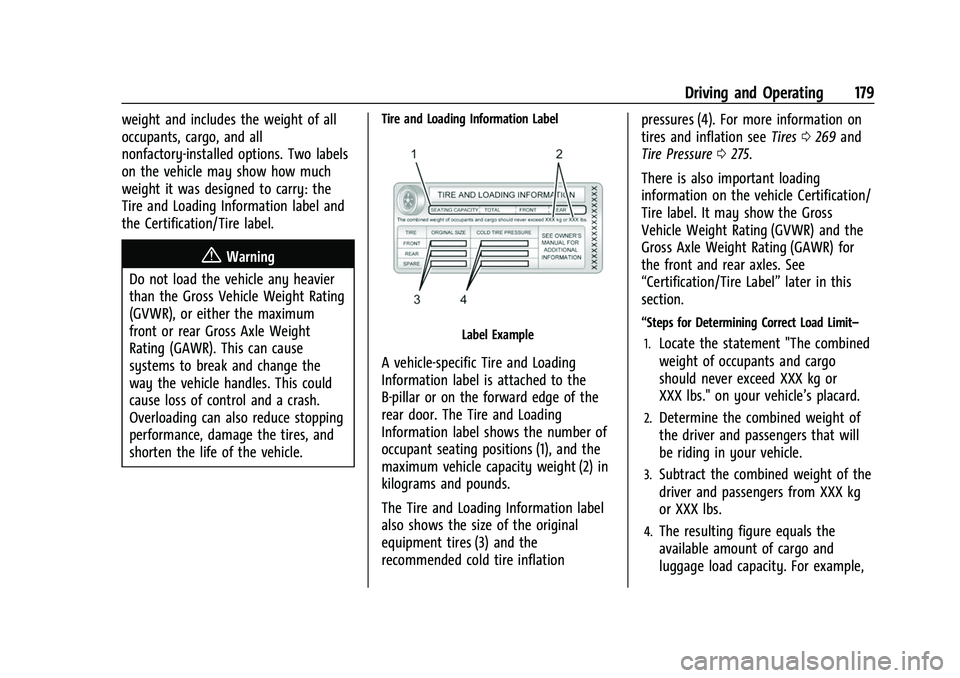
Tire and Loading Information Label
Label Example
A vehicle-specific Tire and Loading
Information label is attached to the
B-pillar or on the forward edge of the
rear door. The Tire and Loading
Information label shows the number of
occupant seating positions (1), and the
maximum vehicle capacity weight (2) in
kilograms and pounds.
The Tire and Loading Information label
also shows the size of the original
equipment tires (3) and the
recommended cold tire inflation pressures (4). For more information on
tires and inflation see
Tires0269 and
Tire Pressure 0275.
There is also important loading
information on the vehicle Certification/
Tire label. It may show the Gross
Vehicle Weight Rating (GVWR) and the
Gross Axle Weight Rating (GAWR) for
the front and rear axles. See
“Certification/Tire Label” later in this
section.
“Steps for Determining Correct Load Limit–
1.
Locate the statement "The combined
weight of occupants and cargo
should never exceed XXX kg or
XXX lbs." on your vehicle’s placard.
2.Determine the combined weight of
the driver and passengers that will
be riding in your vehicle.
3.Subtract the combined weight of the
driver and passengers from XXX kg
or XXX lbs.
4.The resulting figure equals the
available amount of cargo and
luggage load capacity. For example,