assist step CHEVROLET COLORADO 2023 Owners Manual
[x] Cancel search | Manufacturer: CHEVROLET, Model Year: 2023, Model line: COLORADO, Model: CHEVROLET COLORADO 2023Pages: 362, PDF Size: 13.62 MB
Page 9 of 362
Chevrolet Colorado Owner Manual (GMNA-Localizing-U.S./Canada/Mexico-
15274222) - 2022 - CRC - 11/2/21
8 Keys, Doors, and Windows
2. Turn the ignition off and removethe key.
3. Quickly, within five seconds, insert the second original already programmed key
in the ignition and turn the ignition on.
4. Turn the ignition off, and remove the key.
5. Insert the new key to be programmed and turn the ignition on within
five seconds.
The security light will turn off once the
key has been programmed.
6. Repeat Steps 1–5 if additional keys are to be programmed.
If a key is lost or damaged, see your dealer
to have a new key made.
Programming without Two Recognized Keys
Program a new key to the vehicle when a
recognized key is not available. Canadian
regulations require that owners see their
dealer.
If two currently recognized keys are not
available, follow this procedure to program
the first key. This procedure will take approximately
30 minutes to complete for the first key.
The vehicle must be off and all of the keys
you wish to program must be with you.
1. Insert the new vehicle key into the ignition.
2. Turn the ignition on. The security light will come on.
3. Wait 10 minutes until the security light turns off.
4. Turn the ignition off.
5. Repeat Steps 2–4 two more times. After the third time, turn the ignition on; the
key is learned and all previously known
keys will no longer work with the
vehicle.
6. To learn the second key, turn the ignition off. Insert the second key to be
learned and turn the ignition on.
After two keys are learned, the remaining
keys can be learned by following the
procedure in “Programming with Two
Recognized Keys.”
If it becomes difficult to turn a key, inspect
the key blade for debris. Periodically clean
with a brush or pick. See your dealer if a replacement key or
additional key is needed.
If locked out of the vehicle, see
Roadside
Assistance Program 0334.
With an active OnStar or connected service
plan, an OnStar Advisor may remotely
unlock the vehicle. See OnStar Overview
0 342.
Remote Keyless Entry (RKE)
System
See Radio Frequency Statement 0339.
If there is a decrease in the Remote Keyless
Entry (RKE) operating range:
.Check the distance. The transmitter may
be too far from the vehicle.
.Check the location. Other vehicles or
objects may be blocking the signal.
.Check the transmitter's battery. See
“Battery Replacement” later in this
section.
.If the transmitter is still not working
correctly, see your dealer or a qualified
technician for service.
Page 210 of 362
Chevrolet Colorado Owner Manual (GMNA-Localizing-U.S./Canada/Mexico-
15274222) - 2022 - CRC - 11/2/21
Driving and Operating 209
Driver Information Center (DIC) (Uplevel)
096. The increment value used depends on
the units displayed.
Reducing Speed While Using Cruise Control
If the cruise control system is already
activated:
.Press and hold SET– until the desired
lower speed is reached, then release it.
.To slow down in small increments, briefly
press SET– . For each press, the vehicle
goes about 1 km/h (1 mph) slower.
The speedometer reading can be displayed
in either English or metric units. See Driver
Information Center (DIC) (Base Level) 093 or
Driver Information Center (DIC) (Uplevel)
0 96. The increment value used depends on
the units displayed.
Passing Another Vehicle While Using Cruise
Control
Use the accelerator pedal to increase the
vehicle speed. When you take your foot off
the pedal, the vehicle will slow down to the
previous set cruise speed. While pressing the
accelerator pedal or shortly following the
release to override cruise control, briefly
pressing SET– will result in cruise control set
to the current vehicle speed. Using Cruise Control on Hills
How well the cruise control will work on
hills depends on the vehicle speed, load, and
the steepness of the hills. When going up
steep hills, you might have to step on the
accelerator pedal to maintain your speed.
When going downhill, you might have to
brake or shift to a lower gear to keep your
speed down. If the brake pedal is applied,
cruise control will disengage.
Ending Cruise Control
There are three ways to end cruise control:
.Step lightly on the brake pedal.
.Press*.
.To turn off cruise control, press5.
Erasing Speed Memory
The cruise control set speed is erased from
memory if
5is pressed or if the ignition is
turned off.
Driver Assistance Systems
This vehicle may have features that work
together to help avoid crashes or reduce
crash damage while driving, backing, and
parking. Read this entire section before
using these systems.
{Warning
Do not rely on the Driver Assistance
Systems. These systems do not replace
the need for paying attention and driving
safely. You may not hear or see alerts or
warnings provided by these systems.
Failure to use proper care when driving
may result in injury, death, or vehicle
damage. See Defensive Driving 0169.
Under many conditions, these systems
will not:
.Detect children, pedestrians, bicyclists,
or animals.
.Detect vehicles or objects outside the
area monitored by the system.
.Work at all driving speeds.
.Warn you or provide you with enough
time to avoid a crash.
.Work under poor visibility or bad
weather conditions.
.Work if the detection sensor is not
cleaned or is covered by ice, snow,
mud, or dirt. (Continued)
Page 220 of 362
Chevrolet Colorado Owner Manual (GMNA-Localizing-U.S./Canada/Mexico-
15274222) - 2022 - CRC - 11/2/21
Driving and Operating 219
{Warning
Attempting to refuel from a portable fuel
container without using the funnel
adapter may cause fuel spillage and
damage the capless fuel system. This
could cause a fire. You or others could be
badly burned and the vehicle could be
damaged.
3. Remove and clean the funnel adapter and return it to the storage location.
Filling a Portable Fuel Container
{Warning
Never fill a portable fuel container while
it is in the vehicle. Static electricity
discharge from the container can ignite
the fuel vapor. You or others could be
badly burned and the vehicle could be
damaged. To help avoid injury to you
and others:
.Dispense fuel only into approved
containers.
(Continued)
Warning (Continued)
.Do not fill a container while it is
inside a vehicle, in a vehicle's trunk, in
a pickup bed, or on any surface other
than the ground.
.Bring the fill nozzle in contact with
the inside of the fill opening before
operating the nozzle. Maintain contact
until filling is complete.
.Keep sparks, flames, and smoking
materials away from fuel.
.Avoid using electronic devices while
pumping fuel.
.When transporting a fuel container or
other material that can catch fire in
the truck bed, secure the container to
prevent spills.
Trailer Towing
General Towing Information
Only use towing equipment that has been
designed for the vehicle. Contact your dealer
or trailering dealer for assistance with
preparing the vehicle to tow a trailer. Read
the entire section before towing a trailer. To tow a disabled vehicle, see
Towing the
Vehicle 0300. To tow the vehicle behind
another vehicle such as a motor home, see
Recreational Vehicle Towing 0301.
Driving Characteristics and
Towing Tips
{Warning
You can lose control when towing a
trailer if the correct equipment is not
used or the vehicle is not driven properly.
For example, if the trailer is too heavy or
the trailer brakes are inadequate for the
load, the vehicle may not stop as
expected. You and others could be
seriously injured. The vehicle may also be
damaged, and the repairs would not be
covered by the vehicle warranty. Pull a
trailer only if all the steps in this section
have been followed. Ask your dealer for
advice and information about towing a
trailer with the vehicle.
Driving with a Trailer
Trailering is different than just driving the
vehicle by itself. Trailering means changes in
handling, acceleration, braking, durability,
Page 257 of 362
Chevrolet Colorado Owner Manual (GMNA-Localizing-U.S./Canada/Mexico-
15274222) - 2022 - CRC - 11/2/21
256 Vehicle Care
.To check the parking brake's holding
ability: With the engine running and the
transmission in N (Neutral), slowly remove
foot pressure from the regular brake
pedal. Do this until the vehicle is held by
the parking brake only.
.To check the P (Park) mechanism's holding
ability: With the engine running, shift to
P (Park). Then release the parking brake
followed by the regular brake.
Contact your dealer if service is required.
Wiper Blade Replacement
Windshield wiper blades should be inspected
for wear or cracking.
Replacement blades come in different types
and are removed in different ways. For
proper windshield wiper blade length and
type, see Maintenance Replacement Parts
0 324.
Caution
Allowing the wiper arm to touch the
windshield when no wiper blade is
installed could damage the windshield.
Any damage that occurs would not be
(Continued)
Caution (Continued)
covered by the vehicle warranty. Do not
allow the wiper arm to touch the
windshield.
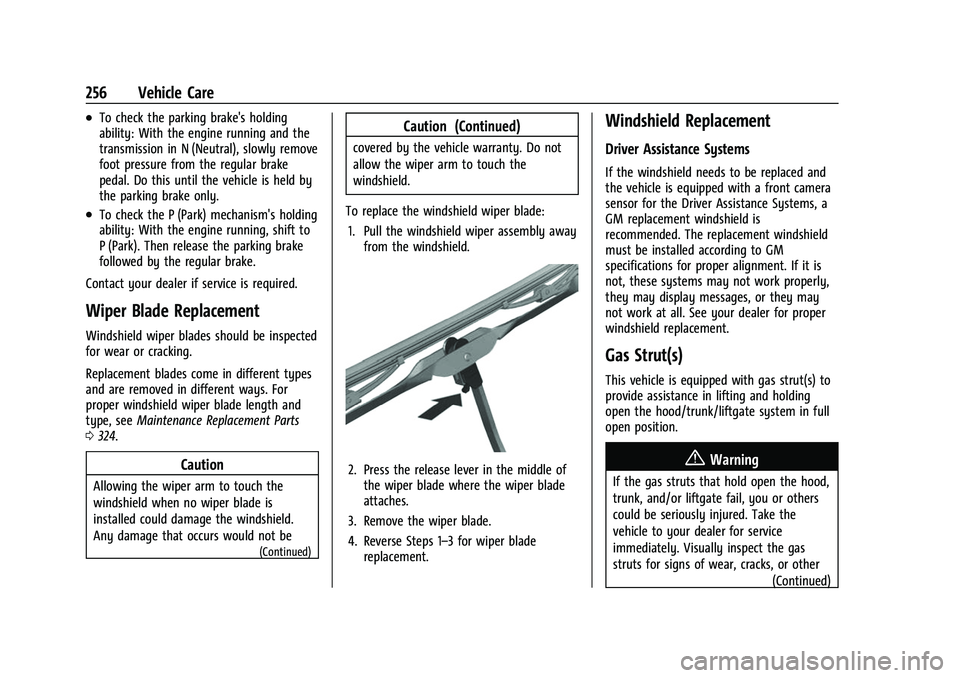
To replace the windshield wiper blade: 1. Pull the windshield wiper assembly away from the windshield.
2. Press the release lever in the middle ofthe wiper blade where the wiper blade
attaches.
3. Remove the wiper blade.
4. Reverse Steps 1–3 for wiper blade replacement.
Windshield Replacement
Driver Assistance Systems
If the windshield needs to be replaced and
the vehicle is equipped with a front camera
sensor for the Driver Assistance Systems, a
GM replacement windshield is
recommended. The replacement windshield
must be installed according to GM
specifications for proper alignment. If it is
not, these systems may not work properly,
they may display messages, or they may
not work at all. See your dealer for proper
windshield replacement.
Gas Strut(s)
This vehicle is equipped with gas strut(s) to
provide assistance in lifting and holding
open the hood/trunk/liftgate system in full
open position.
{Warning
If the gas struts that hold open the hood,
trunk, and/or liftgate fail, you or others
could be seriously injured. Take the
vehicle to your dealer for service
immediately. Visually inspect the gas
struts for signs of wear, cracks, or other
(Continued)
Page 309 of 362
Chevrolet Colorado Owner Manual (GMNA-Localizing-U.S./Canada/Mexico-
15274222) - 2022 - CRC - 11/2/21
308 Vehicle Care
Steering, Suspension, and Chassis
Components
Visually inspect steering, suspension, and
chassis components for damaged, loose,
or missing parts or signs of wear at least
once a year.
Inspect power steering for proper
attachment, connections, binding, leaks,
cracks, chafing, etc.
Visually check constant velocity joint boots
and axle seals for leaks.
Body Component Lubrication
Lubricate all key lock cylinders, hood hinges,
liftgate hinges, steel fuel door hinge, and
power assist step hinges, unless the
components are plastic. Applying silicone
grease on weatherstrips with a clean cloth
will make them last longer, seal better, and
not stick or squeak
Underbody Maintenance
At least twice a year, spring and fall, use
plain water to flush any corrosive materials
from the underbody. Take care to
thoroughly clean any areas where mud and
other debris can collect.Do not directly power wash the transfer
case and/or front/rear axle output seals.
High pressure water can overcome the seals
and contaminate the fluid. Contaminated
fluid will decrease the life of the transfer
case and/or axles and should be replaced.
Sheet Metal Damage
If the vehicle is damaged and requires sheet
metal repair or replacement, make sure the
body repair shop applies anti-corrosion
material to parts repaired or replaced to
restore corrosion protection.
Original manufacturer replacement parts will
provide the corrosion protection while
maintaining the vehicle warranty.
Finish Damage
Quickly repair minor chips and scratches
with touch-up materials available from your
dealer to avoid corrosion. Larger areas of
finish damage can be corrected in your
dealer's body and paint shop.
Chemical Paint Spotting
Airborne pollutants can fall upon and attack
painted vehicle surfaces causing blotchy,
ring-shaped discolorations, and small,irregular dark spots etched into the paint
surface. Refer to
“Finish Care”previously in
this section.
Interior Care
To prevent dirt particle abrasions, regularly
clean the vehicle's interior. Before using
cleaners, read and follow all safety
instructions on the label. While cleaning the
interior, open the doors and windows to get
proper ventilation. Newspapers or dark
garments can transfer color to the vehicle’s
interior.
Caution
Immediately remove cleaners, hand
lotions, sunscreen, and insect repellent
from all interior surfaces or permanent
damage may result.
Caution
Use cleaners specifically designed for the
surfaces being cleaned to prevent
permanent damage to the vehicle. Apply
all cleaners directly to a cleaning cloth.
Do not spray cleaners on any switches or
controls.
Page 332 of 362
Chevrolet Colorado Owner Manual (GMNA-Localizing-U.S./Canada/Mexico-
15274222) - 2022 - CRC - 11/2/21
Customer Information 331
Customer Information
Customer Information
Customer Satisfaction Procedure . . . . . . . 331
Customer Assistance Offices . . . . . . . . . . . 333
Customer Assistance for Text Telephone(TTY) Users . . . . . . . . . . . . . . . . . . . . . . . . . . 333
Online Owner Center . . . . . . . . . . . . . . . . . . 333
GM Mobility Reimbursement Program . . . . . . . . . . . . . . . . . . . . . . . . . . . . . 334
Roadside Assistance Program . . . . . . . . . . 334
Scheduling Service Appointments . . . . . . 336
Courtesy Transportation Program . . . . . 336
Collision Damage Repair . . . . . . . . . . . . . . . 337
Publication Ordering Information . . . . . . 338
Radio Frequency Statement . . . . . . . . . . . 339
Reporting Safety Defects
Reporting Safety Defects to the United States Government . . . . . . . . . . . . . . . . . . 339
Reporting Safety Defects to the Canadian Government . . . . . . . . . . . . . . . 339
Reporting Safety Defects to General Motors . . . . . . . . . . . . . . . . . . . . . . . . . . . . . . 340
Vehicle Data Recording and Privacy
Vehicle Data Recording and Privacy . . . 340
Cybersecurity . . . . . . . . . . . . . . . . . . . . . . . . . 340
Event Data Recorders . . . . . . . . . . . . . . . . . . 341
OnStar . . . . . . . . . . . . . . . . . . . . . . . . . . . . . . . . . 341
Infotainment System . . . . . . . . . . . . . . . . . . 341Customer Information
Customer Satisfaction Procedure
Your satisfaction and goodwill are important
to your dealer and to Chevrolet. Normally,
any concerns with the sales transaction or
the operation of the vehicle will be resolved
by your dealer's sales or service
departments. Sometimes, however, despite
the best intentions of all concerned,
misunderstandings can occur. If your concern
has not been resolved to your satisfaction,
the following steps should be taken:
STEP ONE : Discuss your concern with a
member of dealership management.
Normally, concerns can be quickly resolved
at that level. If the matter has already been
reviewed with the sales, service, or parts
manager, contact the owner of your
dealership or the general manager.
STEP TWO : If after contacting a member of
dealership management, it appears your
concern cannot be resolved by your
dealership without further help, in the U.S.,
call the Chevrolet Customer Assistance
Center at 1-800-222-1020. In Canada, call
General Motors of Canada Customer Care
Centre at 1-800-263-3777 (English),
or 1-800-263-7854 (French).
Page 333 of 362
Chevrolet Colorado Owner Manual (GMNA-Localizing-U.S./Canada/Mexico-
15274222) - 2022 - CRC - 11/2/21
332 Customer Information
We encourage you to call the toll-free
number in order to give your inquiry
prompt attention. Have the following
information available to give the Customer
Assistance representative:
.Vehicle Identification Number (VIN). This is
available from the vehicle registration or
title, or the plate at the top left of the
instrument panel and visible through the
windshield.
.Dealership name and location.
.Vehicle delivery date and present mileage.
When contacting Chevrolet, remember that
your concern will likely be resolved at a
dealer's facility. That is why we suggest
following Step One first.
STEP THREE —U.S. Owners : Both General
Motors and your dealer are committed to
making sure you are completely satisfied
with your new vehicle. However, if you
continue to remain unsatisfied after
following the procedure outlined in
Steps One and Two, you can file with the
Better Business Bureau (BBB) AUTO LINE
Program to enforce your rights.
The BBB AUTO LINE Program is an
out-of-court program administered by BBB
National Programs, Inc. to settle automotive disputes regarding vehicle repairs or the
interpretation of the New Vehicle Limited
Warranty. Although you may be required to
resort to this informal dispute resolution
program prior to filing a court action, use of
the program is free of charge and your case
will generally be heard within 40 days.
If you do not agree with the decision given
in your case, you may reject it and proceed
with any other venue for relief available
to you.
You may contact the BBB AUTO LINE
Program using the toll-free telephone
number or write them at the following
address:
BBB AUTO LINE a Division of
BBB National Programs, Inc.
1676 International Drive
Suite 550
McLean, VA 22102
Telephone: 1-800-955-5100
https://www.bbb.org/council/
programs-services/
dispute-handling-and-resolution/bbb-auto-line
This program is available in all 50 states and
the District of Columbia. Eligibility is limited
by vehicle age, mileage, and other factors.
General Motors reserves the right to change
eligibility limitations and/or discontinue its
participation in this program.
STEP THREE
—Canadian Owners : In the
event that you do not feel your concerns
have been addressed after following the
procedure outlined in Steps One and Two,
General Motors of Canada Company wants
you to be aware of its participation in a
no-charge Mediation/Arbitration Program.
General Motors of Canada Company has
committed to binding arbitration of owner
disputes involving factory-related vehicle
service claims. The program provides for the
review of the facts involved by an impartial
third party arbiter, and may include an
informal hearing before the arbiter. The
program is designed so that the entire
dispute settlement process, from the time
you file your complaint to the final decision,
should be completed in about 70 days. We
believe our impartial program offers
advantages over courts in most jurisdictions
because it is informal, quick, and free of
charge.
For further information concerning eligibility
in the Canadian Motor Vehicle Arbitration
Plan (CAMVAP), call toll-free 1-800-207-0685,