radio CHEVROLET CORVETTE 1996 4.G User Guide
[x] Cancel search | Manufacturer: CHEVROLET, Model Year: 1996, Model line: CORVETTE, Model: CHEVROLET CORVETTE 1996 4.GPages: 386, PDF Size: 20.12 MB
Page 153 of 386
Downloaded from www.Manualslib.com manuals search engine Setting the Tone
BASS:
Turn this knob to the right to hear more bass.
TREB: Turn this control behind the BASS knob to the
right to hear more treble.
Adjusting the Speakers
BAL:
Turn the control behind the FADE knob to move
the sound between the right and left speakers.
FADE: Turn this knob to move the sound between the
front and rear speakers. Turn it counterclockwise to hear
more sound from the front speakers and clockwise to
hear more sound from the rear speakers. Note that
if you
turn the knob all the way to
F or R, you may still get
some sound from the opposite speakers.
Playing a Cassette Tape
Your tape player is built to work best with tapes that are
30 to 45 minutes long on each side. Tapes longer than
that are
so thin they may not work well in this player.
The longer side with the tape visible goes in first. If you
hear nothing or hear just a garbled sound, it may not
be in squarely. Press EJCT to remove the tape and
start over.
Once the tape
is playing, use the knobs for VOL, FADE
and
BAL, just as you do for the radio.
REV: Press this button to return to a previously played
passage rapidly. Press it again to play the passage. The
radio will play while the tape is rewinding.
FF: Press this button to fast forward or advance the tape
rapidly. Press it again to play. The radio will play while
the tape is advancing.
REPT Press this button to go to the beginning of the
current selection after
10 seconds or more of play. After
five seconds or less of play, the player will return to the
beginning of the previous selection.
SRCH: Press this button to go to the beginning of the
next selection.
SCAN: Press this button to listen to the first eight
seconds of each passage. Press it again to stop scanning.
PROG-RCL: Press the upper knob to change the side
of the tape that
is playing. The lighted arrows show
which
side is currently playing.
E JCT Press this button to remove the tape.
STOP-PLAY: Press this button to listen to the radio
without ejecting the cassette tape. Press it again to go
back to the tape.
Cr02: Press this button when playing high-bias chrome
or metal tapes.
3-12
Page 154 of 386
Downloaded from www.Manualslib.com manuals search engine Delco-Bose' AM-FM Stereo with Cassette
Tape Player
(Option)
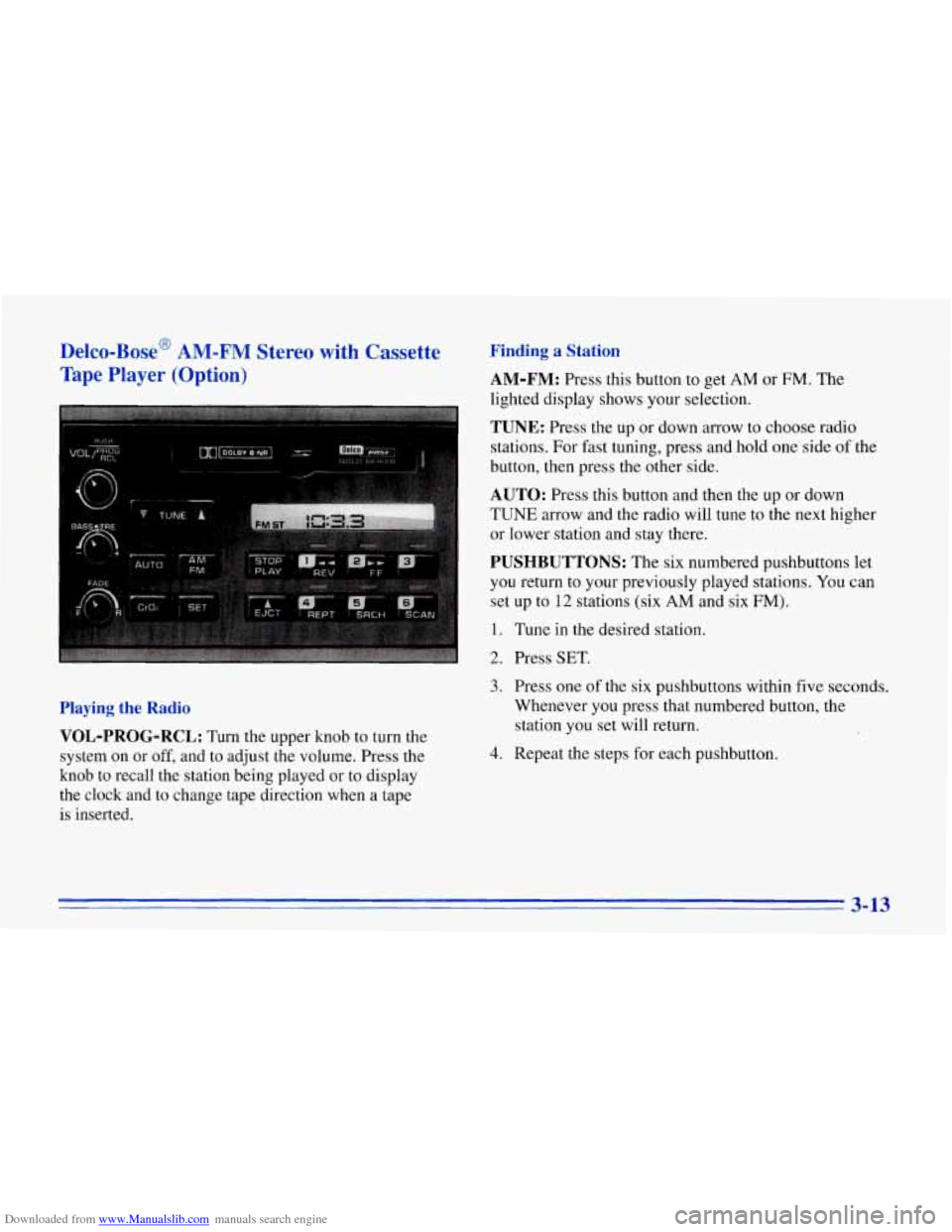
Finding a Station
AM-FM:
Press this button to get AM or FM. The
lighted display shows your selection.
TUNE: Press the up or down arrow to choose radio
stations. For fast tuning, press and hold one side of the
button, then press the other side.
AUTO: Press this button and then the up or down
TUNE arrow and the radio will tune to the next higher
or lower station and stay there.
PUSHBUTTONS: The six numbered pushbuttons let
you return to your previously played stations. You can
set up to
12 stations (six AM and six FM).
1. Tune in the desired station.
2. Press SET.
Playing the Radio
VOL-PROG-RCL:
Turn the upper knob to turn the
system on or
off, and to adjust the volume. Press the
knob to recall the station being played or to display
the clock and to change tape direction when a tape
is inserted.
3. Press one of the six pushbuttons within five seconds.
Whenever you press that numbered button, the
station you set will return.
4. Repeat the steps for each pushbutton.
3-13
Page 155 of 386
Downloaded from www.Manualslib.com manuals search engine Setting the Tone
BASS:
Turn this knob to the right to hear more bass.
TREB: Turn this control behind the BASS knob to the
right to hear more treble.
Adjusting the Speakers
BAL:
With the DelcoBose system, your speakers are
electronically balanced.
FADE: Turn this knob to move the sound between the
front and rear speakers. Note that, with the Delco/Bose
system, if you turn the knob all the way to
F or R, you
may still get some sound from the opposite speakers.
Playing a Cassette Tape
Your tape player is built to work best with tapes that are
30 to 45 minutes long on each side. Tapes longer than
that
are so thin they may not work well in this player.
The longer side with the tape visible goes in first. If you
hear nothing or hear just a garbled sound, it may not
be in squarely. Press EJCT to remove the tape and
start over.
Once the tape is playing, use the knobs for
VOL, FADE
and BAL, just as you do for the radio.
REV: Press this button to return to a previously played
passage rapidly. Press it again to play .the passage. The
radio will play while the tape is rewinding.
FF: Press this button to fast forward or advance the tape
rapidly. Press it again to play the passage. The radio will
play while the tape is advancing.
REPT Press this button to go to the beginning of the
current selection after 10 seconds or more of play. After
five seconds or less
of play, the player will return to the
beginning of the previous selection.
SRCH: Press this button to go to the beginning of the
next selection.
SCAN: Press this button to listen to the first eight seconds
of each passage.
Press it again to ,stop scanning.
PROG-RCL: Press the upper knob to change the side
of the tape that is playing. The lighted
arrows show
which side is currently playing.
EJCT Press this button to remove the tape.
STOP-PLAY: Press this button to listen to the radio
without ejecting the cassette tape. Press it again to
go
back to the tape.
CrO2: Press this button when playing high-bias chrome
or metal tapes.
3-14
Page 156 of 386
Downloaded from www.Manualslib.com manuals search engine Delco-Bose AM-FM Stereo with Cassette
Tape
and Compact Disc Players (Option)
Playing the Radio
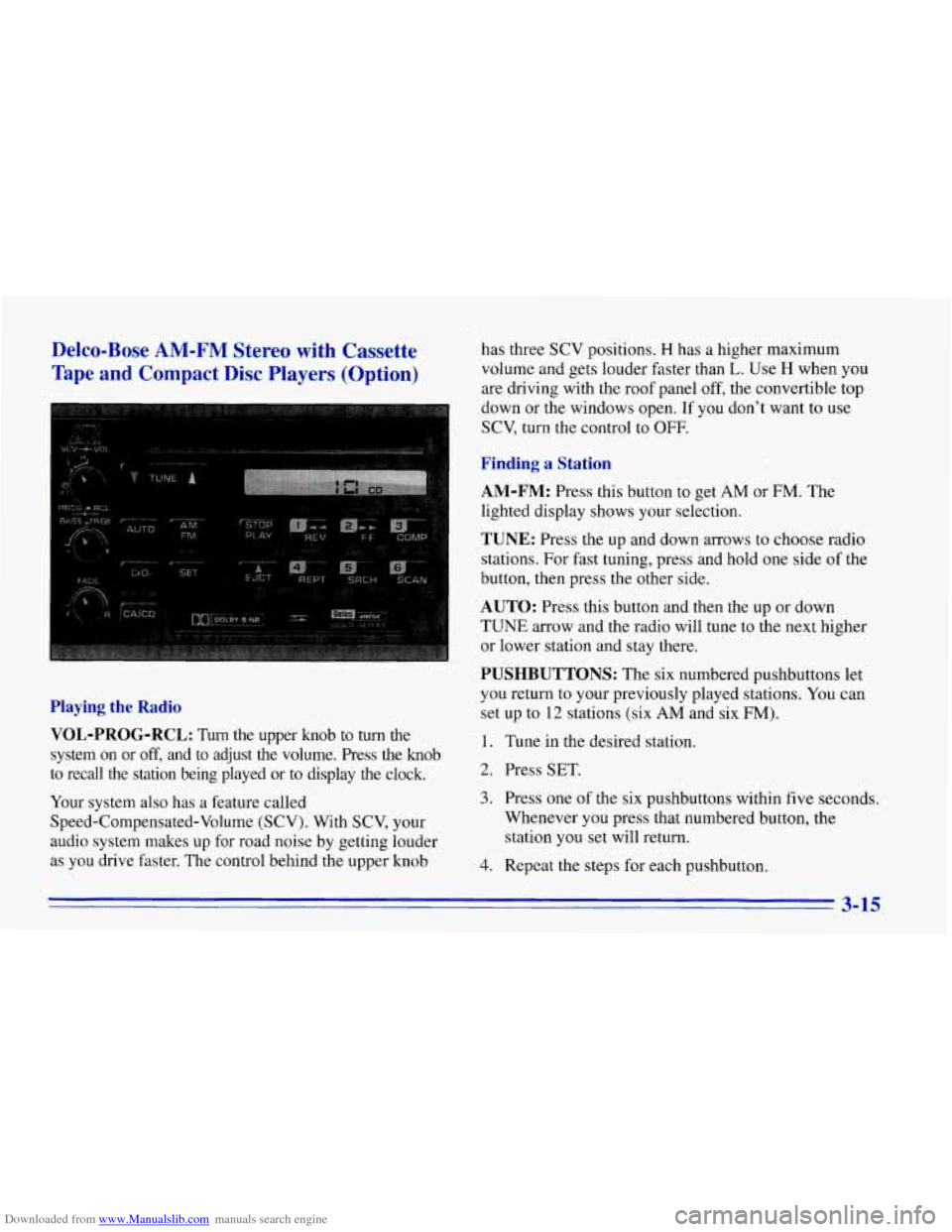
VOL-PROG-RCL:
Turn the upper knob to turn the
system on or
off, and to adjust the volume. Press the knob
to recall the station being played or to display the clock.
Your system also has a feature called
Speed-Compensated-Volume (SCV). With SCV, your
audio system makes up for road noise by getting louder
as you drive faster. The control behind the upper knob has three
SCV positions.
H has a higher maximum
volume and gets louder faster than
L. Use H when you
are driving with the roof panel off, the convertible top
down or the windows open. If you don't want to use
SCV, turn the control to OFF.
Finding a Station
AM-FM:
Press this button to get AM or FM. The
lighted display shows your selection.
TUNE: Press the up and down arrows to choose radio
stations. For fast tuning, press and hold one side of the
button, then press the other side.
AUTO: Press this button and then the up or down
TUNE arrow and the radio will tune to the next higher
or lower station and stay there.
PUSHBUTTONS: The six numbered pushbuttons let
you return to your previously played stations.
You can
set up to
12 stations (six AM and six FM).
1. Tune in the desired station.
2. Press SET.
3. Press one of the six pushbuttons within five seconds.
Whenever
you press that numbered button, the
station you
set will return.
4. Repeat the steps for each pushbutton.
3-15
Page 157 of 386
Downloaded from www.Manualslib.com manuals search engine Setting the Tone
BASS:
Turn this knob to the right to hear more bass.
TREB: Turn this control behind the BASS knob to the
right to hear more treble.
Adjusting the Speakers
BAL:
With the DelcoBose system, your speakers are
electronically balanced.
FADE: Turn this knob to move the sound between the
front and rear speakers. Note that if you turn the knob
all the way to
F or R, you may still get some sound from
the opposite speakers.
Playing a Cassette Tape
Your tape player is built to work best with tapes that are
30 to 45 minutes long on each side. Tapes ,longer than
that are
so thin they may not work well in this player.
The longer side with the tape visible goes in first.
If you
hear nothing or hear just a garbled sound, it may not
be in squarely. Press EJCT to remove the tape and
start over.
Once the tape is playing, use the
knobs for VOL, FADE
and BAL, just as you do for the radio.
REV: Press this button to return to a previously played
passage rapidly. Press it again to play the passage. The
radio will play while the tape is rewinding.
FF: Press this button to fast forward or advance the tape
rapidly. Press it again to play. The radio will play while
the tape is advancing.
REPT Press this button to go to the beginning of the
current selection after
10 seconds or more of play. After
five seconds or less
of play, the player will return to the
beginning
of the previous selection.
SRCH: Press this button to go to the beginning of the
next selection.
SCAN: Press this button to listen to the first eight
seconds of each passage. Press it again to stop scanning.
PROG-RCL: Press the upper knob to change the side
of the tape that is playing. The lighted arrows show
which side is currently playing.
EJCT Press this button to remove the tape.
STOP-PLAY: Press this button to listen to the radio
without ejecting the cassette tape. Press it again to
go
back to the tape.
Cr02: Press this button when playing high-bias chrome
or metal tapes.
Page 158 of 386
Downloaded from www.Manualslib.com manuals search engine Playing a Compact Disc
Don’t use the mini-discs (three-inch singles). They
will eject, and they won’t play. Use only full-size
compact discs.
With the audio system on, insert a disc into the slot with
the label side up. CD will appear on the display and
track one will begin to play.
If both a tape and a compact
disc are loaded into the system, press CNCD to select
the one you want.
If the disc comes back
out and ERR appears on the
display, it could be that:
0 The disc is upside down.
0 It is dirty, scratched or wet.
There’s too much moisture in the air. (Wait about an
hour and try again.)
You are driving on a very rough road.
0 The temperature is too hot or too cold.
RCL: Press this button to see what track is playing.
Press it again within five seconds to
see how long it has
been playing, the elapsed time (EL TIME).
REV: Press and hold this button to return to a
previously played passage rapidly. The decreasing
elapsed time will show on the display.
FF: Press and hold this button to fast forward or
advance through passages. The increasing elapsed time
will show on the display.
REPT: Press this button to go to the beginning of the
current track after eight seconds or more of play. After
eight seconds or less of play, the player will return to the
beginning of the previous track.
SRCH: Press this button to go to the beginning of the
next track.
SCAN: Press this button to listen to the first eight
seconds of each track. Press it again to stop scanning.
COMP: Press this button to make loud and soft passages
more nearly equal
in volume. Press it again for normal play.
Stopping the Disc Player
0 Turn the power off or turn the ignition key to off. The
disc stays in the player and will resume playing at the
point where it stopped when the ignition is turned on.
switch to the radio. Press it again to restart the disc at
the point where it stopped.
Press EJCT to eject the disc and switch to the radio.
If the ignition or audio system
is turned off, the
player will pull the disc back in
if you don’t remove
it from the opening within
30 seconds.
0 Press STOP-PLAY to stop playing the disc and
3-17
Page 159 of 386
Downloaded from www.Manualslib.com manuals search engine Understanding Radio Reception
FM, Stereo
FM stereo will give you the best sound. But FM signals
will reach only about
10 to 40 miles (16 to 65 km). Tall
buildings or hills can interfere with FM signals, causing
the sound to come and go.
AM
The range for most AM stations is greater than for FM,
especially at night. The longer range, however, can
cause stations to interfere with each other.
AM can pick
up noise from things like storms and power lines. Try
reducing the treble to reduce this noise if you ever get it,
Tips About Your Audio System
Hearing damage from loud noise is almost undetectable
until it is too late. Your hearing can adapt to higher
volumes
of sound. Sound that seems normal can be loud
and harmful to your hearing. Take precautions by
adjusting the volume control on your radio to a safe
sound level before your hearing adapts to it. To
help avoid hearing loss or damage:
Adjust the volume control to the lowest setting.
Increase volume slowly until you hear comfortably
and clearly.
NOTICE:
Before you add any sound equipment to your
vehicle
-- like a tape player, CB radio, mobile
telephone or two-way radio
-- be sure you can add
what you want.
If’ you can, it’s very important to
do it properly. Added sound equipment may
interfere with the operation of your vehicle’s
engine, Delco radio or other systems, and even
damage them. Your vehicle’s systems may
interfere with the operation of sound equipment
that has been added improperly.
So, before adding sound equipment, check with
your dealer and be sure to check Federal rules
covering mobile radio and telephone units.
I
3-18
Page 161 of 386
Downloaded from www.Manualslib.com manuals search engine Power Antenna Mast Care
Your power antenna will look its best and work well if it’s
cleaned fiom time to
@e. To clean the antenna mast:
1. Turn on the ignition and radio to raise the antenna.
2. Dampen a clean cloth with mineral spirits or
3. Wipe the cloth over the mast sections, removing
4. Wipe dry with a clean cloth.
5. Make the antenna go up and down by turning the
radio
or ignition off and on.
6. Repeat if necessary.
equivalent solvent.
any
dirt.
NOTICE:
Don’t lubricate the power antenna. Lubrication
could damage it.
NOTICE:
Before entering an automatic car wash, turn off
your radio to make the power antenna go down.
This will prevent the mast from possibly getting
damaged.
If the antenna dqes not go down when
you turn the radio
off, it may be damaged or
need to be cleaned. In either case, lower the
antenna
by hand by carefully pressing the
I antenna down.
If the mast portion of your antenna is damaged, you can
easily replace it.
See your dealer for a replacement kit
and follow the instructions in the kit.
Page 194 of 386
Downloaded from www.Manualslib.com manuals search engine 2. Get the vehicles close enough so the jumper cables
can reach, but be sure the vehicles aren’t touching
each other.
If they are, it could cause a ground
connection you don’t want.
You wouldn’t be able to
start your Corvette, and the bad grounding could
damage the electrical systems.
3. Turn off the ignition on both vehicles. Unplug
unnecessary accessories plugged into the cigarette
lighter or accessory plug. Turn
off all lamps that
aren’t needed as well as radios. This will avoid
sparks and help save both batteries.
In addition,
it could save your radio!
I NOTICE:
4. Open the hoods and locate the batteries. Find the
positive
(+) and negative (-) terminals on each.
An electric fan can start up even when the engine
is not running and can injure you. Keep hands,
clothing and tools away from any underhood
electric fan.
I
If you leave your radio on, it could be badly
damaged. The repairs wouldn’t be covered by
your warranty. Using
a match near a battery can cause battery
gas to explode. People have been hurt doing this,
and some have been blinded. Use a flashlight
if
you need more light.
CAUTION: (Continued)
5-3
Page 226 of 386
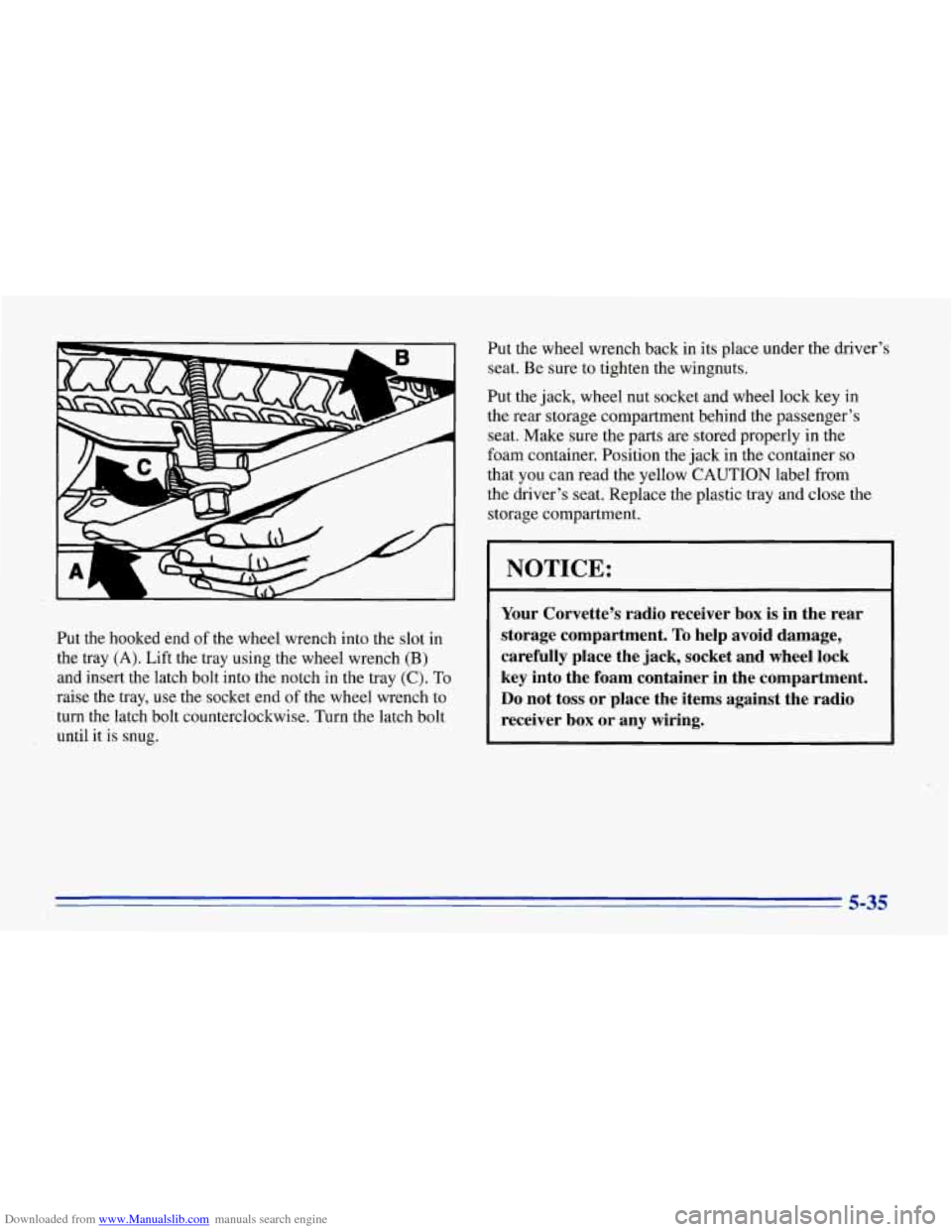
Downloaded from www.Manualslib.com manuals search engine Put the hooked end of the wheel wrench into the slot in
the tray
(A). Lift the tray using the wheel wrench (B)
and insert the latch bolt into the notch in the tray (C). To
raise the tray, use the socket end of the wheel wrench to
turn the latch bolt counterclockwise. Turn the latch bolt
until it is snug. Put
the wheel wrench back in its place under the driver’s
seat. Be sure to tighten the wingnuts.
Put the jack, wheel nut socket and wheel lock
key in
the rear storage compartment behind the passenger’s
seat. Make sure the
parts are stored properly in the
foam container. Position the jack in the container
so
that you can read the yellow CAUTION label from
the driver’s seat. Replace the plastic tray and close the
storage compartment.
I NOTICE: I
Your Corvette’s radio receiver box is in the rear
storage compartment.
To help avoid damage,
carefully place the jack, socket and wheel lock
key into the foam container in the compartment.
Do not toss or ‘place the items against the radio
receiver
box or any wiring.
5-35