ECU CHEVROLET CORVETTE 2003 5.G Owner's Manual
[x] Cancel search | Manufacturer: CHEVROLET, Model Year: 2003, Model line: CORVETTE, Model: CHEVROLET CORVETTE 2003 5.GPages: 368, PDF Size: 2.55 MB
Page 98 of 368

Notice:If your vehicle is equipped with the optional
trunk±mounted CD changer, it is stored in the
center rear storage compartment. To help avoid
damage to the compact disc player, do not store
items such as liquids or sharp objects that could
damage, puncture or cut the trunk±mounted
CD changer or wiring.
Notice:Do not store heavy or sharp objects in the
rear storage compartments located in the
hatch/trunk area. If you do, the objects could
damage the underbody.
Convenience Net
If your vehicle has this feature you will see it on the
back wall of the rear area of the vehicle.
Put small loads, like grocery bags, in the net. It can help
keep them from falling over during sharp turns or
quick starts and stops. The convenience net is not for
larger, heavier loads.
You can unhook the net and place it in one of the rear
storage compartments when you are not using it.
On coupe models only, a vinyl storage bag has also
been provided.
Cargo Cover
If your vehicle has this feature, the security shade can
provide hidden storage in the rear area of the vehicle.
The shade is also helpful in blocking the glare from the
removable roof when it is stored in the rear
compartment.
Using the Cargo Cover
1. Hook the elastic loops
on the front corners (A)
of the shade to the
T-nuts located on the
front corners of the rear
hatch frame.
2. Hook the elastic loops on the rear corners (B) of the
shade to the hooks recessed inside the rear hatch
frame, near the rear corners.
2-42
Page 99 of 368
Roof Panel
Your vehicle may have a removable roof panel.
Removing the Roof Panel
{CAUTION:
Don't try to remove a roof panel while the
vehicle is moving. Trying to remove the roof
panel while the vehicle is moving could cause
an accident. The panel could fall into the
vehicle and cause you to lose control, or it
could ¯y off and strike another vehicle. You or
others could be injured. Remove the roof panel
only when the vehicle is parked.
Until you are sure you can remove the panel alone,
have someone help you.
Notice:To avoid damage to the roof panel, paint
and weatherstripping, do not drop or rest it on
its edges. Place the roof panel in the egg-shaped
stowage receivers after removing it from the vehicle.1. Park on a level surface, set the parking brake ®rmly
and shift an automatic transmission into PARK (P).
Shift a manual transmission into REVERSE (R).
2. Turn the ignition key to OFF. Lower both sun visors
and turn them toward the door glass.
3. Open the rear hatch and remove any items that may
interfere with proper storage of the roof panel.
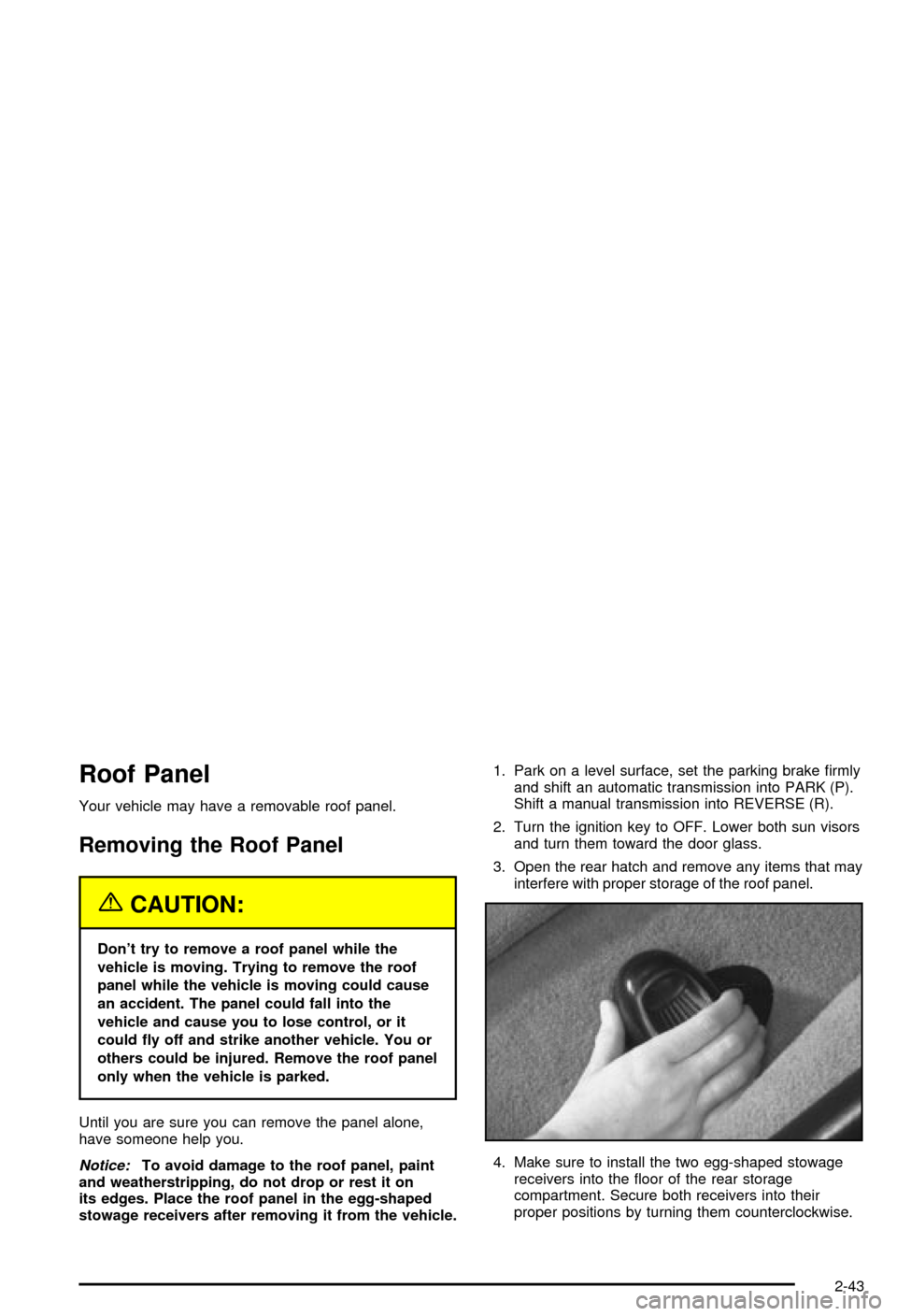
4. Make sure to install the two egg-shaped stowage
receivers into the ¯oor of the rear storage
compartment. Secure both receivers into their
proper positions by turning them counterclockwise.
2-43
Page 102 of 368
Storing the Roof Panel
{CAUTION:
If a roof panel is not stored properly, it could
be thrown about the vehicle in a crash or
sudden maneuver. People in the vehicle could
be injured. Whenever you store a roof panel in
the vehicle, always be sure that it is stored
securely in the proper location.
Notice:To avoid damage to the roof panel, paint
and weatherstripping, do not drop or rest it on
its edges. Place the roof panel in the egg-shaped
stowage receivers after removing it from the vehicle.
1. Turn the roof panel so that the rear edge of the
panel is facing the storage area. The locating
pins (at the rear of the panel) should point toward
the egg-shaped stowage receivers on the ¯oor
of the center compartment.
2. Push the panel forward until the pins bottom out in
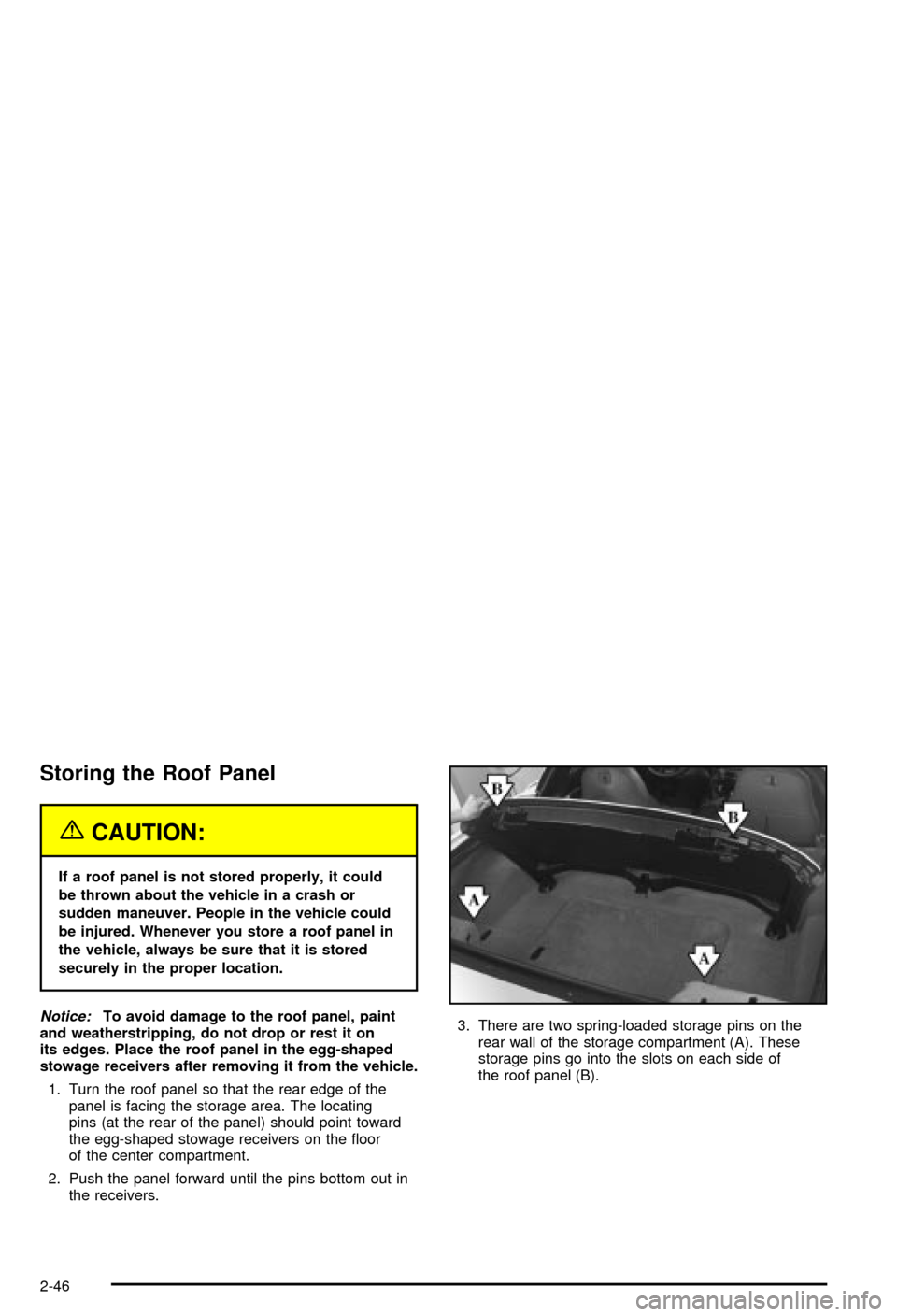
the receivers.3. There are two spring-loaded storage pins on the
rear wall of the storage compartment (A). These
storage pins go into the slots on each side of
the roof panel (B).
2-46
Page 104 of 368
2. If the roof panel is stored in the rear area, grasp it
with your right hand at the middle edge near the
seatbacks, and with your left hand at the middle of
the edge closest to you. Reverse the steps
described previously under
Storing the Roof Panel
on page 2-46.
3. Remove the roof panel from the storage
compartment.
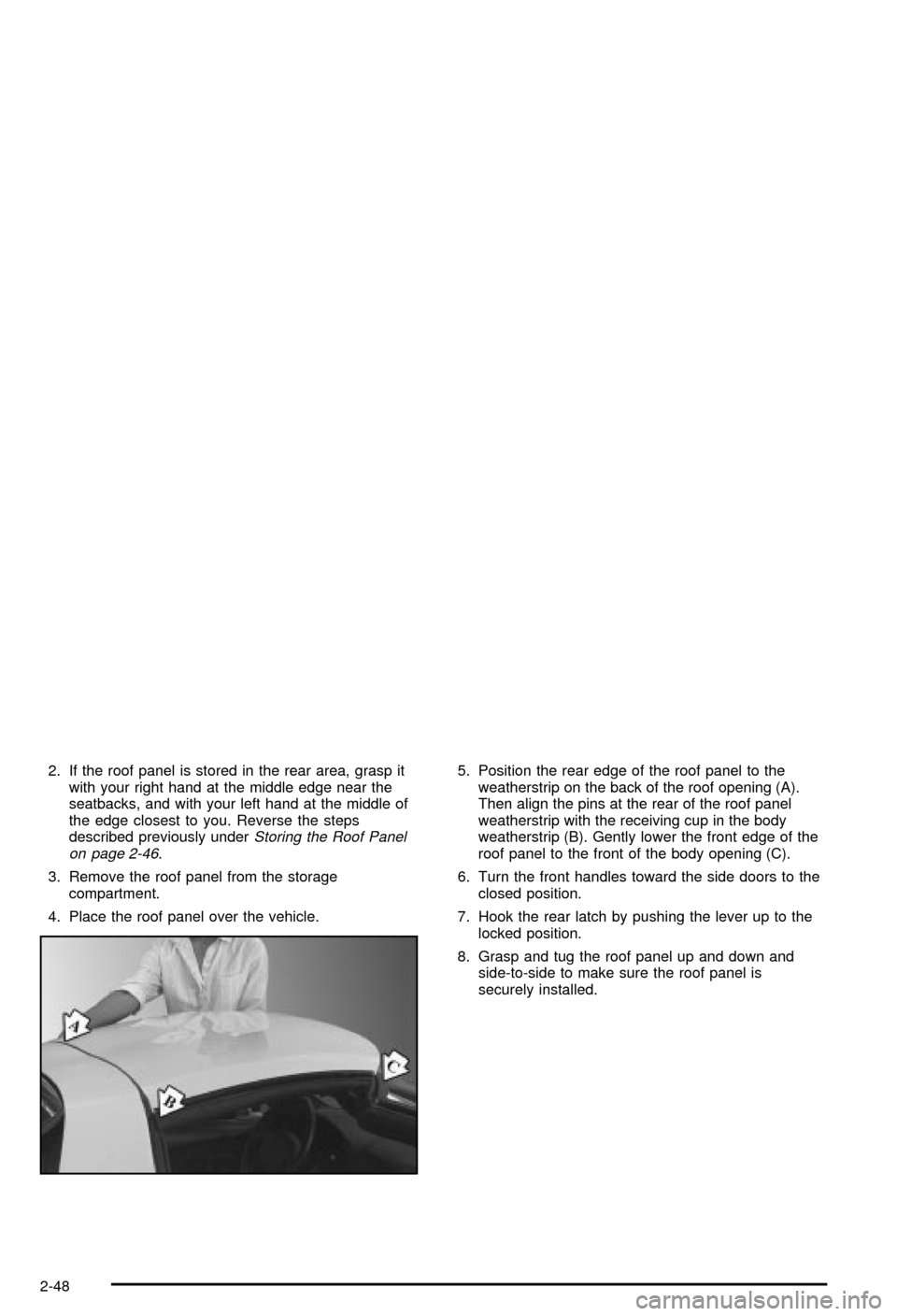
4. Place the roof panel over the vehicle.5. Position the rear edge of the roof panel to the
weatherstrip on the back of the roof opening (A).
Then align the pins at the rear of the roof panel
weatherstrip with the receiving cup in the body
weatherstrip (B). Gently lower the front edge of the
roof panel to the front of the body opening (C).
6. Turn the front handles toward the side doors to the
closed position.
7. Hook the rear latch by pushing the lever up to the
locked position.
8. Grasp and tug the roof panel up and down and
side-to-side to make sure the roof panel is
securely installed.
2-48
Page 110 of 368
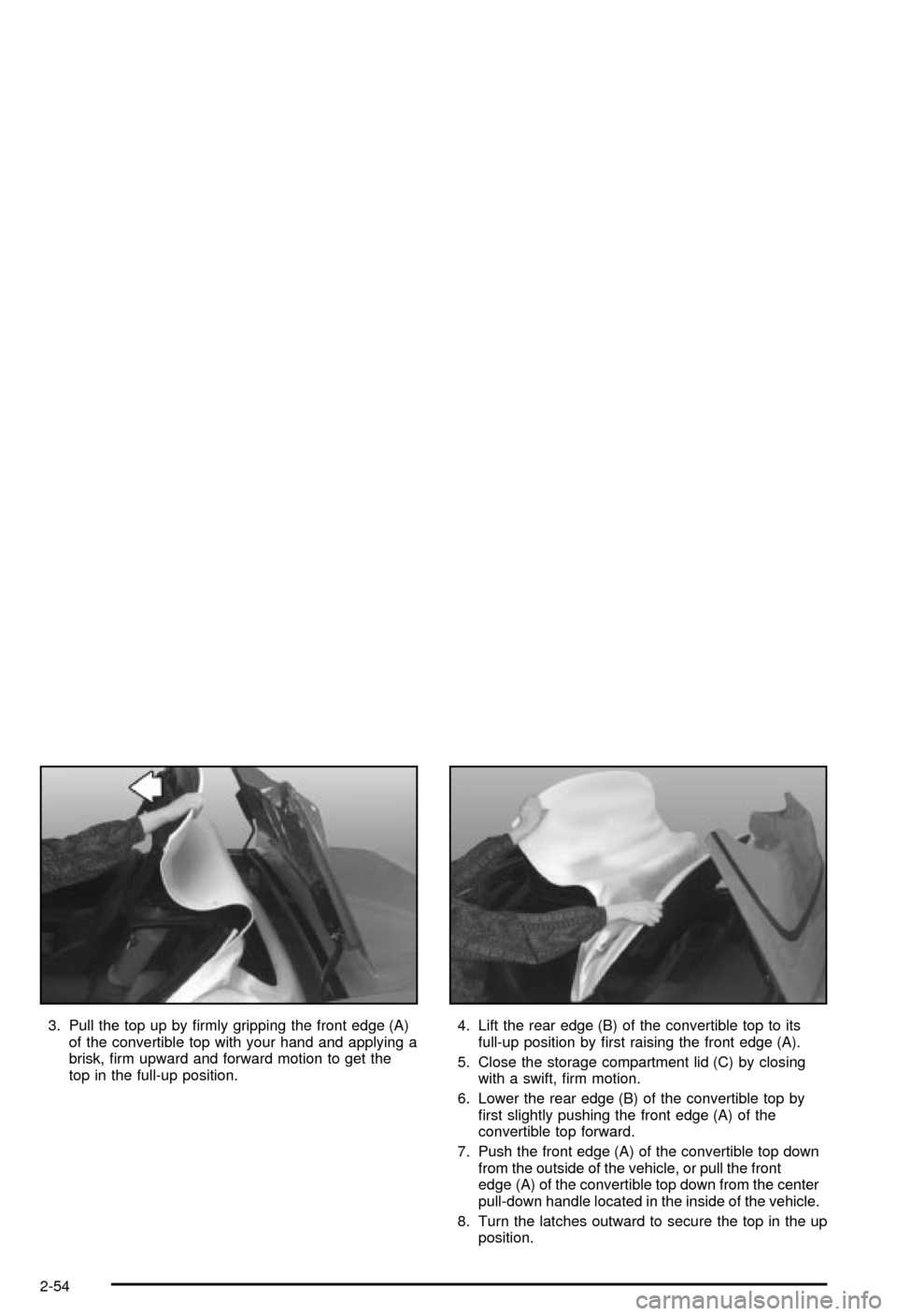
3. Pull the top up by ®rmly gripping the front edge (A)
of the convertible top with your hand and applying a
brisk, ®rm upward and forward motion to get the
top in the full-up position.4. Lift the rear edge (B) of the convertible top to its
full-up position by ®rst raising the front edge (A).
5. Close the storage compartment lid (C) by closing
with a swift, ®rm motion.
6. Lower the rear edge (B) of the convertible top by
®rst slightly pushing the front edge (A) of the
convertible top forward.
7. Push the front edge (A) of the convertible top down
from the outside of the vehicle, or pull the front
edge (A) of the convertible top down from the center
pull-down handle located in the inside of the vehicle.
8. Turn the latches outward to secure the top in the up
position.
2-54
Page 113 of 368

Instrument Panel Overview...............................3-2
Hazard Warning Flashers................................3-4
Other Warning Devices...................................3-4
Horn.............................................................3-5
Tilt Wheel.....................................................3-5
Turn Signal/Multifunction Lever.........................3-6
Exterior Lamps.............................................3-12
Interior Lamps..............................................3-15
Head-Up Display (HUD).................................3-17
Accessory Power Outlets...............................3-20
Ashtrays and Cigarette Lighter........................3-21
Climate Controls............................................3-22
Dual Automatic Climate Control System...........3-22
Outlet Adjustment.........................................3-28
Warning Lights, Gages and Indicators.............3-29
Instrument Panel Cluster................................3-30
Speedometer and Odometer...........................3-31
Tachometer.................................................3-31
Safety Belt Reminder Light.............................3-31
Air Bag Readiness Light................................3-32
Air Bag Off Light..........................................3-33
Voltmeter Gage............................................3-34
Brake System Warning Light..........................3-35
Anti-Lock Brake System Warning Light.............3-36
Traction Control System (TCS) Warning Light . . .3-36Active Handling System Light.........................3-37
Engine Coolant Temperature Gage..................3-38
Malfunction Indicator Lamp.............................3-38
Engine Oil Pressure Gage.............................3-41
Security Light...............................................3-42
Check Gages Warning Light...........................3-42
Fuel Gage...................................................3-42
Driver Information Center (DIC).......................3-44
DIC Controls and Displays.............................3-45
DIC Warnings and Messages.........................3-53
Other Messages...........................................3-61
Audio System(s).............................................3-62
Setting the Time...........................................3-62
Radio with Cassette......................................3-63
Radio with CD..............................................3-67
Trunk-Mounted CD Changer...........................3-71
Theft-Deterrent Feature..................................3-75
Understanding Radio Reception......................3-77
Care of Your Cassette Tape Player.................3-78
Care of Your CDs.........................................3-79
Care of Your CD Player................................3-79
Fixed Mast Antenna (Z06)..............................3-79
Power Antenna Mast Care (Convertible)...........3-79
Integrated Windshield and Rear Window
Antennas (Coupe).....................................3-80
Section 3 Instrument Panel
3-1
Page 146 of 368
{CAUTION:
If the air bag readiness light ever comes on
when you have turned off the air bag, it means
that something may be wrong with the air bag
system. The passenger's air bag could in¯ate
even though the switch is off. If this ever
happens, don't let anyone whom the national
government has identi®ed as a member of a
passenger air bag risk group sit in the
passenger's position (for example, don't
secure a rear-facing child restraint in your
vehicle) until you have your vehicle serviced.
See ªAir Bag Off Switchº in the Index.
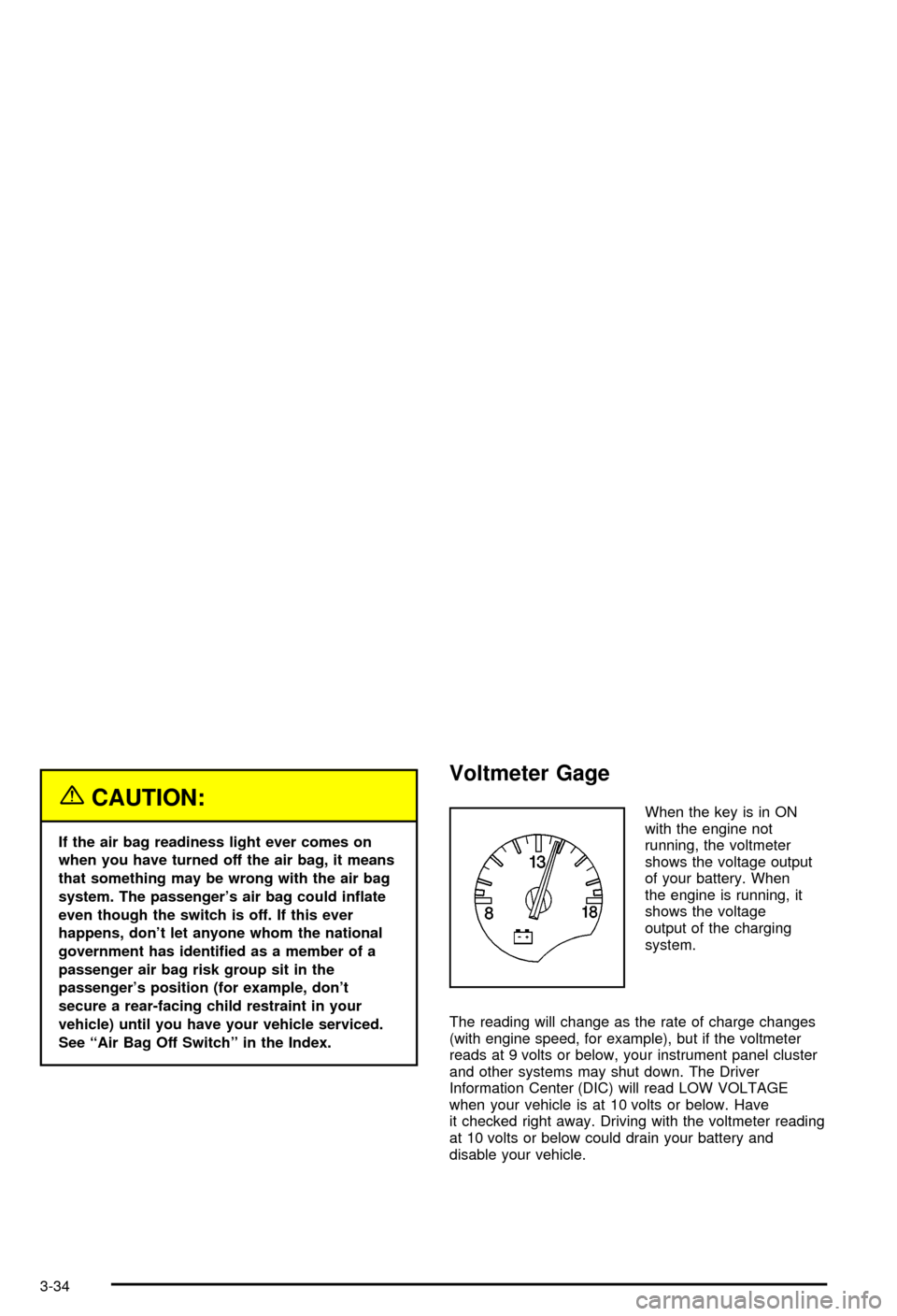
Voltmeter Gage
When the key is in ON
with the engine not
running, the voltmeter
shows the voltage output
of your battery. When
the engine is running, it
shows the voltage
output of the charging
system.
The reading will change as the rate of charge changes
(with engine speed, for example), but if the voltmeter
reads at 9 volts or below, your instrument panel cluster
and other systems may shut down. The Driver
Information Center (DIC) will read LOW VOLTAGE
when your vehicle is at 10 volts or below. Have
it checked right away. Driving with the voltmeter reading
at 10 volts or below could drain your battery and
disable your vehicle.
3-34
Page 154 of 368

Security Light
This light comes on to
remind you to arm your
theft-deterrent system. If it
comes on and stays on
when your ignition is
on, there may be a
problem with your
theft-deterrent system.
See
Theft-Deterrent System on page 2-16andPASS-Keyžon page 2-17.
Check Gages Warning Light
This light will come on
brie¯y when you are
starting the engine. If the
light comes on and
stays on while you are
driving, check your gages
to see if they are in the
warning areas.This light can come on for the following reasons:
·Low Oil Pressure
·High Coolant Temperature
·High or Low Battery Voltage
·Low Fuel Level
Fuel Gage
Your fuel gage tells you
about how much fuel you
have left when the
ignition is on.
When the needle approaches the red zone, RESERVE
FUEL will appear on the Driver Information Center (DIC)
display. When the needle approaches the E, LOW
FUEL will appear on the display. At this time, you still
have a little fuel left, but you should get more soon.
3-42
Page 156 of 368

Driver Information Center (DIC)
The Driver Information Center (DIC) will display
information about how your vehicle is functioning, as
well as warning messages if a system problem is
detected. The DIC display area is located in the
instrument panel cluster below the speedometer and
tachometer, directly above the steering column.
The following buttons are located on the DIC control
panel which is located to the right of the instrument
panel cluster.1 FUEL:Press this button to display fuel information
such as fuel economy and range.
2 GAGES:Press this button to display gage information
like oil pressure and temperature, coolant temperature,
automatic transmission ¯uid temperature, battery
voltage and front/rear tire pressures.
3 TRIP:Press this button to display your total and trip
miles, the elapsed time function, your average speed
and the engine oil life.
4 OPTIONS:This button allows you to choose personal
options that are available on your vehicle, depending
on the options your vehicle is equipped with, such
as security, door locks, easy entry seats and language.
5 E/M (English/Metric):Press this button to change
the display between English and metric units.
RESET:This button, used along with the other buttons,
will reset system functions and turn off or acknowledge
messages on the Driver Information Center (DIC).
At the top of the DIC control buttons is a light sensor.
Be sure not to block the sensor or your lighting functions
may be disrupted.
3-44
Page 163 of 368

If you choose LOCK & ARM ± OFF, you will receive no
security feedback when locking or unlocking your
vehicle.
If you choose LOCK & ARM ± HORN ONLY, only the
horn will chirp to let you know when your alarm system
has armed when locking your vehicle.
If you choose LOCK & ARM ± LIGHTS ONLY, only your
exterior lamps will ¯ash to let you know when your
alarm system has armed when locking your vehicle.
If you choose LOCK & ARM ± HORN & LIGHTS,
the horn will chirp and the exterior lamps will ¯ash brie¯y
to let you know the system has armed when locking
your vehicle.
Alarm
Press the OPTIONS button until ALARM appears on the
display, then use the RESET button to page through
the following selections:
·ALARM-HORN
·ALARM HORN & LIGHTS
If you choose ALARM-HORN, the horn will sound during
an alarm.
If you choose ALARM HORN & LIGHTS, the horn will
sound and the interior and exterior lamps will ¯ash
during an alarm.
Approach Lights
Press the OPTIONS button until APPROACH LIGHTS
appears on the display, then use the RESET button
to page through the following choices:
·APPROACH LIGHTS ON
·APPROACH LIGHTS OFF
If you choose APPROACH LIGHTS ON, the fog lamps,
front turn signal, rear back-up and courtesy lamps
will come on for 30 seconds when you press UNLOCK
on the remote keyless entry transmitter. This will
occur only when it is dark outside.
APPROACH LIGHTS OFF turns off this option.
See
Remote Keyless Entry System on page 2-4for
more information.
Auto Lock
Press the OPTIONS button until AUTO LOCK appears
on the display, then use the RESET button to page
through the following choices:
·AUTO LOCK ON
·AUTO LOCK OFF
If you choose AUTO LOCK ON, both doors will
automatically lock when the vehicle exceeds 10 mph
(16 km/h) in a manual transmission. In a vehicle with an
automatic transmission, both doors will automatically
lock when you move the shift lever out of PARK (P).
Choose AUTO LOCK OFF to turn this option off.
3-51