radio CHEVROLET CORVETTE 2003 5.G Owner's Manual
[x] Cancel search | Manufacturer: CHEVROLET, Model Year: 2003, Model line: CORVETTE, Model: CHEVROLET CORVETTE 2003 5.GPages: 368, PDF Size: 2.55 MB
Page 191 of 368

After you clean the player, press and hold the EJECT
button for ®ve seconds to reset the CLN indicator.
The radio will display --- or CLEANED to show the
indicator was reset.
Cassettes are subject to wear and the sound quality
may degrade over time. Always make sure the cassette
tape is in good condition before you have your tape
player serviced.
Care of Your CDs
Handle discs carefully. Store them in their original cases
or other protective cases and away from direct sunlight
and dust. If the surface of a disc is soiled, dampen
a clean, soft cloth in a mild, neutral detergent solution
and clean it, wiping from the center to the edge.
Be sure never to touch the side without writing when
handling discs. Pick up discs by grasping the outer
edges or the edge of the hole and the outer edge.
Care of Your CD Player
The use of CD lens cleaner discs is not advised, due to
the risk of contaminating the lens of the CD optics
with lubricants internal to the CD mechanism.
Fixed Mast Antenna (Z06)
The ®xed mast antenna can withstand most car washes
without being damaged. If the mast should ever
become slightly bent, you can straighten it out by hand.
If the mast is badly bent, as it might be by vandals,
you should replace it.
Check occasionally to be sure the mast is still tightened
to the rear quarter panel.
Power Antenna Mast Care
(Convertible)
Your power antenna will look its best and work well if
it's cleaned from time to time. To clean the antenna mast
do the following:
1. Turn on the ignition and radio to raise the antenna.
2. Dampen a clean cloth with mineral spirits or
equivalent solvent.
3. Wipe the cloth over the mast sections, removing
any dirt.
4. Wipe dry with a clean cloth.
5. Make the antenna go up and down by turning the
radio or ignition off and on.
6. Repeat if necessary.
3-79
Page 192 of 368

Notice:Don't lubricate the power antenna.
Lubrication could damage it.
Notice:Before entering an automatic car wash,
turn off your radio to make the power antenna
go down. This will prevent the mast from possible
damage. If the antenna does not go down when you
turn the radio off, it may be damaged or need to
be cleaned. In either case, lower the antenna
by hand by carefully pressing the antenna down.
If the mast portion of your antenna is damaged, you can
replace it. See your dealer for a replacement kit and
follow the instructions in the kit.
Integrated Windshield and Rear
Window Antennas (Coupe)
The antennas in your vehicle are located in the
windshield and the rear window. The front connector is
at the top of the windshield and the rear antenna is
incorporated in the rear window defogger grid.
Notice:Do not apply aftermarket glass tinting with
metallic ®lm. The metallic ®lm in some tinting
materials will interfere with or distort the incoming
radio reception. Any damage caused to your
backglass antenna due to metallic tinting materials
will not be covered by your warranty.
3-80
Page 269 of 368
Jump Starting
If your battery has run down, you may want to use
another vehicle and some jumper cables to start your
vehicle. Be sure to follow the steps below to do it safely.
{CAUTION:
Batteries can hurt you. They can be dangerous
because:
·They contain acid that can burn you.
·They contain gas that can explode or
ignite.
·They contain enough electricity to
burn you.
If you don't follow these steps exactly, some
or all of these things can hurt you.
Notice:Ignoring these steps could result in costly
damage to your vehicle that wouldn't be covered
by your warranty. Trying to start your vehicle
by pushing or pulling it won't work, and it could
damage your vehicle.
1. Check the other vehicle. It must have a 12-volt
battery with a negative ground system.
Notice:If the other system isn't a 12-volt system
with a negative ground, both vehicles can be
damaged.
2. Get the vehicles close enough so the jumper cables
can reach, but be sure the vehicles aren't touching
each other. If they are, it could cause a ground
connection you don't want. You wouldn't be able to
start your vehicle, and the bad grounding could
damage the electrical systems.
To avoid the possibility of the vehicles rolling, set
the parking brake ®rmly on both vehicles involved in
the jump start procedure. Put an automatic
transmission in PARK (P) or a manual transmission
in NEUTRAL before setting the parking brakes.
Notice:If you leave your radio on, it could be badly
damaged. The repairs wouldn't be covered by
your warranty.
3. Turn off the ignition on both vehicles. Unplug
unnecessary accessories plugged into the cigarette
lighter or in the accessory power outlet. Turn off
the radio and all lamps that aren't needed. This will
avoid sparks and help save both batteries. And it
could save your radio!
5-41
Page 285 of 368

If the display doesn't show tire pressure, or if the
SERVICE TIRE MON SYS message appears see your
dealer for service. For more information, see
Tire
Pressure Monitor System (Except Z06) on page 5-57
andDriver Information Center (DIC) on page 3-44.
Tire Pressure Monitor System
(Except Z06)
The Tire Pressure Monitor (TPM) has a sensor on each
road wheel that transmits to a receiver on the
instrument panel.
The system operates on a radio frequency subject to
Federal Communications Commission (FCC) Rules and
with Industry and Science Canada.
This device complies with Part 15 of the FCC Rules.
Operation is subject to the following two conditions:
(1) this device may not cause harmful interference, and
(2) this device must accept any interference received,
including interference that may cause undesired
operation.This device complies with RSS±210 of Industry and
Science Canada. Operation is subject to the following
two conditions: (1) this device may not cause
interference, and (2) this device must accept any
interference received, including interference that may
cause undesired operation of the device.
Changes or modi®cations to this system by other than
an authorized service facility could void authorization to
use this equipment.
If a tire's in¯ation pressure is between 5 psi (35 kPa)
and 25 psi (170 kPa), you will see a message on
the Driver Information Center. This message will show
which tire is underin¯ated and two chimes will sound. An
example would be LOW TIRE PRESSURE-LR. This
would mean that the in¯ation pressure in your left rear
tire is between 5 psi (35 kPa) and 25 psi (170 kPa).
If the in¯ation pressure in the tire drops below
5 psi (35 kPa), the message would read FLAT TIRE-LR
and four chimes will sound. See
Driver Information
Center (DIC) on page 3-44.
The TPM will also alert you if a tire's pressure is higher
than 42 psi (290 kPa). The message will show which
tire is overin¯ated and two chimes will sound. An
example would be HIGH PRESSURE-LR. This would
mean that the in¯ation pressure in your left rear tire
is higher than 42 psi (290 kPa). See
Driver Information
Center (DIC) on page 3-44.
5-57
Page 300 of 368
{CAUTION:
It can be dangerous to get out of your vehicle
with the engine running, if the shift lever is not
in NEUTRAL (N) with the parking brake ®rmly
set (manual transmission). Your vehicle can
roll or move suddenly even when on fairly
level ground. To be sure your vehicle won't
move, always set your parking brake and move
the shift lever to NEUTRAL (N) when you start
or idle your engine.
{CAUTION:
Idling the engine in a closed-in place or with
the climate control system off can cause
deadly carbon monoxide (CO). See ªEngine
Exhaustº in the Index.
{CAUTION:
In¯ating something too much can make it
explode, and you or others could be injured.
Be sure to read the in¯ator instructions, and
in¯ate the tire to its recommended pressure.
Do not exceed 36 psi (248 kPa).
Notice:Do not allow the air compressor to operate
continuously for more than six minutes to help
prevent damage from overheating.
Notice:If 26 psi (179 kPa) tire pressure cannot be
reached after six minutes the vehicle should not
be driven further. Damage to the tire is severe and
the sealant will not be effective. Remove the air
compressor plug from the accessory power outlet
and unscrew the in¯ating hose from the tire
valve. See ªRoadside Assistanceº in the Index.
If 26 psi (179 kPa) tire pressure is reached in six
minutes or less, disconnect the air compressor and
attach the enclosed maximum speed label to the inside
upper left corner of the windshield or to the face of
the radio/clock.
5-72
Page 312 of 368

Electrical System
Add-On Electrical Equipment
Notice:Don't add anything electrical to your
vehicle unless you check with your dealer ®rst.
Some electrical equipment can damage your vehicle
and the damage wouldn't be covered by your
warranty. Some add-on electrical equipment can
keep other components from working as they
should.
Your vehicle has an air bag system. Before attempting
to add anything electrical to your vehicle, see
Servicing Your Air Bag-Equipped Vehicle on page 1-47.
Accessory Power Plug
The accessory power plug can be used to connect
electrical equipment such as a cellular phone or
CB radio. It is located behind the carpeting, on the
passenger's side toe-board, at the top left corner near
the body control module. Be sure to follow the
installation instructions included with the equipment.To use the accessory power plug, do the following:
1. Remove the toe-board panel by pulling at the top of
each corner of the panel.
2. Locate the black connector at the top left corner of
the compartment near the body control module
above the two white diagnostic connectors.
3. Disconnect the connector pigtail by pulling forward
on the plastic locking tab and pull the connection
apart from the wire harness.
The plug has the following three separate wires:
·The orange wire connects to battery power.
·The yellow wire connects to ignition power. (Power
is only available when the ignition is in ON.)
·The black wire connects to ground.
5-84
Page 314 of 368
Fuses and Circuit Breakers
The wiring circuits in your vehicle are protected from
short circuits by a combination of maxi-fuses, mini-fuses
and circuit breakers. This greatly reduces the chance
of ®res caused by electrical problems.
Look at the silver-colored band inside the fuse. If the
band is broken or melted, replace the fuse. Be sure you
replace a bad fuse with a new one of the identical
size and rating.
If you ever have a problem on the road and don't have
a spare fuse, you can borrow one that has the same
amperage. Just pick some feature of your vehicle
that you can get along without ± like the radio or
cigarette lighter ± and use its fuse, if it is the correct
amperage. Replace it as soon as you can.
Instrument Panel Fuse Block
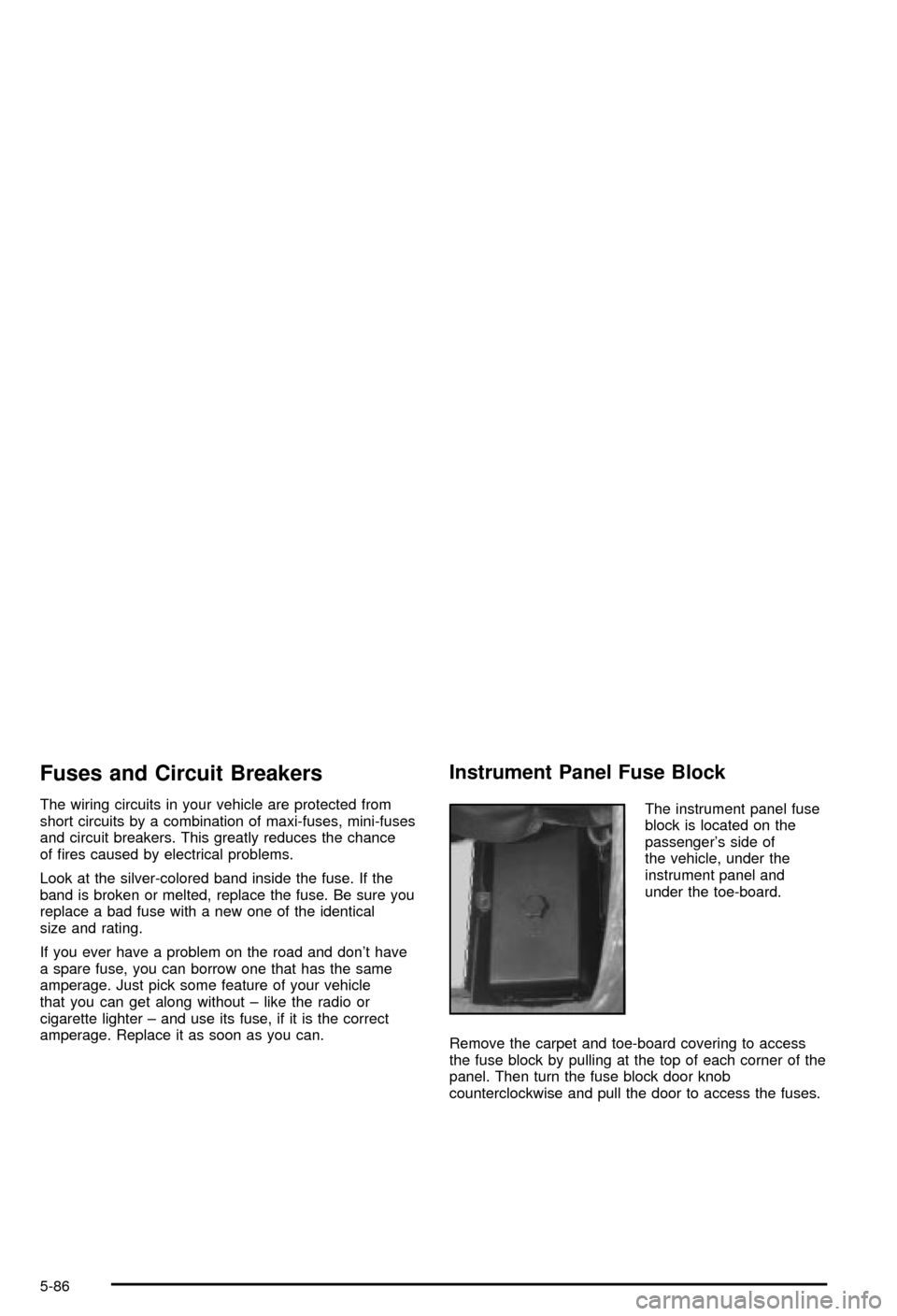
The instrument panel fuse
block is located on the
passenger's side of
the vehicle, under the
instrument panel and
under the toe-board.
Remove the carpet and toe-board covering to access
the fuse block by pulling at the top of each corner of the
panel. Then turn the fuse block door knob
counterclockwise and pull the door to access the fuses.
5-86
Page 315 of 368
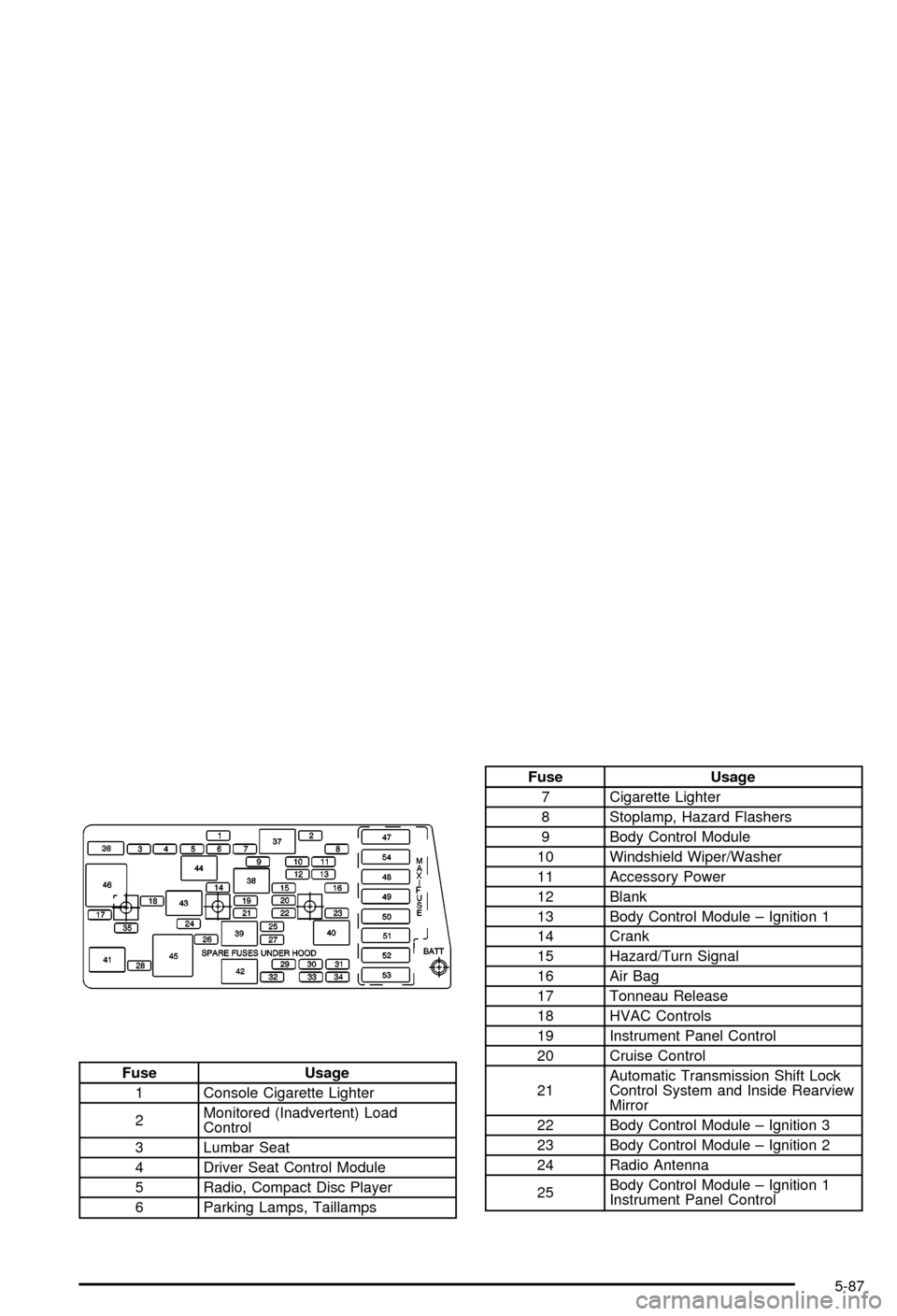
Fuse Usage
1 Console Cigarette Lighter
2Monitored (Inadvertent) Load
Control
3 Lumbar Seat
4 Driver Seat Control Module
5 Radio, Compact Disc Player
6 Parking Lamps, Taillamps
Fuse Usage
7 Cigarette Lighter
8 Stoplamp, Hazard Flashers
9 Body Control Module
10 Windshield Wiper/Washer
11 Accessory Power
12 Blank
13 Body Control Module ± Ignition 1
14 Crank
15 Hazard/Turn Signal
16 Air Bag
17 Tonneau Release
18 HVAC Controls
19 Instrument Panel Control
20 Cruise Control
21Automatic Transmission Shift Lock
Control System and Inside Rearview
Mirror
22 Body Control Module ± Ignition 3
23 Body Control Module ± Ignition 2
24 Radio Antenna
25Body Control Module ± Ignition 1
Instrument Panel Control
5-87
Page 355 of 368

A
Accessory Power Outlets.................................3-20
Accessory Power Plug.....................................5-84
Activating the Theft-Deterrent Feature................3-76
Active Handling System Light...........................3-37
Active Handling System...................................4-10
Adding Washer Fluid.......................................5-36
Additional Program Information........................... 7-9
Additives, Fuel................................................. 5-6
Add-On Electrical Equipment............................5-84
Adjusting the Speakers (Balance/Fade)......3-65, 3-69
Air Bag System..............................................1-39
Air Bag Off Switch.......................................1-44
How Does an Air Bag Restrain?....................1-42
Servicing Your Air Bag-Equipped Vehicle.........1-47
What Makes an Air Bag In¯ate?....................1-42
What Will You See After an
Air Bag In¯ates?......................................1-43
When Should an Air Bag In¯ate?...................1-42
Where Are the Air Bags?..............................1-40
Air Bag .........................................................3-33
Off Light.....................................................3-33
Readiness Light..........................................3-32
Air Cleaner/Filter, Engine.................................5-18
Air Compressor..............................................5-71
Air Dam, Front...............................................2-19
AM ...............................................................3-77
Antenna, Fixed Mast.......................................3-79
Antenna, Power Antenna Mast Care..................3-79Antennas, Integrated Windshield and Rear
Window......................................................3-80
Anti-lock Brake System (ABS)............................ 4-7
Anti-Lock Brake, System Warning Light..............3-36
Appearance Care............................................5-75
Care of Safety Belts....................................5-77
Chemical Paint Spotting...............................5-81
Cleaning the Inside of Your Vehicle................5-75
Cleaning the Outside of Your Vehicle..............5-78
Fiberglass Springs.......................................5-81
Finish Damage............................................5-81
Titanium Exhaust System..............................5-81
Underbody Maintenance...............................5-81
Vehicle Care/Appearance Materials................5-82
Weatherstrips..............................................5-77
Arming the System.........................................2-16
Ashtrays........................................................3-21
Audio System(s).............................................3-62
Care of Your Cassette Tape Player................3-78
Care of Your CD Player...............................3-79
Care of Your CDs........................................3-79
Fixed Mast Antenna.....................................3-79
Integrated Windshield and Rear Window
Antennas................................................3-80
Power Antenna Mast Care............................3-79
Radio with Cassette.....................................3-63
Radio with CD............................................3-67
Setting the Time..........................................3-62
Theft-Deterrent Feature................................3-75
Trunk-Mounted CD Changer..........................3-71
1
Page 356 of 368

Audio System(s) (cont.)
Understanding Radio Reception.....................3-77
Automatic Transmission Check........................... 6-9
Automatic Transmission Shift Lock Control
System Check.............................................6-10
Automatic Transmission...................................2-21
Fluid..........................................................5-20
Operation...................................................2-24
B
Battery Replacement......................................... 2-8
Battery Run-Down Protection............................3-17
Battery..........................................................5-40
Before Leaving on a Long Trip.........................4-24
Body Lubrication Service................................... 6-9
Brake Fluid....................................................5-37
Brake Wear...................................................5-39
Brake............................................................2-30
Parking......................................................2-30
System Inspection.......................................6-13
System Warning Light..................................3-35
Brakes..........................................................5-37
Braking in Emergencies..................................... 4-8
Braking........................................................... 4-6
Break-In, New Vehicle.....................................2-19
Bulb Replacement...........................................5-47
Back-Up Lamps...........................................5-51
Halogen Bulbs............................................5-47Bulb Replacement (cont.)
Headlamps.................................................5-47
Replacement Bulbs......................................5-51
Taillamps and Turn Signal Lamps..................5-49
Buying New Tires...........................................5-59
C
California Fuel.................................................. 5-5
Canada ± Customer Assistance.......................... 7-4
Canadian Owners................................................ ii
Canadian Roadside Assistance........................... 7-7
Capacities and Speci®cations............................5-92
Carbon Monoxide...................4-27, 4-35, 2-11, 2-35
Care of.........................................................5-77
Safety Belts................................................5-77
Your Cassette Tape Player............................3-78
Your CD Player...........................................3-79
Your CDs ...................................................3-79
Cargo Cover..................................................2-42
Cassette Tape Messages.................................3-66
Cassette Tape Player Service............................. 6-8
CD Adapter Kits.............................................3-66
CD Changer, Trunk-Mounted............................3-71
Center Console Storage Area...........................2-39
Chains, Tires..................................................5-64
Check Engine Light.........................................3-38
Checking Coolant............................................5-25
Checking Engine Oil........................................5-13
2