radio CHEVROLET CORVETTE 2003 5.G Owners Manual
[x] Cancel search | Manufacturer: CHEVROLET, Model Year: 2003, Model line: CORVETTE, Model: CHEVROLET CORVETTE 2003 5.GPages: 368, PDF Size: 2.55 MB
Page 60 of 368

One key is used for the
ignition, the driver's door
and all other locks.
When a new vehicle is delivered, the dealer gives the
®rst owner a key and a bar coded tag. Both the key and
the tag are attached to a key ring.
The paper tag has a code on it that tells your dealer or
a quali®ed locksmith how to make an extra key.
Keep the bar-coded tag in a safe place. If you lose your
key, you'll be able to have a new one made easily
using this tag. If your key doesn't have a tag and you
need a new ignition key, go to your dealer for the correct
key code.Notice:Your vehicle has a number of features that
can help prevent theft. You can have a lot of
trouble getting into your vehicle if you ever lock
your keys inside. You may even have to damage
your vehicle to get in. So be sure you have
spare keys.
If you ever do get locked out of your vehicle, call
Chevrolet Roadside Assistance. See
Roadside
Assistance Program on page 7-6for more information.
Remote Keyless Entry System
Your vehicle has a Remote Keyless Entry (RKE) system
that operates on a radio frequency subject to Federal
Communications Commission (FCC) Rules and
with Industry Canada.
This device complies with Part 15 of the FCC Rules.
Operation is subject to the following two conditions:
(1) this device may not cause harmful interference, and
(2) this device must accept any interference received,
including interference that may cause undesired
operation.
This device complies with RSS-210 of Industry Canada.
Operation is subject to the following two conditions:
(1) this device may not cause interference, and
(2) this device must accept any interference received,
including interference that may cause undesired
operation of the device.
2-4
Page 77 of 368

When the engine is not running, ACCESSORY and ON
allow you to operate your electrical accessories,
such as the radio.
A warning tone will sound if you open the driver's door
while the ignition is in OFF or ACCESSORY and
the key is in the ignition.
Retained Accessory Power (RAP)
With RAP, your power windows and the audio system
will continue to work for up to 15 minutes after the
ignition key is turned to OFF and neither door is opened.
If a door is opened, the power windows and audio
system will shut off.
Starting Your Engine
This vehicle has a computer system that monitors
engine speed, throttle and pedal position, and records
the current status.
Automatic Transmission
Move your shift lever to PARK (P) or NEUTRAL (N).
Your engine won't start in any other position ± that's a
safety feature. To restart when you're already moving,
use NEUTRAL (N) only.
Notice:Don't try to shift to PARK (P) if your
vehicle is moving. If you do, you could damage the
transmission. Shift to PARK (P) only when your
vehicle is stopped.
Manual Transmission
The shift lever should be in NEUTRAL and the parking
brake engaged. Hold the clutch pedal to the ¯oor
and start the engine. Your vehicle won't start if the clutch
pedal is not all the way down ± that's a safety feature.
1. With your foot off the accelerator pedal, turn
the ignition key to START. When the engine starts,
let go of the key. The idle speed will go down as
your engine gets warm.
Notice:Holding your key in START for longer than
15 seconds at a time will cause your battery to
be drained much sooner. And the excessive heat
can damage your starter motor. Wait about 15
seconds between each try to help avoid draining
your battery or damaging your starter.
2. If it doesn't start within 10 seconds, push the
accelerator pedal all the way to the ¯oor, while you
hold the ignition key in START. When the engine
starts, let go of the key and let up on the accelerator
pedal. Wait about 15 seconds between each try.
2-21
Page 111 of 368
Vehicle Personalization
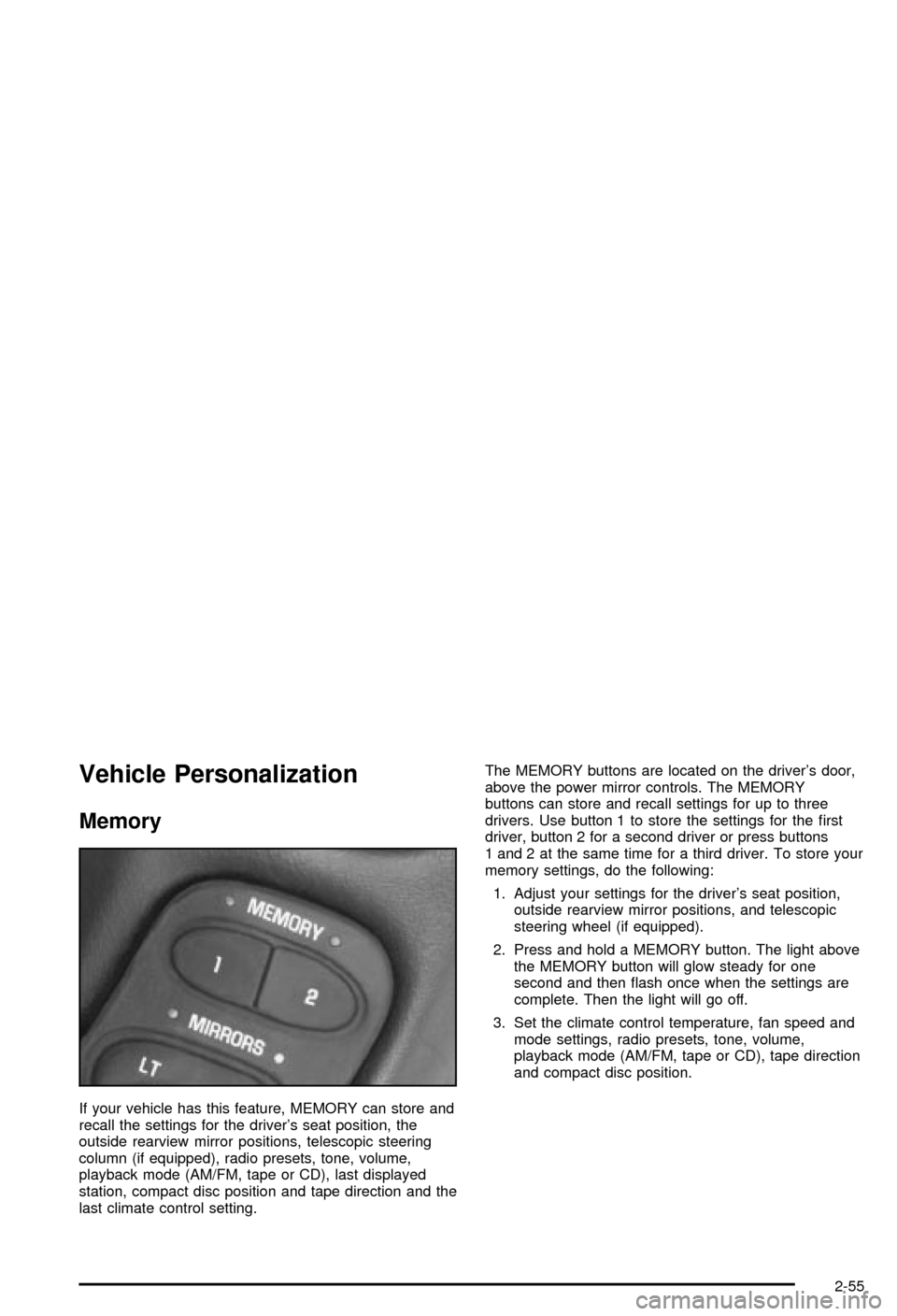
Memory
If your vehicle has this feature, MEMORY can store and
recall the settings for the driver's seat position, the
outside rearview mirror positions, telescopic steering
column (if equipped), radio presets, tone, volume,
playback mode (AM/FM, tape or CD), last displayed
station, compact disc position and tape direction and the
last climate control setting.The MEMORY buttons are located on the driver's door,
above the power mirror controls. The MEMORY
buttons can store and recall settings for up to three
drivers. Use button 1 to store the settings for the ®rst
driver, button 2 for a second driver or press buttons
1 and 2 at the same time for a third driver. To store your
memory settings, do the following:
1. Adjust your settings for the driver's seat position,
outside rearview mirror positions, and telescopic
steering wheel (if equipped).
2. Press and hold a MEMORY button. The light above
the MEMORY button will glow steady for one
second and then ¯ash once when the settings are
complete. Then the light will go off.
3. Set the climate control temperature, fan speed and
mode settings, radio presets, tone, volume,
playback mode (AM/FM, tape or CD), tape direction
and compact disc position.
2-55
Page 113 of 368

Instrument Panel Overview...............................3-2
Hazard Warning Flashers................................3-4
Other Warning Devices...................................3-4
Horn.............................................................3-5
Tilt Wheel.....................................................3-5
Turn Signal/Multifunction Lever.........................3-6
Exterior Lamps.............................................3-12
Interior Lamps..............................................3-15
Head-Up Display (HUD).................................3-17
Accessory Power Outlets...............................3-20
Ashtrays and Cigarette Lighter........................3-21
Climate Controls............................................3-22
Dual Automatic Climate Control System...........3-22
Outlet Adjustment.........................................3-28
Warning Lights, Gages and Indicators.............3-29
Instrument Panel Cluster................................3-30
Speedometer and Odometer...........................3-31
Tachometer.................................................3-31
Safety Belt Reminder Light.............................3-31
Air Bag Readiness Light................................3-32
Air Bag Off Light..........................................3-33
Voltmeter Gage............................................3-34
Brake System Warning Light..........................3-35
Anti-Lock Brake System Warning Light.............3-36
Traction Control System (TCS) Warning Light . . .3-36Active Handling System Light.........................3-37
Engine Coolant Temperature Gage..................3-38
Malfunction Indicator Lamp.............................3-38
Engine Oil Pressure Gage.............................3-41
Security Light...............................................3-42
Check Gages Warning Light...........................3-42
Fuel Gage...................................................3-42
Driver Information Center (DIC).......................3-44
DIC Controls and Displays.............................3-45
DIC Warnings and Messages.........................3-53
Other Messages...........................................3-61
Audio System(s).............................................3-62
Setting the Time...........................................3-62
Radio with Cassette......................................3-63
Radio with CD..............................................3-67
Trunk-Mounted CD Changer...........................3-71
Theft-Deterrent Feature..................................3-75
Understanding Radio Reception......................3-77
Care of Your Cassette Tape Player.................3-78
Care of Your CDs.........................................3-79
Care of Your CD Player................................3-79
Fixed Mast Antenna (Z06)..............................3-79
Power Antenna Mast Care (Convertible)...........3-79
Integrated Windshield and Rear Window
Antennas (Coupe).....................................3-80
Section 3 Instrument Panel
3-1
Page 132 of 368

If the sun comes out or it becomes cloudy, you may
need to adjust the HUD brightness again using
the dimmer control. Polarized sunglasses could make
the HUD image harder to see.
To change from English to metric units, press the
E/M button located to the right of the steering wheel.
Clean the inside of the windshield as needed to remove
any dirt or ®lm that reduces the sharpness or clarity
of the HUD image.
To clean the HUD, spray household glass cleaner on a
soft, clean cloth. Wipe the HUD lens gently, then dry
it. Do not spray cleaner directly on the lens because the
cleaner could leak into the unit.
If the ignition is on and you can't see the HUD image,
check to see if:
·Something is covering the HUD unit.
·The HUD dimmer control is adjusted properly.
·The HUD image is adjusted to the proper height.
·Ambient light, in the direction your vehicle is facing,
is low.
·A fuse is blown. SeeFuses and Circuit Breakers on
page 5-86
.
Keep in mind that your windshield is part of the HUD
system. If you ever have to have your windshield
replaced, be sure to get one that is designed for HUD
or your HUD image may look blurred and out of focus.
Accessory Power Outlets
The accessory power outlet can be used to connect
electrical equipment such as a cellular phone or
CB radio.
The accessory power outlet is located inside the
center console storage compartment, on the forward
left side.
To use the outlet, remove the tethered cap. When not
using it, always cover the outlet with the protective cap.
Notice:When using an accessory power outlet,
maximum electrical load must not exceed 15 amps.
Always turn off any electrical equipment when
not in use. Leaving electrical equipment on for
extended periods will drain your battery.
Certain electrical accessories may not be compatible
with the accessory power outlet and could result
in blown vehicle or adapter fuses. If you experience a
problem, see your dealer for additional information
on accessory power outlets.
Notice:Adding some electrical equipment to your
vehicle can damage it or keep other things from
working as they should. This wouldn't be covered by
your warranty. Check with your dealer before
adding electrical equipment, and never use anything
that exceeds the amperage rating.
3-20
Page 168 of 368

REDUCED ENGINE POWER:You will hear chimes
continuously when this message is displayed. To
acknowledge that you have read the message and to
remove it from the display, press RESET. The message
will reappear every 15 seconds until this condition
changes.
If the Driver Information Center (DIC) displays the
REDUCED ENGINE POWER message and the CHECK
ENGINE light comes on, a noticeable reduction in the
vehicle's performance may occur. If the REDUCED
ENGINE POWER message is displayed but there is no
reduction in performance, proceed to your destination.
The performance may be reduced the next time
the vehicle is driven.
The vehicle may be driven at a reduced speed while the
REDUCED ENGINE POWER message is displayed,
but acceleration and speed may be reduced. Anytime
the CHECK ENGINE light stays on, the vehicle
should be taken to an authorized dealer as soon as
possible for diagnosis and repair.
Also, refer to
Malfunction Indicator Lamp on page 3-38.
If the REDUCED ENGINE POWER message is
displayed in combination with the COOLANT OVER
TEMP message, see
Engine Overheating on page 5-26.
SERVICE VEHICLE SOON:If this message appears
on the DIC, there may be an electrical or another system
problem with your vehicle. Have your vehicle checked
by your dealer if this message keeps appearing.CHARGE SYSTEM FAULT:Press RESET to
acknowledge that you have read the message and to
remove it from the display. The message will reappear
every 10 minutes until this condition changes. You
will hear two chimes when this message is displayed.
If this message comes on while you are driving, you may
have a problem with the electrical charging system. It
could indicate that you have a loose or broken drive belt
or another electrical problem. Have it checked right
away. Driving while this light is on could drain your
battery.
If you must drive a short distance with the message on,
be certain to turn off your accessories, such as the
radio and air conditioner.
TRACTION SYS ACTIVE:When your Traction Control
System is limiting wheel spin, the TRACTION SYS
ACTIVE message will be displayed. Slippery road
conditions may exist if this message is displayed, so
adjust your driving accordingly. The message will
stay on for a few seconds after the Traction Control
System stops limiting wheel spin.
TRACTION SYSTEM ± ON:This message is displayed
when you decide to turn on the Traction Control
System by pressing the switch on the console. This
message will shut off automatically on its own.
3-56
Page 174 of 368

Audio System(s)
Notice:Before you add any sound equipment to
your vehicle ± like a tape player, CB radio, mobile
telephone or two-way radio ± be sure you can
add what you want. If you can, it's very important to
do it properly. Added sound equipment may
interfere with the operation of your vehicle's engine,
radio or other systems, and even damage them.
Your vehicle's systems may interfere with the
operation of sound equipment that has been added
improperly.
So, before adding sound equipment, check with
your dealer and be sure to check federal rules
covering mobile radio and telephone units.Your audio system has been designed to operate easily
and to give years of listening pleasure. You will get
the most enjoyment out of it if you acquaint yourself with
it ®rst. Figure out which radio you have in your vehicle,
®nd out what your audio system can do and how to
operate all of its controls to be sure you're getting the
most out of the advanced engineering that went into it.
Your vehicle may have a feature called Retained
Accessory Power (RAP). With RAP, you can play your
audio system even after the ignition is turned off.
See ªRetained Accessory Power (RAP)º under
Ignition
Positions on page 2-20.
Setting the Time
Press and hold HR until the correct hour appears on the
display. Press and hold MN until the correct minute
appears.
3-62
Page 175 of 368
Radio with Cassette
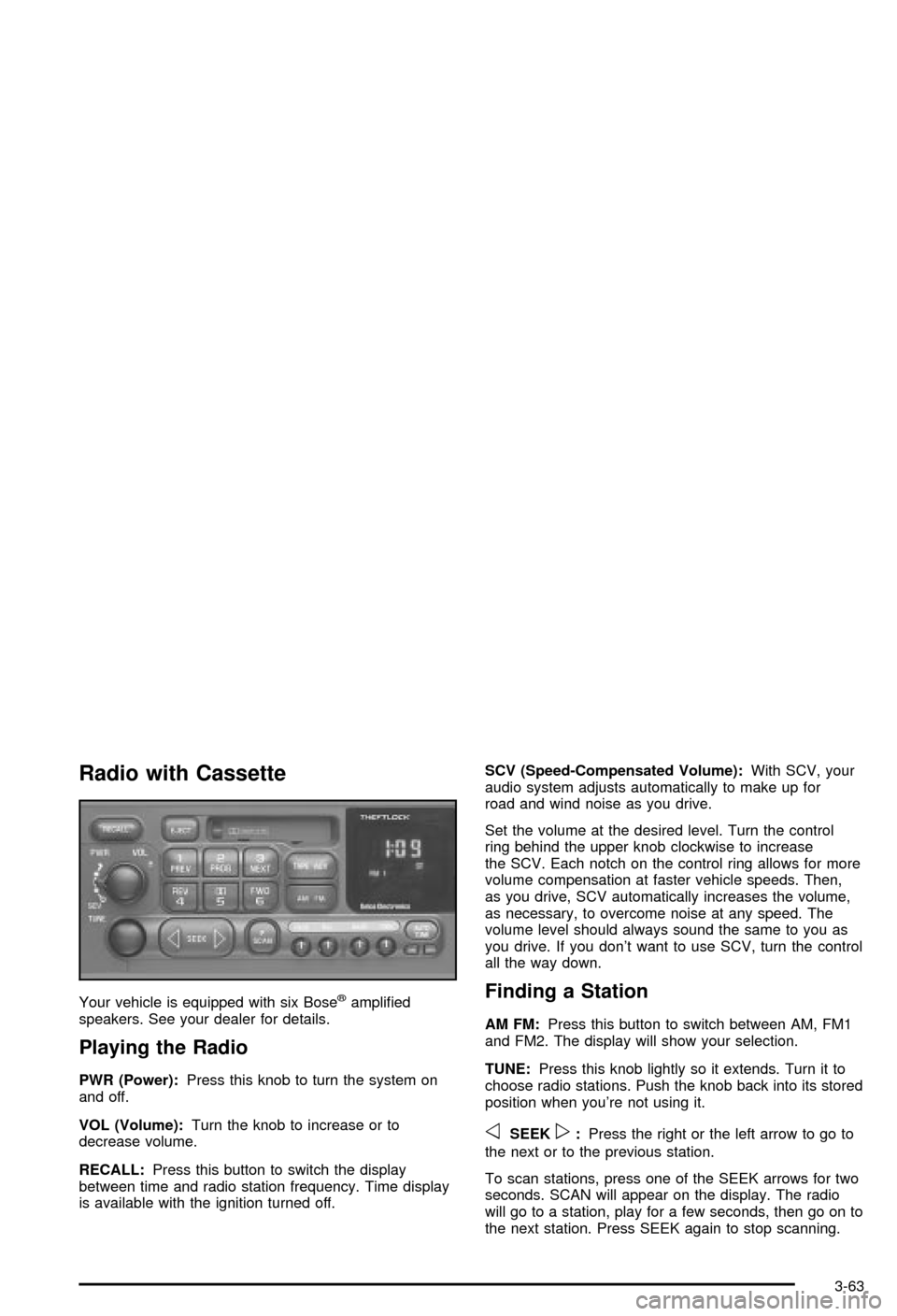
Your vehicle is equipped with six Bosežampli®ed
speakers. See your dealer for details.
Playing the Radio
PWR (Power):Press this knob to turn the system on
and off.
VOL (Volume):Turn the knob to increase or to
decrease volume.
RECALL:Press this button to switch the display
between time and radio station frequency. Time display
is available with the ignition turned off.SCV (Speed-Compensated Volume):With SCV, your
audio system adjusts automatically to make up for
road and wind noise as you drive.
Set the volume at the desired level. Turn the control
ring behind the upper knob clockwise to increase
the SCV. Each notch on the control ring allows for more
volume compensation at faster vehicle speeds. Then,
as you drive, SCV automatically increases the volume,
as necessary, to overcome noise at any speed. The
volume level should always sound the same to you as
you drive. If you don't want to use SCV, turn the control
all the way down.
Finding a Station
AM FM:Press this button to switch between AM, FM1
and FM2. The display will show your selection.
TUNE:Press this knob lightly so it extends. Turn it to
choose radio stations. Push the knob back into its stored
position when you're not using it.
oSEEKp:Press the right or the left arrow to go to
the next or to the previous station.
To scan stations, press one of the SEEK arrows for two
seconds. SCAN will appear on the display. The radio
will go to a station, play for a few seconds, then go on to
the next station. Press SEEK again to stop scanning.
3-63
Page 176 of 368

The radio will seek or scan only to stations that are in
the selected band and only to those with a strong signal.
P.SCAN (Preset Scan):Press this button to listen to
each of your favorite stations stored on the pushbuttons
for a few seconds. The AUTO TONE setting stored
for that pushbutton will be automatically chosen.
P.SCAN will appear on the display. Press P.SCAN
again or one of the pushbuttons to stop scanning
presets.
The radio will scan only to stations that are in the
selected band and only to those with a strong signal.
Setting Preset Stations
The six numbered pushbuttons let you return to your
favorite stations. You can set up to 18 stations (six AM,
six FM1 and six FM2) by performing the following
steps:
1. Turn the radio on.
2. Press AM FM to select AM, FM1 or FM2.
3. Tune in the desired station.
4. Press AUTO TONE to select the equalization that
best suits the type of station selected.5. Press and hold one of the six numbered
pushbuttons. The sound will mute. When it returns,
release the pushbutton. Whenever you press
that numbered pushbutton, the station you set will
return and the AUTO TONE equalization that
you selected will also be automatically selected for
that pushbutton.
6. Repeat the steps for each pushbutton.
Setting the Tone (Bass/Treble)
BASS:To adjust the bass, press this knob lightly so it
extends. Turn the knob to increase or to decrease bass.
TREB (Treble):To adjust the treble, press this knob
lightly so it extends. Turn the knob to increase or
to decrease treble. If a station is weak or noisy, you
may want to decrease the treble.
Return these knobs to their stored positions when
you're not using them.
AUTO TONE (Automatic Tone):Press this button to
choose bass and treble equalization settings designed
for country/western, jazz, talk, pop, rock and classical
stations.
To return the bass and treble to the manual mode,
either press and release the AUTO TONE button until
the display goes blank or press and release the BASS or
TREB knob and turn it until the display goes blank.
3-64
Page 177 of 368

Adjusting the Speakers (Balance/Fade)
BAL (Balance):To adjust the balance between the
right and the left speakers, press this knob lightly so it
extends. Turn the knob to move the sound toward
the right or the left speakers.
FADE:To adjust the fade between the front and the
rear speakers, press this knob lightly so it extends. Turn
the knob to move the sound toward the front or the
rear speakers.
Return these knobs to their stored positions when
you're not using them.
Playing a Cassette Tape
Your tape player is built to work best with tapes that are
up to 30 to 45 minutes long on each side. Tapes longer
than that are so thin they may not work well in this player.
If a tape is inserted when the ignition is on but the radio is
off, the tape will begin playing. A tape symbol is shown in
the center of the graphic display whenever a tape is
inserted. When a tape is active, the tape symbol will be
accompanied by a direction arrow.
While the tape is playing, use the VOL, AUTO TONE,
BAL, FADE, BASS and TREB controls just as you do for
the radio. Other controls may have different functions
when a tape is inserted. The display will show the tape
symbol and an arrow to show which side of the tape
is playing.If you hear nothing or hear just a garbled sound, it may
not be in squarely. Press EJECT to remove the tape
and start over.
The player is able to detect a tight or broken tape, and
will eject the tape. The radio will go back to playing
the last station selected.
The player automatically senses the cassette for metal
or CrO 2 and sets the pre-emphasis. Anytime a tape
is inserted, the top side is selected to play ®rst.
If an error appears on the display, see ªCassette Tape
Messagesº later in this section.
1 PREV (Previous):Your tape must have at least three
seconds of silence between each selection for previous
to work. Press this pushbutton to go to the previous
selection on the tape if the current selection has been
playing for less than eight seconds. If pressed when the
current selection has been playing for more than
eight seconds, it will go to the beginning of the current
selection.
2 PROG (Program):Press this pushbutton to play the
other side of the tape.
3 NEXT:Your tape must have at least three seconds of
silence between each selection for next to work.
Press this pushbutton to go to the next selection on the
tape. If you hold this pushbutton or press it more
than once, the player will continue moving forward
through the tape.
3-65