ECU CHEVROLET CORVETTE 2005 6.G Owner's Manual
[x] Cancel search | Manufacturer: CHEVROLET, Model Year: 2005, Model line: CORVETTE, Model: CHEVROLET CORVETTE 2005 6.GPages: 400, PDF Size: 9.4 MB
Page 79 of 400

Ignition Positions
Your vehicle has an
electronic keyless ignition
with a pushbutton start.
/(START):Press this button while your foot is on the
brake for an automatic transmission, or while pressing
in the clutch for a manual transmission, to start the
engine. If your vehicle is in OFF or RAP mode,
the keyless access transmitter must be inside the
vehicle to start the engine.
9ACC (OFF/ACCESSORY):When the engine is on
or the vehicle is in accessory power mode, a manual
transmission must be placed in REVERSE (R) or
an automatic transmission must be placed in PARK (P),
then press the
9ACC button to turn the engine offand place the vehicle in RAP. See “Retained Accessory
Power (RAP)” later for more information. If a manual
vehicle is not correctly placed in REVERSE (R) a
SHIFT TO REVERSE message will display on the Driver
Information Center (DIC). If an automatic vehicle is
not correctly placed in PARK (P) a SHIFT TO PARK
message will display on the Driver Information
Center (DIC).
For more information, seeDIC Warnings and Messages
on page 3-54.
Notice:If you do not put a manual transmission in
REVERSE (R) before exiting your vehicle, your
vehicle will not be secured, the battery will drain
and could be damaged. Always put a manual
transmission in REVERSE (R) before shutting off the
engine and exiting the vehicle.
When the engine is off, press this button to place the
vehicle in accessory mode. ACCESSORY MODE
ON will display on the Driver Information Center (DIC).
This mode allows you to use things like the radio
and the windshield wipers while the engine is off. Use
accessory mode if you must have your vehicle in motion
while the engine is off, for example, if your vehicle is
being pushed or towed.
After being in accessory mode for about 20 minutes, the
vehicle will automatically enter RAP or OFF, depending
on if the doors are opened or closed.
2-21
Page 81 of 400

Stopping Your Engine
If your vehicle has an automatic transmission, move the
shift lever to PARK (P) and press the ACC button. If
the shifter is not in PARK (P), the vehicle will go
into accessory mode and the DIC will display SHIFT TO
PARK. Once the shifter is moved to PARK (P), the
vehicle will turn off.
If your vehicle has a manual transmission, move the
shift lever to REVERSE (R) and press the ACC button.
If the shifter is not in REVERSE (R), the vehicle will
go into accessory mode and the DIC will display SHIFT
TO REVERSE. Once the shifter is moved to
REVERSE (R), the vehicle will turn off.
If the keyless access transmitter is not detected while
going to off, the DIC will display NO FOB – OFF
OR RUN?.
SeeDIC Warnings and Messages on page 3-54for
more information.
Notice:If you do not put a manual transmission in
REVERSE (R) before exiting your vehicle, your
vehicle will not be secured, the battery will drain
and could be damaged. Always put a manual
transmission in REVERSE (R) before shutting off the
engine and exiting the vehicle.
Racing or Other Competitive Driving
See your warranty book before using your vehicle for
racing or other competitive driving.
Notice:If you use your vehicle for racing or other
competitive driving, the engine may use more
oil than it would with normal use. Low oil levels can
damage the engine. Be sure to check the oil level
often during racing or other competitive driving and
keep the level at or near 1 quart (1 L) above the
upper mark that shows the proper operating range
on the engine oil dipstick. For information on
how to add oil, seeEngine Oil on page 5-13. After
the competitive driving, remove excess oil so
that the level on the dipstick is not above the upper
mark that shows the proper operating range.
Vehicles with the Z51 performance package have
greaseable outer ends on both of the rear toe-links.
Under normal use, lubrication should be performed as
described in the maintenance schedule. SeeScheduled
Maintenance on page 6-4andRecommended Fluids
and Lubricants on page 6-12. If you use the vehicle for
racing, lubrication should be performed at the end of
each racing day. See your dealer for lubrication
and make sure any needed repairs are made at once.
Proper procedures for performing these services can be
found in the service manual. SeeService Publications
Ordering Information on page 7-11.
2-23
Page 90 of 400

Shifting Out of Park (P)
(Automatic Transmission)
Your vehicle has an automatic transmission shift lock
control system which locks the shift lever in PARK (P)
when the ignition is off. In addition, you have to fully
apply your regular brake before you can shift from
PARK (P) when the ignition is on. SeeAutomatic
Transmission Operation on page 2-25.
If you cannot shift out of PARK (P), ease pressure on
the shift lever and push the shift lever all the way
into PARK (P) and release the shift lever button as you
maintain brake application. Then press the shift lever
button and move the shift lever into the gear you wish.
If you ever hold the brake pedal down but still cannot
shift out of PARK (P), try this:
1. Put the vehicle in accessory mode.
2. Apply and hold the brake until the end of Step 4.
3. Shift to NEUTRAL (N).
4. Start the engine and then shift to the drive gear
you want.
5. Have your vehicle inspected by your dealer as soon
as possible.
Parking Your Vehicle
(Manual Transmission)
Before you get out of your vehicle, move the shift lever
into REVERSE (R) and rmly apply the parking
brake. Once the shift lever has been placed into
REVERSE (R) with the clutch pedal pressed in, you can
turn the ignition off and release the clutch. If you
attempt to exit the vehicle without being in
REVERSE (R), the Driver Information Center (DIC) will
display SHIFT TO REVERSE and a chime will sound.
Notice:If you do not put a manual transmission in
REVERSE (R) before exiting your vehicle, your
vehicle will not be secured, the battery will drain
and could be damaged. Always put a manual
transmission in REVERSE (R) before shutting off the
engine and exiting the vehicle.
2-32
Page 99 of 400
Outside Convex Mirror
{CAUTION:
A convex mirror can make things (like other
vehicles) look farther away than they really are.
If you cut too sharply into the right lane, you
could hit a vehicle on your right. Check your
inside mirror or glance over your shoulder
before changing lanes.
The passenger’s side mirror is convex. A convex
mirror’s surface is curved so more can be seen from the
driver’s seat. It also makes things look farther away
than they really are.
OnStar®System
OnStar®uses global positioning system (GPS) satellite
technology, wireless communications, and call centers
to provide you with a wide range of safety, security,
information, and convenience services.
A complete OnStar
®user’s guide and the terms and
conditions of the OnStar®Subscription Service
Agreement are included in the vehicle’s glove box
literature. For more information, visit www.onstar.com orwww.onstarcanada.com. Contact OnStar
®at
1-888-4-ONSTAR (1-888-466-7827), or press the
OnStar
®button to speak to an OnStar®advisor 24 hours
a day, 7 days a week.
Terms and conditions of the Subscription Service
Agreement can be found at www.onstar.com or
www.onstarcanada.com.
OnStar®Services
For new vehicles equipped with OnStar®, the Safe and
Sound Plan is included for the rst year. You can
extend this plan beyond the rst year, or upgrade to the
Directions and Connections Plan to meet your needs.
For more information, press the OnStar
®button to speak
with an advisor.
Safe and Sound Plan
Advanced Automatic Collision Notication
Automatic Notication of Airbag Deployment
Emergency Services
Roadside Assistance
Stolen Vehicle Tracking
AccidentAssist
Remote Door Unlock/Vehicle Alert
Remote Diagnostics
Online Concierge
2-41
Page 100 of 400

Directions and Connections Plan
All Safe and Sound Plan Services
Driving Directions
RideAssist
Information and Convenience Services
OnStar®Personal Calling
As an OnStar®subscriber, the Personal Calling
capability is an available hands-free wireless phone that
is integrated into the vehicle. Calls can be placed
nationwide using simple voice commands with no
additional contracts and no additional roaming charges.
To nd out more about OnStar
®Personal Calling,
refer to the OnStar®user’s guide in the vehicle’s glove
box or visit www.onstar.com or www.onstarcanada.com;
or speak with an OnStar
®advisor by pressing the
OnStar®button or by calling 1-888-4-ONSTAR
(1-888-466-7827).
OnStar®Virtual Advisor
Virtual Advisor is a feature of OnStar®Personal Calling
that uses minutes to access up-to-date weather and
traffic reports for your area, news and sports updates,
stock quotes, entertainment and more. Customize
your information prole at www.myonstar.com. See the
OnStar
®user’s guide for more information.
HomeLink®Wireless Control
System
If your vehicle has this feature, the control buttons are
located on the driver’s sun visor.
HomeLink
®, a combined universal transmitter and
receiver, provides a way to replace up to three
hand-held transmitters used to activate devices such as
gate operators, garage door openers, entry door
locks, security systems and home lighting. Additional
Homelink
®information can be found on the internet at
www.homelink.com or by calling 1-800-355-3515.
The HomeLink
®transmitter operates on a radio
frequency subject to Federal Communications
Commission (FCC) Rules and with Industry Canada.
2-42
Page 101 of 400

This device complies with Part 15 of the FCC Rules.
Operation is subject to the following two conditions:
1. This device may not cause harmful interference.
2. This device must accept any interference received,
including interference that may cause undesired
operation.
This device complies with RSS-210 of Industry Canada.
Operation is subject to the following two conditions:
1. This device may not cause harmful interference.
2. This device must accept any interference received,
including interference that may cause undesired
operation of the device.
Changes or modications to this system by other than
an authorized service facility could void authorization to
use this equipment.
HomeLink®Wireless Control
System Operation
Do not use the HomeLink®Transmitter with any garage
door opener that does not have the “stop and reverse”
feature. This includes any garage door opener model
manufactured before April 1, 1982. If you have a newer
garage door opener with rolling codes, please be
sure to follow Steps 6 through 8 to complete the
programming of your HomeLink
®Transmitter.Read the instructions completely before attempting to
program the HomeLink
®Transmitter. Because of
the steps involved, it may be helpful to have another
person available to assist you in programming the
transmitter.
Keep the original transmitter for use in other vehicles as
well as for future HomeLink
®programming. It is also
recommended that upon the sale of the vehicle,
the programmed HomeLink
®buttons should be erased
for security purposes. Refer to “Erasing HomeLink®
Buttons” or, for assistance, contact HomeLink®on the
Internet at: www.homelink.com or by calling
1-800-355-3515.
Be sure that people and objects are clear of the garage
door or gate operator you are programming. When
programming a garage door, it is advised to park outside
of the garage.
It is recommended that a new battery be installed in
your hand-held transmitter for quicker and more
accurate transmission of the radio frequency.
2-43
Page 107 of 400

To install the trunk partition, secure the partition onto
the retainers located on the oor of the trunk towards the
front of the compartment.Then pull the divider up and then snap the divider onto
the snaps on either side of the trunk.
2-49
Page 108 of 400
Convenience Net
If your vehicle has this feature you will see it on the
back wall of the rear area of the vehicle.
Put small loads, like grocery bags, in the net. It can help
keep them from falling over during sharp turns or
quick starts and stops. The convenience net is not for
larger, heavier loads.
You can unhook the net and place it in one of the rear
storage compartments when you are not using it.
Cargo Cover
If your vehicle has this feature, the security shade can
provide hidden storage in the rear area of the vehicle.
The shade is also helpful in blocking the glare from the
removable roof when it is stored in the rear
compartment.
Using the Cargo Cover
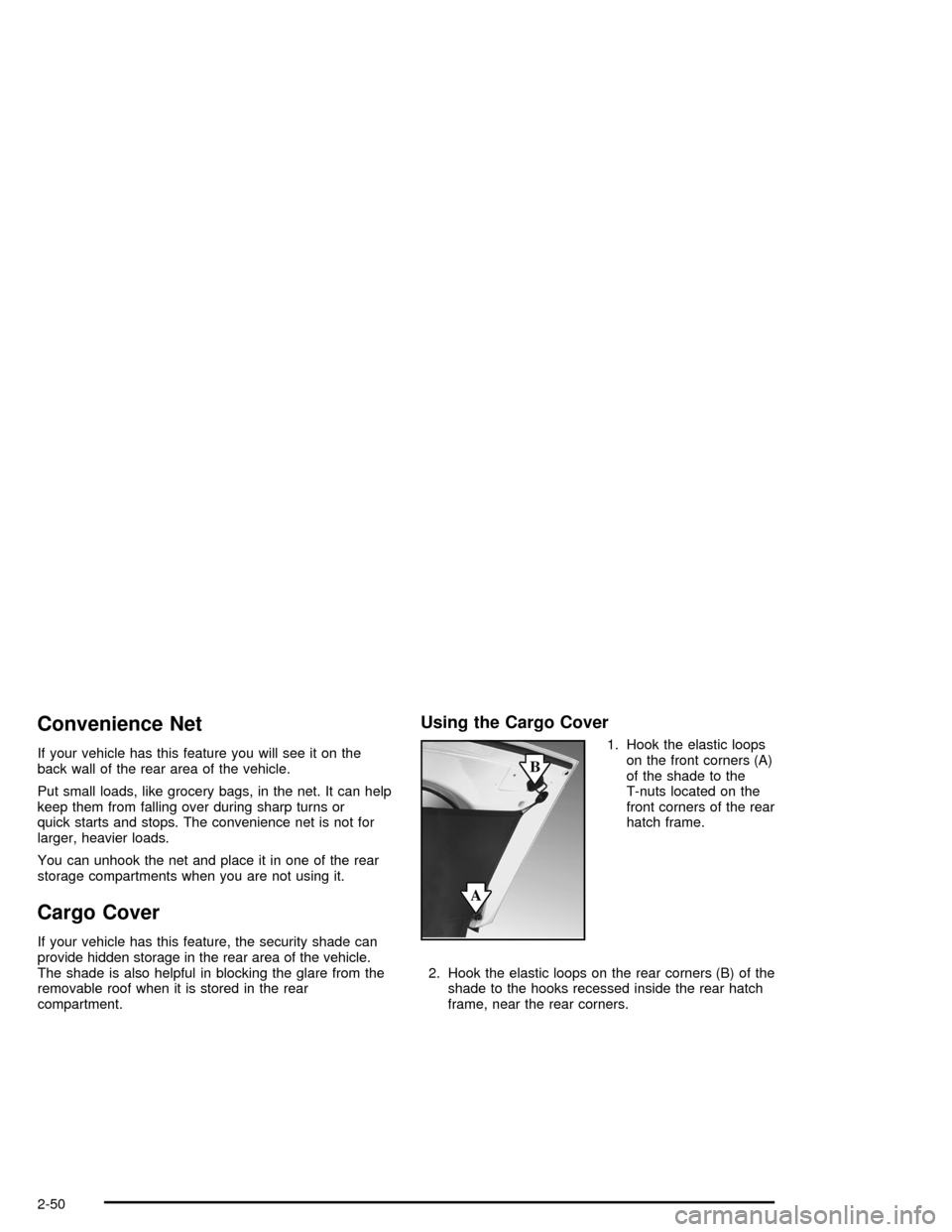
1. Hook the elastic loops
on the front corners (A)
of the shade to the
T-nuts located on the
front corners of the rear
hatch frame.
2. Hook the elastic loops on the rear corners (B) of the
shade to the hooks recessed inside the rear hatch
frame, near the rear corners.
2-50
Page 112 of 400
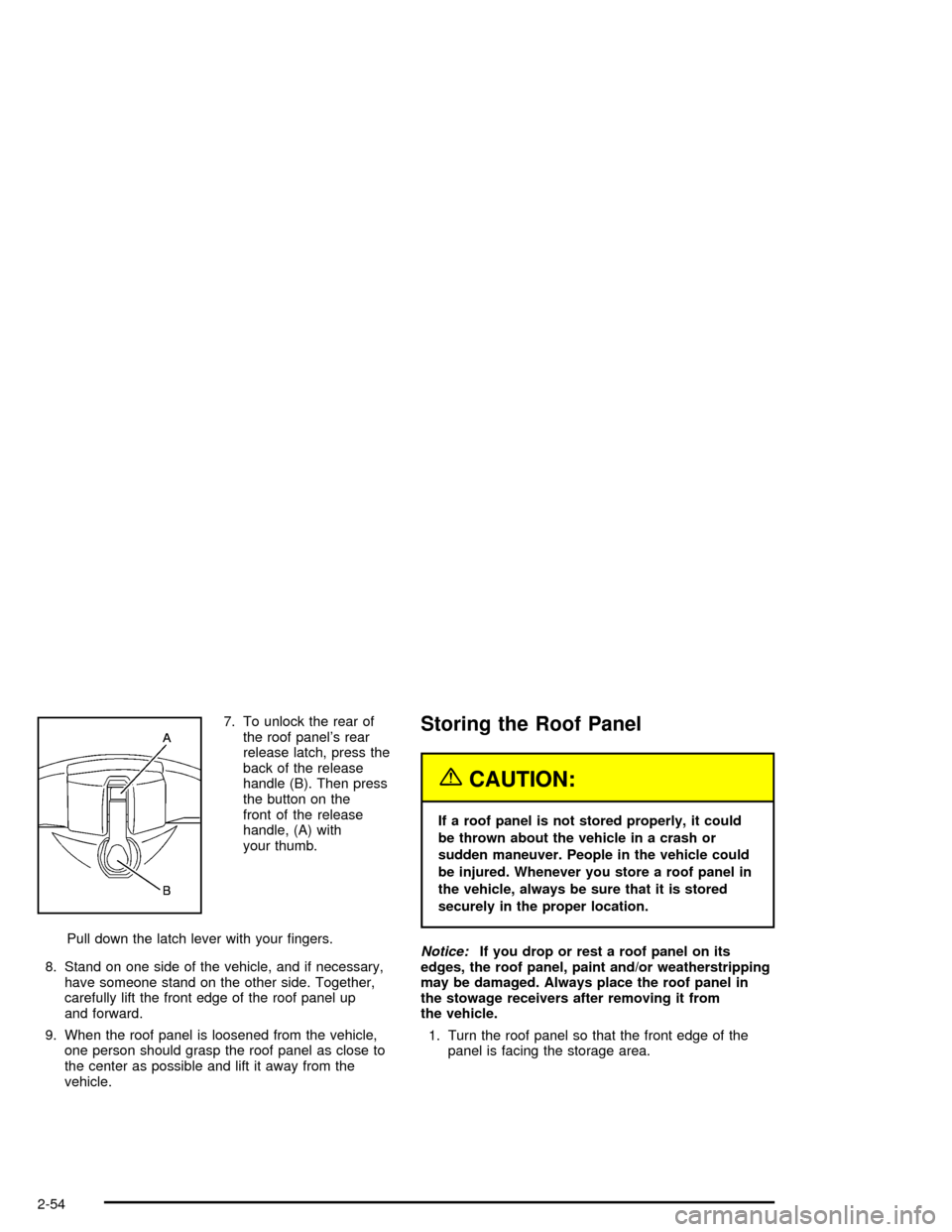
7. To unlock the rear of
the roof panel’s rear
release latch, press the
back of the release
handle (B). Then press
the button on the
front of the release
handle, (A) with
your thumb.
Pull down the latch lever with your ngers.
8. Stand on one side of the vehicle, and if necessary,
have someone stand on the other side. Together,
carefully lift the front edge of the roof panel up
and forward.
9. When the roof panel is loosened from the vehicle,
one person should grasp the roof panel as close to
the center as possible and lift it away from the
vehicle.Storing the Roof Panel
{CAUTION:
If a roof panel is not stored properly, it could
be thrown about the vehicle in a crash or
sudden maneuver. People in the vehicle could
be injured. Whenever you store a roof panel in
the vehicle, always be sure that it is stored
securely in the proper location.
Notice:If you drop or rest a roof panel on its
edges, the roof panel, paint and/or weatherstripping
may be damaged. Always place the roof panel in
the stowage receivers after removing it from
the vehicle.
1. Turn the roof panel so that the front edge of the
panel is facing the storage area.
2-54
Page 114 of 400

In most cases, it makes it easier if two people re-install
the roof panel.
1. Park on a level surface and set the parking brake.
Shift an automatic transmission into PARK (P). Shift
a manual transmission into NEUTRAL.
2. Check that the front release latches and the rear
release latch on the vehicle’s roof opening are in
their opened positions before attempting to
install the roof panel.
3. If the roof panel is stored in the rear storage area of
the vehicle, grasp the rear edge of the roof panel
with both hands and gently lift it up and remove
it from the storage area.
4. Carefully place the roof panel over the top of the
vehicle.
5. Position the rear edge of the roof panel to the
weatherstrip on the back of the roof opening.
Then align and t the pins at the rear of the roof
panel inside the openings in the rear overhead
weatherstrip. Gently lower the front edge of the roof
panel to the front of the roof opening.6. Push up on the handle of the rear roof release
handle to latch its hook in the closed position.
7. Turn the front release handles inward so that they
latch to the closed position.
8. Grasp and tug the roof panel up and down and
side-to-side to ensure the roof panel is securely
installed.
2-56