warning light CHEVROLET CORVETTE 2005 6.G Owner's Manual
[x] Cancel search | Manufacturer: CHEVROLET, Model Year: 2005, Model line: CORVETTE, Model: CHEVROLET CORVETTE 2005 6.GPages: 400, PDF Size: 9.4 MB
Page 193 of 400

TIRE FLAT:You will hear two chimes when this
message is displayed followed by the message
MAXIMUM SPEED 55 MPH (90 km/h). Also, the tire
pressure light on the instrument panel cluster will come
on. SeeTire Pressure Light on page 3-42. If this
message appears, do not drive your vehicle above this
limit. The next message to appear is REDUCED
HANDLING. The active handling system will intervene
more quickly when a at tire has been detected.
Adjust your driving accordingly. To acknowledge these
warnings, press the RESET button. After you press
the RESET button, a message will reappear every
10 minutes until this condition changes. This message
indicates that the pressure in one of your tires is
lower than 10 psi (68 kPa). Next to the TIRE FLAT
message, you can see either LEFT FRONT, RIGHT
FRONT, LEFT REAR or RIGHT REAR to indicate to you
which tire is at. You can receive more than one tire
pressure message at a time. To read other messages
that may have been sent at the same time, press
the RESET button. If a tire pressure message appears
on the DIC, stop as soon as you can. Have the tire
pressures checked and set to those shown on your Tire
Loading Information Label. SeeExtended Mobility
Tires on page 5-56andInation - Tire Pressure on
page 5-58.
{CAUTION:
When the LOW TIRE PRESSURE or TIRE FLAT
message is displayed on the Driver Information
Center, your vehicle’s handling capabilities will
be reduced during severe maneuvers. If you
drive too fast, you could lose control of your
vehicle. You or others could be injured. Don’t
drive over 55 mph (90 km/h) when the LOW
TIRE PRESSURE or TIRE FLAT message is
displayed. Drive cautiously and check your tire
pressures as soon as you can.
TOO COLD TO MOVE TOP:This message displays
and a chime sounds when the power convertible
top button is pressed and the power convertible top
pump motor temperature is below -4°F (-20°C). Wait for
the power convertible top pump motor to warm up
before using the power convertible top.
3-65
Page 194 of 400

TOP MOTOR OVER TEMPERATURE:This message
displays and a chime sounds when the power
convertible top button is pressed and the power
convertible top pump motor temperature is over
221°F (105°C). Wait for the power convertible top
pump motor to cool down before using the power
convertible top.
TOP NOT SECURE:This message displays and a
chime sounds when the power convertible top button is
released before the top open or close operation is
complete or if the top is closed without the header latch
engaged. Press and hold the convertible top button
to fully open or close the top, and make sure that the
header latch is engaged after the top is closed.
TRACTION SYSTEM AND ACTIVE
HANDLING – OFF:By pressing the Active Handling
System console button for ve seconds, the driver can
turn the Traction Control and Active Handling Systems
off. The message TRACTION SYSTEM AND ACTIVE
HANDLING – OFF will be displayed in the DIC, the
instrument panel cluster light will be on and a chime will
sound. You can acknowledge this message by
pressing the RESET button. The anti-lock brake systems
remains on with the Traction Control and Active
Handling Systems off. You should adjust your driving
accordingly.TRACTION SYSTEM AND ACTIVE
HANDLING – ON:If the Traction Control and Active
Handling Systems are off, pressing the Active Handling
System console button momentarily will turn both
systems on. The message TRACTION SYSTEM AND
ACTIVE HANDLING – ON will be displayed temporarily
in the DIC, the instrument panel cluster light will be
off and a chime will sound.
TRACTION SYSTEM ACTIVE:When your Traction
Control System is limiting wheel spin, the TRACTION
SYSTEM ACTIVE message will be displayed. Slippery
road conditions may exist if this message is displayed,
so adjust your driving accordingly. The message
will stay on for a few seconds after the Traction Control
System stops limiting wheel spin.
TRACTION SYSTEM – OFF:You will hear a single
quick tone when this message is displayed and
the traction control system warning light on the
instrument panel cluster will come on. SeeTraction
Control System (TCS) Warning Light on page 3-40. This
message comes on and stays on when the Active
Handling System console button is pressed to turn the
system off. To acknowledge this message, press
the RESET button.
3-66
Page 234 of 400

Avoid needless heavy braking. Some people drive in
spurts — heavy acceleration followed by heavy
braking — rather than keeping pace with traffic. This is
a mistake. Your brakes may not have time to cool
between hard stops. Your brakes will wear out much
faster if you do a lot of heavy braking. If you keep pace
with the traffic and allow realistic following distances,
you will eliminate a lot of unnecessary braking.
That means better braking and longer brake life.
If your engine ever stops while you are driving, brake
normally but do not pump your brakes. If you do,
the pedal may get harder to push down. If your engine
stops, you will still have some power brake assist.
But you will use it when you brake. Once the power
assist is used up, it may take longer to stop and
the brake pedal will be harder to push.Anti-Lock Brake System (ABS)
Your vehicle has anti-lock brakes. ABS is an advanced
electronic braking system that will help prevent a
braking skid.
When you start your engine and begin to drive away,
your anti-lock brake system will check itself. You
may hear a momentary motor or clicking noise while
this test is going on, and you may even notice that your
brake pedal moves a little. This is normal.
If there is a problem with
the anti-lock brake system,
this warning light will
stay on. SeeAnti-Lock
Brake System Warning
Light on page 3-39.
4-6
Page 237 of 400

The SERVICE TRACTION
SYSTEM message and
the TCS warning light will
come on to let you
know if there is a problem
with your TCS system.
SeeDIC Warnings
and Messages on
page 3-54.
When this light and the SERVICE TRACTION SYSTEM
message are on, the system will not limit wheel spin.
Adjust your driving accordingly.The TCS system automatically comes on whenever you
start your vehicle. To limit wheel spin, especially in
slippery road conditions, you should always leave the
system on. But you can turn the TCS system off if
you ever need to.
To turn the system off,
press the button located
on the console. You
can turn the system on or
off at any time by
pressing the ACTIVE
HANDLING button. The
DIC will display the
appropriate message when
you push the button.
4-9
Page 238 of 400

Active Handling System
The Active Handling System is a computer controlled
system that helps the driver maintain directional control
of the vehicle in difficult driving conditions. This is
accomplished by selectively applying any one of the
vehicle’s brakes.
When you rst start your vehicle during cold winter
weather and begin to drive away, the message ACTIVE
HANDLING WARMING UP may be displayed in the
DIC. This is normal. You can acknowledge this message
by pressing the RESET button. The Active Handling
System performance is affected until the message,
ACTIVE HANDLING READY, is displayed in the DIC.
The ACTIVE HANDLING CALIBRATING message may
be displayed in the DIC and the instrument panel
cluster light will be on after exceeding 18 mph (30 km/h)
for 10 seconds. The Active Handling System is off
until the ACTIVE HANDLING READY message
is displayed. This could take up to 15 minutes.
The ACTIVE HANDLING message will come on when
the system is operating. SeeDIC Warnings and
Messages on page 3-54for more information. You may
also feel or hear the system working. This is normal.The SERVICE ACTIVE
HANDLING message will
be displayed, the
instrument cluster light will
come on, and a chime
will sound to let you know
if there is a problem
with the system. SeeDIC
Warnings and Messages
on page 3-54for more
information.
When this light and the SERVICE ACTIVE HANDLING
message are on, the system is not operational.
Adjust your driving accordingly.
The Active Handling System comes on automatically
whenever you start your vehicle. To help maintain
directional control of the vehicle, you should always
leave the system on. You can turn the system off if you
ever need to. If you turn the Active Handling System
off, the Traction Control System will also be turned off.
Adjust your driving accordingly.
4-10
Page 248 of 400

Hydroplaning
Hydroplaning is dangerous. So much water can build up
under your tires that they can actually ride on the
water. This can happen if the road is wet enough and
you are going fast enough. When your vehicle is
hydroplaning, it has little or no contact with the road.
Hydroplaning does not happen often. But it can if your
tires do not have much tread or if the pressure in
one or more is low. It can happen if a lot of water is
standing on the road. If you can see reections
from trees, telephone poles, or other vehicles, and
raindrops dimple the water’s surface, there could be
hydroplaning.
Hydroplaning usually happens at higher speeds. There
just is not a hard and fast rule about hydroplaning.
The best advice is to slow down when it is raining.
Driving Through Deep Standing Water
Notice:If you drive too quickly through deep
puddles or standing water, water can come in
through your engine’s air intake and badly damage
your engine. Never drive through water that is
slightly lower than the underbody of your vehicle. If
you cannot avoid deep puddles or standing water,
drive through them very slowly.
Driving Through Flowing Water
{CAUTION:
Flowing or rushing water creates strong forces.
If you try to drive through owing water, as you
might at a low water crossing, your vehicle can
be carried away. As little as six inches of
owing water can carry away a smaller vehicle.
If this happens, you and other vehicle
occupants could drown. Do not ignore police
warning signs, and otherwise be very cautious
about trying to drive through owing water.
Some Other Rainy Weather Tips
Besides slowing down, allow some extra following
distance. And be especially careful when you
pass another vehicle. Allow yourself more clear
room ahead, and be prepared to have your
view restricted by road spray.
Have good tires with proper tread depth. SeeTires
on page 5-51.
4-20
Page 249 of 400

City Driving
One of the biggest problems with city streets is the
amount of traffic on them. You will want to watch out for
what the other drivers are doing and pay attention to
traffic signals.Here are ways to increase your safety in city driving:
Know the best way to get to where you are
going. Get a city map and plan your trip into
an unknown part of the city just as you would for a
cross-country trip.
Try to use the freeways that rim and crisscross
most large cities. You will save time and energy.
SeeFreeway Driving on page 4-22.
Treat a green light as a warning signal. A traffic
light is there because the corner is busy enough
to need it. When a light turns green, and just before
you start to move, check both ways for vehicles
that have not cleared the intersection or may
be running the red light.
4-21
Page 254 of 400
Winter Driving
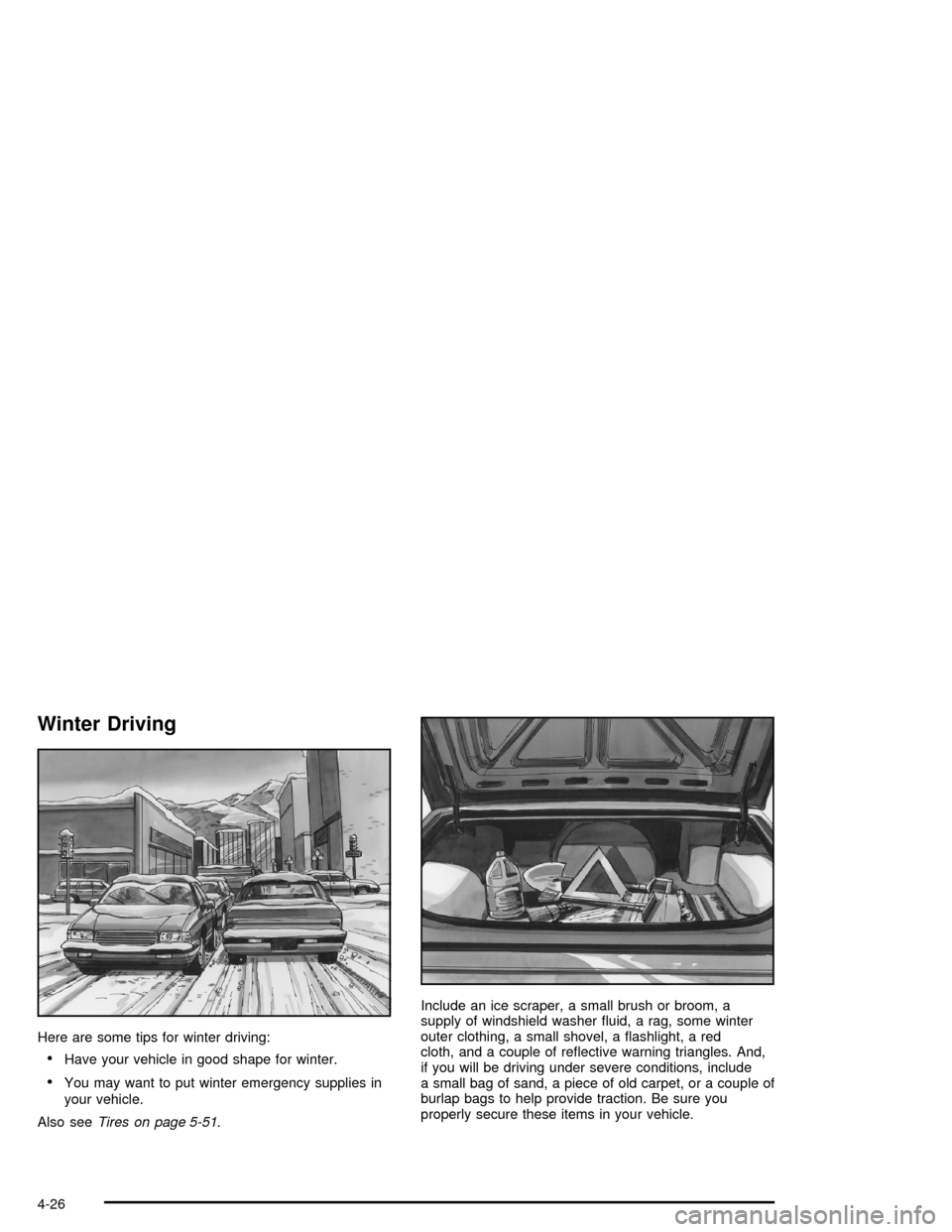
Here are some tips for winter driving:
Have your vehicle in good shape for winter.
You may want to put winter emergency supplies in
your vehicle.
Also seeTires on page 5-51.Include an ice scraper, a small brush or broom, a
supply of windshield washer uid, a rag, some winter
outer clothing, a small shovel, a ashlight, a red
cloth, and a couple of reective warning triangles. And,
if you will be driving under severe conditions, include
a small bag of sand, a piece of old carpet, or a couple of
burlap bags to help provide traction. Be sure you
properly secure these items in your vehicle.
4-26
Page 273 of 400
When replacing the fuel cap, turn it clockwise until it
clicks. Make sure the cap is fully installed. The
diagnostic system can determine if the fuel cap has
been left off or improperly installed. This would allow fuel
to evaporate into the atmosphere. SeeMalfunction
Indicator Lamp on page 3-42.
The CHECK GAS CAP message will be displayed on
the Driver Information Center (DIC) if the fuel cap is not
properly installed. SeeDIC Warnings and Messages
on page 3-54for more information.
{CAUTION:
If a re starts while you are refueling, do not
remove the nozzle. Shut off the ow of fuel by
shutting off the pump or by notifying the
station attendant. Leave the area immediately.
Notice:If you need a new fuel cap, be sure to get
the right type. Your dealer can get one for you.
If you get the wrong type, it may not t properly.
This may cause your malfunction indicator lamp to
light and may damage your fuel tank and emissions
system. SeeMalfunction Indicator Lamp on
page 3-42.
Filling a Portable Fuel Container
{CAUTION:
Never ll a portable fuel container while it is in
your vehicle. Static electricity discharge from
the container can ignite the gasoline vapor.
You can be badly burned and your vehicle
damaged if this occurs. To help avoid injury to
you and others:
Dispense gasoline only into approved
containers.
Do not ll a container while it is inside a
vehicle, in a vehicle’s trunk, pickup bed, or
on any surface other than the ground.
Bring the ll nozzle in contact with the
inside of the ll opening before operating
the nozzle. Contact should be maintained
until the lling is complete.
Do not smoke while pumping gasoline.
5-9
Page 285 of 400

When to Check and What to Use
The hydraulic clutch uid
reservoir cap has this
symbol on it. SeeEngine
Compartment Overview
on page 5-12for reservoir
location.
Refer to the Maintenance Schedule to determine how
often you should check the uid level in your clutch
master cylinder reservoir and for the proper uid to use.
SeeOwner Checks and Services on page 6-8and
Recommended Fluids and Lubricants on page 6-12.
How to Check and Add Fluid
Make sure the uid level is at the MIN (Minimum) line
on the side of the reservoir. If it is not, remove the
cap and add the proper uid until the level reaches the
MIN line.
Engine Coolant
The cooling system in your vehicle is lled with
DEX-COOL®engine coolant. This coolant is designed
to remain in your vehicle for ve years or 150,000 miles
(240 000 km), whichever occurs rst, if you add only
DEX-COOL
®extended life coolant.
The following explains your cooling system and how to
add coolant when it is low. If you have a problem
with engine overheating, seeEngine Overheating on
page 5-24.
A 50/50 mixture of clean, drinkable water and
DEX-COOL
®coolant will:
Give freezing protection down to−34°F (−37°C).
Give boiling protection up to 265°F (129°C).
Protect against rust and corrosion.
Help keep the proper engine temperature.
Let the warning lights and gages work as they
should.
Notice:Using coolant other than DEX-COOL
®may
cause premature engine, heater core or radiator
corrosion. In addition, the engine coolant may
require changing sooner, at 30,000 miles (50 000 km)
or 24 months, whichever occurs rst. Any repairs
would not be covered by your warranty. Always use
DEX-COOL
®(silicate-free) coolant in your vehicle.
5-21