service CHEVROLET CORVETTE 2006 6.G Owner's Manual
[x] Cancel search | Manufacturer: CHEVROLET, Model Year: 2006, Model line: CORVETTE, Model: CHEVROLET CORVETTE 2006 6.GPages: 426, PDF Size: 2.48 MB
Page 181 of 426
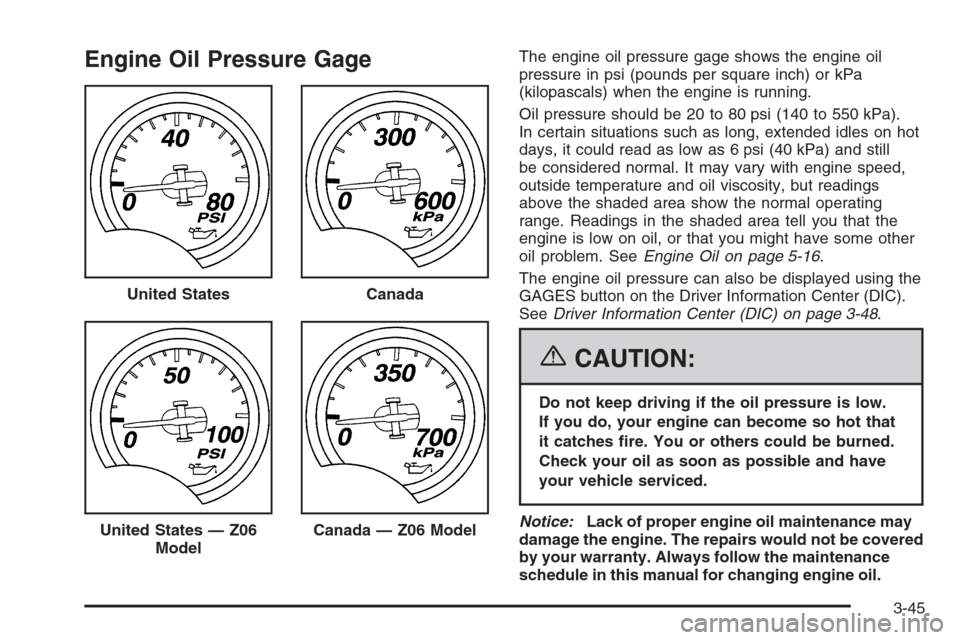
Engine Oil Pressure GageThe engine oil pressure gage shows the engine oil
pressure in psi (pounds per square inch) or kPa
(kilopascals) when the engine is running.
Oil pressure should be 20 to 80 psi (140 to 550 kPa).
In certain situations such as long, extended idles on hot
days, it could read as low as 6 psi (40 kPa) and still
be considered normal. It may vary with engine speed,
outside temperature and oil viscosity, but readings
above the shaded area show the normal operating
range. Readings in the shaded area tell you that the
engine is low on oil, or that you might have some other
oil problem. SeeEngine Oil on page 5-16.
The engine oil pressure can also be displayed using the
GAGES button on the Driver Information Center (DIC).
SeeDriver Information Center (DIC) on page 3-48.
{CAUTION:
Do not keep driving if the oil pressure is low.
If you do, your engine can become so hot that
it catches re. You or others could be burned.
Check your oil as soon as possible and have
your vehicle serviced.
Notice:Lack of proper engine oil maintenance may
damage the engine. The repairs would not be covered
by your warranty. Always follow the maintenance
schedule in this manual for changing engine oil. United States
Canada
United States — Z06
ModelCanada — Z06 Model
3-45
Page 191 of 426
BUCKLE SEATBELT:This message reminds you to
buckle the driver’s seat belt.
This message will display and a chime will sound when
the ignition is on, the driver’s seat belt is unbuckled,
and the vehicle is in motion. You should buckle
your seat belt.
If the driver remains unbuckled when the ignition is
on and the vehicle is in motion, the reminder will
be repeated. If the driver’s seat belt is already buckled,
this message and chime will not come on.
This message is an additional reminder to the Safety
Belt Reminder Light in the instrument panel cluster.
SeeSafety Belt Reminder Light on page 3-34for more
information.
CHANGE ENGINE OIL:This message will appear when
the life of the engine oil has expired. SeeScheduled
Maintenance on page 6-4. After an oil change, the engine
oil life system must be reset. See “Engine Oil Life” under
DIC Controls and Displays on page 3-48. Also, see
Engine Oil on page 5-16andEngine Oil Life System on
page 5-23for more information.
CHECK BRAKE FLUID:This message will appear, a
chime will sound, and the brake system warning light on
the instrument panel cluster will be on if the ignition is
on to inform the driver that the brake uid level is
low. SeeBrake System Warning Light on page 3-38.
Have the brake system serviced by your GM dealer as
soon as possible. SeeBrakes on page 5-42.CHECK COOLANT LEVEL:This message will appear
when there is a low level of engine coolant. Have
the cooling system serviced by your GM dealer as soon
as possible. SeeEngine Coolant on page 5-29.
CHECK GAS CAP:If the gas cap has not been fully
tightened, this message will appear. You should
check your gas cap to ensure that it is on properly.
Once tightened, it will take at least one overnight park
to reset or clear this message. If there is a CHECK GAS
CAP message and a malfunction indicator lamp on in
the instrument panel cluster, you may need to see your
GM dealer for service. SeeMalfunction Indicator
Lamp on page 3-42for more information.
CHECK OIL LEVEL:Press the RESET button to
acknowledge that you have read the message and to
remove it from the display. The message will reappear
every 10 minutes until this condition changes. Once
the vehicle senses a change in the engine oil level, the
light will remain off.
You will hear two chimes when this message is
displayed. If this message appears after starting your
engine, your engine oil level may be too low. You
may need to add oil. SeeEngine Overheating on
page 5-32.
3-55
Page 193 of 426
ENGINE PROTECTION REDUCE ENGINE RPM:
You will hear multiple chimes when this message is
displayed. This message will remain displayed and
active until the issue is resolved.
If the engine oil temperature exceeds 320°F (160°C),
this message is displayed. You should check the engine
coolant temperature and engine oil level. If your engine is
too hot, seeEngine Overheating on page 5-32. Your
vehicle may need service, so see your GM dealer. You
can monitor the oil temperature with the gages button
on the DIC.
HEADLAMPS SUGGESTED:If it is dark enough outside
and the headlamps and Twilight Sentinel
®controls are
off, this message will display. This message informs the
driver that turning on the exterior lamps is recommended.
It has become dark enough outside to require the
headlamps and/or other exterior lamps.
HIGH TIRE PRESSURE:To acknowledge the warning,
press the RESET button. After you press the RESET
button, a message will reappear every 10 minutes
until this condition changes. This message indicates
that the pressure in one of your tires is higher than
42 psi (290 kPa). Next to the HIGH TIRE PRESSURE
message, you can see either LEFT FRONT, RIGHT
FRONT, LEFT REAR, or RIGHT REAR to indicate to
you which tire is higher than 42 psi (290 kPa).You can receive more than one tire pressure message
at a time. To read other messages that may have
been sent at the same time, press the RESET button.
If a tire pressure message appears on the DIC, stop
as soon as you can. Have the tire pressures checked
and set to those shown on your Tire Loading Information
Label. SeeExtended Mobility Tires on page 5-62and
Ination - Tire Pressure on page 5-64.
HOT ENGINE AIR CONDITIONING OFF:This message
displays when the engine coolant becomes hotter than
the normal operating temperature. To avoid added strain
on a hot engine, the air conditioning compressor is
automatically turned off. When the coolant temperature
returns to normal, the A/C operation will automatically
resume. You can continue to drive your vehicle. If this
message continues to appear, have the system repaired
by your GM dealer as soon as possible to avoid
compressor damage.
ICE POSSIBLE:This message displays when the
outside air temperature is cold enough to create icy road
conditions.
LOW FUEL:This message displays when the fuel tank
is less than 10 percent full and the display is turned
off. A multiple chime will also sound when this message
is displayed. SeeFuel Gage on page 3-47.
3-57
Page 194 of 426
LOW OIL PRESSURE:If this message appears while
the engine is running, stop the engine and do not
operate it until the cause of low oil pressure is corrected.
Severe damage to the engine can result. A multiple
chime will sound when this message is displayed. See
Engine Oil on page 5-16.
LOW TIRE PRESSURE:You will hear multiple chimes
and the tire pressure light on the instrument panel
cluster will come on when this message is displayed.
SeeTire Pressure Light on page 3-42. To acknowledge
the warning, press the RESET button. After you
press the RESET button, a message will appear every
10 minutes until this condition changes. This message
indicates that the pressure in one of your tires is
less than 24 psi (164 kPa). Next to the LOW TIRE
PRESSURE message, you can see either LEFT
FRONT, RIGHT FRONT, LEFT REAR, or RIGHT REAR
to indicate to you which tire is low on pressure. You
can receive more than one tire pressure message at a
time. To read other messages that may have been
sent at the same time, press the RESET button. If a tire
pressure message appears on the DIC, stop as soon
as you can. Have the tire pressures checked and set to
those shown on your Tire Loading Information Label.
SeeExtended Mobility Tires on page 5-62andTire
Pressure Monitor System on page 5-67.
{CAUTION:
When the LOW TIRE PRESSURE or TIRE FLAT
message is displayed on the Driver Information
Center, your vehicle’s handling capabilities will
be reduced during severe maneuvers. The
active handling system will be affected. See
Active Handling System on page 4-10.Ifyou
drive too fast, you could lose control of your
vehicle. You or others could be injured. Do not
drive over 55 mph (90 km/h) when the LOW
TIRE PRESSURE or TIRE FLAT message is
displayed. Drive cautiously and check your tire
pressures as soon as you can.
MAXIMUM SPEED 80 MPH (129 km/h):To
acknowledge the warning, press the RESET button.
After you press the RESET button, a message will
reappear every 10 minutes until this condition changes.
This message indicates that a malfunction is present
in the Selective Ride Control system. The vehicle speed
will be limited to a value determined by the vehicle
when the shock absorber system has failed and
the shocks are in their full soft mode. Have your vehicle
serviced by your GM dealer as soon as possible.
3-58
Page 197 of 426
SERVICE ACTIVE HANDLING SYSTEM:If the
SERVICE ACTIVE HANDLING SYSTEM message is
displayed, there is a problem with your Active Handling
System and your vehicle needs service. See your
GM dealer. The instrument cluster light will also be
on and a chime will sound. When this message
is displayed, the system is not working. Adjust your
driving accordingly. SeeActive Handling System
on page 4-10for more information.
SERVICE AIR CONDITIONING:This message
displays when the electronic sensors that control the
air conditioning and heating systems are no longer
working. Have the climate control system serviced by
your GM dealer if you notice a drop in heating and
air conditioning efficiency.
SERVICE ANTILOCK BRAKES:If the SERVICE
ANTILOCK BRAKES message is displayed when you
are driving, stop as soon as possible and turn the
ignition off. Then start the engine again to reset the
system. If the message stays on, or comes back
on again while you are driving, your vehicle is in need
of service. See your GM dealer. If the anti-lock
brake system warning light is on and the regular brake
system warning light is not on, you still have brakes,
but do not have anti-lock brakes. If the regular
brake system light is also on, you do not have anti-lock
brakes and there is a problem with your brakes. See
Anti-Lock Brake System Warning Light on page 3-39
andBrake System Warning Light on page 3-38.If the SERVICE ANTILOCK BRAKES message is being
displayed, your Traction Control System and the
Active Handling System will also be disabled. The Driver
Information Center will scroll three messages: SERVICE
ANTILOCK BRAKES, SERVICE TRACTION SYSTEM,
and SERVICE ACTIVE HANDLING, and the instrument
cluster lights will be illuminated along with a chime.
The driver can acknowledge these messages by
pressing the RESET button. When the service message
is displayed the computer controlled systems will not
assist the driver and you should have the system
repaired by your GM dealer as soon as possible.
Adjust your driving accordingly.
SERVICE CHARGING SYSTEM:Press the RESET
button to acknowledge that you have read the message
and to remove it from the display. The message will
reappear every 10 minutes until this condition changes.
You will hear multiple chimes when this message is
displayed.
If this message comes on while you are driving, you
may have a problem with the electrical charging system.
It could indicate that you have a loose or broken drive
belt or another electrical problem. Have it checked
right away by your GM dealer. Driving while this warning
message is on could drain your battery.
If you must drive a short distance with the message on,
be certain to turn off your accessories, such as the
radio and air conditioner.
3-61
Page 198 of 426
SERVICE ELECTRICAL SYSTEM:This message
displays if an electrical problem has occurred within the
Powertrain Control Module (PCM). Have your vehicle
serviced by your GM dealer.
SERVICE FUEL SYSTEM:This message displays if
the Powertrain Control Module (PCM) has detected
a problem within the fuel system. Have your vehicle
serviced by your GM dealer. This message will also
be displayed when the cluster is not getting fuel
information from the PCM.
SERVICE RIDE CONTROL:This message is used to
indicate to the driver that the Selective Ride Control
system has detected a malfunction and that the system
must be serviced. See your GM dealer. If a fault is
present in the Selective Ride Control system which
causes the shocks to be in their full soft condition, the
SERVICE RIDE CONTROL, SHOCKS INOPERATIVE,
and MAXIMUM SPEED 80 MPH (129 km/h) will
display together.
SERVICE TIRE MONITOR:If this message comes
on, a part on the Tire Pressure Monitor (TPM) is
not working properly. If you drive your vehicle while
any of the four sensors are missing or inoperable, the
warning will come on in about 60 minutes. A sensor
would be missing, for example, if you put different
wheels on your vehicle without transferring the sensors.
If the warning comes on and stays on, there may be
a problem with the TPM. See your GM dealer.SERVICE TRACTION SYSTEM:If the SERVICE
TRACTION SYSTEM message is displayed when you
are driving, there is a problem with your Traction Control
System and your vehicle is in need of service. See
your GM dealer. When this message is displayed, the
system will not limit wheel spin. Adjust your driving
accordingly.
The instrument cluster car icon will also be illuminated
and a chime will sound. The driver can acknowledge
both messages by pressing the RESET button two
times. When the service messages are displayed, the
computer controlled systems will not assist the driver
in controlling the vehicle. Have the system repaired
by your GM dealer as soon as possible. Adjust
your driving accordingly.
SERVICE TRANSMISSION:If this message appears,
there is a problem with the transmission. See your
GM dealer for service.
SERVICE VEHICLE SOON:If this message appears
on the DIC along with a chime, there may be an
electrical or another system problem with your vehicle.
Have your vehicle checked by your GM dealer if
this message keeps appearing.
3-62
Page 199 of 426
SET PARK BRAKE FOR SEAT RECALL:If you have
a manual transmission vehicle, this message displays
if you try to recall the memory positions when the ignition
is on and the parking brake is not set. If the vehicle is
on, you must set the parking brake in order for the
memory positions to recall. SeeMemory on page 2-72
for more information.
SET PARK BRAKE TO MOVE TOP:If you have a
manual transmission vehicle, this message will display
and a chime will sound if you try to operate the
power convertible top without rst setting the parking
brake. Set the parking brake before trying to operate the
power convertible top. SeeConvertible Top (Manual)
on page 2-60orConvertible Top (Power) on page 2-67
for more information.
SHIFT TO PARK:If you have an automatic
transmission vehicle, this message indicates that the
vehicle is not in PARK (P) when the engine is being
turned off. The vehicle will be in ACCESSORY. Once
the shifter is moved to PARK (P), the vehicle will turn off.
The vehicle will remain in ACCESSORY, without the
20 minute time-out period, until the shifter is moved
to PARK (P) or until the driver presses the pushbutton
to restart the vehicle. SeeIgnition Positions on
page 2-22for more information.SHIFT TO PARK OR SET PARK BRAKE FOR TOP:
If you have an automatic transmission vehicle, this
message will display and a chime will sound if you try
to operate the power convertible top without rst shifting
into PARK (P) or setting the parking brake. Either
shift the vehicle into PARK (P) or set the parking brake
before trying to operate the power convertible top.
SeeConvertible Top (Manual) on page 2-60or
Convertible Top (Power) on page 2-67for more
information.
SHOCKS INOPERATIVE:To acknowledge that you
have read the message and to remove it from the
display, press the RESET button. The message will
reappear every 10 minutes until this condition changes.
This message indicates that a malfunction is present
in the Selective Ride Control system which is causing
the shocks to be in their full soft mode. This is a warning
to the driver that the vehicle handling may be affected.
Have your vehicle serviced by your GM dealer as
soon as possible.
3-63
Page 202 of 426
TRANSMISSION HOT IDLE ENGINE:You will hear
four chimes when this message is displayed. To
acknowledge this warning, press the RESET button.
After you press the RESET button, the message will be
displayed every 10 minutes until the condition changes.
If you do not press the RESET button, the message
remains on the display until the condition changes.
If the transmission uid temperature rises above
270°F (132°C) or rises rapidly, this message is displayed.
The transmission may shift gears or apply the torque
converter clutch to reduce the uid temperature. Driving
aggressively or driving on long hills can cause the
transmission uid temperature to be higher than normal.
If this message appears, you may continue to drive
at a slower speed. You should also monitor the
transmission uid temperature and allow it to cool to at
least 230°F (110°C). The transmission uid temperature
can be monitored with the gages button on the DIC.
SeeAutomatic Transmission Fluid on page 5-28. You
should also check the engine coolant temperature. If it is
also hot, seeEngine Overheating on page 5-32.If the TRANSMISSION HOT IDLE ENGINE message is
displayed during normal vehicle operation on at roads,
your vehicle may need service. See your GM dealer for
an inspection.
If driving in a performance or competitive manner, the use
of (S) Sport Automatic Mode or (S) Sport Manual Paddle
Shift gear selection is recommended. SeeAutomatic
Transmission Operation on page 2-26for more
information.
TURN SIGNAL ON:If a turn signal is left on for
three-quarters of a mile (1.2 km), this message will
appear on the display and you will hear a chime. Move
the turn signal/multifunction lever to the off position.
To acknowledge this message, press the RESET button.
UNLATCH HEADER TO MOVE TOP:This message
will display and a chime will sound if you try to lower
the convertible top without rst unlocking the top. Move
the latch handle to unlock the convertible top. See
Convertible Top (Manual) on page 2-60orConvertible
Top (Power) on page 2-67.
3-66
Page 216 of 426
XM™ Satellite Radio Service
If your vehicle has XM™, XM™ is a satellite radio
service that is based in the 48 contiguous United
States and in Canada (if available). XM™ offers
over 100 coast-to-coast channels including music,
news, sports, talk, and children’s programming. XM™
provides digital quality audio and text information
that includes song title and artist name. A service fee is
required in order to receive the XM™ service. For
more information, contact XM™ at www.xmradio.com or
call 1-800-852-XMXM (9696).
Playing the Radio
Top Knob (Power/Volume):Press this knob to turn
the system on and off. Turn this knob to increase or to
decrease the volume.
4(Information):For RDS, press this button to change
what appears on the display while using RDS. The
display options are station name, RDS station frequency,
PTY, and the name of the program (if available).For XM™ (if equipped), press the information button
while in XM™ mode to retrieve four different categories
of information related to the current song or channel:
Artist, Song Title, Category or PTY, Channel
Number/Channel Name.
To change the default on the display, press the
information button until you see the display you want,
then hold the button for two seconds. The radio will
produce one beep and the selected display will now be
the default.
AUTO
n(Automatic Volume):With automatic
volume, the audio system will adjust automatically to
make up for road and wind noise as you drive, by
increasing the volume as vehicle speed increases.
Set the volume at the desired level. Press this button
to select AUTO VOLUME MIN, AUTO VOLUME
MED, or AUTO VOLUME MAX. Each higher setting will
provide more volume compensation at faster vehicle
speeds. To turn automatic volume off, press this button
until AUTO VOLUME OFF appears on the display.
3-80
Page 220 of 426
SCAN:Scan the stations within a category by
performing the following:
1. Press the CAT button. The last selected category
will appear on the display.
2. Turn the tune knob to select the category.
3. Once the desired category is displayed, press and
hold either SCAN arrow until you hear a beep and
SCAN CATEGORY appears on the display.
The radio will begin scanning the stations in the
category.
4. Press either SCAN arrow to stop scanning.
If both category and TRAF are on, the radio will scan
for stations with the selected category and traffic
announcements.
BAND (Alternate Frequency):Alternate frequency
allows the radio to switch to a stronger station with
the same category. To turn alternate frequency
on, press and hold BAND for four seconds. AF ON
will appear on the display. The radio may switch
to stations with a stronger frequency.
To turn alternate frequency off, press and hold BAND
again for four seconds. AF OFF will appear on the
display. The radio will not switch to other stations.
This function does not apply for XM™ Satellite Radio
Service.RDS Messages
ALERT!:Alert warns of local or national emergencies.
When an alert announcement comes on the current
radio station, ALERT! will appear on the display. You will
hear the announcement, even if the volume is low or
a CD is playing. If a CD is playing, play will stop during
the announcement. Alert announcements cannot be
turned off.
ALERT! will not be affected by tests of the emergency
broadcast system. This feature is not supported by
all RDS stations.
4(Information):If the current station has a message,
INFO will appear on the display. Press this button to
see the message. The message may display the artist,
song title, call in phone numbers, etc.
If the entire message is not displayed, parts of the
message will appear every three seconds. To scroll
through the message, press and release this button.
A new group of words will appear on the display after
every press of the button. Once the complete message
has been displayed, INFO will disappear from the display
until another new message is received. The last message
can be displayed by pressing this button. You can view
the last message until a new message is received or a
different station is tuned to.
3-84