trunk CHEVROLET CORVETTE 2008 6.G Owner's Manual
[x] Cancel search | Manufacturer: CHEVROLET, Model Year: 2008, Model line: CORVETTE, Model: CHEVROLET CORVETTE 2008 6.GPages: 432, PDF Size: 2.4 MB
Page 197 of 432
To acknowledge the message, press the RESET button.
The message reappears every 10 minutes until this
condition changes.
CLOSE TRUNK TO MOVE TOP
This message displays and a chime sounds if the trunk
is open while you are trying to operate the convertible
top. Make sure the trunk is closed before operating the
convertible top. SeeConvertible Top (Manual) on
page 2-62orConvertible Top (Power) on page 2-68.
COMPETITIVE DRIVING MODE
This message displays and a short chime sounds
when the Competitive Driving mode is selected.
The instrument panel cluster light will not be on
when the Competitive Driving mode is selected.
The Traction Control System (TCS) will not be operating
while in the Competitive Driving mode. Adjust your
driving accordingly. SeeRacing or Other Competitive
Driving on page 4-15for more information.
COOLANT OVER TEMPERATURE
This message displays and a chime sounds if the engine
coolant exceeds 255°F (124°C). If you have been
operating your vehicle under normal driving conditions,
pull off the road, stop your vehicle, and turn off the
engine as soon as possible.
You can monitor the coolant temperature with the gages
button on the DIC or the engine coolant temperature
gage on the instrument panel cluster. SeeEngine
Overheating on page 5-31,DIC Operation and Displays
on page 3-52, andEngine Coolant Temperature Gage
on page 3-44.
To acknowledge the message, press the RESET button.
The message reappears and a chime sounds every
minute until this condition changes. If you do not press
the RESET button, the message remains on until the
condition changes.
3-61
Page 210 of 432
Other Messages
Here are more messages that you can receive on your
Driver Information Center (DIC). To acknowledge a
message and read another message that may have
come on at the same time, press the RESET button.
ACCESSORY MODE ON
BATTERY VOLTAGE HIGH
SeeVoltmeter Gage on page 3-40.
BATTERY VOLTAGE LOW
SeeVoltmeter Gage on page 3-40.
CHECK WASHER FLUID
SeeWindshield Washer Fluid on page 5-41.
CRUISE SET TO XXX MPH (XXX km/h)
SeeCruise Control on page 3-11.
DRIVER DOOR AJAR
FOB AUTOLEARN WAIT XX MINUTES
See “Matching Transmitter(s) to Your Vehicle” under
Keyless Access System Operation on page 2-6.
FOB BATTERY LOW
See “Battery Replacement” underKeyless Access
System Operation on page 2-6.
HATCH AJAR (Coupe)
INTRUSION SENSOR OFF, if your vehicle has this
feature
INTRUSION SENSOR ON, if your vehicle has this
feature
KNOWN FOB
See “Matching Transmitter(s) to Your Vehicle” under
Keyless Access System Operation on page 2-6.
MAXIMUM NUMBER OF FOBS LEARNED
See “Matching Transmitter(s) to Your Vehicle” under
Keyless Access System Operation on page 2-6.
OFF–ACCESSORY TO LEARN
See “Matching Transmitter(s) to Your Vehicle” under
Keyless Access System Operation on page 2-6.
PASSENGER DOOR AJAR
READY FOR FOB #X
See “Matching Transmitter(s) to Your Vehicle” under
Keyless Access System Operation on page 2-6.
TONNEAU AJAR (Convertible)
TRUNK AJAR (Convertible)
UPSHIFT NOW
SeeManual Transmission Operation on page 2-30.
3-74
Page 215 of 432
If you choose 90 S, the twilight delay time will be set to
90 seconds.
When the mode you want is selected, press the
OPTION button to set your choice and advance to the
next personal option.
Flash at Unlock:This option activates the front and
rear turn signals for two short ashes when the unlock or
hatch/trunk button on the keyless access transmitter
is pressed. This will only occur when the vehicle is off.
Press the OPTION button until FLASH AT UNLOCK
appears on the display, then press the RESET button to
scroll through the following modes:
YES (default)
NO
If you choose YES, the front and rear turn signals will
ash twice when you press the unlock button or
the hatch/trunk button on the keyless access transmitter.
If you choose NO, this option will turn off.
When the mode you want is selected, press the
OPTION button to set your choice and advance to the
next personal option.Flash at Lock:This option activates the front and rear
turn signals for one long ash when the lock button
on the keyless access transmitter is pressed. This will
only occur when the vehicle is off. If the lock button
on the keyless access transmitter is pressed again
within ve seconds, the horn will sound regardless of
which setting you have selected.
Press the OPTION button until FLASH AT LOCK
appears on the display, then press the RESET button to
scroll through the following modes:
YES (default)
NO
If you choose YES, the front and rear turn signals will
ash once when you press the lock button on the
keyless access transmitter.
If you choose NO, this option will turn off.
When the mode you want is selected, press the
OPTION button to set your choice and advance to the
next personal option.
3-79
Page 241 of 432
XM™ Satellite Radio Service
XM™ Satellite Radio Service gives digital radio
reception from coast-to-coast in the 48 contiguous
United States, and in Canada. Just as with FM,
tall buildings or hills can interfere with satellite radio
signals, causing the sound to fade in and out.
In addition, traveling or standing under heavy foliage,
bridges, garages, or tunnels may cause the loss of
XM™ signal for a period of time. The radio may display
NO SIGNAL to indicate interference.
Cellular Phone Usage
Cellular phone usage may cause interference with your
vehicle’s radio. This interference may occur when
making or receiving phone calls, charging the phone’s
battery, or simply having the phone on. This interference
causes an increased level of static while listening to
the radio. If static is received while listening to the radio,
unplug the cellular phone and turn it off.
Diversity Antenna System
The AM-FM antenna is a hidden self tuning system.
It optimizes the AM and FM signals relative to the
vehicle’s position and radio station source.
No maintenance or adjustments are needed.
XM™ Satellite Radio Antenna
System
If your vehicle has the XM™ Satellite Radio Service,
it will have an XM™ Satellite Radio antenna.
This type of antenna is located on the roof or on the
trunk lid of your vehicle. Keep this antenna clear of
snow and ice build up for clear radio reception.
3-105
Page 283 of 432
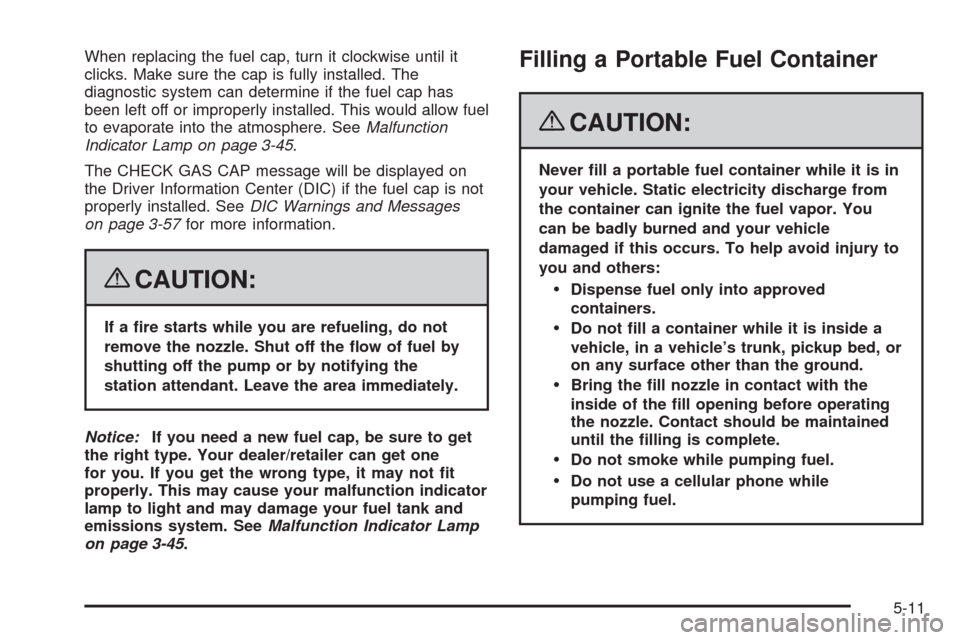
When replacing the fuel cap, turn it clockwise until it
clicks. Make sure the cap is fully installed. The
diagnostic system can determine if the fuel cap has
been left off or improperly installed. This would allow fuel
to evaporate into the atmosphere. SeeMalfunction
Indicator Lamp on page 3-45.
The CHECK GAS CAP message will be displayed on
the Driver Information Center (DIC) if the fuel cap is not
properly installed. SeeDIC Warnings and Messages
on page 3-57for more information.
{CAUTION:
If a re starts while you are refueling, do not
remove the nozzle. Shut off the ow of fuel by
shutting off the pump or by notifying the
station attendant. Leave the area immediately.
Notice:If you need a new fuel cap, be sure to get
the right type. Your dealer/retailer can get one
for you. If you get the wrong type, it may not t
properly. This may cause your malfunction indicator
lamp to light and may damage your fuel tank and
emissions system. SeeMalfunction Indicator Lamp
on page 3-45.
Filling a Portable Fuel Container
{CAUTION:
Never ll a portable fuel container while it is in
your vehicle. Static electricity discharge from
the container can ignite the fuel vapor. You
can be badly burned and your vehicle
damaged if this occurs. To help avoid injury to
you and others:
Dispense fuel only into approved
containers.
Do not ll a container while it is inside a
vehicle, in a vehicle’s trunk, pickup bed, or
on any surface other than the ground.
Bring the ll nozzle in contact with the
inside of the ll opening before operating
the nozzle. Contact should be maintained
until the lling is complete.
Do not smoke while pumping fuel.
Do not use a cellular phone while
pumping fuel.
5-11
Page 375 of 432
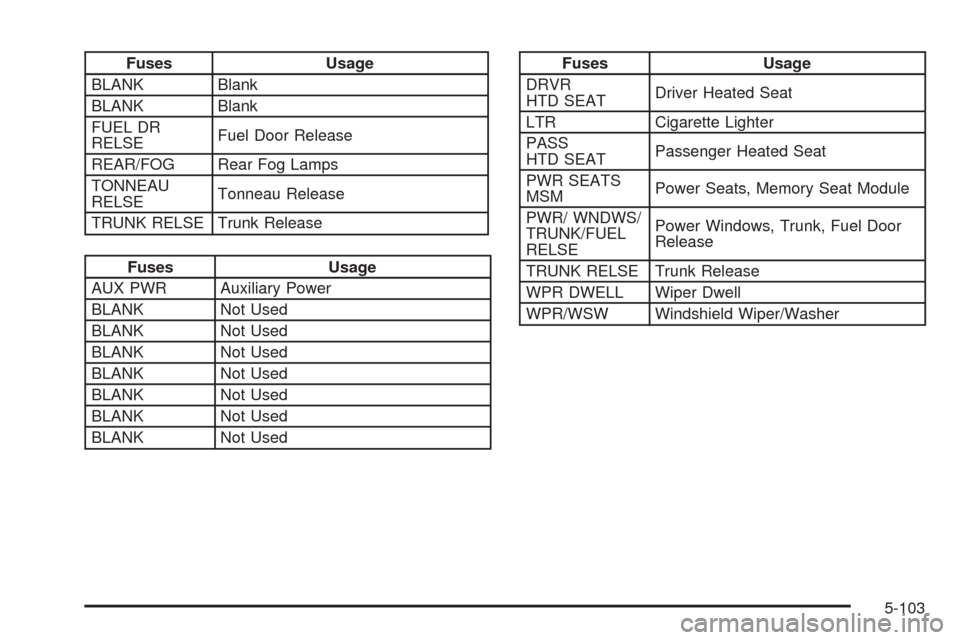
Fuses Usage
BLANK Blank
BLANK Blank
FUEL DR
RELSEFuel Door Release
REAR/FOG Rear Fog Lamps
TONNEAU
RELSETonneau Release
TRUNK RELSE Trunk Release
Fuses Usage
AUX PWR Auxiliary Power
BLANK Not Used
BLANK Not Used
BLANK Not Used
BLANK Not Used
BLANK Not Used
BLANK Not Used
BLANK Not Used
Fuses Usage
DRVR
HTD SEATDriver Heated Seat
LTR Cigarette Lighter
PASS
HTD SEATPassenger Heated Seat
PWR SEATS
MSMPower Seats, Memory Seat Module
PWR/ WNDWS/
TRUNK/FUEL
RELSEPower Windows, Trunk, Fuel Door
Release
TRUNK RELSE Trunk Release
WPR DWELL Wiper Dwell
WPR/WSW Windshield Wiper/Washer
5-103
Page 424 of 432
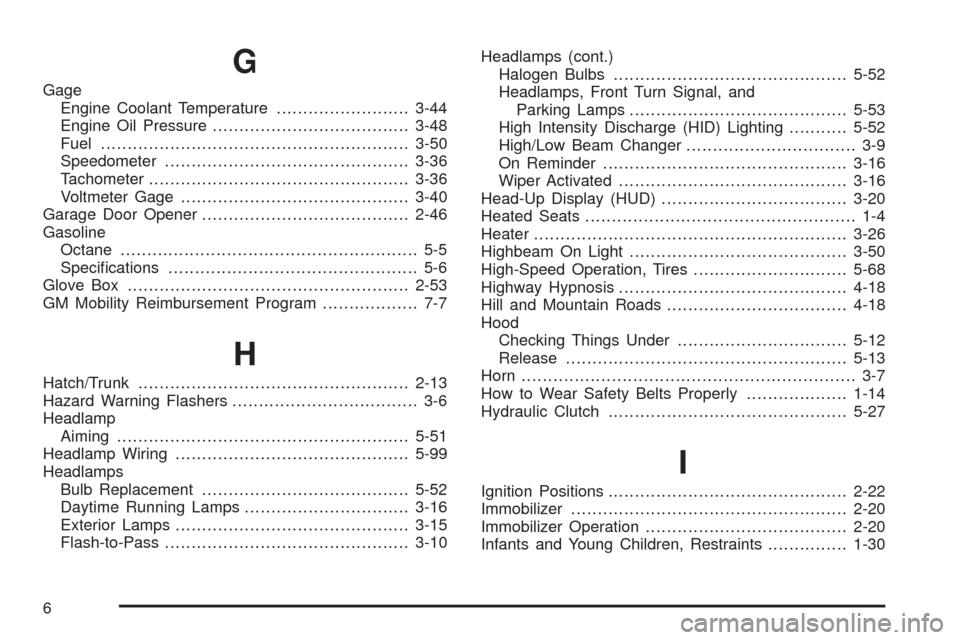
G
Gage
Engine Coolant Temperature.........................3-44
Engine Oil Pressure.....................................3-48
Fuel..........................................................3-50
Speedometer..............................................3-36
Tachometer.................................................3-36
Voltmeter Gage...........................................3-40
Garage Door Opener.......................................2-46
Gasoline
Octane........................................................ 5-5
Specications............................................... 5-6
Glove Box.....................................................2-53
GM Mobility Reimbursement Program.................. 7-7
H
Hatch/Trunk...................................................2-13
Hazard Warning Flashers................................... 3-6
Headlamp
Aiming .......................................................5-51
Headlamp Wiring............................................5-99
Headlamps
Bulb Replacement.......................................5-52
Daytime Running Lamps...............................3-16
Exterior Lamps............................................3-15
Flash-to-Pass..............................................3-10Headlamps (cont.)
Halogen Bulbs............................................5-52
Headlamps, Front Turn Signal, and
Parking Lamps.........................................5-53
High Intensity Discharge (HID) Lighting...........5-52
High/Low Beam Changer................................ 3-9
On Reminder..............................................3-16
Wiper Activated...........................................3-16
Head-Up Display (HUD)...................................3-20
Heated Seats................................................... 1-4
Heater...........................................................3-26
Highbeam On Light.........................................3-50
High-Speed Operation, Tires.............................5-68
Highway Hypnosis...........................................4-18
Hill and Mountain Roads..................................4-18
Hood
Checking Things Under................................5-12
Release.....................................................5-13
Horn ............................................................... 3-7
How to Wear Safety Belts Properly...................1-14
Hydraulic Clutch.............................................5-27
I
Ignition Positions.............................................2-22
Immobilizer....................................................2-20
Immobilizer Operation......................................2-20
Infants and Young Children, Restraints...............1-30
6
Page 431 of 432
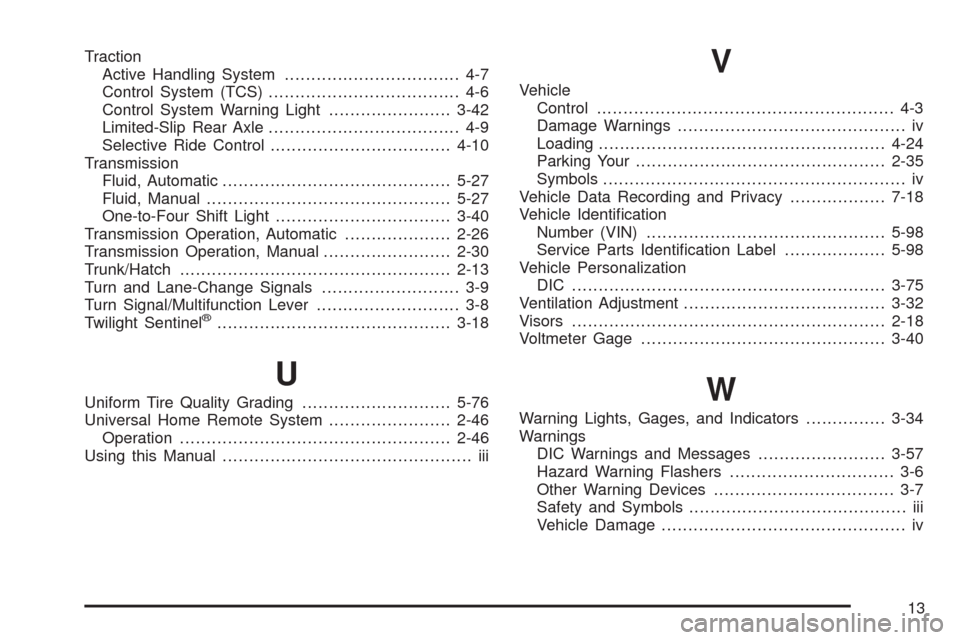
Traction
Active Handling System................................. 4-7
Control System (TCS).................................... 4-6
Control System Warning Light.......................3-42
Limited-Slip Rear Axle.................................... 4-9
Selective Ride Control..................................4-10
Transmission
Fluid, Automatic...........................................5-27
Fluid, Manual..............................................5-27
One-to-Four Shift Light.................................3-40
Transmission Operation, Automatic....................2-26
Transmission Operation, Manual........................2-30
Trunk/Hatch...................................................2-13
Turn and Lane-Change Signals.......................... 3-9
Turn Signal/Multifunction Lever........................... 3-8
Twilight Sentinel
®............................................3-18
U
Uniform Tire Quality Grading............................5-76
Universal Home Remote System.......................2-46
Operation...................................................2-46
Using this Manual............................................... iii
V
Vehicle
Control........................................................ 4-3
Damage Warnings........................................... iv
Loading......................................................4-24
Parking Your...............................................2-35
Symbols......................................................... iv
Vehicle Data Recording and Privacy..................7-18
Vehicle Identication
Number (VIN).............................................5-98
Service Parts Identication Label...................5-98
Vehicle Personalization
DIC ...........................................................3-75
Ventilation Adjustment......................................3-32
Visors...........................................................2-18
Voltmeter Gage..............................................3-40
W
Warning Lights, Gages, and Indicators...............3-34
Warnings
DIC Warnings and Messages........................3-57
Hazard Warning Flashers............................... 3-6
Other Warning Devices.................................. 3-7
Safety and Symbols......................................... iii
Vehicle Damage.............................................. iv
13