audio CHEVROLET CORVETTE 2008 6.G Owners Manual
[x] Cancel search | Manufacturer: CHEVROLET, Model Year: 2008, Model line: CORVETTE, Model: CHEVROLET CORVETTE 2008 6.GPages: 432, PDF Size: 2.4 MB
Page 1 of 432
Seats and Restraint Systems........................... 1-1
Front Seats
............................................... 1-2
Safety Belts
.............................................. 1-9
Child Restraints
.......................................1-26
Airbag System
.........................................1-43
Restraint System Check
............................1-58
Features and Controls..................................... 2-1
Keys
........................................................ 2-3
Doors and Locks
......................................2-10
Windows
.................................................2-16
Theft-Deterrent Systems
............................2-18
Starting and Operating Your Vehicle
...........2-21
Mirrors
....................................................2-37
OnStar
®System
......................................2-43
Universal Home Remote System
................2-46
Storage Areas
.........................................2-53
Roof Panel
..............................................2-57
Convertible Top
.......................................2-62
Instrument Panel............................................. 3-1
Instrument Panel Overview
.......................... 3-4
Climate Controls
......................................3-26
Warning Lights, Gages, and Indicators
........3-34
Driver Information Center (DIC)
..................3-51
Audio System(s)
.......................................3-84Driving Your Vehicle....................................... 4-1
Your Driving, the Road, and the Vehicle
....... 4-2
Towing
...................................................4-29
Service and Appearance Care.......................... 5-1
Service
..................................................... 5-3
Fuel
......................................................... 5-5
Checking Things Under the Hood
...............5-12
Rear Axle
...............................................5-51
Headlamp Aiming
.....................................5-51
Bulb Replacement
....................................5-52
Windshield Replacement
...........................5-55
Windshield Wiper Blade Replacement
.........5-55
Tires
......................................................5-58
Appearance Care
.....................................5-87
Vehicle Identication
.................................5-98
Electrical System
......................................5-99
Capacities and Specications
...................5-107
Maintenance Schedule..................................... 6-1
Maintenance Schedule
................................ 6-2
Customer Assistance Information.................... 7-1
Customer Assistance and Information
........... 7-2
Reporting Safety Defects
...........................7-16
Vehicle Data Recording and Privacy
...........7-18
Index................................................................ 1
2008 Chevrolet Corvette Owner ManualM
Page 87 of 432
When the engine is off, press this button to place the
vehicle in accessory mode. ACCESSORY MODE
ON will display on the Driver Information Center (DIC).
This mode allows you to use things like the radio
and the windshield wipers while the engine is off. Use
accessory mode if you must have your vehicle in motion
while the engine is off, for example, if your vehicle is
being pushed or towed.
After being in accessory mode for about 10 minutes, the
vehicle will automatically enter RAP or OFF, depending
on if the doors are opened or closed.
Retained Accessory Power (RAP)
These vehicle accessories can be used for up to
10 minutes after the engine is turned off:
Audio System
Power Windows
These features continue to work up to 10 minutes after
the engine is turned off or until either door is opened.
If a door is opened, the power windows and audio
system will shut off.
Starting the Engine
Move the shift lever to PARK (P) or NEUTRAL (N) for
an automatic transmission. For a manual transmission
the vehicle can be started in NEUTRAL or any other
gear as long as the clutch is depressed. To restart
a manual transmission when you are already moving,
use the NEUTRAL position only. To restart an automatic
transmission when you are already moving, use
NEUTRAL (N).
Notice:Do not try to shift to P (Park) if your vehicle
is moving. If you do, you could damage the
transmission. Shift to P (Park) only when your
vehicle is stopped.
The keyless access transmitter must be inside the
vehicle for the ignition to work.
Cell phone chargers can interfere with the operation of
the Keyless Access System. Battery chargers should
not be plugged in when starting or turning off the engine.
2-23
Page 133 of 432
Lowering the Power Convertible Top
1. Park on a level surface. Start the engine. Shift an
automatic transmission into PARK (P) and set the
parking brake. Shift a manual transmission into
NEUTRAL, and set the parking brake.
2. Make sure the trunk is closed and the rear trunk
partition in the rear storage area is in the fastened
upright position, and that no objects are forward
of the divider. See “Rear Trunk Partition” under
Rear Storage Area on page 2-54.
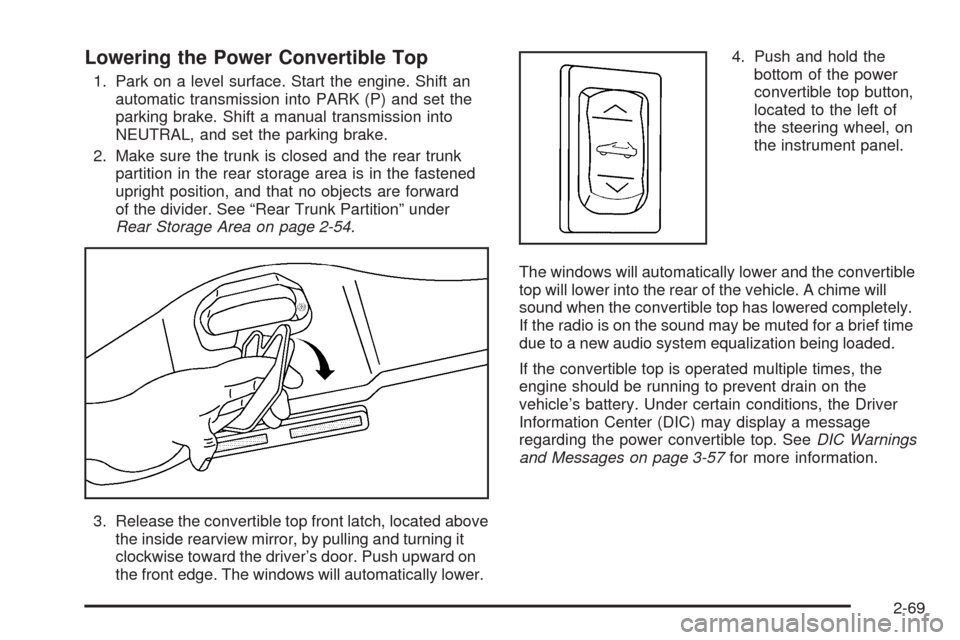
3. Release the convertible top front latch, located above
the inside rearview mirror, by pulling and turning it
clockwise toward the driver’s door. Push upward on
the front edge. The windows will automatically lower.4. Push and hold the
bottom of the power
convertible top button,
located to the left of
the steering wheel, on
the instrument panel.
The windows will automatically lower and the convertible
top will lower into the rear of the vehicle. A chime will
sound when the convertible top has lowered completely.
If the radio is on the sound may be muted for a brief time
due to a new audio system equalization being loaded.
If the convertible top is operated multiple times, the
engine should be running to prevent drain on the
vehicle’s battery. Under certain conditions, the Driver
Information Center (DIC) may display a message
regarding the power convertible top. SeeDIC Warnings
and Messages on page 3-57for more information.
2-69
Page 134 of 432
Raising the Power Convertible Top
Notice:If you raise or lower the convertible top
while the vehicle is in motion, you could damage the
top or the top mechanism. The repairs would not
be covered by your warranty. Always put an
automatic transmission in PARK (P) or a manual
transmission in NEUTRAL before raising or lowering
the convertible top.
1. Park on a level surface. Start the engine. Shift an
automatic transmission into PARK (P) and set the
parking brake. Shift a manual transmission into
NEUTRAL and set the parking brake.
2. Make sure the trunk lid is closed and the rear trunk
partition in the rear storage area is in the fastened
upright position, and that no objects are forward
of the divider. See “Rear Trunk Partition” under
Rear Storage Area on page 2-54.
3. Push and hold the top of the power convertible top
button. The top will raise and the windows will lower
if they were in the raised position. A chime will
sound when the top is raised completely.4. After the convertible top is completely raised,
release the power convertible top button.
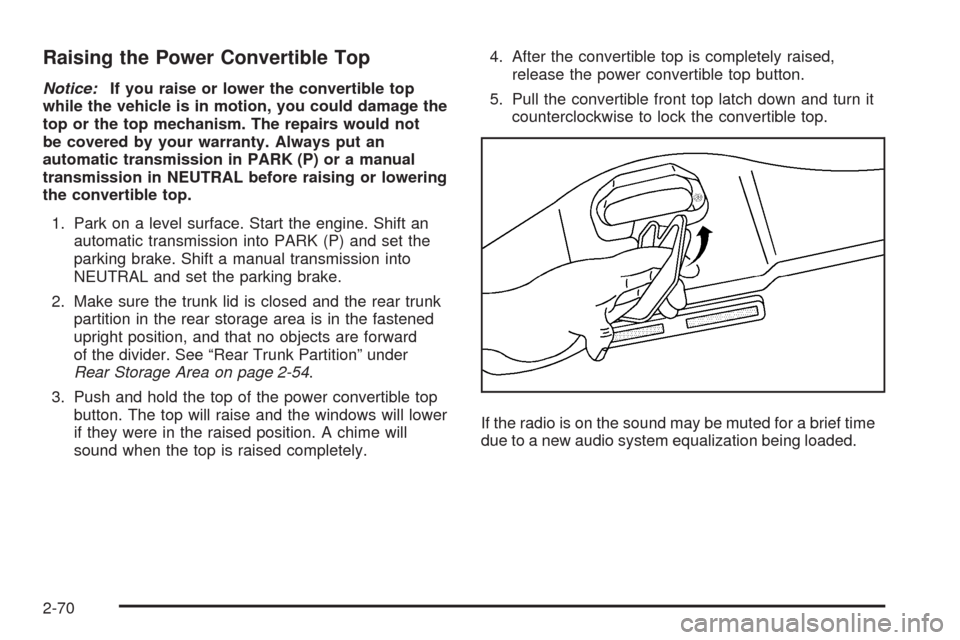
5. Pull the convertible front top latch down and turn it
counterclockwise to lock the convertible top.
If the radio is on the sound may be muted for a brief time
due to a new audio system equalization being loaded.
2-70
Page 138 of 432
Tire Pressure Light.......................................3-44
Malfunction Indicator Lamp.............................3-45
Engine Oil Pressure Gage.............................3-48
Security Light...............................................3-49
Fog Lamp Light............................................3-49
Lights On Reminder......................................3-50
Highbeam On Light.......................................3-50
Fuel Gage...................................................3-50
Driver Information Center (DIC).......................3-51
DIC Operation and Displays...........................3-52
DIC Warnings and Messages.........................3-57
Other Messages...........................................3-74
DIC Vehicle Personalization............................3-75Audio System(s).............................................3-84
Setting the Clock..........................................3-85
Radio(s)......................................................3-85
Using an MP3..............................................3-98
XM Radio Messages...................................3-102
Navigation/Radio System..............................3-103
Theft-Deterrent Feature................................3-103
Audio Steering Wheel Controls......................3-103
Radio Reception.........................................3-104
Diversity Antenna System.............................3-105
XM™ Satellite Radio Antenna System............3-105
Section 3 Instrument Panel
3-2
Page 141 of 432
The main components of your instrument panel are the following:
A. Air Outlet. SeeOutlet Adjustment on page 3-32.
B. Head-Up Display Controls (If Equipped).
SeeHead-Up Display (HUD) on page 3-20.
C. Turn Signal/Multifunction Lever. SeeTurn
Signal/Multifunction Lever on page 3-8. Cruise
Control. SeeCruise Control on page 3-11. Fog
Lamps. SeeFog Lamps on page 3-17. Headlamp
Controls. SeeExterior Lamps on page 3-15.
D. Manual Shift Paddles (If Equipped). SeeAutomatic
Transmission Operation on page 2-26.
E. Driver Information Center (DIC). SeeDriver
Information Center (DIC) on page 3-51.
F. Instrument Panel Cluster. SeeInstrument Panel
Cluster on page 3-35.
G. Audio Steering Wheel Controls (If Equipped).
SeeAudio Steering Wheel Controls on page 3-103.
H. Windshield Wiper/Washer Lever. SeeWindshield
Wipers on page 3-10andWindshield Washer
on page 3-11.
I. Driver Information Center (DIC) Controls.
SeeDIC Operation and Displays on page 3-52.J. Center Air Outlets. SeeOutlet Adjustment on
page 3-32.
K. Hazard Warning Flasher Button. SeeHazard
Warning Flashers on page 3-6.
L. Audio System. SeeAudio System(s) on page 3-84.
M. Climate Controls. SeeDual Automatic Climate
Control System on page 3-26.
N. Fuel Door Release Button. SeeFilling the Tank
on page 5-8. Hatch/Trunk Release Button.
See “Hatch/Trunk Lid Release” underHatch on
page 2-13.
O. Instrument Panel Brightness Control. SeeInstrument
Panel Brightness on page 3-19.
P. Power Folding Top Switch (If Equipped).
SeeConvertible Top (Manual) on page 2-62or
Convertible Top (Power) on page 2-68.
Q. Tilt Wheel Lever. SeeTilt Wheel on page 3-7.
R. Telescopic Wheel Button (If Equipped). SeeTilt
Wheel on page 3-7.
S. Ignition Switch. SeeIgnition Positions on page 2-22.
3-5
Page 157 of 432
Manual Paddle Shift Gear Indicator (If Equipped)
These displays on the HUD are for use when
using the manual paddle shift controls to shift
the transmission. See “Manual Paddle Shift” in
Automatic Transmission Operation on page 2-26.
Shift Light
This light is used for performance driving to indicate
that the vehicle’s best performance level has
been reached to shift the transmission into the next
higher gear. An arrow pointing up will light up on
the display just prior to reaching the engine fuel
cut-off mode. This cut-off is about 6,500 RPM for
the LS3 engine and 7,000 RPM for the LS7 engine.
Check Gages Warning
Engine Coolant Temperature Gage
Transmission Fluid Temperature Gage,
(Automatic Transmission Vehicles Only)
Engine Oil Temperature Gage
Engine Oil Pressure Gage
G-Force Gage
Audio Functions, Street Mode Only
Navigation, Only with Navigation Radio,
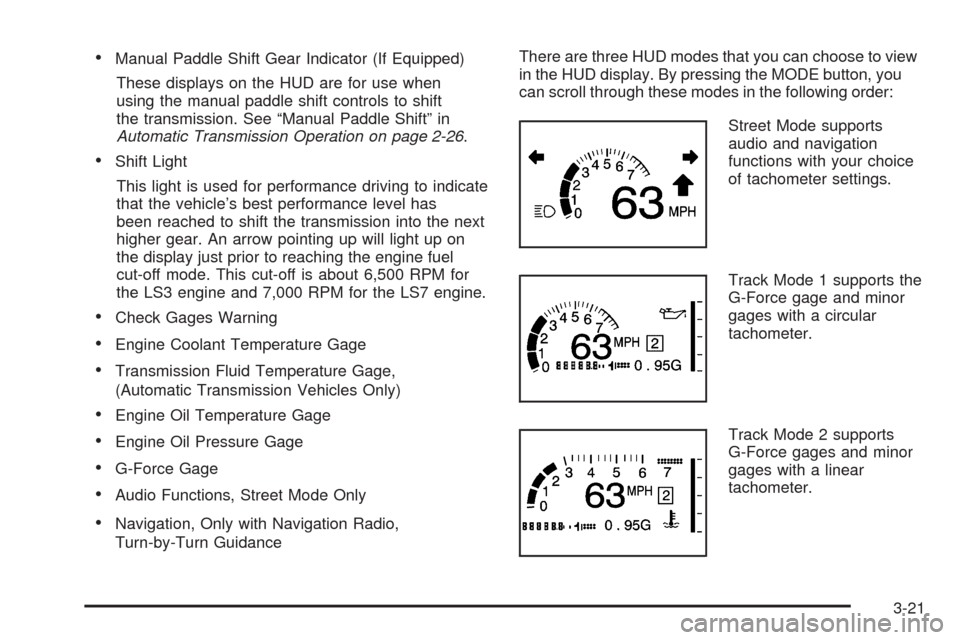
Turn-by-Turn GuidanceThere are three HUD modes that you can choose to view
in the HUD display. By pressing the MODE button, you
can scroll through these modes in the following order:
Street Mode supports
audio and navigation
functions with your choice
of tachometer settings.
Track Mode 1 supports the
G-Force gage and minor
gages with a circular
tachometer.
Track Mode 2 supports
G-Force gages and minor
gages with a linear
tachometer.
3-21
Page 220 of 432
Audio System(s)
Determine which radio your vehicle has and then read
the pages following to familiarize yourself with its
features.
{CAUTION:
This system provides you with far greater
access to audio stations and song listings.
Giving extended attention to entertainment
tasks while driving can cause a crash and you
or others can be injured or killed. Always keep
your eyes on the road and your mind on the
drive — avoid engaging in extended searching
while driving.
Keeping your mind on the drive is important for
safe driving. SeeDefensive Driving on page 4-2.
Here are some ways in which you can help avoid
distraction while driving.While your vehicle is parked:
Familiarize yourself with all of its controls.
Familiarize yourself with its operation.
Set up your audio system by presetting your
favorite radio stations, setting the tone, and
adjusting the speakers. Then, when driving
conditions permit, you can tune to your favorite
radio stations using the presets and steering wheel
controls if the vehicle has them.
Notice:Before adding any sound equipment to
your vehicle, such as an audio system, CD player,
CB radio, mobile telephone, or two-way radio, make
sure that it can be added by checking with your
dealer/retailer. Also, check federal rules covering
mobile radio and telephone units. If sound
equipment can be added, it is very important to do
it properly. Added sound equipment may interfere
with the operation of your vehicle’s engine, radio,
or other systems, and even damage them. Your
vehicle’s systems may interfere with the operation
of sound equipment that has been added.
Your vehicle has a feature called Retained Accessory
Power (RAP). With RAP, the audio system can be
played even after the ignition is turned off. SeeRetained
Accessory Power (RAP) on page 2-23for more
information.
3-84
Page 221 of 432
Setting the Clock
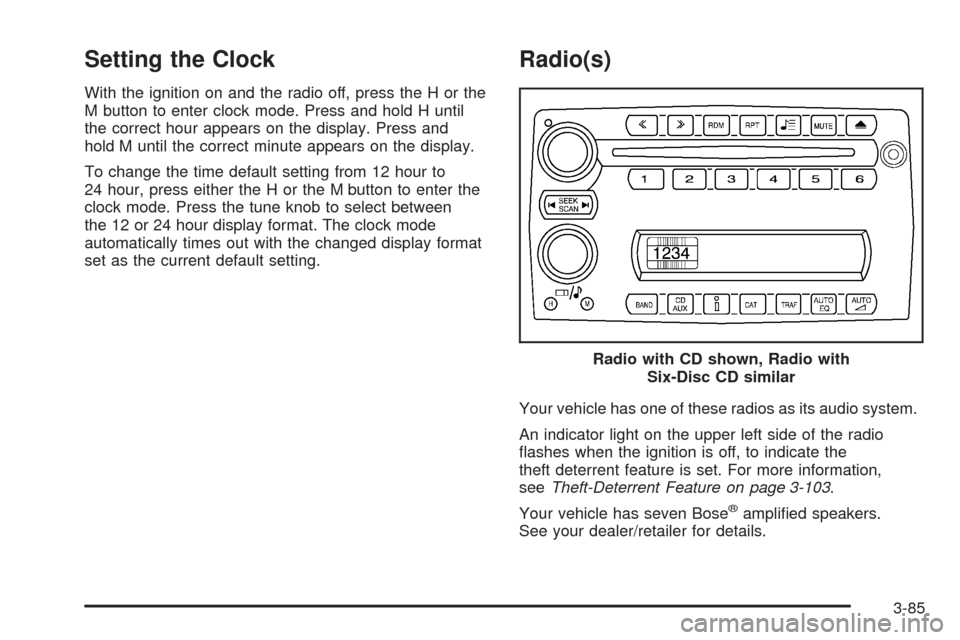
With the ignition on and the radio off, press the H or the
M button to enter clock mode. Press and hold H until
the correct hour appears on the display. Press and
hold M until the correct minute appears on the display.
To change the time default setting from 12 hour to
24 hour, press either the H or the M button to enter the
clock mode. Press the tune knob to select between
the 12 or 24 hour display format. The clock mode
automatically times out with the changed display format
set as the current default setting.
Radio(s)
Your vehicle has one of these radios as its audio system.
An indicator light on the upper left side of the radio
ashes when the ignition is off, to indicate the
theft deterrent feature is set. For more information,
seeTheft-Deterrent Feature on page 3-103.
Your vehicle has seven Bose
®amplied speakers.
See your dealer/retailer for details.Radio with CD shown, Radio with
Six-Disc CD similar
3-85
Page 222 of 432
Radio Data System (RDS)
The audio system has a Radio Data System (RDS).
RDS features are available for use only on FM stations
that broadcast RDS information.
With RDS, the radio can do the following:
Seek to stations broadcasting the selected type of
programming.
Receive announcements concerning local and
national emergencies.
Display messages from radio stations.
Seek to stations with traffic announcements.
This system relies upon receiving specic information
from these stations and works only when the information
is available. In rare cases, a radio station can broadcast
incorrect information that causes the radio features
to work improperly. If this happens, contact the radio
station.
While the radio is tuned to an RDS station, the station
name or call letters display. RDS stations can also
provide the time of day, a program type (PTY) for current
programming, and the name of the program being
broadcast.
Playing the Radio
Top Knob (Power/Volume):Press to turn the system
on and off. Turn clockwise or counterclockwise to
increase or decrease the volume.
4(Information):For RDS, press to change what
display while using RDS. The display options are station
name, RDS station frequency, PTY, and the name of
the program (if available).
For XM™ (if equipped), press while in XM™ mode to
retrieve four different categories of information related to
the current song or channel: Artist, Song Title,
Category or PTY, Channel Number/Channel Name.
To change the default on the display, press until you
see the desired display, then hold for two seconds.
The radio produces one beep and the selected display
is now the default.
AUTO
n(Automatic Volume):Automatic volume
automatically adjusts the audio system to make up
for road and wind noise as you drive, by increasing the
volume as vehicle speed increases.
Set the volume at the desired level. Press this button
to select AUTO VOLUME MIN (minimum), AUTO
VOLUME MED (medium), or AUTO VOLUME MAX
(maximum). Each higher setting provides more volume
compensation at faster vehicle speeds. To turn
automatic volume off, press this until AUTO VOLUME
OFF displays.
3-86