ignition CHEVROLET CORVETTE 2009 6.G Workshop Manual
[x] Cancel search | Manufacturer: CHEVROLET, Model Year: 2009, Model line: CORVETTE, Model: CHEVROLET CORVETTE 2009 6.GPages: 434, PDF Size: 2.53 MB
Page 229 of 434
Root Directory:
The root directory is treated as a folder. Files are stored
in the root directory when the disc or storage device
does not contain folders. Files accessed from the root
directory display as F1 ROOT.
Empty Folder:
Folders that do not contain les are skipped, and the
player advances to the next folder that contains les.
Supported Bit Rates
The following bit rates are supported: 32 kbps,
40 kbps, 56 kbps, 64 kbps, 80 kbps, 96 kbps,
112 kbps, 128 kbps, 160 kbps, 192 kbps, 224 kbps,
256 kbps, and 320 kbps or a variable bit rate.
File Naming
ID3v1 and ID3v2 tags are supported. The track name
contained in the ID3 tag is shown on the display.
The display only shows up to 32 characters for track
and le names.
If the track name is not contained in the ID3 tag, the
display shows the le name without the le extension.
Playlists
Playlists that do not have a .mp3 or .wpl extension
may not work.
Preprogrammed playlists created by WinAmp™,
MusicMatch™, or Real Jukebox™ software are
supported and they cannot be edited using the radio.
Playing an MP3
Insert a CD partway into the slot, label side up. The
player pulls it in, and READING displays. The CD should
begin playing and the CD symbol displays.
If the ignition or radio is turned off with a CD-R in the
player, it stays in the player. When the ignition or radio is
turned on, the CD-R starts to play where it stopped, if
it was the last selected audio source.
As each new track starts to play, the track number
displays.
Order of Play
Tracks are played sequentially in the following order:
1. Playlists.
2. Files contained in the root directory.
3. Files contained in folders.
3-93
Page 242 of 434
Other Information
The Bluetooth®word mark and logos are owned by the
Bluetooth®SIG, Inc. and any use of such marks by
General Motors is under license. Other trademarks and
trade names are those of their respective owners.
This device complies with Part 15 of the FCC Rules.
Operation is subject to the following two conditions:
1. This device may not cause harmful interference.
2. This device must accept any interference received,
including interference that may cause undesired
operation.
This device complies with RSS-210 of Industry Canada.
Operation is subject to the following two conditions:
1. This device may not cause interference.
2. This device must accept any interference received,
including interference that may cause undesired
operation of the device.
Changes or modications to this system by other than
an authorized service facility could void authorization to
use this equipment.
Theft-Deterrent Feature
THEFTLOCK®is designed to discourage theft of the
vehicle’s radio by learning a portion of the Vehicle
Identication Number (VIN). The radio does not operate
and LOCKED displays if the radio is stolen or moved
to a different vehicle.
When the when the ignition is in the off position, a
blinking red light on the upper left side of the radio
indicates that THEFTLOCK
®is armed.
Audio Steering Wheel Controls
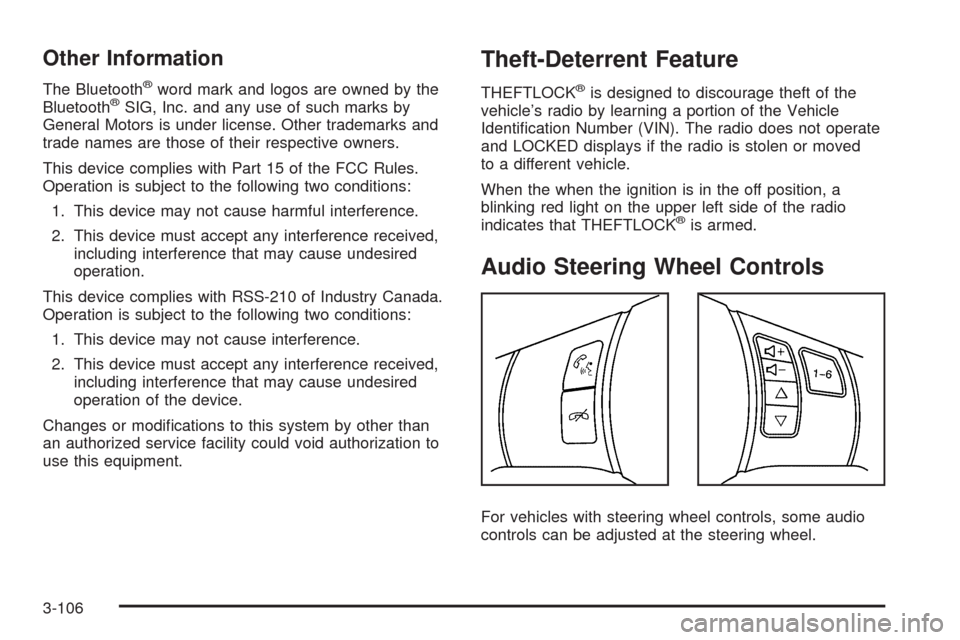
For vehicles with steering wheel controls, some audio
controls can be adjusted at the steering wheel.
3-106
Page 263 of 434
{CAUTION:
Coasting downhill in N (Neutral) or with the ignition
off is dangerous. The brakes will have to do all the
work of slowing down and they could get so hot
that they would not work well. You would then
have poor braking or even none going down a hill.
You could crash. Always have the engine running
and the vehicle in gear when going downhill.
Stay in your own lane. Do not swing wide or cut
across the center of the road. Drive at speeds
that let you stay in your own lane.
Top of hills: Be alert — something could be in your
lane (stalled car, accident).
Pay attention to special road signs (falling rocks
area, winding roads, long grades, passing or
no-passing zones) and take appropriate action.
Winter Driving
Driving on Snow or Ice
Drive carefully when there is snow or ice between the
tires and the road, creating less traction or grip. Wet ice
can occur at about 32°F (0°C) when freezing rain begins
to fall, resulting in even less traction. Avoid driving on wet
ice or in freezing rain until roads can be treated with salt
or sand.
Drive with caution, whatever the condition. Accelerate
gently so traction is not lost. Accelerating too quickly
causes the wheels to spin and makes the surface under
the tires slick, so there is even less traction.
Try not to break the fragile traction. If you accelerate too
fast, the drive wheels will spin and polish the surface
under the tires even more.
TheTraction Control System (TCS) on page 4-6
improves the ability to accelerate on slippery roads, but
slow down and adjust your driving to the road conditions.
TheActive Handling System on page 4-8might also
activate. When driving through deep snow, turn off the
traction control system to help maintain vehicle motion
at lower speeds.
4-19
Page 314 of 434
Power Steering Fluid
SeeEngine Compartment
Overview on page 5-14for
reservoir location.
When to Check Power Steering Fluid
It is not necessary to regularly check power steering
uid unless you suspect there is a leak in the system or
you hear an unusual noise. A uid loss in this system
could indicate a problem. Have the system inspected
and repaired.
How to Check Power Steering Fluid
To check the power steering uid:
1. Turn the ignition off and let the engine compartment
cool down.
2. Wipe the cap and the top of the reservoir clean.
3. Unscrew the cap and wipe the dipstick with a
clean rag.
4. Replace the cap and completely tighten it.
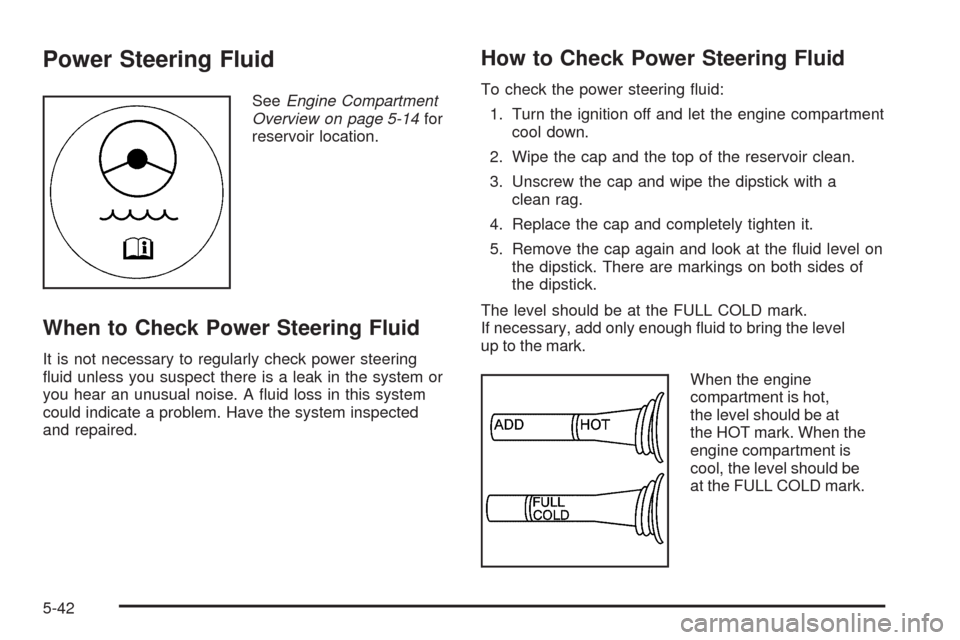
5. Remove the cap again and look at the uid level on
the dipstick. There are markings on both sides of
the dipstick.
The level should be at the FULL COLD mark.
If necessary, add only enough uid to bring the level
up to the mark.
When the engine
compartment is hot,
the level should be at
the HOT mark. When the
engine compartment is
cool, the level should be
at the FULL COLD mark.
5-42
Page 323 of 434
Jump Starting
If your battery has run down, you may want to use
another vehicle and some jumper cables to start your
vehicle. Be sure to use the following steps to do it safely.
{CAUTION:
Batteries can hurt you. They can be dangerous
because:
They contain acid that can burn you.
They contain gas that can explode or ignite.
They contain enough electricity to burn you.
If you do not follow these steps exactly, some or
all of these things can hurt you.
Notice:If you try to start your vehicle by pushing
or pulling it, you could damage your vehicle. Do not
push or pull your vehicle to start it; instead, use
the jump starting procedure in this manual to start
your vehicle when the battery has run down.
1. Check the other vehicle. It must have a 12-volt
battery with a negative ground system.Notice:If the other vehicle’s system is not a 12-volt
system with a negative ground, both vehicles can
be damaged. Only use vehicles with 12-volt systems
with negative grounds to jump start your vehicle.
2. Get the vehicles close enough so the jumper cables
can reach, but be sure the vehicles are not touching
each other. If they are, it could cause a ground
connection you do not want. You would not be able
to start your vehicle, and the bad grounding could
damage the electrical systems.
To avoid the possibility of the vehicles rolling,
set the parking brake rmly on both vehicles
involved in the jump start procedure. Put an
automatic transmission in P (Park) or a manual
transmission in Neutral before setting the parking
brakes.
Notice:If you leave the radio or other accessories
on during the jump starting procedure, they could
be damaged. The repairs would not be covered by
the warranty. Always turn off the radio and other
accessories when jump starting the vehicle.
3. Turn off the ignition on both vehicles. Unplug
unnecessary accessories plugged into the cigarette
lighter or the accessory power outlet. Turn off the
radio and all lamps that are not needed. This will
avoid sparks and help save both batteries. And it
could save the radio!
5-51
Page 346 of 434
Federal Communications
Commission (FCC) and Industry
and Science Canada
The Tire Pressure Monitor System (TPMS) operates
on a radio frequency and complies with Part 15 of the
FCC Rules. Operation is subject to the following two
conditions:
1. This device may not cause harmful interference.
2. This device must accept any interference received,
including interference that may cause undesired
operation.
The TPMS operates on a radio frequency and complies
with RSS-210 of Industry and Science Canada.
Operation is subject to the following two conditions:
1. This device may not cause interference.
2. This device must accept any interference received,
including interference that may cause undesired
operation of the device.
Changes or modications to this system by other than
an authorized service facility could void authorization to
use this equipment.
Tire Pressure Monitor Operation
This vehicle may have a Tire Pressure Monitor
System (TPMS). The TPMS is designed to warn the
driver when a low tire pressure condition exists. TPMS
sensors are mounted onto each tire and wheel assembly
on your vehicle. The TPMS sensors monitor the air
pressure in the vehicle’s tires and transmits the tire
pressure readings to a receiver located in the vehicle.
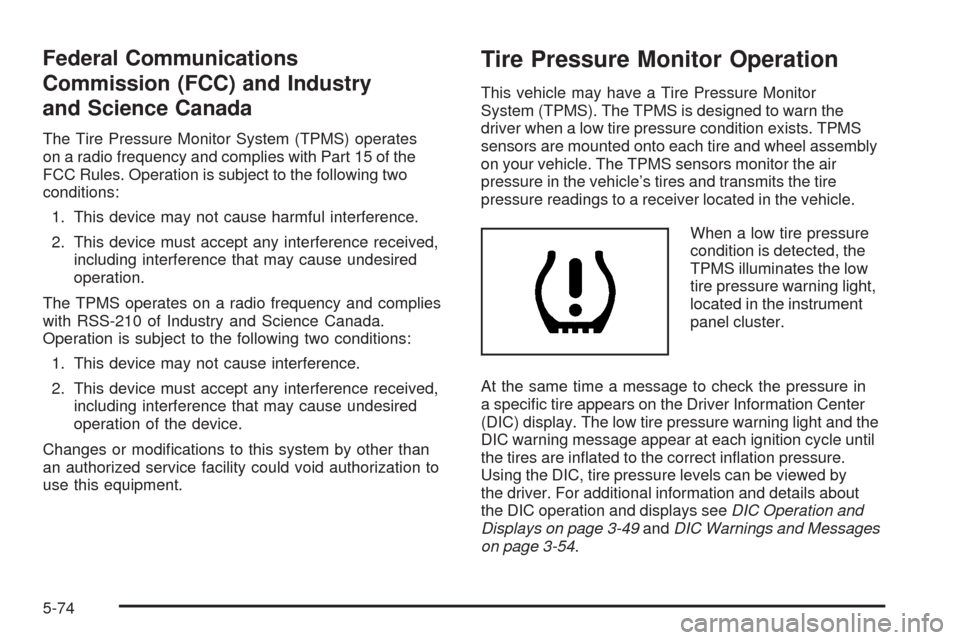
When a low tire pressure
condition is detected, the
TPMS illuminates the low
tire pressure warning light,
located in the instrument
panel cluster.
At the same time a message to check the pressure in
a specic tire appears on the Driver Information Center
(DIC) display. The low tire pressure warning light and the
DIC warning message appear at each ignition cycle until
the tires are inated to the correct ination pressure.
Using the DIC, tire pressure levels can be viewed by
the driver. For additional information and details about
the DIC operation and displays seeDIC Operation and
Displays on page 3-49andDIC Warnings and Messages
on page 3-54.
5-74
Page 347 of 434
The low tire pressure warning light may come on in
cool weather when the vehicle is rst started, and then
turn off as you start to drive. This could be an early
indicator that the air pressure in the tire(s) are getting
low and need to be inated to the proper pressure.
A Tire and Loading Information label, attached to
your vehicle, shows the size of your vehicle’s original
equipment tires and the correct ination pressure for
your vehicle’s tires when they are cold. SeeLoading the
Vehicle on page 4-22, for an example of the Tire and
Loading Information label and its location on your vehicle.
Also seeInflation - Tire Pressure on page 5-70for
additional information.
Your vehicle’s TPMS can warn you about a low tire
pressure condition but it does not replace normal
tire maintenance. SeeTire Inspection and Rotation on
page 5-76,When It Is Time for New Tires on page 5-77,
andTires on page 5-62.
Notice:Liquid tire sealants could damage the Tire
Pressure Monitor System (TPMS) sensors. Sensor
damage caused by using a tire sealant is not covered
by your warranty. Do not use liquid tire sealants.TPMS Malfunction Light and Message
The TPMS will not function properly if one or more of
the TPMS sensors are missing or inoperable. When the
system detects a malfunction, the low tire warning light
ashes for about one minute and then stays on for the
remainder of the ignition cycle. A DIC warning message
is also displayed. The low tire warning light and DIC
warning message come on at each ignition cycle until
the problem is corrected. Some of the conditions that
can cause the malfunction light and DIC message to
come on are:
The TPMS sensor matching process was not done
or not completed successfully. The DIC message
should go off after successfully completing the
sensor matching process.
One or more TPMS sensors are missing or
damaged. Under these conditions the TPMS
malfunction light (low tire warning light) comes on,
and at the same time the DIC message is displayed.
The DIC message and TPMS malfunction light
should go off once the TPMS sensors are installed
and the sensor matching process is performed
successfully.
5-75
Page 377 of 434
Fuses Usage
CRUISE
SWITCHCruise Control Switch
CTSY/LAMP Courtesy Lamp
DR LCK Door Locks
DRIV DR
SWITCHDriver Door Switch
ECM Engine Control Module (ECM)
EXH MDLExhaust Module (Z06),
Spare (Coupe and Convertible)
GM LAN
RUN/CRNKGM LAN Devices
HTD SEAT/
WPR RLYHeated Seat, Wiper Relays
HVAC/
PWR SNDHeating. Ventilation/Air Conditioning,
Power Sounder
IGN SWTCH/
INTR SNSRIgnition Switch, Intrusion Sensor
ISRVM/HVACElectric Inside Rearview Mirror,
Heating, Ventilation, Air Conditioning
ONSTAR OnStar
®
RDO/S-BAND/
VICSRadio, S-Band, VICS
Fuses Usage
REAR
FOG/ALDL/
TOP SWTCHRear Fog Lamp, Assembly Line
Diagnostic Link Connector,
Convertible Top Switch
REVERSE
LAMPSReverse Lamps
RUN CRNK Run/Crank Relay
SDM/AOS
SWTCH
AIRBAGSensing and Diagnostic Module,
Automatic Occupant Sensing
Module, Airbag
SPARE Spare
SPARE Spare
SPARE Spare
SPARE Spare
STOP LAMP Stop Lamp
SWC DM Steering Wheel Dimming
TELE
SWTCH/MSMTelescope Switch, Memory Seat
Module
TONNEAU
RELSETonneau Release
TPA Tonneau Pulldown Actuator
5-105
Page 381 of 434
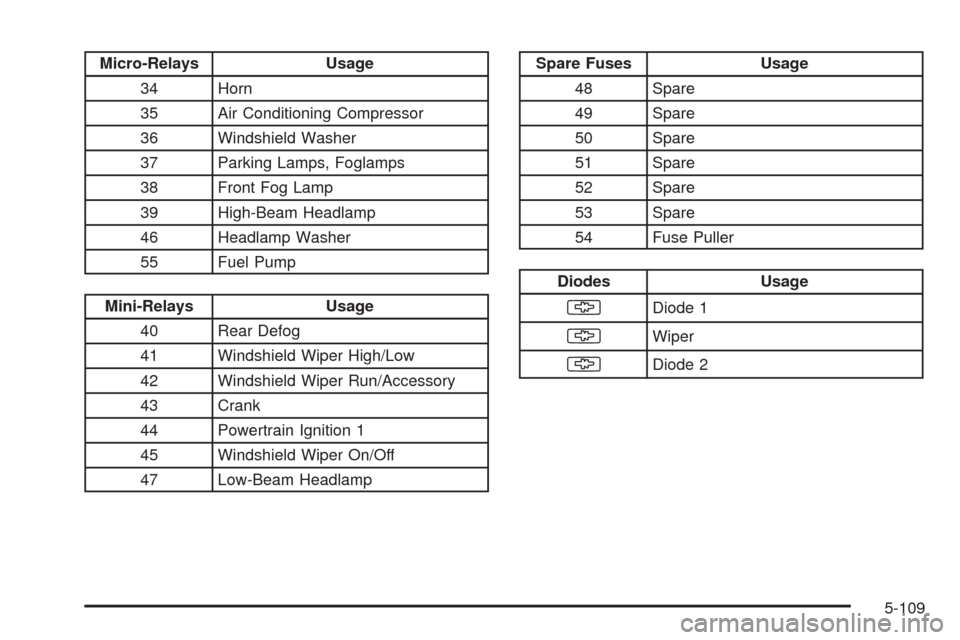
Micro-Relays Usage
34 Horn
35 Air Conditioning Compressor
36 Windshield Washer
37 Parking Lamps, Foglamps
38 Front Fog Lamp
39 High-Beam Headlamp
46 Headlamp Washer
55 Fuel Pump
Mini-Relays Usage
40 Rear Defog
41 Windshield Wiper High/Low
42 Windshield Wiper Run/Accessory
43 Crank
44 Powertrain Ignition 1
45 Windshield Wiper On/Off
47 Low-Beam Headlamp
Spare Fuses Usage
48 Spare
49 Spare
50 Spare
51 Spare
52 Spare
53 Spare
54 Fuse Puller
Diodes Usage
§Diode 1
§Wiper
§Diode 2
5-109
Page 420 of 434
OnStar®
If your vehicle has OnStar and you subscribe to the
OnStar services, please refer to the OnStar Terms
and Conditions for information on data collection and
use. See alsoOnStar
®System on page 2-40in
this manual for more information.
Navigation System
If your vehicle has a navigation system, use of the
system may result in the storage of destinations,
addresses, telephone numbers, and other trip
information. Refer to the navigation system operating
manual for information on stored data and for deletion
instructions.
Radio Frequency
Identication (RFID)
RFID technology is used in some vehicles for functions
such as tire pressure monitoring and ignition system
security, as well as in connection with conveniences
such as key fobs for remote door locking/unlocking and
starting, and in-vehicle transmitters for garage door
openers. RFID technology in GM vehicles does not use
or record personal information or link with any other
GM system containing personal information.
7-18