sensor CHEVROLET CORVETTE 2011 6.G User Guide
[x] Cancel search | Manufacturer: CHEVROLET, Model Year: 2011, Model line: CORVETTE, Model: CHEVROLET CORVETTE 2011 6.GPages: 428, PDF Size: 6.63 MB
Page 136 of 428
Black plate (16,1)Chevrolet Corvette Owner Manual - 2011
5-16 Instruments and Controls
The Driver Information Center (DIC)
reads BATTERY VOLTAGE LOW
when the vehicle is at 10 volts or
below. Have it checked right away.
Driving with the voltmeter reading at
10 volts or below could drain the
battery and disable the vehicle.
Safety Belt Reminders
Safety Belt Reminder Light
When the engine is started, a chime
sounds for several seconds to
remind a driver to fasten the safety
belt, unless the driver safety belt is
already buckled.
The safety belt light comes on and
stays on for several seconds, then
flashes for several more.
This chime and light are repeated if
the driver remains unbuckled and
the vehicle is in motion. If the driver
safety belt is already buckled,
neither the chime nor the light
comes on.
Airbag Readiness Light
The system checks the airbag's
electrical system for possible
malfunctions. If the light stays on
it indicates there is an electrical
problem. The system check
includes the airbag sensor, the
pretensioners, the airbag modules,
the wiring and the crash sensing
and diagnostic module. For more
information on the airbag system,
seeAirbag System on page 3‑22.
Page 156 of 428
Black plate (36,1)Chevrolet Corvette Owner Manual - 2011
5-36 Instruments and Controls
SERVICE CHARGING SYSTEM
If this message displays while you
are driving, there may be a problem
with the electrical charging system.
It could mean that there is a loose
or broken drive belt or that there is
another electrical problem. Have the
vehicle checked right away by your
dealer. Driving while this message is
on could drain the battery.
If you must drive a short distance
with the message on, be certain to
turn off the vehicle's accessories,
such as the radio and air
conditioner.
Multiple chimes sound when this
message is displayed.
To acknowledge the message, press
the RESET button. The message
reappears every 10 minutes until
this condition changes.
Brake System Messages
ABS (Antilock Brake System)
ACTIVE
This message displays when the
Antilock Brake System (ABS) is
adjusting brake pressure to help
avoid a braking skid.
Slippery road conditions may exist
if this message is displayed, so
adjust your driving accordingly.
The message stays on for a few
seconds after the system stops
adjusting brake pressure. See
Antilock Brake System (ABS) on
page 9‑34for more information.
CHANGE BRAKE PADS
On vehicles with electronic brake
pad wear sensors, this message will
be displayed when the pads are
worn. See your dealer for service.
CHECK BRAKE FLUID
This message displays, a sound
will be heard, and the brake
system warning light on the
instrument panel cluster turns
on if the ignition is on to inform the
driver that the brake fluid level is
low. SeeBrake System Warning
Light on page 5‑21. Have the brake
system serviced by your dealer as
soon as possible. See Brakes on
page 10‑38.
SERVICE ANTILOCK BRAKES
If this message displays while
you are driving, stop as soon as
possible and turn the ignition off.
Then start the engine again to reset
the system. If the message stays
on, or comes back on again while
you are driving, the vehicle is in
need of service. See your dealer.
If the antilock brake system (ABS)
warning light is on and the regular
brake system warning light
is not on, you still have brakes,
but do not have ABS.
Page 170 of 428
Black plate (50,1)Chevrolet Corvette Owner Manual - 2011
5-50 Instruments and Controls
Anti-Theft Alarm System
Messages
INTRUSION SENSOR OFF
This message may display when the
anti-theft alarm has been disarmed.
INTRUSION SENSOR ON
This message may display when the
anti-theft alarm has been armed.
Service Vehicle Messages
SERVICE AIR CONDITIONING
This message displays when the
electronic sensors that control
the air conditioning and heating
systems are no longer working.
Have the climate control system
serviced by your dealer if you
notice a drop in heating and air
conditioning efficiency.
SERVICE ELECTRICAL
SYSTEM
This message displays if an
electrical problem has occurred
within the Powertrain Control
Module (PCM). Have the vehicle
serviced by your dealer.
SERVICE VEHICLE SOON
This message displays and a sound
will be heard when there may be an
electrical or another system problem
with the vehicle. Have your vehicle
checked by your dealer if this
message keeps appearing.
Starting the Vehicle
Messages
PRESS BRAKE TO START
ENGINE (Automatic
Transmission Only)
This message displays if you
try to start the engine by pressing
the keyless ignition start button
without having the brake pressed.
The brake needs to be pressed
when starting the engine. See
Ignition Positions on page 9‑20for
more information.
Page 193 of 428
Black plate (3,1)Chevrolet Corvette Owner Manual - 2011
Lighting 6-3
When it is dark enough outside, the
front turn signal lamps turn off and
the normal low-beam headlamps
turn on.
When it is bright enough outside,
the regular lamps go off, and the
front turn signal lamps will take over.
If the vehicle is started in a dark
garage, the automatic headlamp
system comes on immediately.
Once the vehicle leaves the garage,
it takes approximately one minute
for the automatic headlamp system
to change to DRL if it is light
outside. During that delay, the
instrument panel cluster may not
be as bright as usual. Make sure
the instrument panel brightness
knob is in the full bright position.
SeeInstrument Panel Illumination
Control on page 6‑5 for more
information. If it is dark enough outside and
the exterior lamp control is off,
a HEADLAMPS SUGGESTED
message will display on the Driver's
Information Center (DIC). See
Lamp
Messages on page 5‑44.
Turning the exterior lamp control
to off a second time, or turning
on the headlamps will remove
the HEADLAMPS SUGGESTED
message in the DIC. If the parking
lamps or the fog lamps were turned
on instead, the HEADLAMPS
SUGGESTED message will
continue to be displayed.
The regular headlamp system
should be turned on when needed.
To turn off the DRL, turn the exterior
lamp control to the off position or
shift into P (Park). The DRL will
stay off until the control is toggled
again or the vehicle is shifted out
of P (Park).
This procedure applies only
to vehicles first sold in the
United States.Twilight Sentinel
Twilight Sentinel®is an automatic
headlamp system. When activated,
this feature turns your headlamps
and parking lamps on and off by
sensing how dark it is outside.
Be sure not to cover the light sensor
on the top of the instrument panel.
AUTO: Activates the system.
If the band is already in the AUTO
position when you start your vehicle,
Twilight Sentinel is automatically
enabled.
If it is dark outside, your vehicle
headlamps and parking lamps will
turn on automatically.
Once it is bright enough outside, the
headlamps and parking lamps will
automatically turn back off.
Twilight Sentinel may also turn on
when you drive through a dimly
lit area.
Page 224 of 428
Black plate (2,1)Chevrolet Corvette Owner Manual - 2011
8-2 Climate Controls
When the vehicle is first started,
the display shows the driver's
temperature setting, the outside
temperature, the fan speed and the
air delivery, for about 10 seconds.
The outside temperature is shown
in the center of the display.
The digital display will show the
readings in Fahrenheit or Celsius.
See“Personal Options” under
Vehicle Personalization on
page 5‑55 for information
on changing your display.
Automatic Operation
AUTO (Automatic): Press the
AUTO button to place the entire
system in the automatic mode.
When automatic operation is active,
the system automatically controls
the inside temperature, the air
delivery mode, and the fan speed. After a ten second display of the
current settings, the word AUTO,
the driver's temperature setting
and the outside temperature will
be shown. The system operates
to reach the set temperature as
quickly as possible. The AUTO
control system works best with the
windows up and the removable roof
installed or the convertible top up.
1. Press the AUTO button.
2. Adjust the temperature to a
comfortable setting between
16°C (60°F) and 32°C (90°F).
Choosing the coldest or warmest
temperature setting will not
cause the system to heat or
cool any faster. A setting of
23°C (73°F) is suggested.
In cold weather, the system will
start at reduced fan speeds to
avoid blowing cold air into your
vehicle until warmer air is available. The system starts out
blowing air at the floor but may
change modes automatically as
the vehicle warms up to maintain
the chosen temperature setting.
The length of time needed for
warm up depends on the outside
temperature and the length of
time that has elapsed since the
vehicle was last driven.
3. Wait for the system to regulate. This may take from 10 to
30 minutes. Then adjust the
temperature, if necessary.
Do not cover the solar sensor
located in the center of the
instrument panel, near the
windshield. For more information
on the solar sensor, see “Sensor”
later in this section.
Page 227 of 428
Black plate (5,1)Chevrolet Corvette Owner Manual - 2011
Climate Controls 8-5
Using these settings together for
long periods of time may cause
the air inside of your vehicle to
become too dry. To prevent this
from happening, after the air in
the vehicle has cooled, turn the
recirculation mode off.
The air conditioning system
removes moisture from the air,
so a small amount of water might
drip under the vehicle while idling
or after turning off the engine.
This is normal.
?(Recirculation):Press to
turn the recirculation mode on or off.
An indicator light comes on to show
that recirculation is on. This mode
prevents outside air from entering
your vehicle. It can be used to
prevent outside air and odors from
entering your vehicle and to help
cool the air inside your vehicle more
quickly. Recirculation mode is not
available in defrost or defog mode.
Sensors
The solar sensor on the vehicle
monitors the solar heat and
uses the information to maintain
the selected temperature when
operating in AUTO mode by
automatically adjusting the
temperature, fan speed and air
delivery system. The system
may also supply cooler air to the
side of the vehicle facing the sun.
The recirculation mode will also
be activated, as necessary. Do not
cover the solar sensor located on
the top of the instrument panel near
the windshield or the system will
not work properly.
There is also a sensor located
behind the front bumper.
This sensor reads the outside
air temperature and helps to
maintain the temperature inside
the vehicle. Any cover on the front
of the vehicle could give a false
reading in the temperature. If the outside temperature goes up,
the displayed temperature will not
change until:
.The vehicle's speed is above
19 km/h (12 mph) for 5 minutes.
.The vehicle's speed is above
52 km/h (32 mph) for
2.5 minutes.
These delays prevent false
readings. If the temperature goes
down, the outside temperature
will be shown when you start the
vehicle. If it has been turned off
for less than three hours, the
temperature will be recalled from
the previous vehicle operation.
There is also an inside temperature
sensor located to the left of the
ignition switch. The automatic
climate control system uses this
sensor to receive information, so
if you block or cover it, the system
will not function properly.
Page 310 of 428
Black plate (26,1)Chevrolet Corvette Owner Manual - 2011
10-26 Vehicle Care
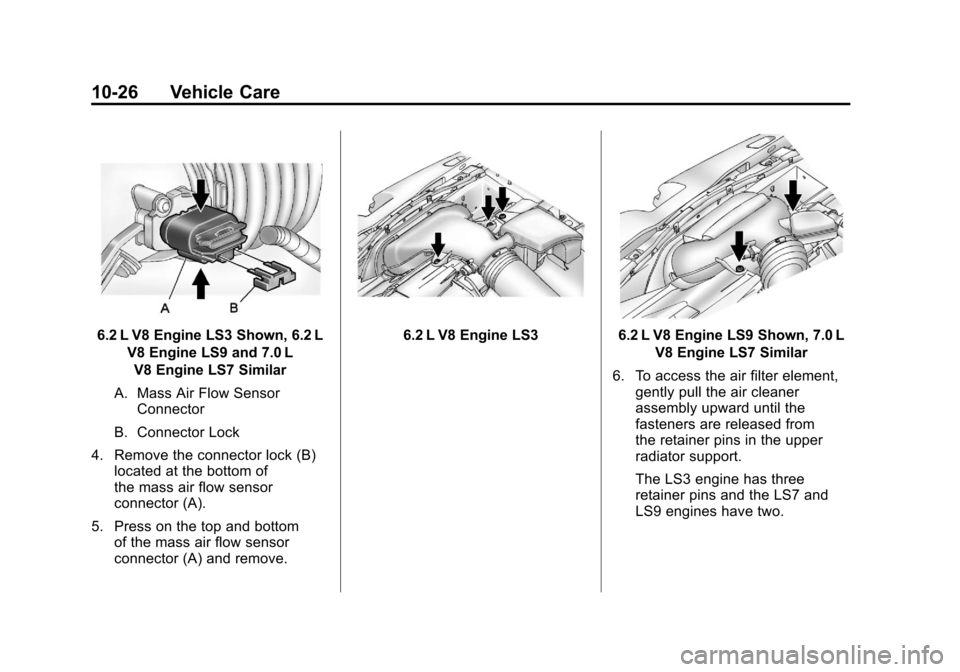
6.2 L V8 Engine LS3 Shown, 6.2 LV8 Engine LS9 and 7.0 LV8 Engine LS7 Similar
A. Mass Air Flow Sensor Connector
B. Connector Lock
4. Remove the connector lock (B) located at the bottom of
the mass air flow sensor
connector (A).
5. Press on the top and bottom of the mass air flow sensor
connector (A) and remove.6.2 L V8 Engine LS36.2 L V8 Engine LS9 Shown, 7.0 L
V8 Engine LS7 Similar
6. To access the air filter element, gently pull the air cleaner
assembly upward until the
fasteners are released from
the retainer pins in the upper
radiator support.
The LS3 engine has three
retainer pins and the LS7 and
LS9 engines have two.
Page 323 of 428
Black plate (39,1)Chevrolet Corvette Owner Manual - 2011
Vehicle Care 10-39
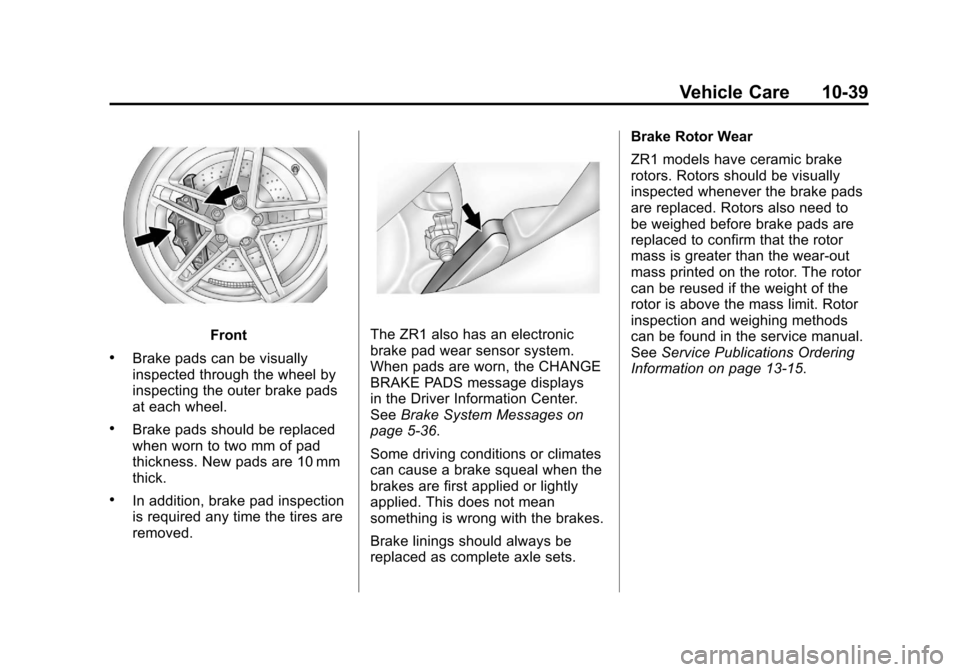
Front
.Brake pads can be visually
inspected through the wheel by
inspecting the outer brake pads
at each wheel.
.Brake pads should be replaced
when worn to two mm of pad
thickness. New pads are 10 mm
thick.
.In addition, brake pad inspection
is required any time the tires are
removed.
The ZR1 also has an electronic
brake pad wear sensor system.
When pads are worn, the CHANGE
BRAKE PADS message displays
in the Driver Information Center.
SeeBrake System Messages on
page 5‑36.
Some driving conditions or climates
can cause a brake squeal when the
brakes are first applied or lightly
applied. This does not mean
something is wrong with the brakes.
Brake linings should always be
replaced as complete axle sets. Brake Rotor Wear
ZR1 models have ceramic brake
rotors. Rotors should be visually
inspected whenever the brake pads
are replaced. Rotors also need to
be weighed before brake pads are
replaced to confirm that the rotor
mass is greater than the wear‐out
mass printed on the rotor. The rotor
can be reused if the weight of the
rotor is above the mass limit. Rotor
inspection and weighing methods
can be found in the service manual.
See
Service Publications Ordering
Information on page 13‑15.
Page 337 of 428
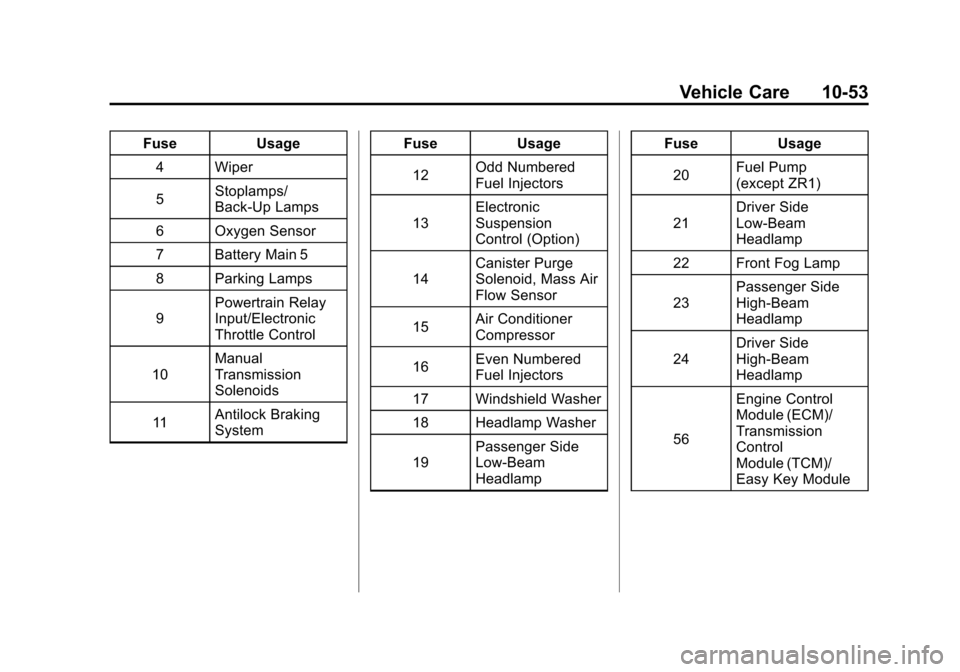
Black plate (53,1)Chevrolet Corvette Owner Manual - 2011
Vehicle Care 10-53
FuseUsage
4 Wiper
5 Stoplamps/
Back-Up Lamps
6 Oxygen Sensor
7 Battery Main 5
8 Parking Lamps
9 Powertrain Relay
Input/Electronic
Throttle Control
10 Manual
Transmission
Solenoids
11 Antilock Braking
System Fuse
Usage
12 Odd Numbered
Fuel Injectors
13 Electronic
Suspension
Control (Option)
14 Canister Purge
Solenoid, Mass Air
Flow Sensor
15 Air Conditioner
Compressor
16 Even Numbered
Fuel Injectors
17 Windshield Washer
18 Headlamp Washer
19 Passenger Side
Low-Beam
Headlamp Fuse
Usage
20 Fuel Pump
(except ZR1)
21 Driver Side
Low-Beam
Headlamp
22 Front Fog Lamp
23 Passenger Side
High-Beam
Headlamp
24 Driver Side
High-Beam
Headlamp
56 Engine Control
Module (ECM)/
Transmission
Control
Module (TCM)/
Easy Key Module
Page 340 of 428
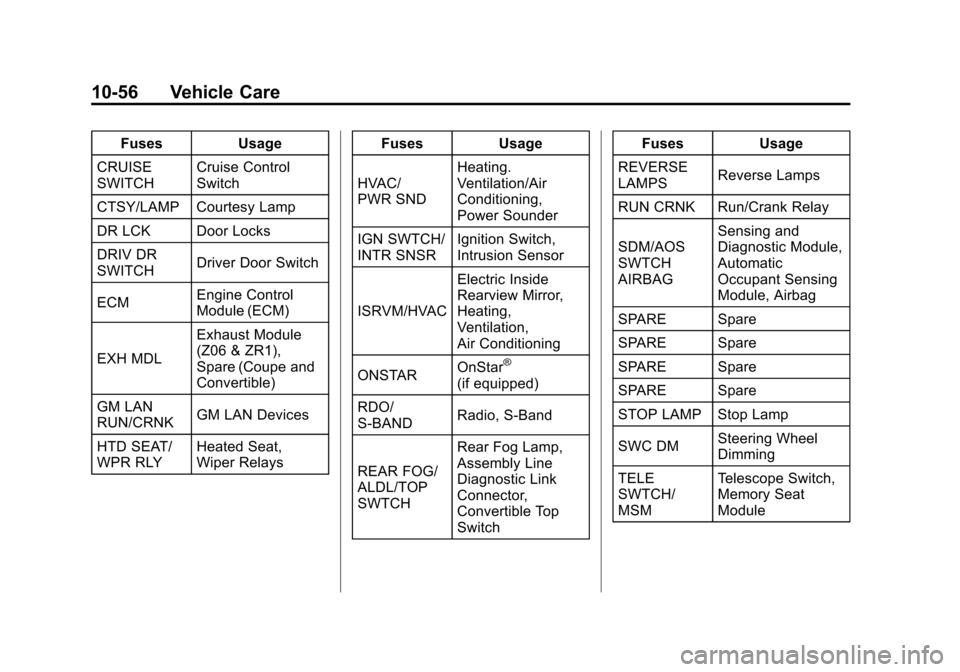
Black plate (56,1)Chevrolet Corvette Owner Manual - 2011
10-56 Vehicle Care
FusesUsage
CRUISE
SWITCH Cruise Control
Switch
CTSY/LAMP Courtesy Lamp
DR LCK Door Locks
DRIV DR
SWITCH Driver Door Switch
ECM Engine Control
Module (ECM)
EXH MDL Exhaust Module
(Z06 & ZR1),
Spare (Coupe and
Convertible)
GM LAN
RUN/CRNK GM LAN Devices
HTD SEAT/
WPR RLY Heated Seat,
Wiper Relays Fuses
Usage
HVAC/
PWR SND Heating.
Ventilation/Air
Conditioning,
Power Sounder
IGN SWTCH/
INTR SNSR Ignition Switch,
Intrusion Sensor
ISRVM/HVAC Electric Inside
Rearview Mirror,
Heating,
Ventilation,
Air Conditioning
ONSTAR OnStar
®
(if equipped)
RDO/
S‐BAND Radio, S‐Band
REAR FOG/
ALDL/TOP
SWTCH Rear Fog Lamp,
Assembly Line
Diagnostic Link
Connector,
Convertible Top
Switch Fuses Usage
REVERSE
LAMPS Reverse Lamps
RUN CRNK Run/Crank Relay
SDM/AOS
SWTCH
AIRBAG Sensing and
Diagnostic Module,
Automatic
Occupant Sensing
Module, Airbag
SPARE Spare
SPARE Spare
SPARE Spare
SPARE Spare
STOP LAMP Stop Lamp
SWC DM Steering Wheel
Dimming
TELE
SWTCH/
MSM Telescope Switch,
Memory Seat
Module