horn CHEVROLET CORVETTE 2011 6.G Owners Manual
[x] Cancel search | Manufacturer: CHEVROLET, Model Year: 2011, Model line: CORVETTE, Model: CHEVROLET CORVETTE 2011 6.GPages: 428, PDF Size: 6.63 MB
Page 9 of 428

Black plate (3,1)Chevrolet Corvette Owner Manual - 2011
In Brief 1-3
A.Air Vents on page 8‑6.
B. Head-Up Display (HUD) on
page 5‑31 (If Equipped).
C. Turn and Lane‐Change Lever. See Turn and Lane-Change
Signals (Auto Signal) on
page 6‑4.
Cruise Control on page 9‑44.
Fog Lamps on page 6‑5.
Exterior Lamp Controls on
page 6‑1.
D. Manual Shift Paddles (If Equipped). See Automatic
Transmission on page 9‑28.
E. Driver Information Center (DIC)
on page 5‑25.
F. Instrument Cluster on page 5‑9.
G. Windshield Wiper/Washer on
page 5‑4.
H. Driver Information Center (DIC) Buttons. See Driver Information
Center (DIC) on page 5‑25.
I. Hazard Warning Flashers on
page 6‑4. J.
AM-FM Radio on page 7‑5.
K. Dual Automatic Climate Control
System on page 8‑1.
L. Fuel Door Release Button. See Filling the Tank on page 9‑51.
Hatch/Trunk Release Button.
See “Hatch/Trunk Lid Release”
under Hatch on page 2‑10.
M. Instrument Panel Illumination
Control on page 6‑5.
N. Data Link Connector (DLC). See Malfunction Indicator Lamp
on page 5‑18.
O. Power Folding Top Switch (If Equipped). See Convertible
Top on page 2‑22.
P. Bluetooth on page 7‑18
(If Equipped).
Steering Wheel Controls on
page 5‑3 (If Equipped).
Q. Steering Wheel Adjustment on
page 5‑2.
R. Horn on page 5‑4. S. Telescopic Wheel Button
(If Equipped). See Steering
Wheel Adjustment on page 5‑2.
T. Ignition Positions on page 9‑20.
U. Heated Front Seats on page 3‑8
(If Equipped).
V. Shift Lever (Automatic Shown). See Automatic Transmission on
page 9‑28 orManual
Transmission on page 9‑32.
W. Active Handling System on
page 9‑37.
X. Power Outlets on page 5‑6.
Y. Selective Ride Control on
page 9‑42.
Z. Cupholders on page 4‑1.
AA. Ashtrays on page 5‑8.
Cigarette Lighter on page 5‑7.
AB. Parking Brake on page 9‑35.
AC. Glove Box on page 4‑1.
AD. Instrument Panel Fuse Block on
page 10‑55.
Page 10 of 428
Black plate (4,1)Chevrolet Corvette Owner Manual - 2011
1-4 In Brief
Initial Drive
Information
This section provides a brief
overview about some of the
important features that may or may
not be on your specific vehicle.
For more detailed information, refer
to each of the features which can be
found later in this owner manual.
Remote Keyless Entry
(RKE) System
The keyless access transmitter is
used to lock and unlock the doors
from up to 30 m (100 feet) away
from the vehicle.
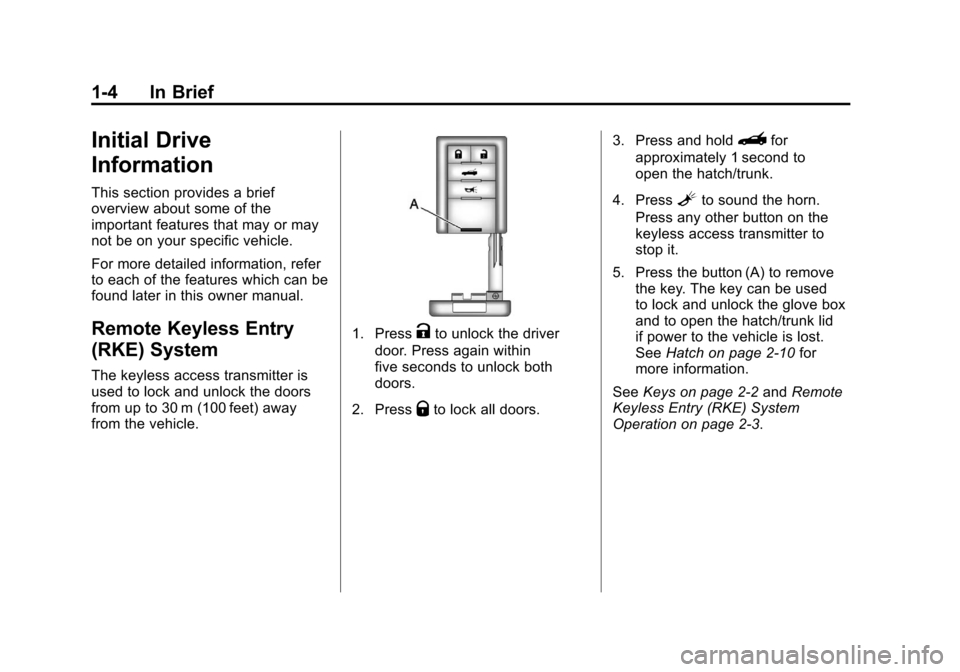
1. PressKto unlock the driver
door. Press again within
five seconds to unlock both
doors.
2. Press
Qto lock all doors. 3. Press and hold
}for
approximately 1 second to
open the hatch/trunk.
4. Press
Lto sound the horn.
Press any other button on the
keyless access transmitter to
stop it.
5. Press the button (A) to remove the key. The key can be used
to lock and unlock the glove box
and to open the hatch/trunk lid
if power to the vehicle is lost.
See Hatch on page 2‑10 for
more information.
See Keys on page 2‑2 andRemote
Keyless Entry (RKE) System
Operation on page 2‑3.
Page 36 of 428
Black plate (4,1)Chevrolet Corvette Owner Manual - 2011
2-4 Keys, Doors and Windows
Keyless Locking
The doors lock after
several seconds if all doors
are closed and at least one
keyless access transmitter
has been removed from the
interior of the vehicle. To customize
whether the doors automatically
lock when exiting the vehicle,
see“Passive Door Locking”
under Vehicle Personalization on
page 5‑55 for additional information.
Keyless Trunk Opening
Press the hatch/trunk release
button located on the rear of
the hatch/trunk lid above the
license plate to open the trunk
if the keyless access transmitter
is within range. See Hatch on
page 2‑10 for additional information. There are other conditions that
can affect the performance of the
transmitter. See
Remote Keyless
Entry (RKE) System on page 2‑3.
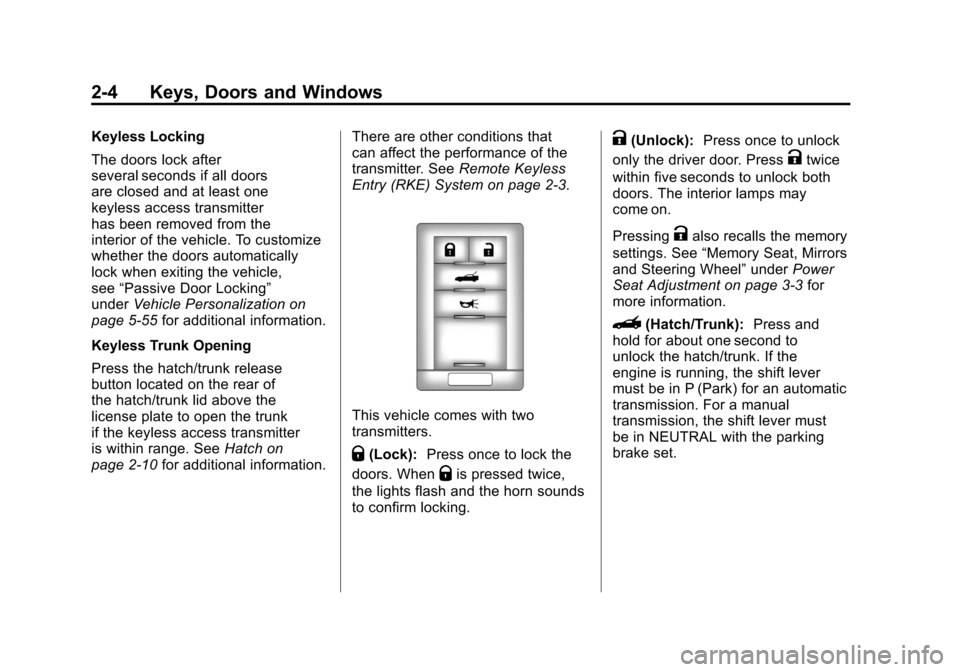
This vehicle comes with two
transmitters.
Q(Lock): Press once to lock the
doors. When
Qis pressed twice,
the lights flash and the horn sounds
to confirm locking.
K(Unlock): Press once to unlock
only the driver door. Press
Ktwice
within five seconds to unlock both
doors. The interior lamps may
come on.
Pressing
Kalso recalls the memory
settings. See “Memory Seat, Mirrors
and Steering Wheel” underPower
Seat Adjustment on page 3‑3 for
more information.
}(Hatch/Trunk): Press and
hold for about one second to
unlock the hatch/trunk. If the
engine is running, the shift lever
must be in P (Park) for an automatic
transmission. For a manual
transmission, the shift lever must
be in NEUTRAL with the parking
brake set.
Page 37 of 428
Black plate (5,1)Chevrolet Corvette Owner Manual - 2011
Keys, Doors and Windows 2-5
L(Panic):Press to sound the
horn. Press any other button on the
keyless access transmitter to stop it.
The vehicle comes with
two transmitters. Each transmitter
will have a number on top of
it, “1” or“2”. These numbers
correspond to the driver of the
vehicle. For example, the memory
seat position for driver 1 will be
recalled when using the transmitter
labeled “1”, if enabled through the
DIC. See “Memory Seat, Mirrors
and Steering Wheel” underPower
Seat Adjustment on page 3‑3
and Vehicle Personalization on
page 5‑55 for more information.
Programming Transmitters to
the Vehicle
Only keyless access transmitters
programmed to this vehicle will
work. If a transmitter is lost or
stolen, a replacement can be
purchased and programmed through
your dealer. The vehicle can be reprogrammed so that lost or stolen
transmitters no longer work.
Each vehicle can have up to
four transmitters programmed to it.
Programming with a Recognized
Transmitter
A new transmitter can be
programmed to the vehicle when
there is one recognized transmitter.
For vehicles sold in Canada, two
recognized transmitters are required
to program a new transmitter.
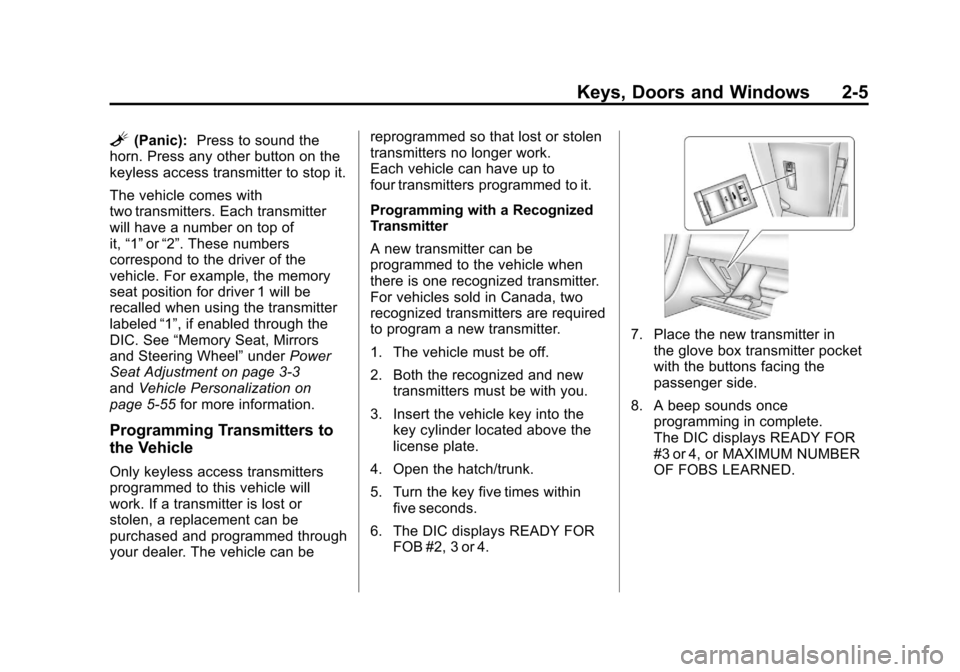
1. The vehicle must be off.
2. Both the recognized and new
transmitters must be with you.
3. Insert the vehicle key into the key cylinder located above the
license plate.
4. Open the hatch/trunk.
5. Turn the key five times within five seconds.
6. The DIC displays READY FOR FOB #2, 3 or 4.
7. Place the new transmitter inthe glove box transmitter pocket
with the buttons facing the
passenger side.
8. A beep sounds once programming in complete.
The DIC displays READY FOR
#3 or 4, or MAXIMUM NUMBER
OF FOBS LEARNED.
Page 42 of 428
Black plate (10,1)Chevrolet Corvette Owner Manual - 2011
2-10 Keys, Doors and Windows
Automatic Door Locks
The vehicle is programmed so that,
when the doors are closed, the
ignition is on and the shift lever is
moved out of P (Park) for automatic
transmissions, or when vehicle
speed becomes faster than 13 km/h
(8 mph) for manual transmissions,
both doors will lock.
Use the power door unlock switch to
unlock the door when the vehicle is
not in P (Park). When the door is
closed again, the doors will lock
either when your foot is removed
from the brake or the vehicle
speed becomes faster than
13 km/h (8 mph).
Automatic Door Unlock
The vehicle is programmed so that
when the shift lever is moved into
P (Park) for automatic transmission
vehicles or when the ignition is
turned OFF or is in Retained
Accessory Power (RAP) for manual
transmission vehicles, both doors
will unlock.With the vehicle stopped and the
engine running, door unlocking
can be programmed through the
Driver Information Center (DIC).
This allows the driver to choose
various unlock settings.
For programming information,
see
Vehicle Personalization on
page 5‑55.
Lockout Protection
Your vehicle can be programmed
to sound the horn three times and
unlock the driver door when both
doors are closed and there is a
keyless access transmitter inside
the vehicle. When the driver door
is opened, a reminder chime will
sound continuously. The vehicle will
remain locked only when at least
one transmitter has been removed
from the vehicle and both doors are
closed. See Vehicle Personalization
on page 5‑55.
Doors
Hatch
{WARNING
Exhaust gases can enter the
vehicle if it is driven with the
liftgate, trunk/hatch open, or
with any objects that pass
through the seal between the
body and the trunk/hatch or
liftgate. Engine exhaust contains
Carbon Monoxide (CO) which
cannot be seen or smelled. It can
cause unconsciousness and even
death.
If the vehicle must be driven with
the liftgate, or trunk/hatch open:
.Close all of the windows.
.Fully open the air outlets
on or under the instrument
panel.
(Continued)
Page 45 of 428
Black plate (13,1)Chevrolet Corvette Owner Manual - 2011
Keys, Doors and Windows 2-13
Arming the System
To arm the system:
.PressQon the keyless access
transmitter.
.Open the door and lock the
door with the power door lock
switch. The security light should
flash. Remove the keyless
access transmitter from inside
the vehicle and close the door.
The security light stops flashing
and stays on. After 30 seconds,
the light should turn off.
The vehicle can be programmed
to automatically lock the doors
and arm the theft-deterrent
system when you exit the
vehicle. See Vehicle
Personalization on page 5‑55.
If a door or the hatch/trunk is
opened without using the keyless
access transmitter, the alarm
goes off. The horn sounds for
two minutes, then goes off to save battery power. The vehicle will not
start without a keyless access
transmitter present.
The theft-deterrent system does not
arm if the driver door is locked with
the power door lock switch after the
doors are closed.
If the keyless access transmitter is
removed from the vehicle while a
passenger is in it, have them lock
the doors after they are closed.
The alarm will not arm, so the
passenger will not set it off.
Testing the Alarm
To test the system:
1. Make sure the trunk lid/hatch is
latched.
2. Lower the window on the driver door.
3. Manually arm the system.
4. Close the doors and wait 30 seconds. 5. Reach through the open window
and manually pull the release
lever on the floor.
6. Press the unlock button on the transmitter to turn off the alarm.
If the alarm does not sound, check
to see if the horn works. The horn
fuse may be blown. See Fuses and
Circuit Breakers on page 10‑51.
If the horn works, but the alarm
does not go off, see your dealer.
Disarming the System
Press the unlock button on the
keyless access transmitter or
squeeze the door handle sensor
while the transmitter is near the
vehicle to unlock a door. Unlocking
a door any other way sets off the
alarm. If the alarm sounds, press
the unlock button on the keyless
access transmitter to disarm it.
Do not leave the key or device that
disarms or deactivates the theft
deterrent system in the vehicle.
Page 121 of 428
Black plate (1,1)Chevrolet Corvette Owner Manual - 2011
Instruments and Controls 5-1
Instruments and
Controls
Controls
Steering Wheel Adjustment . . . 5-2
Steering Wheel Controls . . . . . . 5-3
Horn . . . . . . . . . . . . . . . . . . . . . . . . . . 5-4
Windshield Wiper/Washer . . . . . 5-4
Compass . . . . . . . . . . . . . . . . . . . . . 5-5
Clock . . . . . . . . . . . . . . . . . . . . . . . . . 5-6
Power Outlets . . . . . . . . . . . . . . . . . 5-6
Cigarette Lighter . . . . . . . . . . . . . . 5-7
Ashtrays . . . . . . . . . . . . . . . . . . . . . . 5-8
Warning Lights, Gauges, and
Indicators
Warning Lights, Gauges, andIndicators . . . . . . . . . . . . . . . . . . . . 5-8
Instrument Cluster . . . . . . . . . . . . 5-9
Speedometer . . . . . . . . . . . . . . . . 5-11
Odometer . . . . . . . . . . . . . . . . . . . . 5-11
Tachometer . . . . . . . . . . . . . . . . . . 5-11
Fuel Gauge . . . . . . . . . . . . . . . . . . 5-11
Boost Gauge (ZR1) . . . . . . . . . . 5-12
Engine Oil Pressure Gauge . . . . . . . . . . . . . . . . . . . . . . 5-13 Engine Coolant Temperature
Gauge . . . . . . . . . . . . . . . . . . . . . . 5-15
Voltmeter Gauge . . . . . . . . . . . . . 5-15
Safety Belt Reminders . . . . . . . 5-16
Airbag Readiness Light . . . . . . 5-16
Passenger Airbag Status Indicator . . . . . . . . . . . . . . . . . . . . 5-17
Malfunction Indicator Lamp . . . . . . . . . . . . . 5-18
Brake System Warning Light . . . . . . . . . . . . . . . . . . . . . . . 5-21
Antilock Brake System (ABS) Warning Light . . . . . . . . . . . . . . 5-22
One-to-Four Shift Light (Manual Transmission) . . . . . 5-22
Active Handling System Light . . . . . . . . . . . . . . . . . . . . . . . 5-23
Traction Control System (TCS) Warning Light . . . . . . . 5-23
Tire Pressure Light . . . . . . . . . . 5-24
Security Light . . . . . . . . . . . . . . . . 5-24
High-Beam on Light . . . . . . . . . 5-25
Front Fog Lamp Light . . . . . . . . 5-25
Lamps on Reminder . . . . . . . . . 5-25
Information Displays
Driver Information Center (DIC) . . . . . . . . . . . . . . . 5-25
Head-Up Display (HUD) . . . . . 5-31
Vehicle Messages
Vehicle Messages . . . . . . . . . . . 5-35
Battery Voltage and Charging Messages . . . . . . . . . . . . . . . . . . 5-35
Brake System Messages . . . . 5-36
Convertible Top Messages . . . 5-37
Cruise Control Messages . . . . 5-38
Door Ajar Messages . . . . . . . . . 5-39
Engine Cooling System Messages . . . . . . . . . . . . . . . . . . 5-39
Engine Oil Messages . . . . . . . . 5-40
Engine Power Messages . . . . 5-41
Fuel System Messages . . . . . . 5-41
Key and Lock Messages . . . . . 5-42
Lamp Messages . . . . . . . . . . . . . 5-44
Ride Control System Messages . . . . . . . . . . . . . . . . . . 5-44
Safety Belt Messages . . . . . . . 5-49
Anti-Theft Alarm System Messages . . . . . . . . . . . . . . . . . . 5-50
Service Vehicle Messages . . . 5-50
Starting the Vehicle Messages . . . . . . . . . . . . . . . . . . 5-50
Tire Messages . . . . . . . . . . . . . . . 5-51
Transmission Messages . . . . . 5-53
Vehicle Reminder Messages . . . . . . . . . . . . . . . . . . 5-54
Washer Fluid Messages . . . . . 5-54
Page 124 of 428
Black plate (4,1)Chevrolet Corvette Owner Manual - 2011
5-4 Instruments and Controls
To select tracks on a CD:
.Pressworxto go to the next
or to the previous track when a
CD is playing.
.Press and holdworxfor
more than 2 seconds to scan
the current CD. The CD goes
to the next track, plays the first
10 seconds, then goes to the
next track. Press again to stop
scanning.
.Press and holdworxfor
more than 4 seconds to scan all
of the CDs loaded. The CD goes
to the next CD, plays the first
10 seconds of each track, then
goes to the next CD. Press
again to stop scanning.
+
e−e(Volume): Press to
increase or to decrease the radio
volume.
1 to 6 (Preset Pushbuttons):
Press to play stations that are
programmed on the radio preset
pushbuttons.
Horn
Press near or on the horn symbols
on the steering wheel pad to sound
the horn.
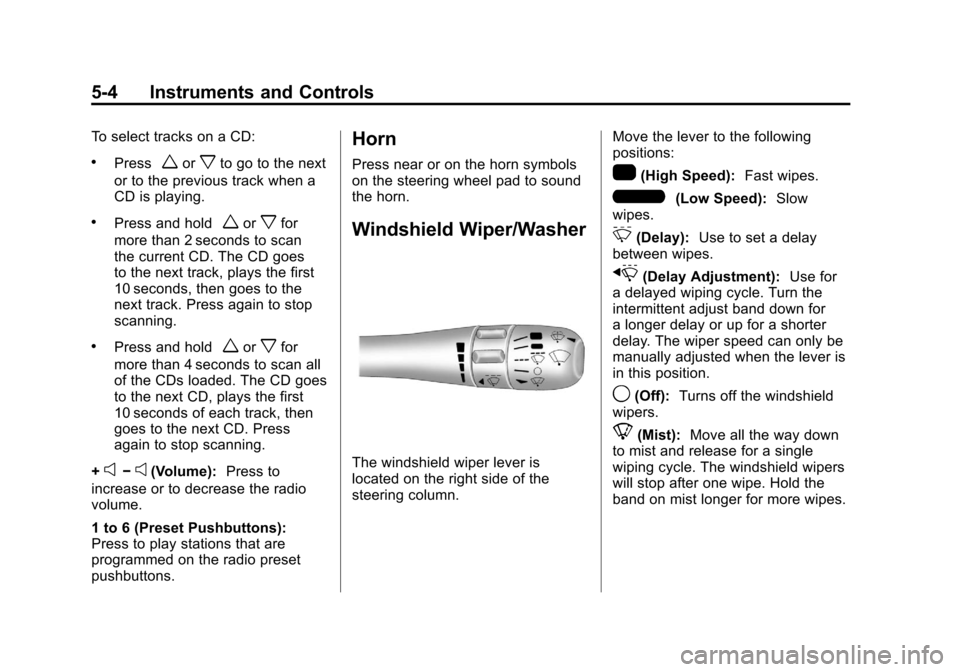
Windshield Wiper/Washer
The windshield wiper lever is
located on the right side of the
steering column. Move the lever to the following
positions:
1(High Speed):
Fast wipes.
6(Low Speed):Slow
wipes.
&(Delay): Use to set a delay
between wipes.
x(Delay Adjustment): Use for
a delayed wiping cycle. Turn the
intermittent adjust band down for
a longer delay or up for a shorter
delay. The wiper speed can only be
manually adjusted when the lever is
in this position.
9(Off): Turns off the windshield
wipers.
8(Mist): Move all the way down
to mist and release for a single
wiping cycle. The windshield wipers
will stop after one wipe. Hold the
band on mist longer for more wipes.
Page 179 of 428
Black plate (59,1)Chevrolet Corvette Owner Manual - 2011
Instruments and Controls 5-59
Press the OPTION button until
TWILIGHT DELAY appears on the
display, then press the RESET
button to scroll through the following
modes:
.OFF
.15 S
.30 S (default)
.90 S
If you choose OFF, this option will
turn off.
If you choose 15 S, the twilight
delay time will be set to 15 seconds.
If you choose 30 S, the twilight
delay time will be set to 30 seconds.
If you choose 90 S, the twilight
delay time will be set to 90 seconds.
When the mode you want is
selected, press the OPTION button
to set your choice and advance to
the next personal option. Flash at Unlock:
This option
activates the front and rear turn
signals for two short flashes when
the unlock or hatch/trunk button on
the keyless access transmitter is
pressed. This will only occur when
the vehicle is off.
Press the OPTION button until
FLASH AT UNLOCK appears on
the display, then press the RESET
button to scroll through the following
modes:
.YES (default)
.NO
If you choose YES, the front and
rear turn signals will flash twice
when you press the unlock button
or the hatch/trunk button on the
keyless access transmitter.
If you choose NO, this option will
turn off.
When the mode you want is
selected, press the OPTION button
to set your choice and advance to
the next personal option. Flash at Lock:
This option
activates the front and rear turn
signals for one long flash when the
lock button on the keyless access
transmitter is pressed. This will only
occur when the vehicle is off. If the
lock button on the keyless access
transmitter is pressed again within
five seconds, the horn will sound
regardless of which setting you
have selected.
Press the OPTION button until
FLASH AT LOCK appears on the
display, then press the RESET
button to scroll through the following
modes:
.YES (default)
.NO
If you choose YES, the front and
rear turn signals will flash once
when you press the lock button on
the keyless access transmitter.
If you choose NO, this option will
turn off.
Page 180 of 428
Black plate (60,1)Chevrolet Corvette Owner Manual - 2011
5-60 Instruments and Controls
When the mode you want is
selected, press the OPTION button
to set your choice and advance to
the next personal option.
FOB Reminder:This option
sounds the horn three times when
the driver's door is closed and there
is a keyless access transmitter
inside the interior of the vehicle.
This will only occur when the
vehicle is off.
Press the OPTION button until FOB
REMINDER appears on the display,
then press the RESET button to
scroll through the following modes:
.YES
.NO (default)
If you choose YES, the horn will
sound three times when a keyless
access transmitter is inside of the
vehicle while the ignition is turned
off and the driver's door is closed.
If you choose NO, this option will
turn off. When the mode you want is
selected, press the OPTION button
to set your choice and advance to
the next personal option.
Passive Door Locking:
This
option allows you to select whether
the doors automatically lock during
normal vehicle exit. When the
ignition is turned off and all doors
become closed, the vehicle will
determine how many keyless
access transmitters remain in
the vehicle interior. If at least one
keyless access transmitter has
been removed from the interior
of the vehicle, the doors will lock
after a short delay.
For example, if there are two
keyless access transmitters in
the vehicle and one is removed,
the other will be locked in. The
keyless access transmitter locked
in the vehicle can still be used to
start the vehicle or unlock the doors,
if needed. A person approaching the
outside of the locked vehicle without an authorized keyless access
transmitter, however, will not be
able to open the door, even with a
transmitter in the vehicle.
You may temporarily disable the
passive door locking feature by
pressing the door unlock switch for
three seconds on an open door.
Passive door locking will then
remain disabled until a door lock
switch is pressed or until the power
mode transitions from the off
power mode.
Press the OPTION button until
PASSIVE DOOR LOCKING appears
on the display, then press the
RESET button to scroll through the
following modes:
.OFF (default)
.SILENT
.HORN
If you choose OFF, this option will
turn off.