change wheel CHEVROLET CORVETTE 2011 6.G Owners Manual
[x] Cancel search | Manufacturer: CHEVROLET, Model Year: 2011, Model line: CORVETTE, Model: CHEVROLET CORVETTE 2011 6.GPages: 428, PDF Size: 6.63 MB
Page 5 of 428

Black plate (5,1)Chevrolet Corvette Owner Manual - 2011
Introduction v
Vehicle Symbol Chart
Here are some additional symbols
that may be found on the vehicle
and what they mean. For more
information on the symbol, refer
to the Index.
9:Airbag Readiness Light
#:Air Conditioning
!:Antilock Brake System (ABS)
g:Audio Steering Wheel Controls
or OnStar®
$: Brake System Warning Light
":Charging System
I:Cruise Control
B: Engine Coolant Temperature
O:Exterior Lamps
#:Fog Lamps
.: Fuel Gauge
+:Fuses
3: Headlamp High/Low-Beam
Changer
j: LATCH System Child
Restraints
*: Malfunction Indicator Lamp
::Oil Pressure
}:Power
/:Remote Vehicle Start
>:Safety Belt Reminders
7:Tire Pressure Monitor
F:Traction Control
M:Windshield Washer Fluid
Page 9 of 428

Black plate (3,1)Chevrolet Corvette Owner Manual - 2011
In Brief 1-3
A.Air Vents on page 8‑6.
B. Head-Up Display (HUD) on
page 5‑31 (If Equipped).
C. Turn and Lane‐Change Lever. See Turn and Lane-Change
Signals (Auto Signal) on
page 6‑4.
Cruise Control on page 9‑44.
Fog Lamps on page 6‑5.
Exterior Lamp Controls on
page 6‑1.
D. Manual Shift Paddles (If Equipped). See Automatic
Transmission on page 9‑28.
E. Driver Information Center (DIC)
on page 5‑25.
F. Instrument Cluster on page 5‑9.
G. Windshield Wiper/Washer on
page 5‑4.
H. Driver Information Center (DIC) Buttons. See Driver Information
Center (DIC) on page 5‑25.
I. Hazard Warning Flashers on
page 6‑4. J.
AM-FM Radio on page 7‑5.
K. Dual Automatic Climate Control
System on page 8‑1.
L. Fuel Door Release Button. See Filling the Tank on page 9‑51.
Hatch/Trunk Release Button.
See “Hatch/Trunk Lid Release”
under Hatch on page 2‑10.
M. Instrument Panel Illumination
Control on page 6‑5.
N. Data Link Connector (DLC). See Malfunction Indicator Lamp
on page 5‑18.
O. Power Folding Top Switch (If Equipped). See Convertible
Top on page 2‑22.
P. Bluetooth on page 7‑18
(If Equipped).
Steering Wheel Controls on
page 5‑3 (If Equipped).
Q. Steering Wheel Adjustment on
page 5‑2.
R. Horn on page 5‑4. S. Telescopic Wheel Button
(If Equipped). See Steering
Wheel Adjustment on page 5‑2.
T. Ignition Positions on page 9‑20.
U. Heated Front Seats on page 3‑8
(If Equipped).
V. Shift Lever (Automatic Shown). See Automatic Transmission on
page 9‑28 orManual
Transmission on page 9‑32.
W. Active Handling System on
page 9‑37.
X. Power Outlets on page 5‑6.
Y. Selective Ride Control on
page 9‑42.
Z. Cupholders on page 4‑1.
AA. Ashtrays on page 5‑8.
Cigarette Lighter on page 5‑7.
AB. Parking Brake on page 9‑35.
AC. Glove Box on page 4‑1.
AD. Instrument Panel Fuse Block on
page 10‑55.
Page 19 of 428
Black plate (13,1)Chevrolet Corvette Owner Manual - 2011
In Brief 1-13
Exterior Lighting
Exterior Lamps
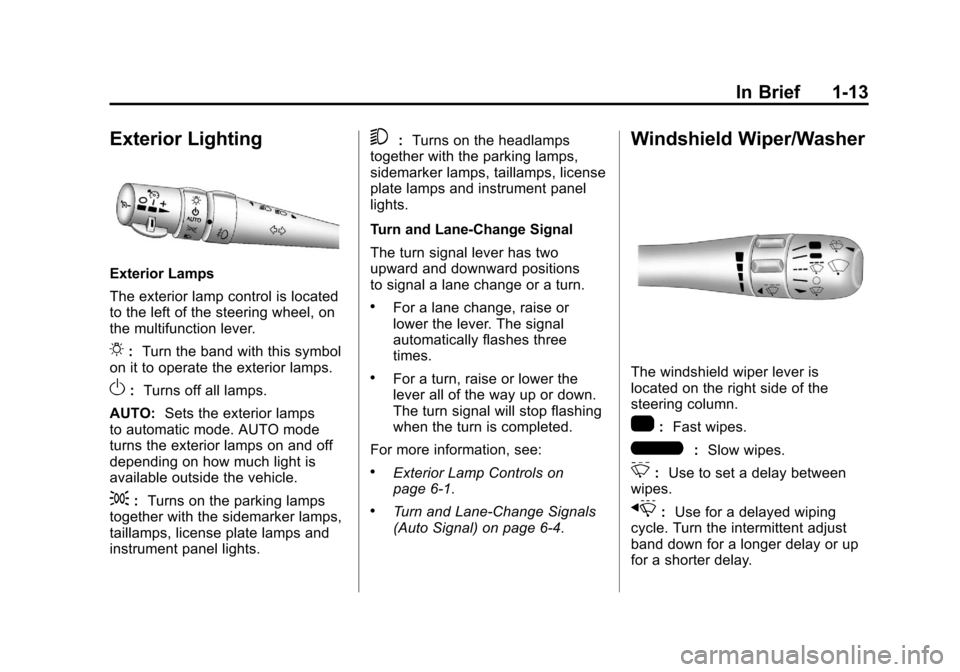
The exterior lamp control is located
to the left of the steering wheel, on
the multifunction lever.
O:Turn the band with this symbol
on it to operate the exterior lamps.
O: Turns off all lamps.
AUTO: Sets the exterior lamps
to automatic mode. AUTO mode
turns the exterior lamps on and off
depending on how much light is
available outside the vehicle.
;: Turns on the parking lamps
together with the sidemarker lamps,
taillamps, license plate lamps and
instrument panel lights.
5: Turns on the headlamps
together with the parking lamps,
sidemarker lamps, taillamps, license
plate lamps and instrument panel
lights.
Turn and Lane-Change Signal
The turn signal lever has two
upward and downward positions
to signal a lane change or a turn.
.For a lane change, raise or
lower the lever. The signal
automatically flashes three
times.
.For a turn, raise or lower the
lever all of the way up or down.
The turn signal will stop flashing
when the turn is completed.
For more information, see:
.Exterior Lamp Controls on
page 6‑1.
.Turn and Lane-Change Signals
(Auto Signal) on page 6‑4.
Windshield Wiper/Washer
The windshield wiper lever is
located on the right side of the
steering column.
1: Fast wipes.
6:Slow wipes.
&:Use to set a delay between
wipes.
x: Use for a delayed wiping
cycle. Turn the intermittent adjust
band down for a longer delay or up
for a shorter delay.
Page 24 of 428
Black plate (18,1)Chevrolet Corvette Owner Manual - 2011
1-18 In Brief
Bluetooth®
For vehicles with a Bluetooth
system, it allows users with a
Bluetooth‐enabled cell phone
to make and receive hands-free
calls using the vehicle’s audio
system and controls.
The Bluetooth‐enabled cell phone
must be paired with the Bluetooth
system before it can be used in the
vehicle. Not all phones will support
all functions. For more information,
visit www.gm.com/bluetooth.
For more information, seeBluetooth
on page 7‑18.
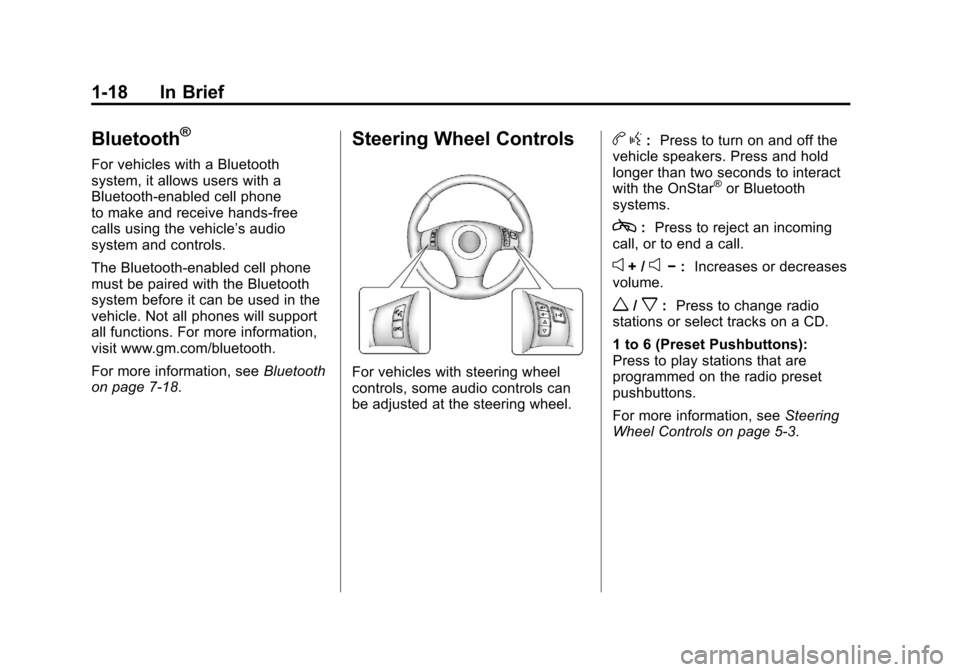
Steering Wheel Controls
For vehicles with steering wheel
controls, some audio controls can
be adjusted at the steering wheel.
b g: Press to turn on and off the
vehicle speakers. Press and hold
longer than two seconds to interact
with the OnStar
®or Bluetooth
systems.
c: Press to reject an incoming
call, or to end a call.
e+ /e− : Increases or decreases
volume.
w/x: Press to change radio
stations or select tracks on a CD.
1 to 6 (Preset Pushbuttons):
Press to play stations that are
programmed on the radio preset
pushbuttons.
For more information, see Steering
Wheel Controls on page 5‑3.
Page 29 of 428
Black plate (23,1)Chevrolet Corvette Owner Manual - 2011
In Brief 1-23
Car Wash Guidelines
Automatic car washes are not
recommended for this vehicle.
Some car washes cause damage
to the vehicle, the wheels, and the
convertible top, if the vehicle is so
equipped.
If you drive the vehicle through an
automatic car wash that does not
have enough clearance for the
undercarriage and/or wide rear tires
and wheels, you could damage the
vehicle. Verify with the manager of
the car wash that the vehicle will fit
before entering the car wash or use
a touchless car wash. See“Washing
Your Vehicle” underExterior Care
on page 10‑86.Engine Oil Life System
The engine oil life system calculates
engine oil life based on vehicle
use and displays a DIC message
when it is necessary to change the
engine oil and filter. The oil life
system should be reset to 100%
only following an oil change.
Resetting the Oil Life System
1. Press the TRIP button so the OIL LIFE percentage is
displayed.
2. Press RESET and hold for two seconds. OIL LIFE
REMAINING 100% will appear.
See Engine Oil Life System on
page 10‑22.
Driving for Better Fuel
Economy
Driving habits can affect fuel
mileage. Here are some driving
tips to get the best fuel economy
possible.
.Avoid fast starts and accelerate
smoothly.
.Brake gradually and avoid
abrupt stops.
.Avoid idling the engine for long
periods of time.
.When road and weather
conditions are appropriate, use
cruise control, if equipped.
.Always follow posted speed
limits or drive more slowly when
conditions require.
.Keep vehicle tires properly
inflated.
.Combine several trips into a
single trip.
Page 99 of 428

Black plate (35,1)Chevrolet Corvette Owner Manual - 2011
Seats and Restraints 3-35
Adding Equipment to the
Airbag-Equipped Vehicle
Q: Is there anything I might addto or change about the vehicle
that could keep the airbags
from working properly?
A: Yes. If you add things that
change the vehicle's frame,
bumper system, height, front
end or side sheet metal, they
may keep the airbag system
from working properly. Changing
or moving any parts of the front
seats, safety belts, the airbag
sensing and diagnostic module,
steering wheel, instrument
panel, the inside rear mirror,
front sensors, or airbag wiring
can affect the operation of the
airbag system.
In addition, the vehicle has
a passenger sensing system
for the right front passenger
position, which includes sensors
that are part of the passenger seat. The passenger sensing
system may not operate properly
if the original seat trim is
replaced with non-GM covers,
upholstery or trim, or with
GM covers, upholstery or
trim designed for a different
vehicle. Any object, such as
an aftermarket seat heater or
a comfort enhancing pad or
device, installed under or on
top of the seat fabric, could
also interfere with the operation
of the passenger sensing
system. This could either
prevent proper deployment
of the passenger airbag(s) or
prevent the passenger sensing
system from properly turning
off the passenger airbag(s).
See
Passenger Sensing System
on page 3‑30.
If you have any questions
about this, you should contact
Customer Assistance before you
modify your vehicle. The phone
numbers and addresses for
Customer Assistance are in Step Two of the Customer
Satisfaction Procedure in
this manual. See
Customer
Satisfaction Procedure
(United States and Canada) on
page 13‑1 orCustomer
Satisfaction Procedure (Mexico)
on page 13‑3.
Q: Because I have a disability, I have to get my vehicle
modified. How can I find out
whether this will affect my
airbag system?
A: If you have questions,
call Customer Assistance.
The phone numbers and
addresses for Customer
Assistance are in Step Two
of the Customer Satisfaction
Procedure in this manual.
See Customer Satisfaction
Procedure (United States and
Canada) on page 13‑1 or
Customer Satisfaction
Procedure (Mexico) on
page 13‑3.
Page 123 of 428
Black plate (3,1)Chevrolet Corvette Owner Manual - 2011
Instruments and Controls 5-3
The telescopic steering column
position can be stored with your
memory settings. See“Memory
Seat, Mirrors and Steering Wheel”
under Power Seat Adjustment on
page 3‑3 for more information.
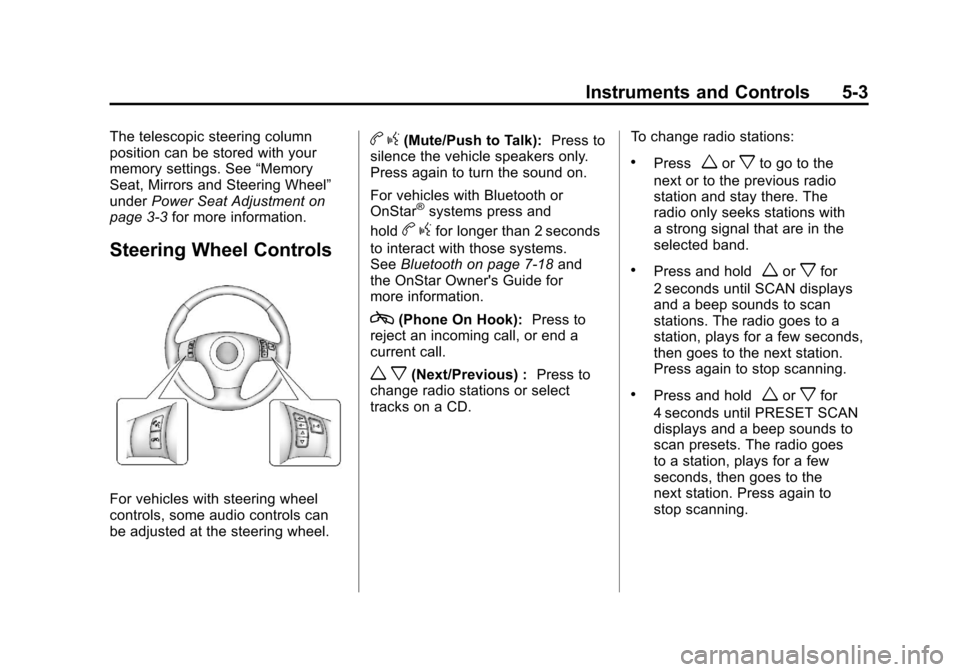
Steering Wheel Controls
For vehicles with steering wheel
controls, some audio controls can
be adjusted at the steering wheel.
bg(Mute/Push to Talk): Press to
silence the vehicle speakers only.
Press again to turn the sound on.
For vehicles with Bluetooth or
OnStar
®systems press and
hold
b gfor longer than 2 seconds
to interact with those systems.
See Bluetooth on page 7‑18 and
the OnStar Owner's Guide for
more information.
c(Phone On Hook): Press to
reject an incoming call, or end a
current call.
w x(Next/Previous) : Press to
change radio stations or select
tracks on a CD. To change radio stations:
.Pressworxto go to the
next or to the previous radio
station and stay there. The
radio only seeks stations with
a strong signal that are in the
selected band.
.Press and holdworxfor
2 seconds until SCAN displays
and a beep sounds to scan
stations. The radio goes to a
station, plays for a few seconds,
then goes to the next station.
Press again to stop scanning.
.Press and holdworxfor
4 seconds until PRESET SCAN
displays and a beep sounds to
scan presets. The radio goes
to a station, plays for a few
seconds, then goes to the
next station. Press again to
stop scanning.
Page 140 of 428
Black plate (20,1)Chevrolet Corvette Owner Manual - 2011
5-20 Instruments and Controls
.Make sure to fuel the vehicle
with quality fuel. Poor fuel quality
causes the engine not to run as
efficiently as designed and may
cause: stalling after start-up,
stalling when the vehicle is
changed into gear, misfiring,
hesitation on acceleration,
or stumbling on acceleration.
These conditions might go away
once the engine is warmed up.
If one or more of these
conditions occurs, change
the fuel brand used. It will
require at least one full tank
of the proper fuel to turn the
light off.
SeeRecommended Fuel on
page 9‑48.
If none of the above have made
the light turn off, your dealer can
check the vehicle. The dealer
has the proper test equipment
and diagnostic tools to fix any
mechanical or electrical problems
that might have developed.Emissions Inspection and
Maintenance Programs
Some state/provincial and
local governments may have
programs to inspect the on-vehicle
emission control equipment For
the inspection, the emission
system test equipment is connected
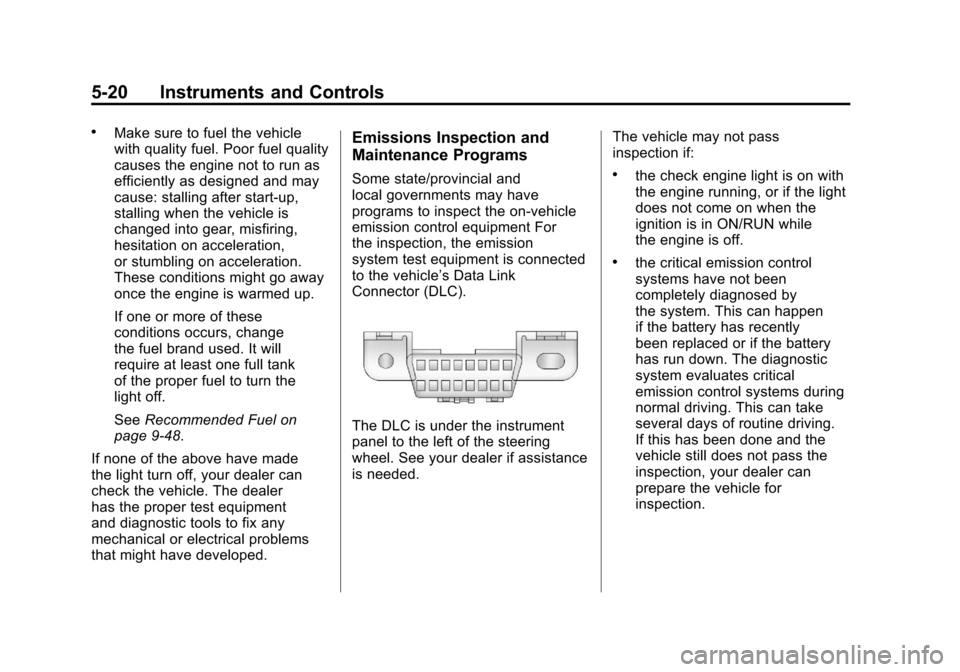
to the vehicle’s Data Link
Connector (DLC).
The DLC is under the instrument
panel to the left of the steering
wheel. See your dealer if assistance
is needed. The vehicle may not pass
inspection if:
.the check engine light is on with
the engine running, or if the light
does not come on when the
ignition is in ON/RUN while
the engine is off.
.the critical emission control
systems have not been
completely diagnosed by
the system. This can happen
if the battery has recently
been replaced or if the battery
has run down. The diagnostic
system evaluates critical
emission control systems during
normal driving. This can take
several days of routine driving.
If this has been done and the
vehicle still does not pass the
inspection, your dealer can
prepare the vehicle for
inspection.
Page 161 of 428
Black plate (41,1)Chevrolet Corvette Owner Manual - 2011
Instruments and Controls 5-41
LOW OIL PRESSURE
This message displays if low
oil pressure levels occur. If this
message appears while the engine
is running, stop the engine and do
not operate it until the cause of low
oil pressure is corrected. Severe
damage to the engine can result.
A sound will be heard when this
message is displayed. SeeEngine
Oil on page 10‑15.
Engine Power Messages
ENGINE DRAG CONTROL
ACTIVE
This message displays when
engine drag control is active.
When driving in a lower gear in
rainy, snowy, or icy conditions and
then letting up on the accelerator
or downshifting, the rear wheels
may begin to slip and this message
displays. This message stays on for
a few seconds following the engine
drag control event.
REDUCED ENGINE POWER
If this message displays and the
check engine light comes on,
a noticeable reduction in the
vehicle's performance may occur.
If the REDUCED ENGINE POWER
message is displayed, but there
is no reduction in performance,
proceed to your destination. The
performance may be reduced the
next time the vehicle is driven.
The vehicle may be driven at a
reduced speed while the REDUCED
ENGINE POWER message is
displayed, but acceleration and
speed may be reduced. Anytime
the check engine light stays on,
the vehicle should be taken to
your dealer as soon as possible
for diagnosis and repair. See
Malfunction Indicator Lamp on
page 5‑18 for more information.
Multiple chimes sound when this
message is displayed. To acknowledge the message, press
the RESET button. The message
reappears every five minutes until
this condition changes.
If the REDUCED ENGINE
POWER message is displayed in
combination with the COOLANT
OVER TEMPERATURE message,
see
Engine Overheating on
page 10‑34.
Fuel System Messages
CHECK GAS CAP
This message displays if the fuel
cap has not been fully tightened.
Check the fuel cap to make
sure that it is on properly. Once
tightened, it takes at least one
overnight park to reset or clear this
message. If both the CHECK GAS
CAP message and the malfunction
indicator lamp in the instrument
panel cluster are on, you may need
to see your dealer for service.
See Malfunction Indicator Lamp on
page 5‑18 for more information.
Page 168 of 428
Black plate (48,1)Chevrolet Corvette Owner Manual - 2011
5-48 Instruments and Controls
SHOCKS INOPERATIVE
This message displays when a
malfunction is present in the
Selective Ride Control system
which is causing the shocks to
be in their full soft mode. This is a
warning to the driver that the vehicle
handling may be affected. Have the
vehicle serviced by your dealer as
soon as possible.
To acknowledge the message, press
the RESET button. The message
reappears every 10 minutes until
this condition changes.
TRACTION SYSTEM ACTIVE
This message displays when the
Traction Control System (TCS) is
limiting wheel spin. Slippery road
conditions may exist if this message
is displayed, so adjust your driving
accordingly. The message stays
on for a few seconds after the
TCS stops limiting wheel spin.
SeeTraction Control System (TCS)
on page 9‑36 for more information.
TRACTION SYSTEM AND
ACTIVE HANDLING –OFF
This message displays, the
instrument panel cluster light
turns on, and a sound will be
heard when the Traction Control
System (TCS) and Active Handling
System are turned off by pressing
the Active Handling System button
on the console for five seconds.
The Antilock Brake System (ABS)
remains on with the TCS and Active
Handling System off. Adjust your
driving accordingly. See Traction
Control System (TCS) on page 9‑36
and Active Handling System on
page 9‑37 for more information.
To acknowledge this message,
press the RESET button.
TRACTION SYSTEM AND
ACTIVE HANDLING –ON
If the Traction Control System (TCS)
and Active Handling System are
off, this message displays briefly,
the instrument panel cluster light
turns off, and a sound will be heard
when the TCS and Active Handling
System are turned on by briefly
pressing the Active Handling
System button on the console.
See Traction Control System (TCS)
on page 9‑36 andActive Handling
System on page 9‑37 for more
information.