air condition CHEVROLET CORVETTE 2012 6.G User Guide
[x] Cancel search | Manufacturer: CHEVROLET, Model Year: 2012, Model line: CORVETTE, Model: CHEVROLET CORVETTE 2012 6.GPages: 434, PDF Size: 6.96 MB
Page 151 of 434
Black plate (41,1)Chevrolet Corvette Owner Manual - 2012
Instruments and Controls 5-41
ENGINE OVERHEATED–
STOP ENGINE
This message displays and a sound
will be heard when the engine has
overheated. Stop and turn the
engine off immediately to avoid
severe engine damage. See Engine
Overheating on page 10‑34.
ENGINE PROTECTION
REDUCE ENGINE RPM
This message displays if the engine
oil temperature exceeds 160°C
(320°F). Check the engine coolant
temperature and engine oil level.
If the engine is too hot, see Engine
Overheating on page 10‑34. The
vehicle may need service, so see
your dealer.
You can monitor the oil temperature
with the gauges button on the DIC.
See Driver Information Center (DIC)
on page 5‑28. Multiple chimes sound when this
message is displayed. This
message remains displayed and
active until the issue is resolved.
HOT ENGINE AIR
CONDITIONING OFF
This message displays when the
engine coolant becomes hotter than
the normal operating temperature.
To avoid added strain on a hot
engine, the air conditioning
compressor is automatically turned
off. When the coolant temperature
returns to normal, the A/C operation
automatically resumes. You can
continue to drive the vehicle. If this
message continues to appear, have
the system repaired by your dealer
as soon as possible to avoid
compressor damage.
Engine Oil Messages
CHANGE ENGINE OIL
This message displays when the
life of the engine oil has expired.
See
Maintenance Schedule on
page 11‑3. After an oil change, the
engine oil life system must be reset.
See “Engine Oil Life” underDriver
Information Center (DIC) on
page 5‑28. Also, see Engine Oil on
page 10‑16 andEngine Oil Life
System on page 10‑22 for more
information.
Page 152 of 434
Black plate (42,1)Chevrolet Corvette Owner Manual - 2012
5-42 Instruments and Controls
CHECK OIL LEVEL
On some vehicles, this message
displays and two chimes sound if
the oil level in the vehicle is low.
Once the vehicle senses a change
in the engine oil level, the light
remains off.
If this message appears after
starting the engine, the engine oil
level may be too low. You may need
to add oil. SeeEngine Overheating
on page 10‑34.
To acknowledge the message, press
the RESET button. The message
reappears every 10 minutes until
this condition changes.
LOW OIL PRESSURE
This message displays if low oil
pressure levels occur. If this
message appears while the engine
is running, stop the engine and do
not operate it until the cause of low
oil pressure is corrected. Severe
damage to the engine can result. A sound will be heard when this
message is displayed. See
Engine
Oil on page 10‑16.
Engine Power Messages
ENGINE DRAG CONTROL
ACTIVE
This message displays when engine
drag control is active. When driving
in a lower gear in rainy, snowy,
or icy conditions and then letting up
on the accelerator or downshifting,
the rear wheels may begin to slip
and this message displays. This
message stays on for a few
seconds following the engine drag
control event.
REDUCED ENGINE POWER
If this message displays and the
check engine light comes on, a
noticeable reduction in the vehicle's
performance may occur. If the
REDUCED ENGINE POWER
message is displayed, but there is
no reduction in performance, proceed to your destination. The
performance may be reduced the
next time the vehicle is driven.
The vehicle may be driven at a
reduced speed while the REDUCED
ENGINE POWER message is
displayed, but acceleration and
speed may be reduced. Anytime the
check engine light stays on, the
vehicle should be taken to your
dealer as soon as possible for
diagnosis and repair. See
Malfunction Indicator Lamp on
page 5‑19
for more information.
Multiple chimes sound when this
message is displayed.
To acknowledge the message, press
the RESET button. The message
reappears every five minutes until
this condition changes.
If the REDUCED ENGINE POWER
message is displayed in
combination with the COOLANT
OVER TEMPERATURE message,
see Engine Overheating on
page 10‑34.
Page 154 of 434
Black plate (44,1)Chevrolet Corvette Owner Manual - 2012
5-44 Instruments and Controls
The following conditions may
cause this message to appear.
.Driver-added equipment plugged
into the accessory power outlet
on the center console is causing
interference. Examples of these
devices are cell phones and cell
phone chargers, two-way radios,
power inverters, or similar items.
Try moving the RKE transmitter
away from these devices when
starting the vehicle. In addition,
PDA devices and remote garage
and gate openers may also
generate Electromagnetic
Interference (EMI) that may
interfere with the RKE
transmitter. Do not carry the
RKE transmitter in the same
pocket or bag as these devices.
.The vehicle is experiencing
Electromagnetic
Interference (EMI). Some
locations, such as airports,
automatic toll booths, and some
gas stations have EMI fields
which may interfere with the
RKE transmitter.
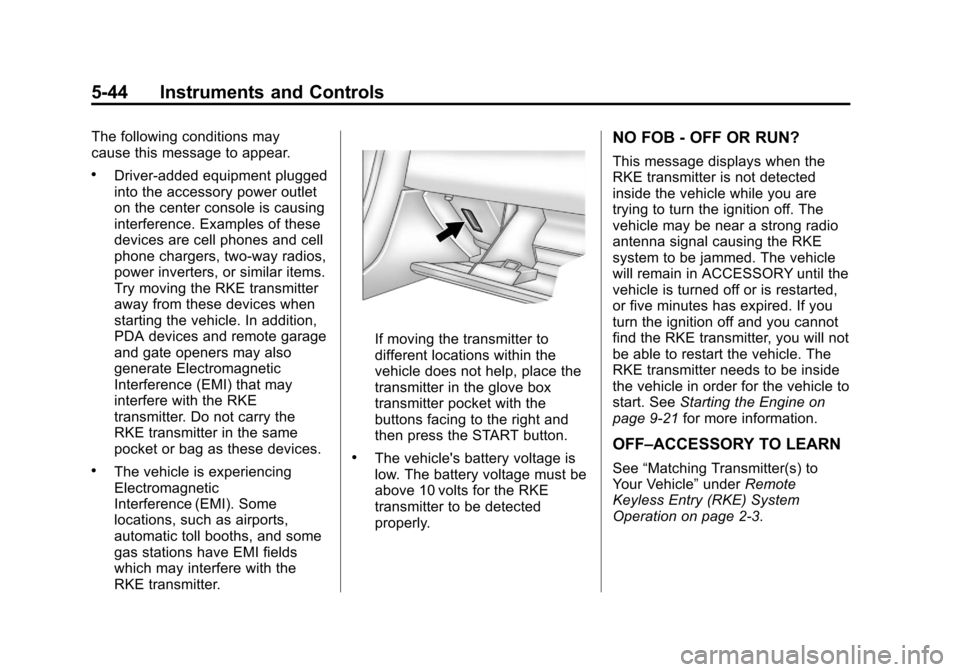
If moving the transmitter to
different locations within the
vehicle does not help, place the
transmitter in the glove box
transmitter pocket with the
buttons facing to the right and
then press the START button.
.The vehicle's battery voltage is
low. The battery voltage must be
above 10 volts for the RKE
transmitter to be detected
properly.
NO FOB - OFF OR RUN?
This message displays when the
RKE transmitter is not detected
inside the vehicle while you are
trying to turn the ignition off. The
vehicle may be near a strong radio
antenna signal causing the RKE
system to be jammed. The vehicle
will remain in ACCESSORY until the
vehicle is turned off or is restarted,
or five minutes has expired. If you
turn the ignition off and you cannot
find the RKE transmitter, you will not
be able to restart the vehicle. The
RKE transmitter needs to be inside
the vehicle in order for the vehicle to
start. SeeStarting the Engine on
page 9‑21 for more information.
OFF–ACCESSORY TO LEARN
See“Matching Transmitter(s) to
Your Vehicle” underRemote
Keyless Entry (RKE) System
Operation on page 2‑3.
Page 158 of 434
Black plate (48,1)Chevrolet Corvette Owner Manual - 2012
5-48 Instruments and Controls
MAXIMUM SPEED 129 km/h
(80 MPH) will display together. See
Selective Ride Control on page 9‑43
for more information.
SERVICE TRACTION SYSTEM
If this message displays when you
are driving, there is a problem with
the Traction Control System (TCS)
and the vehicle is in need of
service. See your dealer. When this
message is displayed, the system
will not limit wheel spin. Adjust your
driving accordingly.
The traction control system (TCS)
warning light on the instrument
panel cluster will also turn on and a
sound will be heard.
When this message is displayed,
the computer controlled systems will
not assist the driver in controlling
the vehicle. Have the system
repaired by your dealer as soon as
possible. Adjust your driving
accordingly. SeeTraction Control
System (TCS) on page 9‑36 for
more information. To acknowledge the message, press
the RESET button.
SHOCKS INOPERATIVE
This message displays when a
malfunction is present in the
Selective Ride Control system
which is causing the shocks to
be in their full soft mode. This is a
warning to the driver that the vehicle
handling may be affected. Have the
vehicle serviced by your dealer as
soon as possible.
To acknowledge the message, press
the RESET button. The message
reappears every 10 minutes until
this condition changes.
TRACTION SYSTEM ACTIVE
This message displays when the
Traction Control System (TCS) is
limiting wheel spin. Slippery road
conditions may exist if this message
is displayed, so adjust your driving
accordingly. The message stays
on for a few seconds after the
TCS stops limiting wheel spin. See
Traction Control System (TCS) on
page 9‑36
for more information.
TRACTION SYSTEM AND
ACTIVE HANDLING –OFF
This message displays, the
instrument panel cluster light turns
on, and a sound will be heard when
the Traction Control System (TCS)
and Active Handling System are
turned off by pressing the Active
Handling System button on the
console for five seconds. The
Antilock Brake System (ABS)
remains on with the TCS and Active
Handling System off. Adjust your
driving accordingly. See Traction
Control System (TCS) on page 9‑36
and Active Handling System on
page 9‑38 for more information.
To acknowledge this message,
press the RESET button.
Page 160 of 434
Black plate (50,1)Chevrolet Corvette Owner Manual - 2012
5-50 Instruments and Controls
BUCKLE SEATBELT
This message reminds you to
buckle the driver's safety belt.
This message displays and a sound
will be heard when the ignition is on,
the driver's safety belt is unbuckled,
and the vehicle is in motion. You
should buckle your safety belt.
If the driver remains unbuckled
when the ignition is on and the
vehicle is in motion, the reminder
will be repeated. If the driver's
safety belt is already buckled, this
message will not come on.
This message is an additional
reminder to the safety belt reminder
light in the instrument panel cluster.
SeeSafety Belt Reminders on
page 5‑17 for more information.
Anti-theft Alarm System
Messages
INTRUSION SENSOR OFF
This message may display when the
anti-theft alarm has been disarmed.
INTRUSION SENSOR ON
This message may display when the
anti-theft alarm has been armed.
Service Vehicle Messages
SERVICE AIR CONDITIONING
This message displays when the
electronic sensors that control
the air conditioning and heating
systems are no longer working.
Have the climate control system
serviced by your dealer if you
notice a drop in heating and air
conditioning efficiency.
SERVICE ELECTRICAL
SYSTEM
This message displays if an
electrical problem has occurred
within the Powertrain Control
Module (PCM). Have the vehicle
serviced by your dealer.
SERVICE VEHICLE SOON
This message displays and a sound
will be heard when there may be an
electrical or another system problem
with the vehicle. Have your vehicle
checked by your dealer if this
message keeps appearing.
Starting the Vehicle
Messages
PRESS BRAKE TO START
ENGINE (Automatic
Transmission Only)
This message displays if you try to
start the engine by pressing the
keyless ignition start button without
having the brake pressed. The
brake needs to be pressed when
starting the engine. See Ignition
Positions on page 9‑19 for more
information.
Page 161 of 434
Black plate (51,1)Chevrolet Corvette Owner Manual - 2012
Instruments and Controls 5-51
Tire Messages
HIGH TIRE PRESSURE
This message may be displayed
when one or more of the tires is
overinflated. This message also
displays LEFT FRONT,
RIGHT FRONT, LEFT REAR,
or RIGHT REAR to indicate which
tire is affected. You can receive
more than one tire pressure
message at a time. To read other
messages that may have been sent
at the same time, press the RESET
button . If a tire pressure message
appears on the DIC, stop as soon
as you can. Have the tire pressures
checked and set to those shown on
the Tire and Loading Information
label. SeeRun-Flat Tires on
page 10‑59, Vehicle Load Limits on
page 9‑14, Tire Pressure on
page 10‑66, and Tire Pressure
Monitor System on page 10‑68.
The DIC also shows the tire
pressure values. See Driver
Information Center (DIC) on
page 5‑28. To acknowledge the message, press
the RESET button. A message
reappears every 10 minutes until the
condition is corrected.
LOW TIRE PRESSURE or TIRE
LOW ADD AIR TO TIRE
{WARNING
When the LOW TIRE
PRESSURE or TIRE FLAT
message is displayed on the
Driver Information Center, your
vehicle's handling capabilities will
be reduced during severe
maneuvers. The active handling
system will be affected. See
Active Handling System on
page 9‑38. If you drive too fast,
you could lose control of your
vehicle. You or others could
be injured. Do not drive over
90 km/h (55 mph) when the LOW
TIRE PRESSURE or TIRE FLAT
(Continued)
WARNING (Continued)
message is displayed. Drive
cautiously and check your tire
pressures as soon as you can.
This message displays when one or
more of the tires is underinflated.
This message also displays LEFT
FRONT, RIGHT FRONT, LEFT
REAR, or RIGHT REAR to indicate
which tire is affected. Multiple
chimes sound and the tire pressure
light on the instrument panel cluster
turns on when this message is
displayed. See Tire Pressure Light
on page 5‑25. You can receive more
than one tire pressure message at a
time. To read other messages that
may have been sent at the same
time, press the RESET button. If a
tire pressure message appears on
the DIC, stop as soon as you can.
Have the tire pressures checked
and set to those shown on the
Tire and Loading Information label.
Page 164 of 434
Black plate (54,1)Chevrolet Corvette Owner Manual - 2012
5-54 Instruments and Controls
If this message is displayed during
normal vehicle operation on flat
roads, the vehicle may need
service. See your dealer for an
inspection.
If driving in a performance or
competitive manner, the use of
(S) Sport Automatic Mode or
(S) Sport Manual Paddle Shift gear
selection is recommended. See
Automatic Transmission on
page 9‑27for more information.
To acknowledge the message, press
the RESET button. The message
reappears every 10 minutes until
this condition changes. If you do not
press the RESET button, the
message remains on the display
until the condition changes.
UPSHIFT NOW
See Manual Transmission on
page 9‑32.
Vehicle Reminder
Messages
ACCESSORY MODE ON
This message displays when the
vehicle is in accessory mode.
ICE POSSIBLE
This message displays when the
outside air temperature is cold
enough to create icy road
conditions. Adjust your driving
accordingly.
OPTIONS UNAVAILABLE
This message displays for a few
seconds if a RKE transmitter that is
not labeled 1 or 2 is used and you
try to personalize the features on
the vehicle by pressing the OPTION
button. The personalization system
will not recognize the transmitter
and the DIC will not display the
current driver number or the menus
used to set personalizations. The personalization features will
then be set to the default states.
See
Vehicle Personalization on
page 5‑55 for more information.
SET PARK BRAKE FOR SEAT
RECALL
If the vehicle has a manual
transmission, this message displays
if you try to recall the memory
positions when the ignition is on and
the parking brake is not set. If the
vehicle is on, you must set the
parking brake in order for the
memory positions to recall.
See“Memory Seat, Mirrors and
Steering Wheel” underPower Seat
Adjustment on page 3‑3 for more
information.
Washer Fluid Messages
CHECK WASHER FLUID
See Washer Fluid on page 10‑38.
Page 213 of 434
Black plate (1,1)Chevrolet Corvette Owner Manual - 2012
Climate Controls 8-1
Climate Controls
Climate Control Systems
Dual Automatic Climate ControlSystem . . . . . . . . . . . . . . . . . . . . . . 8-1
Air Vents
Air Vents . . . . . . . . . . . . . . . . . . . . . . 8-6
Maintenance
Passenger Compartment AirFilter . . . . . . . . . . . . . . . . . . . . . . . . . 8-6
Climate Control Systems
Dual Automatic Climate Control System
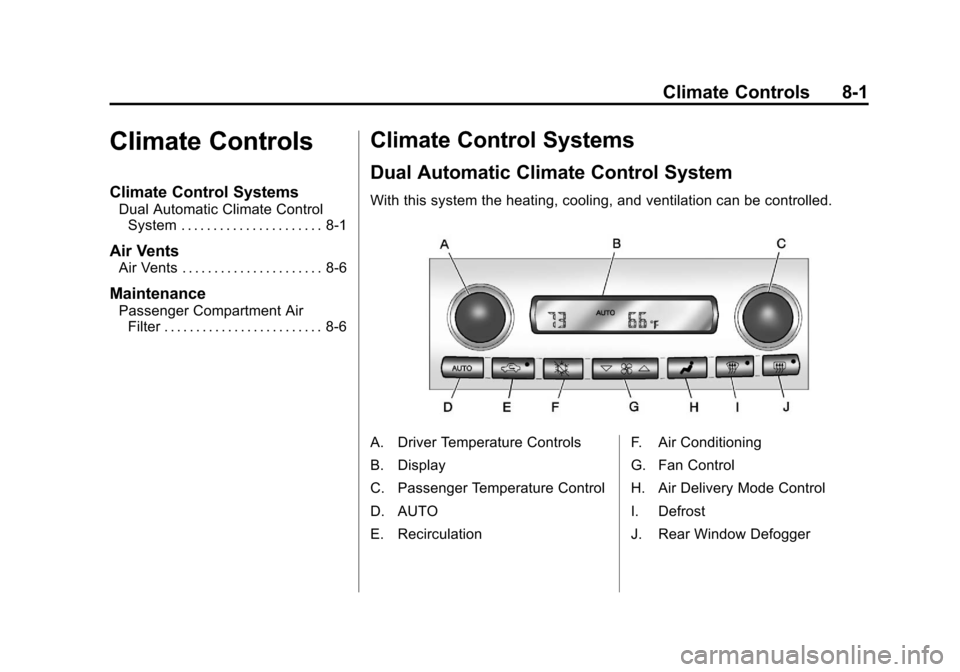
With this system the heating, cooling, and ventilation can be controlled.
A. Driver Temperature Controls
B. Display
C. Passenger Temperature Control
D. AUTO
E. Recirculation F. Air Conditioning
G. Fan Control
H. Air Delivery Mode Control
I. Defrost
J. Rear Window Defogger
Page 215 of 434

Black plate (3,1)Chevrolet Corvette Owner Manual - 2012
Climate Controls 8-3
If the passenger's climate control
system is off, the driver's
temperature knob will control the
temperature for the entire vehicle.
x 9 w(Fan):Press to increase
or decrease the fan speed. The fan
speed setting will appear in the
display.
Pressing the arrows will delete
AUTO from the digital display. The
fan graphics with the fan speed bars
will be shown. The AUTO button
must be pressed to return to the
automatic fan control.
If the airflow seems low when the
fan speed is at the highest setting,
the passenger compartment air filter
may need to be replaced. For more
information, see Passenger
Compartment Air Filter on page 8‑6.
N(Air Delivery Mode Control):
Press this button to manually lock in
the current air delivery setting and
to stop the automatic mode control.
Pressing
Ndeletes AUTO from
the digital display and the mode
graphics will be shown. To change the setting, press
N
again. The AUTO button must be
pressed to return to the automatic
mode selection.
To change the current mode, select
one of the following:
H(Vent):
Air is directed to the
instrument panel outlets, with some
air directed to the floor outlets.
%(Bi-Level): Air is divided
between the instrument panel and
floor outlets.
6(Floor): Air is directed to the
floor outlets, with some air directed
to the windshield and side window
defogger outlets.
-(Floor/Defog): This mode clears
the windows of fog or moisture. Air
is directed to the windshield and the
floor outlets, with a small amount to
the side window outlets. In this
mode, the system automatically
turns off the recirculation and runs
the air conditioning compressor
unless the outside temperature is at or below freezing. The recirculation
mode cannot be selected while in
the defog mode.
1(Defrost):
This mode clears the
windows of fog or frost more quickly.
Air is directed to the windshield, with
a small amount directed to the side
window outlets. The indicator light
comes on and the digital display will
show the defrost mode symbol and
fan speed when the front defrost
mode is being used. In this mode,
the system automatically turns off
the recirculation and runs the air
conditioning compressor, unless the
outside temperature is at or below
freezing. Recirculation cannot be
selected while in the defrost mode.
Pressing
1again will return the
system to the last operating mode.
For severe ice conditions, turn the
driver's temperature knob to 32°C
(90°F) while in defrost mode.
Do not drive the vehicle until all the
windows are clear.
Page 216 of 434
Black plate (4,1)Chevrolet Corvette Owner Manual - 2012
8-4 Climate Controls
^(Air Conditioning Off):Press to
turn the air conditioning compressor
off. Press AUTO to return to
automatic operation. When in
AUTO, the air conditioning
compressor comes on automatically,
as needed.
Air conditioning does not operate at
temperatures below about 2°C to
4°C (35°F to 40°F). In temperatures
above 4°C (40°F), the air
conditioning cannot be turned off in
defrost and defog, as it helps to
remove moisture from the vehicle.
It also helps to keep the windows
clear.
You may notice a slight change in
engine performance when the air
conditioning compressor shuts off
and turns on again. This is normal.
The system is designed to make
adjustments to help with fuel
economy while still maintaining the
selected temperature.
On hot days, open the windows to
let hot inside air escape; then close
them. This helps to reduce the time it takes for the vehicle to cool down.
It also helps the system to operate
more efficiently.
For quick cool down on hot days
press the AUTO button and adjust
the temperature to a cool,
comfortable setting. To achieve
maximum cool down, do the
following:
1. Select
Hmode.
2. Press
?.
3. Select the a/c on.
4. Select the coolest temperature.
5. Select the highest fan speed.
Using these settings together for
long periods of time may cause the
air inside of your vehicle to become
too dry. To prevent this from
happening, after the air in the
vehicle has cooled, turn the
recirculation mode off.
The air conditioning system
removes moisture from the air, so a
small amount of water might drip under the vehicle while idling or
after turning off the engine.
This is normal.
?(Recirculation):
Press to turn
the recirculation mode on or off. An
indicator light comes on to show
that recirculation is on. This mode
prevents outside air from entering
your vehicle. It can be used to
prevent outside air and odors from
entering your vehicle and to help
cool the air inside your vehicle more
quickly. Recirculation mode is not
available in defrost or defog mode.
Sensors
The solar sensor on the vehicle
monitors the solar heat and uses
the information to maintain the
selected temperature when
operating in AUTO mode by
automatically adjusting the
temperature, fan speed, and air
delivery system. The system may
also supply cooler air to the side of
the vehicle facing the sun. The
recirculation mode will also be
activated, as necessary.