steering wheel CHEVROLET CORVETTE 2012 6.G Owners Manual
[x] Cancel search | Manufacturer: CHEVROLET, Model Year: 2012, Model line: CORVETTE, Model: CHEVROLET CORVETTE 2012 6.GPages: 434, PDF Size: 6.96 MB
Page 5 of 434

Black plate (5,1)Chevrolet Corvette Owner Manual - 2012
Introduction v
Vehicle Symbol Chart
Here are some additional symbols
that may be found on the vehicle
and what they mean. For more
information on the symbol, refer to
the Index.
9:Airbag Readiness Light
#:Air Conditioning
!:Antilock Brake System (ABS)
%:Audio Steering Wheel Controls
or OnStar®
$: Brake System Warning Light
":Charging System
I:Cruise Control
B: Engine Coolant Temperature
O:Exterior Lamps
#:Fog Lamps
.: Fuel Gauge
+:Fuses
3: Headlamp High/
Low-Beam Changer
j: LATCH System Child
Restraints
*: Malfunction Indicator Lamp
::Oil Pressure
}:Power
/:Remote Vehicle Start
>:Safety Belt Reminders
7:Tire Pressure Monitor
d:Traction Control/Stabilitrak®
M:Windshield Washer Fluid
Page 7 of 434
Black plate (1,1)Chevrolet Corvette Owner Manual - 2012
In Brief 1-1
In Brief
Instrument Panel
Instrument Panel . . . . . . . . . . . . . . 1-2
Initial Drive Information
Initial Drive Information . . . . . . . . 1-4
Remote Keyless Entry (RKE)System . . . . . . . . . . . . . . . . . . . . . . 1-4
Door Locks . . . . . . . . . . . . . . . . . . . 1-5
Trunk Release . . . . . . . . . . . . . . . . 1-6
Windows . . . . . . . . . . . . . . . . . . . . . . 1-7
Seat Adjustment . . . . . . . . . . . . . . 1-8
Memory Features . . . . . . . . . . . . . 1-9
Safety Belts . . . . . . . . . . . . . . . . . . 1-11
Passenger Sensing System . . . . . . . . . . . . . . . . . . . . . 1-11
Mirror Adjustment . . . . . . . . . . . . 1-12 Steering Wheel
Adjustment . . . . . . . . . . . . . . . . . 1-12
Interior Lighting . . . . . . . . . . . . . . 1-13
Exterior Lighting . . . . . . . . . . . . . 1-14
Windshield Wiper/Washer . . . . 1-14
Climate Controls . . . . . . . . . . . . . 1-15
Transmission . . . . . . . . . . . . . . . . 1-16Vehicle Features
Radio(s) . . . . . . . . . . . . . . . . . . . . . 1-17
Satellite Radio . . . . . . . . . . . . . . . 1-18
Portable Audio Devices . . . . . . 1-18
Bluetooth
®. . . . . . . . . . . . . . . . . . . 1-18
Steering Wheel Controls . . . . . 1-19
Cruise Control . . . . . . . . . . . . . . . 1-19
Navigation System . . . . . . . . . . . 1-19
Driver Information Center (DIC) . . . . . . . . . . . . . . . 1-20
Power Outlets . . . . . . . . . . . . . . . 1-21
Roof Panel . . . . . . . . . . . . . . . . . . 1-21
Convertible . . . . . . . . . . . . . . . . . . 1-21
Performance and Maintenance
Traction Control System (TCS) . . . . . . . . . . . . . . 1-21
Tire Pressure Monitor . . . . . . . . 1-22
Z06, Z16, and ZR1 Features . . . . . . . . . . . . . . . . . . . 1-22
Engine Oil Life System . . . . . . 1-23
Driving for Better Fuel Economy . . . . . . . . . . . . . . . . . . . 1-24
Battery . . . . . . . . . . . . . . . . . . . . . . . 1-24
Roadside Assistance Program . . . . . . . . . . . . . . . . . . . . 1-25
OnStar
®. . . . . . . . . . . . . . . . . . . . . 1-25
Page 9 of 434

Black plate (3,1)Chevrolet Corvette Owner Manual - 2012
In Brief 1-3
A.Air Vents on page 8‑6.
B. Head‐Up Display Controls (If Equipped). See Head-Up
Display (HUD) on page 5‑32.
C. Turn and Lane‐Change Lever. See Turn and Lane-Change
Signals on page 6‑4.
Cruise Control on page 9‑45.
Fog Lamps on page 6‑5.
Exterior Lamp Controls on
page 6‑1.
D. Manual Shift Paddles (If Equipped). See Automatic
Transmission on page 9‑27.
E. Driver Information Center (DIC)
on page 5‑28.
F. Instrument Cluster on page 5‑9.
G. Windshield Wiper/Washer on
page 5‑4.
H. Driver Information Center (DIC) Buttons. See Driver Information
Center (DIC) on page 5‑28. I.
Hazard Warning Flashers on
page 6‑4.
J. Infotainment on page 7‑1.
K. Dual Automatic Climate Control
System on page 8‑1.
L. Fuel Door Release Button. See Filling the Tank on page 9‑51.
Hatch/Trunk Release Button.
See “Hatch/Trunk Lid Release”
under Hatch on page 2‑11.
M. Instrument Panel Illumination
Control on page 6‑5.
N. Power Folding Top Switch (If Equipped). See Convertible
Top on page 2‑24.
O. Data Link Connector (DLC) (Out of View). See Malfunction
Indicator Lamp on page 5‑19.
P. Bluetooth Controls (If Equipped). See Bluetooth on
page 7‑18.
Steering Wheel Controls on
page 5‑3 (If Equipped). Q.
Steering Wheel Adjustment on
page 5‑2.
R. Horn on page 5‑4.
S. Telescopic Steering Column Control (If Equipped). See
Steering Wheel Adjustment on
page 5‑2.
T. Ignition Positions on page 9‑19.
U. Heated Front Seats on page 3‑8
(If Equipped).
V. Shift Lever (Automatic Shown). See Automatic Transmission on
page 9‑27 orManual
Transmission on page 9‑32.
W. Active Handling System on
page 9‑38.
X. Power Outlets on page 5‑6.
Y. Selective Ride Control on
page 9‑43 (If Equipped).
Z. Parking Brake on page 9‑36.
Page 18 of 434
Black plate (12,1)Chevrolet Corvette Owner Manual - 2012
1-12 In Brief
Mirror Adjustment
Exterior Mirrors
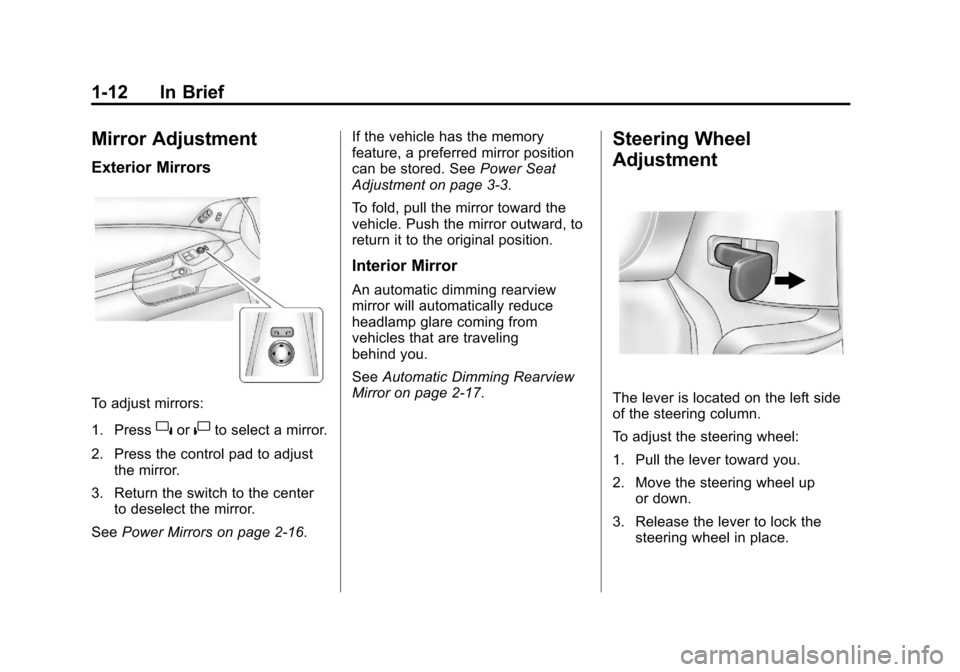
To adjust mirrors:
1. Press
}or|to select a mirror.
2. Press the control pad to adjust the mirror.
3. Return the switch to the center to deselect the mirror.
See Power Mirrors on page 2‑16. If the vehicle has the memory
feature, a preferred mirror position
can be stored. See
Power Seat
Adjustment on page 3‑3.
To fold, pull the mirror toward the
vehicle. Push the mirror outward, to
return it to the original position.
Interior Mirror
An automatic dimming rearview
mirror will automatically reduce
headlamp glare coming from
vehicles that are traveling
behind you.
See Automatic Dimming Rearview
Mirror on page 2‑17.
Steering Wheel
Adjustment
The lever is located on the left side
of the steering column.
To adjust the steering wheel:
1. Pull the lever toward you.
2. Move the steering wheel up
or down.
3. Release the lever to lock the steering wheel in place.
Page 19 of 434
Black plate (13,1)Chevrolet Corvette Owner Manual - 2012
In Brief 1-13
Telescopic Steering Column
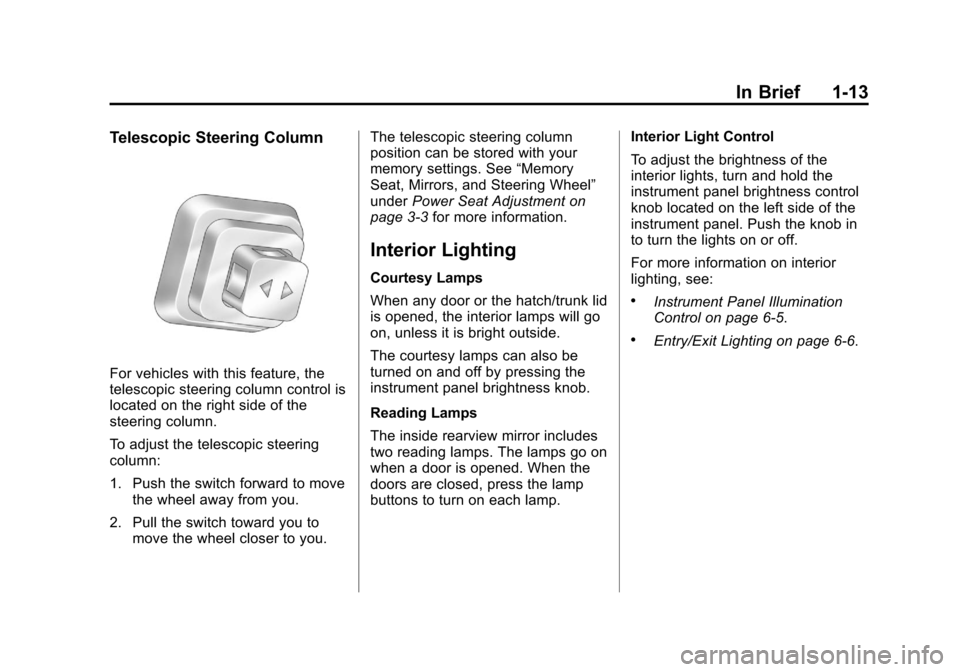
For vehicles with this feature, the
telescopic steering column control is
located on the right side of the
steering column.
To adjust the telescopic steering
column:
1. Push the switch forward to movethe wheel away from you.
2. Pull the switch toward you to move the wheel closer to you. The telescopic steering column
position can be stored with your
memory settings. See
“Memory
Seat, Mirrors, and Steering Wheel”
under Power Seat Adjustment on
page 3‑3 for more information.
Interior Lighting
Courtesy Lamps
When any door or the hatch/trunk lid
is opened, the interior lamps will go
on, unless it is bright outside.
The courtesy lamps can also be
turned on and off by pressing the
instrument panel brightness knob.
Reading Lamps
The inside rearview mirror includes
two reading lamps. The lamps go on
when a door is opened. When the
doors are closed, press the lamp
buttons to turn on each lamp. Interior Light Control
To adjust the brightness of the
interior lights, turn and hold the
instrument panel brightness control
knob located on the left side of the
instrument panel. Push the knob in
to turn the lights on or off.
For more information on interior
lighting, see:
.Instrument Panel Illumination
Control on page 6‑5.
.Entry/Exit Lighting on page 6‑6.
Page 20 of 434
Black plate (14,1)Chevrolet Corvette Owner Manual - 2012
1-14 In Brief
Exterior Lighting
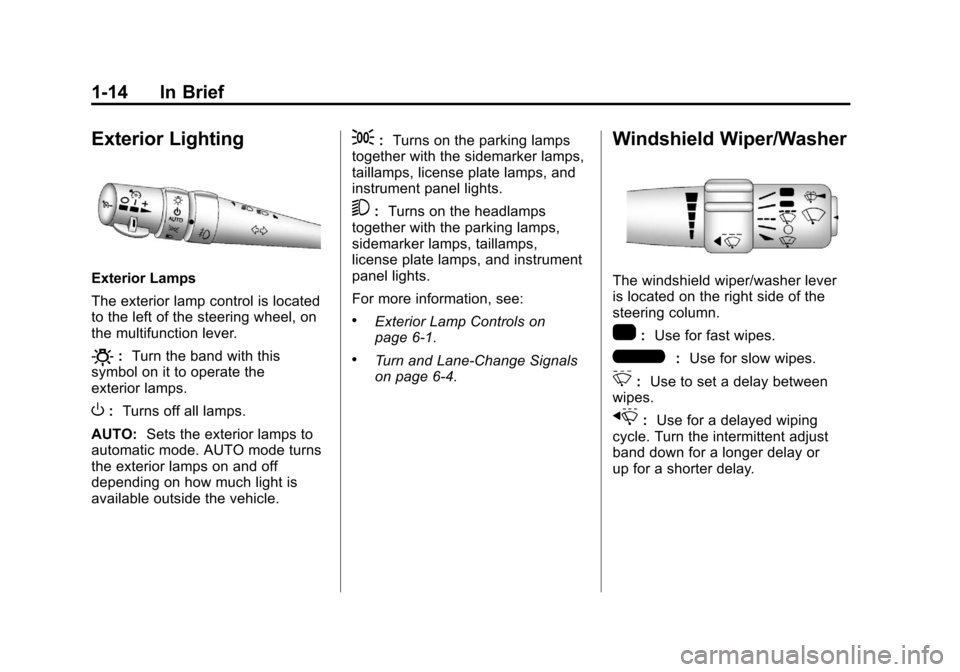
Exterior Lamps
The exterior lamp control is located
to the left of the steering wheel, on
the multifunction lever.
O:Turn the band with this
symbol on it to operate the
exterior lamps.
O: Turns off all lamps.
AUTO: Sets the exterior lamps to
automatic mode. AUTO mode turns
the exterior lamps on and off
depending on how much light is
available outside the vehicle.
;: Turns on the parking lamps
together with the sidemarker lamps,
taillamps, license plate lamps, and
instrument panel lights.
5: Turns on the headlamps
together with the parking lamps,
sidemarker lamps, taillamps,
license plate lamps, and instrument
panel lights.
For more information, see:
.Exterior Lamp Controls on
page 6‑1.
.Turn and Lane-Change Signals
on page 6‑4.
Windshield Wiper/Washer
The windshield wiper/washer lever
is located on the right side of the
steering column.
1: Use for fast wipes.
6:Use for slow wipes.
3:Use to set a delay between
wipes.
x: Use for a delayed wiping
cycle. Turn the intermittent adjust
band down for a longer delay or
up for a shorter delay.
Page 22 of 434
Black plate (16,1)Chevrolet Corvette Owner Manual - 2012
1-16 In Brief
Transmission
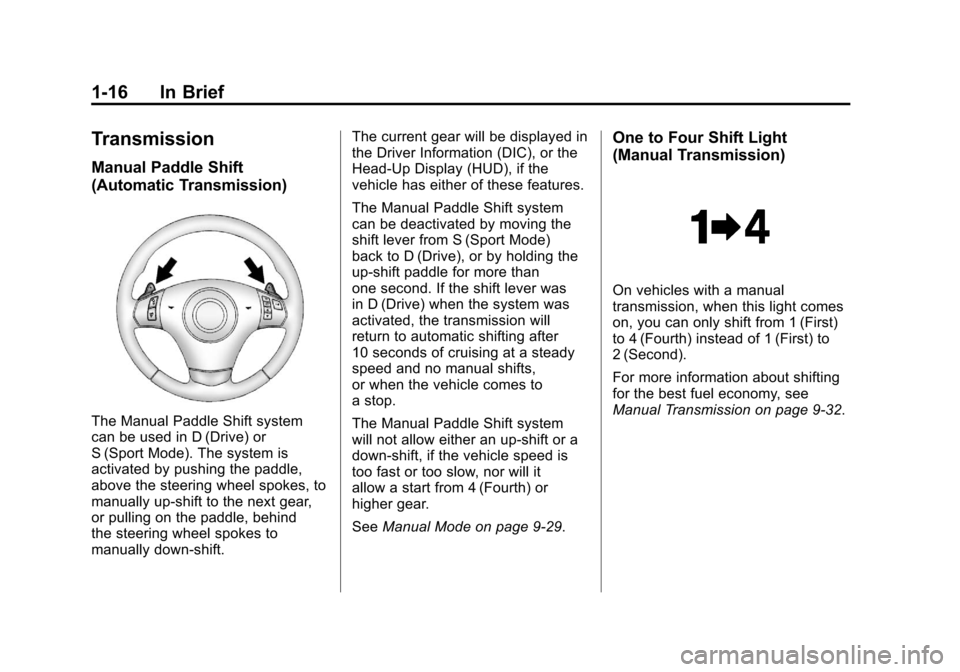
Manual Paddle Shift
(Automatic Transmission)
The Manual Paddle Shift system
can be used in D (Drive) or
S (Sport Mode). The system is
activated by pushing the paddle,
above the steering wheel spokes, to
manually up-shift to the next gear,
or pulling on the paddle, behind
the steering wheel spokes to
manually down-shift.The current gear will be displayed in
the Driver Information (DIC), or the
Head-Up Display (HUD), if the
vehicle has either of these features.
The Manual Paddle Shift system
can be deactivated by moving the
shift lever from S (Sport Mode)
back to D (Drive), or by holding the
up‐shift paddle for more than
one second. If the shift lever was
in D (Drive) when the system was
activated, the transmission will
return to automatic shifting after
10 seconds of cruising at a steady
speed and no manual shifts,
or when the vehicle comes to
a stop.
The Manual Paddle Shift system
will not allow either an up-shift or a
down-shift, if the vehicle speed is
too fast or too slow, nor will it
allow a start from 4 (Fourth) or
higher gear.
See
Manual Mode on page 9‑29.
One to Four Shift Light
(Manual Transmission)
On vehicles with a manual
transmission, when this light comes
on, you can only shift from 1 (First)
to 4 (Fourth) instead of 1 (First) to
2 (Second).
For more information about shifting
for the best fuel economy, see
Manual Transmission on page 9‑32.
Page 25 of 434
Black plate (19,1)Chevrolet Corvette Owner Manual - 2012
In Brief 1-19
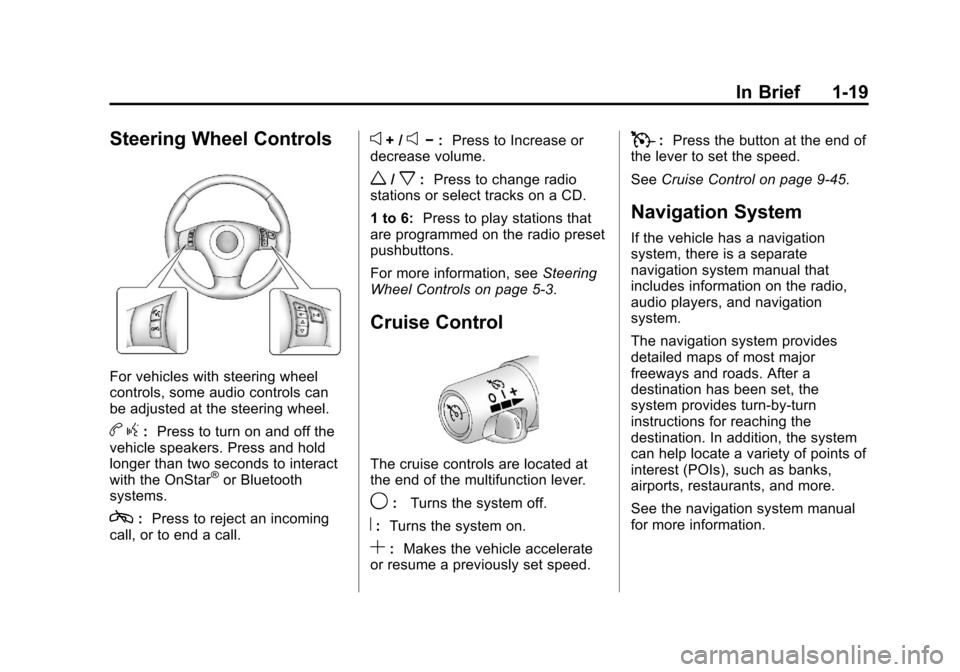
Steering Wheel Controls
For vehicles with steering wheel
controls, some audio controls can
be adjusted at the steering wheel.
bg: Press to turn on and off the
vehicle speakers. Press and hold
longer than two seconds to interact
with the OnStar
®or Bluetooth
systems.
c: Press to reject an incoming
call, or to end a call.
e+ /e− : Press to Increase or
decrease volume.
w/x: Press to change radio
stations or select tracks on a CD.
1 to 6: Press to play stations that
are programmed on the radio preset
pushbuttons.
For more information, see Steering
Wheel Controls on page 5‑3.
Cruise Control
The cruise controls are located at
the end of the multifunction lever.
9: Turns the system off.
R:Turns the system on.
S:Makes the vehicle accelerate
or resume a previously set speed.
T: Press the button at the end of
the lever to set the speed.
See Cruise Control on page 9‑45.
Navigation System
If the vehicle has a navigation
system, there is a separate
navigation system manual that
includes information on the radio,
audio players, and navigation
system.
The navigation system provides
detailed maps of most major
freeways and roads. After a
destination has been set, the
system provides turn-by-turn
instructions for reaching the
destination. In addition, the system
can help locate a variety of points of
interest (POIs), such as banks,
airports, restaurants, and more.
See the navigation system manual
for more information.
Page 36 of 434
Black plate (4,1)Chevrolet Corvette Owner Manual - 2012
2-4 Keys, Doors, and Windows
Keyless Trunk Opening
Press the hatch/trunk release button
located on the rear of the hatch/
trunk lid above the license plate
to open the trunk if the RKE
transmitter is within range.
SeeHatch on page 2‑11 for
additional information.
There are other conditions that can
affect the performance of the
transmitter. See Remote Keyless
Entry (RKE) System on page 2‑3.
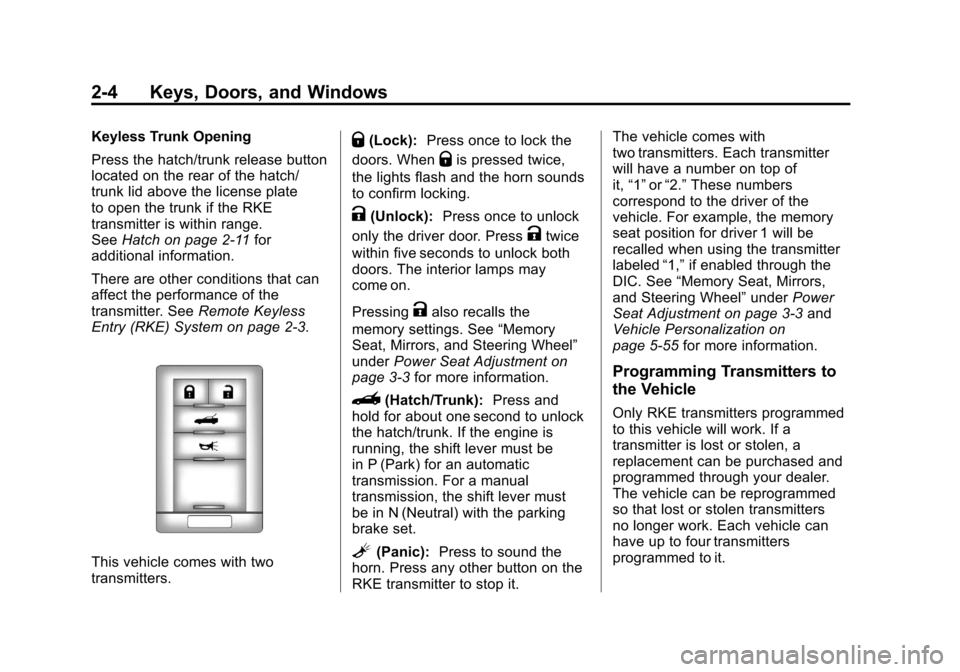
This vehicle comes with two
transmitters.
Q(Lock): Press once to lock the
doors. When
Qis pressed twice,
the lights flash and the horn sounds
to confirm locking.
K(Unlock): Press once to unlock
only the driver door. Press
Ktwice
within five seconds to unlock both
doors. The interior lamps may
come on.
Pressing
Kalso recalls the
memory settings. See “Memory
Seat, Mirrors, and Steering Wheel”
under Power Seat Adjustment on
page 3‑3 for more information.
}(Hatch/Trunk): Press and
hold for about one second to unlock
the hatch/trunk. If the engine is
running, the shift lever must be
in P (Park) for an automatic
transmission. For a manual
transmission, the shift lever must
be in N (Neutral) with the parking
brake set.
L(Panic): Press to sound the
horn. Press any other button on the
RKE transmitter to stop it. The vehicle comes with
two transmitters. Each transmitter
will have a number on top of
it,
“1” or“2.” These numbers
correspond to the driver of the
vehicle. For example, the memory
seat position for driver 1 will be
recalled when using the transmitter
labeled “1,”if enabled through the
DIC. See “Memory Seat, Mirrors,
and Steering Wheel” underPower
Seat Adjustment on page 3‑3 and
Vehicle Personalization on
page 5‑55 for more information.
Programming Transmitters to
the Vehicle
Only RKE transmitters programmed
to this vehicle will work. If a
transmitter is lost or stolen, a
replacement can be purchased and
programmed through your dealer.
The vehicle can be reprogrammed
so that lost or stolen transmitters
no longer work. Each vehicle can
have up to four transmitters
programmed to it.
Page 79 of 434
Black plate (15,1)Chevrolet Corvette Owner Manual - 2012
Seats and Restraints 3-15
Replacing Safety Belt
System Parts after a
Crash
{WARNING
A crash can damage the safety
belt system in the vehicle.
A damaged safety belt system
may not properly protect the
person using it, resulting in
serious injury or even death in a
crash. To help make sure the
safety belt systems are working
properly after a crash, have them
inspected and any necessary
replacements made as soon
as possible.After a minor crash, replacement of
safety belts may not be necessary.
But the safety belt assemblies that
were used during any crash may
have been stressed or damaged.
See your dealer to have the
safety belt assemblies inspected
or replaced.
New parts and repairs may be
necessary even if the safety belt
system was not being used at the
time of the crash.
Have the safety belt pretensioners
checked if the vehicle has been in a
crash, or if the airbag readiness light
stays on after you start the vehicle
or while you are driving. See
Airbag
Readiness Light on page 5‑18.
Airbag System
The vehicle has the following
airbags:
.A frontal airbag for the driver.
.A frontal airbag for the front
outboard passenger.
.A seat-mounted side impact
airbag for the driver.
.A seat-mounted side impact
airbag for the front outboard
passenger.
All vehicle airbags have the word
AIRBAG on the trim or on a label
near the deployment opening.
For frontal airbags, the word
AIRBAG is on the center of the
steering wheel for the driver and on
the instrument panel for the front
outboard passenger.
For seat-mounted side impact
airbags, the word AIRBAG is on the
side of the seatback closest to
the door.