display CHEVROLET CORVETTE 2012 6.G User Guide
[x] Cancel search | Manufacturer: CHEVROLET, Model Year: 2012, Model line: CORVETTE, Model: CHEVROLET CORVETTE 2012 6.GPages: 434, PDF Size: 6.96 MB
Page 38 of 434
Black plate (6,1)Chevrolet Corvette Owner Manual - 2012
2-6 Keys, Doors, and Windows
Programming without a
Recognized Transmitter
This procedure requires three
10-minute cycles to complete the
programming process. United
States owners are permitted to
program a new transmitter to
their vehicle when a recognized
transmitter is not available. The
Canadian immobilizer standard
requires that Canadian owners see
their dealer for programming new
transmitters when two recognized
transmitters are not available.
1. The vehicle must be off.
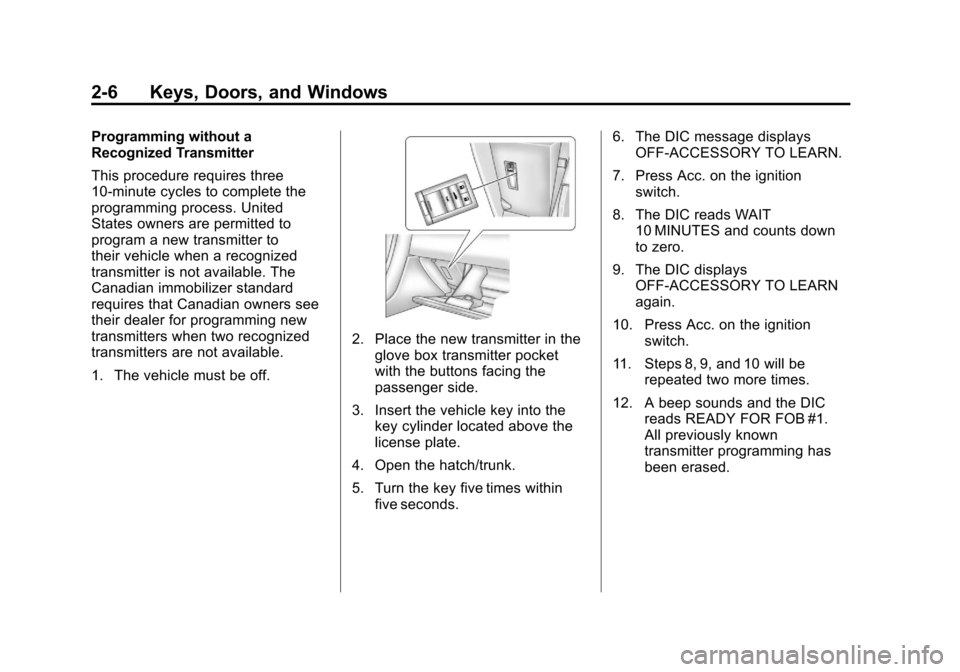
2. Place the new transmitter in theglove box transmitter pocket
with the buttons facing the
passenger side.
3. Insert the vehicle key into the key cylinder located above the
license plate.
4. Open the hatch/trunk.
5. Turn the key five times within five seconds. 6. The DIC message displays
OFF-ACCESSORY TO LEARN.
7. Press Acc. on the ignition switch.
8. The DIC reads WAIT 10 MINUTES and counts down
to zero.
9. The DIC displays OFF-ACCESSORY TO LEARN
again.
10. Press Acc. on the ignition switch.
11. Steps 8, 9, and 10 will be repeated two more times.
12. A beep sounds and the DIC reads READY FOR FOB #1.
All previously known
transmitter programming has
been erased.
Page 39 of 434
Black plate (7,1)Chevrolet Corvette Owner Manual - 2012
Keys, Doors, and Windows 2-7
13. A beep sounds onceprogramming in complete.
The DIC displays READY
FOR FOB #2.
To program additional
transmitters, take transmitter 1
out of the transmitter pocket
and place transmitter 2 in the
pocket. Up to four transmitters
can be programmed. The DIC
then displays MAXIMUM
NUMBER OF FOBS
LEARNED and exits the
programming mode.
Press Acc. on the ignition
switch to complete the process.
14. Press Acc. on the ignition switch if programming is
complete.
15. Press
Kon each newly
programmed transmitter to
complete the process.
Starting the Vehicle with a Low
Transmitter Battery
If the transmitter battery is weak,
the DIC may display NO FOBS
DETECTED when trying to start the
vehicle. To start the vehicle, place
the transmitter in the glove box
transmitter pocket with the buttons
facing the passenger side. Then,
with the vehicle in P (Park) for an
automatic transmission, press the
brake pedal and
/. If the vehicle
has a manual transmission, press
the clutch and
/. Replace the
transmitter battery as soon as
possible. Change the transmitter
battery if the DIC displays FOB
BATTERY LOW.
Battery Replacement
Notice: When replacing the
battery, do not touch any of the
circuitry on the transmitter. Static
from your body could damage the
transmitter.
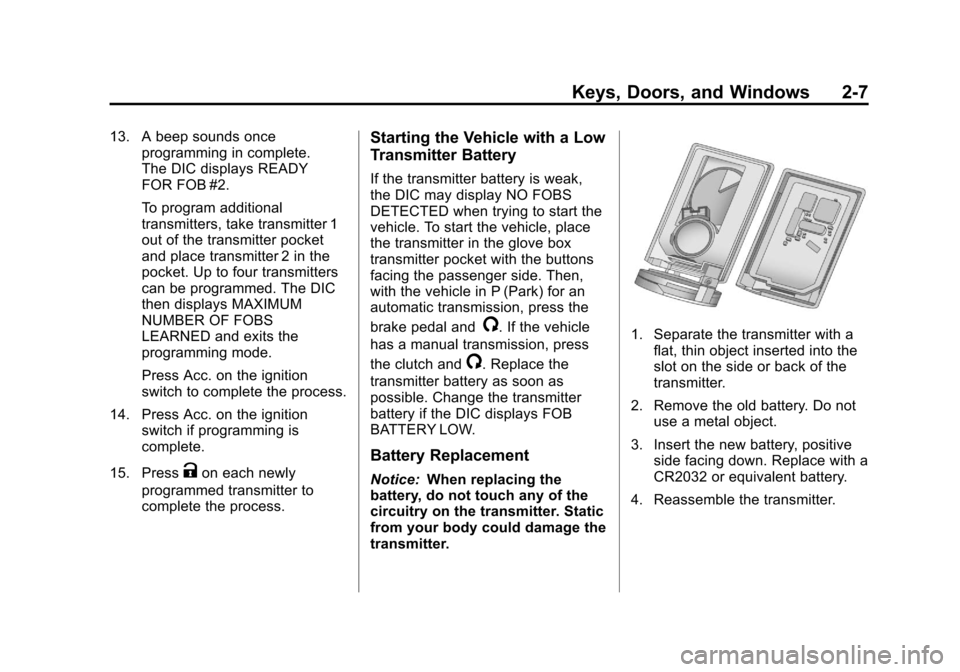
1. Separate the transmitter with a
flat, thin object inserted into the
slot on the side or back of the
transmitter.
2. Remove the old battery. Do not use a metal object.
3. Insert the new battery, positive side facing down. Replace with a
CR2032 or equivalent battery.
4. Reassemble the transmitter.
Page 62 of 434
Black plate (30,1)Chevrolet Corvette Owner Manual - 2012
2-30 Keys, Doors, and Windows
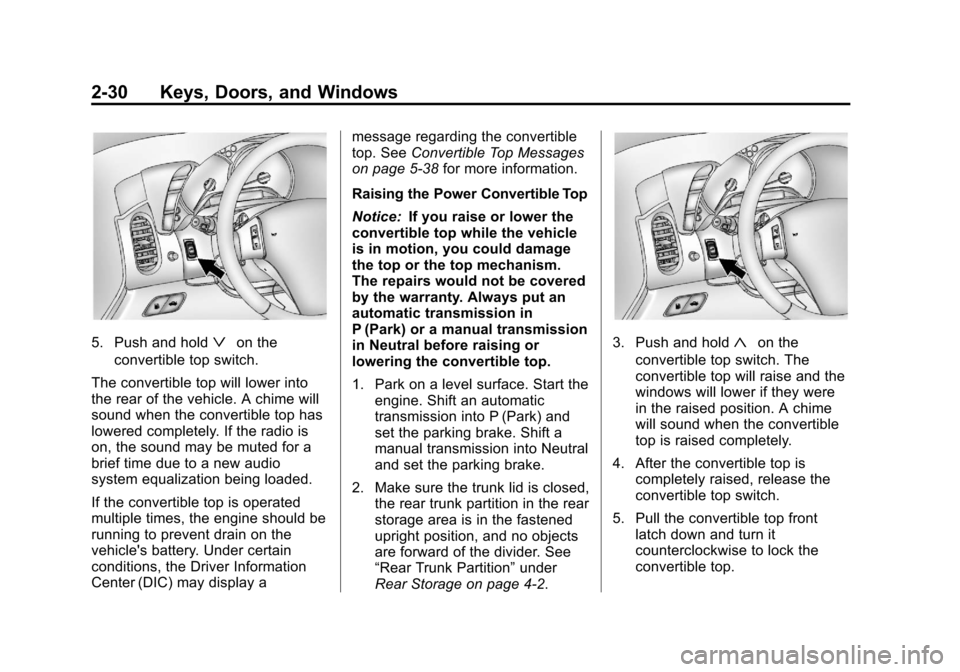
5. Push and holdªon the
convertible top switch.
The convertible top will lower into
the rear of the vehicle. A chime will
sound when the convertible top has
lowered completely. If the radio is
on, the sound may be muted for a
brief time due to a new audio
system equalization being loaded.
If the convertible top is operated
multiple times, the engine should be
running to prevent drain on the
vehicle's battery. Under certain
conditions, the Driver Information
Center (DIC) may display a message regarding the convertible
top. See
Convertible Top Messages
on page 5‑38 for more information.
Raising the Power Convertible Top
Notice: If you raise or lower the
convertible top while the vehicle
is in motion, you could damage
the top or the top mechanism.
The repairs would not be covered
by the warranty. Always put an
automatic transmission in
P (Park) or a manual transmission
in Neutral before raising or
lowering the convertible top.
1. Park on a level surface. Start the engine. Shift an automatic
transmission into P (Park) and
set the parking brake. Shift a
manual transmission into Neutral
and set the parking brake.
2. Make sure the trunk lid is closed, the rear trunk partition in the rear
storage area is in the fastened
upright position, and no objects
are forward of the divider. See
“Rear Trunk Partition” under
Rear Storage on page 4‑2.3. Push and hold«on the
convertible top switch. The
convertible top will raise and the
windows will lower if they were
in the raised position. A chime
will sound when the convertible
top is raised completely.
4. After the convertible top is completely raised, release the
convertible top switch.
5. Pull the convertible top front latch down and turn it
counterclockwise to lock the
convertible top.
Page 64 of 434
Black plate (32,1)Chevrolet Corvette Owner Manual - 2012
2-32 Keys, Doors, and Windows
5. Then follow the steps underraising the manual convertible
top. See “Manual Operation” or
“Power Operation” in this
section.
When power is restored to the
vehicle, the hydraulic bolt must be
tightened, by turning it clockwise.
The convertible top switch can then
be used to lower or raise the
convertible top.
If the convertible top is operated
multiple times, the engine should
be running to prevent drain on the
vehicle's battery. Under certain
conditions, the Driver Information
Center (DIC) may display a
message regarding the convertible
top. See Convertible Top Messages
on page 5‑38 for more information. If the battery has been
disconnected, the power windows
must be initialized for the power
convertible top to operate. See
Power Windows on page 2‑18
for
more information.
Cleaning the Convertible Top
The convertible top should be
cleaned often. However, high
pressure car washes may cause
water to enter the vehicle.
When hand washing the convertible
top, do it in partial shade. Use a
mild soap, lukewarm water, and a
soft sponge. A chamois or cloth may
leave lint on the top, and a brush
can chafe the threads in the top
fabric. Do not use detergents,
harsh cleaners, solvents,
or bleaching agents. Wet the entire vehicle and wash the
top evenly to avoid spots or rings.
Let the soap remain on the fabric
for a few minutes. When the top is
really dirty, use a mild foam-type
cleaner. Thoroughly rinse the
entire vehicle, then let the top dry
in direct sunlight.
To protect the convertible top:
.After washing the vehicle, make
sure the convertible top is
completely dry before lowering it.
.Do not get any cleaner on the
vehicle's painted finish; it could
leave streaks.
Page 108 of 434
Black plate (2,1)Chevrolet Corvette Owner Manual - 2012
4-2 Storage
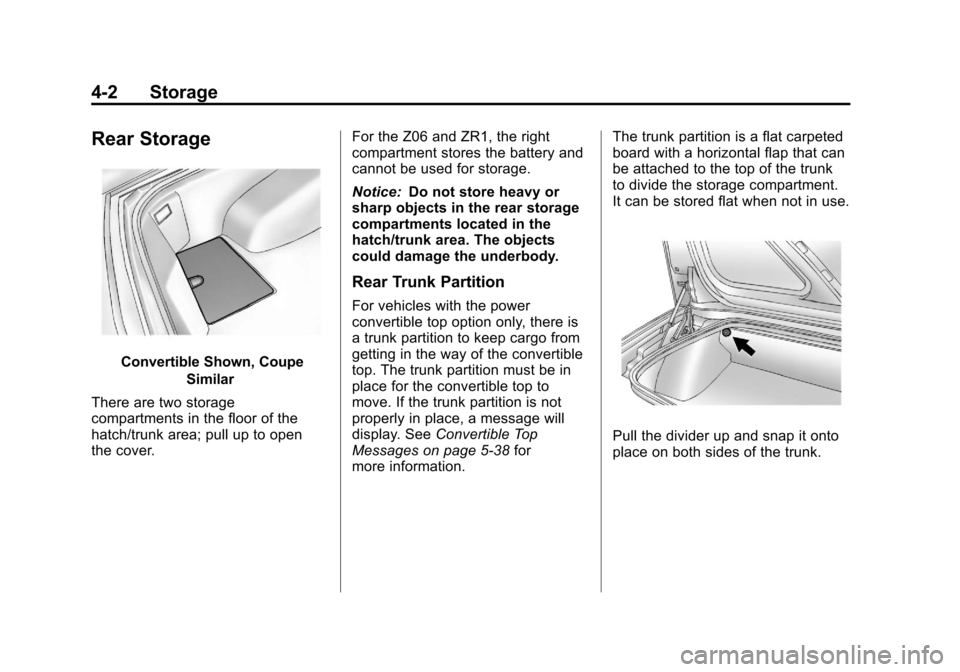
Rear Storage
Convertible Shown, CoupeSimilar
There are two storage
compartments in the floor of the
hatch/trunk area; pull up to open
the cover. For the Z06 and ZR1, the right
compartment stores the battery and
cannot be used for storage.
Notice:
Do not store heavy or
sharp objects in the rear storage
compartments located in the
hatch/trunk area. The objects
could damage the underbody.
Rear Trunk Partition
For vehicles with the power
convertible top option only, there is
a trunk partition to keep cargo from
getting in the way of the convertible
top. The trunk partition must be in
place for the convertible top to
move. If the trunk partition is not
properly in place, a message will
display. See Convertible Top
Messages on page 5‑38 for
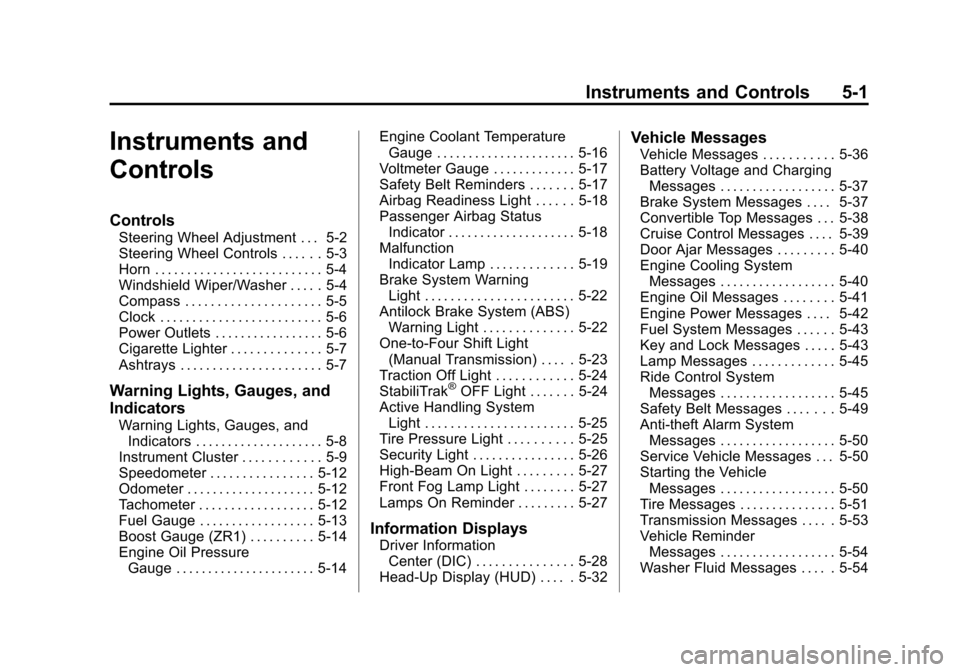
more information. The trunk partition is a flat carpeted
board with a horizontal flap that can
be attached to the top of the trunk
to divide the storage compartment.
It can be stored flat when not in use.
Pull the divider up and snap it onto
place on both sides of the trunk.
Page 111 of 434
Black plate (1,1)Chevrolet Corvette Owner Manual - 2012
Instruments and Controls 5-1
Instruments and
Controls
Controls
Steering Wheel Adjustment . . . 5-2
Steering Wheel Controls . . . . . . 5-3
Horn . . . . . . . . . . . . . . . . . . . . . . . . . . 5-4
Windshield Wiper/Washer . . . . . 5-4
Compass . . . . . . . . . . . . . . . . . . . . . 5-5
Clock . . . . . . . . . . . . . . . . . . . . . . . . . 5-6
Power Outlets . . . . . . . . . . . . . . . . . 5-6
Cigarette Lighter . . . . . . . . . . . . . . 5-7
Ashtrays . . . . . . . . . . . . . . . . . . . . . . 5-7
Warning Lights, Gauges, and
Indicators
Warning Lights, Gauges, andIndicators . . . . . . . . . . . . . . . . . . . . 5-8
Instrument Cluster . . . . . . . . . . . . 5-9
Speedometer . . . . . . . . . . . . . . . . 5-12
Odometer . . . . . . . . . . . . . . . . . . . . 5-12
Tachometer . . . . . . . . . . . . . . . . . . 5-12
Fuel Gauge . . . . . . . . . . . . . . . . . . 5-13
Boost Gauge (ZR1) . . . . . . . . . . 5-14
Engine Oil Pressure Gauge . . . . . . . . . . . . . . . . . . . . . . 5-14 Engine Coolant Temperature
Gauge . . . . . . . . . . . . . . . . . . . . . . 5-16
Voltmeter Gauge . . . . . . . . . . . . . 5-17
Safety Belt Reminders . . . . . . . 5-17
Airbag Readiness Light . . . . . . 5-18
Passenger Airbag Status Indicator . . . . . . . . . . . . . . . . . . . . 5-18
Malfunction Indicator Lamp . . . . . . . . . . . . . 5-19
Brake System Warning Light . . . . . . . . . . . . . . . . . . . . . . . 5-22
Antilock Brake System (ABS) Warning Light . . . . . . . . . . . . . . 5-22
One-to-Four Shift Light (Manual Transmission) . . . . . 5-23
Traction Off Light . . . . . . . . . . . . 5-24
StabiliTrak
®OFF Light . . . . . . . 5-24
Active Handling System Light . . . . . . . . . . . . . . . . . . . . . . . 5-25
Tire Pressure Light . . . . . . . . . . 5-25
Security Light . . . . . . . . . . . . . . . . 5-26
High-Beam On Light . . . . . . . . . 5-27
Front Fog Lamp Light . . . . . . . . 5-27
Lamps On Reminder . . . . . . . . . 5-27
Information Displays
Driver Information Center (DIC) . . . . . . . . . . . . . . . 5-28
Head-Up Display (HUD) . . . . . 5-32
Vehicle Messages
Vehicle Messages . . . . . . . . . . . 5-36
Battery Voltage and Charging Messages . . . . . . . . . . . . . . . . . . 5-37
Brake System Messages . . . . 5-37
Convertible Top Messages . . . 5-38
Cruise Control Messages . . . . 5-39
Door Ajar Messages . . . . . . . . . 5-40
Engine Cooling System Messages . . . . . . . . . . . . . . . . . . 5-40
Engine Oil Messages . . . . . . . . 5-41
Engine Power Messages . . . . 5-42
Fuel System Messages . . . . . . 5-43
Key and Lock Messages . . . . . 5-43
Lamp Messages . . . . . . . . . . . . . 5-45
Ride Control System Messages . . . . . . . . . . . . . . . . . . 5-45
Safety Belt Messages . . . . . . . 5-49
Anti-theft Alarm System Messages . . . . . . . . . . . . . . . . . . 5-50
Service Vehicle Messages . . . 5-50
Starting the Vehicle Messages . . . . . . . . . . . . . . . . . . 5-50
Tire Messages . . . . . . . . . . . . . . . 5-51
Transmission Messages . . . . . 5-53
Vehicle Reminder Messages . . . . . . . . . . . . . . . . . . 5-54
Washer Fluid Messages . . . . . 5-54
Page 113 of 434
Black plate (3,1)Chevrolet Corvette Owner Manual - 2012
Instruments and Controls 5-3
The telescopic steering column
position can be stored with your
memory settings. See“Memory
Seat, Mirrors, and Steering Wheel”
under Power Seat Adjustment on
page 3‑3 for more information.
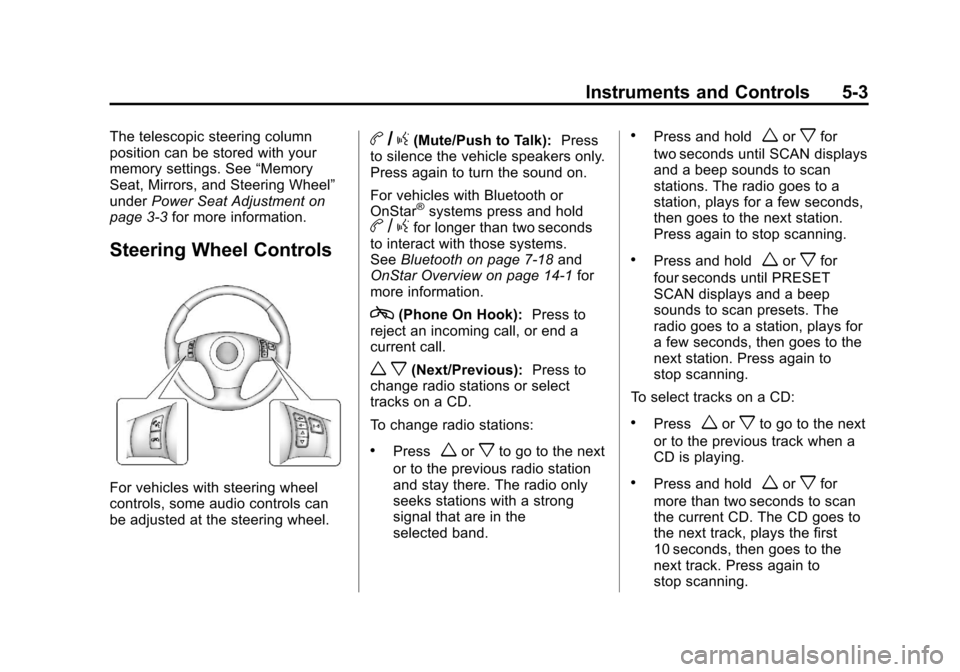
Steering Wheel Controls
For vehicles with steering wheel
controls, some audio controls can
be adjusted at the steering wheel.
b/g(Mute/Push to Talk): Press
to silence the vehicle speakers only.
Press again to turn the sound on.
For vehicles with Bluetooth or
OnStar
®systems press and holdb /gfor longer than two seconds
to interact with those systems.
See Bluetooth on page 7‑18 and
OnStar Overview on page 14‑1 for
more information.
c(Phone On Hook): Press to
reject an incoming call, or end a
current call.
w x(Next/Previous): Press to
change radio stations or select
tracks on a CD.
To change radio stations:
.Pressworxto go to the next
or to the previous radio station
and stay there. The radio only
seeks stations with a strong
signal that are in the
selected band.
.Press and holdworxfor
two seconds until SCAN displays
and a beep sounds to scan
stations. The radio goes to a
station, plays for a few seconds,
then goes to the next station.
Press again to stop scanning.
.Press and holdworxfor
four seconds until PRESET
SCAN displays and a beep
sounds to scan presets. The
radio goes to a station, plays for
a few seconds, then goes to the
next station. Press again to
stop scanning.
To select tracks on a CD:
.Pressworxto go to the next
or to the previous track when a
CD is playing.
.Press and holdworxfor
more than two seconds to scan
the current CD. The CD goes to
the next track, plays the first
10 seconds, then goes to the
next track. Press again to
stop scanning.
Page 115 of 434
Black plate (5,1)Chevrolet Corvette Owner Manual - 2012
Instruments and Controls 5-5
Windshield Washer
Press and hold the button at the end
of the lever to spray washer fluid on
the windshield. The washer will
spray until the button is released.
The wipers will continue to clear the
window for about six seconds after
the button is released and then stop
or return to your preset speed.
{WARNING
In freezing weather, do not use
the washer until the windshield is
warmed. Otherwise the washer
fluid can form ice on the
windshield, blocking your vision.
If the fluid in the windshield washer
fluid reservoir is low, the message
CHECK WASHER FLUID will
appear on the Driver Information
Center (DIC) display. It will take
15 seconds after the bottle is refilled
for this message to turn off. For information on the correct
washer fluid to use, see
Washer
Fluid on page 10‑38 and
Recommended Fluids and
Lubricants on page 11‑12.
Compass
Compass Operation
With the compass feature on, each
time the vehicle is started, the
compass will take a few seconds to
adjust and display the current
compass heading. For example,
NE is displayed for north-east.
Compass Calibration
PressPonce to turn the compass
display on or off.
If after several seconds the display
does not show a compass heading,
there may be a strong magnetic
field interfering with the compass.
Interference can be caused by a
magnetic antenna mount, note pad
holder, or similar object. If the letter C or CAL appears in the
compass window, the compass
needs calibration.
Depending on the mirror, in order
to calibrate, CAL must be displayed
in the mirror compass windows.
If CAL is not displayed, press
Pfor
several seconds or until CAL is
displayed.
If the compass has map lamps, it
can be placed in calibration mode
by pressing and holding the left map
light button until a C appears on the
compass display.
The mirror compass can be
calibrated by driving the vehicle in
circles at 8 km/h (5 mph) or less until
the display reads a direction.
Page 116 of 434
Black plate (6,1)Chevrolet Corvette Owner Manual - 2012
5-6 Instruments and Controls
Compass Variance
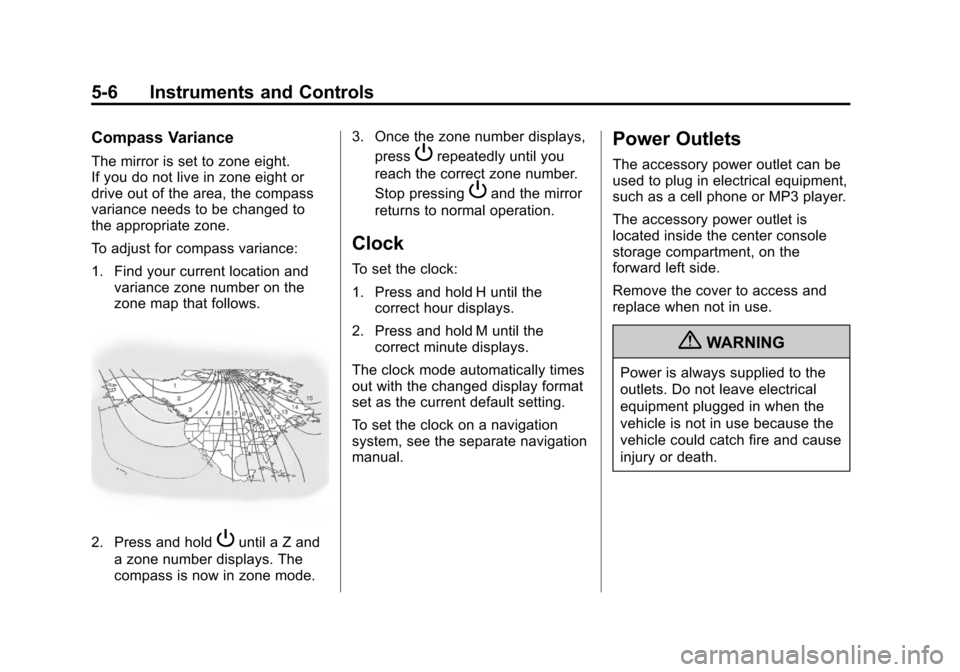
The mirror is set to zone eight.
If you do not live in zone eight or
drive out of the area, the compass
variance needs to be changed to
the appropriate zone.
To adjust for compass variance:
1. Find your current location andvariance zone number on the
zone map that follows.
2. Press and holdPuntil a Z and
a zone number displays. The
compass is now in zone mode. 3. Once the zone number displays,
press
Prepeatedly until you
reach the correct zone number.
Stop pressing
Pand the mirror
returns to normal operation.
Clock
To set the clock:
1. Press and hold H until the correct hour displays.
2. Press and hold M until the correct minute displays.
The clock mode automatically times
out with the changed display format
set as the current default setting.
To set the clock on a navigation
system, see the separate navigation
manual.
Power Outlets
The accessory power outlet can be
used to plug in electrical equipment,
such as a cell phone or MP3 player.
The accessory power outlet is
located inside the center console
storage compartment, on the
forward left side.
Remove the cover to access and
replace when not in use.
{WARNING
Power is always supplied to the
outlets. Do not leave electrical
equipment plugged in when the
vehicle is not in use because the
vehicle could catch fire and cause
injury or death.
Page 122 of 434
Black plate (12,1)Chevrolet Corvette Owner Manual - 2012
5-12 Instruments and Controls
Speedometer
The speedometer shows the speed
in either kilometers per hour (km/h)
or miles per hour (mph). For more
information see“Personal Options”
under Vehicle Personalization on
page 5‑55.
Odometer
To read the odometer with the
ignition off, turn on the parking
lamps.
If the vehicle needs a new odometer
installed, the mileage total of the
new odometer will be set to the
original kilometers (miles) of the
old odometer. See your dealer if
the odometer must be replaced in
the vehicle.
Tachometer
The tachometer displays the engine
speed in thousands of revolutions
per minute (rpm).
Notice: Fuel shuts off at about
6500 rpm for the base model,
7000 rpm for the Z06 model, and
6600 rpm for the ZR1 model. If the
vehicle continues to be driven at
the fuel shut off rpm, the engine
could be damaged. Be sure to
operate the vehicle below the
fuel shut off rpm or reduce the
vehicle's rpm quickly when the
fuel shuts off.