remote control CHEVROLET CORVETTE 2012 6.G User Guide
[x] Cancel search | Manufacturer: CHEVROLET, Model Year: 2012, Model line: CORVETTE, Model: CHEVROLET CORVETTE 2012 6.GPages: 434, PDF Size: 6.96 MB
Page 155 of 434
Black plate (45,1)Chevrolet Corvette Owner Manual - 2012
Instruments and Controls 5-45
READY FOR FOB #X
See“Matching Transmitter(s) to
Your Vehicle” underRemote
Keyless Entry (RKE) System
Operation on page 2‑3.
Lamp Messages
HEADLAMPS SUGGESTED
This message displays if it is dark
enough outside and the headlamps
and the Twilight Sentinel
®controls
are off. This message informs the
driver that turning on the exterior
lamps is recommended. It has
become dark enough outside to
require the headlamps and/or
other exterior lamps.
TURN SIGNAL ON
This message displays and a
sound will be heard if a turn signal
is left on for 1.2 km (three-quarters
of a mile). Move the turn signal/
multifunction lever to the off
position. To acknowledge this message,
press the RESET button.
Ride Control System
Messages
ACTIVE HANDLING
This message displays when the
Active Handling System is
operating. The Active Handling
System is a computer controlled
system that assists the driver in
controlling the vehicle in difficult
driving conditions. You may feel or
hear the system working and see
the ACTIVE HANDLING message
displayed in the DIC. This message
stays on for a few seconds following
the active handling event. This is
normal when the system is
operating. See
Active Handling
System on page 9‑38 andBraking
on page 9‑4.
ACTIVE HANDLING READY
This message displays when the
functional check of the Active
Handling System has been
completed. See Active Handling
System on page 9‑38 for more
information.
COMPETITIVE DRIVING MODE
This message displays and a sound
will be heard when the Competitive
Driving mode is selected. The
instrument panel cluster light will be
on when the Competitive Driving
mode is selected. If your vehicle
is equipped with a manual
transmission, Launch Control is
available when this mode is
selected. The Traction Control
System (TCS) will not be operating
while in the Competitive Driving
mode. Adjust your driving
accordingly. This system is available
on all models except ZR1and Z06.
See Competitive Driving Mode on
page 9‑39, including the “Launch
Control” information.
Page 165 of 434
Black plate (55,1)Chevrolet Corvette Owner Manual - 2012
Instruments and Controls 5-55
Vehicle
Personalization
Many features on your vehicle can
be personalized. This means that
the operation of these features
can be set to operate differently
depending on who is driving the
vehicle. See“Personal Options”
later in this section for the features
that you can personalize.
The personalization settings for
other features are automatically
updated and saved as the driver
adjusts them. These include the
following settings and presets:
.The radio presets, tone,
volume, fade, balance,
equalization (EQ) settings, and
source (radio or CD).
.The last climate control setting.
.The Head-Up Display (HUD)
position and dimming level,
if your vehicle has this feature.
.The instrument panel cluster
dimming level and last selected
DIC display.
Separate personalization settings
are saved for two different drivers.
One of the Remote Keyless Entry
(RKE) transmitters is assigned to
driver 1. The other is assigned to
driver 2. The backs of the RKE
transmitters are labelled 1 or 2 to
correspond to each driver.
The current driver's preferences are
recalled when one of the following
occurs:
.The lock or unlock button on the
RKE transmitter, labelled 1 or 2,
is pressed.
.The appropriate memory
button, 1 or 2, located on the
driver door is pressed. See
“Memory Seat, Mirrors, and
Steering Wheel” underPower
Seat Adjustment on page 3‑3 for
more information.
.A valid RKE transmitter is
detected upon opening the
driver door.
If more than one valid RKE
transmitter is detected upon opening
the driver door, the driver
preferences for the lowest driver
number will be recalled.
If an RKE transmitter that is not
labelled 1 or 2 is used, the
personalization system will not
recognize the transmitter. The Driver
Information Center (DIC) will not
display a current driver number and
the features that are normally
programmed through the DIC will be
set to the default states. Also, if the
OPTION button is pressed, the DIC
does not display the menus used to
set personalizations, but instead
displays OPTIONS UNAVAILABLE
for a few seconds.
Page 168 of 434
Black plate (58,1)Chevrolet Corvette Owner Manual - 2012
5-58 Instruments and Controls
When the mode you want is
selected, press the OPTION button
to set your choice and advance to
the next personal option.
Approach Lights:This option
briefly turns on the parking lamps,
the high-beam headlamps, and the
back-up lamps during low light
periods when the RKE transmitter is
used to unlock the vehicle.
Press the OPTION button until
APPROACH LIGHTS appears on
the display, then press the RESET
button to scroll through the following
modes:
.OFF
.ON (default)
If you choose OFF, this option will
turn off. If you choose ON, the parking
lamps, the high-beam headlamps,
and the back-up lamps will come on
for 20 seconds during low light
periods when all of the following
occur:
.You press the unlock button on
the RKE transmitter.
.Both of the doors are closed.
.The vehicle is off or in RAP.
The lamps remain on for 20 seconds
or until a door is opened, the lock
button on the RKE transmitter is
pressed, or the vehicle is no longer
off or in RAP.
See Remote Keyless Entry (RKE)
System on page 2‑3 for more
information.
When the mode you want is
selected, press the OPTION button
to set your choice and advance to
the next personal option. Twilight Delay:
This option allows
you to set the amount of time you
want the parking lamps and
high-beam headlamps to remain on
after you exit the vehicle. This will
occur when the vehicle is off or in
RAP and the headlamps are on due
to the automatic headlamp system.
The parking lamps and high-beam
headlamps will remain on until the
driver selected time expires, the
exterior lamp control is activated,
or the vehicle is no longer off or
in RAP.
Press the OPTION button until
TWILIGHT DELAY appears on
the display, then press the
RESET button to scroll through
the following modes:
.OFF
.15 S
.30 S (default)
.90 S
If you choose OFF, this option will
turn off.
Page 174 of 434
Black plate (64,1)Chevrolet Corvette Owner Manual - 2012
5-64 Instruments and Controls
If you choose NO, this option will
turn off.
If a customized name or greeting is
not programmed, the DIC display
will show Driver 1 or Driver 2 to
correspond with either the
number on the back of the RKE
transmitter (1 or 2) being used or to
the memory button (1 or 2) that is
pressed.
PERSONALIZE NAME is the last
option available to program in the
PERSONAL OPTIONS menu.
Pressing the OPTION button after
this setting will exit you from the
PERSONAL OPTIONS menu.
The last item you were in prior to
entering PERSONAL OPTIONS will
then display on the DIC.Universal Remote
System
SeeRadio Frequency Statement on
page 13‑21 for information
regarding Part 15 of the Federal
Communications Commission (FCC)
rules and Industry Canada
Standards RSS-210/220/310.
The FCC Grant of Equipment
Authorization Certificate number is
KOBFTE05A.
The Canadian Registration
ID number is 3521A-FTE05A.
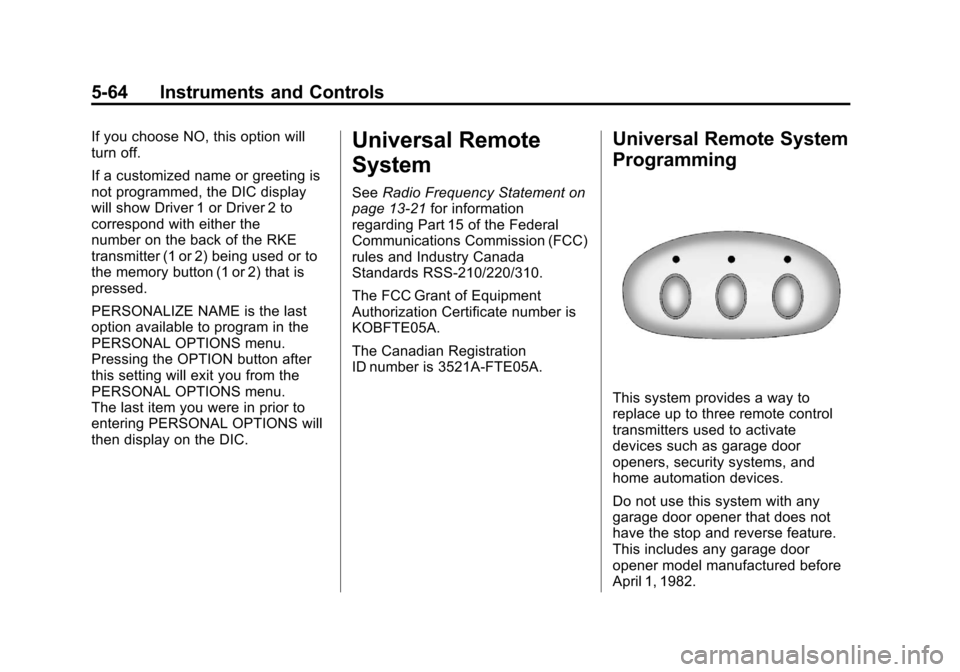
Universal Remote System
Programming
This system provides a way to
replace up to three remote control
transmitters used to activate
devices such as garage door
openers, security systems, and
home automation devices.
Do not use this system with any
garage door opener that does not
have the stop and reverse feature.
This includes any garage door
opener model manufactured before
April 1, 1982.
Page 175 of 434
Black plate (65,1)Chevrolet Corvette Owner Manual - 2012
Instruments and Controls 5-65
Read the instructions completely
before attempting to program the
transmitter. Because of the steps
involved, it may be helpful to have
another person assist with
programming the transmitter.
Be sure to keep the original remote
control transmitter for use in other
vehicles, as well as for future
programming. Only the original
remote control transmitter is needed
for Fixed Code programming. The
programmed buttons should be
erased when the vehicle is sold or
the lease ends. See“Erasing
Universal Home Remote Buttons” in
this section.
Park the vehicle outside of the
garage when programming a garage
door. Be sure that people and
objects are clear of the garage door
or gate being programmed.Programming Universal Home
Remote —Rolling Code
For questions or help programming
the Universal Home Remote
System, call 1-866-572-2728 or go
to www.learcar2u.com.
Most garage door openers sold
after 1996 are Rolling Code units.
Programming a garage door opener
involves time-sensitive actions, so
read the entire procedure before
starting. Otherwise, the device will
time out and the procedure will have
to be repeated.
To program up to three devices:
1. Press START or put the vehicle
in accessory mode. See Ignition
Positions on page 9‑19 for
additional information.
Programming can only occur
when the vehicle is running or in
accessory mode.
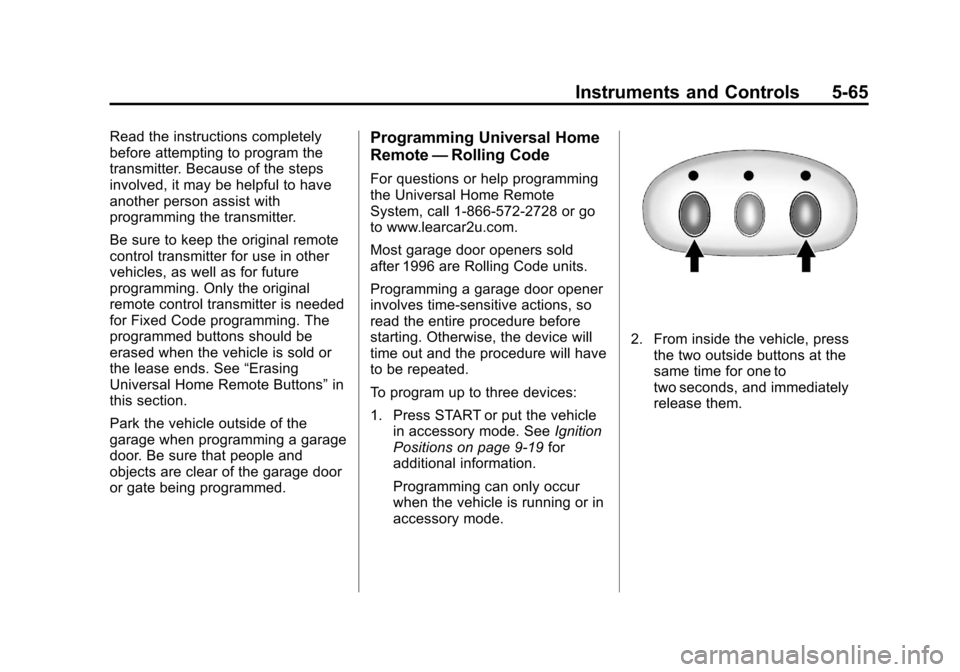
2. From inside the vehicle, press the two outside buttons at the
same time for one to
two seconds, and immediately
release them.
Page 176 of 434
Black plate (66,1)Chevrolet Corvette Owner Manual - 2012
5-66 Instruments and Controls
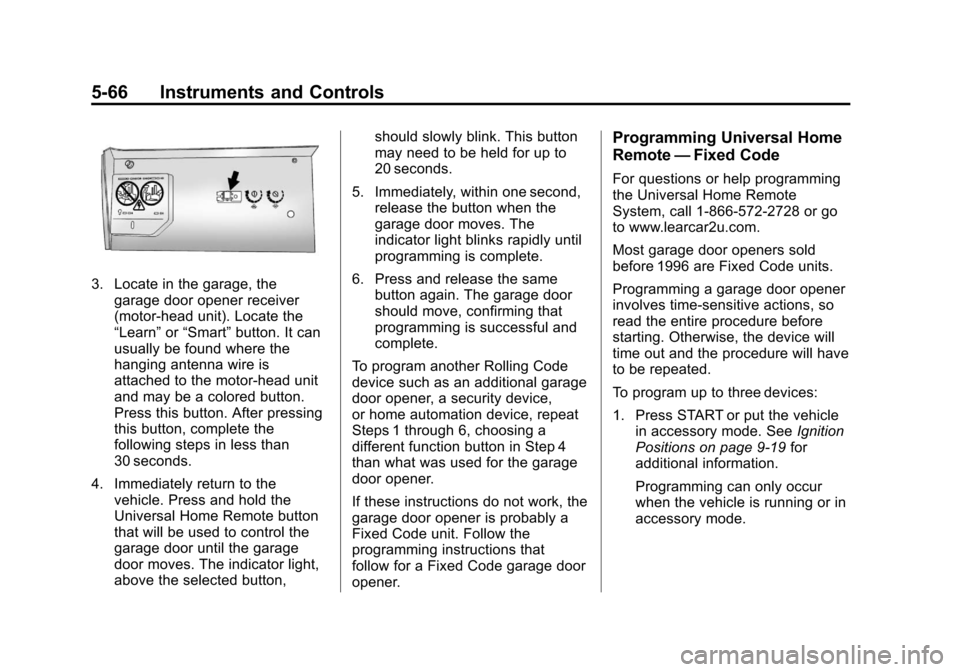
3. Locate in the garage, thegarage door opener receiver
(motor-head unit). Locate the
“Learn” or“Smart” button. It can
usually be found where the
hanging antenna wire is
attached to the motor-head unit
and may be a colored button.
Press this button. After pressing
this button, complete the
following steps in less than
30 seconds.
4. Immediately return to the vehicle. Press and hold the
Universal Home Remote button
that will be used to control the
garage door until the garage
door moves. The indicator light,
above the selected button, should slowly blink. This button
may need to be held for up to
20 seconds.
5. Immediately, within one second, release the button when the
garage door moves. The
indicator light blinks rapidly until
programming is complete.
6. Press and release the same button again. The garage door
should move, confirming that
programming is successful and
complete.
To program another Rolling Code
device such as an additional garage
door opener, a security device,
or home automation device, repeat
Steps 1 through 6, choosing a
different function button in Step 4
than what was used for the garage
door opener.
If these instructions do not work, the
garage door opener is probably a
Fixed Code unit. Follow the
programming instructions that
follow for a Fixed Code garage door
opener.
Programming Universal Home
Remote —Fixed Code
For questions or help programming
the Universal Home Remote
System, call 1-866-572-2728 or go
to www.learcar2u.com.
Most garage door openers sold
before 1996 are Fixed Code units.
Programming a garage door opener
involves time-sensitive actions, so
read the entire procedure before
starting. Otherwise, the device will
time out and the procedure will have
to be repeated.
To program up to three devices:
1. Press START or put the vehicle
in accessory mode. See Ignition
Positions on page 9‑19 for
additional information.
Programming can only occur
when the vehicle is running or in
accessory mode.
Page 177 of 434
Black plate (67,1)Chevrolet Corvette Owner Manual - 2012
Instruments and Controls 5-67
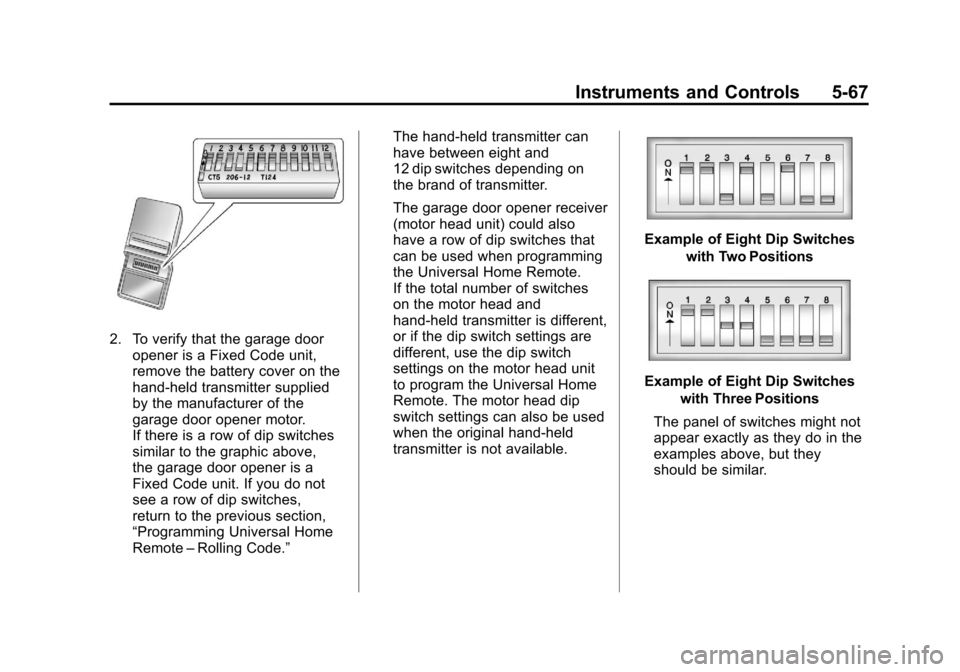
2. To verify that the garage dooropener is a Fixed Code unit,
remove the battery cover on the
hand-held transmitter supplied
by the manufacturer of the
garage door opener motor.
If there is a row of dip switches
similar to the graphic above,
the garage door opener is a
Fixed Code unit. If you do not
see a row of dip switches,
return to the previous section,
“Programming Universal Home
Remote –Rolling Code.” The hand-held transmitter can
have between eight and
12 dip switches depending on
the brand of transmitter.
The garage door opener receiver
(motor head unit) could also
have a row of dip switches that
can be used when programming
the Universal Home Remote.
If the total number of switches
on the motor head and
hand-held transmitter is different,
or if the dip switch settings are
different, use the dip switch
settings on the motor head unit
to program the Universal Home
Remote. The motor head dip
switch settings can also be used
when the original hand-held
transmitter is not available.
Example of Eight Dip Switches
with Two Positions
Example of Eight Dip Switcheswith Three Positions
The panel of switches might not
appear exactly as they do in the
examples above, but they
should be similar.
Page 178 of 434
Black plate (68,1)Chevrolet Corvette Owner Manual - 2012
5-68 Instruments and Controls
The switch positions on the
hand-held transmitter could be
labeled as follows:
.A switch in the up position
could be labeled as
“Up,” “+,”or“On.”
.A switch in the down
position could be labeled as
“Down,” “−,” or“Off.”
.A switch in the middle
position could be labeled as
“Middle,” “0,” or“Neutral.”
3. Write down the eight to 12 switch settings from left to right as
follows:
.When a switch is in the
up position, write “Left.”
.When a switch is in the
down position, write “Right.”
.If a switch is set between
the up and down position,
write“Middle.”
The switch settings written
down in Step 3 now
become the button strokes
to be entered into the
Universal Home Remote in
Step 5. Be sure to enter the
switch settings written down
in Step 3, in order from left
to right, into the Universal
Home Remote, when
completing Step 5.
4. From inside the vehicle, first firmly press all three buttons at
the same time for about
three seconds. Release the
buttons to put the Universal
Home Remote into
programming mode.
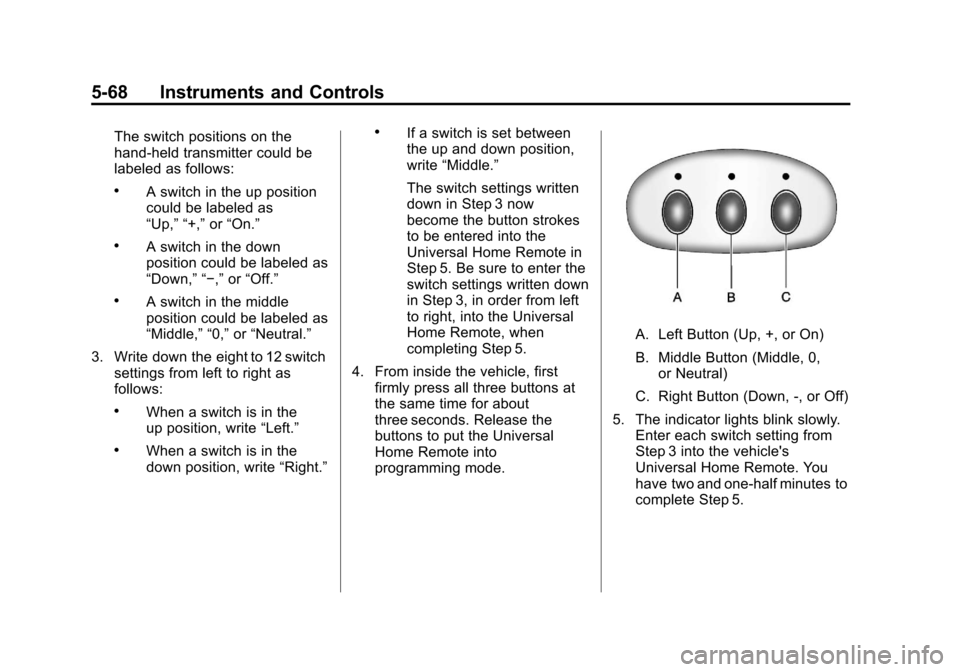
A. Left Button (Up, +, or On)
B. Middle Button (Middle, 0,or Neutral)
C. Right Button (Down, -, or Off)
5. The indicator lights blink slowly. Enter each switch setting from
Step 3 into the vehicle's
Universal Home Remote. You
have two and one-half minutes to
complete Step 5.
Page 179 of 434
Black plate (69,1)Chevrolet Corvette Owner Manual - 2012
Instruments and Controls 5-69
Now press one button on the
Universal Home Remote for
each switch setting as follows:
.If you wrote“Left,”press
the left button (A) in the
vehicle.
.If you wrote “Right,”press
the right button (C) in the
vehicle.
.If you wrote “Middle,”press
the middle button (B) in the
vehicle.
6. After entering all of the switch positions, again, firmly press and
release all three buttons at the
same time. The indicator lights
turn on. 7. Press and hold the button that
will be used to control the
garage door until the garage
door moves. The indicator light
above the selected button
should slowly blink. This button
may need to be held for up to
55 seconds.
8. Immediately release the button when the garage door moves.
The indicator light blinks rapidly
until programming is complete.
9. Press and release the same button again. The garage door
should move, confirming that
programming is successful
and complete. To program another Fixed Code
device such as an additional garage
door opener, a security device,
or home automation device, repeat
Steps 1 through 9, choosing a
different button in Step 7 than
what was used for the garage
door opener.
Page 180 of 434
Black plate (70,1)Chevrolet Corvette Owner Manual - 2012
5-70 Instruments and Controls
Universal Remote System
Operation
Press and hold the appropriate
button for at least one-half second.
The indicator light comes on while
the signal is being transmitted.
Operation can occur:
.If the vehicle is in
accessory mode.
.If the vehicle is running.
.If the vehicle is in Retained
Accessory Mode (RAP). See
Retained Accessory Power
(RAP) on page 9‑23for more
information.
.Up to an additional 10 minutes
after RAP finishes.
.Up to 10 minutes after any door
is opened.
Reprogramming Universal
Home Remote Buttons
Any of the three buttons can be
reprogrammed by repeating the
instructions.
Erasing Universal Home
Remote Buttons
The programmed buttons should be
erased when the vehicle is sold or
the lease ends.
To erase either Rolling Code or
Fixed Code on the Universal Home
Remote device:
1. Press and hold the two outside buttons at the same time for
approximately 20 seconds,
until the indicator lights, located
directly above the buttons, begin
to blink rapidly. 2. Once the indicator lights begin
to blink, release both buttons.
The codes from all buttons
are erased.
For help or information on the
Universal Home Remote System,
call the customer assistance phone
number under Customer Assistance
Offices (U.S. and Canada) on
page 13‑5 orCustomer Assistance
Offices (Mexico) on page 13‑6.