seat memory CHEVROLET CORVETTE 2013 6.G User Guide
[x] Cancel search | Manufacturer: CHEVROLET, Model Year: 2013, Model line: CORVETTE, Model: CHEVROLET CORVETTE 2013 6.GPages: 414, PDF Size: 6.97 MB
Page 65 of 414
Black plate (5,1)Chevrolet Corvette Owner Manual - 2013 - crc2 - 11/8/12
Seats and Restraints 3-5
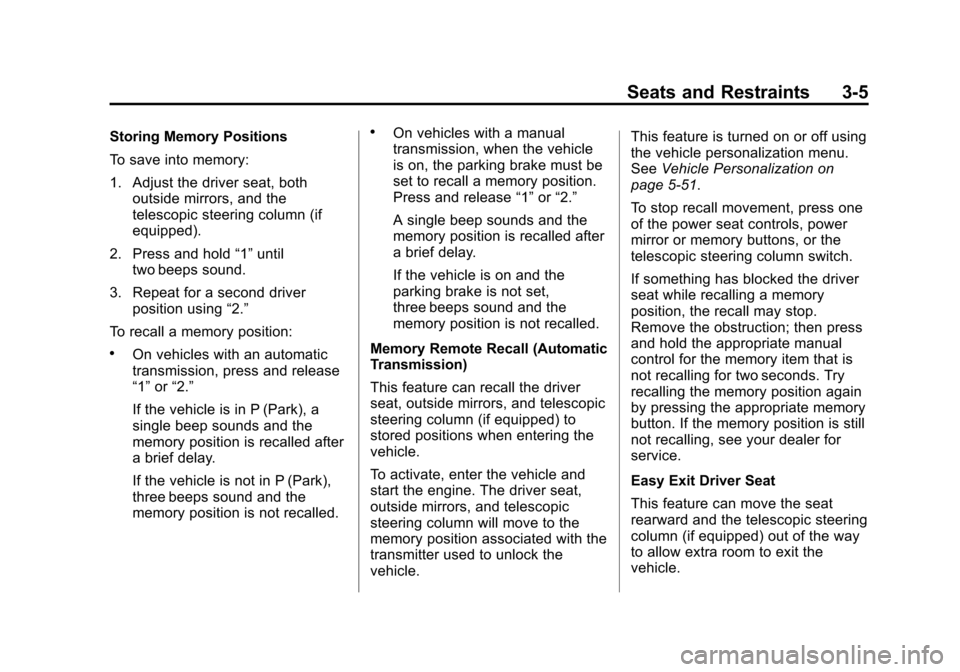
Storing Memory Positions
To save into memory:
1. Adjust the driver seat, bothoutside mirrors, and the
telescopic steering column (if
equipped).
2. Press and hold “1”until
two beeps sound.
3. Repeat for a second driver position using “2.”
To recall a memory position:
.On vehicles with an automatic
transmission, press and release
“1” or“2.”
If the vehicle is in P (Park), a
single beep sounds and the
memory position is recalled after
a brief delay.
If the vehicle is not in P (Park),
three beeps sound and the
memory position is not recalled.
.On vehicles with a manual
transmission, when the vehicle
is on, the parking brake must be
set to recall a memory position.
Press and release “1”or“2.”
A single beep sounds and the
memory position is recalled after
a brief delay.
If the vehicle is on and the
parking brake is not set,
three beeps sound and the
memory position is not recalled.
Memory Remote Recall (Automatic
Transmission)
This feature can recall the driver
seat, outside mirrors, and telescopic
steering column (if equipped) to
stored positions when entering the
vehicle.
To activate, enter the vehicle and
start the engine. The driver seat,
outside mirrors, and telescopic
steering column will move to the
memory position associated with the
transmitter used to unlock the
vehicle. This feature is turned on or off using
the vehicle personalization menu.
See
Vehicle Personalization on
page 5‑51.
To stop recall movement, press one
of the power seat controls, power
mirror or memory buttons, or the
telescopic steering column switch.
If something has blocked the driver
seat while recalling a memory
position, the recall may stop.
Remove the obstruction; then press
and hold the appropriate manual
control for the memory item that is
not recalling for two seconds. Try
recalling the memory position again
by pressing the appropriate memory
button. If the memory position is still
not recalling, see your dealer for
service.
Easy Exit Driver Seat
This feature can move the seat
rearward and the telescopic steering
column (if equipped) out of the way
to allow extra room to exit the
vehicle.
Page 66 of 414
Black plate (6,1)Chevrolet Corvette Owner Manual - 2013 - crc2 - 11/8/12
3-6 Seats and Restraints
B(Easy Exit Driver Seat):Press
to save and recall the easy exit seat
position.
To save into memory:
1. Recall the desired driving position by pressing “1.”
2. Adjust the seat and the telescopic steering column to the
desired exit position.
3. Press and hold
Buntil
two beeps sound.
4. Repeat for a second driver position using “2.”
To recall, press and release
B.
The vehicle must be in P (Park) for
an automatic transmission or the
parking brake must be set for a
manual transmission. A single beep
sounds. The seat and telescopic
steering column will move to the
position previously stored for the
identified driver. If this feature is programmed on in
the vehicle personalization menu,
automatic recall occurs when one of
the following conditions is met:
.The vehicle is turned off, in
Retained Accessory
Power (RAP) or accessory
mode, and the driver door is
opened.
.The vehicle is turned off, or in
RAP, and the unlock button on
the RKE transmitter is pressed.
If something has blocked the driver
seat while recalling the exit position,
the recall may stop. Remove the
obstruction; then press and hold the
power seat control rearward for
two seconds. Try recalling the exit
position again. If the exit position is
still not recalling, see your dealer for
service.
See Vehicle Personalization on
page 5‑51.
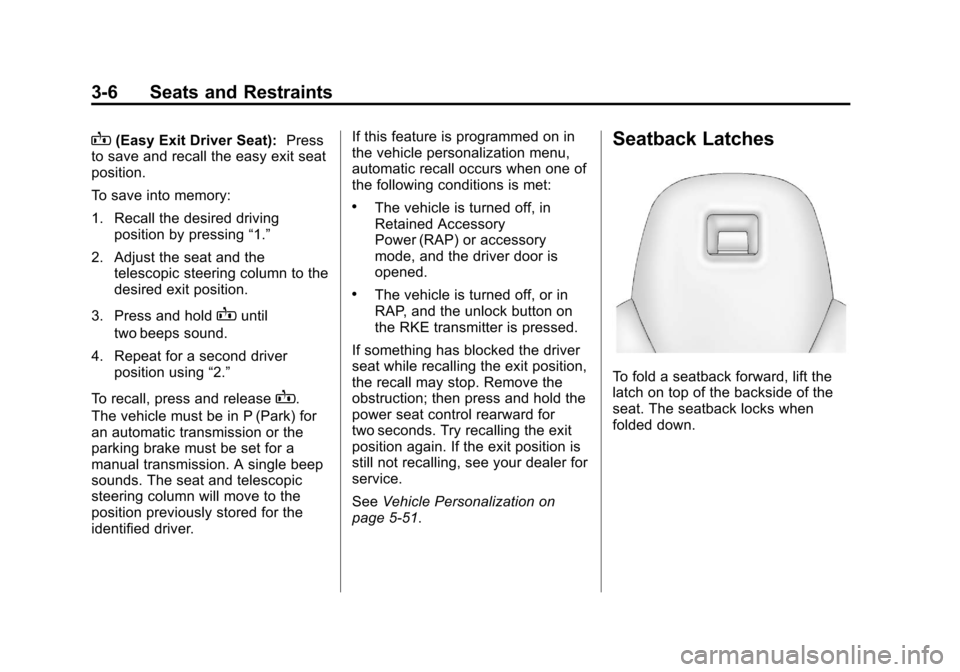
Seatback Latches
To fold a seatback forward, lift the
latch on top of the backside of the
seat. The seatback locks when
folded down.
Page 107 of 414
Black plate (3,1)Chevrolet Corvette Owner Manual - 2013 - crc2 - 11/8/12
Instruments and Controls 5-3
The telescopic steering column
position can be stored with your
memory settings. SeeMemory
Seats on page 3‑4.
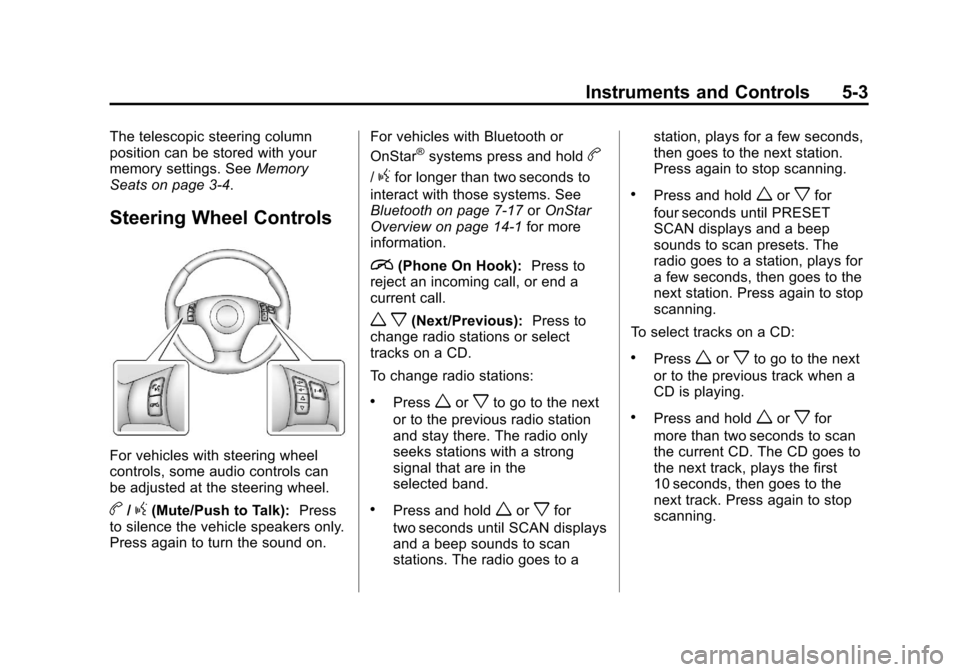
Steering Wheel Controls
For vehicles with steering wheel
controls, some audio controls can
be adjusted at the steering wheel.
b/g(Mute/Push to Talk): Press
to silence the vehicle speakers only.
Press again to turn the sound on. For vehicles with Bluetooth or
OnStar
®systems press and holdb
/gfor longer than two seconds to
interact with those systems. See
Bluetooth on page 7‑17 orOnStar
Overview on page 14‑1 for more
information.
i(Phone On Hook): Press to
reject an incoming call, or end a
current call.
w x(Next/Previous): Press to
change radio stations or select
tracks on a CD.
To change radio stations:
.Pressworxto go to the next
or to the previous radio station
and stay there. The radio only
seeks stations with a strong
signal that are in the
selected band.
.Press and holdworxfor
two seconds until SCAN displays
and a beep sounds to scan
stations. The radio goes to a station, plays for a few seconds,
then goes to the next station.
Press again to stop scanning.
.Press and holdworxfor
four seconds until PRESET
SCAN displays and a beep
sounds to scan presets. The
radio goes to a station, plays for
a few seconds, then goes to the
next station. Press again to stop
scanning.
To select tracks on a CD:
.Pressworxto go to the next
or to the previous track when a
CD is playing.
.Press and holdworxfor
more than two seconds to scan
the current CD. The CD goes to
the next track, plays the first
10 seconds, then goes to the
next track. Press again to stop
scanning.
Page 155 of 414
Black plate (51,1)Chevrolet Corvette Owner Manual - 2013 - crc2 - 11/8/12
Instruments and Controls 5-51
UPSHIFT NOW
SeeManual Transmission on
page 9‑29.
Vehicle Reminder
Messages
ACCESSORY MODE ON
This message displays when the
vehicle is in accessory mode.
ICE POSSIBLE
This message displays when the
outside air temperature is cold
enough to create icy road
conditions. Adjust your driving
accordingly.
OPTIONS UNAVAILABLE
This message displays for a few
seconds if a RKE transmitter that is
not labeled 1 or 2 is used and you
try to personalize the features on
the vehicle by pressing the OPTION
button. The personalization system
will not recognize the transmitter
and the DIC will not display the current driver number or the menus
used to set personalizations. The
personalization features will then be
set to the default states. See
Vehicle Personalization on
page 5‑51
for more information.
SET PARK BRAKE FOR SEAT
RECALL
If the vehicle has a manual
transmission, this message displays
if you try to recall the memory
positions when the ignition is on and
the parking brake is not set. If the
vehicle is on, you must set the
parking brake in order for the
memory positions to recall. See
Memory Seats on page 3‑4 for more
information.
Washer Fluid Messages
CHECK WASHER FLUID
See Washer Fluid on page 10‑32.
Vehicle
Personalization
Many features on your vehicle can
be personalized. This means that
the operation of these features can
be set to operate differently
depending on who is driving the
vehicle. See “Personal Options”
later in this section for the features
that you can personalize.
The personalization settings for
other features are automatically
updated and saved as the driver
adjusts them. These include the
following settings and presets:
.The radio presets, tone, volume,
fade, balance, equalization (EQ)
settings, and source (radio
or CD).
.The last climate control setting.
.The Head-Up Display (HUD)
position and dimming level,
if your vehicle has this feature.
Page 156 of 414
Black plate (52,1)Chevrolet Corvette Owner Manual - 2013 - crc2 - 11/8/12
5-52 Instruments and Controls
.The instrument panel cluster
dimming level and last selected
DIC display.
Separate personalization settings
are saved for two different drivers.
One of the Remote Keyless Entry
(RKE) transmitters is assigned to
driver 1. The other is assigned to
driver 2. The backs of the RKE
transmitters are labelled 1 or 2 to
correspond to each driver.
The current driver's preferences are
recalled when one of the following
occurs:
.The lock or unlock button on the
RKE transmitter, labelled 1 or 2,
is pressed.
.The appropriate memory
button, 1 or 2, located on the
driver door is pressed. See
Memory Seats on page 3‑4 for
more information.
.A valid RKE transmitter is
detected upon opening the
driver door. If more than one valid RKE
transmitter is detected upon opening
the driver door, the driver
preferences for the lowest driver
number will be recalled.
If an RKE transmitter that is not
labelled 1 or 2 is used, the
personalization system will not
recognize the transmitter. The Driver
Information Center (DIC) will not
display a current driver number and
the features that are normally
programmed through the DIC will be
set to the default states. Also, if the
OPTION button is pressed, the DIC
does not display the menus used to
set personalizations, but instead
displays OPTIONS UNAVAILABLE
for a few seconds.
Entering the Personal
Options Menu
To enter the personal options menu,
use the following steps:
1. If you have an automatic
transmission vehicle, turn the
vehicle on with the shift lever in
P (Park).
If you have a manual
transmission vehicle, turn the
vehicle on with the parking
brake set.
To avoid excessive drain on the
battery, it is recommended that
the headlamps are turned off.
2. Press the OPTION button and you will enter the PERSONAL
OPTIONS menu.
Page 157 of 414
Black plate (53,1)Chevrolet Corvette Owner Manual - 2013 - crc2 - 11/8/12
Instruments and Controls 5-53
The DIC will display the current
driver number (1 or 2) for a few
seconds and then will display
instructions on which buttons to
use for setting the
personalizations. The RESET
button is used to select a setting
for a particular feature. The
OPTION button is used to move
to the next feature.
3. Press the OPTION button while the instruction screen is
displayed to enter the first
personalization menu item.
4. Once you have cycled through all of the personal options,
pressing the OPTION button a
final time exits the personal
options menu. In addition, if no
button is pressed within
45 seconds, the DIC will exit the
personal options menu. Personal Options
The following options are available
for programming:
Display Units:
This option allows
you to choose the measurement
units.
Press the OPTION button until
DISPLAY UNITS appears on the
display, then press the RESET
button to scroll through the following
modes:
.ENGLISH (default)
.METRIC
If you choose ENGLISH, all
information will be displayed in
English units.
If you choose METRIC, all
information will be displayed in
metric units.
When the mode you want is
selected, press the OPTION button
to set your choice and advance to
the next personal option. Auto Memory Recall (Automatic
Transmission only):
If your
automatic transmission vehicle has
the memory package, you may have
this option. This option allows the
driver seat, the telescopic steering
column, if your vehicle has this
feature, and the outside rearview
mirrors to automatically move to the
current driver's set position when
the engine starts.
Press the OPTION button until
AUTO MEMORY RECALL appears
on the display, then press the
RESET button to scroll through the
following modes:
.YES
.NO (default)
If you choose YES, the driver seat,
the outside rearview mirrors and the
telescopic steering column, if your
vehicle has this feature, positions
are recalled when you turn the
ignition on.
If you choose NO, this option will
turn off.
Page 158 of 414
Black plate (54,1)Chevrolet Corvette Owner Manual - 2013 - crc2 - 11/8/12
5-54 Instruments and Controls
When the mode you want is
selected, press the OPTION button
to set your choice and advance to
the next personal option.
Auto Exit Recall:If your vehicle
has the memory package, you may
have this option. This option allows
the driver seat and telescopic
steering column, if your vehicle has
this feature, to automatically move
to the current driver's exit position
when one of the following occurs:
.The vehicle is turned off or in
Retained Accessory Power
(RAP) or accessory mode and
the driver door is opened.
.The vehicle is turned off or in
RAP and the unlock button on
the RKE transmitter is pressed.
In order for the Auto Exit Recall
feature to work on an automatic
transmission vehicle, the vehicle
must be in P (Park). On a manual
transmission vehicle, the parking
brake must be set. Press the OPTION button until
AUTO EXIT RECALL appears on
the display, then press the RESET
button to scroll through the following
modes:
.YES
.NO (default)
If you choose YES, when you turn
the ignition off and open the driver
door or press the unlock button on
the RKE transmitter, the seat and
the telescopic steering wheel, if your
vehicle has this feature, will return
to their stored exit positions for an
easy exit or an easy entrance when
returning to the vehicle.
The seat and steering wheel will
only return to the stored driving
position if you press the appropriate
memory button or activate the Auto
Memory Recall feature.
If you choose NO, this option will
turn off. When the mode you want is
selected, press the OPTION button
to set your choice and advance to
the next personal option.
Approach Lights:
This option
briefly turns on the parking lamps,
the high-beam headlamps, and the
back-up lamps during low light
periods when the RKE transmitter is
used to unlock the vehicle.
Press the OPTION button until
APPROACH LIGHTS appears on
the display, then press the RESET
button to scroll through the following
modes:
.OFF
.ON (default)
If you choose OFF, this option will
turn off.
Page 312 of 414
Black plate (50,1)Chevrolet Corvette Owner Manual - 2013 - crc2 - 11/8/12
10-50 Vehicle Care
FusesUsage
EXH MDL Exhaust Module (Z06 &
ZR1),
Spare (Coupe and
Convertible)
FUSE PLR Fuse Puller
GM LAN
RUN/CRNK GM LAN Devices
HTD SEAT/
WPR RLY Heated Seat,
Wiper Relays
HVAC/
PWR SND Heating Ventilation/
Air Conditioning,
Power Sounder
IGN SWTCH/
INTR SNSR Ignition Switch,
Intrusion Sensor Fuses
Usage
ISRVM/HVAC Electric Inside Rearview Mirror,
Heating,
Ventilation, Air
Conditioning
ONSTAR OnStar (if equipped)
RDO/
S-BAND Radio, S-Band
REAR FOG/
ALDL/TOP
SWTCH Rear Fog Lamp,
Assembly Line
Diagnostic Link
Connector,
Convertible Top
Switch
REVERSE
LAMPS Reverse Lamps
RUN CRNK Run/Crank Relay Fuses
Usage
SDM/AOS
SWTCH
AIRBAG Sensing and
Diagnostic Module,
Automatic
Occupant Sensing
Module, Airbag
SPARE Spare
SPARE Spare
SPARE Spare
SPARE Spare
STOP LAMP Stop Lamp
SWC DM Steering Wheel Dimming
TELE
SWTCH/
MSM Telescope Switch,
Memory Seat
Module
TONNEAU
RELSE Tonneau Release
TPA Tonneau Pulldown Actuator
Page 313 of 414
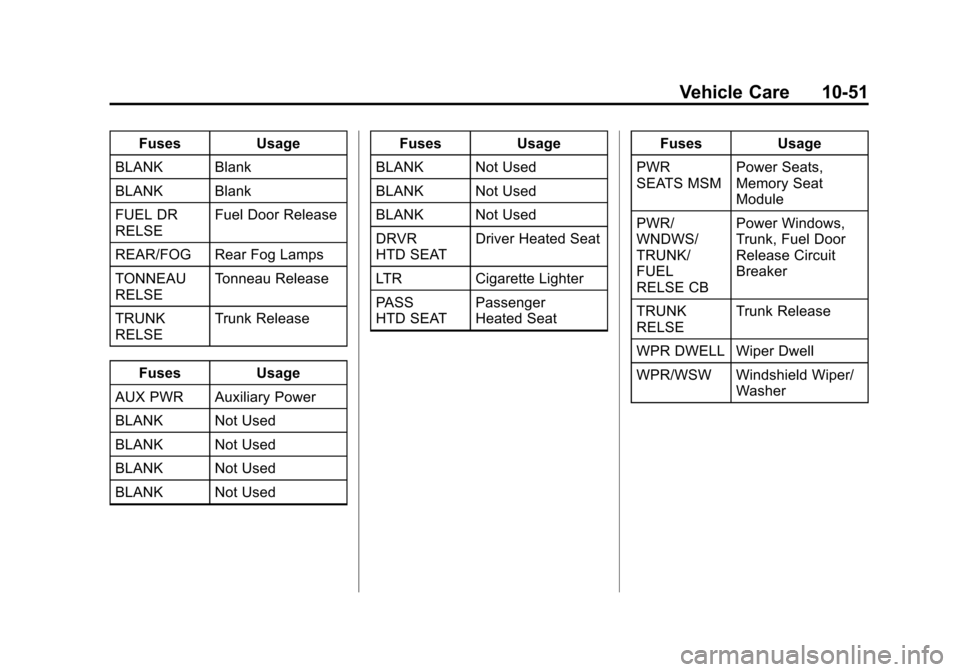
Black plate (51,1)Chevrolet Corvette Owner Manual - 2013 - crc2 - 11/8/12
Vehicle Care 10-51
FusesUsage
BLANK Blank
BLANK Blank
FUEL DR
RELSE Fuel Door Release
REAR/FOG Rear Fog Lamps
TONNEAU
RELSE Tonneau Release
TRUNK
RELSE Trunk Release
Fuses Usage
AUX PWR Auxiliary Power
BLANK Not Used
BLANK Not Used
BLANK Not Used
BLANK Not Used Fuses
Usage
BLANK Not Used
BLANK Not Used
BLANK Not Used
DRVR
HTD SEAT Driver Heated Seat
LTR Cigarette Lighter
PASS
HTD SEAT Passenger
Heated Seat Fuses
Usage
PWR
SEATS MSM Power Seats,
Memory Seat
Module
PWR/
WNDWS/
TRUNK/
FUEL
RELSE CB Power Windows,
Trunk, Fuel Door
Release Circuit
Breaker
TRUNK
RELSE Trunk Release
WPR DWELL Wiper Dwell
WPR/WSW Windshield Wiper/ Washer
Page 406 of 414

Black plate (4,1)Chevrolet Corvette Owner Manual - 2013 - crc2 - 11/8/12
i-4 INDEX
E
Electrical Equipment,Add-On . . . . . . . . . . . . . . . . . . . . . . 9-50
Electrical System Engine CompartmentFuse Block . . . . . . . . . . . . . . . . 10-45
Fuses and Circuit
Breakers . . . . . . . . . . . . . . . . . . 10-45
Instrument Panel Fuse Block . . . . . . . . . . . . . . . . . . . . . . 10-48
Overload . . . . . . . . . . . . . . . . . . . 10-44
Emergency OnStar
®. . . . . . . . . . . . . . . . . . . . . . 14-2
Engine Air Cleaner/Filter . . . . . . . . . . . 10-21
Check and Service EngineSoon Light . . . . . . . . . . . . . . . . . . 5-18
Compartment Overview . . . . . . . 10-8
Coolant . . . . . . . . . . . . . . . . . . . . . 10-26
Coolant Temperature Gauge . . . . . . . . . . . . . . . . . . . . . . 5-15
Cooling System . . . . . . 10-24, 10-25
Cooling System Messages . . . 5-38
Drive Belt Routing . . . . . . . . . . . . 12-5
Exhaust . . . . . . . . . . . . . . . . . . . . . . 9-24
Oil Life System . . . . . . . . . . . . . 10-19 Engine (cont'd)
Oil Messages . . . . . . . . . . . . . . . . . 5-39
Oil Pressure Gauge . . . . . . . . . . 5-14
Overheated Protection
Operating Mode . . . . . . . . . . . 10-30
Overheating . . . . . . . . . . . . . . . . 10-29
Power Messages . . . . . . . . . . . . . 5-39
Running While Parked . . . . . . . . 9-24
Starting . . . . . . . . . . . . . . . . . . . . . . . 9-20
Entry/Exit Lighting . . . . . . . . . . . . . . 6-6
Extender, Safety Belt . . . . . . . . . . 3-13
Exterior Lamp Controls . . . . . . . . . 6-1
Exterior Lamps Off Reminder . . . 6-2
Exterior Lighting Battery Saver . . . . . . . . . . . . . . . . . . . . . . . . . 6-7
F
FeaturesMemory . . . . . . . . . . . . . . . . . . . . . . . . 1-9
Filter,
Engine Air Cleaner . . . . . . . . . 10-21
Flash-to-Pass . . . . . . . . . . . . . . . . . . . 6-2
Flashers, Hazard Warning . . . . . . 6-4
Flat Tire . . . . . . . . . . . . . . . . . . . . . . 10-74
Floor Mats . . . . . . . . . . . . . . . . . . . . 10-86 Fluid
Automatic Transmission . . . . 10-20
Brakes . . . . . . . . . . . . . . . . . . . . . . 10-36
Power Steering . . . . . . . . . . . . . 10-31
Washer . . . . . . . . . . . . . . . . . . . . . 10-32
Fog Lamps Bulb Replacement . . . . . . . . . . . . . 6-5
Folding Mirrors . . . . . . . . . . . . . . . . 2-15
Front Air Dam . . . . . . . . . . . . . . . . . 9-17
Front Fog Lamp Light . . . . . . . . . . . . . . . . . . . . . . . . . . 5-24
Front Seats Heated . . . . . . . . . . . . . . . . . . . . . . . . 3-7
Fuel . . . . . . . . . . . . . . . . . . . . . . . . . . . 9-45 Additives . . . . . . . . . . . . . . . . . . . . . 9-46
Economy Driving . . . . . . . . . . . . . 1-22
Filling a Portable FuelContainer . . . . . . . . . . . . . . . . . . . 9-49
Filling the Tank . . . . . . . . . . . . . . . 9-47
Foreign Countries . . . . . . . . . . . . 9-46
Gasoline Specifications . . . . . . . 9-46
Gauge . . . . . . . . . . . . . . . . . . . . . . . . 5-12
Recommended . . . . . . . . . . . . . . . 9-45
Requirements, California . . . . . 9-46
System Messages . . . . . . . . . . . . 5-40